Lifetime Deal Complete Personal Financial Planning Bundle →
✓ Financial Planning✓ Net Worth Tracker✓ Monthly Budgeting✓ Travel Budget Planner✓ Annual Budgeting Planner✓ Monthly Expense Tracker✓ Annual Tax Planner✓ Retirement Planning
View Bundle →

Instant digital delivery · Terms & Conditions apply

Ultimate Template - Excel & Google Sheets

Ultimate Crypto Portfolio Tracker Spreadsheet Template for Google Sheets & Excel

Fifty positions, each tagged with the wallet or exchange it sits on and a category, and a Transaction Log of a hundred lines carrying type, fee and venue. The Ultimate Crypto Portfolio Tracker spreadsheet template keeps regular buying on a DCA Tracker, holds forty purchase lots individually with their holding period and unrealised gain, and sets your actual allocation against the targets you set. Six working sheets. Google Sheets and Excel, one file. No macros, no VBA.

See Preview

Instant digital delivery · Terms & Conditions apply

Crypto Portfolio Tracker Spreadsheet Template - Ultimate version for Google Sheets and Excel

What's Included

  • A wallet or exchange and a category on every position
  • A Transaction Log carrying type, fee and venue
  • Fees recorded per transaction, where they accumulate out of sight
  • DCA Tracker for positions built by buying on a schedule
  • Purchase lots kept individually, each with its holding period and unrealised gain
  • Allocation Analysis setting actual shares against targets you choose
  • Variance per category, so drift is visible rather than suspected
  • Dashboard with portfolio value, total invested, gain and the largest position
  • Works in Microsoft Excel and Google Sheets with no macros required

The FinancialAha Ultimate Crypto Portfolio Tracker Spreadsheet Template for Google Sheets and Excel is a six-sheet workbook that records where everything sits and how it got there, with a How to Use guide on a seventh tab. It ships as an Ultimate Crypto Portfolio Tracker Excel template and an Ultimate Crypto Portfolio Tracker Google Sheets template in one file. This Ultimate Crypto Portfolio Tracker spreadsheet template tags every position by wallet or exchange, logs transactions with their fees, regular buying on its own sheet, purchase lots with how long each has been held, and the allocation you intend against the one you have. No macros, no VBA.

Inside the workbook

What's inside the FinancialAha Ultimate Crypto Portfolio Tracker spreadsheet template

The FinancialAha Ultimate Crypto Portfolio Tracker Spreadsheet Template runs on six working sheets - four you type into, two that report back - plus the guide. It works in both Microsoft Excel and Google Sheets and here is what the Ultimate Crypto Portfolio Tracker spreadsheet holds.

  1. 01 of 06

    Dashboard

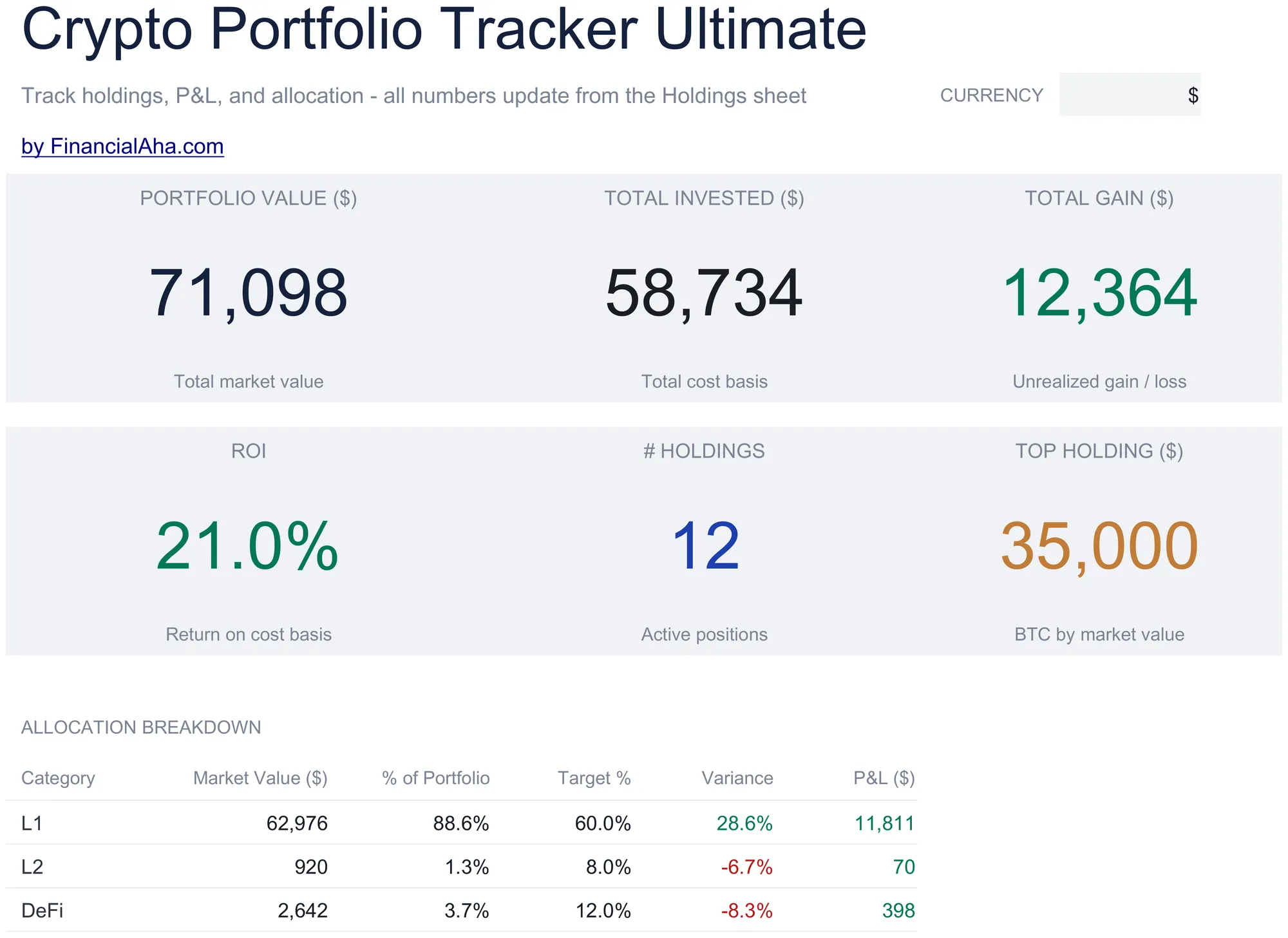
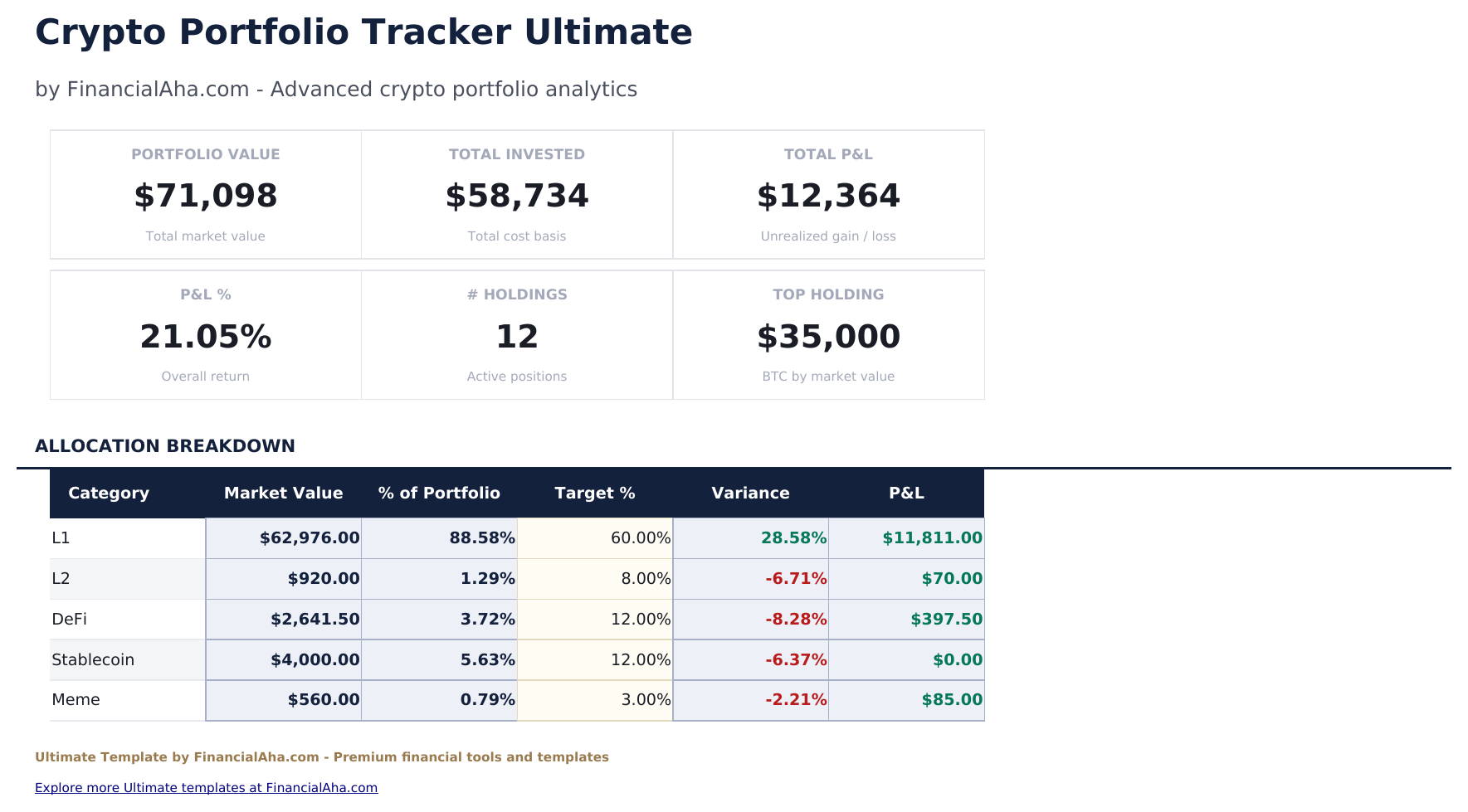
    Six figures. What the portfolio is worth, what went into it and the gain between them on the top row; the return on cost, how many positions are held, and the largest single holding by value on the second. The caption beside that last one names a coin from the sample rather than yours. An allocation table underneath sets each category's actual share against the share you intended, with the gap on each - which is the view that turns a portfolio that has drifted into something you can see rather than suspect.

  2. 02 of 06

    Holdings

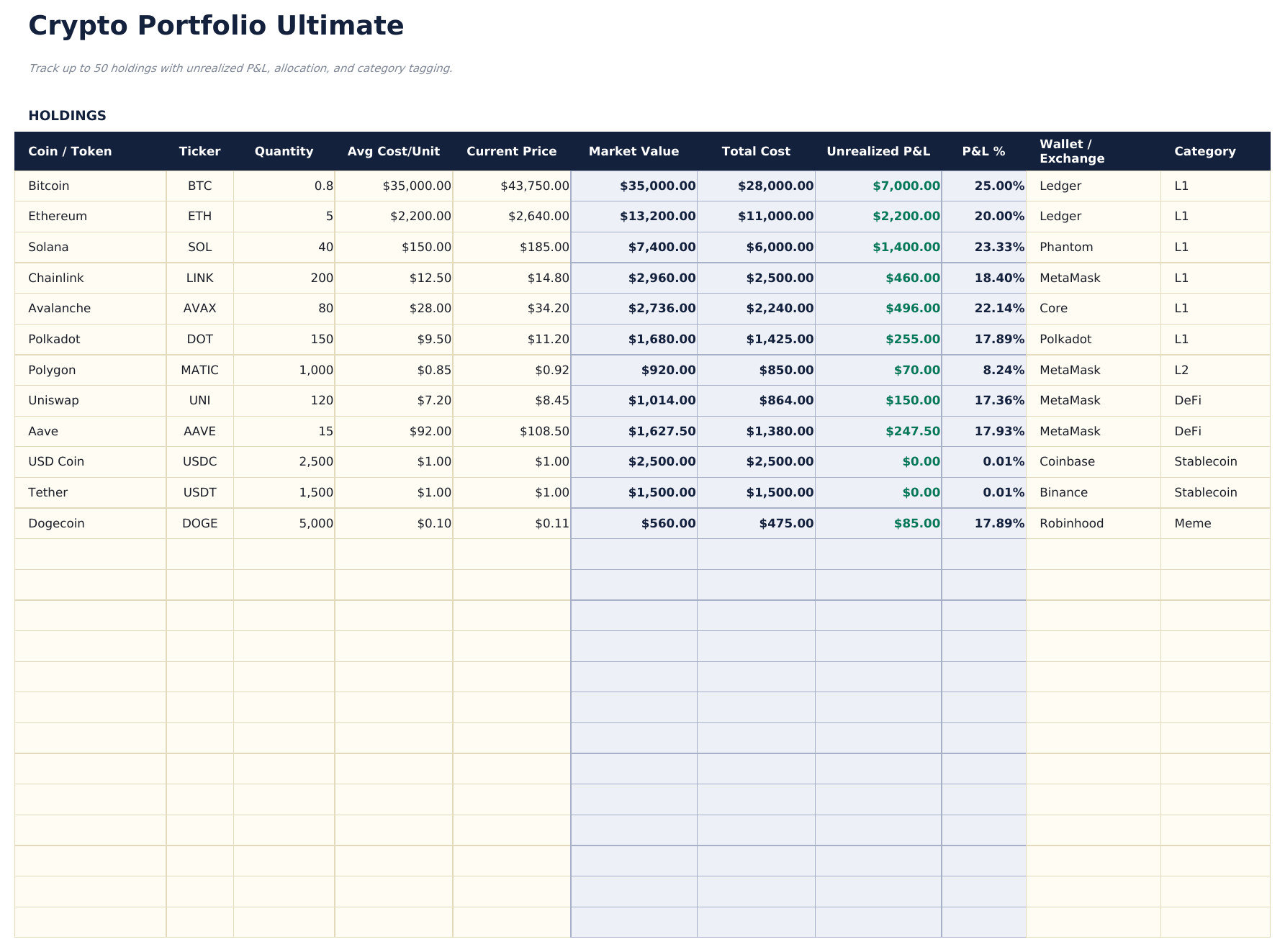
    A row per position, each with the coin and ticker, the quantity, what you paid per unit and what it is worth now, and the value, cost, gain and percentage return that follow. Two fields make this more than a bigger list: where the holding actually sits - which wallet or exchange - and the category it belongs to. The first is the one people wish they had recorded; the second is what the allocation view groups by.

  3. 03 of 06

    Transaction Log

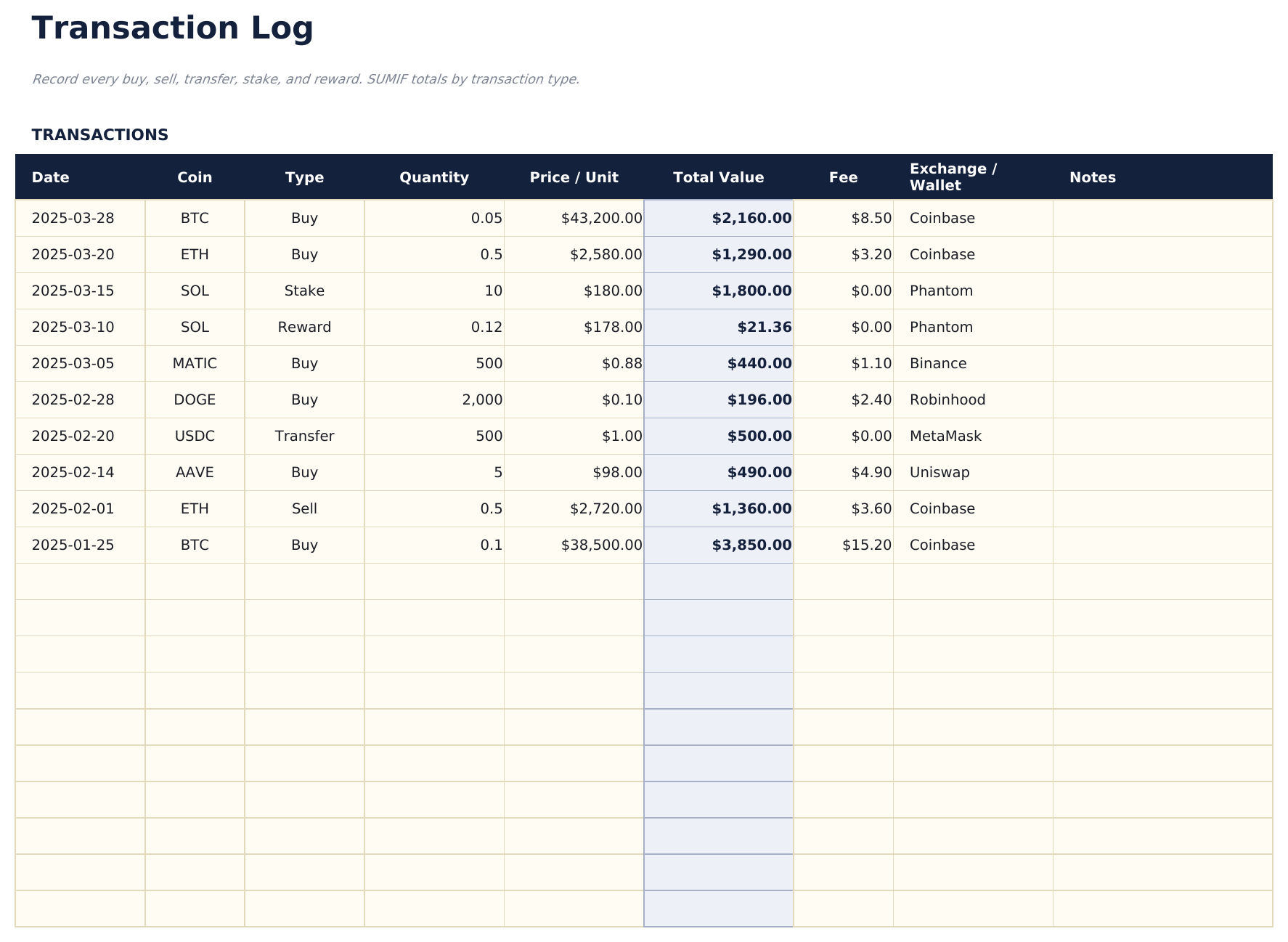
    A row per transaction covering how the positions came to exist: the date, the coin, the type of transaction, the quantity and price, the fee, and where it happened. The fee column matters more here than in most markets, and recording the venue alongside means the history survives an exchange you no longer use.

  4. 04 of 06

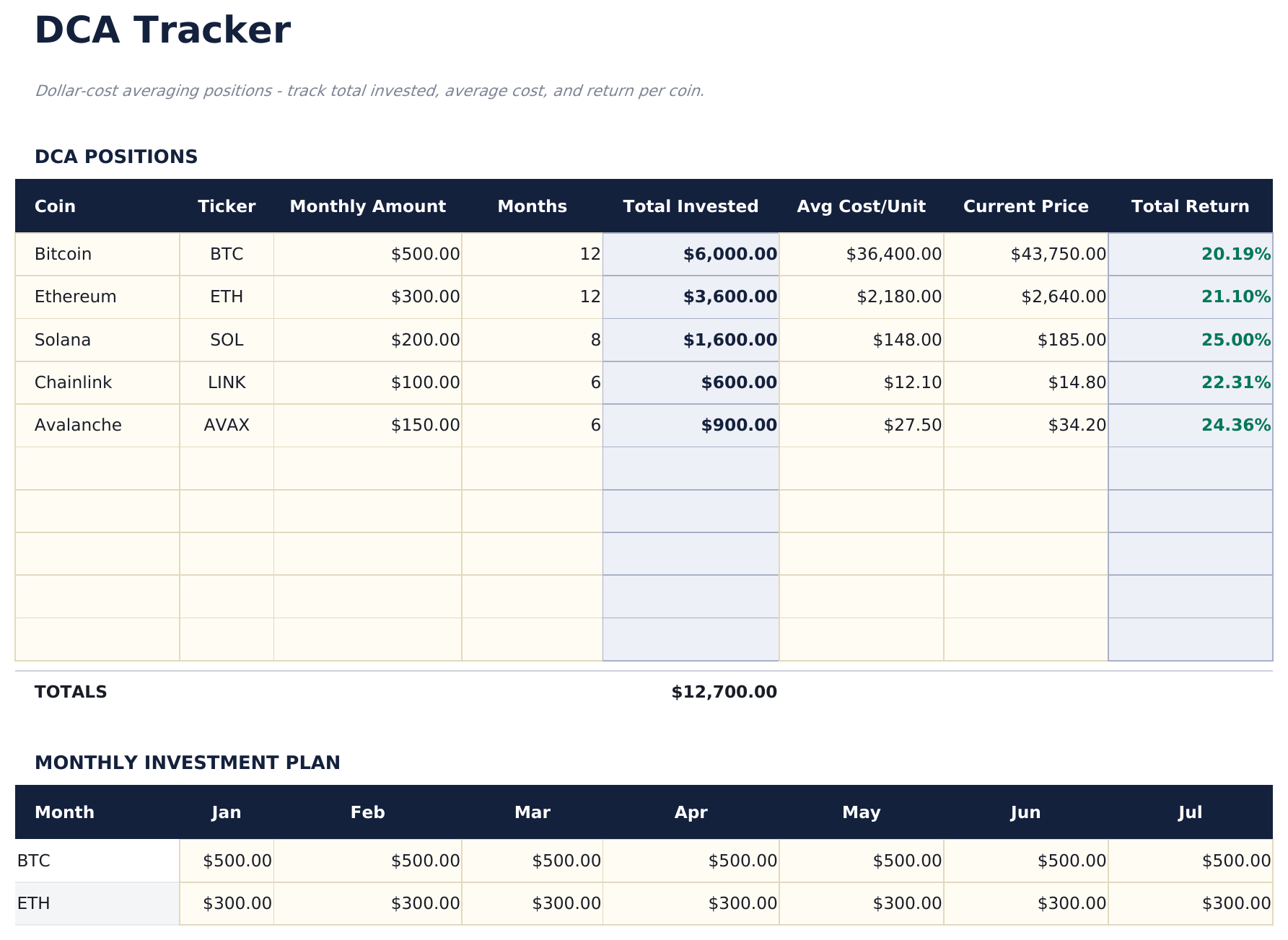
    DCA Tracker

    Positions built by buying a fixed amount on a schedule, kept separately because they behave differently from a single purchase - a monthly amount over a number of months produces an average cost that no individual price explains. It reports what has gone in and what the resulting average works out to.

  5. 05 of 06

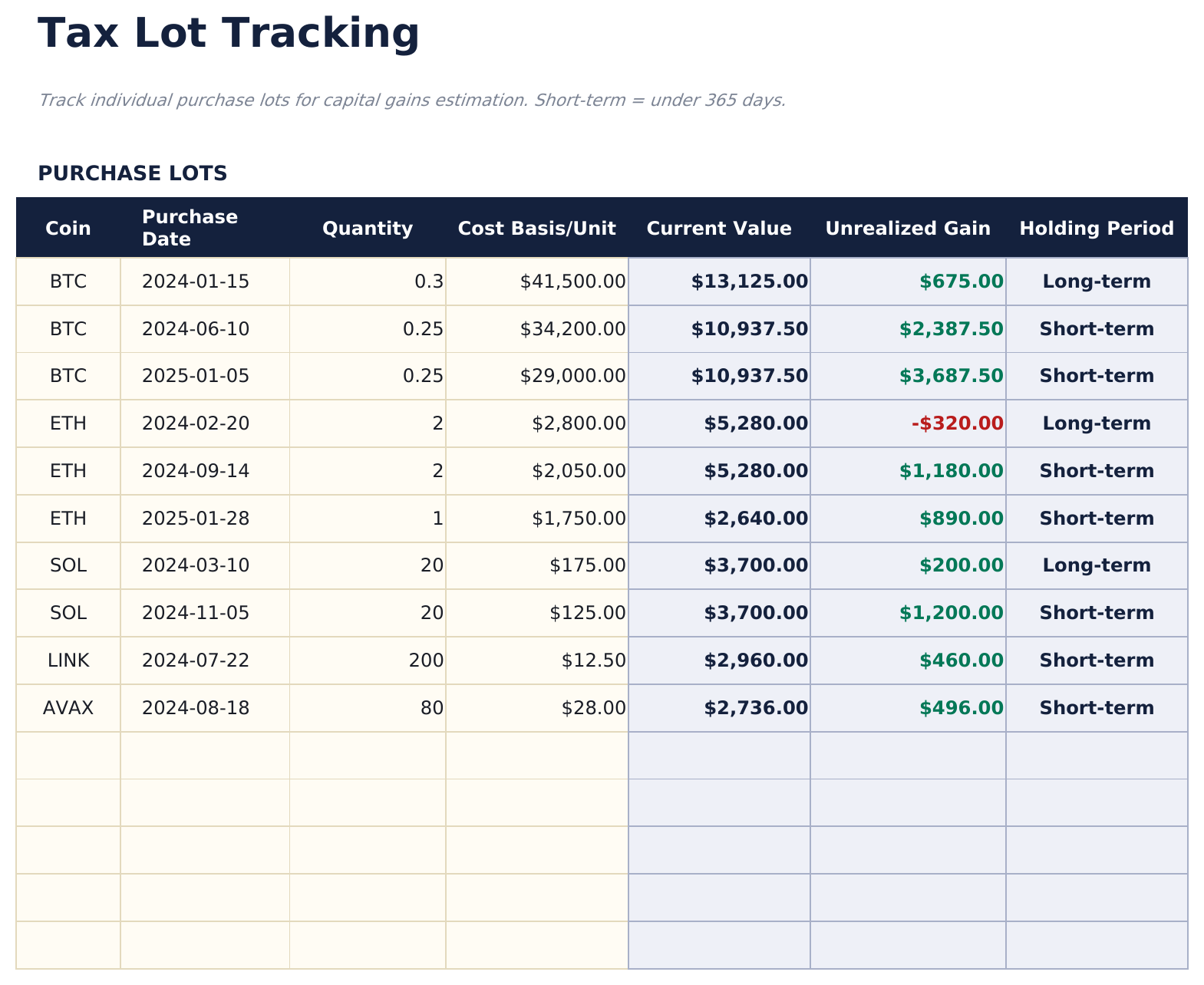
    Tax Lot Tracking

    Each purchase kept as its own lot, with its date, quantity, cost per unit, what it is worth now, the unrealised gain, and how long it has been held. It records elapsed time and value rather than deciding anything about it - what any of that means is a question for your own circumstances.

  6. 06 of 06

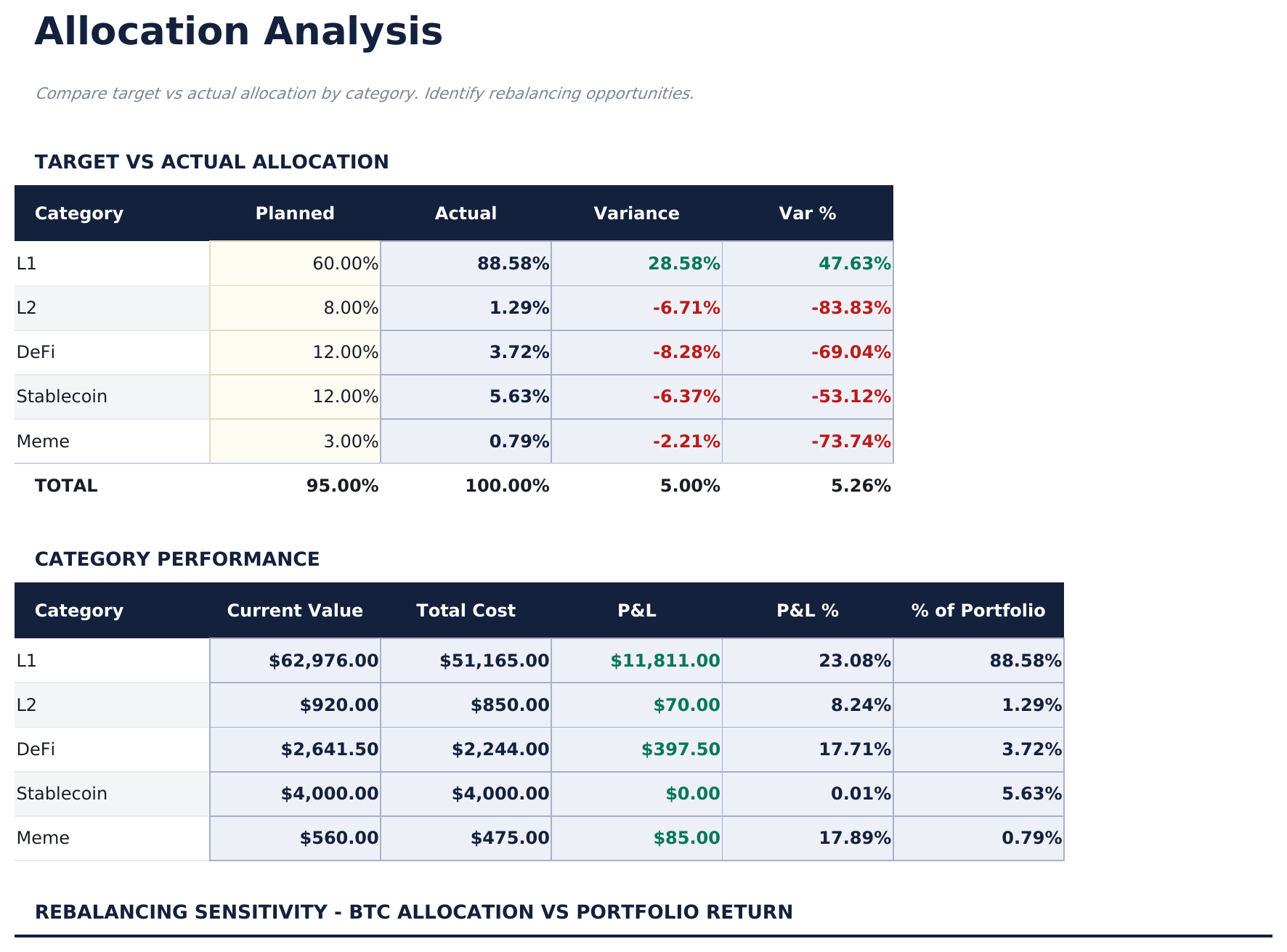
    Allocation Analysis

    Categories set against the targets you have chosen: what each is worth, what it cost, what it has returned, and the share of the portfolio it now represents against the share you intended. The targets are yours - the sheet reports the distance rather than proposing a destination.

  7. Included guide

    How to Use

    A step-by-step guide on its own tab, covering setup, what each sheet records, and how the allocation view groups the holdings. Because it ships inside the file, the instructions travel with the template wherever it is opened.

Works in both Google Sheets and Excel

Ultimate Crypto Portfolio Tracker Spreadsheet template for Google Sheets

Upload the Ultimate Crypto Portfolio Tracker Spreadsheet Template to Drive, right-click it, and choose "Open with Google Sheets". This Ultimate Crypto Portfolio Tracker Google Sheets template needs no conversion step and the chart survives the trip intact. The lookups that group holdings by category rely on the existing tab names and on the category labels matching, so both are worth leaving alone.

Ultimate Crypto Portfolio Tracker Google Sheets template setup

A shared copy of the Ultimate Crypto Portfolio Tracker Google Sheets template suits a portfolio held between two people or reviewed by someone else, and Sheets version history covers a transaction edited after the fact. Recording the wallet or exchange on each holding matters more in a shared file, not less.

Sharing the Ultimate Crypto Portfolio Tracker Google Sheet

The Ultimate Crypto Portfolio Tracker Google Sheet is a per-transaction job with a periodic price update: log what you buy or sell as it happens, and refresh the prices on whatever rhythm suits. The allocation and lot views follow from those without further entry.

Ultimate Crypto Portfolio Tracker Spreadsheet template for Excel

The Ultimate Crypto Portfolio Tracker spreadsheet Excel download is a plain .xlsx. Excel opens this Ultimate Crypto Portfolio Tracker Excel template directly, with no import step and no compatibility prompt, and the chart is a native Excel chart that redraws as entries go in. There are no macros and no VBA in the file, so it opens without a security warning.

Ultimate Crypto Portfolio Tracker Excel template setup

The same Ultimate Crypto Portfolio Tracker Excel template opens in Excel on Windows, Excel on Mac, and Excel for the web. It is also the identical file you would upload to Drive, so there is no separate Ultimate Crypto Portfolio Tracker spreadsheet download to choose between.

Ultimate Crypto Portfolio Tracker spreadsheet Excel notes

The Ultimate Crypto Portfolio Tracker spreadsheet Excel file carries no macros and no VBA, so Excel opens it without a trust prompt. The same Ultimate Crypto Portfolio Tracker spreadsheet Excel download also opens in Excel for the web, which matters when you move between a work machine and a personal one.

Opening the Ultimate Crypto Portfolio Tracker spreadsheet Excel file

Nothing in the Ultimate Crypto Portfolio Tracker Excel template is version-specific, so this Ultimate Crypto Portfolio Tracker spreadsheet Excel workbook behaves identically in Excel on Windows, Excel on Mac, and older builds.

Spreadsheet template highlights

What the Ultimate Crypto Portfolio Tracker spreadsheet template tracks

Holdings and the Transaction Log are the sheets you live in. These are the columns the Ultimate Crypto Portfolio Tracker Spreadsheet Template works from:

Coin / Token
the holding the row covers
Ticker
its symbol
Quantity
how much you hold, fractions included
Avg Cost / Unit
what you paid per unit on average
Current Price
what a unit is worth now, entered rather than fetched
Market Value auto
derived, the quantity against the current price
Total Cost auto
derived, what the position cost in total
P&L % auto
derived, the gain measured against that cost
Wallet / Exchange
where the holding actually sits
Category
what it is grouped under for the allocation view
Fee
what a transaction cost, recorded on every entry
Holding Period auto
derived, how long a purchase lot has been held

Compare builds

FinancialAha Crypto Portfolio Tracker spreadsheet template: Free, Essentials, and Ultimate compared

Feature Free View Spreadsheet Template Essentials View Spreadsheet Template Ultimate This page
Working sheets 1 2 6
Holdings 16 20 50
Gain or loss Derived Derived, with % return Derived, with % return
Fractional amounts Yes Yes Yes
Charts – 1 1
Where a holding sits – – Wallet or exchange, per holding
Transaction history – – 100 entries, with fees
Regular buying – – Dedicated sheet
Purchase lots – – With holding period
Target allocation – – Set per category, with variance

The FinancialAha Ultimate Crypto Portfolio Tracker Spreadsheet Template covers six working sheets and records the portfolio's history rather than only its state. The Free Crypto Portfolio Tracker Spreadsheet Template values your holdings and shows the gain. The Essentials Crypto Portfolio Tracker Spreadsheet Template for Google Sheets and Excel adds a percentage return and an allocation chart. This build tags every position with the wallet or exchange it sits on and the category it belongs to, logs transactions with their fees, keeps regular buying on its own sheet because an averaged-in position behaves differently from a single purchase, holds each purchase as a lot with how long it has been held, and sets your actual allocation against targets you choose.

Good to know

Notes on working in the Ultimate Crypto Portfolio Tracker spreadsheet template

  • Recording where a holding sits is the field people wish they had kept - an exchange you stop using does not remember for you.
  • Fees are recorded per transaction because in this market they accumulate in a way a headline price hides.
  • The lot sheet records how long a purchase has been held and what it is worth. What that means for you is a question for your own circumstances.
  • Targets are yours to set. The allocation view reports the distance from them rather than proposing where they should be.
  • Prices are entered rather than fetched throughout, so every derived figure is as current as your last update and no more.

How to Use This Template

1

Enter your holdings

Add each position with its quantity, average cost, current price, category, and the wallet or exchange it sits on.

2

Log transactions

Record buys and sells with their type, quantity, price, fee and venue.

3

Track lots and schedules

Purchase lots keep their own dates and holding periods; the DCA Tracker sheet handles positions bought on a schedule.

4

Check the drift

Allocation Analysis sets each category's actual share against the target you chose.

Stress-tested with AI.

Every template starts with deep research into how people actually track the topic. We design the layout, build the formulas, and polish the design until it feels like something we would use ourselves. Along the way, we use AI to stress-test the calculations: unusual inputs, edge cases, and formula behavior, checked until the numbers hold.

One-time purchase. No subscription. Works in Excel & Google Sheets.

Frequently Asked Questions

Is the FinancialAha Ultimate Crypto Portfolio Tracker Spreadsheet Template a Google Sheets template?

Yes. Upload the file to Drive and choose "Open with Google Sheets". The Ultimate Crypto Portfolio Tracker Google Sheets template needs no conversion step and the chart survives the trip intact. The lookups rely on the existing tab names and on category labels matching, so both are worth leaving alone.

Is the FinancialAha Ultimate Crypto Portfolio Tracker Spreadsheet Template an Excel template?

Yes. The download is a plain .xlsx, so the Ultimate Crypto Portfolio Tracker Excel template opens directly in Excel with no import step. The chart is a native Excel chart, and there are no macros or VBA.

Will the FinancialAha Ultimate Crypto Portfolio Tracker spreadsheet Excel file open in older versions of Excel?

Yes. The Ultimate Crypto Portfolio Tracker spreadsheet Excel workbook ships as a plain .xlsx, so it opens identically in current Excel and in builds that predate dynamic arrays.

Does the tax lot sheet in the Ultimate Crypto Portfolio Tracker spreadsheet decide anything for tax?

No. It keeps each purchase as its own lot and records the date, the quantity, the cost, the current value, the unrealised gain and how long it has been held. It reports elapsed time and value; what any of it means depends on your own circumstances.

Why does the Ultimate Crypto Portfolio Tracker spreadsheet record the wallet or exchange?

Because a portfolio spread across several venues is difficult to reconstruct later, and an exchange you have stopped using will not remember for you. It is the field people most often wish they had kept.

What does the DCA tracker do in the Ultimate Crypto Portfolio Tracker spreadsheet?

It holds positions built by buying a fixed amount on a schedule, reporting what has gone in over the months and the average cost that produces - a figure no single purchase price explains.

How do the allocation targets work in the Ultimate Crypto Portfolio Tracker spreadsheet?

You set a target share per category, and the sheet reports what each category actually represents and the gap between the two. The targets are yours; it measures the distance rather than proposing a destination.

Does the Ultimate Crypto Portfolio Tracker spreadsheet template fetch prices automatically?

No. Prices are entered throughout, so every derived figure is as current as your last update and no more.

What do I get after buying the Ultimate Crypto Portfolio Tracker spreadsheet template?

You receive the Ultimate Crypto Portfolio Tracker spreadsheet template as an Excel file (.xlsx) that works in Microsoft Excel and Google Sheets. Download it immediately after purchase - no signup or account required.

Is there a free Ultimate Crypto Portfolio Tracker spreadsheet template?

Yes. A free version of the Ultimate Crypto Portfolio Tracker spreadsheet template is available with basic features. The Ultimate version adds advanced analysis, more capacity, and additional sheets.

What if the Ultimate Crypto Portfolio Tracker spreadsheet template does not work for me?

Contact us and we will help troubleshoot. The Ultimate Crypto Portfolio Tracker spreadsheet template works in Microsoft Excel and Google Sheets with no macros required.

Ultimate

Highlights:

Instant download after purchase
No macros or VBA required
All formulas auto-calculate
No subscription required
Works in
Excel Google Sheets

Looking for more Ultimate templates?

We offer Ultimate versions of our most popular spreadsheet templates with advanced features, more capacity, and deeper analysis.

Private & secure

Your financial data stays on your device. We never see it.

Learn more →

Need help?

Check our guides or reach out with questions.

View FAQ →