Best Value Complete Financial Planning Bundle
✓ Financial Planning✓ Net Worth Tracker✓ Monthly Budgeting✓ Travel Budget Planner✓ Annual Budgeting Planner✓ Monthly Expense Tracker✓ Annual Tax Planner✓ Retirement Planning
View Bundle →
1099 Income Tracker Ultimate

Instant digital delivery · Terms & Conditions apply

Essentials Template - Excel & Google Sheets

Essentials 1099 Income Tracker Spreadsheet Template for Google Sheets & Excel

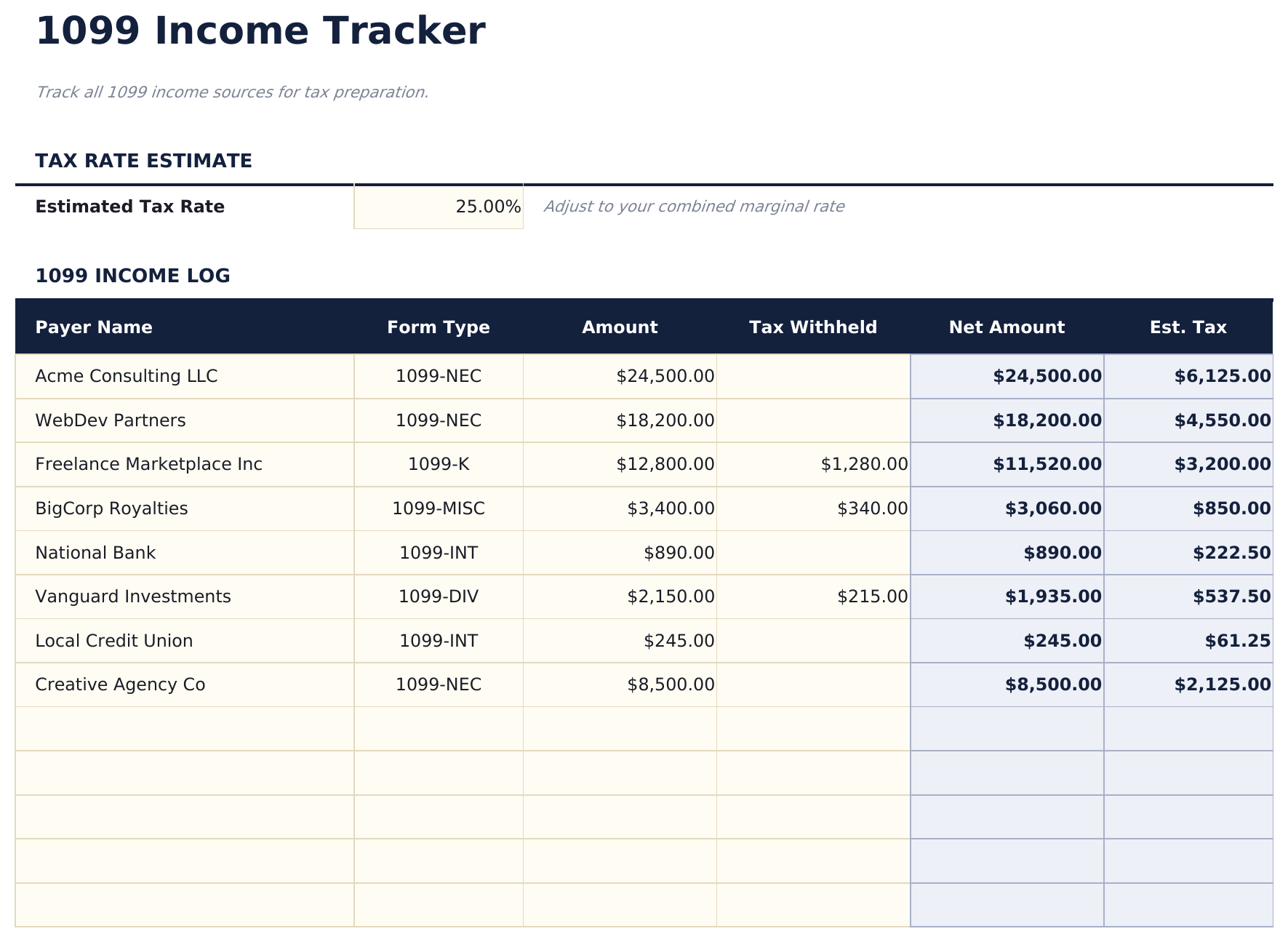
Twelve payers, each tagged 1099-NEC, MISC, K, INT or DIV, with anything already withheld recorded next to the gross and the net following on its own. One estimated tax rate sits at the top of the log and drives every estimate under it. The Essentials 1099 Income Tracker spreadsheet template reads all of it back on a dashboard - income, tax already paid, what is left - with a chart of the form mix and the formula cells locked so the log is safe to tab through. Google Sheets and Excel.

See Ultimate Spreadsheet Template

Instant digital delivery · Terms & Conditions apply

View Ultimate 1099 Income Tracker Spreadsheet Template
$29
Essentials 1099 Income Tracker spreadsheet template - Google Sheets and Excel preview

What's Included

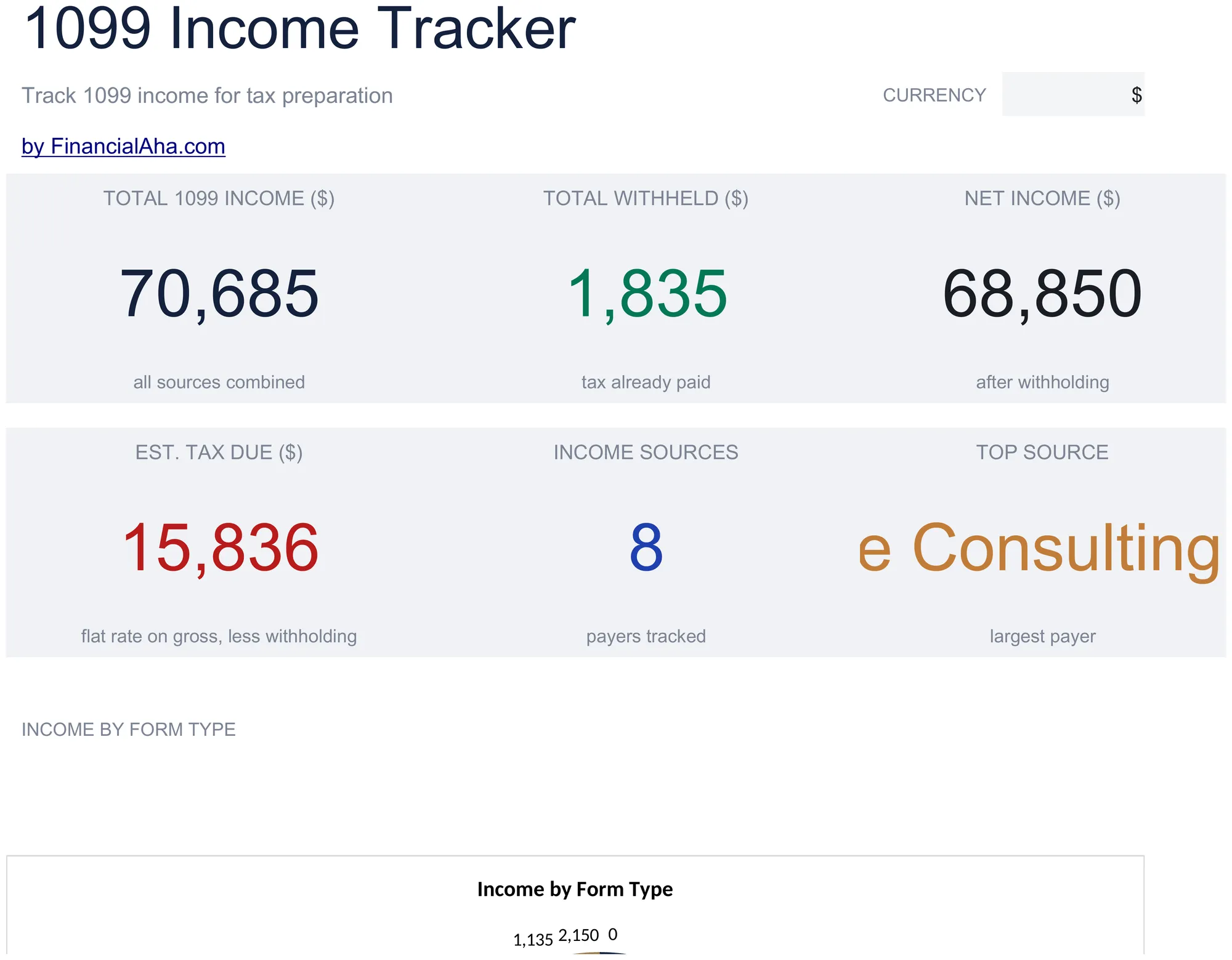
  • A dashboard reading total income, what was already withheld, what is left and an estimate of what is due
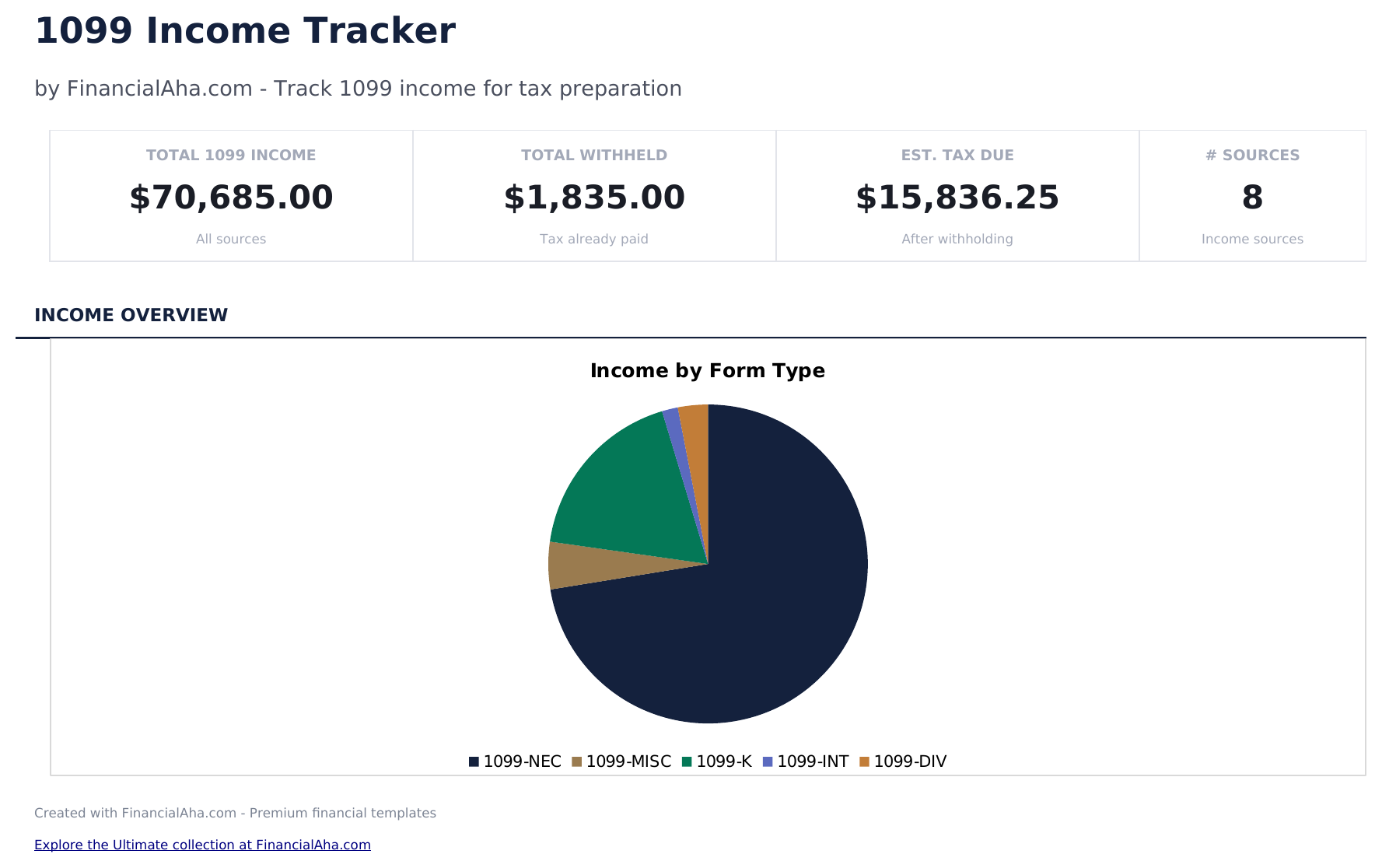
  • Income split across the 1099-NEC, MISC, K, INT and DIV form types, with a chart of the mix
  • One estimated tax rate at the top of the log, driving every estimate on the sheet
  • Withholding recorded per payer, with the net amount and the estimate following from it
  • Colour-coded input cells, so the log is safe to tab through without overwriting a formula
  • Works in Microsoft Excel and Google Sheets with no setup required
Ultimate Version Available

Need more from this template?

The Essentials Spreadsheet Template covers everyday tracking. The Ultimate Spreadsheet Template gives each part of the template its own sheet, with more capacity and deeper reporting on top.

See what's in the Ultimate version One-time purchase. No subscription.

The FinancialAha Essentials 1099 Income Tracker Spreadsheet Template for Google Sheets and Excel is a two-sheet workbook that turns a list of payments into a picture of the year, with a How to Use guide on a third tab. It works as an Essentials 1099 Income Tracker Excel template and an Essentials 1099 Income Tracker Google Sheets template from the same download. Where the Free build records what came in, this Essentials 1099 Income Tracker spreadsheet template splits it by form type, tracks what was already withheld, and carries an estimate column driven by a rate you set yourself. No macros, no VBA.

Inside the workbook

What's inside the FinancialAha Essentials 1099 Income Tracker spreadsheet template

The FinancialAha Essentials 1099 Income Tracker Spreadsheet Template runs on two working sheets - one you type into, one that reports back - plus the guide. It works in both Microsoft Excel and Google Sheets and here is what the Essentials 1099 Income Tracker spreadsheet holds.

  1. 01 of 02

    Dashboard

    Where the year stands, in one view: what came in across every payer, what was already withheld, and what is left net of it - alongside the estimated amount still outstanding, how many payers you are tracking, and which one is largest. A breakdown by 1099 form type shows the shape of the year's income at a glance, with a chart splitting the same total across the form types. Nothing here is typed; it all reads from the Income Log.

  2. 02 of 02

    Income Log

    The one sheet you type into. Each form you receive takes a payer name, a form type picked from the list, the amount, and anything already withheld - and the net and estimate columns follow from those. A single Estimated Tax Rate field at the top drives every estimate on the sheet, so the figure reflects your own combined rate rather than an assumed one.

  3. Included guide

    How to Use

    A guide on its own tab covering setup, what each form type in the list means, and how to read the dashboard. It ships inside the file, so the instructions are there whenever the template is open.

Works in both Google Sheets and Excel

Essentials 1099 Income Tracker Spreadsheet template for Google Sheets

Upload the Essentials 1099 Income Tracker Spreadsheet Template to Drive and choose "Open with Google Sheets". This Essentials 1099 Income Tracker Google Sheets template needs no conversion step and nothing gets rewritten on the way in - the dropdowns, the breakdown chart and every figure behave exactly as they do in Excel. The currency dropdown on the Dashboard relabels every money header across all three tabs at once.

Essentials 1099 Income Tracker Google Sheets template setup

The dashboard updates the moment a row changes in the Income Log, so the Essentials 1099 Income Tracker Google Sheets template stays current without a refresh step. A shared copy works if a bookkeeper logs alongside you, and version history covers an overwritten figure.

Keeping the Essentials 1099 Income Tracker Google Sheet current

Day to day the Essentials 1099 Income Tracker Google Sheet is a two-minute job: add the form, pick its type, enter the amount and any withholding, and the dashboard follows. Adjusting the Estimated Tax Rate once updates every estimate on the sheet at the same time.

Essentials 1099 Income Tracker Spreadsheet template for Excel

The Essentials 1099 Income Tracker spreadsheet Excel download is a plain .xlsx, so Excel opens this Essentials 1099 Income Tracker Excel template with no import step and no compatibility prompt. Dropdowns, the breakdown chart, and number formats all behave natively. The cells you type into carry a warm tint and the reporting cells do not, which makes the Income Log safe to tab straight through.

Essentials 1099 Income Tracker Excel template setup

The Essentials 1099 Income Tracker Excel template ships as a standard .xlsx rather than a macro-enabled .xlsm, so it opens without a trust prompt in Excel on Windows, Excel on Mac, and Excel for the web. It is the same single Essentials 1099 Income Tracker spreadsheet you would upload to Drive.

Essentials 1099 Income Tracker spreadsheet Excel compatibility

The Essentials 1099 Income Tracker spreadsheet Excel file carries no macros and no VBA, so Excel opens it without a trust prompt. The same Essentials 1099 Income Tracker spreadsheet Excel download opens in Excel for the web too, and the locked cells stay locked in both.

Opening the Essentials 1099 Income Tracker spreadsheet Excel file

Nothing in the Essentials 1099 Income Tracker Excel template is version-specific, so this Essentials 1099 Income Tracker spreadsheet Excel workbook performs the same in older Excel builds as in current ones.

Spreadsheet template highlights

What the Essentials 1099 Income Tracker spreadsheet template tracks

Four fields in the Essentials 1099 Income Tracker Spreadsheet Template are yours to fill on the Income Log. The workbook derives the rest:

Payer Name
a free-text label for the client or institution
Form Type
picked from the list: 1099-NEC, MISC, K, INT or DIV
Amount
the income shown on the form
Tax Withheld
anything already withheld on that form
Net Amount auto
derived from the amount and the withholding
Est. Tax auto
derived using the Estimated Tax Rate you set at the top of the sheet

Compare builds

FinancialAha 1099 Income Tracker spreadsheet template: Free, Essentials, and Ultimate compared

Feature Free View Spreadsheet Template Essentials This page Ultimate View Spreadsheet Template
Working sheets 1 2 6
Income rows 11 12 100
Running totals Yes Yes Yes
Form-type breakdown NEC, MISC, K, INT, DIV NEC, MISC, K, INT, DIV
Charts 1, income by form type 2, by client and by quarter
Withholding tracked Yes Yes
Tax estimate Rate you set Quarterly, per period
Expense log 100 rows, Schedule C categories
Client summary 6 rows, one per client
Schedule C reference Yes

The FinancialAha Essentials 1099 Income Tracker Spreadsheet Template for Google Sheets and Excel covers two working sheets. It is the build where the file starts interpreting rather than only recording: income splits by form type, withholding is tracked against it, and an estimate column follows a rate you set. The Free 1099 Income Tracker Spreadsheet Template has one working sheet and keeps a running total without any of that. The Ultimate 1099 Income Tracker Spreadsheet Template adds the expense side - an expense log against Schedule C categories, a per-client summary, quarterly figures, and a Schedule C reference sheet, with income and expenses logged separately.

Good to know

Notes on working in the Essentials 1099 Income Tracker spreadsheet template

  • A warm tint marks every cell you are meant to type into, so the Income Log is safe to tab through without overwriting a calculation.
  • The Estimated Tax Rate is a single field at the top of the Income Log, and it drives every estimate on the sheet.
  • The form-type list covers 1099-NEC, MISC, K, INT and DIV, and the dashboard breakdown reads from it - so picking the right type keeps the mix accurate.
  • The currency dropdown changes labels across all three sheets of the Essentials 1099 Income Tracker spreadsheet template. It does not convert the underlying numbers.
  • Estimate columns are a working figure from the rate you enter, not a filing calculation.

How to Use the Essentials 1099 Income Tracker Spreadsheet Template

1

Enter each payer

Add each company or client that pays you as a contractor in the Payer Name column.

2

Log each form

Record the payer name, the form type it was reported on, the amount, and anything already withheld.

3

Watch the running totals

The template totals income and withholding across every payer and flags the largest source, so you have something to check the forms against when they arrive.

4

Review the dashboard

The dashboard shows total 1099 income across all sources, making it easy to include this income on your tax return.

Stress-tested with AI.

Every template starts with deep research into how people actually track the topic. We design the layout, build the formulas, and polish the design until it feels like something we would use ourselves. Along the way, we use AI to stress-test the calculations: unusual inputs, edge cases, and formula behavior, checked until the numbers hold.

See Ultimate Spreadsheet Template

Instant digital delivery · Terms & Conditions apply

Frequently Asked Questions

Is the FinancialAha Essentials 1099 Income Tracker Spreadsheet Template a Google Sheets template?

Yes. Upload the file to Drive and choose "Open with Google Sheets". Every figure in the Essentials 1099 Income Tracker Google Sheets template behaves exactly as it does in Excel, including the form-type dropdowns and the dashboard breakdown.

Is the FinancialAha Essentials 1099 Income Tracker Spreadsheet Template an Excel template?

Yes. The Essentials 1099 Income Tracker spreadsheet Excel download is a plain .xlsx that opens directly in Excel with no import step, and it ships without macros or VBA.

Will the Essentials 1099 Income Tracker spreadsheet Excel file open in older versions of Excel?

Yes. Nothing in the Essentials 1099 Income Tracker spreadsheet Excel workbook is version-specific, so it performs the same in older Excel builds as in current ones.

How does the FinancialAha Essentials 1099 Income Tracker Spreadsheet Template estimate tax?

A single Estimated Tax Rate field at the top of the Income Log drives every estimate on the sheet, so the figure reflects the combined rate you enter rather than an assumed one. It is a working figure, not a filing calculation.

Why log payments if the forms arrive anyway?

Keeping your own log through the year means you have something to check the forms against when they arrive.

What income types belong here?

Track any non-employee income - freelance payments, contract work, rental income, royalties, or other 1099-reportable earnings.

Does the template track small payments?

The template logs every payment you enter, whatever the amount, so your own record is complete regardless of which payers send a form. Which payments you need to report is a question for a tax professional.

Can I also track related expenses?

This template focuses on income. Use the Tax Deduction Tracker or Freelancer Finance Tracker alongside it to log business expenses against this income.

How do I open the Essentials 1099 Income Tracker spreadsheet template in Google Sheets?

Upload the .xlsx file to Google Drive, then open it with Google Sheets. All formulas and formatting will be preserved.

More Essentials Tax Planning Templates

Essentials

Highlights:

Dashboard with charts and KPIs
Pre-filled categories and sample data
No sign-up, no subscription
Lifetime free updates
Works in
Excel Google Sheets

Looking for premium spreadsheet templates?

Our paid templates include advanced multi-sheet dashboards, native Excel charts, and ongoing updates.

Private & secure

Your financial data stays on your device. We never see it.

Learn more →

Need help?

Check our guides or reach out with questions.

View FAQ →