Best Value Complete Financial Planning Bundle
✓ Financial Planning✓ Net Worth Tracker✓ Monthly Budgeting✓ Travel Budget Planner✓ Annual Budgeting Planner✓ Monthly Expense Tracker✓ Annual Tax Planner✓ Retirement Planning
View Bundle →

Instant digital delivery · Terms & Conditions apply

Essentials Template - Excel & Google Sheets

Essentials Credit Repair Spreadsheet Spreadsheet Template for Google Sheets & Excel

Scores from all three bureaus tracked month by month, with an average that stays blank until all three are filled in rather than quietly averaging two. The Essentials Credit Repair Spreadsheet template logs twenty disputes with the creditor, bureau, type, amount and date filed, and keeps a result column as well as a status. Three working sheets and a dashboard reading both. Google Sheets and Excel. No macros, no VBA.

Instant digital delivery · Terms & Conditions apply

Essentials Credit Repair Spreadsheet spreadsheet template - Google Sheets and Excel preview

What's Included

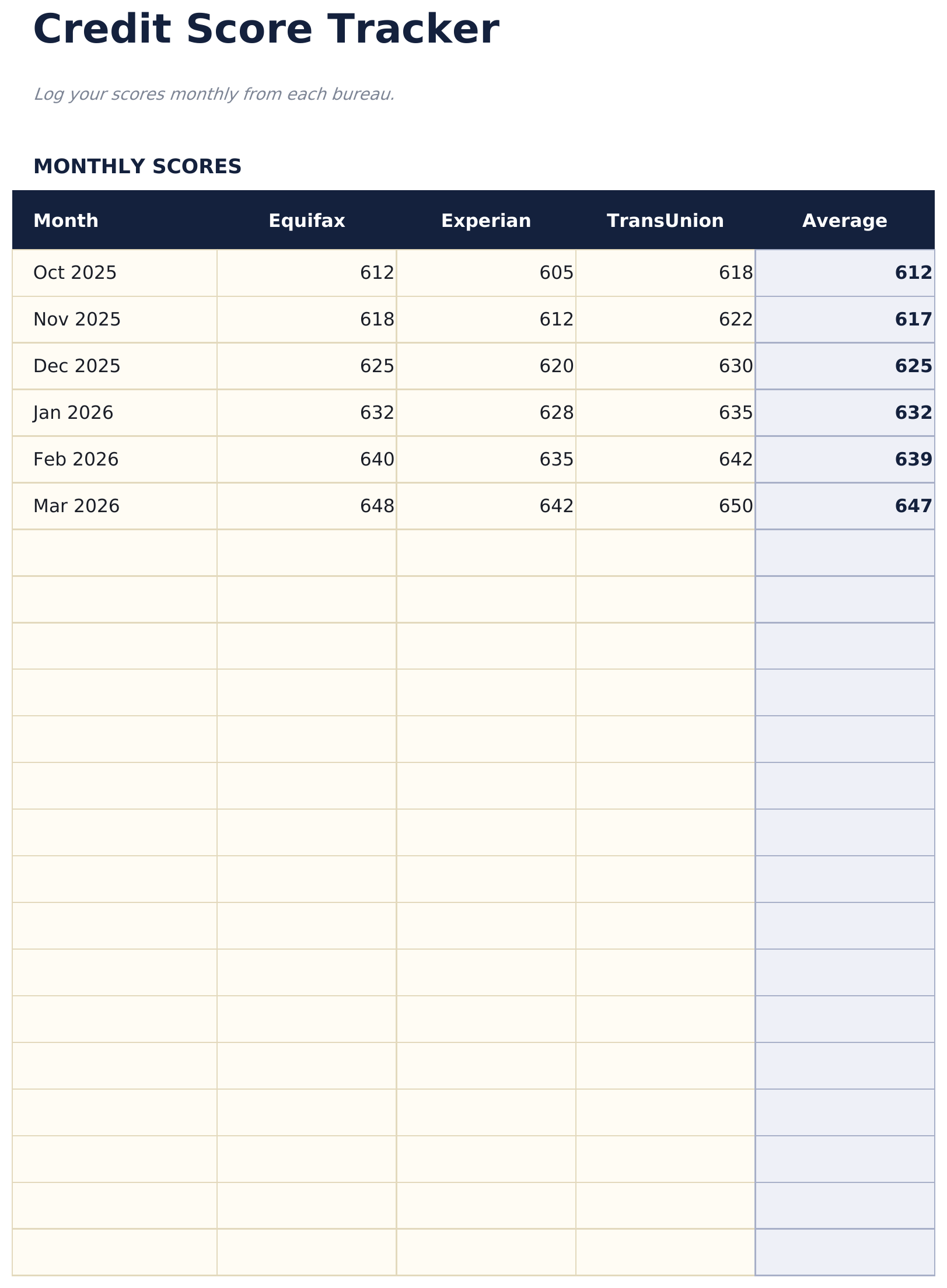
  • A score tracker with a column for each of the three bureaus
  • An average that stays blank until all three are filled in
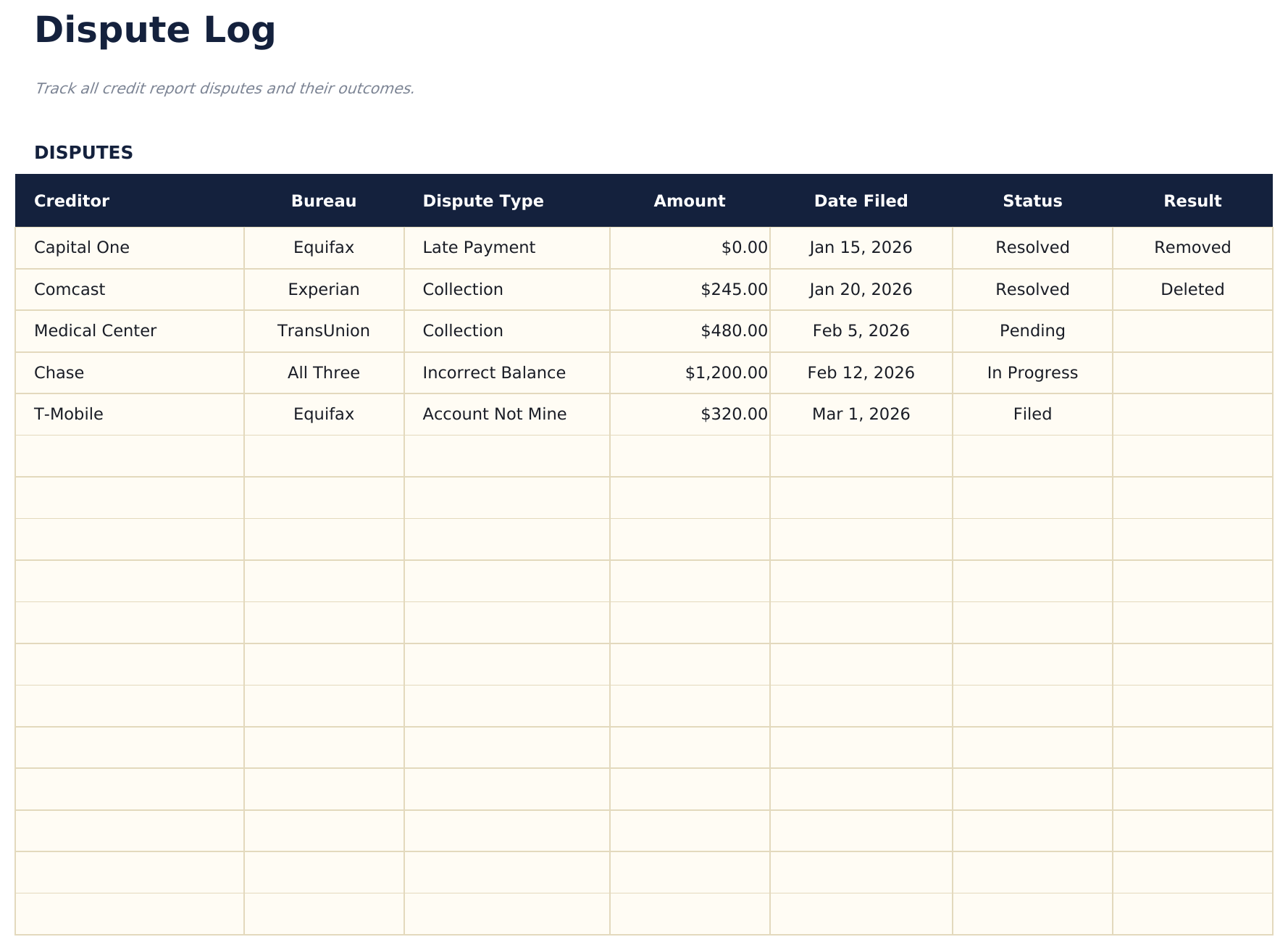
  • A row per dispute with creditor, bureau and type
  • The amount in dispute and the date filed on every row
  • A result column as well as a status
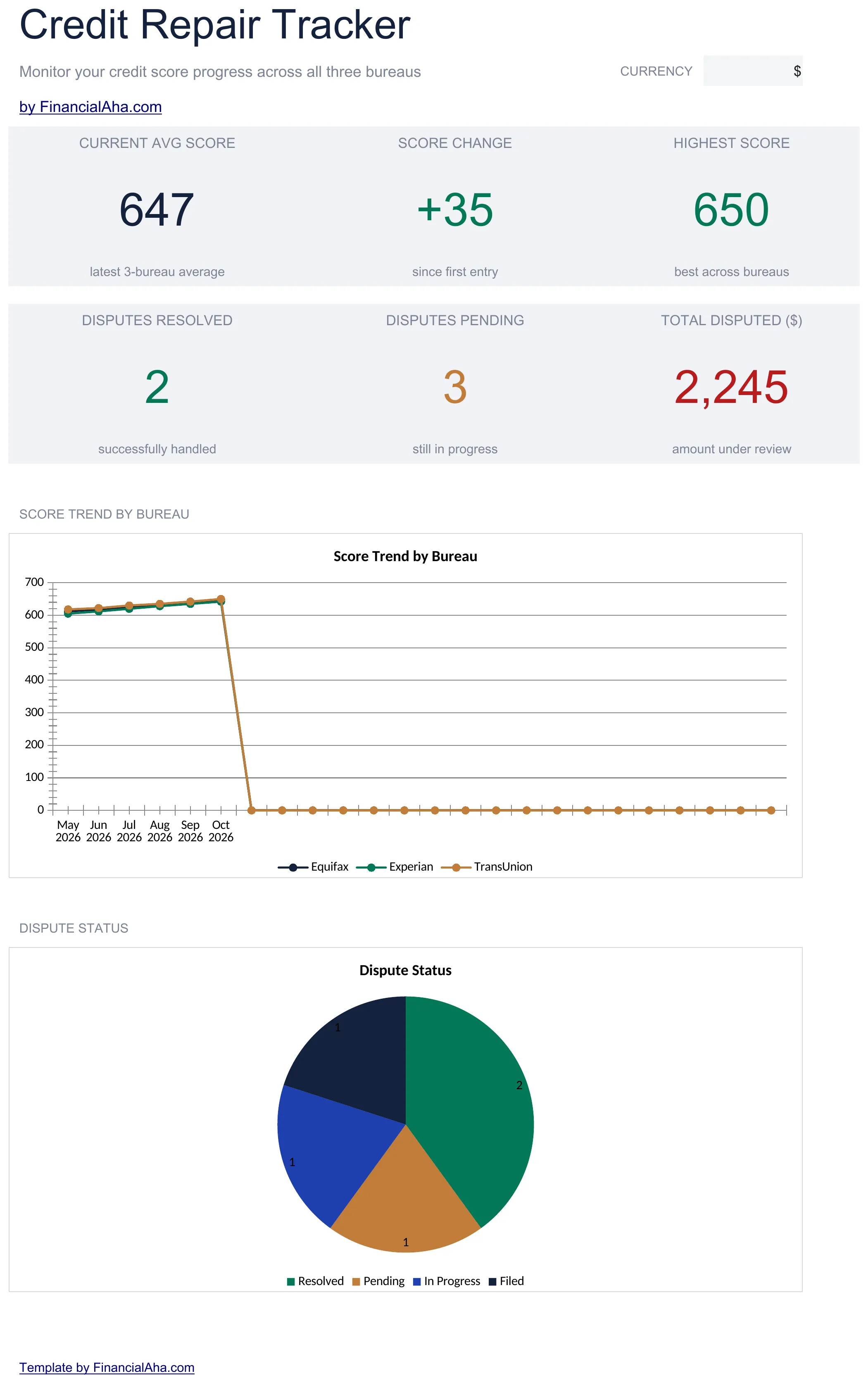
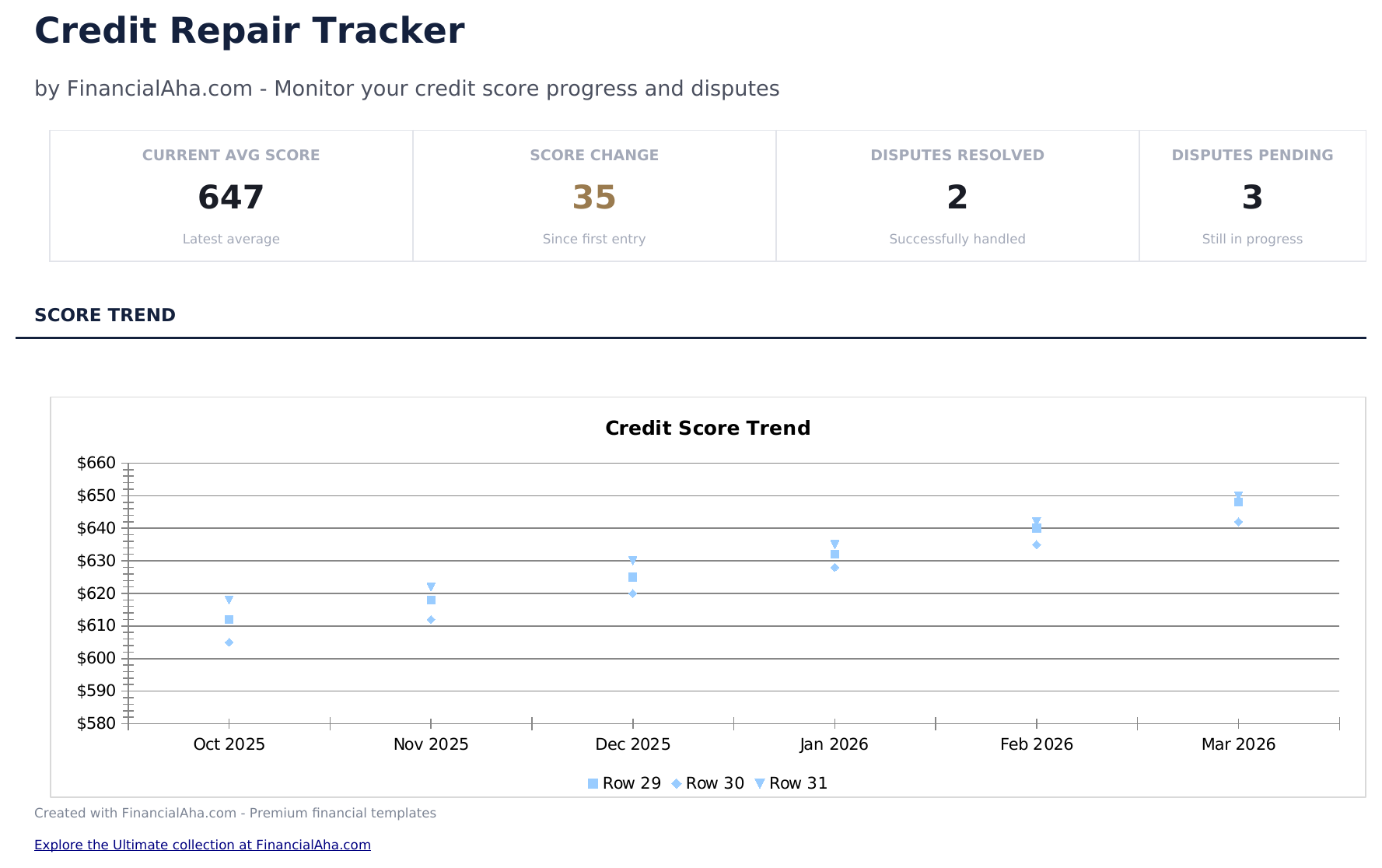
  • A dashboard with the latest average, the change since the first entry, the best score, the disputes resolved and pending, and the amount under review
  • A totals row on the dispute log - the amount disputed, the count logged and the count resolved
  • Two charts reading the sheets beneath
  • A currency dropdown that relabels the money columns across every sheet
  • Works in Microsoft Excel and Google Sheets with no setup required

The FinancialAha Essentials Credit Repair Spreadsheet Template is a three-sheet workbook for Google Sheets and Excel, with a How to Use guide on a fourth tab. It works as an Essentials Credit Repair Spreadsheet Excel template and an Essentials Credit Repair Spreadsheet Google Sheets template from the same download. Scores from three bureaus month by month, twenty disputes with the amount and the result, and a dashboard reading both. No macros, no VBA.

Inside the workbook

What's inside the FinancialAha Essentials Credit Repair Spreadsheet spreadsheet template

The FinancialAha Essentials Credit Repair Spreadsheet Template runs on three working sheets, with the instructions on a tab of their own. It works in both Microsoft Excel and Google Sheets and here is what the Essentials Credit Repair Spreadsheet holds.

  1. 01 of 03

    Score Tracker

    A row per month with a column for each of the three bureaus and an average across them. Tracking all three rather than one is the point. The bureaus hold different data and update on different schedules, so a single score is a sample rather than a picture - and a change at one bureau and not the others points at something specific having happened at that one. The average stays blank until all three are filled in. That guard matters more than it sounds: an average of the two you happened to check would move for reasons that have nothing to do with your credit, and reading it as progress would be reading noise.

  2. 02 of 03

    Dispute Log

    A row per dispute: the creditor, the bureau, what kind it is, the amount involved, the date it was filed, the status and the result. The result column is what separates this from the free build's status. A status says where a dispute is; a result says how it ended - removed, deleted, verified, unchanged - and that is the column you read back over when you are deciding whether a line of argument is working. A totals row at the foot adds the amounts, counts the disputes logged and counts the ones resolved. The amount is worth filling in for the row as much as the total: it is what tells a small collection from one many times its size when you are choosing where to spend the effort, and the date filed is what makes a clock visible.

  3. 03 of 03

    Dashboard

    Six figures. The latest three-bureau average, the change since the first entry and the best score across bureaus on the top row; how many disputes are resolved, how many are still open and the total amount under review on the second. The change-since-first-entry figure is the honest one to look at. A single month moves for all sorts of reasons; the line from where you started is the one that says whether anything is happening.

  4. Included guide

    How to Use

    A step-by-step guide on its own tab, covering what each sheet records, how the average is guarded, and how to change the currency. Because it ships inside the file, the instructions travel with the template wherever it is opened.

Works in both Google Sheets and Excel

Essentials Credit Repair Spreadsheet Spreadsheet template for Google Sheets

Upload the Essentials Credit Repair Spreadsheet Template to Drive, right-click it, and choose "Open with Google Sheets". This Essentials Credit Repair Spreadsheet Google Sheets template needs no conversion step and both charts come across intact.

Essentials Credit Repair Spreadsheet Google Sheets template setup

A Google Sheets copy is the practical one, because the scores get entered when you happen to see them rather than at a desk.

Running the Essentials Credit Repair Google Sheets template

The Essentials Credit Repair Google Sheet is updated monthly for the scores and per letter for the disputes.

Essentials Credit Repair Spreadsheet Spreadsheet template for Excel

The Essentials Credit Repair Spreadsheet Excel download is a plain .xlsx. Excel opens this Essentials Credit Repair Spreadsheet Excel template directly, with no import step, and both charts are native Excel charts. There are no macros and no VBA in the file.

Essentials Credit Repair Spreadsheet Excel template setup

The same Essentials Credit Repair Spreadsheet Excel template opens in Excel on Windows, Excel on Mac, and Excel for the web. It is also the identical file you would upload to Drive, so there is no separate Essentials Credit Repair Spreadsheet download to choose between.

Essentials Credit Repair Spreadsheet template notes for Excel

The Essentials Credit Repair Spreadsheet Excel file carries no macros and no VBA, so Excel opens it without a trust prompt.

Opening the Essentials Credit Repair Spreadsheet spreadsheet Excel file

Nothing in the Essentials Credit Repair Spreadsheet Excel template is version-specific, so this Essentials Credit Repair Spreadsheet Excel workbook behaves identically in Excel on Windows, Excel on Mac, and older builds.

Spreadsheet template highlights

What the Essentials Credit Repair Spreadsheet spreadsheet template tracks

The dispute log runs a row per dispute. This is what each records:

Creditor
who the item is with
Bureau
which one the dispute was filed at
Dispute Type
late payment, collection, error or your own headings
Amount ($)
what is involved, which is how you choose where to spend effort
Date Filed
what makes the clock visible
Status
where it stands now
Result
how it ended, which is the column worth reading back over

Compare builds

FinancialAha Credit Repair Spreadsheet spreadsheet template: Free and Essentials compared

Feature Free View Spreadsheet Template Essentials This page
Working sheets 1 3
Items logged 14 20 disputes
Counted at the top Open and pending Resolved and pending, plus the amount disputed
Scores tracked over time Three bureaus, monthly
Amount in dispute recorded Yes
Result recorded, not just status Yes
Charts 2

The Free Credit Repair Spreadsheet Template logs items with a bureau, an action, a status and a follow-up date. The FinancialAha Essentials Credit Repair Spreadsheet Template adds a score tracker running three bureaus month by month with a guarded average, a dispute log carrying the amount and the result rather than just the status, and a dashboard with two charts.

Good to know

Notes on working in the Essentials Credit Repair Spreadsheet spreadsheet template

  • Three bureaus rather than one, because they hold different data and update on different schedules.
  • The average stays blank until all three are filled in, so a part-entered month cannot read as movement.
  • The result column is what you read back over when deciding whether a line of argument is working.
  • The amount rolls up into the totals row, but it is worth reading row by row too - it is how you choose where to spend effort.
  • The change since your first entry is a steadier read than any single month.
  • The currency dropdown on the dashboard relabels the money columns across every sheet. It changes the label only and does not convert the numbers.
  • The dispute log totals row adds the amounts and counts the disputes, and the dashboard carries that total. Nothing about it forecasts an outcome.

How to Use the Essentials Credit Repair Spreadsheet Spreadsheet Template

1

Log the scores

A row per month, all three bureaus.

2

Record the disputes

Creditor, bureau, type and amount.

3

Date each filing

Which is what makes the clock visible.

4

Record the result

Not just the status - how it ended.

Stress-tested with AI.

Every template starts with deep research into how people actually track the topic. We design the layout, build the formulas, and polish the design until it feels like something we would use ourselves. Along the way, we use AI to stress-test the calculations: unusual inputs, edge cases, and formula behavior, checked until the numbers hold.

Instant digital delivery · Terms & Conditions apply

Frequently Asked Questions

Is the FinancialAha Essentials Credit Repair Spreadsheet Template a Google Sheets template?

Yes. Upload the file to Drive and choose "Open with Google Sheets". The Essentials Credit Repair Spreadsheet Google Sheets template needs no conversion step and both charts come across intact.

Is the FinancialAha Essentials Credit Repair Spreadsheet Template an Excel template?

Yes. The download is a plain .xlsx, so the Essentials Credit Repair Spreadsheet Excel template opens directly in Excel with no import step, and both charts are native Excel charts.

Will the FinancialAha Essentials Credit Repair Spreadsheet Excel file open in older versions of Excel?

Yes. The Essentials Credit Repair Spreadsheet Excel workbook ships as a plain .xlsx, so it opens identically in current Excel and in builds that predate dynamic arrays.

Why does the Essentials Credit Repair Spreadsheet track all three bureaus?

Because they hold different data and update on different schedules, so a single score is a sample rather than a picture. A change at one and not the others points at something specific that happened at that one.

Why does the average in the Essentials Credit Repair Spreadsheet stay blank sometimes?

Until all three bureaus are filled in for that month. An average of the two you happened to check would move for reasons that have nothing to do with your credit, and reading it as progress would be reading noise.

What does the result column add over the status in the Essentials Credit Repair Spreadsheet?

A status says where a dispute is; a result says how it ended. It is the column you read back over when deciding whether a line of argument is working.

Does the Essentials Credit Repair Spreadsheet template sum the disputed amounts?

Yes. The dispute log carries a totals row - the amount under dispute, how many disputes are logged and how many are resolved - and the dashboard shows the total as a figure of its own. The amount is still worth filling in row by row for its own sake: it is what tells a small collection from one many times its size when you are choosing where to spend the effort.

Does the FinancialAha Essentials Credit Repair Spreadsheet predict a score change?

No. It records what you filed, what happened and what the scores were. Nothing in it forecasts an outcome.

How do I open the Essentials Credit Repair Spreadsheet spreadsheet template in Google Sheets?

Upload the .xlsx file to Google Drive, then open it with Google Sheets. All formulas and formatting will be preserved.

More Essentials Debt Management Templates

Essentials

Highlights:

Dashboard with charts and KPIs
Pre-filled categories and sample data
No sign-up, no subscription
Lifetime free updates
Works in
Excel Google Sheets

Looking for premium spreadsheet templates?

Our paid templates include advanced multi-sheet dashboards, native Excel charts, and ongoing updates.

Private & secure

Your financial data stays on your device. We never see it.

Learn more →

Need help?

Check our guides or reach out with questions.

View FAQ →