
An investment portfolio tracker spreadsheet is built from three parts: Holdings (one row per position with shares, cost basis, and current value), a dividend log (one row per payment), and a performance view (cumulative ROI and portfolio totals). Return is (current value + dividends - cost) / cost, or XIRR when you want to account for the timing of contributions. Our Excel template covers this in two tiers: $19 Essentials, with a Holdings sheet feeding a value, return, and allocation dashboard, or $29 Ultimate, which adds a Dividends sheet with annual income and yield per holding, sector allocation targets with rebalancing variance, and a year-over-year performance view.
The portfolio tracker is the spreadsheet that long-term investors reach for most often. Brokerage statements show the current snapshot; the spreadsheet shows the history, the dividend pattern, and the performance attribution. This post covers the column structure, the formulas that matter, and the workflow for keeping it current. If you would rather start from a finished file, our Investment Portfolio Tracker Essentials template ($19) ships the Holdings sheet and dashboard already wired.
What the tracker needs to do
Five jobs.
- List every position with cost basis and current value. This is the table.
- Log every dividend received. For dividend tracking and total return calculation.
- Calculate cumulative ROI per position. Both price appreciation and dividend yield.
- Aggregate portfolio totals. Total cost, total value, total return.
- Make broker statements importable without manual re-typing. CSV paste workflow.
That’s it. Charting, asset allocation, sector breakdown are all extras that can sit on a dashboard but aren’t required for the core function.
The Holdings sheet
One row per position. Columns:
| Column | Example | Notes |
|---|---|---|
| Ticker | VTI | Or fund name |
| Account | Vanguard taxable | Helps when you have multiple accounts |
| Shares | 124.5 | Including fractional |
| Cost basis (total) | 22,800 | What you paid for all shares combined |
| Avg cost per share | =Cost basis / Shares | Calculated |
| Current price | 245.30 | Manual update or formula |
| Current value | =Shares * Current price | Calculated |
| Unrealized gain/loss | =Current value - Cost basis | Calculated |
| Percent return (price only) | =(Current value - Cost basis) / Cost basis | Calculated |
| Annualized return | XIRR-based | Optional |
The Current price column is where most trackers handle either manual updates (you type in a price weekly) or formula-based pulls. Google Sheets has GOOGLEFINANCE, which can pull quotes with =GOOGLEFINANCE("VTI","price"), though those quotes are delayed rather than real-time. Excel has no direct formula equivalent; the built-in Stocks data type in Microsoft 365 or a Power Query pull fills the same role.
For most users, manual updates weekly or monthly are easier than wrestling with live data feeds. The portfolio doesn’t change second-to-second; weekly is sufficient for tracking.
The Dividends sheet
One row per dividend received. Columns:
| Column | Example |
|---|---|
| Date paid | 2026-03-31 |
| Ticker | VTI |
| Account | Vanguard taxable |
| Amount | 87.20 |
| Per-share | 0.70 |
| DRIP? | Yes |
| Notes | Q1 2026 distribution |
Why log dividends separately instead of relying on broker statements? Two reasons. First, dividend totals across accounts are tedious to assemble at tax time without a single log. Second, total return (price appreciation plus dividend yield) is the right measure of investment performance, and you can’t calculate it without the dividend log.
Most brokers export dividends as a CSV for any date range. A monthly paste into the Dividends sheet keeps it current.
The Performance sheet
Read-only. Pulls from Holdings and Dividends and produces:
- Total portfolio value (sum of Current value column)
- Total cost basis (sum of Cost basis column)
- Unrealized gain/loss (total value minus total cost)
- Total dividends YTD (sum of Dividends sheet for current year)
- Total dividends LTM (last twelve months)
- Total return YTD = (current value plus YTD dividends - prior year-end value) / prior year-end value
- Total return since inception (XIRR across all cash flows)
The XIRR calculation is the gold-standard performance measure because it accounts for the timing of contributions and dividends. The formula in Google Sheets:
=XIRR(cash_flows_range, dates_range)Where cash flows are negative for contributions, negative for dividends reinvested, and positive for current value (as if you sold today). Dates are the corresponding transaction dates.
This is more accurate than simple “current value minus cost basis divided by cost basis” because it factors in when you put money in.
To sketch a return before wiring up the sheet, the investment returns calculator below takes what you put in, the current value, the years held, and any dividends, then reports ROI, total return, and the compound annual growth rate.
A worked example
Dana has a small taxable portfolio. Her Holdings sheet:
| Ticker | Account | Shares | Cost basis | Current price | Current value | Gain/loss | Percent |
|---|---|---|---|---|---|---|---|
| VTI | Vanguard | 78.4 | 18,200 | 245.30 | 19,231 | 1,031 | 5.7% |
| VXUS | Vanguard | 102.1 | 6,400 | 64.80 | 6,616 | 216 | 3.4% |
| VTEB | Vanguard | 156.7 | 8,300 | 51.10 | 8,007 | -293 | -3.5% |
| Total | 32,900 | 33,854 | 954 | 2.9% |
Dividends logged this year: $412. Total return including those dividends: $954 + $412 = $1,366. Against the $32,900 cost basis, that is 4.1 percent. Note this measures return since purchase, not a calendar-year figure; a true year-to-date number compares against the prior year-end value, which is what the Performance sheet does.
She updates current prices weekly, dividends monthly, and reviews the Performance dashboard quarterly. Total time: about 90 minutes a year for a small portfolio.
Where the spreadsheet helps that the broker doesn’t
Cross-broker view. If you have positions at Vanguard, Fidelity, and a 401(k) at Schwab, no single broker shows the consolidated view. The spreadsheet does.
Historical dividend yield. Brokers often show last 12 months. A spreadsheet shows whatever range you’ve logged.
Total return vs price-only return. Brokers often default to price-only. The spreadsheet calculates true total return including dividends.
Tax-lot detail for selling decisions. The spreadsheet can hold tax-lot rows (date acquired, shares, cost) to identify which lots to sell for tax-loss harvesting. Some brokers expose this; many don’t, especially for old positions.
Where the spreadsheet doesn’t help
Live prices. Brokers show live; spreadsheets show last-updated. For long-term investors this doesn’t matter; for active traders it’s a deal-breaker.
Tax document generation. Brokers send 1099-DIV, 1099-INT, and 1099-B forms at year end. The spreadsheet doesn’t produce these, so broker documents are still required for filing. It helps cross-check the numbers and pull deduction-relevant figures, but it doesn’t replace the forms.
Cost basis for old positions. Brokers have only been required to report cost basis on stock acquired after 2010 (mutual fund and dividend-reinvestment shares after 2011), so for older lots the basis may be blank and has to be reconstructed. The spreadsheet is a place to record what you find, not a way to find it.
The broker CSV import workflow
Most brokers let you download a transaction CSV. The workflow:
- In the broker portal, open Transaction History or Account Activity.
- Filter to the date range you want (typically last month or YTD).
- Export as CSV.
- Open the CSV in Excel or Sheets.
- Filter to dividend rows (transaction type = “DIV” or similar).
- Copy the relevant columns (date, ticker, amount).
- Paste into the Dividends sheet of the tracker.
- For new buy/sell transactions, update the Holdings sheet with new share counts and adjusted cost basis.
10 minutes a month if you do it consistently. Two hours if you wait until December. Consistency wins.
What our paid template adds
The Investment Portfolio Tracker Essentials template is $19 and includes:
- A Holdings sheet that takes ticker, name, shares, average cost, and current price, then calculates market value, gain or loss, and percent return
- Total value, total gain, overall percent return, and a count of active positions across the top of the dashboard
- A portfolio allocation pie chart broken down by holding
- Twenty holding rows out of the box, with a totals row underneath them
- A currency picker on the dashboard that switches the symbol shown in the labels, without converting the underlying numbers
- Excel format that also opens in Google Sheets and LibreOffice Calc
 Investment Portfolio Tracker Essentials ($19 tier): holdings roll up into total value, gain, return, and an allocation pie chart.
The Ultimate tier is $29 and adds separate sheets for the rest: a Dividends sheet that reads each position’s annual dividend per share and reports income and yield per holding, an Allocation sheet with sector targets and rebalancing variance, a Performance sheet comparing sector value against the two prior years, and room for up to 50 holdings.
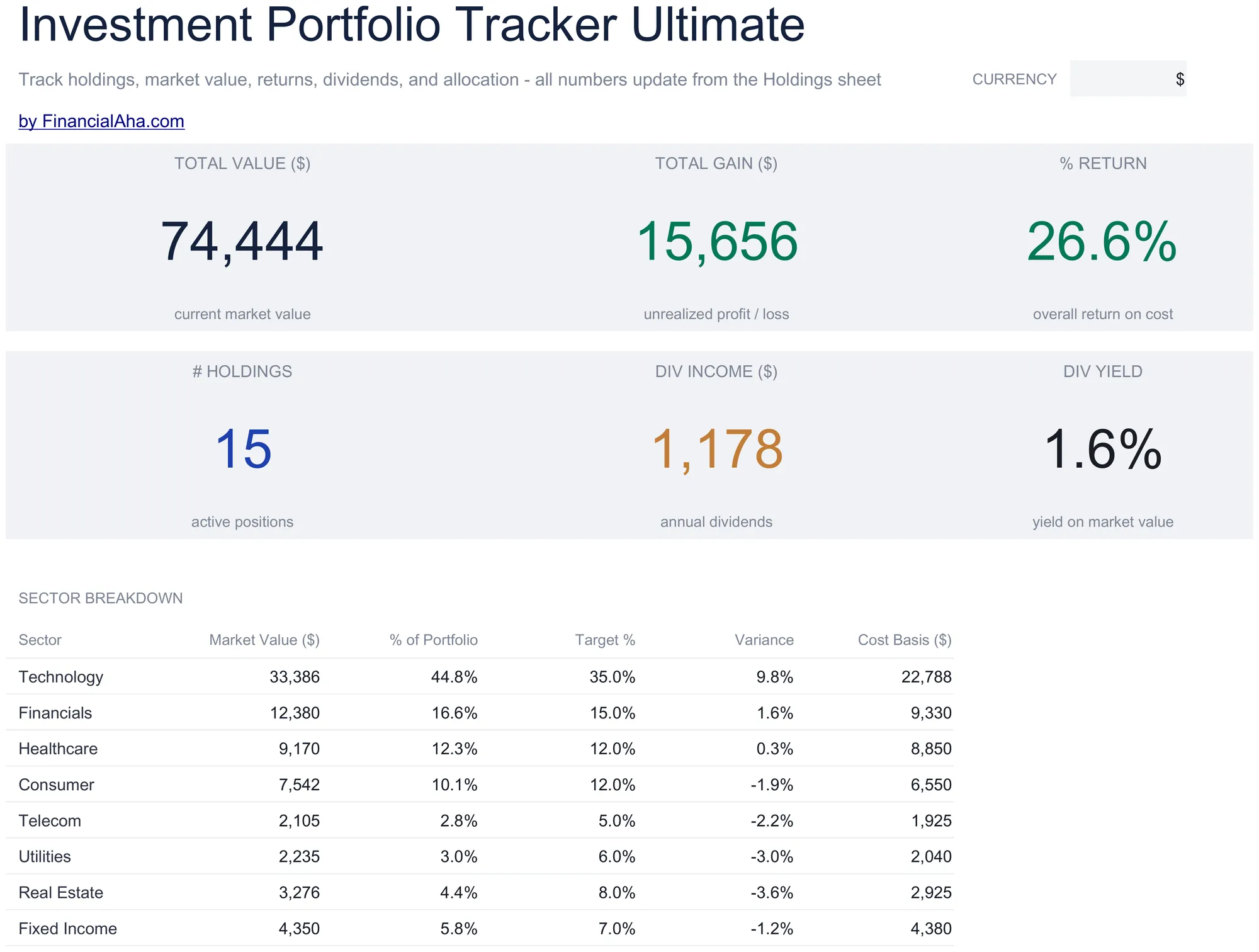 Investment Portfolio Tracker Ultimate ($29 tier): dividend income and yield tiles, plus a sector breakdown with target allocation and variance for rebalancing.
If you would rather build it from scratch, the structure above is reproducible in about 90 minutes. People who track manually for a few months often end up wanting a finished file anyway, and the $19 tier saves the rebuilding effort.
Two extensions worth considering
Two small additions that regular users tend to make:
A “tax location” tag per holding. A single column noting whether a position sits in a taxable or tax-advantaged account. It makes asset-location questions easier to see at a glance, for example which accounts hold the bond funds versus the equity funds.
A “rebalance check” cell. With a target allocation entered, say 70 stocks / 25 bonds / 5 cash, a cell calculates the current drift from target. Conditional formatting can turn it red once drift passes whatever threshold you set, which changes rebalancing from a calendar chore into a visual cue.
Both are a handful of cells and a noticeable change in usefulness. The Ultimate template builds the rebalancing version in with its sector target and variance columns.
Where to go next
If the three-part structure is what you want without building it, the Investment Portfolio Tracker Essentials ($19) is the starting point, and the Ultimate tier ($29) adds the dividend income view and sector rebalancing covered above.
To fit a portfolio into the wider picture, two related files help:
- Financial Planning Spreadsheet: assets across 15 types, debts, monthly cash flow, and a projection that runs out to an end year you set.
- Net Worth Tracker: a monthly asset and liability log with net worth over time, liquidity and allocation breakdowns, and milestone tracking, where portfolio value becomes one line among all your assets.
Related
Frequently asked questions
Do I need to update prices live?
No. Weekly is sufficient for long-term investors. Monthly is fine if you mostly hold index funds. Live prices matter for active traders, who probably need a different tool altogether.
Should I track each broker separately or consolidated?
Both. One workbook with an Account column lets you filter to a single broker view while still showing the portfolio-wide total. Our own templates do not ship that column, so adding one next to the ticker is the change to make if a per-broker view matters to you.
How does the tracker handle stock splits?
Manually. When a 4-for-1 split happens, you multiply shares by 4 and divide cost basis per share by 4 (total cost basis stays the same). Add a note in the row. Most brokers handle the split automatically in their statements; the spreadsheet needs a manual reconciliation that day.
What about crypto?
Same structure. One holding per coin, one row per dividend (rare for crypto), price updates manually or via Apps Script for live data. Many users keep a separate sheet for crypto because the dynamics differ from equities; that's a personal call.
Is the tracker tax-aware?
The basic version isn't. It records average cost per share and current value rather than the individual lots, so lot-level selling decisions still come off the broker's records. For full tax preparation, broker 1099 forms are still required. The Annual Tax Planner covers investment income alongside the rest of a tax year, which complements this.
Does GOOGLEFINANCE work in Excel?
No. GOOGLEFINANCE is a Google Sheets function only. In Excel the closest equivalent is the built-in Stocks data type in Microsoft 365, or a Power Query pull from a data source. Prices from either refresh on demand rather than tick by tick, and GOOGLEFINANCE quotes are themselves delayed.
How many holdings can one spreadsheet track?
A plain sheet has no real row limit; readability is the constraint once you pass a few dozen positions. The Essentials template ships with 20 holding rows, and the Ultimate template is laid out for up to 50 holdings with a sector breakdown, so larger portfolios stay legible.
Sources
- GOOGLEFINANCE function - Google Docs Editors Help
- Get a stock quote (Stocks data type) - Microsoft Support
- Instructions for Form 1099-B (covered vs. noncovered securities) - Internal Revenue Service
- About Form 1099-DIV, Dividends and Distributions - Internal Revenue Service
About this article
Template sheets, inputs and outputs checked on 2026-09-10 against the shipped Investment Portfolio Tracker Essentials workbook (Dashboard, Holdings, How to Use) and the Ultimate workbook (Dashboard, Holdings, Performance, Dividends, Allocation, How to Use). Cost-basis reporting years and year-end tax forms verified against the IRS Form 1099-B instructions and IRS form pages. Last reviewed September 2026.