
Both platforms run the same retirement math, so FV, PV and PMT behave identically, which makes Google Sheets enough (and free) for most savers. Excel earns its place mainly in your 50s, when Monte Carlo simulations and Solver-based tax optimization reward its faster desktop engine. Which one fits depends more on your stage in life than on the software.
Retirement planning at 30 looks nothing like retirement planning at 55. At 30, you might be estimating how much to put away each month. At 55, you might be stress-testing whether your savings survive 30 years of withdrawals, inflation, and a market crash in year two. The spreadsheet platform that works at one stage doesn’t necessarily work at the other.
Our templates work in Google Sheets. The Retirement Financial Planning Template is built for Google Sheets - scenario modeling, projections, and easy sharing with an advisor.
In Your 20s and 30s - Getting Started
Early in your career, the actual planning part is straightforward. How much can you save? What might it grow to over 30 or 40 years? A basic compound growth projection answers most of the questions that matter at this stage.
Google Sheets fits this stage well. It’s free, you can access it from your phone, and the financial functions (FV, PMT, PV) work the same as Excel. When you’re starting out and experimenting with different savings rates, the low barrier to entry matters. No software to install, no subscription to justify. Open a browser, build a projection, and adjust it when your salary changes.
The collaboration aspect also helps at this stage. Plenty of people in their 20s and 30s are figuring this out with a partner. A shared Google Sheet where both people can see the projections and test different contribution levels is more practical than emailing Excel files back and forth.
At this point, computation speed is irrelevant. A projection with 3-4 variables over 35 years runs instantly on either platform. The choice comes down to access and convenience, and Google Sheets wins on both.
Before you build anything, it helps to sketch a rough target. The Retirement Calculator below runs a quick projection of savings, growth, and withdrawals so you have a first number to plug into whichever platform you choose.
In Your 40s - The Complexity Builds
By your 40s, the picture gets more complicated. Multiple retirement accounts, maybe a pension, some investment properties, kids’ college funds competing for the same dollars. The spreadsheet starts doing more work.
This is where the platforms start to feel different.
Google Sheets still handles the core modeling. You can track multiple accounts, project different growth rates for each, and build scenarios where you vary your contribution amounts. GOOGLEFINANCE can pull live values for investment accounts holding publicly traded securities, so your projections start from current numbers rather than ones you entered last quarter.
Excel starts showing its strengths if you want to get analytical. Goal Seek answers questions like “what monthly contribution gets me to $1.5 million by 65?” without you having to guess and check manually. Power Query can pull in data from multiple sources if you’re tracking accounts across brokerages. The formula library is slightly deeper, though for retirement math specifically, the overlap is nearly complete.
The meaningful difference at this stage: if you work with a financial advisor, Google Sheets makes those conversations easier. Share a link, sit on a video call, and watch your advisor adjust assumptions in real time. That kind of collaborative session is awkward with Excel unless you’re both on OneDrive, and even then the experience is clunkier.
In Your 50s - Pre-Retirement Detail Work
This is where retirement planning gets serious, and where platform choice actually matters.
At 55, the questions change. It’s no longer “how much do I need to save?” but rather “will what I have last?” The modeling gets specific. Social Security timing decisions. Required minimum distributions. Tax bracket management across traditional and Roth accounts. Healthcare costs before Medicare kicks in. Sequence-of-returns risk during the first five years of retirement.
Excel has real advantages here. Monte Carlo simulations, which run thousands of randomized return scenarios to see what percentage of them end in running out of money, are computationally heavy. Excel’s desktop calculation engine handles these faster than a browser-based tool. If you’re running 10,000 iterations with variable inflation, market returns, and withdrawal rates, you’ll feel the difference.
Solver becomes genuinely useful for optimization problems. What combination of account withdrawals minimizes your tax burden in year three of retirement? That’s a constrained optimization problem, and Solver handles it natively. Google Sheets has a Solver add-on, but it’s less capable.
The offline access also matters more at this stage. People doing serious pre-retirement planning often sit down for extended sessions, sometimes at a kitchen table with printed statements, sometimes with a financial planner in an office. Google Sheets can work offline once you enable that mode in Chrome, but Excel’s desktop app is offline by default, so it removes one friction point from those sessions without any setup.
Google Sheets still works for pre-retirement planning, especially for people who don’t need Monte Carlo-level analysis. Most people at 55 aren’t running stochastic models. They’re testing three or four scenarios (conservative, moderate, optimistic, disaster) and seeing what happens. Google Sheets handles that without issue.
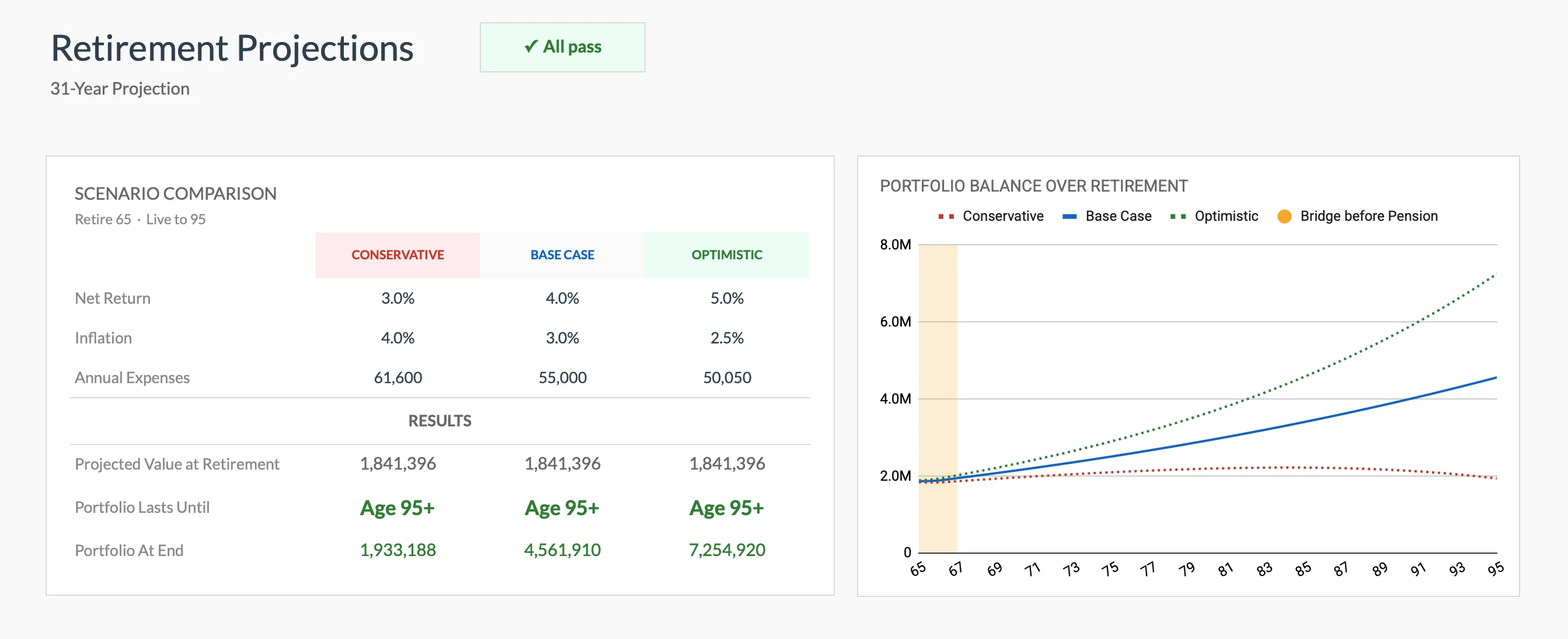 Scenario comparison in the Retirement Financial Planning Template (Premium tier), built for Google Sheets. The same conservative, base case, and optimistic modeling most people run at 55 without needing Excel.
Google Sheets vs Excel, at a Glance
The stage-by-stage detail matters, but here is the short version of where each platform pulls ahead for retirement work.
| What you need | Google Sheets | Excel |
|---|---|---|
| Cost | Free with a Google account | Paid (Microsoft 365 or a one-time Office license) |
| Access | Any browser, phone, or tablet | Desktop app (lighter web version) |
| Core retirement math (FV, PV, PMT) | Identical | Identical |
| Live market values | GOOGLEFINANCE, built in | Stocks data type (Microsoft 365) |
| What-if optimization | Solver add-on, less capable | Goal Seek and Solver, built in |
| Monte Carlo, 10,000 runs | Works, but slower in a browser | Faster desktop engine |
| Real-time advisor collaboration | Share a link | Needs OneDrive, clunkier |
| Offline use | After enabling offline mode | Native |
For most savers, the left column covers everything. The right column only starts to matter once the analysis in your 50s gets heavy.
The Advisor Relationship Changes Over Time
One thread running through all these stages: how you interact with a financial professional.
At 30, you might not have an advisor at all. At 45, you might meet with one annually. At 58, you might be talking to one monthly as retirement approaches.
For occasional collaboration, Google Sheets is more than enough. Share a link, have the conversation, make the changes together. For intensive planning relationships where an advisor is building sophisticated models on your behalf, Excel is more common in that professional world. Most financial planners who build custom models use Excel, partly because of its analytical tools and partly because the industry grew up on it.
Neither answer is wrong. Some people do just fine with a Google Sheet at every stage. Some switch to Excel when the complexity warrants it. Some use Google Sheets for their own tracking and let their advisor handle the heavy modeling in Excel.
What Stays True at Every Age
Both platforms support the same core financial functions. FV, PV, PMT, RATE, NPV, and IRR all work identically. A retirement projection built with these formulas produces the same output regardless of platform.
The formulas aren’t the hard part. The hard part is the assumptions: what return rate to use, how to model inflation, when Social Security starts, how long to plan for. Those decisions matter far more than whether you make them in a browser or a desktop app.
And the single most useful thing at any age is a projection you actually look at and update. A rough estimate in Google Sheets that you revisit twice a year beats a sophisticated Excel model that sits in a folder untouched.
Template recommendation: The Retirement Financial Planning Template works in Google Sheets with built-in projections and scenario modeling - a solid starting point regardless of where you are in the journey.
Related
Frequently asked questions
Can Google Sheets handle 30-year retirement projections?
Yes. Google Sheets handles multi-decade projections with variable rates, inflation adjustments, and multiple income sources without issues. Performance only becomes a concern with extremely complex models running thousands of simultaneous scenarios.
Is Excel faster for retirement calculations?
For simple to moderate projections, you won't notice a difference. Excel's speed advantage shows up with complex Monte Carlo simulations or models with hundreds of interconnected variables. For typical retirement planning spreadsheets, both perform well.
Can I share my retirement plan with a financial advisor using Google Sheets?
Yes, and this is one of Google Sheets' strengths. Share a link with view or edit access, and your advisor can review your projections in real time without installing software. You can also use the commenting feature to discuss specific assumptions.
Which has better retirement planning templates?
Both platforms have retirement planning templates available. Google Sheets benefits from easy template sharing - copy a shared link and it's yours. Excel has a longer history of professional-grade templates. The quality depends more on the specific template than the platform.
Can Google Sheets run a Monte Carlo retirement simulation?
It can, using RAND or RANDBETWEEN to generate randomized returns across a data table. The limit is speed, not capability: a browser recalculates thousands of iterations more slowly than Excel's desktop engine, so very large simulations can feel sluggish. For a few hundred iterations, the difference is minor.
Does Google Sheets work offline for retirement planning?
Yes. Once you enable offline access for Google Sheets in Chrome, the file opens and recalculates without a connection. Excel's desktop app is offline by default, which is why long planning sessions away from wifi tend to feel more natural there.
Sources
- GOOGLEFINANCE function - Google Docs Editors Help
- Use Goal Seek to find the result you want by adjusting an input value - Microsoft Support
- Define and solve a problem by using Solver - Microsoft Support
- Retirement topics - Required Minimum Distributions (RMDs) - Internal Revenue Service
- Benefit Reduction for Early Retirement - Social Security Administration
About this article
Platform capabilities checked against Google Docs Editors Help (GOOGLEFINANCE) and Microsoft Support (Goal Seek, Solver). Retirement rules referenced from IRS required minimum distribution guidance and the Social Security Administration. Last reviewed August 2026.