免费 50/30/20 预算 电子表格模板
使用 50/30/20 框架将支出分为必需品、非必需品和储蓄。适合偏好按百分比预算方式的人。
Upgrade your spreadsheet
Here is how you unlock a better version.
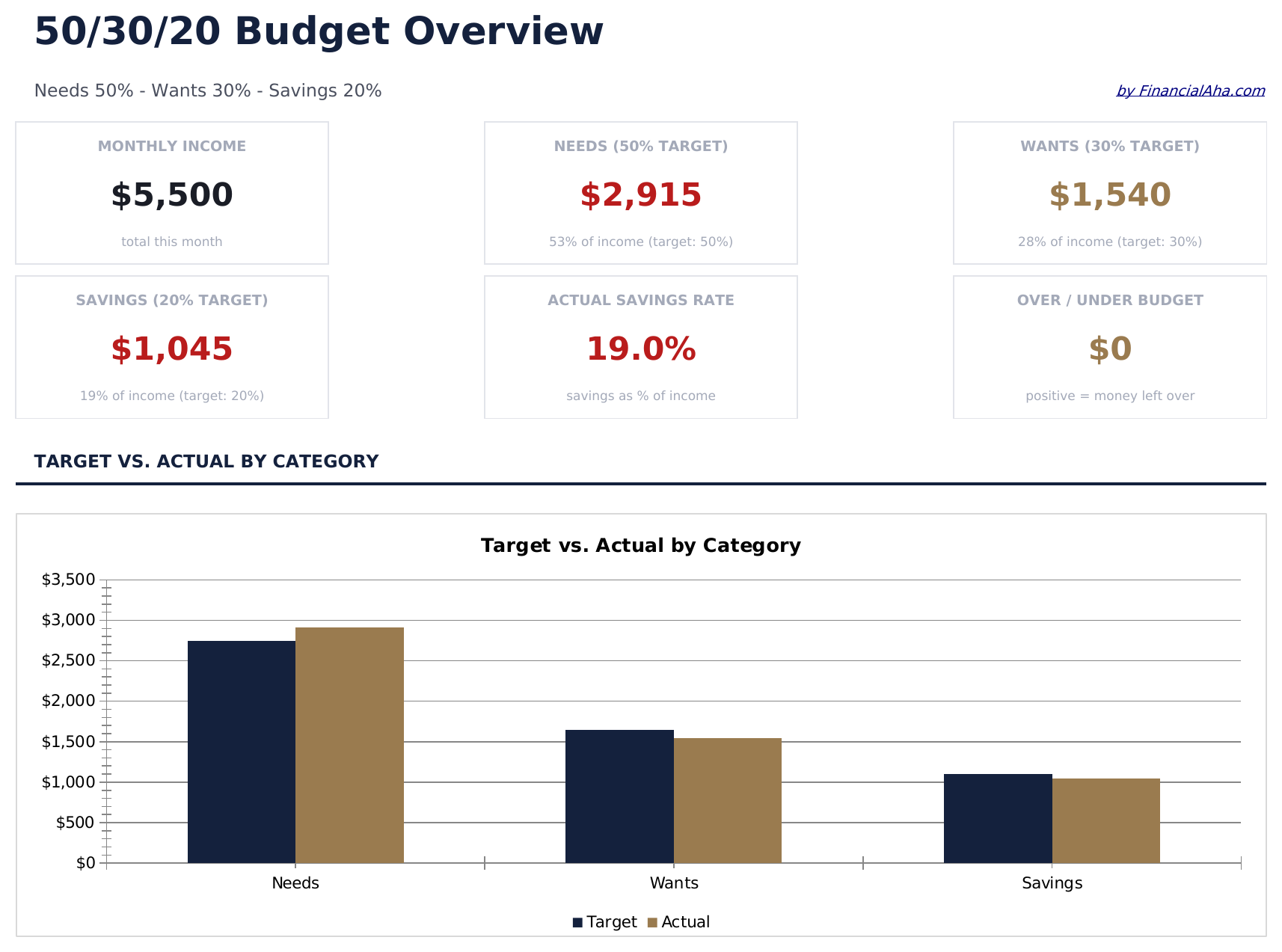
- Full-featured 50/30/20 Budget with dashboard and detailed analytics
- Pre-filled subcategories, sample scenarios, and helper calculations
- Larger data capacity for real-world usage
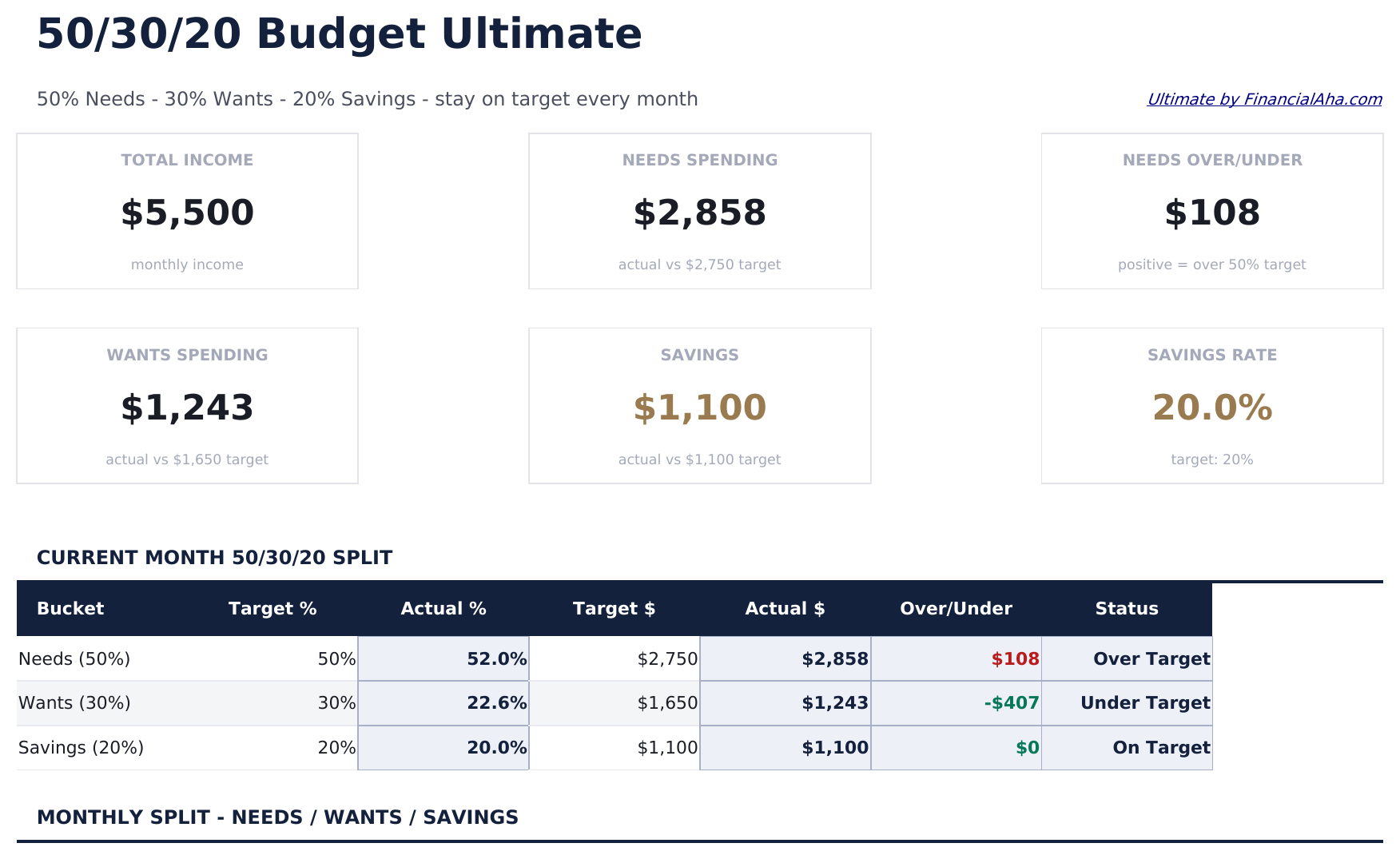
- Income Targets sheet setting monthly income and calculating the 50/30/20 dollar targets for Needs, Wants, and Savings automatically
- Needs sheet for logging all essential expenses - housing, utilities, groceries, insurance, transportation - with category subtotals and 50% target comparison
- Wants sheet for discretionary spending - dining, entertainment, shopping, subscriptions - with category subtotals and 30% target comparison
包含内容
- 仪表板以可视化方式显示 50/30/20 分配,将必需品、非必需品和储蓄按收入百分比展示
- 自动百分比计算,根据您的总收入输入更新各目标金额
- 带有预填项目的类别预算跟踪器,包括住房、食品杂货、保险和娱乐
- 基于收入的目标金额,实时显示每个类别超出或低于预算的差异
- 颜色编码的输入单元格和格式化的结果区域,提供清晰易读的预算布局
- 可在 Microsoft Excel、Google Sheets 和 LibreOffice Calc 中使用,无需任何设置
Free、Essentials 与 Ultimate - 有什么区别?
- Pre-filled budget worksheet titled "Budget" with sample income and expense categories
- Automatic totals, running balance, and surplus/deficit calculation
- Color-coded input cells so you know exactly where to type your own numbers
- Step-by-step "How to Use" guide included in a second sheet
- Works in Microsoft Excel, Google Sheets, and LibreOffice Calc - no setup or sign-up
- 包含 Free 的全部
- Full-featured 50/30/20 Budget with dashboard and detailed analytics
- Pre-filled subcategories, sample scenarios, and helper calculations
- Larger data capacity for real-world usage
- $12 one-time purchase, lifetime access
- 包含 Essentials 的全部
- Income Targets sheet setting monthly income and calculating the 50/30/20 dollar targets for Needs, Wants, and Savings automatically
- Needs sheet for logging all essential expenses - housing, utilities, groceries, insurance, transportation - with category subtotals and 50% target comparison
- Wants sheet for discretionary spending - dining, entertainment, shopping, subscriptions - with category subtotals and 30% target comparison
- Savings sheet tracking contributions to emergency fund, retirement, investments, and savings goals with 20% target comparison
50/30/20 预算 模板的工作原理
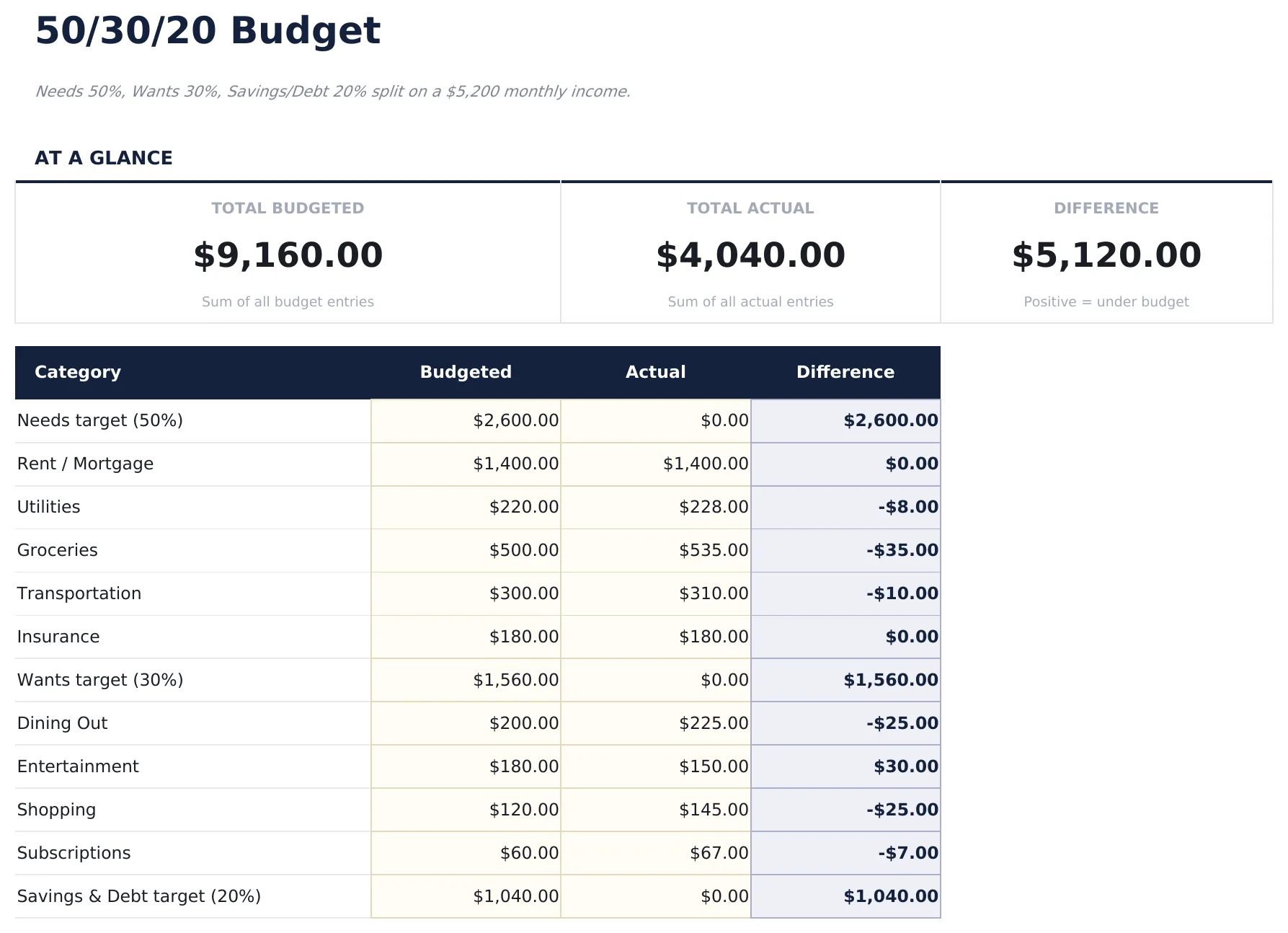
Needs 50%, Wants 30%, Savings/Debt 20% split on a $5,200 monthly income. Open the spreadsheet, enter your own numbers, and let the formulas do the math.
此模板何时有用
- You just started tracking spending and want a clear monthly snapshot.
- You want to see where your money actually goes compared to what you planned.
- Your expenses changed (new job, moved, new baby) and you need to re-baseline.
- You prefer a spreadsheet you control over a budgeting app.
充分利用的小贴士
- Keep the column labels simple - the formulas work best when categories are consistent month to month.
- Review the numbers regularly - once a week is a good rhythm for most people.
需要避免的常见错误
- Forgetting to include savings as a category - treat savings like any other bill so it gets funded first.
- Using gross income instead of take-home. Budget with what actually lands in your account.
- Over-optimistic "variable" categories. Groceries and dining out almost always come in higher than memory suggests.
如何使用这个50/30/20 预算模板
输入总收入
在顶部输入您的月度税后收入。模板会自动计算 50%、30% 和 20% 的目标金额。
分类您的支出
将每项支出分配到必需品、非必需品或储蓄类别。预填类别为您提供可自定义的起点。
检查您的分配
仪表板显示您的实际支出与 50/30/20 目标的对比,按桶显示百分比细分。
根据需要重新平衡
如果某个桶超出目标,查找可以转移或减少的支出。差异列突出显示可能需要调整的地方。
由 Claude AI 构建,经我们精心打磨。
我们使用 Claude AI 在深入研究后起草每个模板。然后由团队接手,优化布局、全面测试每个公式、修复边界情况,并打磨设计,直到达到我们自己愿意使用的标准。AI 完成了 80% 的工作,最后 20% 靠的是人工判断。
Upgrade your spreadsheet
Here is how you unlock a better version.
- Full-featured 50/30/20 Budget with dashboard and detailed analytics
- Pre-filled subcategories, sample scenarios, and helper calculations
- Larger data capacity for real-world usage
- Income Targets sheet setting monthly income and calculating the 50/30/20 dollar targets for Needs, Wants, and Savings automatically
- Needs sheet for logging all essential expenses - housing, utilities, groceries, insurance, transportation - with category subtotals and 50% target comparison
- Wants sheet for discretionary spending - dining, entertainment, shopping, subscriptions - with category subtotals and 30% target comparison
常见问题
什么算必需品,什么算非必需品?
必需品是住房、食品杂货、保险和最低还款额等基本开支。非必需品是外出就餐、娱乐和订阅等非基本开支。模板在每个类别中包含预填示例。
分配是基于税前还是税后收入?
该模板设计用于税后(净)收入。输入您实际在工资单或银行账户中收到的金额。
我可以更改百分比分配吗?
可以。百分比单元格可编辑,您可以调整为 60/20/20 或任何适合您情况的比例。
如果我的必需品超过 50% 怎么办?
模板仍会准确跟踪所有内容。差异列显示您超出或低于的程度,即使分配不同,也能帮助您了解资金去向。
如何在 Google Sheets 中打开?
将 .xlsx 文件上传到 Google Drive,然后使用 Google Sheets 打开。所有公式和格式都会保留。
此模板使用什么许可证?
所有免费模板均采用 CC BY 4.0(知识共享署名)许可证发布。您可以自由使用、修改和分享,包括用于商业用途,只需注明来源为 FinancialAha.com。模板按原样提供,不构成财务建议。