Best Value Complete Financial Planning Bundle
✓ Financial Planning✓ Net Worth Tracker✓ Monthly Budgeting✓ Travel Budget Planner✓ Annual Budgeting Planner✓ Monthly Expense Tracker✓ Annual Tax Planner✓ Retirement Planning
View Bundle →
Ultimate Template - Excel & Google Sheets

Ultimate Stock Trading Journal Spreadsheet Template for Google Sheets & Excel

Two hundred trade rows carry both prices together, so a result and a percentage return derive on each and different position sizes compare. The Ultimate Stock Trading Journal spreadsheet template breaks the record down by ticker with wins and win rate, by strategy with count and average return, and by month, keeps a strategy label and notes on every trade, and adds a risk sheet reporting what the record implies. Six working sheets and a chart, Google Sheets and Excel. No macros, no VBA.

See Preview
Stock Trading Journal Spreadsheet Template - Ultimate version for Google Sheets and Excel

What's Included

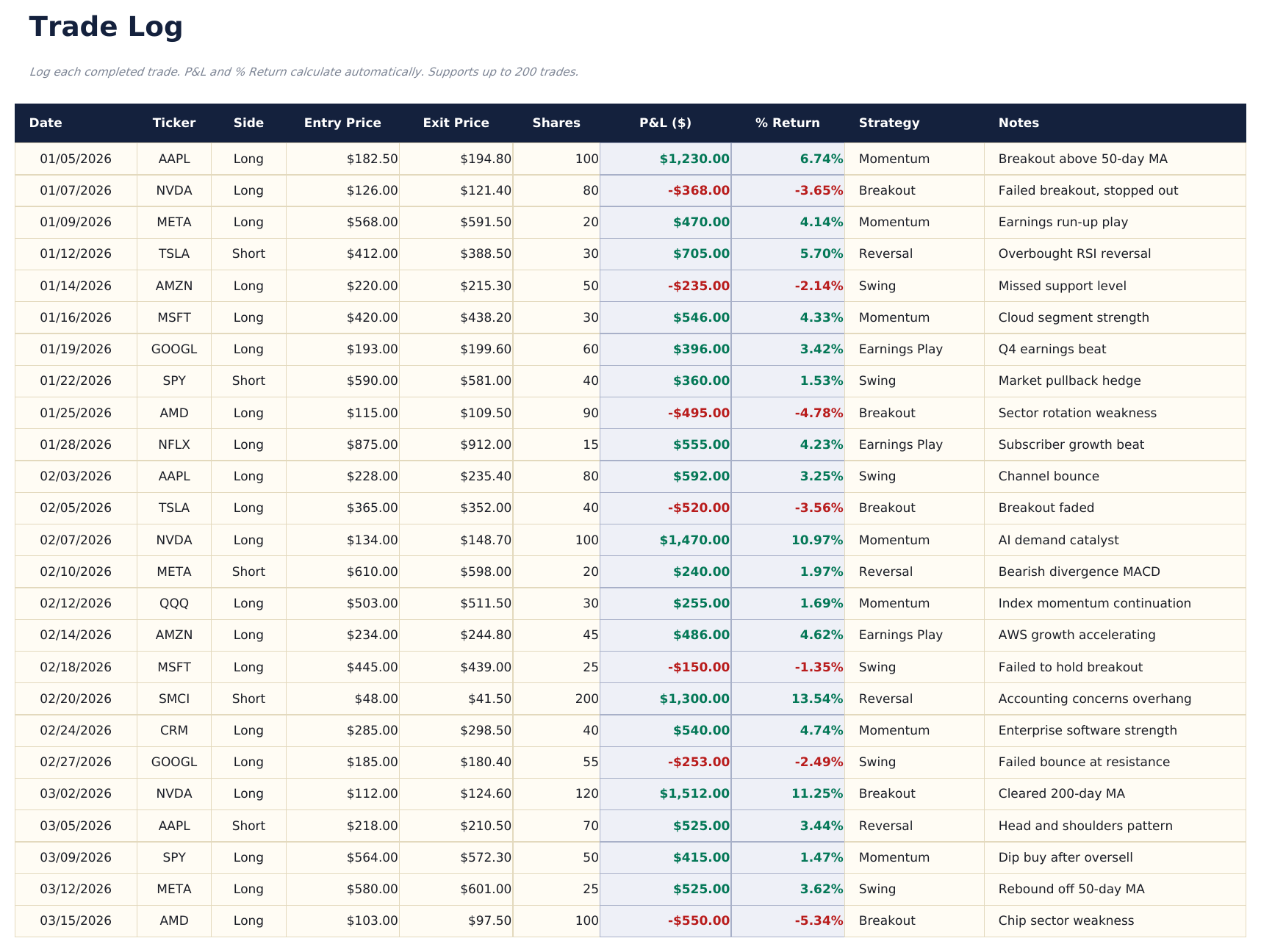
  • A Trade Log carrying both prices on the same row
  • Result and percentage return derived, so different position sizes compare
  • A strategy label and a notes column on every trade
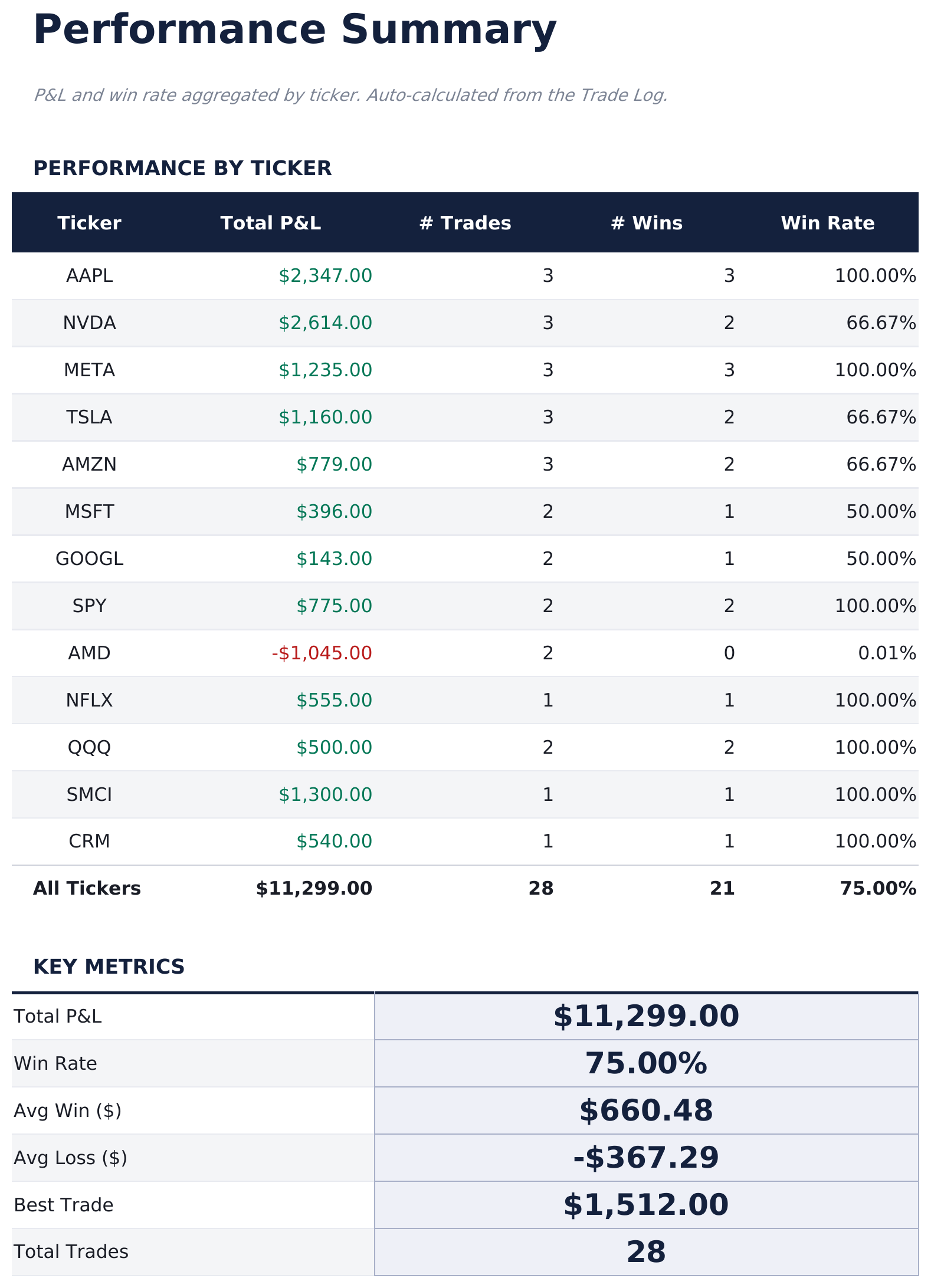
  • Performance Summary by ticker with wins and win rate
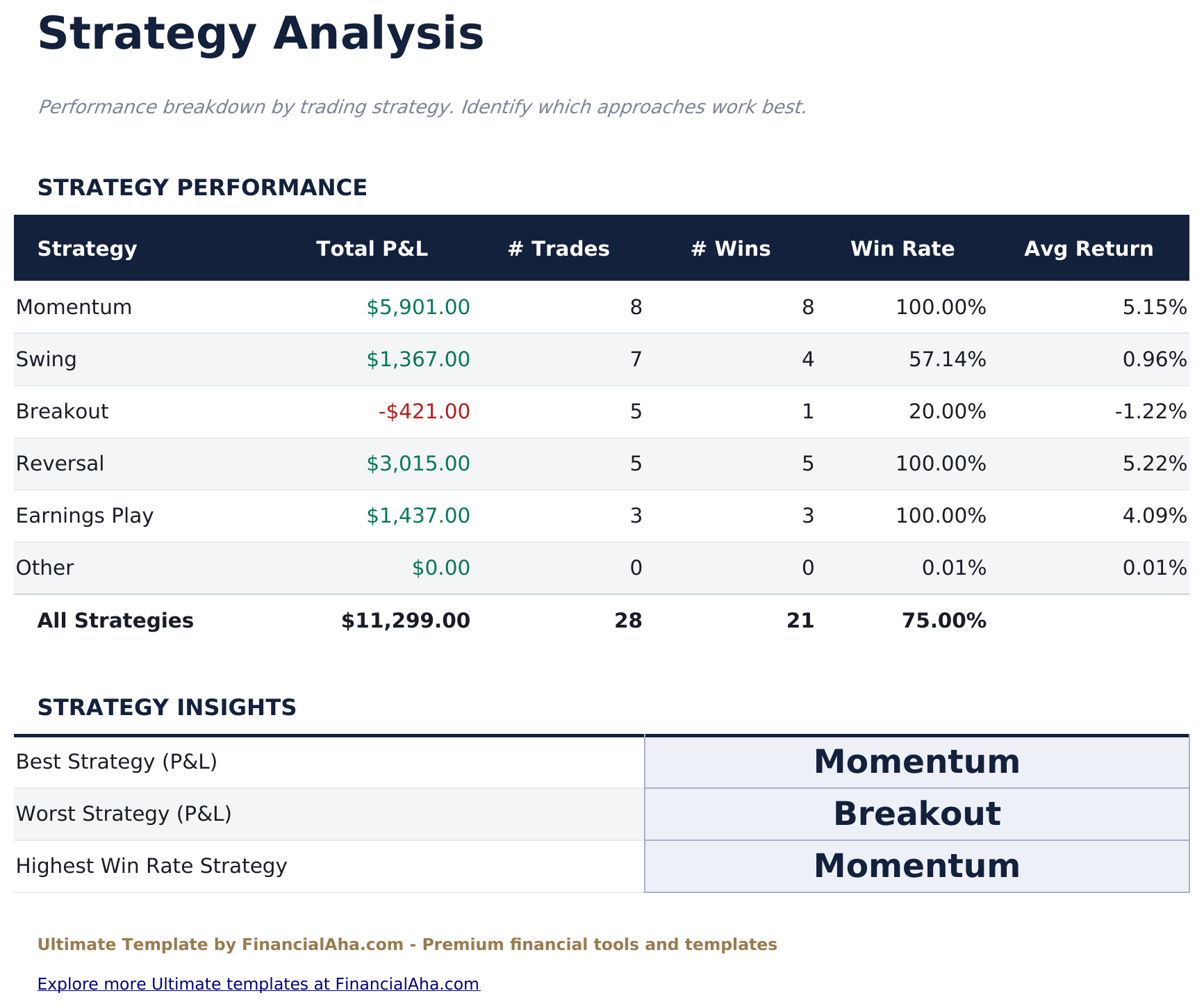
  • Strategy Analysis with result, count, win rate and average return per approach
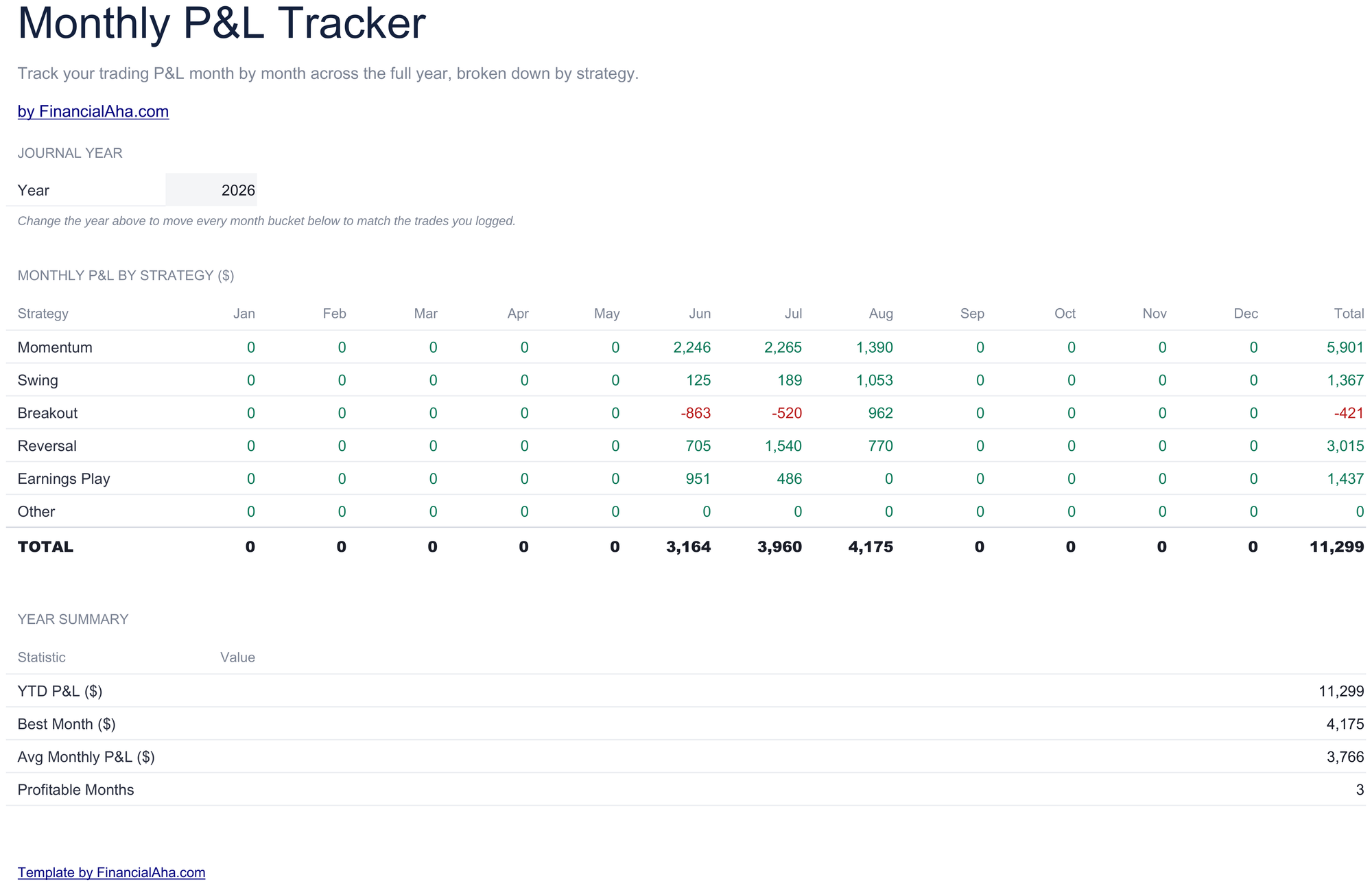
  • Monthly view carrying each strategy across the months
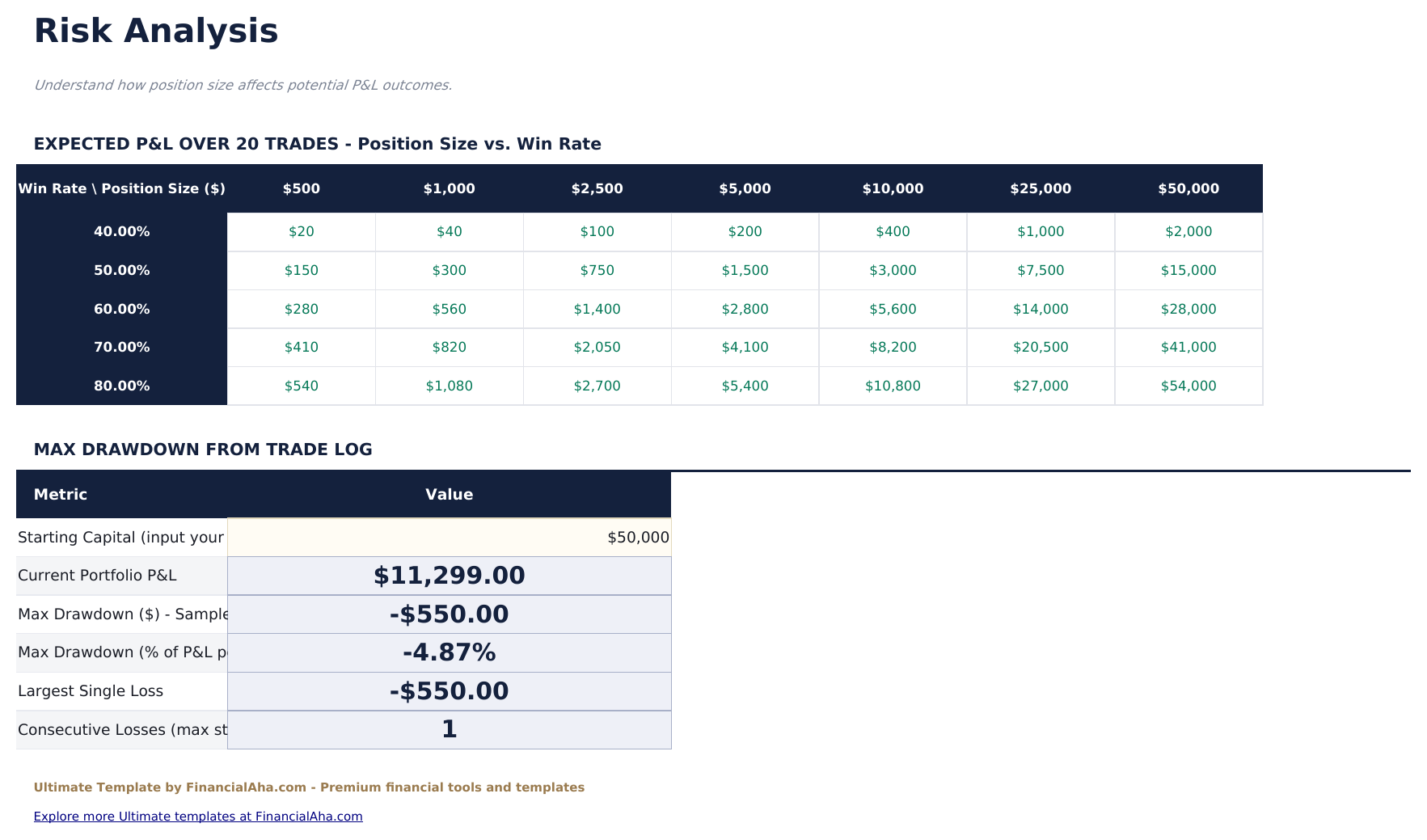
  • Risk Analysis reporting the expected value the record implies
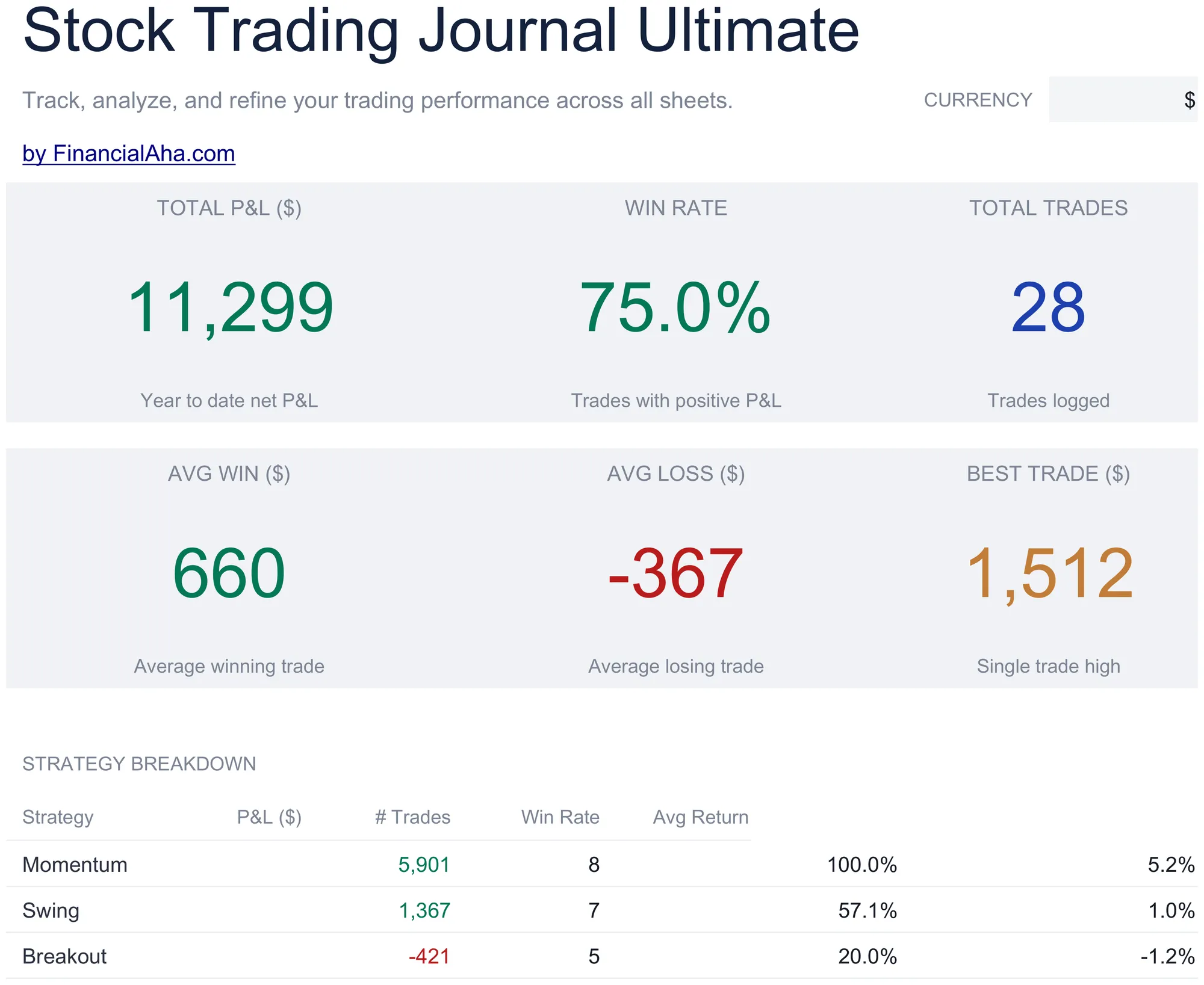
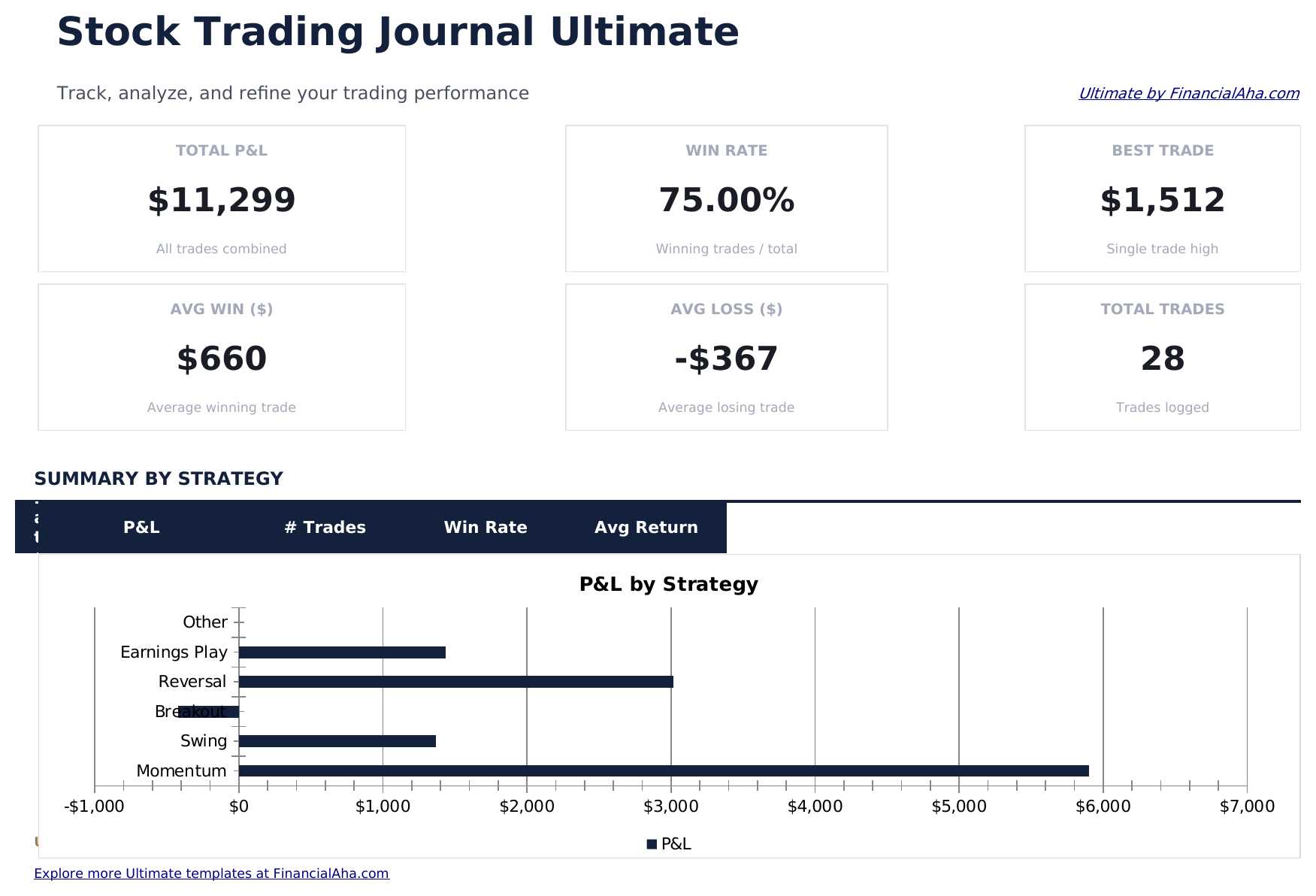
  • Dashboard with six KPIs including average win against average loss
  • Works in Microsoft Excel and Google Sheets with no macros required

The FinancialAha Ultimate Stock Trading Journal Spreadsheet Template for Google Sheets and Excel is a six-sheet workbook that turns a trade log into something you can read a pattern from, with a How to Use guide on a seventh tab. It ships as an Ultimate Stock Trading Journal Excel template and an Ultimate Stock Trading Journal Google Sheets template in one file. This Ultimate Stock Trading Journal spreadsheet template works out a percentage return on every complete trade, then breaks the record down by ticker, by strategy, by month, and by what the results imply about risk. No macros, no VBA.

Inside the workbook

What's inside the FinancialAha Ultimate Stock Trading Journal spreadsheet template

The FinancialAha Ultimate Stock Trading Journal Spreadsheet Template runs on six working sheets - two you type into, four that report back - plus the guide. It works in both Microsoft Excel and Google Sheets and here is what the Ultimate Stock Trading Journal spreadsheet holds.

  1. 01 of 06

    Dashboard

    The record in six figures: the net result, the share of trades that finished ahead, how many there were, the average size of a winner and of a loser, and the best single trade. Setting the average win against the average loss is the pairing that matters, because a win rate on its own says nothing about whether the wins were bigger than the losses. A strategy table underneath carries each approach with its own result, count, win rate and average return.

  2. 02 of 06

    Trade Log

    The sheet you live in, each row a complete trade rather than a single side. Entry and exit prices sit on the same line with the size, so the result and the return as a percentage both follow without matching anything up. A strategy label and a notes column sit at the end - the two fields that make a journal worth rereading, since the numbers record what happened and the note records why.

  3. 03 of 06

    Performance Summary

    Every ticker you have traded, with its total result, how many trades it accounts for, how many of those were wins, and the rate that implies. It is the view that answers whether a run of losses is spread across the book or concentrated in one name.

  4. 04 of 06

    Strategy Analysis

    The same question asked of approaches rather than instruments: each strategy with its result, its trade count, its win rate and its average return. Because the strategy label is on every row of the log, this reads live rather than needing maintenance.

  5. 05 of 06

    Monthly P&L

    Each strategy carried across the months of the year, so a run of good months in one approach and a drift in another are visible side by side. A single annual figure hides that entirely.

  6. 06 of 06

    Risk Analysis

    What the record implies rather than what it recorded: the expected value the win rate and the average sizes work out to. A sensitivity grid runs win rate against position size on assumptions you set - average win, average loss and a trade count for the simulation - and a drawdown section reads the log directly once you enter your starting capital. It describes the pattern in the trades already logged, not a prediction about the next one.

  7. Included guide

    How to Use

    A step-by-step guide on its own tab, covering setup, how the result and percentage return are arrived at, and what each reporting sheet draws from the log. Because it ships inside the file, the instructions travel with the template wherever it is opened.

Works in both Google Sheets and Excel

Ultimate Stock Trading Journal Spreadsheet template for Google Sheets

Upload the Ultimate Stock Trading Journal Spreadsheet Template to Drive, right-click it, and choose "Open with Google Sheets". This Ultimate Stock Trading Journal Google Sheets template needs no conversion step and the chart survives the trip intact. The lookups the reporting sheets use rely on the existing tab names and on strategy labels matching, so both are worth leaving alone.

Ultimate Stock Trading Journal Google Sheets template setup

A shared copy of the Ultimate Stock Trading Journal Google Sheets template suits a journal kept for review, and Sheets version history covers a row edited after the fact. The reporting sheets update for everyone as trades go in.

Sharing the Ultimate Stock Trading Journal Google Sheet

Day to day the Ultimate Stock Trading Journal Google Sheet is one row per closed trade, with the strategy picked from your own list. Everything else - the ticker view, the strategy view, the monthly view - follows from that single entry.

Ultimate Stock Trading Journal Spreadsheet template for Excel

The Ultimate Stock Trading Journal spreadsheet Excel download is a plain .xlsx. Excel opens this Ultimate Stock Trading Journal Excel template directly, with no import step and no compatibility prompt, and the chart is a native Excel chart that redraws as trades go in. There are no macros and no VBA in the file, so it opens without a security warning.

Ultimate Stock Trading Journal Excel template setup

The same Ultimate Stock Trading Journal Excel template opens in Excel on Windows, Excel on Mac, and Excel for the web. It is also the identical file you would upload to Drive, so there is no separate Ultimate Stock Trading Journal spreadsheet download to choose between.

Ultimate Stock Trading Journal spreadsheet Excel notes

The Ultimate Stock Trading Journal spreadsheet Excel file carries no macros and no VBA, so Excel opens it without a trust prompt. The same Ultimate Stock Trading Journal spreadsheet Excel download also opens in Excel for the web, which matters when you move between a work machine and a personal one.

Opening the Ultimate Stock Trading Journal spreadsheet Excel file

Nothing in the Ultimate Stock Trading Journal Excel template is version-specific, so this Ultimate Stock Trading Journal spreadsheet Excel workbook behaves identically in Excel on Windows, Excel on Mac, and older builds.

Spreadsheet template highlights

What the Ultimate Stock Trading Journal spreadsheet template tracks

The Trade Log is the sheet everything else reads from. These are the columns the Ultimate Stock Trading Journal Spreadsheet Template works from:

Date
when the trade was closed
Ticker
the stock or fund traded
Side
which way the position was taken
Entry Price
what you got in at
Exit Price
what you got out at
Shares
the size of the position
P&L auto
derived, from the prices, the size and the side
% Return auto
derived, the result measured against what went in
Strategy
picked from your own list, which the breakdowns total by
Notes
why the trade was taken, which the numbers cannot record

Compare builds

FinancialAha Stock Trading Journal spreadsheet template: Free, Essentials, and Ultimate compared

Feature Free View Spreadsheet Template Essentials View Spreadsheet Template Ultimate This page
Working sheets 1 2 6
Trade capacity 16 trades 30 rows - 15 round trips 200 trades
Row records A complete trade One side of a trade A complete trade
Result per row Entered by you Derived on the sell side Derived, with % return
Fees counted Yes Within the prices
Win rate Yes Yes, and per strategy
Charts 1 1
Performance by ticker Dedicated sheet
Strategy breakdown Dedicated sheet
Month-by-month By strategy
Risk analysis Dedicated sheet

The FinancialAha Ultimate Stock Trading Journal Spreadsheet Template covers six working sheets and records complete trades. The Free Stock Trading Journal Spreadsheet Template takes a result you supply. The Essentials Stock Trading Journal Spreadsheet Template for Google Sheets and Excel logs each side of a trade separately and derives the cash flow, which suits tracking positions as they open and close. This build goes back to one row per finished trade and adds what neither can: a percentage return that makes different position sizes comparable, performance broken down by ticker and by strategy, a month-by-month view per approach, and a risk sheet reporting what the win rate and the average sizes work out to.

Good to know

Notes on working in the Ultimate Stock Trading Journal spreadsheet template

  • The percentage return is what makes a large position and a small one comparable - a money figure alone favours whichever was bigger.
  • The average win set against the average loss is the pairing worth reading, since a high win rate with small wins and large losses is not what it appears.
  • The strategy label drives the breakdowns, so picking from your own list rather than retyping is what keeps them intact.
  • The notes column is the one people skip and later wish they had not - the numbers say what happened, not why.
  • The risk figures describe the trades already logged rather than predicting the next one.

How to Use This Template

1

Log the trade

Enter the date, ticker, side, both prices and the size. The result and return follow.

2

Label the approach

Pick the strategy from your own list so the breakdowns total correctly.

3

Write the note

Record why the trade was taken - the part the numbers cannot hold.

4

Read the breakdowns

By ticker, by strategy, by month, with the risk sheet reporting what the record implies.

Customer Reviews

What Our Customers Say

"If I get half as good at handling my finances as you are at customer service, this'll be the best $26 I've spent lately."

J Jenny Verified Buyer

"Great tool! Simplifies financial planning without the hassle of complex spreadsheets."

F Fazia Search Marketing Manager

"I recently purchased your super convenient spreadsheet, it really helps me!"

J John Verified Buyer

"They're great and super intuitive. Thank you!"

M Mira Verified Buyer

Built by Claude AI. Perfected by us.

We use Claude AI to draft each template, after a deep research. Then our team steps in. We refine the layout, stress-test every formula, fix edge cases, and polish the design until it feels like something we would actually use ourselves. The AI gets us 80% there. The last 20% is all human judgment.

One-time purchase. No subscription. Works in Excel & Google Sheets.

Frequently Asked Questions

Is the FinancialAha Ultimate Stock Trading Journal Spreadsheet Template a Google Sheets template?

Yes. Upload the file to Drive and choose "Open with Google Sheets". The Ultimate Stock Trading Journal Google Sheets template needs no conversion step and the chart survives the trip intact. The lookups rely on the existing tab names, so those are worth leaving alone.

Is the FinancialAha Ultimate Stock Trading Journal Spreadsheet Template an Excel template?

Yes. The download is a plain .xlsx, so the Ultimate Stock Trading Journal Excel template opens directly in Excel with no import step. The chart is a native Excel chart, and there are no macros or VBA.

Will the FinancialAha Ultimate Stock Trading Journal spreadsheet Excel file open in older versions of Excel?

Yes. The Ultimate Stock Trading Journal spreadsheet Excel workbook ships as a plain .xlsx, so it opens identically in current Excel and in builds that predate dynamic arrays.

What does the risk analysis in the Ultimate Stock Trading Journal spreadsheet do?

It reports the expected value that your win rate and average win and loss sizes work out to. It describes the trades already logged rather than predicting anything about the next one.

How many trades can I log in the Ultimate Stock Trading Journal spreadsheet template?

Up to 200, each recorded as a complete trade with entry and exit on the same row.

Why does the Ultimate Stock Trading Journal show average win and average loss separately?

Because a win rate on its own says nothing about size. A high win rate with small wins and large losses looks very different once the two averages sit beside each other.

How does the strategy breakdown in the Ultimate Stock Trading Journal spreadsheet work?

Every trade carries a strategy label, and the analysis totals each one live from the log with its count, win rate and average return. The monthly view carries the same strategies across the months.

What is the notes column in the Ultimate Stock Trading Journal spreadsheet for?

Recording why a trade was taken. The numbers capture what happened; the note is the only part that captures the reasoning, and it is what makes a journal worth rereading.

What do I get after buying the Ultimate Stock Trading Journal spreadsheet template?

You receive the Ultimate Stock Trading Journal spreadsheet template as an Excel file (.xlsx) that works in Microsoft Excel and Google Sheets. Download it immediately after purchase - no signup or account required.

Is there a free Ultimate Stock Trading Journal spreadsheet template?

Yes. A free version of the Ultimate Stock Trading Journal spreadsheet template is available with basic features. The Ultimate version adds advanced analysis, more capacity, and additional sheets.

What if the Ultimate Stock Trading Journal spreadsheet template does not work for me?

Contact us and we will help troubleshoot. The Ultimate Stock Trading Journal spreadsheet template works in Microsoft Excel and Google Sheets with no macros required.

Ultimate

Highlights:

Instant download after purchase
No macros or VBA required
All formulas auto-calculate
No subscription required
Works in
Excel Google Sheets

Looking for more Ultimate templates?

We offer Ultimate versions of our most popular spreadsheet templates with advanced features, more capacity, and deeper analysis.

Private & secure

Your financial data stays on your device. We never see it.

Learn more →

Need help?

Check our guides or reach out with questions.

View FAQ →