Lifetime Deal Complete Personal Financial Planning Bundle →
✓ Financial Planning✓ Net Worth Tracker✓ Monthly Budgeting✓ Travel Budget Planner✓ Annual Budgeting Planner✓ Monthly Expense Tracker✓ Annual Tax Planner✓ Retirement Planning
View Bundle →

Instant digital delivery · Terms & Conditions apply

Ultimate Template - Excel & Google Sheets

Ultimate Options Trading Journal Spreadsheet Template for Google Sheets & Excel

A hundred and fifty positions, each carrying the date opened and the date closed, with entry and exit as total position values and the result and percentage return derived from them. The Ultimate Options Trading Journal spreadsheet template marks a position open by leaving the close date blank, keeps strategy and direction on dropdowns so the breakdowns stay consistent, and reports total, count, win rate, average result and average return per approach. Seven sheets, Google Sheets and Excel. No macros, no VBA.

See Preview

Instant digital delivery · Terms & Conditions apply

Options Trading Journal Spreadsheet Template - Ultimate version for Google Sheets and Excel

What's Included

  • A Trade Log carrying date opened and date closed on every position
  • Entry and exit cost as total position values, with result and percentage return derived
  • Open positions marked simply by leaving the close date blank
  • Strategy and direction dropdowns that keep the breakdowns consistent
  • Strategy Analysis with total, count, win rate, average result and average return per approach
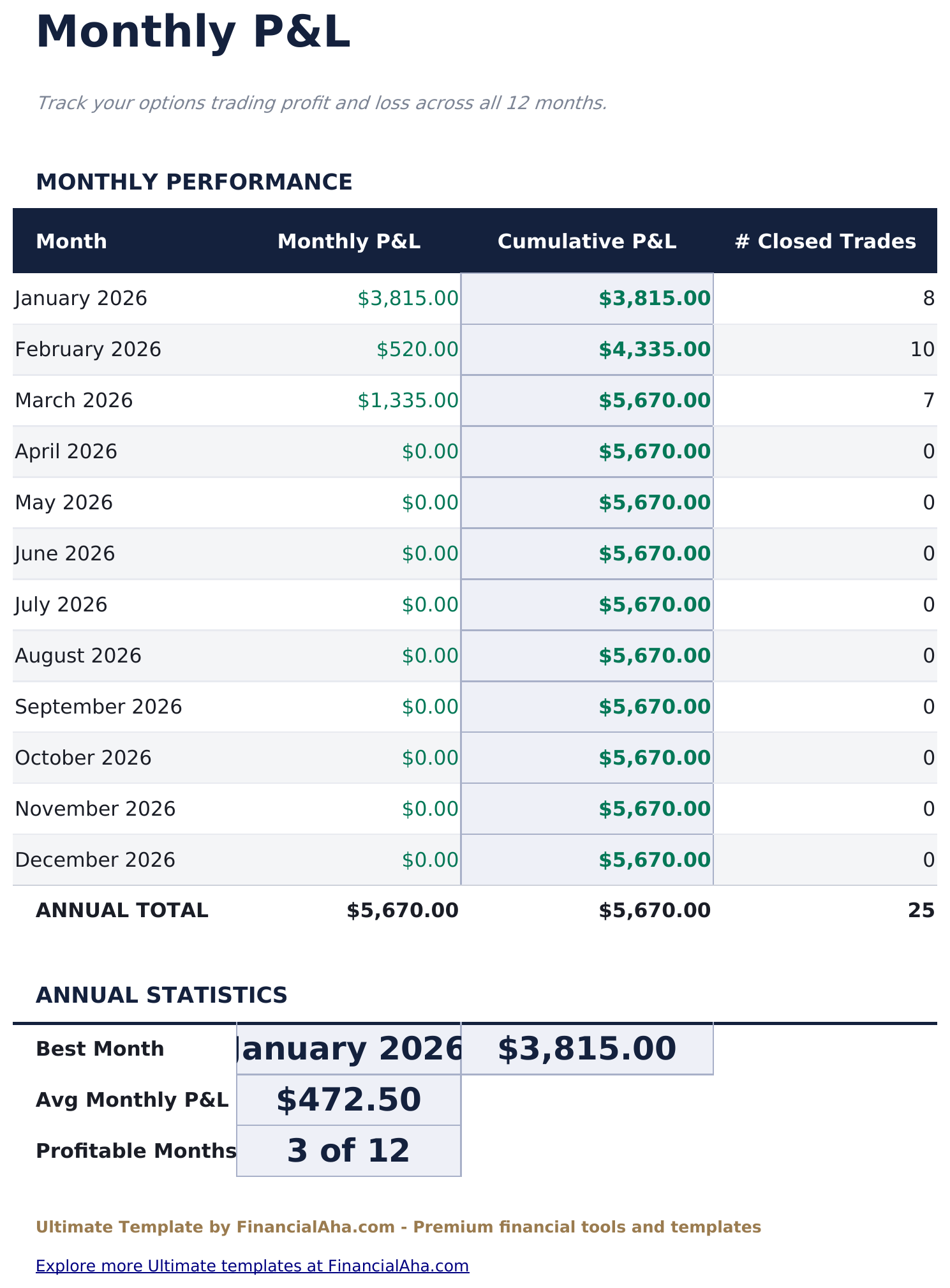
  • Monthly P&L across twelve months with a running cumulative figure
  • Best month, average month and the count of profitable months
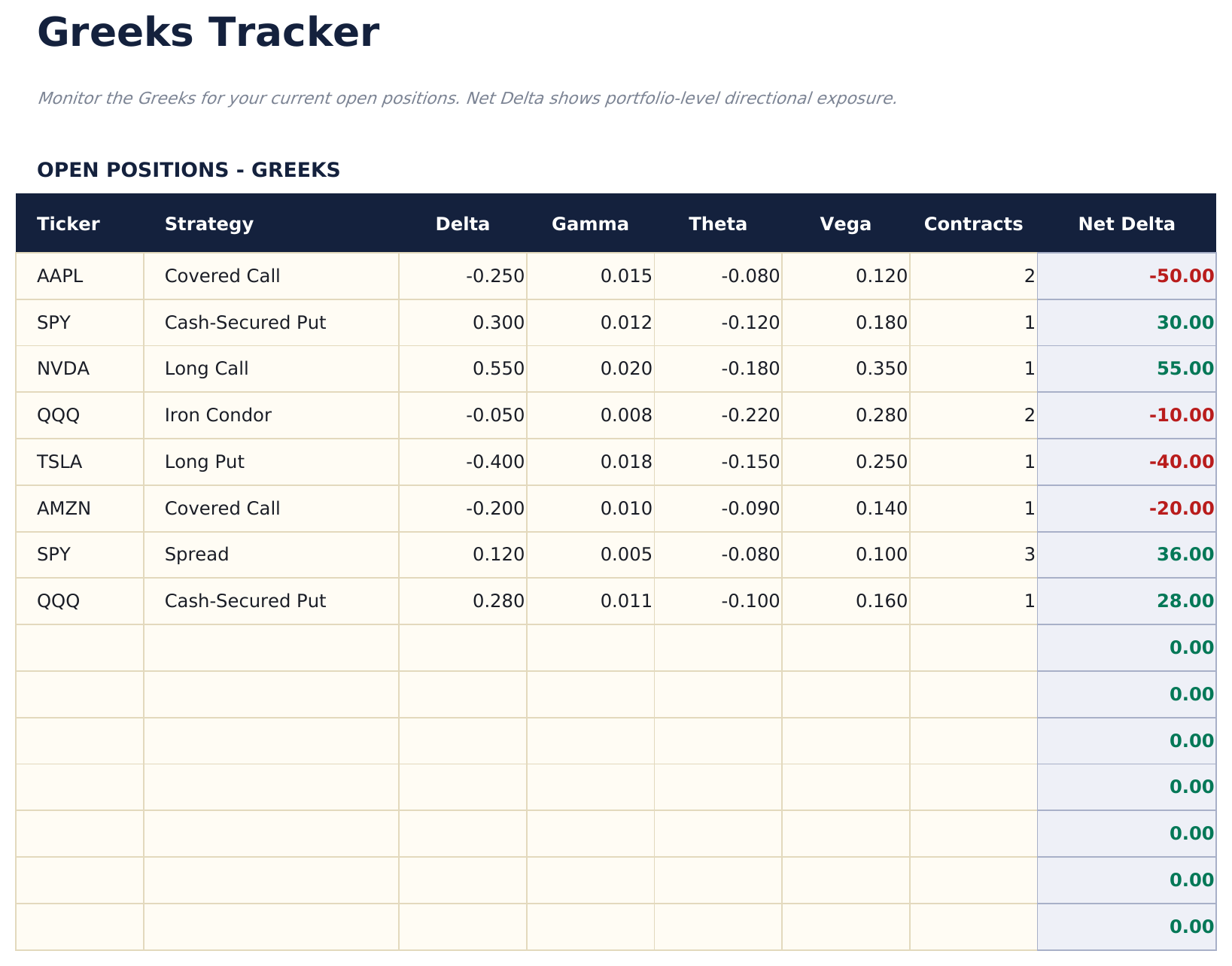
  • Greeks Tracker aggregating delta, gamma, theta and vega across open positions into a net delta
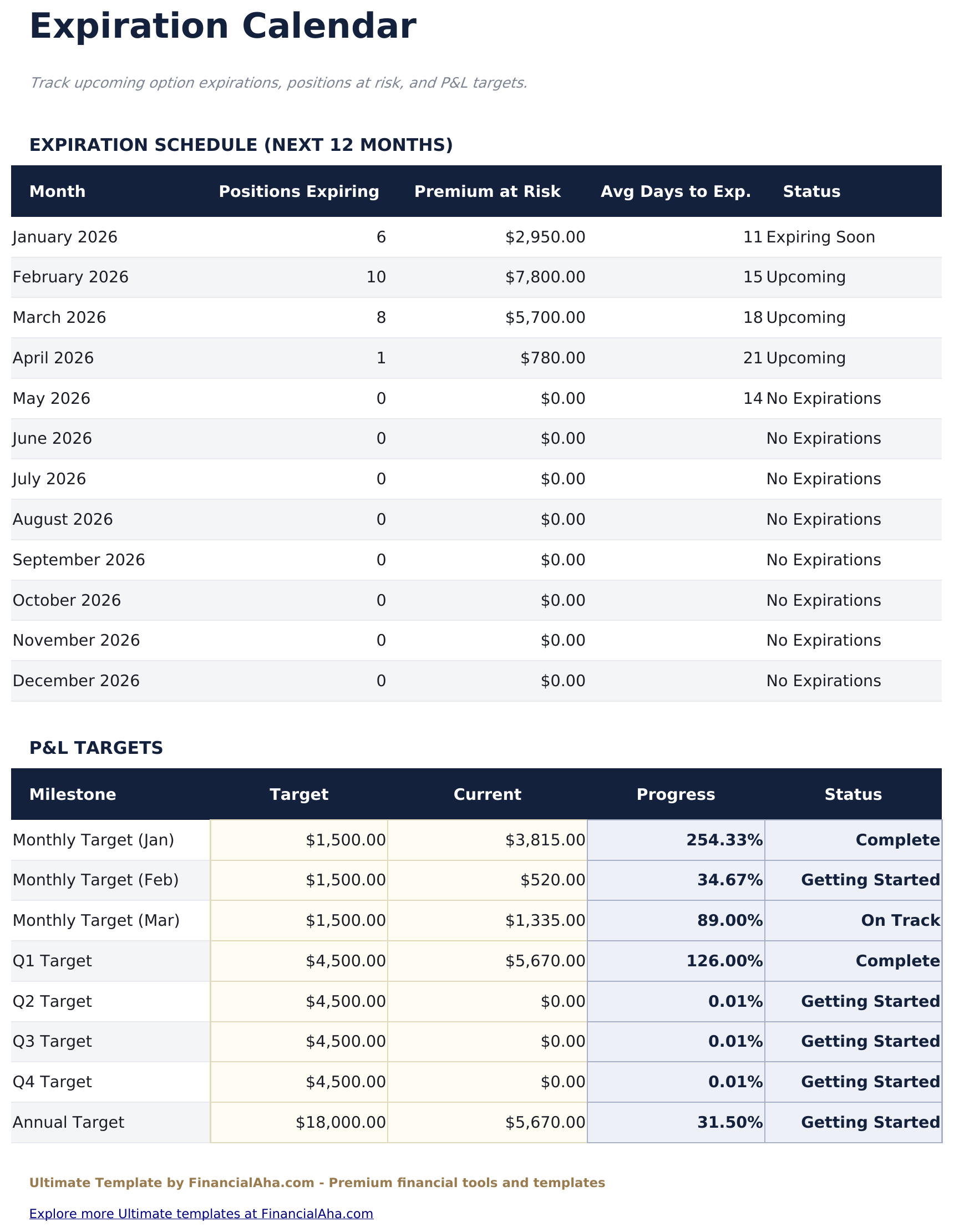
  • Expiration Calendar reporting what expires each month and the premium riding on it
  • Dashboard with six KPIs plus a strategy table
  • Works in Microsoft Excel and Google Sheets with no macros required

The FinancialAha Ultimate Options Trading Journal Spreadsheet Template for Google Sheets and Excel is a six-sheet workbook that treats each trade as a complete position rather than a pair of legs, with a How to Use guide on a seventh tab. It ships as an Ultimate Options Trading Journal Excel template and an Ultimate Options Trading Journal Google Sheets template in one file. This Ultimate Options Trading Journal spreadsheet template records both dates and a percentage return on every trade, then breaks the record down by strategy, by month, by exposure and by expiry. No macros, no VBA.

Inside the workbook

What's inside the FinancialAha Ultimate Options Trading Journal spreadsheet template

The FinancialAha Ultimate Options Trading Journal Spreadsheet Template runs on six working sheets - three you type into, three that report back - plus the guide. It works in both Microsoft Excel and Google Sheets and here is what the Ultimate Options Trading Journal spreadsheet holds.

  1. 01 of 06

    Dashboard

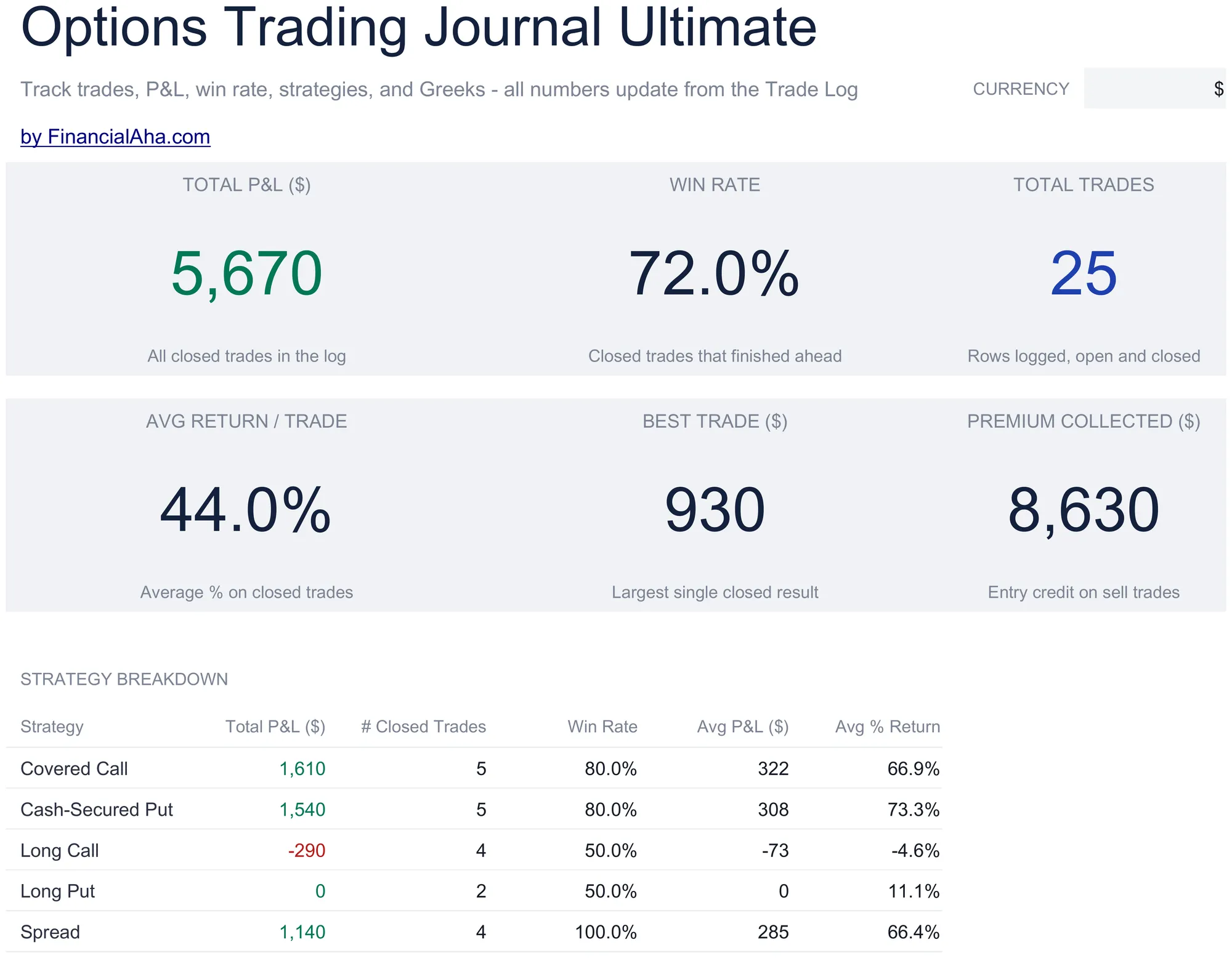
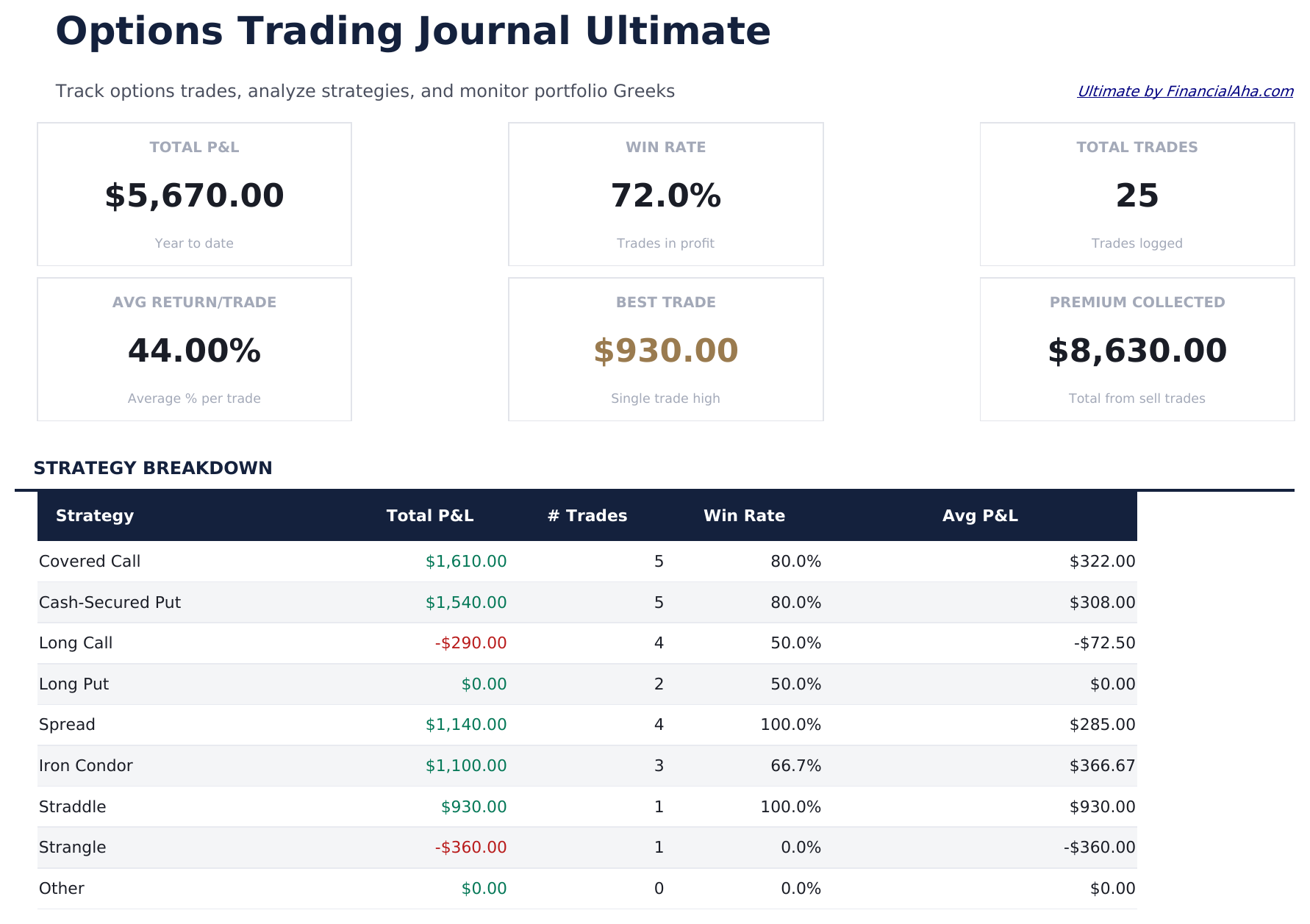
    The record in six figures: the net result, the share of trades that finished ahead, how many there were, the average return across them, the largest single winner, and the premium taken in. A strategy table underneath carries each approach with its own total, count, win rate and average return - which is the view that turns a journal into something you can actually read a pattern from.

  2. 02 of 06

    Trade Log

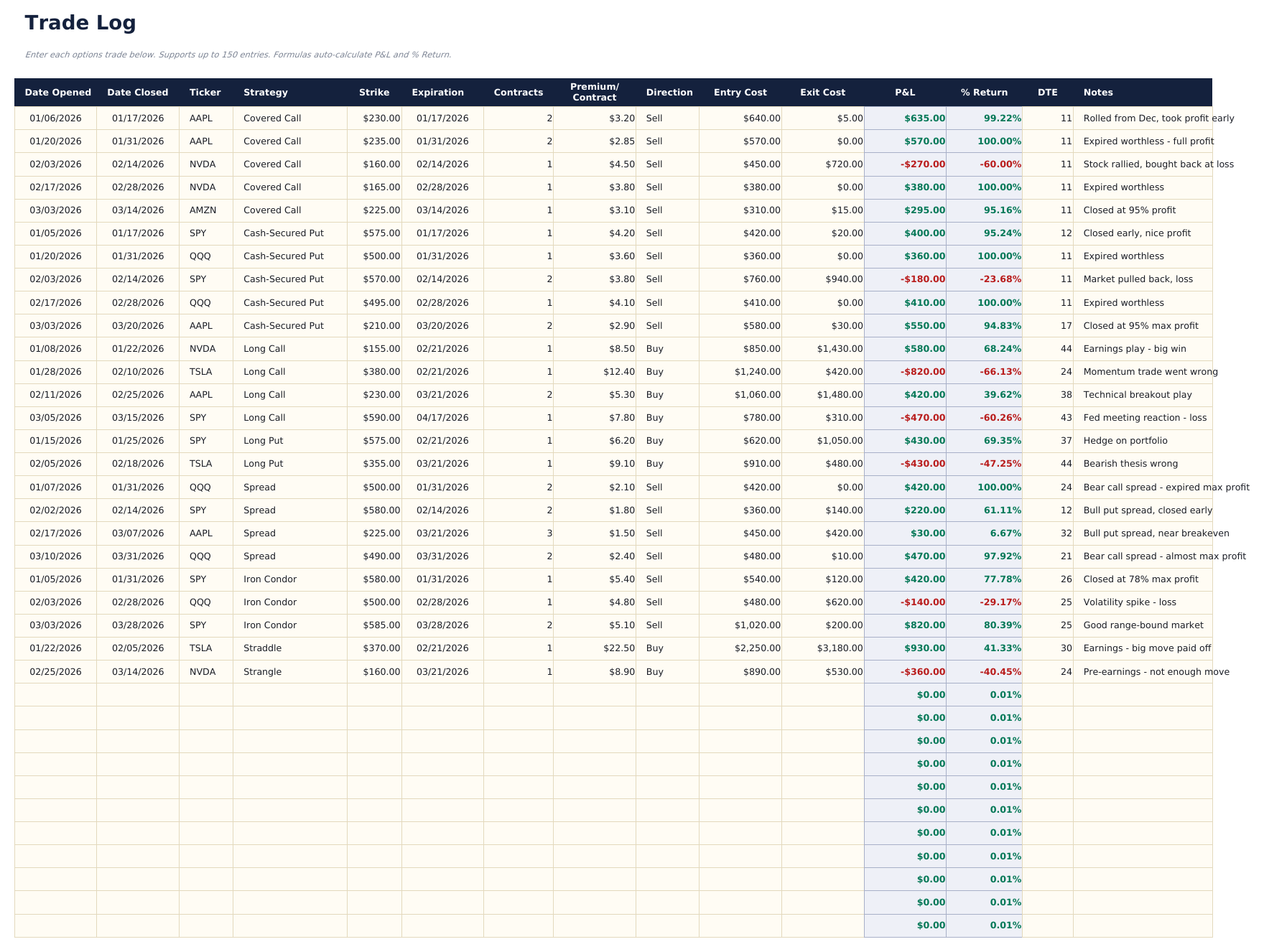
    The sheet you live in, and it records positions rather than legs. Each row takes the date opened and the date closed, the underlying, the strategy and direction from dropdowns, the contract details, and the entry and exit cost as total position values - with the result and the percentage return following from those two. Leaving the close date blank is how a position is marked still open, so the log holds live and finished trades together.

  3. 03 of 06

    Strategy Analysis

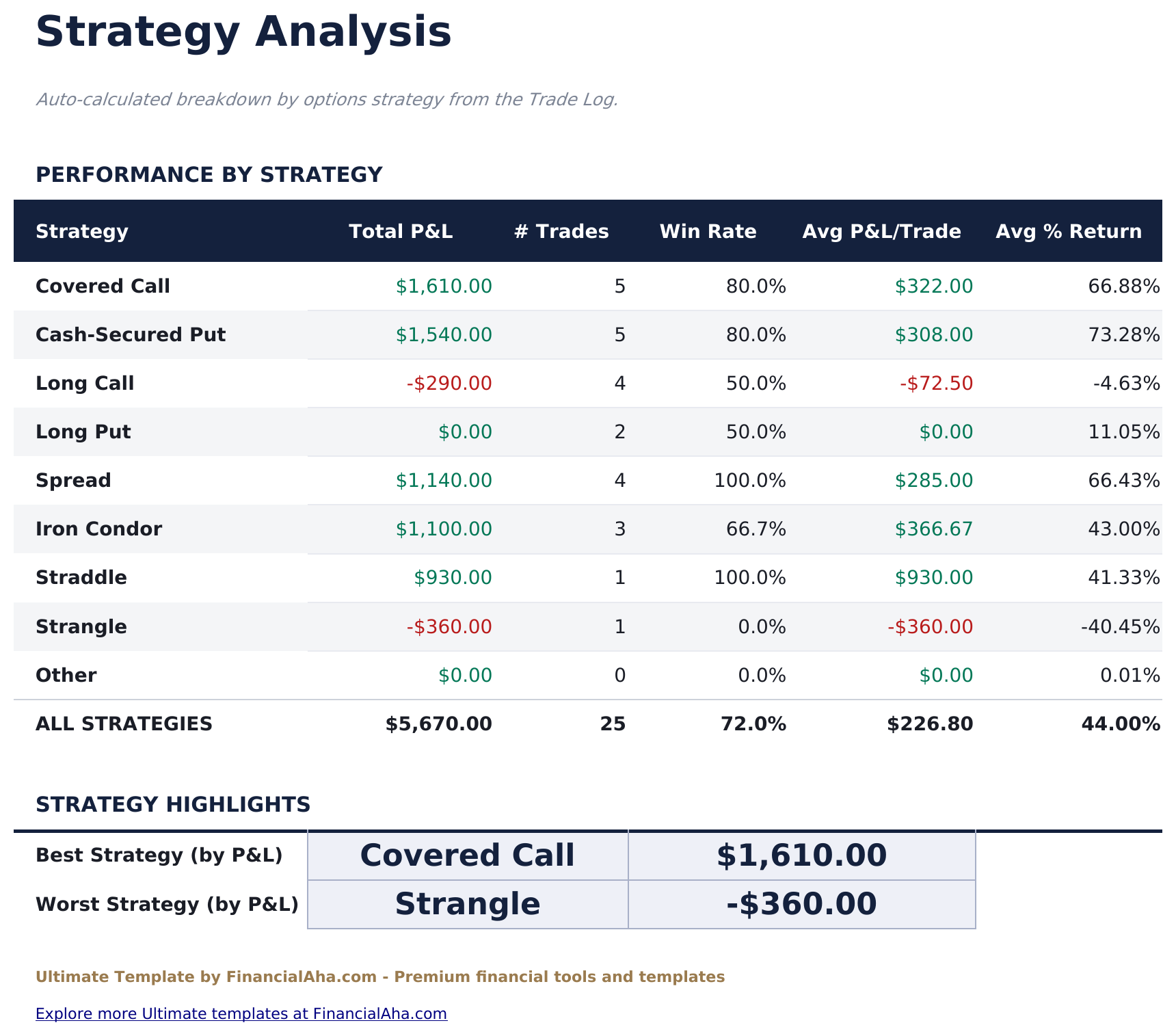
    Every strategy you have used, with its total result, how many trades it accounts for, its win rate, and its average result and percentage return. The best and worst by total are picked out at the foot. It reads live from the log, so the comparison reflects what you have actually done rather than what you remember doing.

  4. 04 of 06

    Monthly P&L

    The year month by month, each with its own result, a running cumulative figure and the number of trades closed. The summary underneath carries the best month, the average, and how many months finished ahead - the kind of view that flattens a run of individually memorable trades into an actual trend.

  5. 05 of 06

    Greeks Tracker

    Exposure across the positions still open, holding delta, gamma, theta and vega per position and combining them into a net delta across the book. These are figures you bring in from your broker rather than ones the workbook derives - it is a place to see the aggregate rather than an options pricing model.

  6. 06 of 06

    Expiration Calendar

    What is coming up, by month: how many positions expire, the premium at risk against them, the average time left, and a status. It is the sheet that answers what needs attention next, which a log sorted by entry date cannot show. Below that sit P&L targets you set for each month, each quarter and the year, with the Current column reading live from Monthly P&L and a status showing whether each one has been met.

  7. Included guide

    How to Use

    A step-by-step guide on its own tab, covering setup, how the result and percentage return are arrived at, how open positions are marked, and what each reporting sheet draws from the log. Because it ships inside the file, the instructions travel with the template wherever it is opened.

Works in both Google Sheets and Excel

Ultimate Options Trading Journal Spreadsheet template for Google Sheets

Upload the Ultimate Options Trading Journal Spreadsheet Template to Drive, right-click it, and choose "Open with Google Sheets". This Ultimate Options Trading Journal Google Sheets template needs no conversion step and the chart survives the trip intact. The strategy and direction dropdowns and the lookups the reporting sheets use rely on the existing tab names, so those are worth leaving alone.

Ultimate Options Trading Journal Google Sheets template setup

A shared copy of the Ultimate Options Trading Journal Google Sheets template suits a journal kept for review, and Sheets version history covers a row edited after the fact - which on a trading record is the point of keeping one. The reporting sheets update for everyone as trades go in.

Sharing the Ultimate Options Trading Journal Google Sheet

Day to day the Ultimate Options Trading Journal Google Sheet is one row per position: the details on the way in, the exit cost and close date on the way out. Everything else - the strategy comparison, the monthly totals, the expiry view - follows from the log without a second entry anywhere.

Ultimate Options Trading Journal Spreadsheet template for Excel

The Ultimate Options Trading Journal spreadsheet Excel download is a plain .xlsx. Excel opens this Ultimate Options Trading Journal Excel template directly, with no import step and no compatibility prompt, and the chart is a native Excel chart that redraws as trades go in. There are no macros and no VBA in the file, so it opens without a security warning.

Ultimate Options Trading Journal Excel template setup

The same Ultimate Options Trading Journal Excel template opens in Excel on Windows, Excel on Mac, and Excel for the web. It is also the identical file you would upload to Drive, so there is no separate Ultimate Options Trading Journal spreadsheet download to choose between.

Ultimate Options Trading Journal spreadsheet Excel notes

The Ultimate Options Trading Journal spreadsheet Excel file carries no macros and no VBA, so Excel opens it without a trust prompt. The same Ultimate Options Trading Journal spreadsheet Excel download also opens in Excel for the web, which matters when you move between a work machine and a personal one.

Opening the Ultimate Options Trading Journal spreadsheet Excel file

Nothing in the Ultimate Options Trading Journal Excel template is version-specific, so this Ultimate Options Trading Journal spreadsheet Excel workbook behaves identically in Excel on Windows, Excel on Mac, and older builds.

Spreadsheet template highlights

What the Ultimate Options Trading Journal spreadsheet template tracks

The Trade Log is the sheet everything else reads from. These are the columns the Ultimate Options Trading Journal Spreadsheet Template works from:

Date Opened
when the position was put on
Date Closed
when it came off, left blank while it is still open
Ticker
the underlying stock or fund
Strategy
picked from a list, which is what the strategy breakdown totals by
Strike
the strike price on the contract
Expiration
when the contract expires
Contracts
how many the position covers
Direction
whether the position was bought or sold
Entry Cost
the total value of the position going in
Exit Cost
the total value coming out
P&L auto
derived, from the entry and exit costs and the direction
% Return auto
derived, the result measured against what went in
DTE
days to expiration when the position was opened
Notes
anything worth recording about the trade

Compare builds

FinancialAha Options Trading Journal spreadsheet template: Free, Essentials, and Ultimate compared

Feature Free View Spreadsheet Template Essentials View Spreadsheet Template Ultimate This page
Working sheets 1 2 6
Trade capacity 14 30 150
Result per row Entered by you Derived from the leg Derived, with % return
Open and close dates One date One date Both, with days to expiry
Fees counted – Yes Within entry and exit cost
Win rate – Yes Yes, and per strategy
Charts – 1 1
Strategy performance – – Dedicated sheet
Month-by-month P&L – – With a running total
Greeks on open positions – – Delta, gamma, theta, vega
Expiration calendar – – Yes, with premium at risk

The FinancialAha Ultimate Options Trading Journal Spreadsheet Template covers six working sheets and records complete positions rather than legs. The Free Options Trading Journal Spreadsheet Template keeps a result you enter. The Essentials Options Trading Journal Spreadsheet Template for Google Sheets and Excel derives the cash flow of each leg and reports a total and a win rate. This build records both dates on every trade, so a percentage return can be measured against what actually went in, and open positions sit alongside closed ones. On top of that it breaks performance down by strategy, carries the year month by month with a running total, aggregates the Greeks across what is still open, and reports what expires next with the premium riding on it.

Good to know

Notes on working in the Ultimate Options Trading Journal spreadsheet template

  • Entry and exit cost are total position values rather than per-contract figures, which is what makes the percentage return meaningful.
  • Leaving the close date blank marks a position as open, so the log holds live and finished trades without a separate list.
  • The strategy dropdown is what the breakdown totals by. Picking from it rather than typing keeps the comparison intact.
  • The Greeks are figures you bring in from your broker - the sheet aggregates them across open positions rather than pricing anything.
  • The currency dropdown sits on the Dashboard and relabels money columns across the whole Ultimate Options Trading Journal spreadsheet. It changes the label only and does not convert the numbers.

How to Use This Template

1

Log the position

Enter the date opened, the underlying, and pick the strategy and direction from the dropdowns.

2

Record the costs

Enter entry cost as the total position value. Add the exit cost and close date when the position comes off.

3

Read the breakdowns

Strategy Analysis and Monthly P&L both read from the log, so nothing needs entering twice.

4

Watch what is open

Greeks Tracker aggregates exposure across live positions, and the Expiration Calendar shows what is coming up.

Stress-tested with AI.

Every template starts with deep research into how people actually track the topic. We design the layout, build the formulas, and polish the design until it feels like something we would use ourselves. Along the way, we use AI to stress-test the calculations: unusual inputs, edge cases, and formula behavior, checked until the numbers hold.

One-time purchase. No subscription. Works in Excel & Google Sheets.

Frequently Asked Questions

Is the FinancialAha Ultimate Options Trading Journal Spreadsheet Template a Google Sheets template?

Yes. Upload the file to Drive and choose "Open with Google Sheets". The Ultimate Options Trading Journal Google Sheets template needs no conversion step and the chart survives the trip intact. The dropdowns and lookups rely on the existing tab names, so those are worth leaving alone.

Is the FinancialAha Ultimate Options Trading Journal Spreadsheet Template an Excel template?

Yes. The download is a plain .xlsx, so the Ultimate Options Trading Journal Excel template opens directly in Excel with no import step. The chart is a native Excel chart, and there are no macros or VBA.

Will the FinancialAha Ultimate Options Trading Journal spreadsheet Excel file open in older versions of Excel?

Yes. The Ultimate Options Trading Journal spreadsheet Excel workbook ships as a plain .xlsx, so it opens identically in current Excel and in builds that predate dynamic arrays.

Does the Ultimate Options Trading Journal spreadsheet template price options or calculate the Greeks?

No. The Greeks Tracker is a place to record delta, gamma, theta and vega from your broker and see them aggregated across open positions as a net delta. The workbook does not model option prices.

How many trades can I log in the Ultimate Options Trading Journal spreadsheet?

Up to 150, recorded as complete positions rather than individual legs - which is what makes a percentage return on each meaningful.

How do I record an open position in the Ultimate Options Trading Journal spreadsheet?

Leave the date closed blank. The position stays in the log and in the exposure and expiry views, and joins the closed results once you fill the exit in.

How does the strategy analysis work in the Ultimate Options Trading Journal spreadsheet?

It reads live from the log, totalling each strategy with its trade count, win rate, average result and average percentage return, and picking out the best and worst by total. The strategy dropdown is what it groups by.

What does the expiration calendar show in the Ultimate Options Trading Journal spreadsheet?

How many positions expire in each month, the premium riding on them, the average time left and a status - which is the view a log sorted by entry date cannot give you.

What do I get after buying the Ultimate Options Trading Journal spreadsheet template?

You receive the Ultimate Options Trading Journal spreadsheet template as an Excel file (.xlsx) that works in Microsoft Excel and Google Sheets. Download it immediately after purchase - no signup or account required.

Is there a free Ultimate Options Trading Journal spreadsheet template?

Yes. A free version of the Ultimate Options Trading Journal spreadsheet template is available with basic features. The Ultimate version adds advanced analysis, more capacity, and additional sheets.

What if the Ultimate Options Trading Journal spreadsheet template does not work for me?

Contact us and we will help troubleshoot. The Ultimate Options Trading Journal spreadsheet template works in Microsoft Excel and Google Sheets with no macros required.

Ultimate

Highlights:

Instant download after purchase
No macros or VBA required
All formulas auto-calculate
No subscription required
Works in
Excel Google Sheets

Looking for more Ultimate templates?

We offer Ultimate versions of our most popular spreadsheet templates with advanced features, more capacity, and deeper analysis.

Private & secure

Your financial data stays on your device. We never see it.

Learn more →

Need help?

Check our guides or reach out with questions.

View FAQ →