Best Value Complete Financial Planning Bundle
✓ Financial Planning✓ Net Worth Tracker✓ Monthly Budgeting✓ Travel Budget Planner✓ Annual Budgeting Planner✓ Monthly Expense Tracker✓ Annual Tax Planner✓ Retirement Planning
View Bundle →

Instant digital delivery · Terms & Conditions apply

Ultimate Template - Excel & Google Sheets

Ultimate Auto Loan Calculator Spreadsheet Template for Google Sheets & Excel

Three offers configured side by side, each with its own term and rate, compared on payment, lifetime interest and total cost. The Ultimate Auto Loan Calculator spreadsheet template then adds what the payment leaves out - insurance, maintenance and fuel - for a true monthly cost, shows interest across a range of rates rather than the one you were quoted, and tracks the vehicle's value against the loan balance year by year. Six working sheets. Google Sheets and Excel.

See Preview

Instant digital delivery · Terms & Conditions apply

Auto Loan Calculator Spreadsheet Template - Ultimate version for Google Sheets and Excel

What's Included

  • Three offers configured side by side, each with its own term and rate
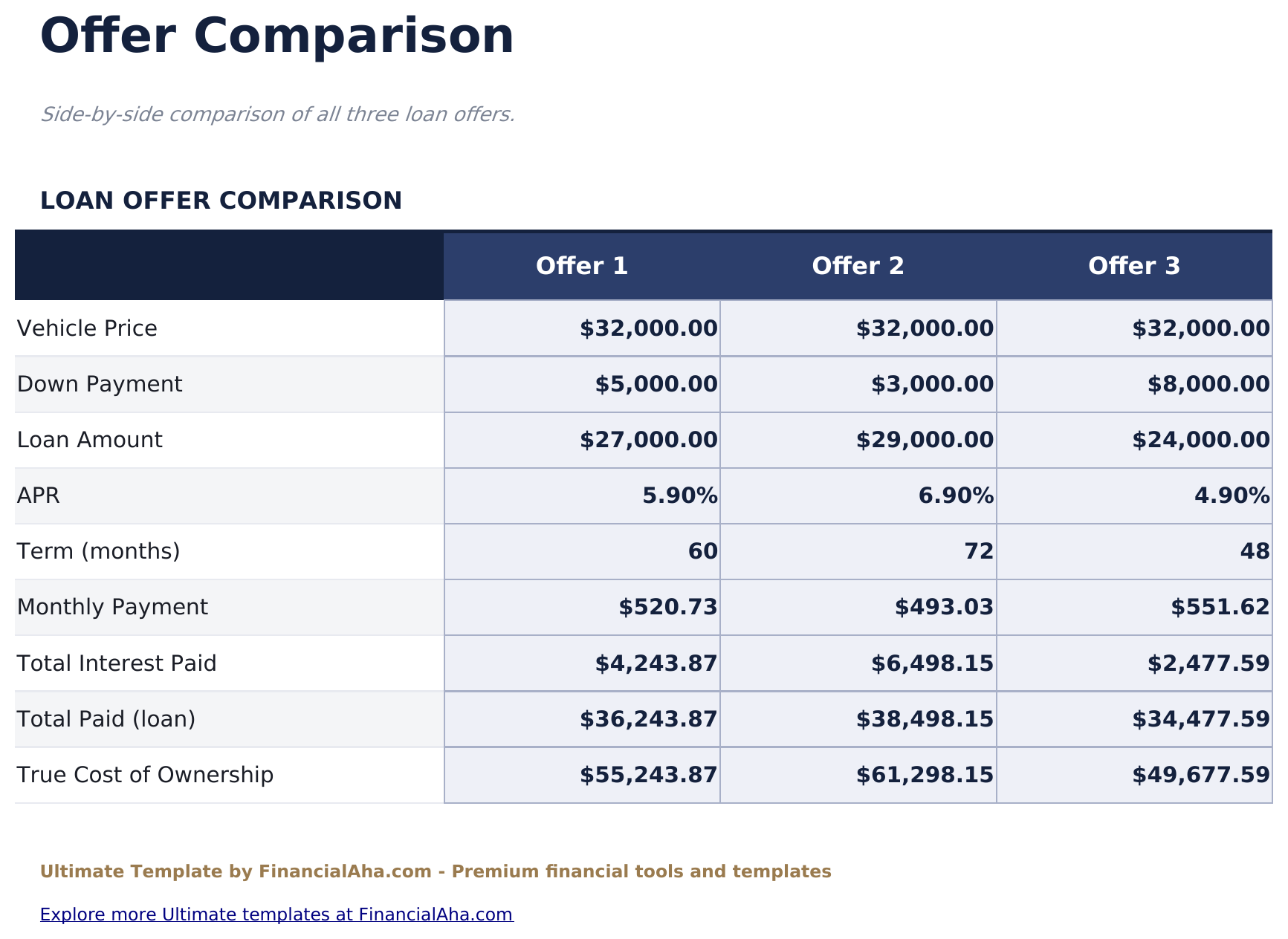
  • Offer Comparison on payment, lifetime interest and total cost
  • A true monthly cost including insurance, maintenance and fuel
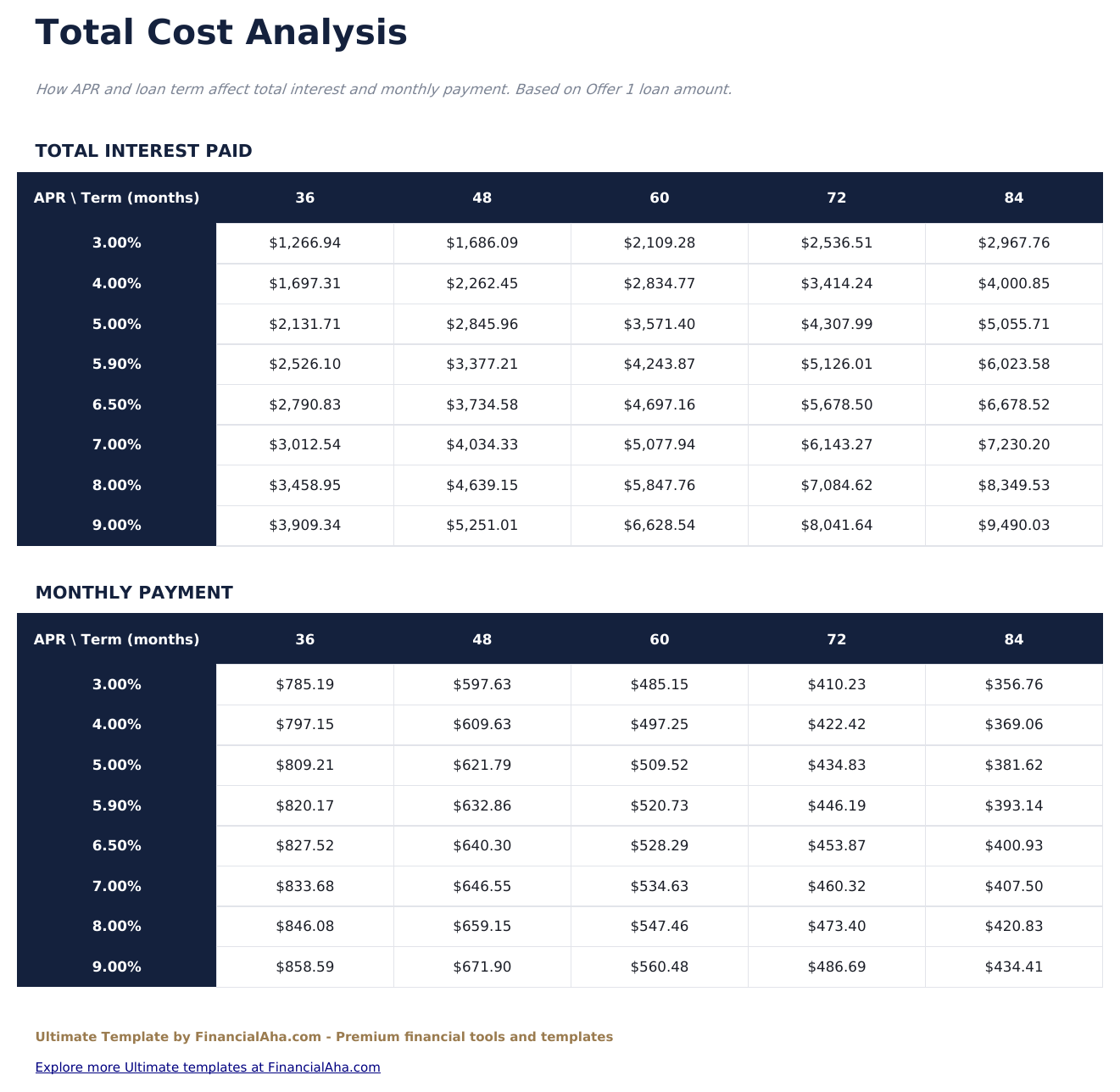
  • Total Cost Analysis showing interest across a range of rates rather than one
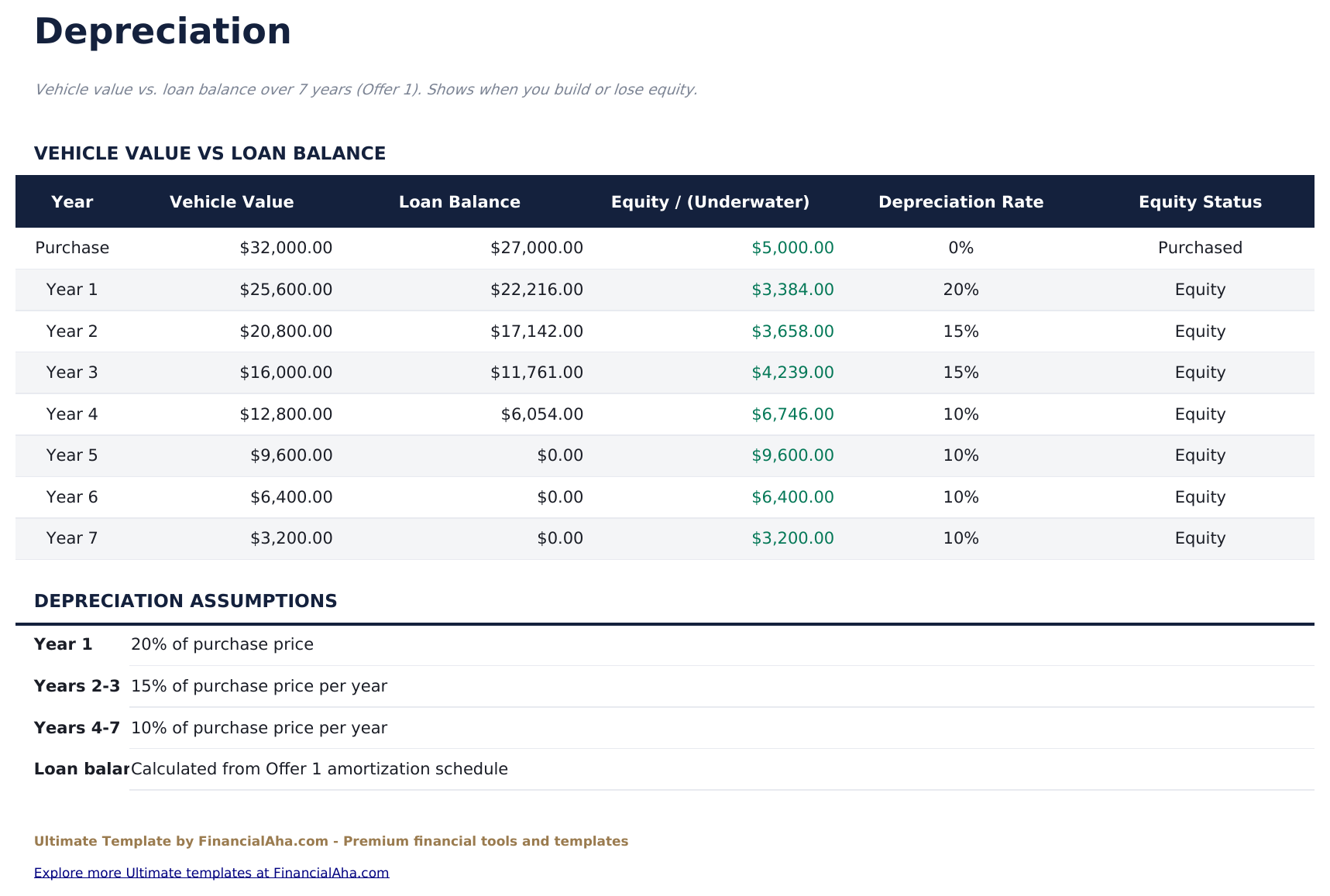
  • Depreciation tracking vehicle value against the loan balance year by year
  • An equity column showing when the balance exceeds the value
  • Editable depreciation rates, so a car that holds value differently can be modelled
  • Full amortization schedule with the principal and interest split
  • Works in Microsoft Excel and Google Sheets with no macros required

The FinancialAha Ultimate Auto Loan Calculator Spreadsheet Template for Google Sheets and Excel is a six-sheet workbook that costs the car rather than the finance, with a How to Use guide on a seventh tab. It ships as an Ultimate Auto Loan Calculator Excel template and an Ultimate Auto Loan Calculator Google Sheets template in one file. This Ultimate Auto Loan Calculator spreadsheet template sets three offers against each other, adds insurance, maintenance and fuel on top of the payment, and tracks what the vehicle is worth against what is still owed on it. No macros, no VBA.

Inside the workbook

What's inside the FinancialAha Ultimate Auto Loan Calculator spreadsheet template

The FinancialAha Ultimate Auto Loan Calculator Spreadsheet Template runs on six working sheets - one you type into, five that report back - plus the guide. It works in both Microsoft Excel and Google Sheets and here is what the Ultimate Auto Loan Calculator spreadsheet holds.

  1. 01 of 06

    Dashboard

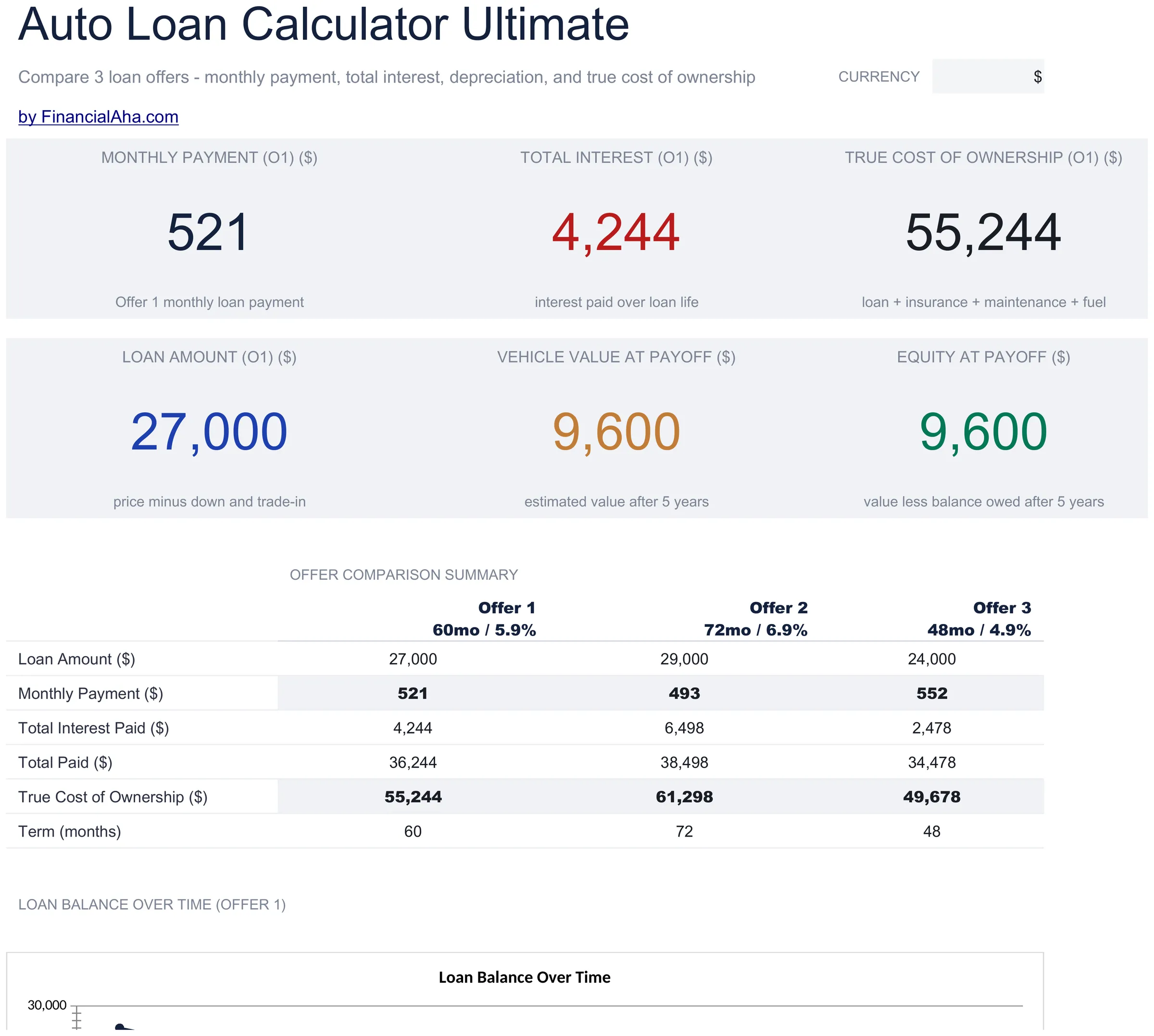
    The purchase at the top level: the amount actually financed, what an offer costs a month, what its interest comes to over the term, and the figure that matters more than any of them - the true monthly cost once insurance, maintenance and fuel are counted alongside the payment. Alongside those sits what the vehicle is projected to be worth at payoff and the equity that leaves once the loan balance comes off it. A car is quoted on the finance and lived with on the total, and this is the sheet that shows the difference.

  2. 02 of 06

    Loan Setup

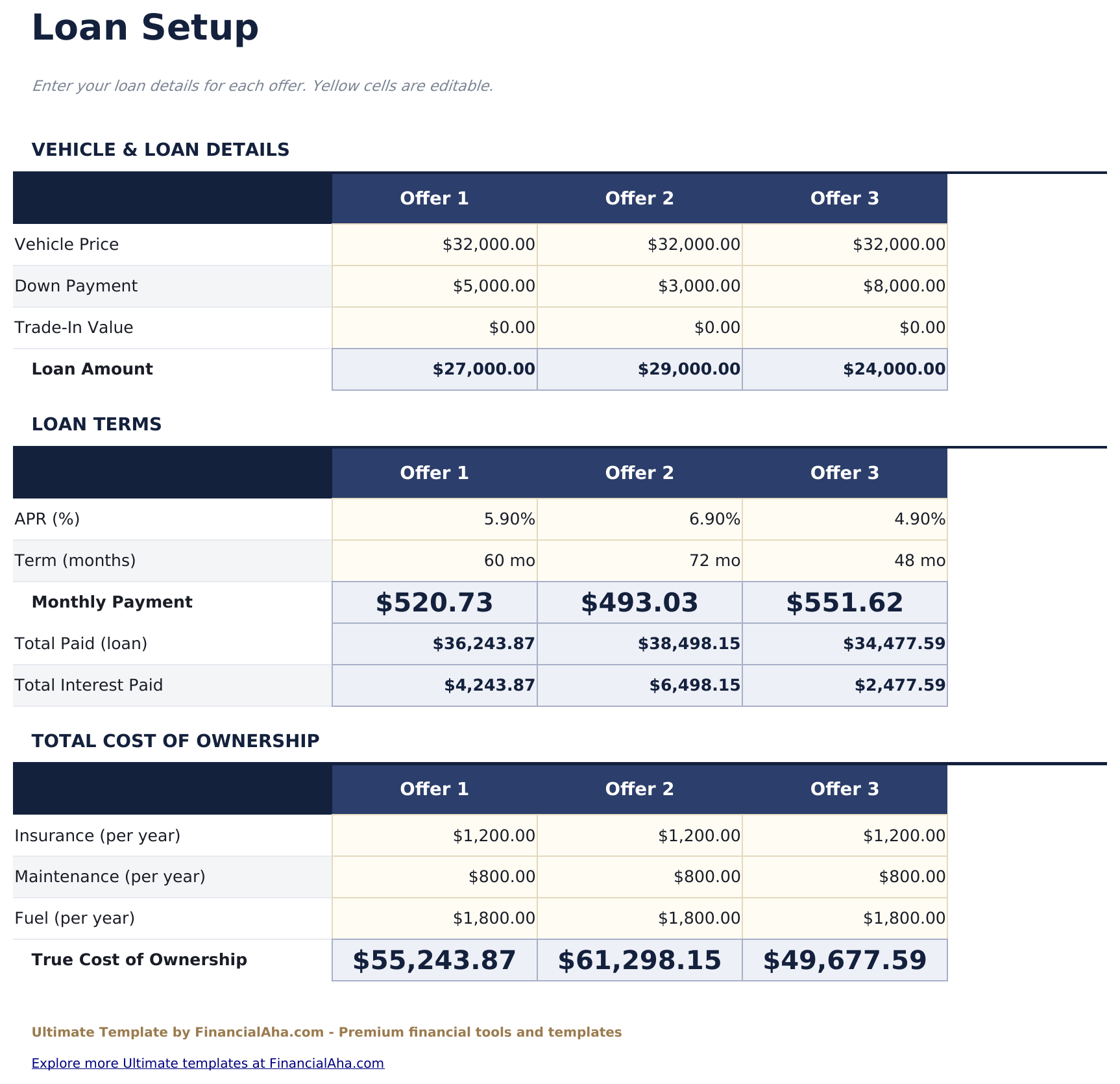
    Where the purchase is defined and where the three offers are configured side by side. Each column carries its own term and rate, so the comparison is between whole propositions rather than a single variable - which is how finance is actually offered, with a longer term dressed as a smaller payment.

  3. 03 of 06

    Amortization Schedule

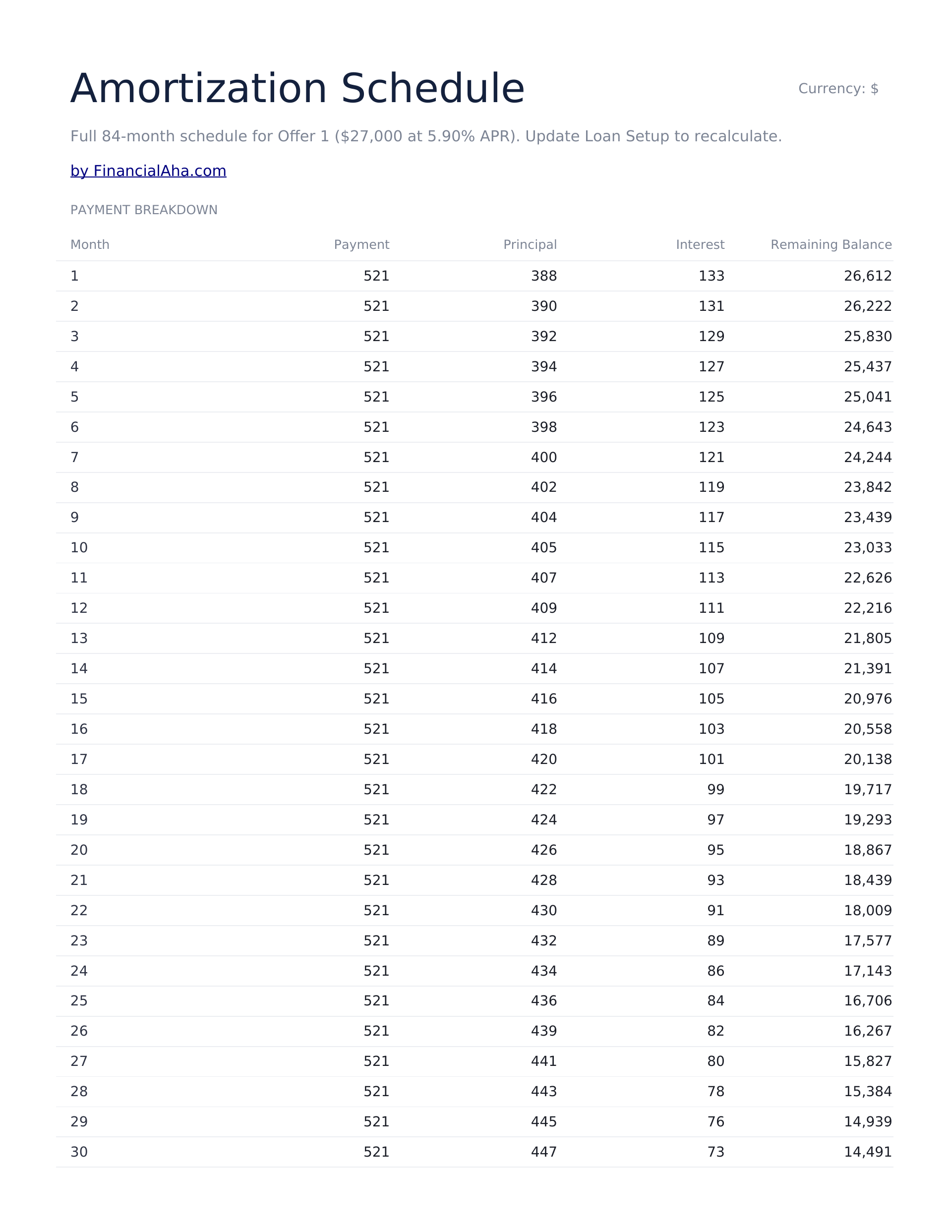
    Every payment in turn, with the amount due split into principal and interest and the balance carried down. Reading it beside the depreciation view is what makes negative equity concrete rather than theoretical.

  4. 04 of 06

    Offer Comparison

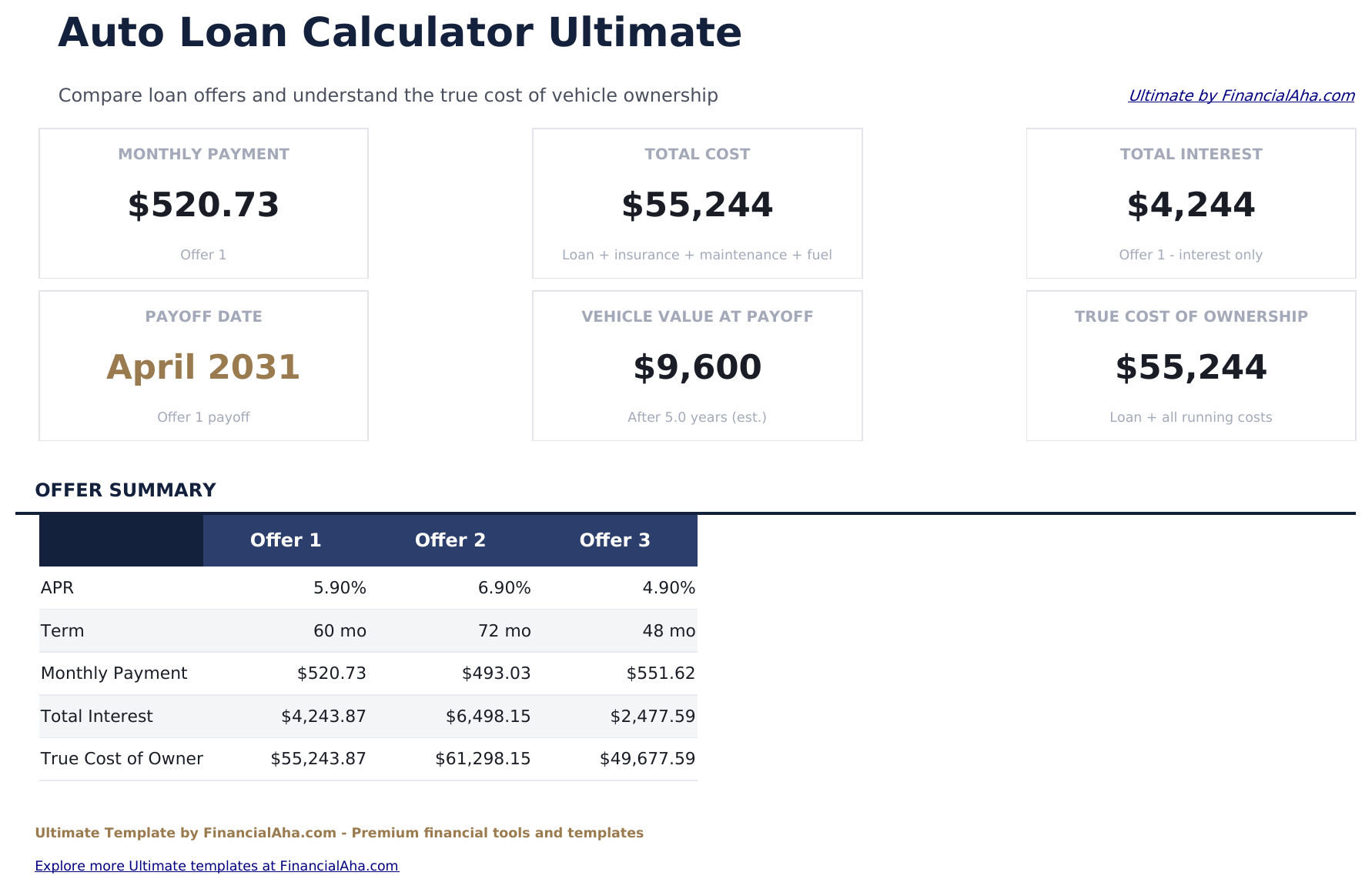
    The three offers set against each other on what separates them: the monthly payment, the interest each costs over its life, and what each comes to in total. A longer term almost always shows the smallest payment, and this is the sheet where what that costs becomes visible.

  5. 05 of 06

    Total Cost Analysis

    What the interest comes to across a range of rates rather than at the one you were quoted. Rates on car finance move with credit and with negotiation, and seeing the span is more useful than a single figure that assumes one outcome.

  6. 06 of 06

    Depreciation

    The vehicle's value set against the loan balance year by year, with the gap between them and whether that gap is equity or the other thing. Cars lose value fastest early and loans repay principal slowest early, which is why the two lines cross later than most buyers expect - and this sheet is where that is shown rather than described.

  7. Included guide

    How to Use

    A step-by-step guide on its own tab, covering setup, how the offers are configured, what the true cost figure includes, and how to read the depreciation view. Because it ships inside the file, the instructions travel with the template wherever it is opened.

Works in both Google Sheets and Excel

Ultimate Auto Loan Calculator Spreadsheet template for Google Sheets

Upload the Ultimate Auto Loan Calculator Spreadsheet Template to Drive, right-click it, and choose "Open with Google Sheets". This Ultimate Auto Loan Calculator Google Sheets template needs no conversion step and both charts survive the trip intact. The cross-sheet references that feed the Dashboard rely on the existing tab names, so those are worth leaving alone.

Ultimate Auto Loan Calculator Google Sheets template setup

A shared copy of the Ultimate Auto Loan Calculator Google Sheets template suits a purchase being decided together, or a forecourt conversation where three offers can be looked at side by side rather than one at a time. Sheets version history covers a figure typed over.

Sharing the Ultimate Auto Loan Calculator Google Sheet

The Ultimate Auto Loan Calculator Google Sheet is built for sittings rather than a routine: configure the offers once, then read the comparison as quotes change. The depreciation view is the one worth returning to after the purchase.

Ultimate Auto Loan Calculator Spreadsheet template for Excel

The Ultimate Auto Loan Calculator spreadsheet Excel download is a plain .xlsx. Excel opens this Ultimate Auto Loan Calculator Excel template directly, with no import step and no compatibility prompt, and both charts are native Excel charts that redraw as the inputs change. There are no macros and no VBA in the file, so it opens without a security warning.

Ultimate Auto Loan Calculator Excel template setup

The same Ultimate Auto Loan Calculator Excel template opens in Excel on Windows, Excel on Mac, and Excel for the web. It is also the identical file you would upload to Drive, so there is no separate Ultimate Auto Loan Calculator spreadsheet download to choose between.

Ultimate Auto Loan Calculator spreadsheet Excel notes

The Ultimate Auto Loan Calculator spreadsheet Excel file carries no macros and no VBA, so Excel opens it without a trust prompt. The same Ultimate Auto Loan Calculator spreadsheet Excel download also opens in Excel for the web, which matters when you move between a work machine and a personal one.

Opening the Ultimate Auto Loan Calculator spreadsheet Excel file

Nothing in the Ultimate Auto Loan Calculator Excel template is version-specific, so this Ultimate Auto Loan Calculator spreadsheet Excel workbook behaves identically in Excel on Windows, Excel on Mac, and older builds.

Spreadsheet template highlights

What the Ultimate Auto Loan Calculator spreadsheet template tracks

Loan Setup is the sheet you fill in. These are the columns the Ultimate Auto Loan Calculator Spreadsheet Template carries across the schedule and the depreciation view:

Month
each payment of the agreement
Payment auto
derived, the amount due that month
Principal auto
derived, the part reducing the balance
Interest auto
derived, the part going to the lender
Remaining Balance auto
derived, what is still owed
Year
each year of ownership on the depreciation view
Vehicle Value auto
derived, what the car is worth as it depreciates
Loan Balance auto
derived, what is still owed at that point
Equity / (Underwater) auto
derived, the gap between the two
Depreciation Rate
the rate applied that year, yours to edit

Compare builds

FinancialAha Auto Loan Calculator spreadsheet template: Free, Essentials, and Ultimate compared

Feature Free View Spreadsheet Template Essentials View Spreadsheet Template Ultimate This page
Working sheets 1 3 6
Monthly payment Yes Yes Yes, per offer
Deposit and trade-in Both, netted off the price Both, netted off the price
Total interest Yes Yes Per offer
Amortization schedule Every payment Every payment
Charts 2 2
Out-of-pocket total Yes Yes
Offers compared 3, side by side
Running costs Insurance, maintenance and fuel
Interest across rates Dedicated sheet
Value against balance Year by year, with equity

The FinancialAha Ultimate Auto Loan Calculator Spreadsheet Template covers six working sheets and costs the car rather than the finance. The Free Auto Loan Calculator Spreadsheet Template returns a payment for an amount you supply. The Essentials Auto Loan Calculator Spreadsheet Template for Google Sheets and Excel derives the loan from the price, deposit and trade-in and schedules every payment. This build sets three whole offers against each other, each with its own term and rate; adds insurance, maintenance and fuel so the monthly figure is what the car actually costs rather than what the lender charges; shows what the interest would be across a range of rates rather than one; and tracks the vehicle's value against the balance so the period of owing more than it is worth is visible rather than discovered.

Good to know

Notes on working in the Ultimate Auto Loan Calculator spreadsheet template

  • The offers differ in term and rate together, which is how they are actually presented - a longer term shows a smaller payment and costs more.
  • The true cost figure includes insurance, maintenance and fuel. It is the number to compare against a monthly budget rather than the payment.
  • The rate range exists because car finance rates move with credit and negotiation, so a single quoted figure is rarely the whole story.
  • The depreciation view is the one to read before signing: a car falls in value fastest early and a loan repays principal slowest early.
  • Depreciation rates are editable, so a vehicle that holds value differently can be modelled rather than assumed.

How to Use This Template

1

Configure the offers

On Loan Setup, enter the vehicle details and set up the three offers with their own terms and rates.

2

Add the running costs

Insurance, maintenance and fuel go in so the monthly figure reflects the car rather than the loan.

3

Compare the offers

Offer Comparison sets them against each other on payment, lifetime interest and total cost.

4

Look ahead

Depreciation tracks the vehicle's value against the balance, showing when equity turns positive.

Stress-tested with AI.

Every template starts with deep research into how people actually track the topic. We design the layout, build the formulas, and polish the design until it feels like something we would use ourselves. Along the way, we use AI to stress-test the calculations: unusual inputs, edge cases, and formula behavior, checked until the numbers hold.

One-time purchase. No subscription. Works in Excel & Google Sheets.

Frequently Asked Questions

Is the FinancialAha Ultimate Auto Loan Calculator Spreadsheet Template a Google Sheets template?

Yes. Upload the file to Drive and choose "Open with Google Sheets". The Ultimate Auto Loan Calculator Google Sheets template needs no conversion step and both charts survive the trip intact. The cross-sheet references rely on the existing tab names, so those are worth leaving alone.

Is the FinancialAha Ultimate Auto Loan Calculator Spreadsheet Template an Excel template?

Yes. The download is a plain .xlsx, so the Ultimate Auto Loan Calculator Excel template opens directly in Excel with no import step. Both charts are native Excel charts, and there are no macros or VBA.

Will the FinancialAha Ultimate Auto Loan Calculator spreadsheet Excel file open in older versions of Excel?

Yes. The Ultimate Auto Loan Calculator spreadsheet Excel workbook ships as a plain .xlsx, so it opens identically in current Excel and in builds that predate dynamic arrays.

What does the depreciation sheet in the Ultimate Auto Loan Calculator spreadsheet show?

The vehicle's value against the outstanding balance year by year, with the gap between them marked as equity or the reverse. A car loses value fastest early and a loan repays principal slowest early, so the two lines cross later than most buyers expect - this is where that is shown rather than described.

How do the three offers differ?

Each has its own term and rate, so the comparison is between whole propositions rather than one variable. That matters because a longer term almost always shows the smallest monthly payment while costing the most overall.

What is included in the true monthly cost?

The loan payment plus insurance, maintenance and fuel. It is the figure to set against a monthly budget, rather than the payment the lender quotes.

Why show interest across a range of rates?

Because rates on car finance move with credit and with negotiation. Seeing the span between outcomes is more useful than one figure resting on the rate you were first offered.

Can I change the depreciation assumptions?

Yes. The rates are editable per year, so a vehicle that holds its value differently can be modelled rather than assumed.

What do I get after buying the Ultimate Auto Loan Calculator spreadsheet template?

You receive the Ultimate Auto Loan Calculator spreadsheet template as an Excel file (.xlsx) that works in Microsoft Excel and Google Sheets. Download it immediately after purchase - no signup or account required.

Is there a free Ultimate Auto Loan Calculator spreadsheet template?

Yes. A free version of the Ultimate Auto Loan Calculator spreadsheet template is available with basic features. The Ultimate version adds advanced analysis, more capacity, and additional sheets.

What if the Ultimate Auto Loan Calculator spreadsheet template does not work for me?

Contact us and we will help troubleshoot. The Ultimate Auto Loan Calculator spreadsheet template works in Microsoft Excel and Google Sheets with no macros required.

Ultimate

Highlights:

Instant download after purchase
No macros or VBA required
All formulas auto-calculate
No subscription required
Works in
Excel Google Sheets

Looking for more Ultimate templates?

We offer Ultimate versions of our most popular spreadsheet templates with advanced features, more capacity, and deeper analysis.

Private & secure

Your financial data stays on your device. We never see it.

Learn more →

Need help?

Check our guides or reach out with questions.

View FAQ →