Annual Tax Planner
Annual Tax Planner for YouTubers
One annual tax planner you set up around creator income: AdSense, sponsorship, and merch payments in a single log, content costs as deductions, and quarterly estimated payments.
In Depth
Multiple Revenue Streams and Creator Tax Complexity
Content creation income arrives from sources that each report differently at tax time. AdSense revenue appears on a 1099-MISC or 1099-NEC from Google, typically showing the total annual payout. Sponsorship income may come with a 1099 from each brand (if they paid $600+), or it may not be reported at all - but it is still taxable. Merchandise platforms like Shopify or Spring report through 1099-K. Affiliate programs (Amazon Associates, Impact, ShareASale) each issue their own 1099s. Consolidating five to ten different income sources into a single tax picture - and reconciling each 1099 against actual payments received - is where year-round tracking prevents the confusion that comes from trying to reconstruct this at filing time.
Estimated quarterly taxes on variable creator income require a calculation that accounts for the unpredictable nature of the revenue. A creator earning $2,000 in Q1 and $15,000 in Q3 (common when a video goes viral or a large sponsorship lands) faces very different quarterly obligations across the year. The annualized income installment method allows quarterly payments to match actual income pace rather than assuming equal quarters, but it requires careful tracking of cumulative income and expenses through each quarter. For creators with rapidly growing channels, updating quarterly estimates based on year-to-date actuals prevents both underpayment penalties and the shock of a large year-end balance.
The transition from hobby to business is a tax threshold that many creators cross without fully recognizing it. The IRS looks at factors like profit motive, regularity of activity, and whether the creator depends on the income. Once content creation is clearly a business, all income is subject to self-employment tax (15.3% on net earnings), but all legitimate expenses become deductible - including the home studio portion of rent, internet service, equipment depreciation, and even the business-use percentage of a phone plan. Having organized records from the start makes this transition smoother and ensures nothing falls through the cracks during that pivotal first profitable year.
The Challenge
Why YouTubers Need Year-Round Tax Planning
YouTube income comes from multiple sources - AdSense, sponsorships, merchandise, memberships - and none of it arrives with taxes withheld. Content creation costs are significant but only deductible if tracked.
Multiple revenue streams complicate tracking
AdSense pays monthly, sponsorships pay per deal, merchandise varies, and memberships trickle in. Combining all of these into a coherent tax picture requires organization.
Equipment and software are deductible but expensive
Cameras, microphones, lighting, editing software, music licensing, and computers - the cost of producing content is substantial and deductible, but only with records.
Sponsorship income timing varies
Some sponsors pay upfront, others net-30 or net-60. Knowing when income was actually received versus when it was earned matters for tax timing.
Growth brings tax bracket changes
A channel that goes from $20K to $100K in revenue crosses tax brackets. Without quarterly adjustment, the year-end tax bill can be substantially larger than expected.
Ready to take control of your youtuber finances?
What You Get
Tax Tools for YouTube and Creator Revenue
Every payment in one income log
AdSense, sponsorship, merch, and membership payments each go in as their own dated row with the source named in the description. The dashboard combines them into one self-employment total.
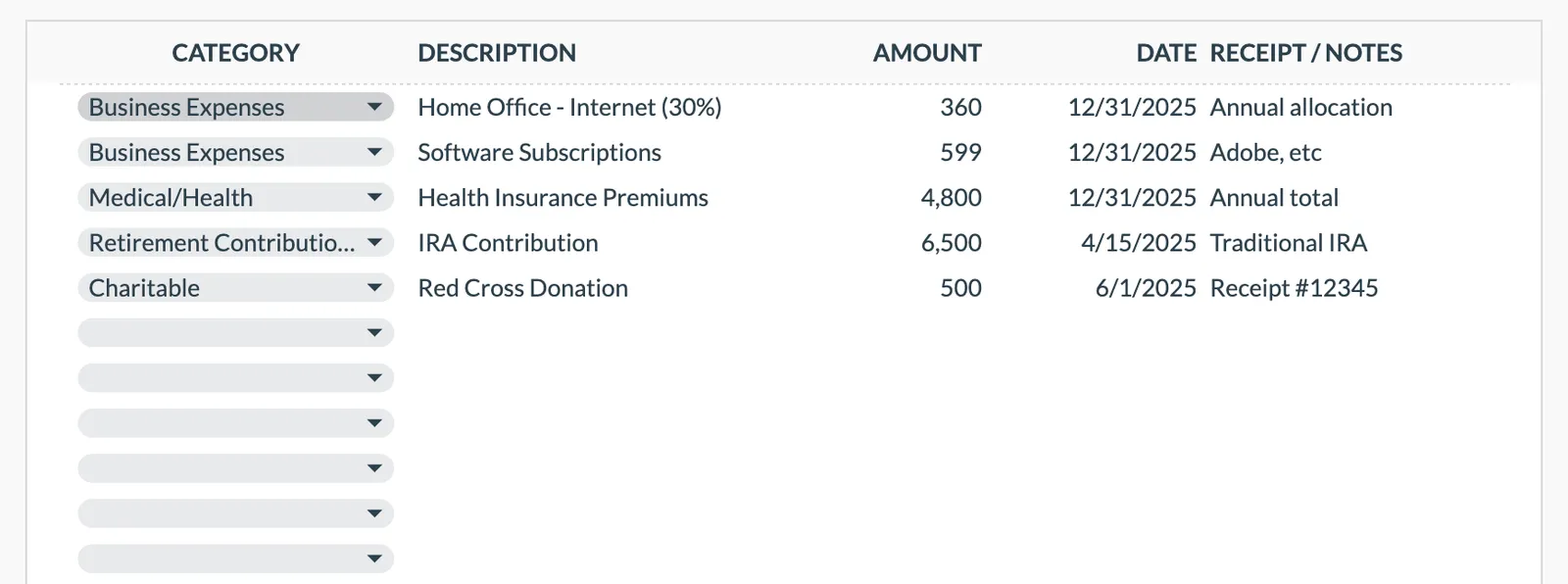
Deduction categories that hold production costs
Eight categories ship with the sheet, including Business Expenses, Education, Housing/Mortgage, and Insurance. Gear, software, licensing, and outsourced editing are typed as descriptions under Business Expenses.
Sponsorship income log
Each brand deal is a row with the amount, the date it landed, and the sponsor named in the description. Contract details go in the notes column for reconciling 1099s later.
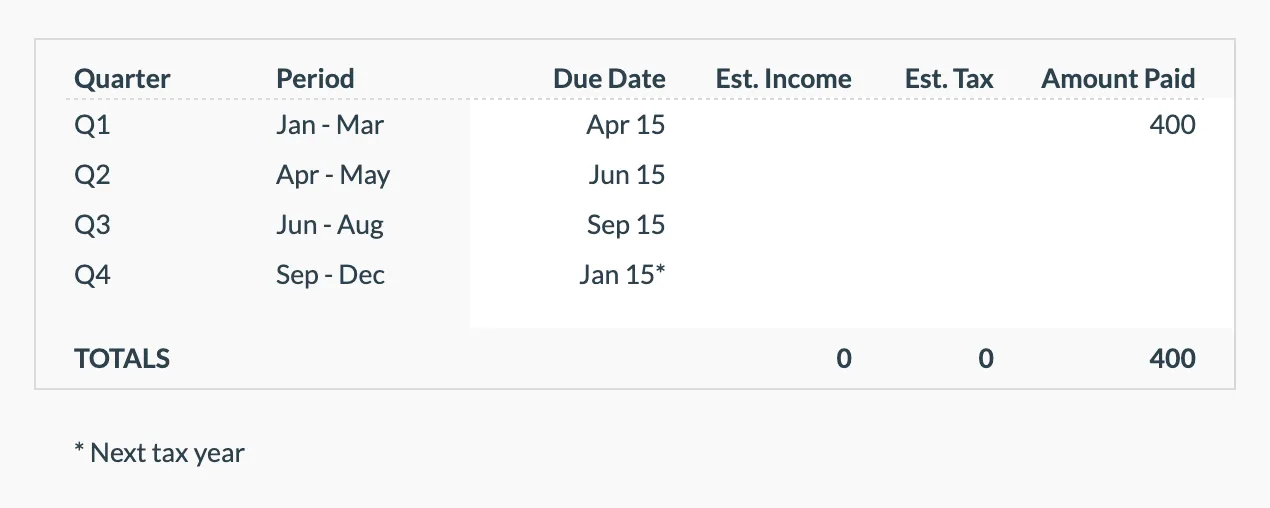
Quarterly payment rows for creators
The four quarters arrive with their periods and due dates. You enter your own estimated income and estimated tax for each, then the amount paid.
Self-employment income on its own line
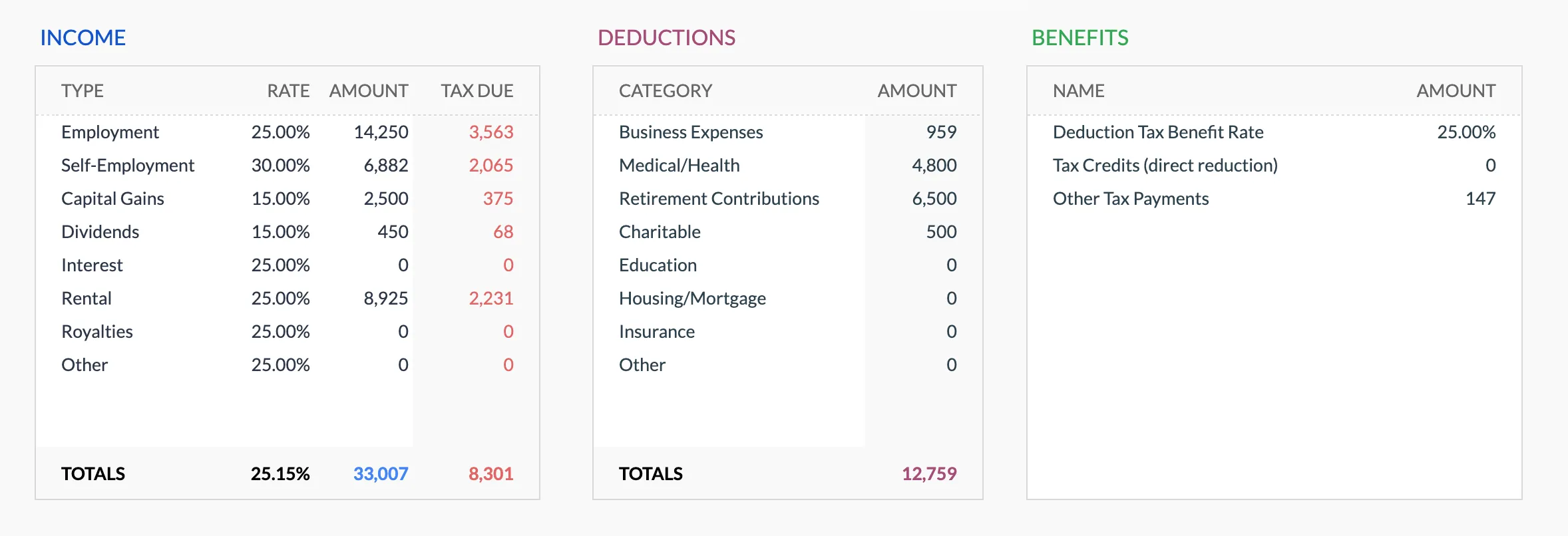
Self-Employment is one of the eight dashboard income types, with a rate you set and its own tax due figure beside any employment or investment income.
End-of-year creator tax snapshot
Total income, total deductions, the tax due from the rates you set, payments made, and the balance remaining. One reference for filing.
See It In Action
What the template looks like
Browse through the template to see how it handles income tracking, deductions, quarterly payments, and tax projections.
- Tax overview dashboard
- Income source tracking
- Deduction organization
- Quarterly payment planning
- Tax projection estimates
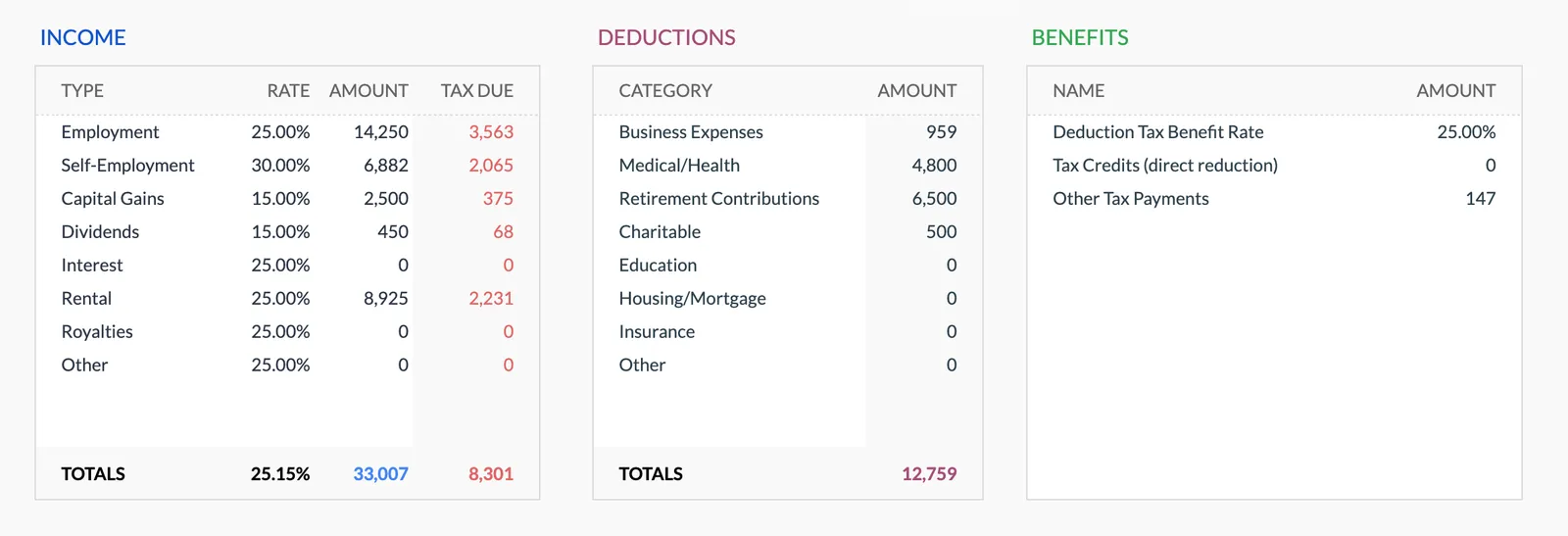
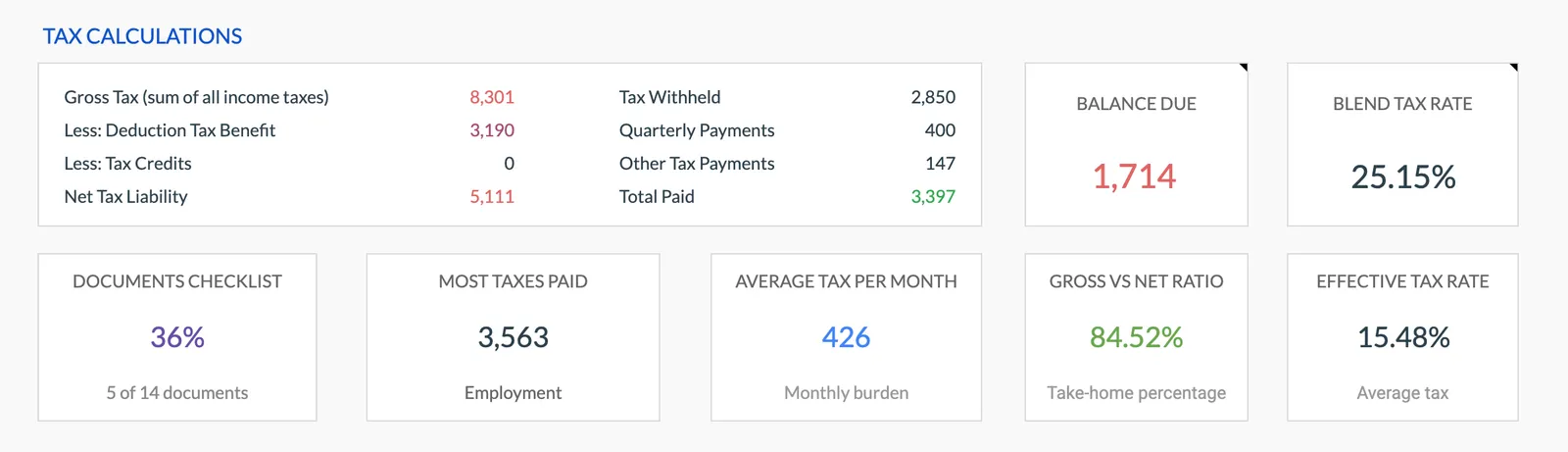
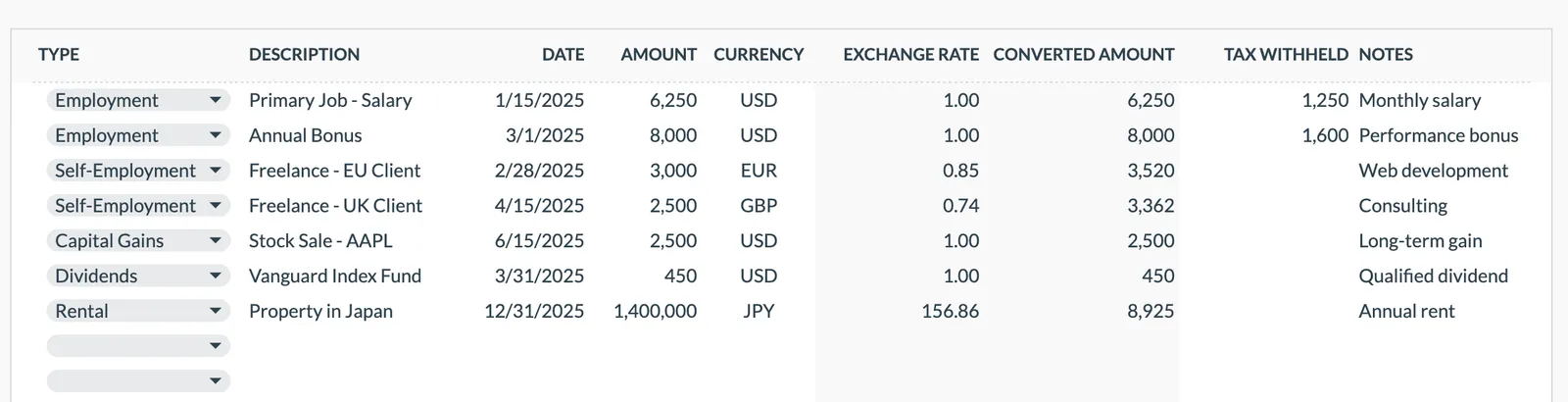
Annual tax overview with key figures
Detailed tax breakdown and projections
Track all income sources for tax purposes
Organize and track tax deductions
Plan and track quarterly estimated tax payments
Getting Started
Begin Organizing Your Creator Tax Records
Set your rates on the dashboard
Set the rate that applies to self-employment income and to any other type you earn. Those rates drive every tax due figure the dashboard shows.
Record income as it arrives
Log each payment with date and source. AdSense monthly, sponsorships when paid, merchandise as reported.
Track every production expense
Equipment purchases, software subscriptions, outsourced services - enter each expense in the appropriate category.
Estimate quarterly payments
Work each quarter out from year-to-date income and deductions, then enter the figure on the Quarterly Payments sheet alongside what you paid.
Compile for tax filing
The year-end summary shows all income and deductions organized by category. Share with your tax preparer or use for self-filing.
Common Questions
Tax Planner for YouTubers- FAQ
Are equipment purchases fully deductible in the year of purchase?
Section 179 and bonus depreciation may allow full deduction in the purchase year for business equipment. Track the full cost - the deduction method can be determined at filing time.
What about a home studio deduction?
If you use part of your home regularly and exclusively for content creation, the home office deduction may apply. Track the square footage and associated costs.
How do I handle gifted products from sponsors?
Products received for review are generally taxable income at fair market value. Track them as income if they are above a nominal value.
Can I deduct courses and education?
Courses related to improving your content creation skills - video editing, marketing, business management - are typically deductible business expenses.
What about international AdSense income?
Income earned from international viewers is still taxable in your home country. Track it the same as domestic AdSense revenue.
Do I need to track subscriber milestones for tax purposes?
Not directly. But income tends to correlate with growth, so rapid subscriber increases usually mean increasing income and potentially higher quarterly payment requirements.
How do I consolidate income from AdSense, sponsorships, and merchandise for taxes?
Enter each payment as its own row with the source named in the description, then total each source at year-end and reconcile against the 1099s received from Google, brands, and merchandise platforms. The income log keeps all of them in one place for Schedule C preparation.
Can't find the answer you're looking for? Contact our team
Start tax planning as a youtuber
One-time purchase. No subscription. Your financial data stays in your Google Drive.