Annual Tax Planner
Annual Tax Planner for Online Sellers
One annual tax planner you set up around online selling: sales revenue in the income log, cost of goods and marketplace fees as deductions, and quarterly estimated payments.
In Depth
Sales Tax, COGS, and the E-Commerce Tax Landscape
Online selling introduces a tax concept that most people never encounter in traditional employment - cost of goods sold. The tax math works differently for product-based businesses: gross sales minus COGS equals gross profit, then gross profit minus operating expenses equals net taxable income. For a seller with $40,000 in gross sales, $15,000 in COGS (materials, wholesale purchases, packaging), and $8,000 in operating expenses (platform fees, shipping, advertising, software), the taxable income is $17,000 - less than half the top-line number. Every dollar of COGS that goes untracked is a dollar of extra tax paid.
Platform fees create a significant gap between what a customer pays and what a seller actually receives, and the gap varies meaningfully by platform. Etsy's combined fees (listing, transaction, payment processing, offsite ads) can total 10-13% of the sale price. Amazon's referral fees run 8-15% depending on category, plus FBA fees if using fulfillment. Shopify's transaction fees are lower (2.6-2.9% + $0.30) but come with a monthly subscription. The 1099-K from each platform reports the gross amount the customer paid - not what landed in the seller's account. A seller who received $20,000 in deposits might see a 1099-K showing $25,000. Tracking platform fees throughout the year documents the difference and supports the deduction.
Inventory management has direct tax implications that catch many sellers off guard. Unsold inventory at year-end is an asset on the books, not a deduction - meaning the $3,000 spent stocking up for holiday sales in November cannot be written off until those items sell. For sellers who buy in bulk to get better unit pricing, this creates a timing mismatch between cash outflow and tax deduction. Tracking purchases, sales, and remaining inventory throughout the year makes the year-end COGS calculation straightforward and ensures the distinction between sold and unsold goods is clear for Schedule C.
The Challenge
Why Online Sellers Need Proactive Tax Planning
Online selling is a business, and businesses owe taxes on profit. Between marketplace fees, cost of goods, shipping, and platform complexities, calculating actual profit - and the tax on it - takes deliberate tracking.
Revenue does not equal profit
A $50,000 Etsy shop sounds impressive until you subtract materials, shipping, marketplace fees, packaging, and other costs. Tax is owed on profit, not revenue - but calculating profit requires tracking everything.
Cost of goods sold needs meticulous records
Materials, wholesale purchases, packaging, and direct labor - COGS reduces taxable income but only if tracked. Every unrecorded cost is extra tax paid.
Multiple platforms mean multiple 1099s
Selling on Etsy, Amazon, Shopify, and eBay means multiple income reports. Reconciling them against actual deposits requires organized records.
Sales tax and income tax are different obligations
Sales tax collected from customers is not income. But it flows through your accounts and creates confusion if not separated from actual revenue.
Ready to take control of your online seller finances?
What You Get
Tax Planning Features for Online Sales
Sales revenue in one income log
Each payout is a dated row with an amount and a description, so Etsy, Amazon, and Shopify are named on the line. The dashboard totals them together.
Cost of goods recorded as deductions
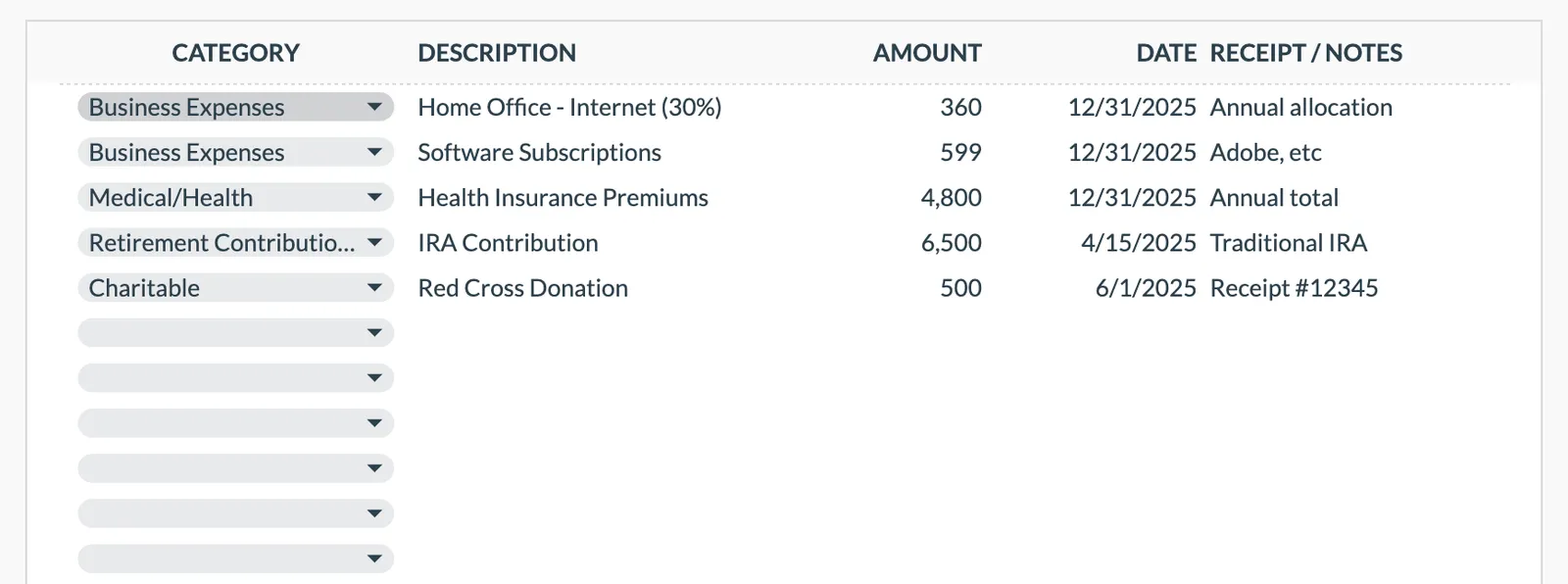
Materials, wholesale purchases, and packaging go in as dated rows under Business Expenses. There is no separate COGS section, so the description carries the detail.
Deduction categories that hold selling costs
Eight categories ship with the sheet, including Business Expenses, Insurance, and Housing/Mortgage. Shipping, packaging, marketplace fees, and advertising are typed as descriptions under Business Expenses.
Quarterly payment rows for sellers
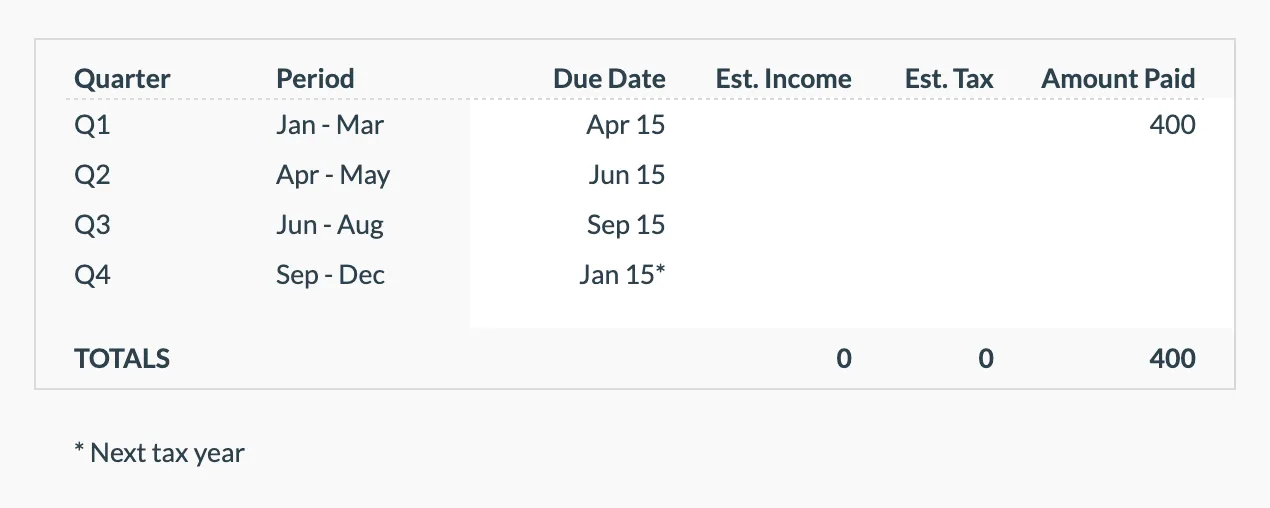
The four quarters come with their periods and due dates. You enter the estimated income and estimated tax for each, then record the amount paid.
Self-employment income on its own line
Online selling income sits under Self-Employment, one of the eight dashboard income types, with a rate you set and its own tax due figure.
Seller tax totals at a glance
Total income, total deductions, the tax due from the rates you set, payments made, and the balance remaining. A reference for Schedule C.
See It In Action
What the template looks like
Browse through the template to see how it handles income tracking, deductions, quarterly payments, and tax projections.
- Tax overview dashboard
- Income source tracking
- Deduction organization
- Quarterly payment planning
- Tax projection estimates
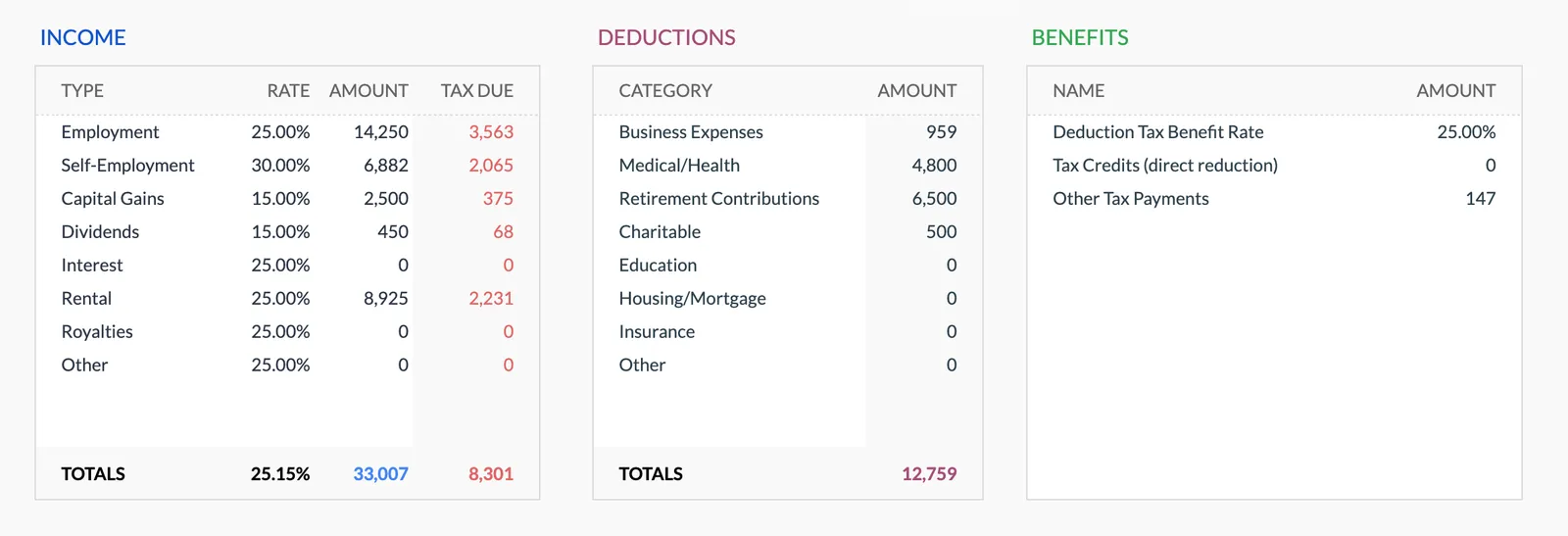
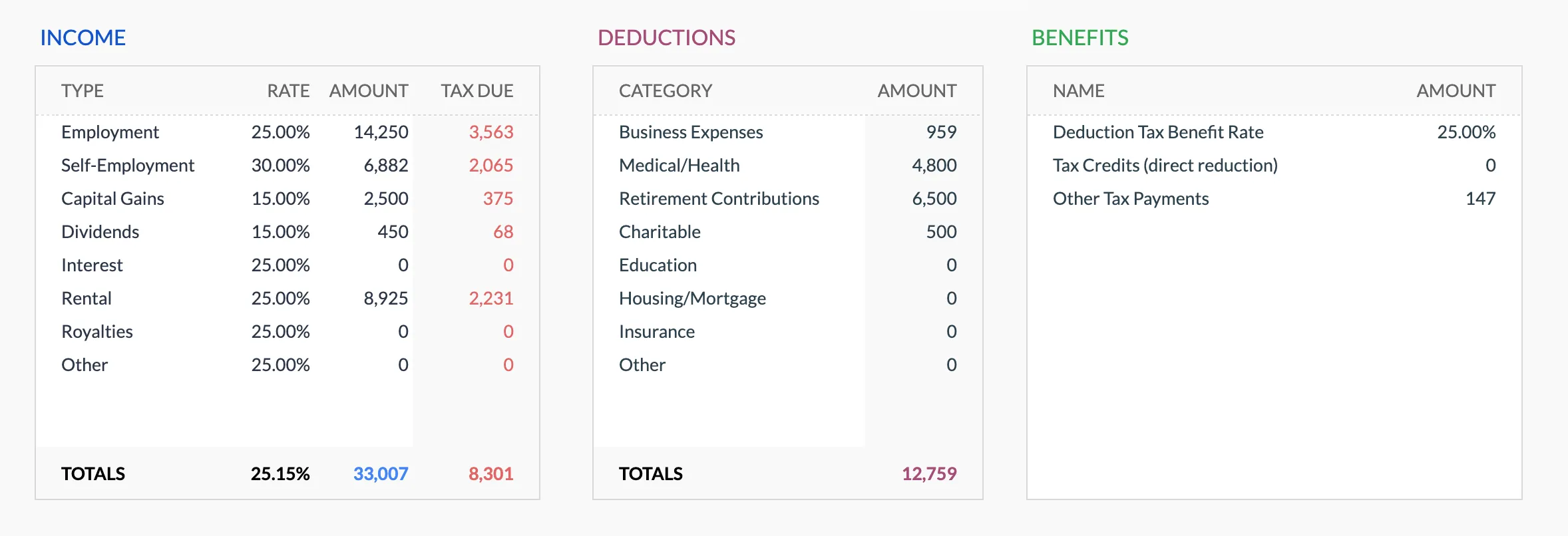
Annual tax overview with key figures
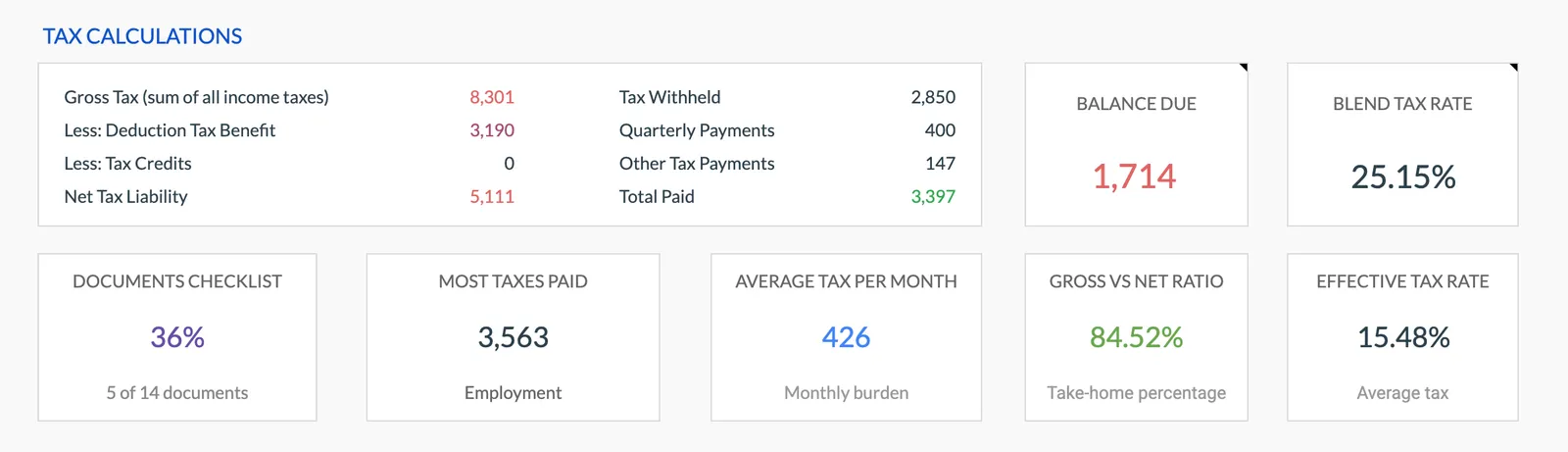
Detailed tax breakdown and projections
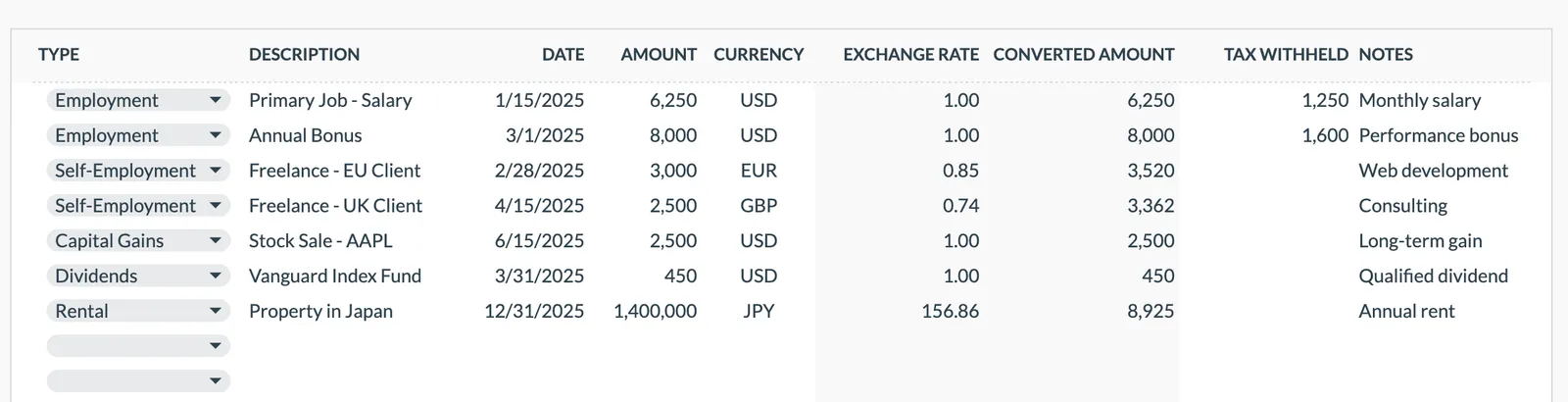
Track all income sources for tax purposes
Organize and track tax deductions
Plan and track quarterly estimated tax payments
Getting Started
Start Planning Taxes on Online Sales
Set your rate before logging sales
Set the rate that applies to self-employment income on the dashboard. Platform names then go in the description of each income row.
Record sales and costs regularly
Log sales revenue and cost of goods weekly or monthly. Consistent tracking prevents year-end scrambles.
Track every business expense
Shipping labels, packaging materials, advertising spend, software subscriptions - enter them as they occur.
Calculate quarterly payments
Before each quarterly deadline, work the estimate out from income less deductions and enter it on the Quarterly Payments sheet with the amount paid.
Reconcile platform reports at year end
Compare your tracked revenue to 1099s from each platform. Resolve any discrepancies before filing.
Common Questions
Tax Planner for Online Sellers- FAQ
Is collected sales tax considered income?
No. Sales tax you collect on behalf of your state is not income. It should be tracked separately and remitted to the appropriate state. Do not include it in revenue.
How do I track inventory for tax purposes?
Record the cost of inventory when purchased. Deduct it as COGS when the items sell. Unsold inventory at year end is an asset, not an expense.
What about marketplace fees?
Platform listing fees, transaction fees, and payment processing fees are all deductible business expenses. They go under Business Expenses with the platform named in the description.
Do I need this if my sales are under the 1099 threshold?
Yes. All business income is taxable regardless of whether a 1099 is issued. The 1099 threshold affects reporting requirements for platforms, not your tax obligation.
Can I deduct shipping supplies?
Yes. Boxes, tape, labels, bubble wrap, and other shipping materials are deductible business expenses.
What if I sell both handmade and resold items?
Material costs for handmade items and purchase costs for resold items are both deductible. Both go under Business Expenses, with the description separating them.
How do I reconcile 1099-K amounts that differ from what I actually received?
The 1099-K reports gross transaction amounts including platform fees, shipping charges collected, and sales tax. Your actual deposits are lower after these deductions. Track platform fees and shipping costs throughout the year so you can document the difference between the 1099-K total and your actual net receipts.
Can't find the answer you're looking for? Contact our team
Start tax planning as an online seller
One-time purchase. No subscription. Your financial data stays in your Google Drive.