SaaS Metrics & Financial Model Spreadsheet Template for Excel & Google Sheets
A SaaS-native operating model with the metrics investors and operators actually ask for - MRR movement, NRR, GRR, cohort retention, LTV:CAC, CAC payback, and runway. One workbook, dual compatible with Microsoft Excel and Google Sheets.
Instant digital delivery · Terms & Conditions apply
See SaaS Founder Bundle 3 templates included • $58 offOne-time purchase
SaaS Operating Model
Everything in This SaaS Spreadsheet
Your SaaS KPIs at a Glance
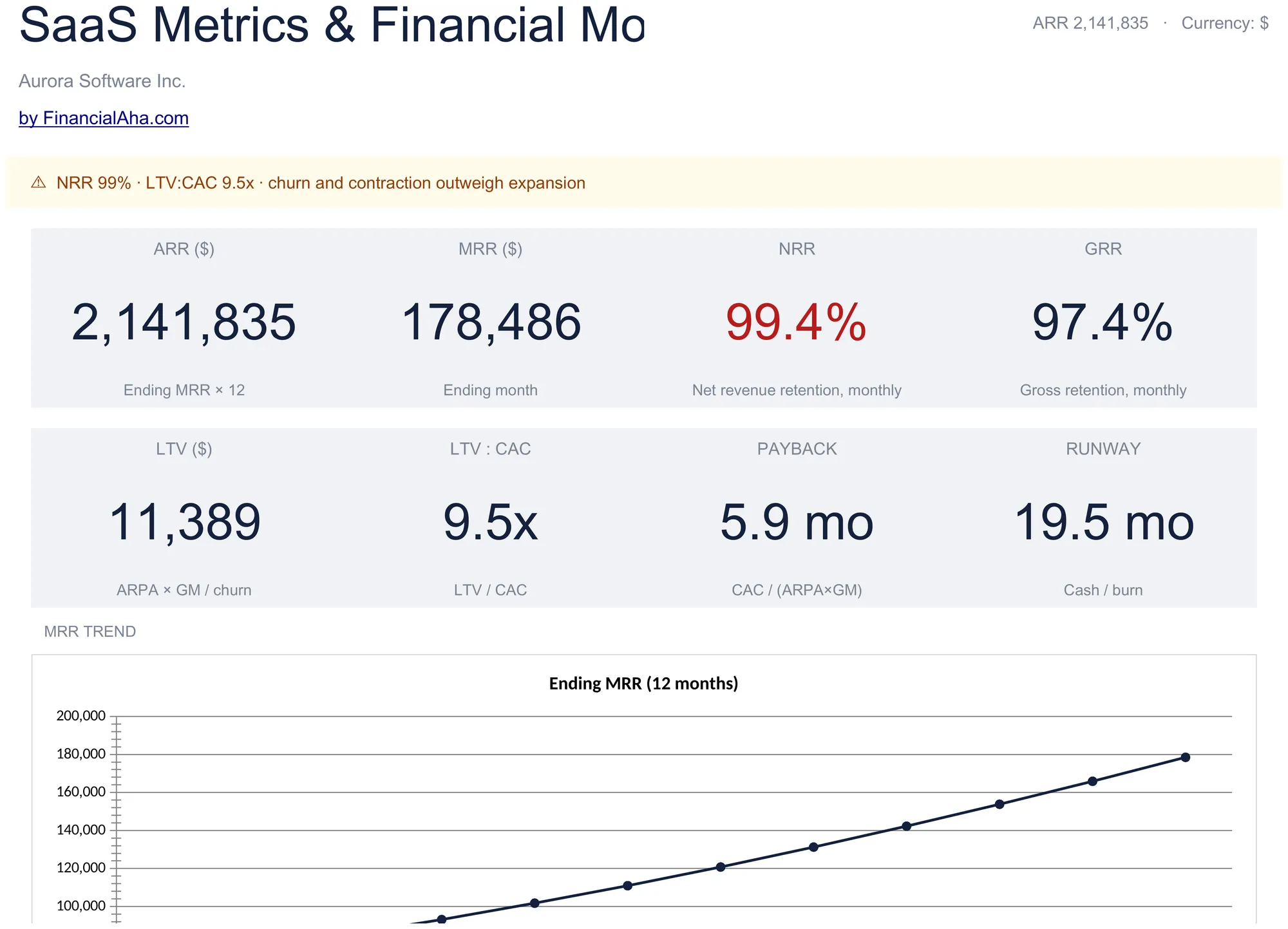
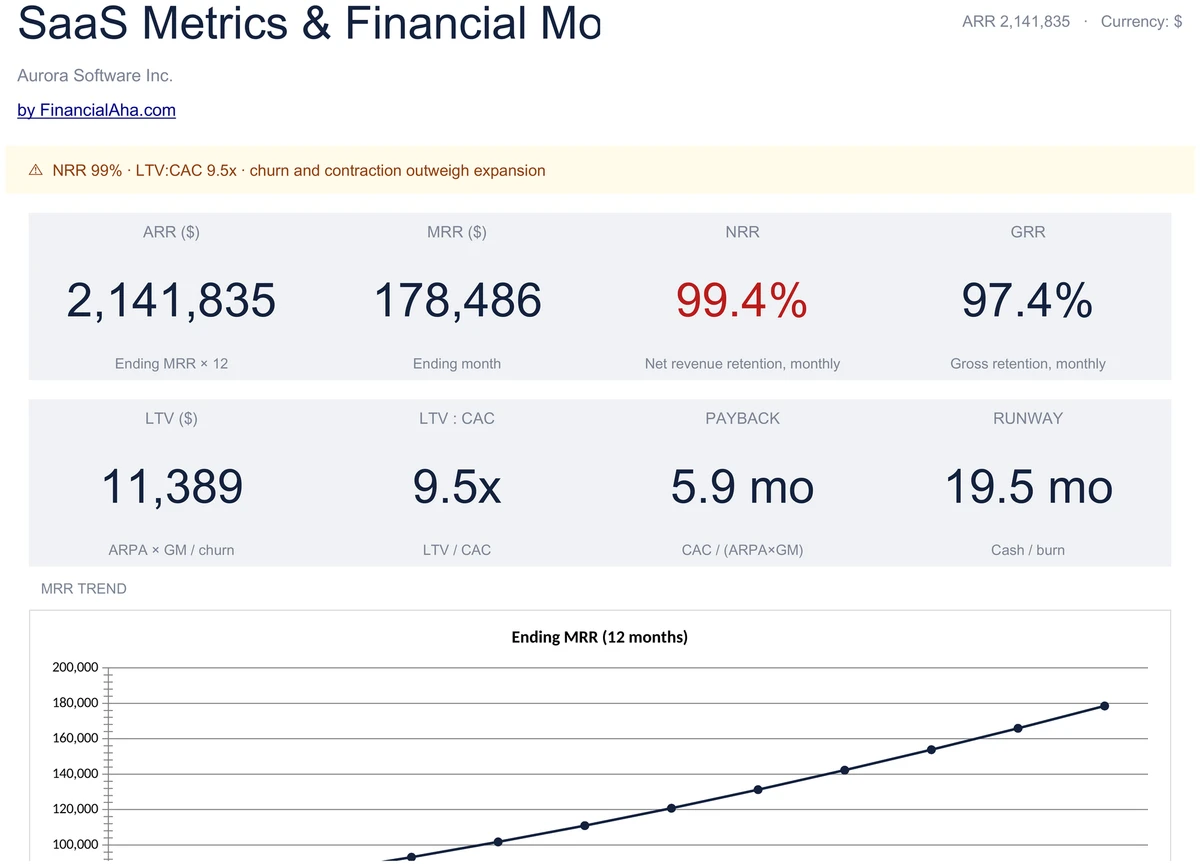
Open the dashboard and see where the business stands. ARR, MRR, NRR, and GRR sit on the top row. LTV, LTV:CAC, CAC payback, and runway sit beneath - with NRR, GRR, LTV:CAC, and payback cards flagged green when in healthy ranges.
- 8 KPI cards covering revenue, retention, and unit economics
- Color-coded against NRR, GRR, LTV:CAC, payback bands
- MRR trend and retention curve charts
12-Month Revenue Waterfall
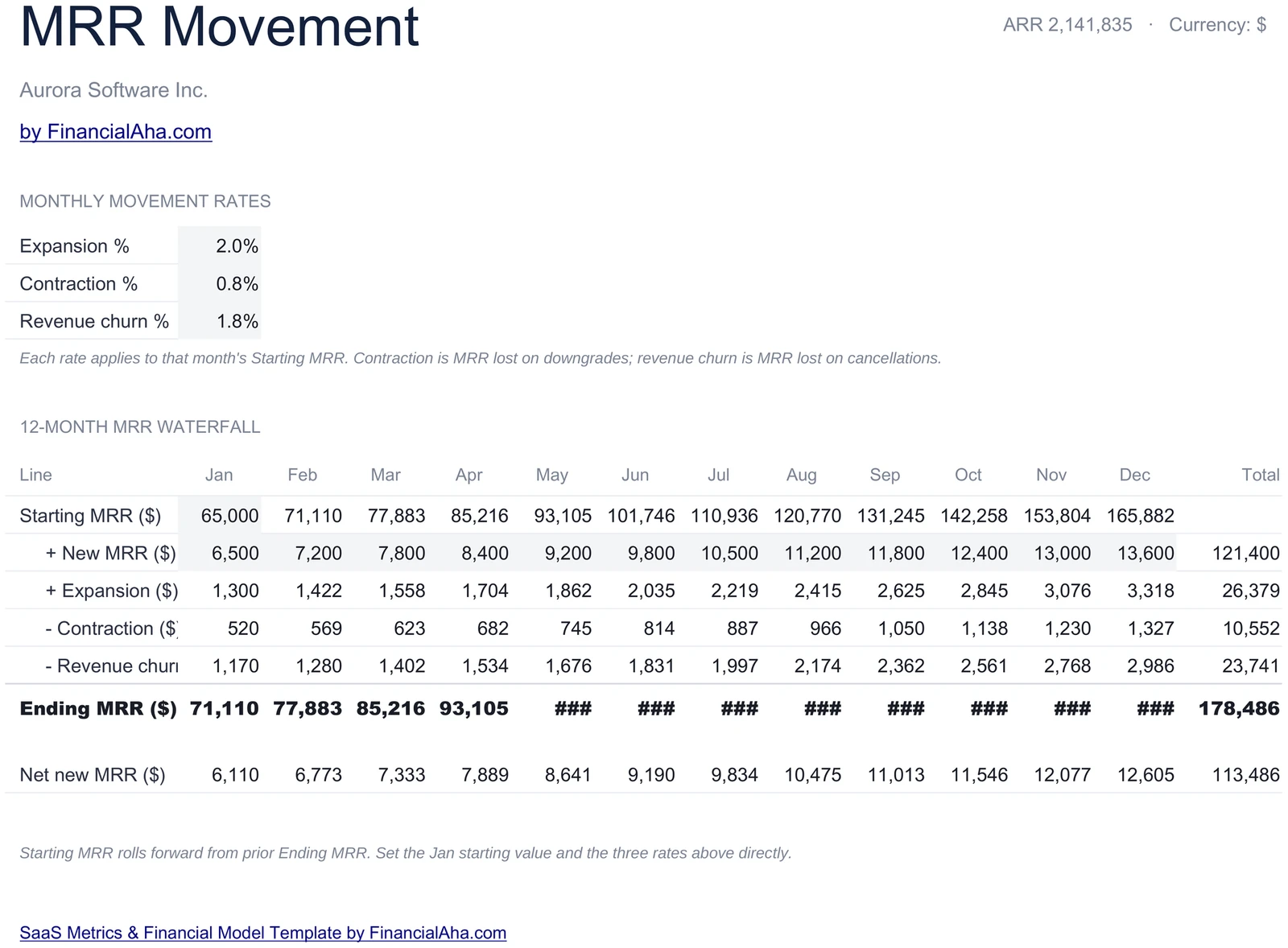
Each month: starting MRR + new MRR + expansion - contraction - churn = ending MRR. Net new MRR sits at the bottom. The same numbers drive ARR and the NRR / GRR ratios on the dashboard.
- Start + new + expansion - contraction - churn = end
- 12-month grid with monthly subtotals
- Powers ARR, NRR, GRR on the dashboard
Retention by Cohort
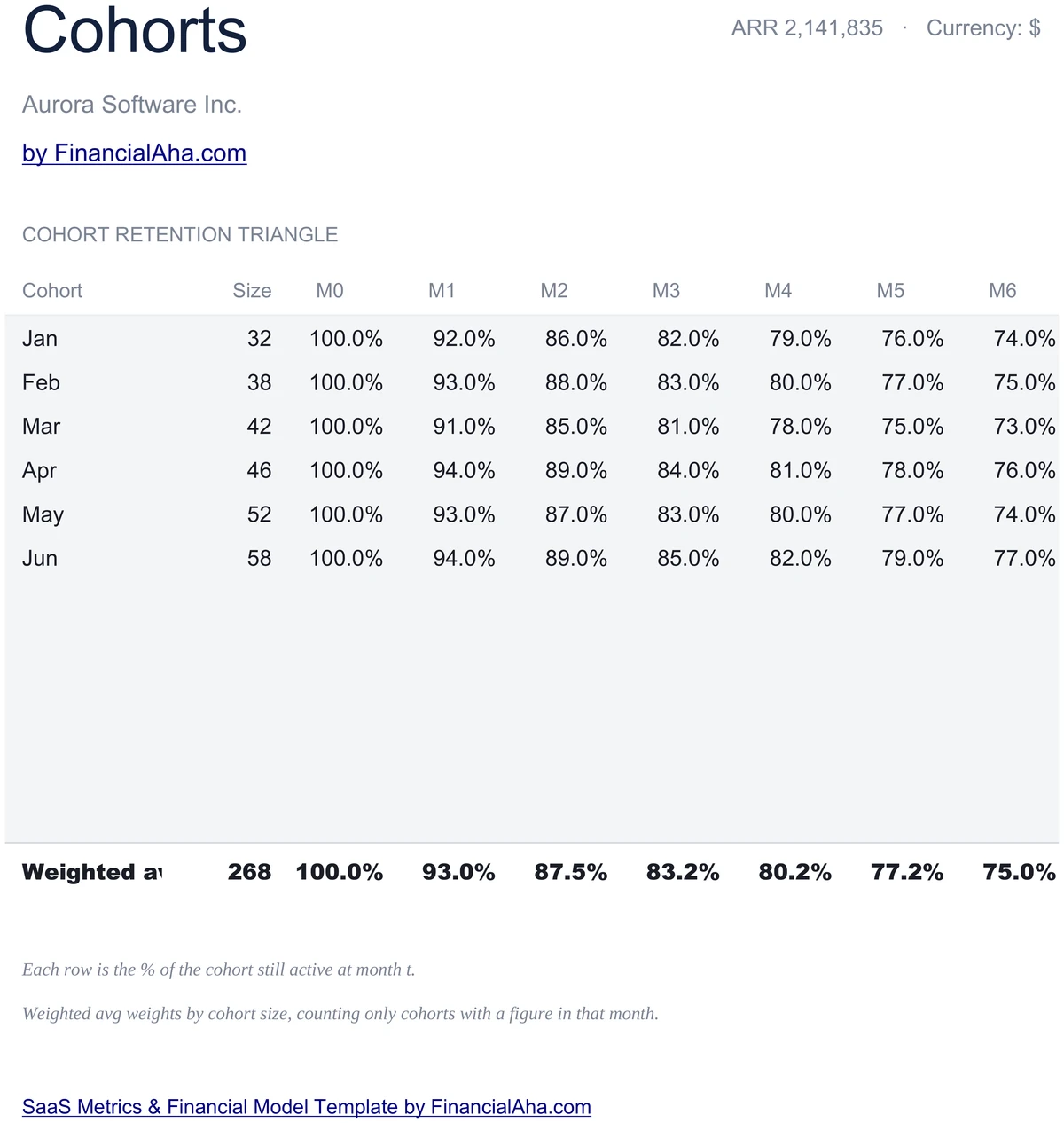
Six monthly cohorts with retention percent at month 0 through month 6. A weighted-average retention curve rolls them up by cohort size and powers the retention chart on the dashboard. The shape of that curve tells you whether retention is improving.
- 6 monthly cohorts, M0 through M6
- Weighted-average curve by cohort size
- Powers the dashboard retention chart
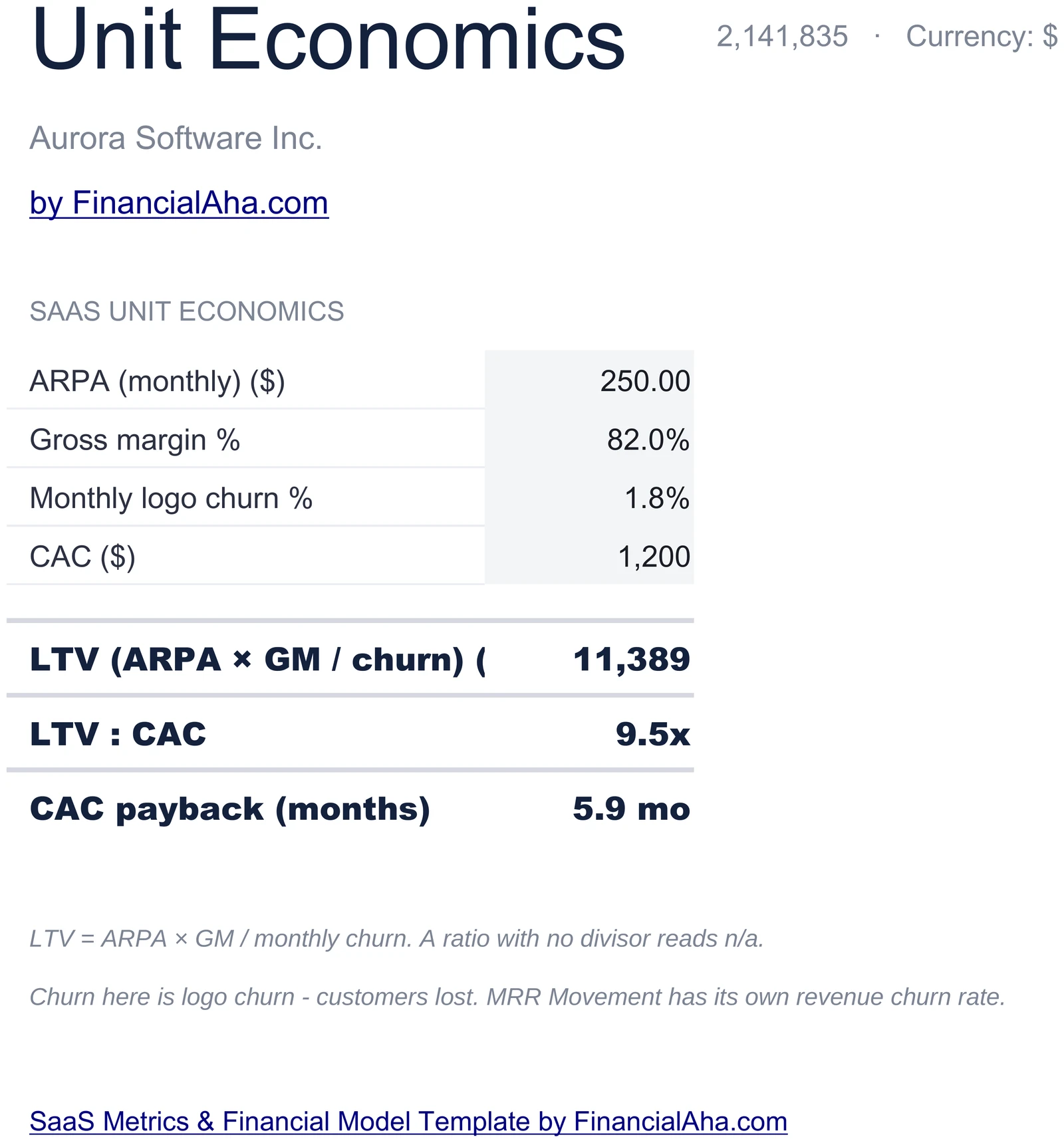
LTV, LTV:CAC, CAC Payback
Enter ARPA, gross margin, monthly churn rate, and CAC. LTV calculates as ARPA times gross margin divided by churn. LTV:CAC follows, and CAC payback comes out as CAC divided by ARPA times gross margin - both flagged against standard benchmarks on the dashboard.
- ARPA, GM%, churn, and CAC inputs
- LTV = ARPA × GM / churn
- LTV:CAC and CAC payback months
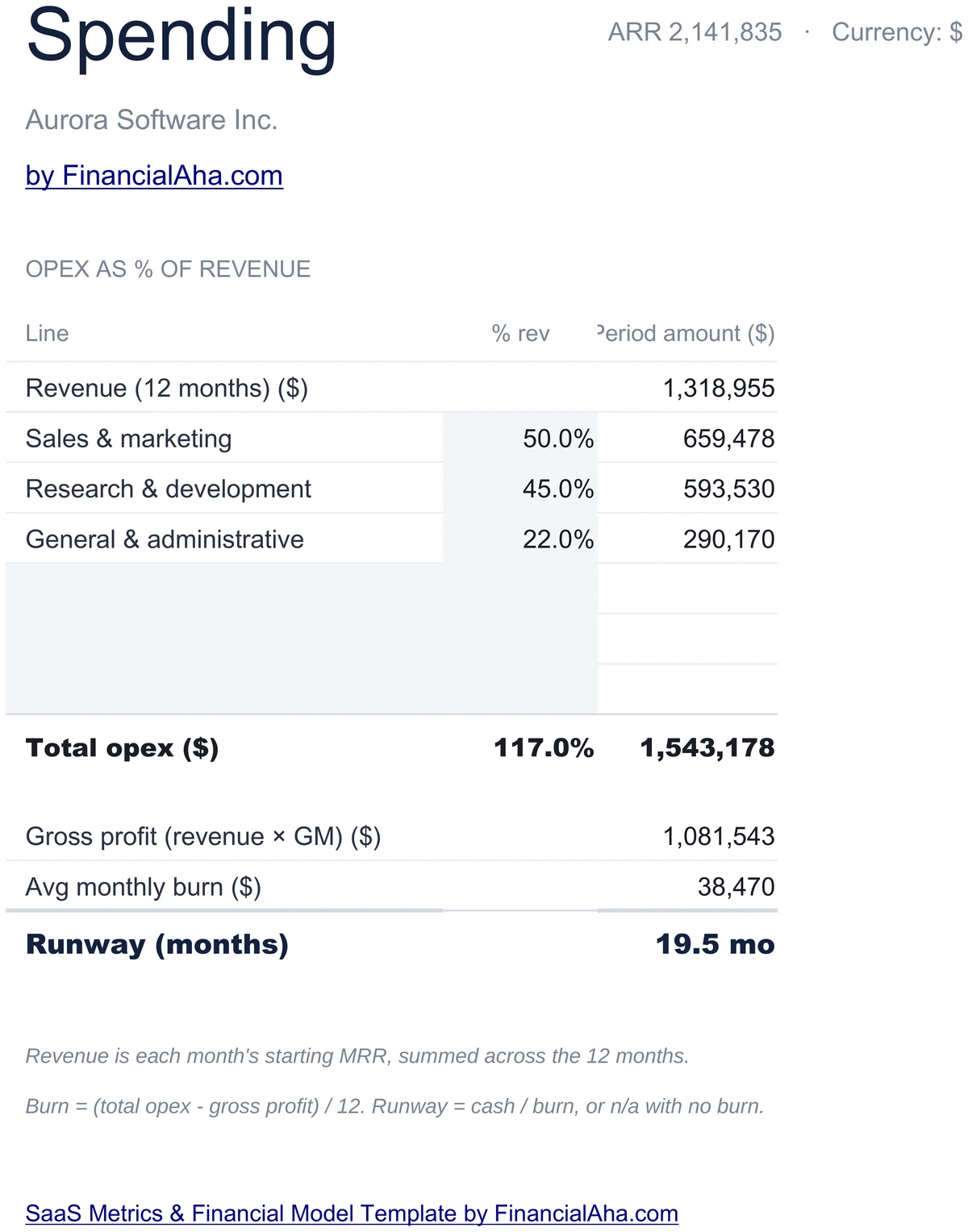
S&M, R&D, G&A as % of Revenue
Set sales & marketing, R&D, and G&A as percent of revenue. The sheet derives monthly burn and runway in months from cash on hand. Useful for stress-testing efficiency before you raise the next round.
- S&M, R&D, G&A as % of revenue
- Monthly burn and runway in months
- Cash on hand on Settings drives runway
Calibrated Against SaaS Norms
NRR at or above 100% means existing accounts are net growing. GRR at or above 95% is healthy retention. LTV:CAC at or above 3x is the long-standing benchmark. CAC payback at or below 12 months is healthy for most B2B SaaS. The dashboard cards reflect those bands.
- NRR ≥ 100%, GRR ≥ 95%
- LTV:CAC ≥ 3x marks the healthy line
- CAC payback ≤ 12 months for B2B SaaS
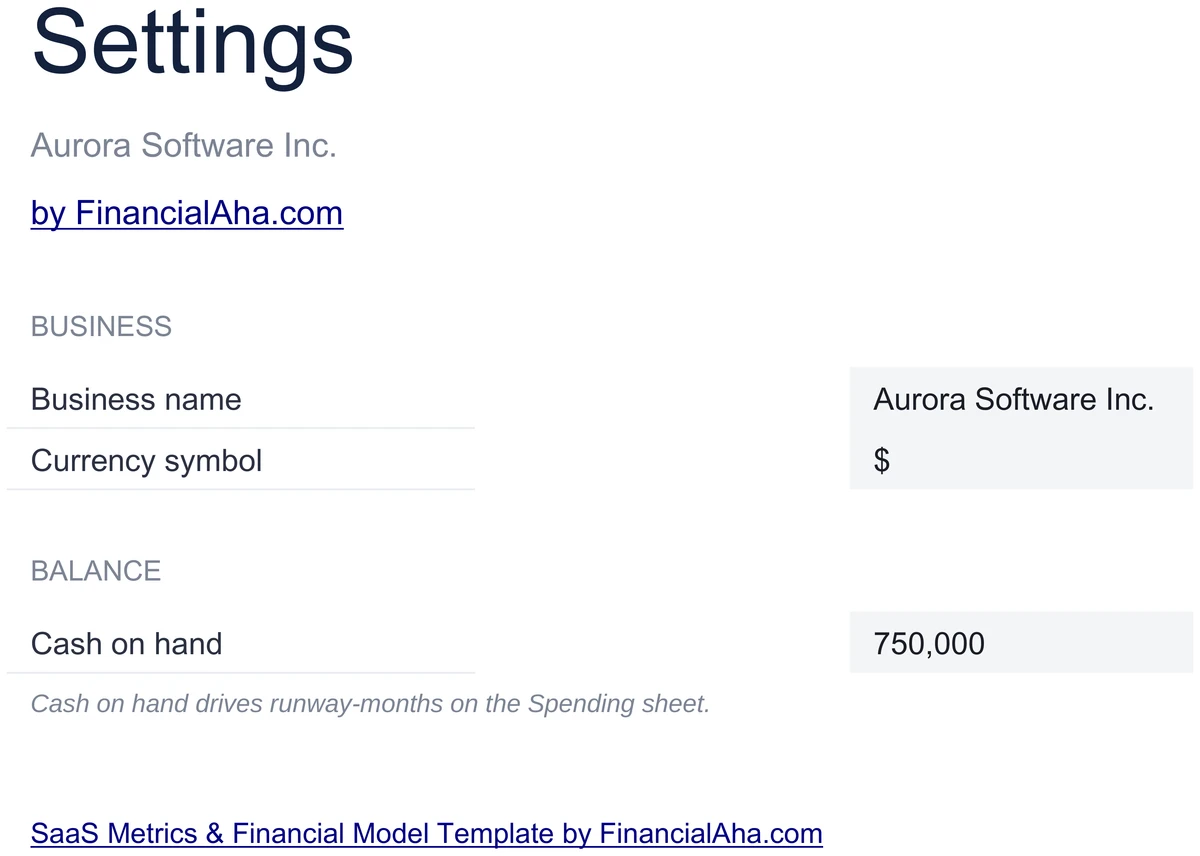
Configure It for Your SaaS
Set your business name, currency, and cash on hand. Cash on hand drives the runway figure on the dashboard. The rest of the workbook reads these values, so you set them once.
- Business name and currency
- Cash on hand drives runway
- Set once, the workbook reads them
Customizable & Flexible
Adapt the workbook to your motion. Tweak the MRR inputs, add cohorts, change spending mix - the formulas update automatically. Works identically in Excel and Google Sheets.
- Adjust MRR inputs and cohort retention
- Tweak spending mix and ARPA
- Excel and Google Sheets compatible
Ready to take control of your finances?
Set Up in 15 Minutes
How the SaaS Model Works
Open in Excel or Google Sheets
Get instant access after purchase. Open in Microsoft Excel directly, or import into Google Sheets - no software to install, no add-ons.
Configure Your SaaS
Set your business name, currency, and cash on hand on the Settings sheet. Takes about 15 minutes.
MRR Movement and Cohorts
Enter monthly new MRR plus expansion, contraction, and churn rates. Fill the cohort retention grid for 6 monthly cohorts.
Unit Economics and Spending
Set ARPA, gross margin, churn, CAC, and spending percentages. LTV, LTV:CAC, payback, and runway calculate automatically.
Built for SaaS Operators
Why Operators Use This Model
SaaS-Native KPIs
Built around MRR, ARR, NRR, GRR, LTV:CAC, CAC payback, and runway - the numbers SaaS operators actually run on.
No Formulas to Write
Enter numbers in highlighted input cells. NRR, GRR, LTV, LTV:CAC, CAC payback, retention curve, and runway are pre-built.
Excel and Google Sheets
Works identically in Microsoft Excel and Google Sheets. No macros, no add-ons, no proprietary functions.
Free Lifetime Updates
Any updates we release to the SaaS model included at no extra cost.
Your Financial Data Stays Private
Runs entirely in your spreadsheet. Your data stays in your file - we never see or store it.
One-Time Purchase
Pay once, use forever. No subscriptions, no monthly fees, no recurring charges.
Got Questions?
Frequently Asked Questions
Is this template free to use?
This template is not free, but it is available for a one-time purchase. This purchase gives you lifetime access to the template and to any updates we release.
What do you mean by lifetime access?
Lifetime access means that you will have access to this template for as long as you need it. You will not be required to pay any additional fees for continued access to the template or to any updates we release.
Do I need to sign up to use this template?
You don't need to create an account with us. The template is delivered as an Excel file: open it directly in Microsoft Excel, or import it into Google Sheets from your own Google account if you prefer working there.
What are the benefits of using this template?
This template offers a range of benefits, including: Easy-to-use interface, Customizable to suit your needs, Secure and private, Free access to any updates we release, One-time purchase for lifetime access.
Can I get future updates?
Yes. Whenever we release an update to this template, you get it at no additional cost - lifetime access covers every version we publish. We do not commit to a fixed update schedule; improvements ship when they are ready.
Do you offer any discounts?
There are no discount codes for individual templates, but many templates are also part of a bundle that costs less than buying the same templates separately. Either way it is a one-time purchase with lifetime access and free updates.
Do you have any access to my financial data?
No, we do not have access to your financial data when you use this template. The template is a file you keep yourself, on your computer or in your own Google Drive, so your financial information never reaches us.
Is this template financial advice?
Our templates are not financial advice. They are tools designed to help you manage your personal finances more effectively. If you need personalized financial advice, consider consulting with a financial advisor or accountant.
Can I make my own changes and customize this template?
Yes, you can make your own changes and customize this template to suit your needs. The template is designed to be flexible and adaptable, allowing you to add or remove sections, change formulas, and adjust formatting as needed.
Do you offer technical support?
This is a self-service product, and we do not offer technical support. However, if you encounter any issues or have any questions about the template, please contact our team for assistance. Because everyone's financial situation is unique, consider consulting with a financial advisor or accountant if you need personalized financial advice.
Do you offer refunds?
Because these digital products are delivered instantly, purchases are generally final once you consent to immediate delivery at checkout. If the file we delivered has a genuine error, such as a formula that miscalculates or a feature its page describes but the file lacks, tell us what does not match: we will fix or replace it, or refund you if we cannot. Reporting within 30 days speeds resolution but never limits your statutory consumer rights; the full policy is in our Terms & Conditions.
Can't find the answer you're looking for? Contact our team
Instant digital delivery · Terms & Conditions apply
Highlights:
Run Your SaaS on the Right Numbers
Get the SaaS Metrics & Financial Model and track MRR, NRR, GRR, LTV:CAC, and runway in Excel or Google Sheets.