Free Money Management for Kids Spreadsheet Template for Google Sheets & Excel
Money coming in on the top rows, money going out beneath, twelve rows in all on a single working sheet. The Free Money Management for Kids spreadsheet template sets the plan beside what actually happened, works out the difference on every row, and shows budgeted balance, actual balance and the gap between them above the table. Google Sheets or Excel, one file. No macros, no VBA.
The FinancialAha Free Money Management for Kids Spreadsheet Template is a one-sheet workbook for Google Sheets and Excel, with a How to Use guide on a second tab. It works as a Free Money Management for Kids Excel template and a Free Money Management for Kids Google Sheets template from the same download. Money in and money out on rows of their own, with a plan beside what actually happened and what is left at the foot. No macros, no VBA.
Inside the workbook
What's inside the FinancialAha Free Money Management for Kids spreadsheet template
The FinancialAha Free Money Management for Kids Spreadsheet Template runs on a single working sheet, with the instructions on a tab of their own. It works in both Microsoft Excel and Google Sheets and here is what the Free Money Management for Kids spreadsheet holds.
01of 01
Kid Money
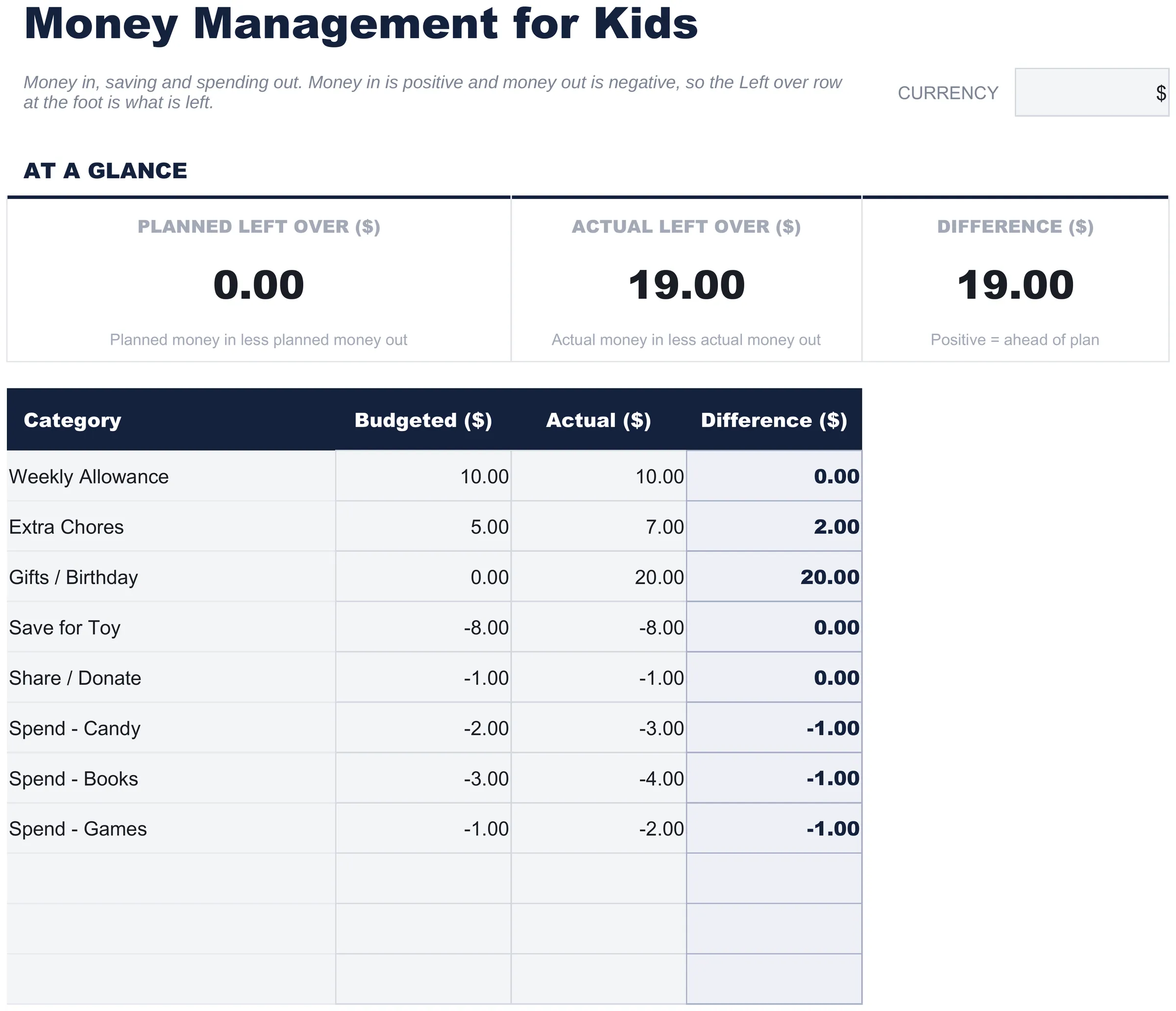
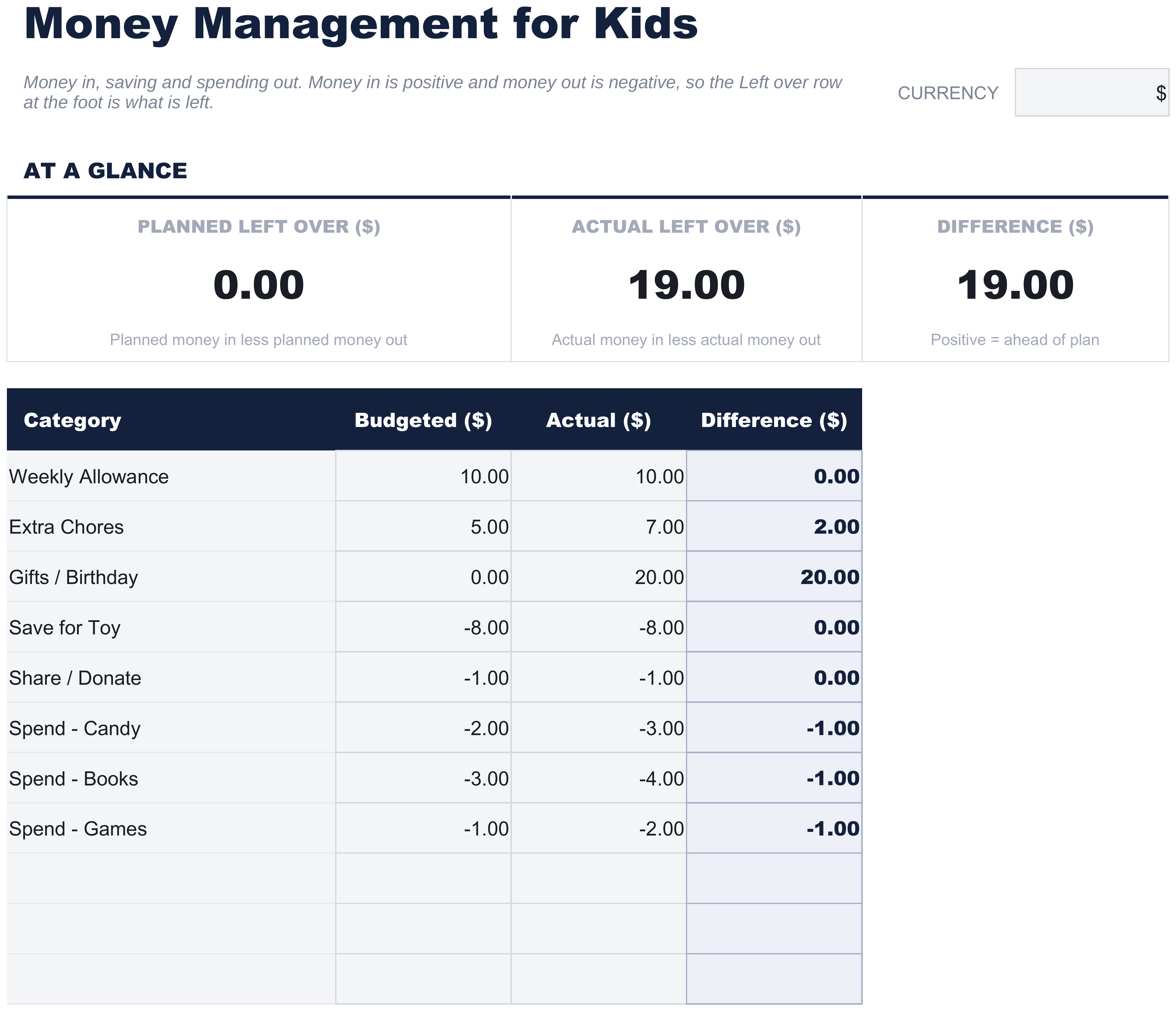
Some rows come labelled as a starting point and the rest are blank for whatever your household adds. The first few are money coming in - an allowance, extra jobs, a birthday - entered as positive amounts. The rest are money going out, entered as negatives: what gets set aside, what goes to giving if that is part of how your family does it, and what gets spent, split across a few kinds of spending.
Each row carries two figures: the plan and what actually happened. The difference sits beside them and reads positive where the row came out ahead of the plan.
Above the table sit three figures that restate the whole sheet: the budgeted balance, the actual balance, and the gap between the two. They move as the rows are filled in, so the plan, the outcome and the distance between them are readable without scrolling.
Money set aside is a negative row rather than a leftover, which is the one convention worth explaining to whoever is filling it in. It means the total at the foot is what remains after saving rather than before it - so the number at the bottom is genuinely spendable, and a week where the saving happened does not look identical to one where it did not.
The row labels are a starting point. Which categories exist, what goes in them and what any of it should add up to are decisions for the family rather than the spreadsheet - the sheet counts, and nothing in it takes a position.
Kid Money
Included guide
How to Use
A step-by-step guide on its own tab, covering the positive-and-negative convention, how to replace the sample values, and how to change the currency. Because it ships inside the file, the instructions travel with the template wherever it is opened.
Works in both Google Sheets and Excel
Free Money Management for Kids Spreadsheet template for Google Sheets
Upload the Free Money Management for Kids Spreadsheet Template to Drive, right-click it, and choose "Open with Google Sheets". This Free Money Management for Kids Google Sheets template needs no conversion step and nothing gets rewritten on the way in - the totals recalculate exactly as they do in Excel.
Free Money Management for Kids Google Sheets template setup
A shared copy of the Free Money Management for Kids Google Sheets template lets a parent and a child both open the same file, so neither has to relay what it says to the other.
Running the Free Money Management for Kids Google Sheet
The Free Money Management for Kids Google Sheet is short enough to update in a minute. It opens on a phone or a tablet, which is often the device to hand.
Free Money Management for Kids Spreadsheet template for Excel
The Free Money Management for Kids spreadsheet Excel download is a plain .xlsx. Excel opens this Free Money Management for Kids Excel template directly, with no import step and no compatibility prompt, and the totals update as figures change. There are no macros and no VBA in the file, so it opens without a security warning.
Free Money Management for Kids Excel template setup
The same Free Money Management for Kids Excel template opens in Excel on Windows, Excel on Mac, and Excel for the web. It is also the identical file you would upload to Drive, so there is no separate Free Money Management for Kids spreadsheet download to choose between.
Free Money Management for Kids spreadsheet Excel notes
The Free Money Management for Kids spreadsheet Excel file carries no macros and no VBA, so Excel opens it without a trust prompt.
Opening the Free Money Management for Kids spreadsheet Excel file
Nothing in the Free Money Management for Kids Excel template is version-specific, so this Free Money Management for Kids spreadsheet Excel workbook behaves identically in Excel on Windows, Excel on Mac, and older builds.
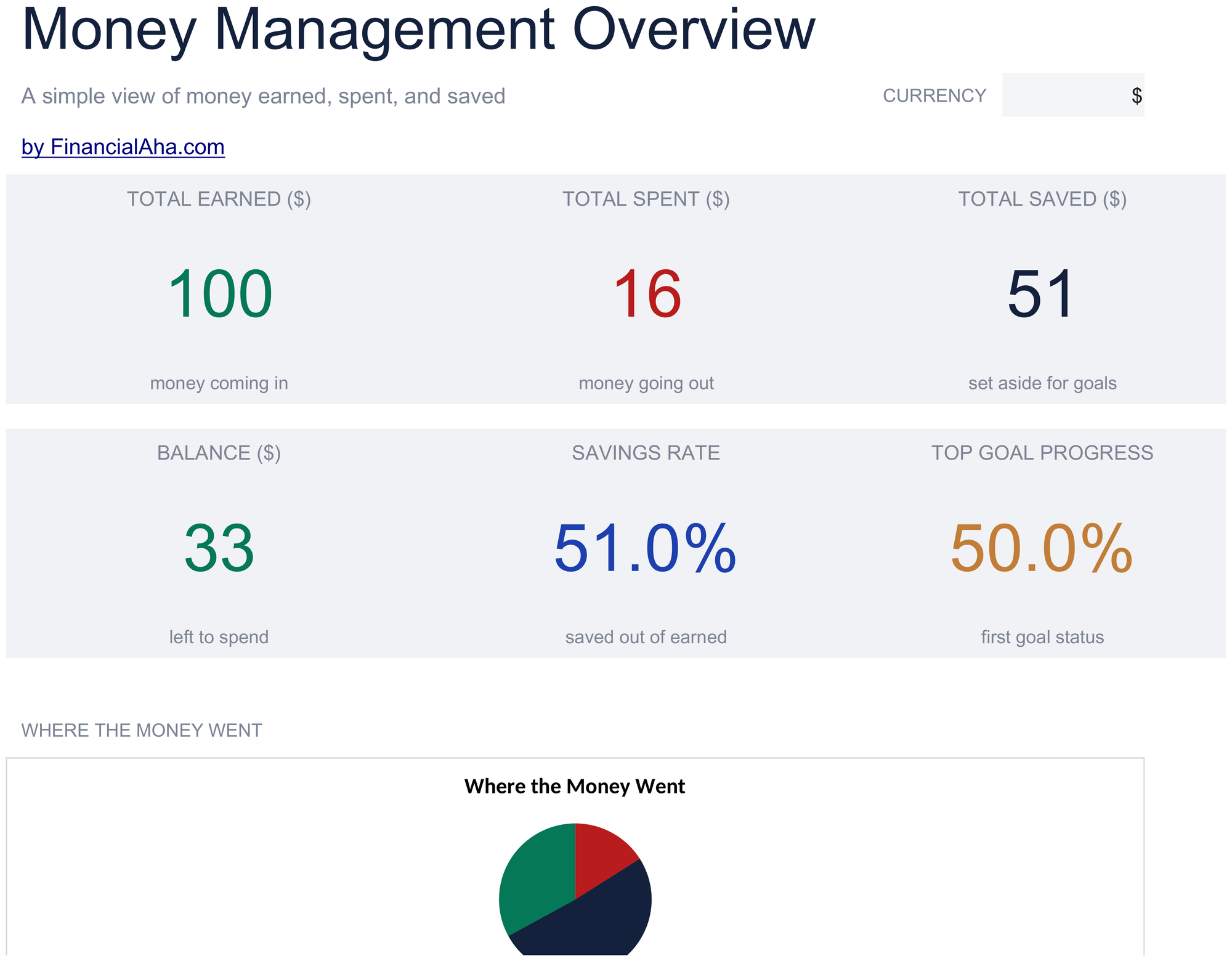
The FinancialAha Free Money Management for Kids Spreadsheet Template is a plan against what happened, one week at a time, with the total showing what is left. The Essentials Money Management for Kids Spreadsheet Template for Google Sheets and Excel works the other way round - a dated log where each entry records what happened and what it was, with earned, spent and saved in their own columns and a balance running down the sheet. It adds a savings-goals block carrying a target, what has been put towards it and how far along that is, plus a dashboard reporting what has been earned, spent and saved with two charts.
Notes on working in the Free Money Management for Kids spreadsheet template
Money in is positive and money out is negative, which is what makes the row at the foot the money left.
Setting money aside is entered as an outgoing, so the total is what remains after saving rather than before it.
The Difference column reads actual less planned, so a positive number means that row came out ahead of the plan.
The two headline figures sum the whole column, money in and money out together, so each reports a balance rather than a total spent.
A dated log with a running balance and savings goals is on the Essentials build.
The dropdown beside the title relabels the money columns. It changes the label and nothing else.
How the Money Management for Kids template works
The Free Money Management for Kids Spreadsheet Template puts everything on one sheet: money coming in at the top - an allowance, extra jobs, a birthday - entered as positive amounts, and money going out beneath as negatives, covering what gets set aside, what goes to giving if that is part of how your family does it, and what gets spent. Each row carries the plan beside what actually happened, with the difference worked out. Money set aside is a negative row rather than a leftover, which means the total at the foot is what remains after saving - so the number at the bottom is genuinely spendable. The row labels are a starting point: which categories exist and what goes in them are decisions for the family, and nothing in the sheet takes a position.
When this template helps
01
A child is getting an allowance and you want somewhere to write it down.
02
You want the plan and what happened side by side rather than one or the other.
03
A parent and child want to look at the same file rather than one reporting to the other.
04
You want something short enough to fill in without it becoming a chore.
Tips to get the most out of it
The categories are a starting point. Which ones exist and what belongs in them is a decision for the family, and every label is free text.
Filling the planned column together and coming back to the actual column later is what gives the difference column something to say.
Because saving is a row like any other, a week that funded it still shows what was left afterwards.
Common mistakes to avoid
Entering money going out as a positive number, which makes the total add things that should subtract.
Treating money set aside as still available - the total already takes it off.
Filling in the plan and never coming back to what happened, which is where the difference column comes from.
Reading the sheet as though it recommends a split. It records; the decisions are yours.
How to Use the Free Money Management for Kids Spreadsheet Template
Every template starts with deep research into how people actually track the topic. We design the layout, build the formulas, and polish the design until it feels like something we would use ourselves. Along the way, we use AI to stress-test the calculations: unusual inputs, edge cases, and formula behavior, checked until the numbers hold.
Excel
Sheets
Privacy by default
Your numbers stay in your own file
Formula-driven
All calculations update automatically
Dual compatible
Works in Excel and Google Sheets
Sample data included
See the template in action right away
Frequently Asked Questions
What is the difference between the free and Essentials Free Money Management for Kids spreadsheet template?
Free is a single-sheet starter template with sample data and a How to Use guide. Essentials ($19) is the fuller build, with more worked out for you rather than typed. This template has no Ultimate build. What each tier holds differs by template - the comparison table on every template page lists it exactly.
Which Free Money Management for Kids spreadsheet template should I download?
Essentials is the fuller build of this template for ongoing use, and the comparison table on this page lists exactly what it adds. The Free version is a good fit for one-off planning or trying out the layout.
Can I upgrade the Free Money Management for Kids spreadsheet template later?
Yes. Essentials is a one-time $19 purchase with no subscription. What it adds depends on the template: some builds gain capacity and a dashboard, others richer detail in the same layout. The comparison table on this page lists the differences exactly.
Is the FinancialAha Free Money Management for Kids Spreadsheet Template a Google Sheets template?
Yes. Upload the file to Drive and choose "Open with Google Sheets". Nothing needs rewriting in the Free Money Management for Kids Google Sheets template, and a parent and child can both open the same file.
Is the FinancialAha Free Money Management for Kids Spreadsheet Template an Excel template?
Yes. The download is a plain .xlsx, so the Free Money Management for Kids Excel template opens directly in Excel with no import step. There are no macros and no VBA.
Will the FinancialAha Free Money Management for Kids spreadsheet Excel file open in older versions of Excel?
Yes. The Free Money Management for Kids spreadsheet Excel workbook ships as a plain .xlsx, so it opens identically in current Excel and in builds that predate dynamic arrays.
Why does the Free Money Management for Kids Spreadsheet Template enter money set aside as a negative?
So the total at the foot is what remains after it rather than before. It means the number at the bottom is genuinely spendable, and a week where the saving happened does not look identical to one where it did not.
Can we change the categories in the Free Money Management for Kids Spreadsheet Template?
Yes. The row labels are a starting point. Which categories exist and what goes in them is a decision for the family - the sheet counts and takes no position on any of it.
Does the Free Money Management for Kids Spreadsheet Template say how much to save or give?
No. It has no targets and no rules in it. It records what was planned and what happened, and everything else is for whoever is using it to decide.
Is the Free Money Management for Kids spreadsheet download safe to open?
Yes. No macros, no tracking. The file is a plain .xlsx that opens directly in Excel or Google Sheets.
How do I open the Free Money Management for Kids spreadsheet template in Google Sheets?
Upload the .xlsx file to Google Drive, then open it with Google Sheets. All formulas and formatting will be preserved.
Can I use the Free Money Management for Kids spreadsheet template for commercial work?
All free templates are released under CC BY 4.0 (Creative Commons Attribution). You can use, modify, and share them freely - including for commercial purposes - as long as you credit FinancialAha.com. They are provided as-is and do not constitute financial advice.