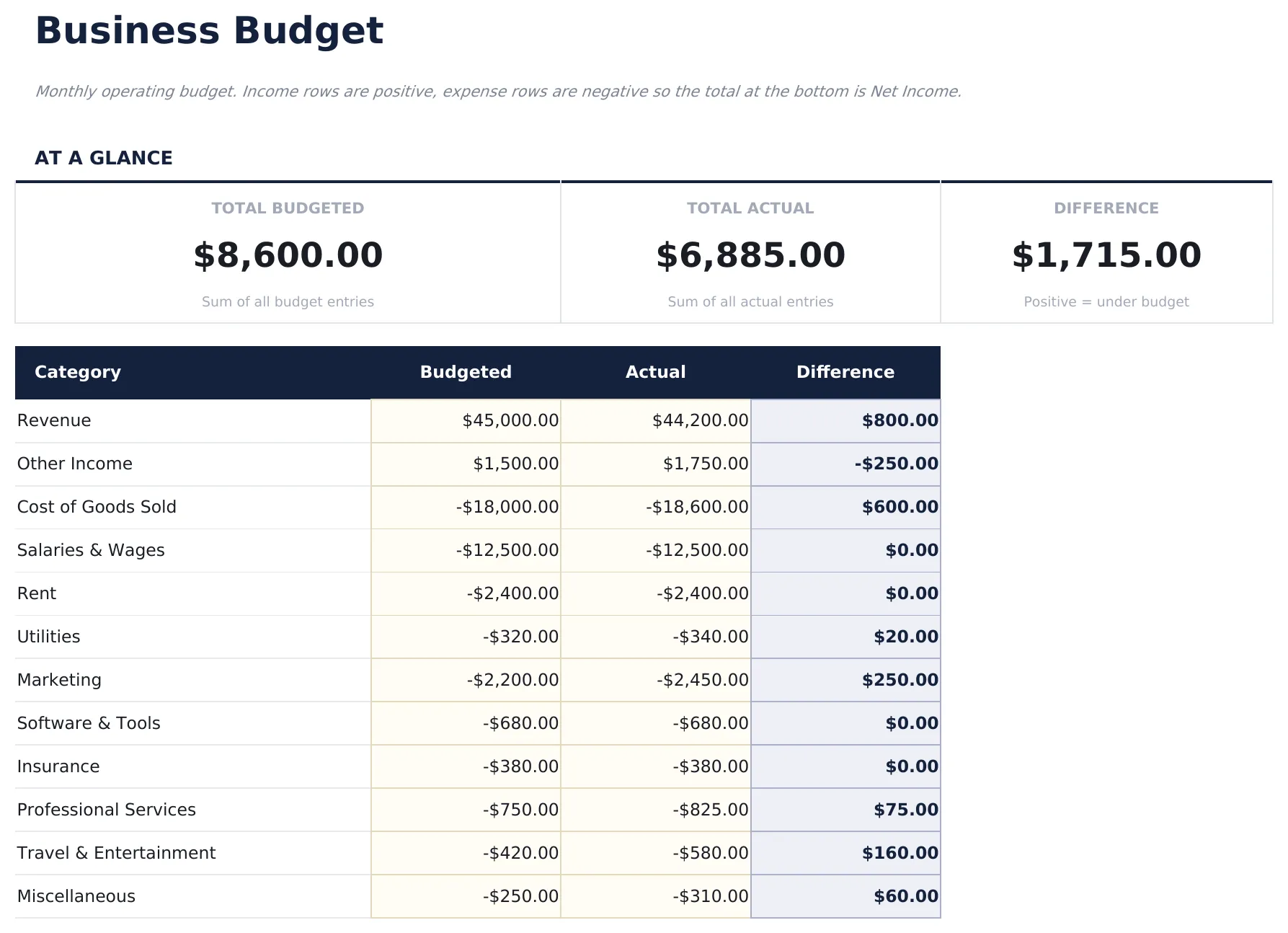
- Pre-filled budget worksheet titled "Business Budget" with sample income and expense categories
- Automatic totals, running balance, and surplus/deficit calculation
- Color-coded input cells so you know exactly where to type your own numbers
- Step-by-step "How to Use" guide included in a second sheet
- Works in Microsoft Excel, Google Sheets, and LibreOffice Calc - no setup or sign-up
Free Business Budget Spreadsheet Template
Monthly operating budget for a small business covering major spend categories.
Essentials $12 Ultimate $19 Free See Comparison & Free Download
Free, Essentials, and Ultimate - what's the difference?
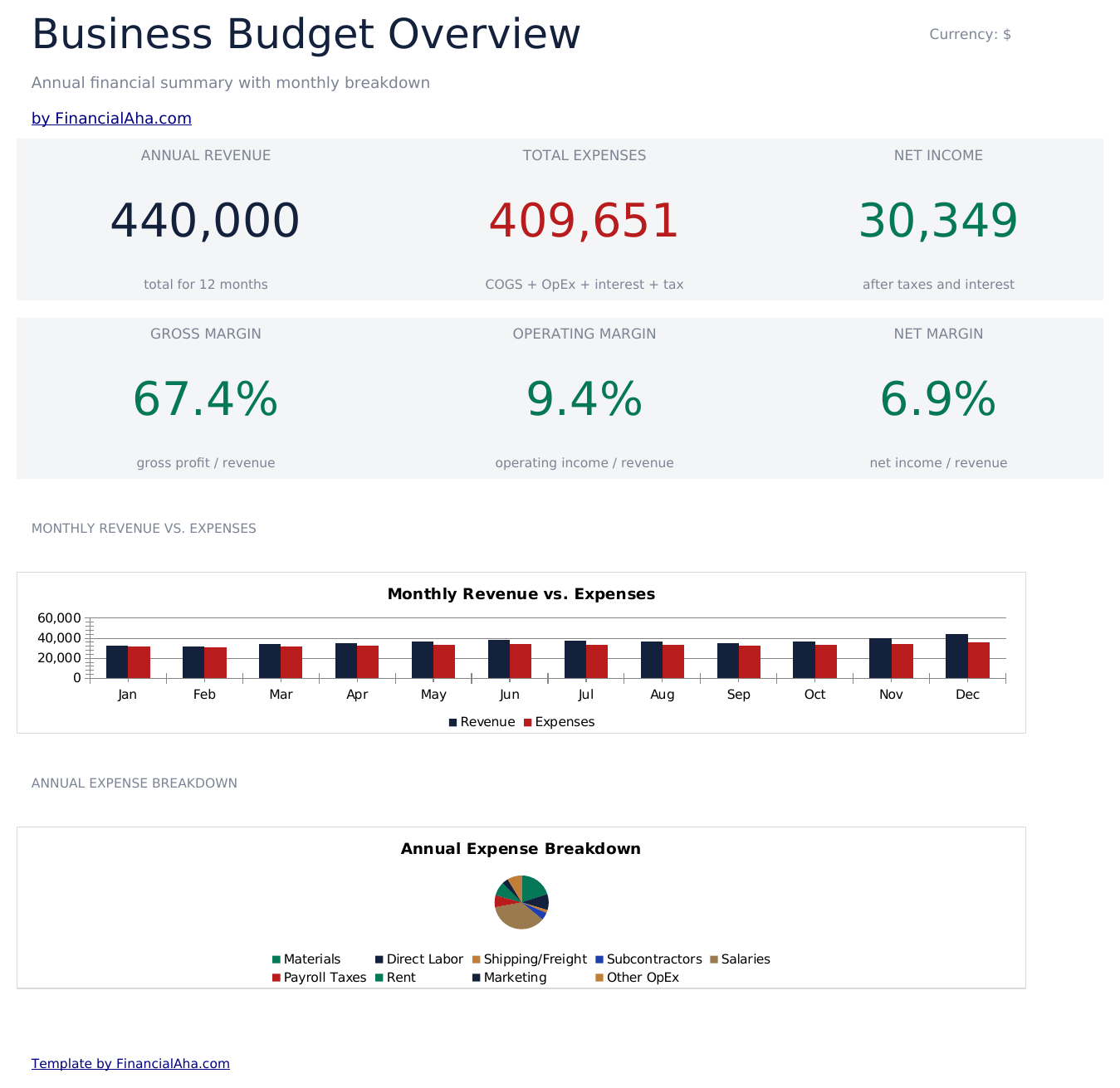
Essentials Business Budget
- Everything in Free
- Dashboard with business budget overview showing total revenue, total expenses, net income, and budget utilization
- Monthly budget with revenue categories and expense line items for payroll, rent, marketing, utilities, and supplies
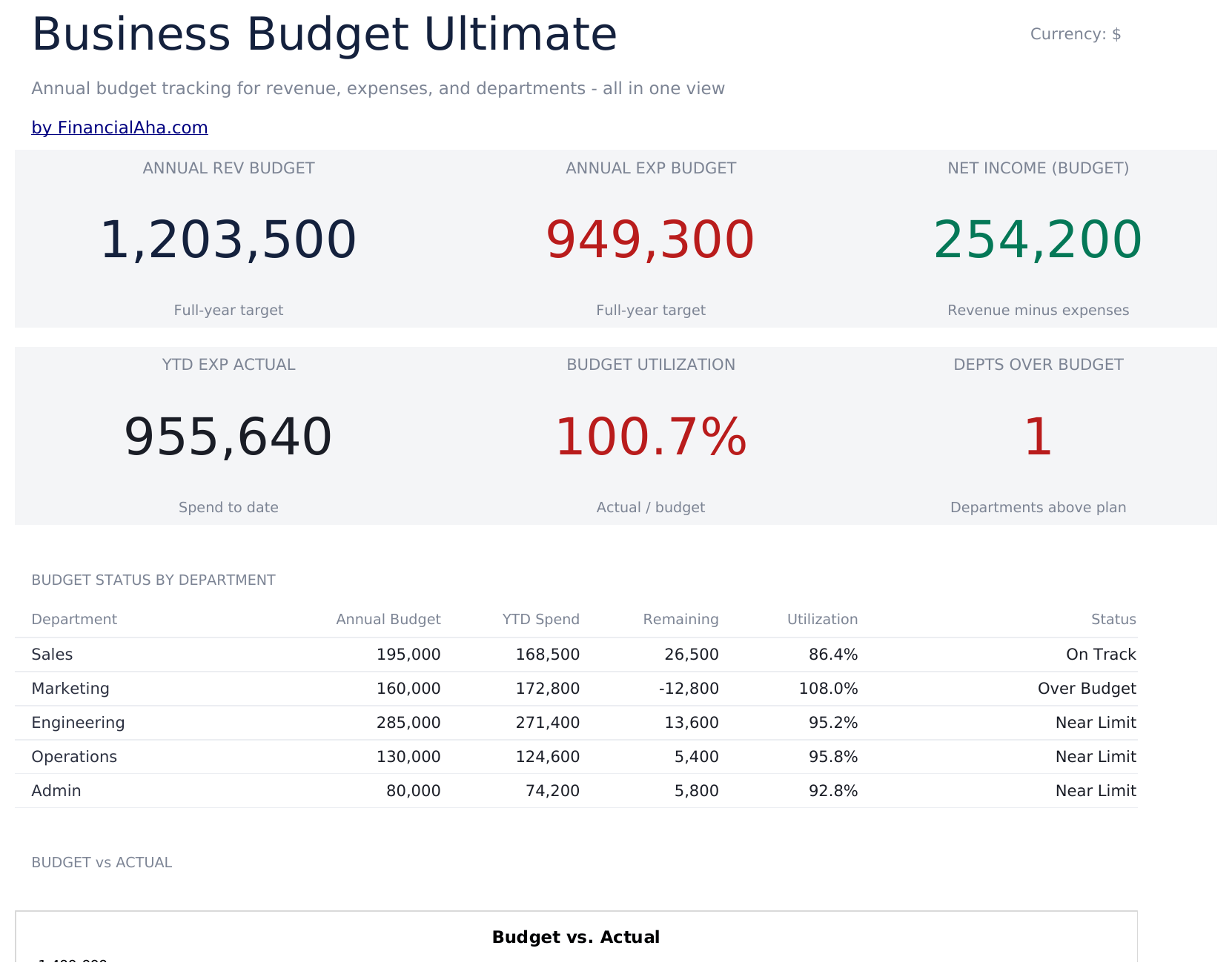
- Department or category breakdowns allowing separate budget tracking for sales, operations, admin, and other teams
- Budget vs. actual comparison columns with automatic variance calculations for every revenue and expense line
Ultimate Business Budget
- Everything in Essentials
- Revenue Budget sheet with up to 10 revenue streams, monthly targets, and annual totals with editable growth assumptions
- Expense Budget sheet covering up to 15 expense categories across 12 months with monthly and annual totals
- Department Budgets sheet allocating budget across up to 6 departments with headcount, salary, and operating expense breakdowns
- Dashboard with 6 KPI cards: budgeted revenue, budgeted expenses, net budget, largest expense category, revenue growth rate, and operating margin
How the Business Budget template works
Monthly operating budget. Income rows are positive, expense rows are negative so the total at the bottom is Net Income. A net-income business budget. Income goes in as positive amounts, expenses go in as negative. The total at the bottom shows Net Income (profit or loss) for both budgeted and actual columns.
When this template helps
You just started tracking spending and want a clear monthly snapshot.
You want to see where your money actually goes compared to what you planned.
Your expenses changed (new job, moved, new baby) and you need to re-baseline.
You prefer a spreadsheet you control over a budgeting app.
Tips to get the most out of it
- If you want gross margin, add a subtotal under "Cost of Goods Sold" before operating expenses.
- Seasonal business? Copy the sheet for each month and track trends with a yearly rollup file.
Common mistakes to avoid
- Forgetting to include savings as a category - treat savings like any other bill so it gets funded first.
- Using gross income instead of take-home. Budget with what actually lands in your account.
- Over-optimistic "variable" categories. Groceries and dining out almost always come in higher than memory suggests.
How to Use This Business Budget Template
Frequently Asked Questions
What is the difference between Free, Essentials, and Ultimate?
Free is a single-sheet starter template (sample data + How to Use guide). Essentials ($12) adds a dashboard, charts, expanded categories, and pre-filled subcategories. Ultimate (when available) adds multi-entity tracking, scenario analysis, and power-user reporting across 6-7 interconnected sheets.
Should I upgrade to Essentials?
Upgrade to Essentials if you want a dashboard with charts, more categories, larger capacity, and a more polished spreadsheet for ongoing use. The Free version is a good fit for one-off planning or trying out the layout.
Is Essentials worth $12?
Essentials is a one-time $12 purchase with no subscription. It typically adds a full dashboard, 30-50% more categories or rows than the Free version, and richer formulas. Most buyers upgrade after using the Free version for a few weeks and hitting its limits.
What is included in the free version?
The free Business Budget is a single-sheet template with sample data and a "How to Use" guide. It covers the essentials. The Essentials version ($12) adds a dashboard, larger capacity, and extended categories; Ultimate (when available) adds multi-entity tracking and ultimate-grade reporting.
Can I add or rename categories?
Yes. Insert new rows above the totals row and rename any existing category. The SUM formulas adjust to include new rows automatically.
How do I start fresh without the sample data?
Select the amount cells and clear them. Keep the category labels and formulas intact - you can overwrite category names too if you want different labels.
Is the file safe to download?
Yes. No macros, no sign-up, no tracking. The file is a plain .xlsx that opens directly in Excel, Google Sheets, or LibreOffice Calc.
How do I open this in Google Sheets?
Upload the .xlsx file to Google Drive, then open it with Google Sheets. All formulas and formatting will be preserved.
What license is this template under?
All free templates are released under CC BY 4.0 (Creative Commons Attribution). You can use, modify, and share them freely - including for commercial purposes - as long as you credit FinancialAha.com. They are provided as-is and do not constitute financial advice.