
Pick the template that matches the one problem bothering you most right now, not the one you think you should have. If you don't know where your money goes, start with the Monthly Expense Tracker; if you know but can't control it, the Monthly Budget Template. Layer in annual, net worth, planning, retirement, or business tools only as new needs appear. Setting up several at once is the fastest way to maintain none.
Seven templates. Different purposes. The question isn’t which one is objectively the right choice - it’s which problem you’re actually trying to solve right now. Not what you think you should be doing with your finances. What’s actually bothering you.
Start there.
“I have no idea where my money goes”
This is the most common starting point, and it’s a perfectly good one. Money comes in, money goes out, and the gap between the two is a mystery. The checking account balance feels like a random number that occasionally dips in alarming ways.
The Monthly Expense Tracker exists for exactly this situation. No targets to set, no frameworks to learn, no guilt-inducing categories labeled “discretionary spending.” Just record what you spend and let the picture form on its own.
Something interesting tends to happen when people start tracking without judgment: the spending patterns become obvious within a few weeks. The $6 daily coffee doesn’t actually matter (it’s $180/month, sure, but most people who buy it know they’re buying it). The surprise is usually something else - the forgotten subscriptions, the impulse Amazon orders, the “quick” grocery runs that somehow cost $90. Pure observation, without any attempt to change behavior, often shifts spending patterns on its own.
“I know where it goes, but I can’t seem to control it”
This is a different problem. You have awareness but not structure. You know you’re spending too much on dining out, but knowing doesn’t translate into doing anything about it.
The Monthly Budget Template adds what tracking alone doesn’t provide: targets. Set spending limits for each category at the start of the month, track against them as you go, and review the gap between planned and actual at the end. The feedback loop is fast, thirty days rather than a year, which means you can adjust quickly.
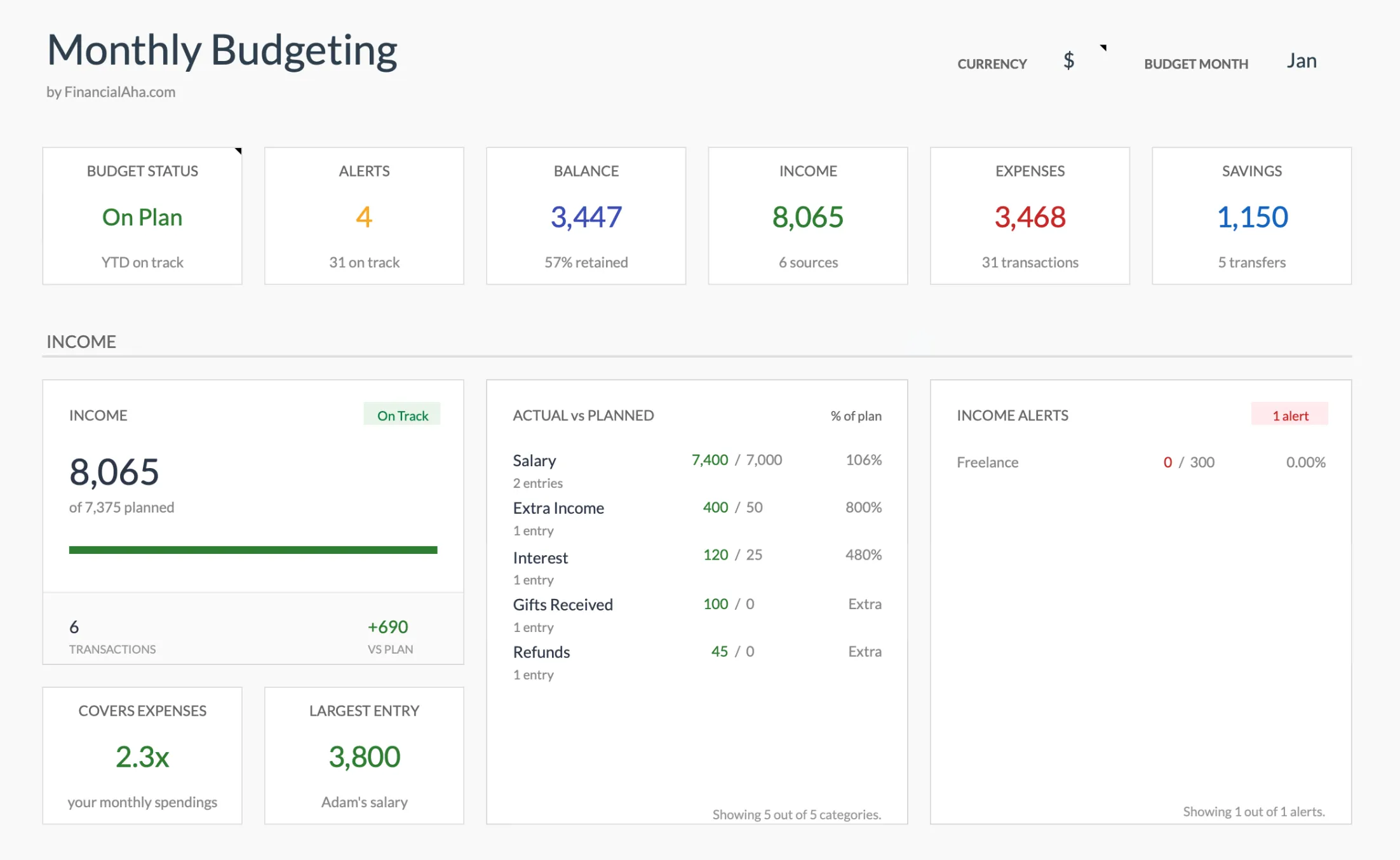 The Monthly Budget Template (Premium tier) tracks actual versus planned for each category, so the gap you are trying to close is visible at a glance.
This is where frameworks like 50/30/20 or zero-based budgeting come into play, one splitting income into needs, wants, and savings, the other giving every dollar a job. The template supports either approach. Some people find that having a framework reduces decision fatigue - instead of wondering “can I afford this dinner?”, the budget answers the question. Others find the frameworks too rigid and prefer loose category limits. Either way, the monthly budget gives you something to push against, which pure tracking doesn’t.
“I keep getting blindsided by irregular expenses”
Monthly budgets have a blind spot: they can’t account for things that don’t happen monthly. Insurance premiums that hit twice a year. Holiday gift spending concentrated in December. Quarterly estimated tax payments. That annual gym membership renewal you forgot about.
The Annual Budgeting Planner spreads everything across twelve months so you can see the full picture. That $1,200 insurance premium isn’t a surprise in June - it’s been sitting there in the plan since January. Holiday spending doesn’t blow up December’s budget because you budgeted for it across the year.
Some people jump straight to the annual template without doing monthly tracking first, a choice worth weighing if you are still deciding monthly versus annual budgeting. That works if you already have a reasonable sense of your spending categories. If you’re starting from scratch, a month or two of basic tracking makes the annual targets more realistic. Otherwise you’re guessing at numbers for twelve months, which tends to produce a plan that looks clean in January and falls apart by March.
“I have multiple goals competing for the same money”
This is the point where budgeting stops being enough. You want to save for a house, pay off student loans, build an emergency fund, and invest for retirement - but the paycheck is the same size regardless of how many goals you have. Something needs to give, and figuring out what requires seeing how the pieces connect.
The Financial Planning Template goes beyond monthly spending. It covers assets, debts, cash flow, and long-term projections in one place. Because the projections update as you change the inputs, you can see how a decision like raising your savings rate or paying down a debt faster shifts your trajectory, rather than only tracking what has already happened. That connected view is the difference between reacting to your finances and steering them.
This is typically a second step, not a starting point. People who get the most out of it usually have basic budgeting under control and want to think at a higher level. The Financial Planning PRO Bundle includes this template along with additional planning tools.
“I just want to know if I’m building wealth”
Net worth, what you own minus what you owe, distills your entire financial position into one number. It’s the metric that cuts through everything else. You can have a high income and a negative net worth. You can have a modest income and steadily growing wealth. Net worth tells you which direction you’re actually heading.
The Net Worth Tracker takes minutes to update. Refresh your account balances once a month or once a quarter, and watch the number over time. It’s the lowest-maintenance option on this list, and for people who are motivated by watching a number move in the right direction, it can be more motivating than detailed budgeting.
Net worth tracking pairs well with a budget template. The budget controls the monthly flow; the net worth tracker shows whether that flow is actually building something over time.
“I need to think about retirement”
Retirement planning operates on different timescales and requires different assumptions than monthly budgeting. Thirty years of compound growth, inflation adjustments, withdrawal strategies, Social Security timing - the variables multiply. A monthly budget template isn’t built for this.
The Retirement Financial Planning Template handles year-by-year projections, scenario comparisons (retire at 60 vs. 65, different savings rates), and withdrawal modeling. It’s designed for people within 10-20 years of retirement who want ongoing tracking rather than a one-time calculator result, though younger users can get value from understanding how current savings rates affect long-term outcomes.
“I run a business and personal finances blur together”
Business finances follow different rules. Revenue is variable, timing matters as much as amounts, and running out of cash is an existential risk rather than an inconvenience. Personal finance templates aren’t built for this, which is why many people keep personal budgets and business cash flow in separate tools.
The Cash Flow Forecast Template projects business revenue and expenses twelve months out, accounting for seasonal patterns and variable income. For freelancers and small business owners, the question isn’t “did I spend too much on groceries?” - it’s “can I make payroll in March?”
If you run a business, keeping business and personal finances in separate templates (the cash flow forecast for business, the Monthly Budget Template for personal) prevents the blurring that makes both sides harder to manage.
Quick Reference
| Your Situation | Template | Effort Level |
|---|---|---|
| No idea where money goes | Expense Tracker | Low |
| Can’t control spending | Monthly Budget | Low-Medium |
| Irregular expenses blindside you | Annual Budget | Medium |
| Multiple competing goals | Financial Planning | Medium-High |
| Want to track wealth building | Net Worth Tracker | Low |
| Thinking about retirement | Retirement Planning | Medium-High |
| Business cash flow | Cash Flow Forecast | Medium |
Starting Points by Life Stage
The same problems tend to cluster around life stages. If one of these situations sounds familiar, it can point to a reasonable first template and a natural second one to layer in later.
| Situation | Where to start | What often comes next |
|---|---|---|
| Recent graduate with a first real income | Monthly Budget Template | Net Worth Tracker once savings start to build |
| Dual-income household planning together | Annual Budgeting Planner | Financial Planning Template for shared goals |
| Mid-career and thinking about retirement | Financial Planning Template | Retirement Financial Planning Template for detailed modeling |
| Carrying multiple debts | Monthly Budget Template | Financial Planning Template to model payoff timelines |
| Want a complete picture of everything | Net Worth Tracker | Monthly Budget Template for ongoing tracking |
One Template at a Time
The most common mistake is setting up three templates at once and maintaining none of them. Pick the one that addresses your most pressing problem. Use it until it feels natural. Then, if another problem emerges, add another tool. Expense tracking naturally leads to wanting targets. Monthly budgeting leads to the annual view. Net worth tracking leads to wanting projections. The progression happens when it makes sense, not because a template catalog told you to buy everything.
Getting Started Guides
- How to Create a Monthly Budget in Google Sheets - Step-by-step setup
- How to Create an Annual Budget in Google Sheets - Year-long planning setup
- Expense Tracker vs Budget Template - Which tool for which need
- The Best Personal Finance Spreadsheets - A review of the free and paid options
Related Templates
- Monthly Budget Template - Monthly spending control
- Financial Planning Template - Comprehensive financial planning
- Financial Planning PRO Bundle - Full planning toolkit
Frequently asked questions
What if I have multiple financial goals?
Start with the most pressing one. Once that template feels natural, layer in additional tools. Trying to set up everything at once usually leads to using nothing consistently.
Can I switch templates later?
Yes. None of these templates lock you in. Data from one often feeds into another - expense tracking data helps set budget targets, net worth data feeds into financial planning, and so on.
What's the most popular starting template?
The Monthly Budget Template tends to be where most people begin. It covers the most common need - understanding and controlling monthly spending.
Do I need all of these templates?
No. Most people use one or two that match their current goals. The templates serve different purposes, and not every purpose is relevant at every stage of life.
Do these templates work in Excel or only Google Sheets?
These are built for Google Sheets. You copy the sheet into your own Google Drive and start entering numbers; the formulas are already written and update as you type. No add-ons or setup are required.
Can I see a template before buying?
Each template page links to a preview version you can open in your browser, so you can see the layout, sample data, and formulas before deciding whether it fits.
About this article
Template capabilities and positioning checked against the live FinancialAha product pages. Last reviewed August 2026.