
Bank-connected budgeting apps see every merchant, amount, and paycheck date, then route it through aggregators like Plaid and, in many privacy policies, share it with advertisers and data brokers. Free apps monetize that data; subscription apps have less reason to. The fully private path is manual tracking in a spreadsheet you own, where nothing leaves your Google Sheet.
Budgeting apps know more about you than most people realize. Not just transaction amounts - they see where you shop, what you earn, when you get paid, and how your habits change over time.
For privacy-conscious users, that’s a problem. This piece maps what the apps collect, where it travels, how the big names differ, and the manual-entry path that keeps every figure inside a file you own.
What Apps Collect
When you connect bank accounts to a budgeting app, you’re sharing:
Transaction data:
- Every merchant you visit
- Transaction amounts and times
- Location data from transactions
- Recurring payment patterns
Account information:
- Account numbers and balances
- Account types (checking, savings, credit)
- Your name and address from bank records
Device and behavior:
- Device identifiers
- App usage patterns
- Browsing behavior
- Sometimes contact information
That wording comes straight from TD Bank’s guidance on fintech app data risks. This level of access is necessary for the automation these apps provide. The question is whether the convenience is worth the trade-off.
Where Your Data Goes
It doesn’t stay with the app you’re using. Not even close.
Third-party sharing: Many budgeting apps share data with advertising networks, data brokers, financial product marketers, and analytics companies. Some privacy policies allow sharing for “marketing purposes” - meaning your transaction history might inform ads you see elsewhere.
Data aggregators: Most budget apps don’t connect to banks directly. They use third-party services like Plaid, Yodlee, or Finicity. Your data passes through these intermediaries too.
“Anonymized” data: When apps claim to share only anonymized data, they’ve stripped your name - but detailed transaction histories can often be re-identified. Your unique spending patterns? Potentially as identifiable as your name.
How Specific Apps Handle Your Data
Mint / Credit Karma: Free because users aren’t customers - they’re the product. Revenue comes from financial product recommendations and data monetization. Intuit’s privacy policy allows sharing with third-party partners.
Rocket Money: Privacy policy allows data collection and sharing for “marketing purposes,” including transaction data.
YNAB: Different approach. The $109/year subscription means they don’t need to monetize user data. Explicitly states they don’t sell data to third parties.
Tiller: A $99/year subscription, with transactions flowing into your own Google Sheets. Data still passes through aggregation, but your budget lives in your files, not their servers.
The pattern is consistent: free apps monetize user data, subscription apps have less incentive to do so.
The Security Problem
Beyond privacy concerns, there’s also security to consider.
Every app with your bank credentials is a potential attack surface - if the app’s security is compromised, your bank access may be too. In 2023, finance surpassed healthcare to become the most breached industry, accounting for 27% of the breaches Kroll handled that year.
Each third party involved, the app, the aggregator, partner services, is another database where your information exists, and another organization with varying security practices.
Privacy-Focused Alternatives
Manual spreadsheet tracking: Enter expenses yourself in Google Sheets or Excel. Complete data control. No third-party access. Works offline. Templates like the Monthly Budget Template provide structure without data sharing, and Budgeting Without Linking Your Bank Account walks through the manual-entry routine end to end.
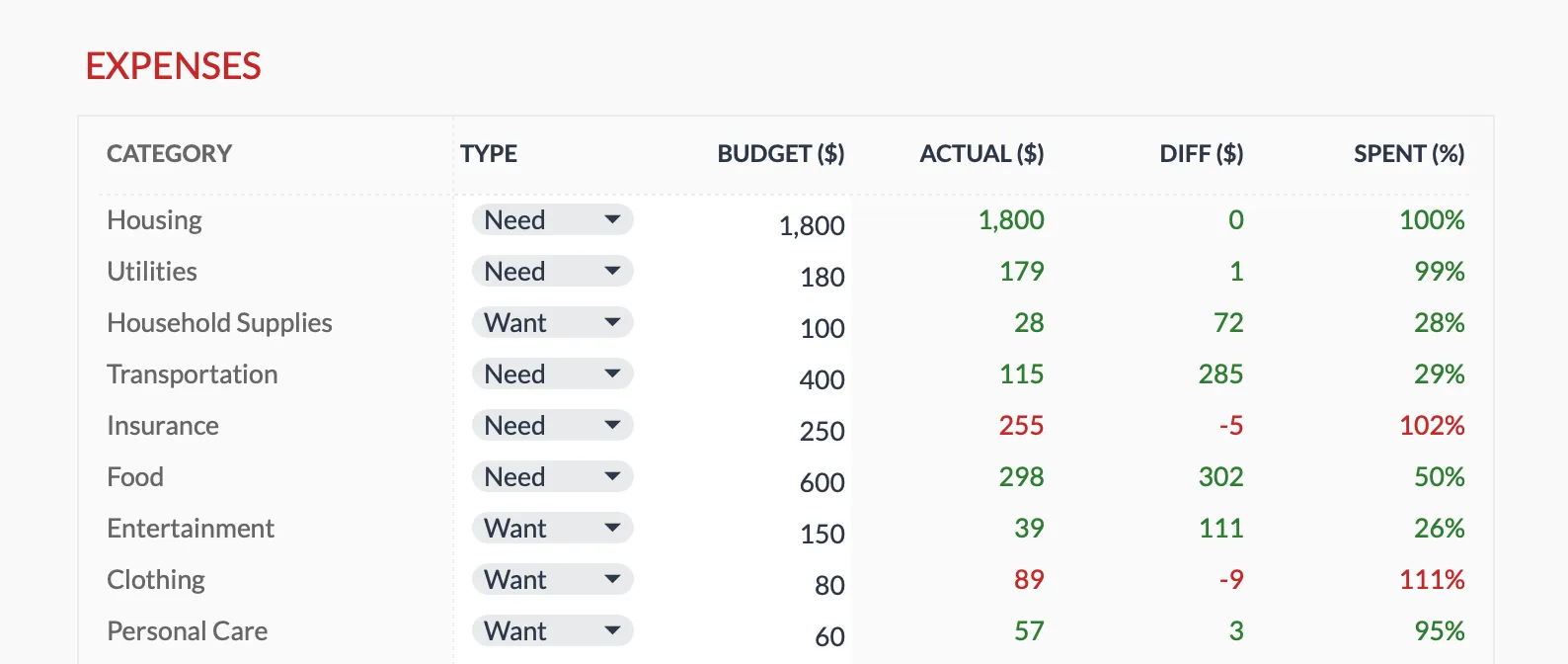 The Monthly Budget Template (Premium tier) tracks categories against targets entirely inside your own Google Sheet, with no app connection and no aggregator in the path.
Manual-entry apps: Goodbudget, EveryDollar (free tier), Fudget. No bank connections, though data still lives on company servers.
Subscription apps: YNAB, Copilot. The subscription model means user fees, not data, drive the revenue.
The Trade-Off
This isn’t about scaring you away from budgeting tools. It’s about understanding what you’re trading.
Maximum privacy: Manual spreadsheet entry. Data never leaves your device. No account connections. The cost? About 5-10 minutes daily or 20-30 minutes weekly.
Moderate privacy: Manual-entry apps. No bank connections. Data lives on app servers but limited in scope.
Convenience-focused: Bank-connected apps. Automatic transactions. Extensive data collection and sharing. Zero manual work.
There’s no universally correct choice. What matters is making an informed decision that matches your values.
Auditing Your App Connections
Check what’s connected by looking at your bank account settings, which usually show which apps have access. It’s worth reviewing what’s there, especially apps you haven’t opened in months.
Narrow the scope if possible - some apps let you grant access to specific accounts rather than everything. This is useful if you want automated tracking for daily spending but not your investment accounts.
Look at the business model because free apps need revenue somehow. Subscription apps have less incentive to monetize your data.
Revisit periodically since an app you connected two years ago might not be serving you anymore. Needs change over time.
If the goal is maximum privacy rather than the least manual effort, the practical starting point is a spreadsheet you own. The Monthly Budget Template keeps every figure inside your own Google Sheet with no app connection, and the Budgeting Without Linking Your Bank Account guide covers how to keep the manual entry quick.
Related
- Net Worth Tracker - track assets and liabilities privately
- Annual Budget Template - year-long view without app connections
- Monthly Budget Template - expense tracking in your control
- Budgeting Without Linking Your Bank Account
Frequently asked questions
Are budgeting apps safe?
For most people, the risk is more about privacy (data collection) than security (account theft). Read privacy policies and understand the business model.
Why do free apps collect so much data?
Without subscription fees, their options include advertising, data sales, and financial product referrals. User data enables all three revenue streams.
Is manual tracking worth the effort?
It depends on your values. The 5-10 minutes daily buys complete privacy, though for some people automatic tracking is worth the trade-off.
Can I trust 'anonymized' data claims?
Only with caution - detailed transaction histories can often be re-identified even without your name attached.
Can I use a budgeting app without going through Plaid or Yodlee?
Manual-entry apps and spreadsheets skip aggregators entirely because there is no bank connection to broker. With bank-connected apps, the aggregator is usually built in and not something you opt out of while keeping the sync.
If I disconnect an app, is my data deleted?
Disconnecting stops new data flowing, but it does not automatically erase what was already collected. Most privacy policies describe a separate deletion request, and copies held by aggregators or partners may follow their own retention schedules.
Sources
- YNAB Pricing - YNAB
- Tiller Pricing - Tiller
- Fintech App Personal Financial Data Risks: What To Know - TD Bank
- Data Breach Outlook 2024 - Kroll
About this article
Competitor subscription prices checked against each company's published pricing page (YNAB, Tiller). The most-breached-industry figure checked against Kroll's Data Breach Outlook, and the third-party-access quote against TD Bank's security center. Last reviewed August 2026.