A rental property cash flow spreadsheet projects monthly and annual cash flow across a portfolio of up to five properties, then lets you track what actually happened against the projection. This walkthrough follows the six sheets of a real workbook using a worked example: a two-property portfolio (a $280,000 duplex and a $195,000 condo) with $4,250 of gross monthly rent, a modeled portfolio cash flow of $278 a month, a 6.3 percent portfolio cap rate, and a 12-month actual tracker that lands at $3,630 for the year. Our Rental Property Cashflow Ultimate template ($29) ships the same structure ready-made for Excel and Google Sheets.
Owning a rental is a monthly business, not a one-time decision. Rent arrives, the mortgage goes out, a boiler fails in July, a unit turns over and sits empty for three weeks. The question that matters once the keys have changed hands is not whether the property should have been bought. It is what the property throws off, month after month, and whether the answer holds up when a tenant leaves or a repair lands. Answering that across more than one building at once is where a spreadsheet starts to earn its place.
That is a different job from underwriting a purchase. Deciding whether a single deal pencils out, with a ten-year projection and a sale at exit, is covered in the how to analyze a rental property in a spreadsheet walkthrough. The return ideas that sit underneath it, cap rate and cash-on-cash, are unpacked in how to calculate ROI on a rental property. What follows is neither of those. It is projecting the ongoing cash flow of a portfolio you already hold, then tracking what actually happens against that projection, one month at a time.
The examples come from our Rental Property Cashflow Ultimate Spreadsheet Template ($29), which ships the whole structure ready-made for Excel and Google Sheets. The sample file carries two properties, a duplex and a condo, and holds room for five. The structure is reproducible by hand if you would rather build your own.
What a rental cash flow projection has to hold
Strip away the presentation and a portfolio cash flow model is only a few kinds of information, repeated once per property:
- Property and financing facts. Purchase price, down payment, loan, interest rate, term, and the current value, for each building. These set the mortgage payment and the denominators for the return ratios.
- Operating assumptions. Rent, a vacancy rate, and the recurring monthly bills each property generates whether or not a tenant is in place.
- Actual monthly figures. What rent really came in and what really went out, month by month, so the plan can be checked against the record.
- Derived metrics. Effective rent, NOI, monthly and annual cash flow, cap rate, cash-on-cash, and a gross rent multiplier. None of these are ever typed.
The template gives each of these its own sheet. Property Setup holds the inputs, Income & Expenses projects the monthly picture, Monthly Cash Flow records the actuals, ROI Calculator lines up the return ratios, Sensitivity Analysis stress-tests the assumptions, and a Dashboard sits on top. A How to Use sheet carries the instructions. Six working sheets, all reading from one set of inputs.
Start with Property Setup: the inputs everything reads from
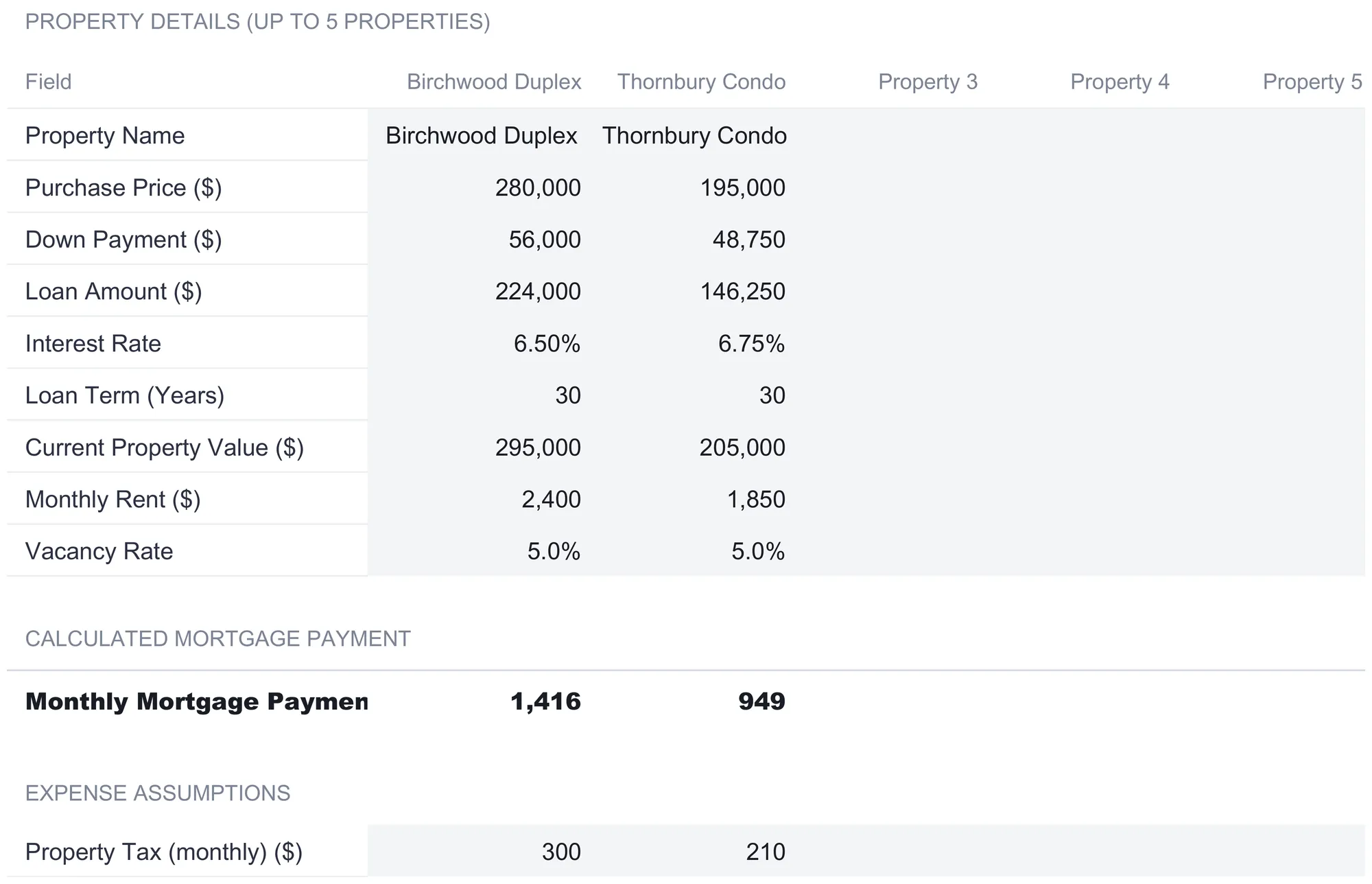
Property Setup is the only place the deal is described, and every other sheet pulls from it. The sample fills two of its five columns.
The Birchwood Duplex is entered at a $280,000 purchase price, a $56,000 down payment, and a $224,000 loan at 6.50 percent over 30 years. Its current value is $295,000, its rent is $2,400 a month, and its vacancy rate is 5.0 percent. The Thornbury Condo sits alongside it at $195,000, a $48,750 down payment, a $146,250 loan at 6.75 percent over 30 years, a $205,000 current value, $1,850 of rent, and the same 5.0 percent vacancy.
Below those inputs, one row is computed rather than typed. The monthly mortgage payment runs a standard amortization on the loan amount, rate, and term:
Monthly payment = loan × monthly rate ÷ (1 - (1 + monthly rate)^-payments)That produces $1,416 a month for the duplex and $949 for the condo. Two edge cases are handled rather than left to error: a zero interest rate repays the loan in equal installments, and a blank loan or term leaves the payment at zero, so the sheet reports 0 until both a loan amount and a term are present.
The rest of the sheet is expense assumptions, again per property: property tax and insurance as monthly amounts ($300 and $115 for the duplex, $210 and $85 for the condo), HOA or condo fees ($0 for the duplex, $150 for the condo), plus a maintenance reserve and a management fee entered as percentages, 5 percent and 8 percent in the sample. Utilities and other expenses round out the list at zero here.
Two of those inputs deserve a note because they decide a headline number later. The Current Property Value is entered here and nowhere else, and it is what the cap rate divides by rather than the purchase price. And the tinted cells are the ones meant to be filled in; the white cells carry formulas, so overwriting one breaks the chain that feeds every sheet downstream.
Income & Expenses: the monthly projection
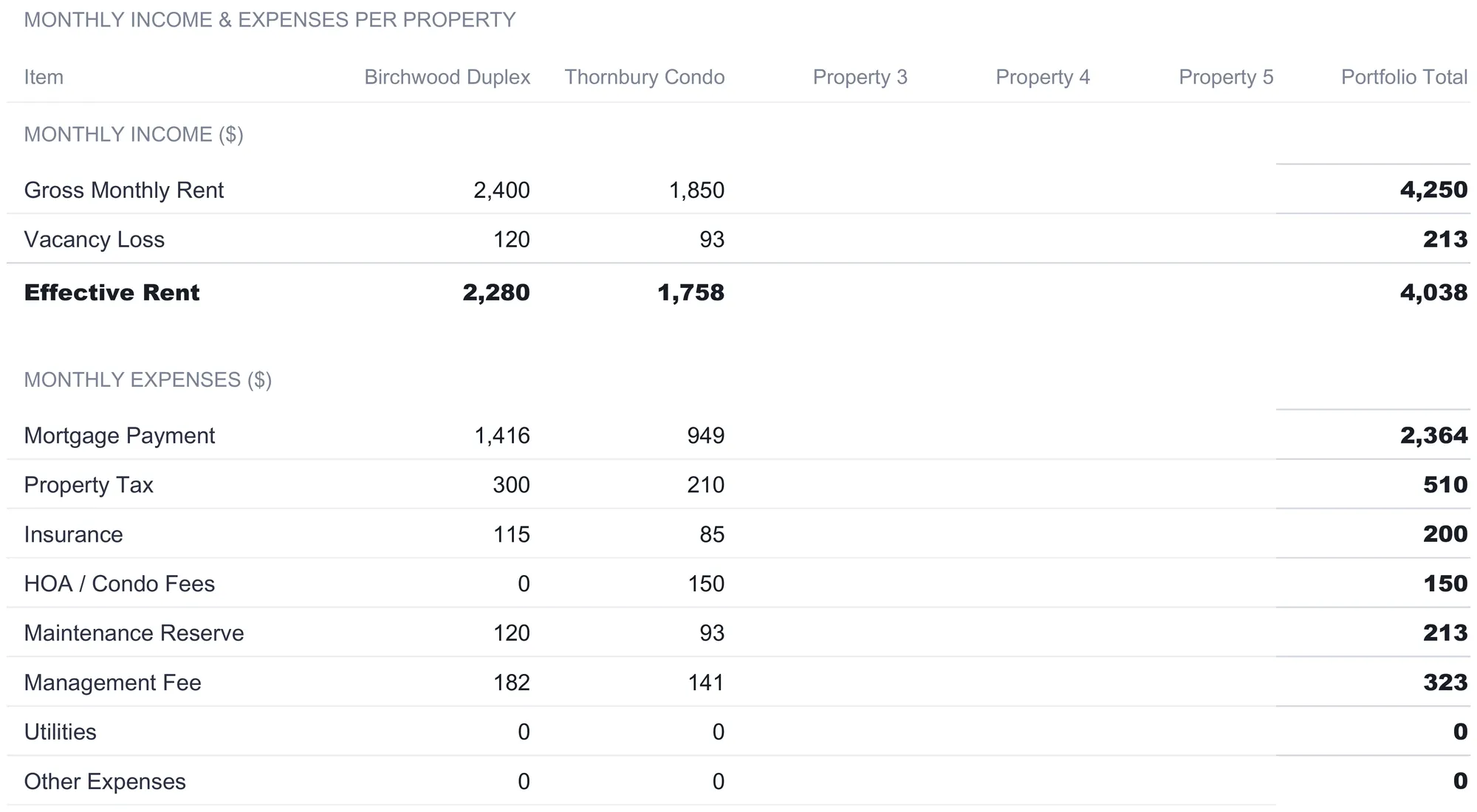
The Income & Expenses sheet turns those inputs into a modeled monthly picture, one column per property plus a Portfolio Total that sums across them. Nothing on it is typed; every cell reads from Property Setup.
Income comes first. Gross monthly rent is the figure from Setup, $2,400 for the duplex and $1,850 for the condo, $4,250 combined. Vacancy loss is rent times the vacancy rate, $120 and $93, and effective rent is what remains, $2,280 and $1,758, for a portfolio effective rent of $4,038. Vacancy is modeled as a haircut on income rather than as specific empty months, which keeps the projection compact.
Then the expenses, stacked below. The mortgage payment carries over from Setup ($1,416 and $949), followed by property tax, insurance, HOA, maintenance reserve, management fee, utilities, and other. Two of those are computed rather than copied, and the way they are computed is worth copying into any hand-built version. The maintenance reserve is a percentage of gross rent, so the duplex’s 5 percent works out to $120. The management fee is a percentage of effective rent, so the duplex’s 8 percent applies to $2,280 and gives $182. Modeling management against the rent that actually collects, and maintenance against the full rent roll, is a small distinction that keeps each cost tied to the thing that drives it.
Total monthly expenses come to $2,133 for the duplex and $1,627 for the condo. Monthly cash flow is effective rent minus total expenses: $147 for the duplex, $131 for the condo, and $278 for the portfolio combined. That last figure is the modeled monthly cash flow the dashboard leads with.
Monthly Cash Flow: the projection meets reality
This is the sheet that sets the workbook apart from a pure underwriting model, and it is where the word projection earns a second meaning. The Income & Expenses sheet says what a smooth month looks like. The Monthly Cash Flow tracker records what the twelve real months actually did, and the two do not match.
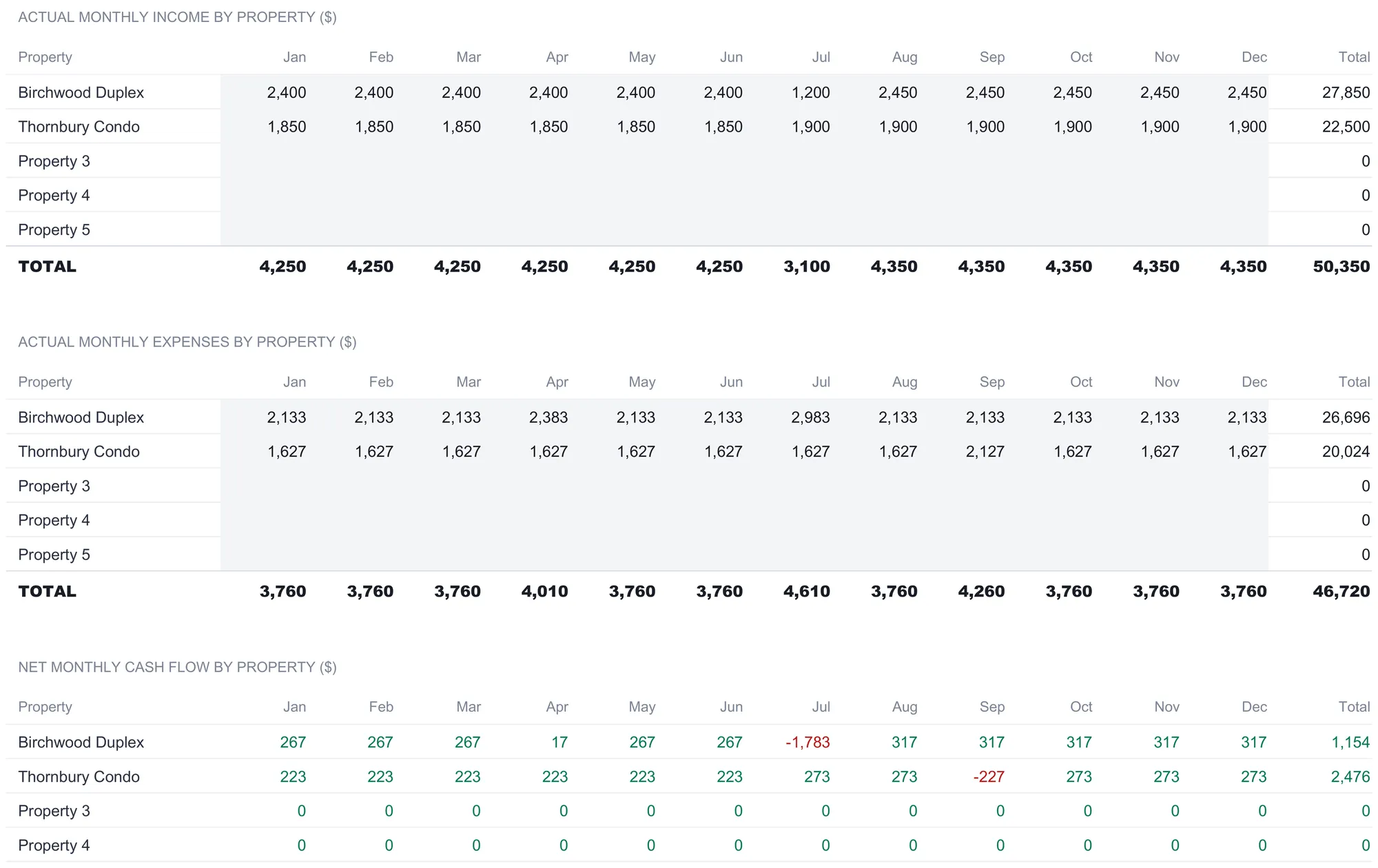
It is built as three grids, each a property-by-month table running January to December. The top grid is actual income by property and the middle grid is actual expenses; both are typed as real figures come in. The bottom grid is net cash flow, and it is computed, each cell being that month’s recorded income minus that month’s recorded expenses, so it follows whatever the two grids above it hold.
The sample year is filled in to show the gap the smooth projection hides. The duplex collects $2,400 a month through June, then drops to $1,200 in July before settling at a raised $2,450 from August on, the shape of a mid-year turnover followed by a new lease. Its recorded expenses sit at $2,133 most months but spike to $2,383 in April and $2,983 in July, a maintenance bill landing in the same month as the vacancy. The net grid turns those two into a July of minus $1,783 for that property and an April of $17, against $267 a month before the turnover and $317 after it in the ten months without a shock. The condo has its own bump, a $2,127 expense month in September that pulls that month to minus $227.
An annual summary under the three grids totals the year at $50,350 of recorded income, $46,720 of recorded expenses, and $3,630 of net cash flow. Set that beside the projection: the modeled portfolio cash flow of $278 a month would imply about $3,331 across a smooth year. The recorded figure is higher, because the mid-year rent increases outran the July and September shocks. Neither number is wrong. One is the plan and one is the ledger, and holding them side by side is the reason to keep both sheets.
ROI Calculator: three ratios, side by side
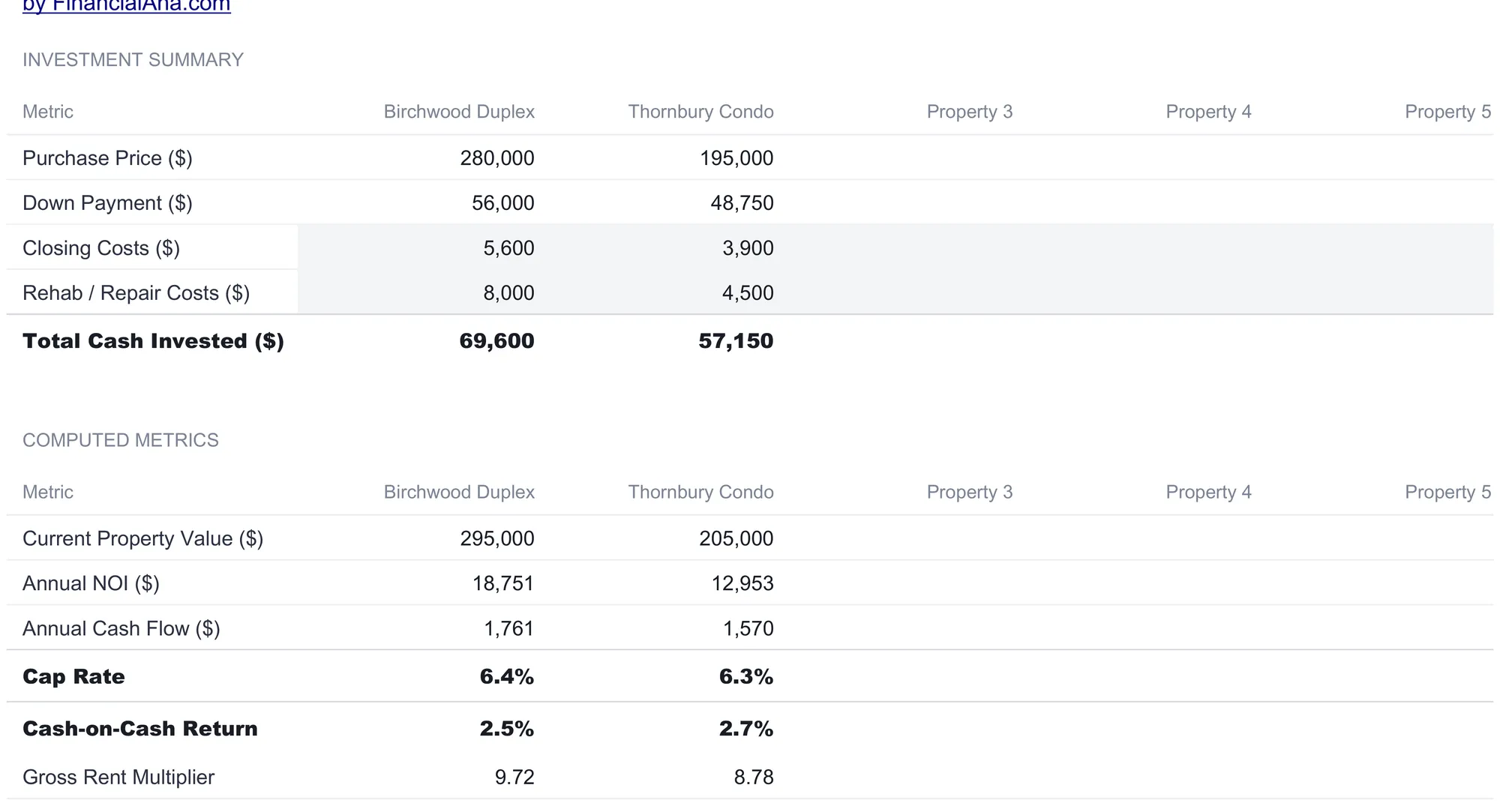
The ROI Calculator lines up every property in its own column and computes the same return ratios for each, so a portfolio can be read across rather than one file at a time. It starts with an investment summary and finishes with the ratios.
The investment summary adds two costs that Property Setup does not carry. Closing costs and rehab or repair costs are typed here per property, $5,600 and $8,000 for the duplex, $3,900 and $4,500 for the condo. Total cash invested is down payment plus closing plus rehab, which comes to $69,600 for the duplex and $57,150 for the condo. Folding rehab into the cash figure matters, because it is the denominator of the cash-on-cash return. A property that needed work before it could rent has more of the owner’s money tied up in it than the down payment alone suggests.
Below that, the computed metrics. Annual NOI is effective rent minus operating expenses, mortgage excluded, times twelve: $18,751 for the duplex and $12,953 for the condo. Annual cash flow is the monthly figure times twelve, $1,761 and $1,570. Then the three ratios:
| Ratio | Birchwood Duplex | Thornbury Condo | How it is derived |
|---|---|---|---|
| Cap rate | 6.4% | 6.3% | Annual NOI ÷ current property value |
| Cash-on-cash | 2.5% | 2.7% | Annual cash flow ÷ total cash invested |
| Gross rent multiplier | 9.72 | 8.78 | Purchase price ÷ annual gross rent |
Each ratio divides numbers the other sheets already produced, which is why they agree with the dashboard. Cap rate excludes financing by design, dividing NOI by the current value, so it describes the building rather than the loan. Cash-on-cash is the only one that reflects the mortgage and the cash actually sunk in, which is why it reads so much lower than the cap rate on the same property. Gross rent multiplier is the crudest, price against gross rent with no expenses at all, useful as a first-pass sort and little more. Each reads N/A rather than an error when the figure it divides by is blank, so a half-filled file stays readable.
Sensitivity Analysis: the number as a range
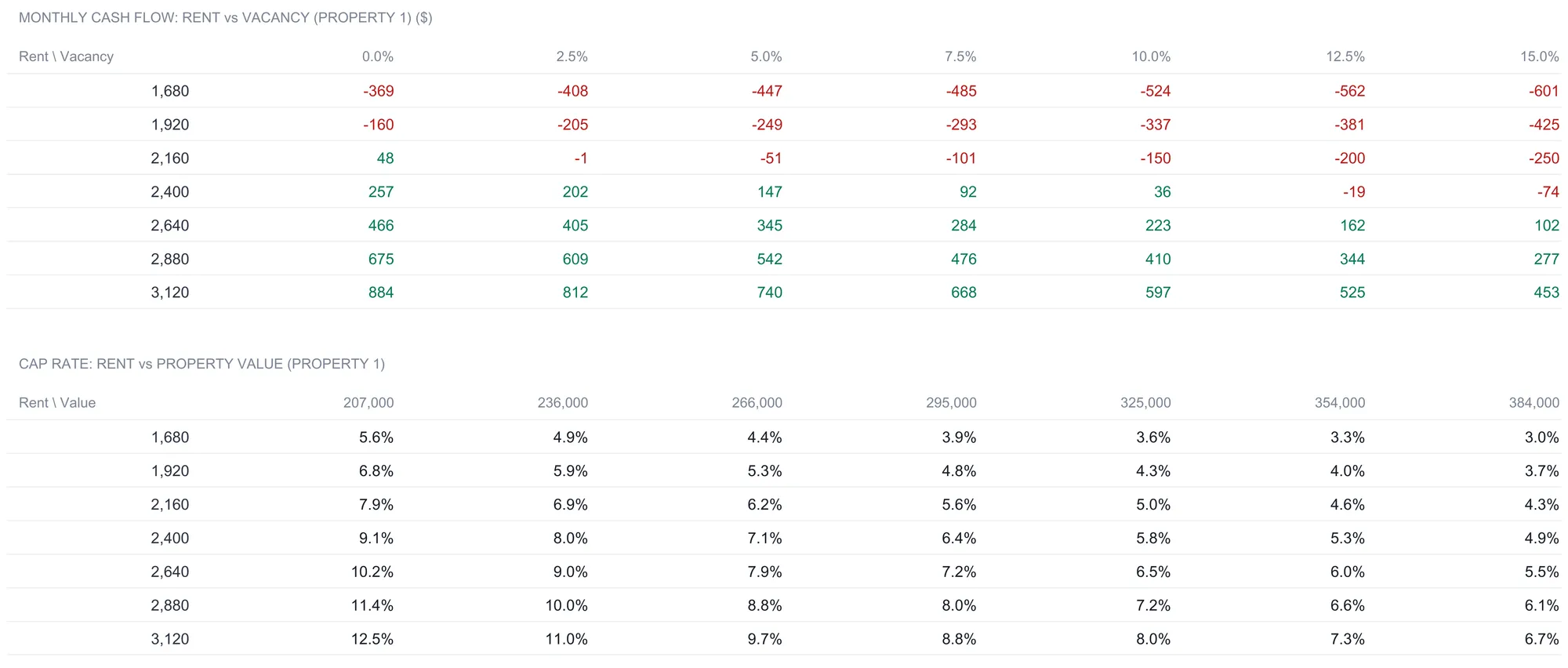
Every figure so far rests on inputs someone typed. The Sensitivity Analysis sheet takes the two that move the most, rent and vacancy, and shows what happens across a spread of them rather than at a single point. It runs on Property 1’s assumptions as the base.
The top grid is monthly cash flow at seven rent levels down the side and seven vacancy rates across the top. Both axes step around the duplex’s own inputs, so the rows run from 70 percent of its $2,400 rent up to 130 percent, and the columns run from a vacancy floor near zero up to 15 percent. The base case, $2,400 of rent at 5 percent vacancy, sits in the middle at $147, the same figure the projection produced. From there the grid fans out: down to minus $601 a month in the corner where a low rent meets a high vacancy, up to plus $884 where a high rent meets full occupancy. Cells above zero are shaded green and below zero red, so the line where the property stops covering itself is visible as a color change rather than a number hunt.
The bottom grid does the same for cap rate, stepping rent against property value. The base cell, $2,400 of rent against the $295,000 value, reads 6.4 percent, matching the ROI Calculator, and the surrounding cells run from 3.0 percent to 12.5 percent. This grid is left uncolored on purpose. Whether a given cap rate is ordinary is a market question rather than an arithmetic one, so the sheet computes the number and declines to tint it. The grids are a way to see how far the answer travels when an assumption is wrong, not a claim about which cell will come true.
The dashboard: the portfolio on one screen
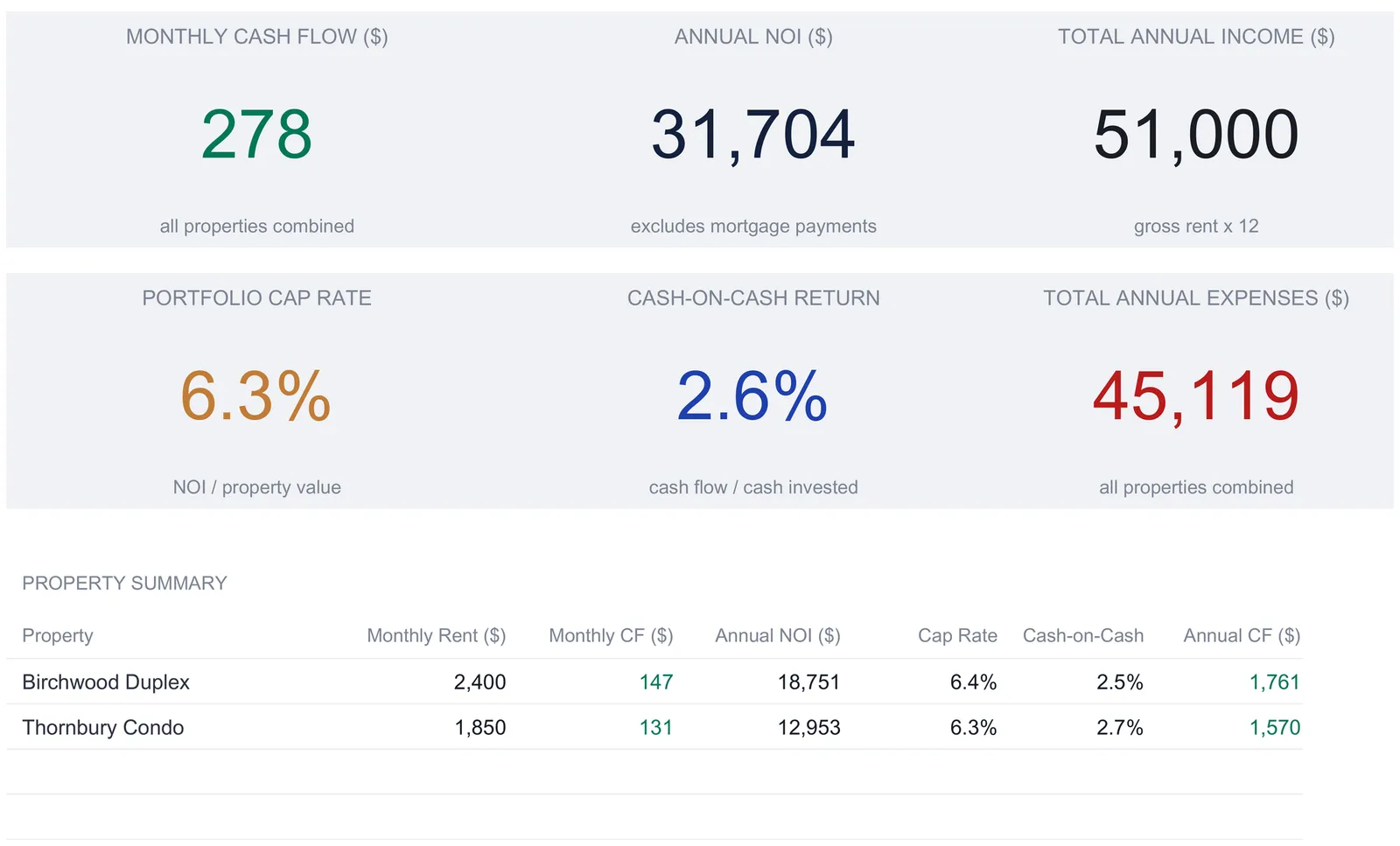
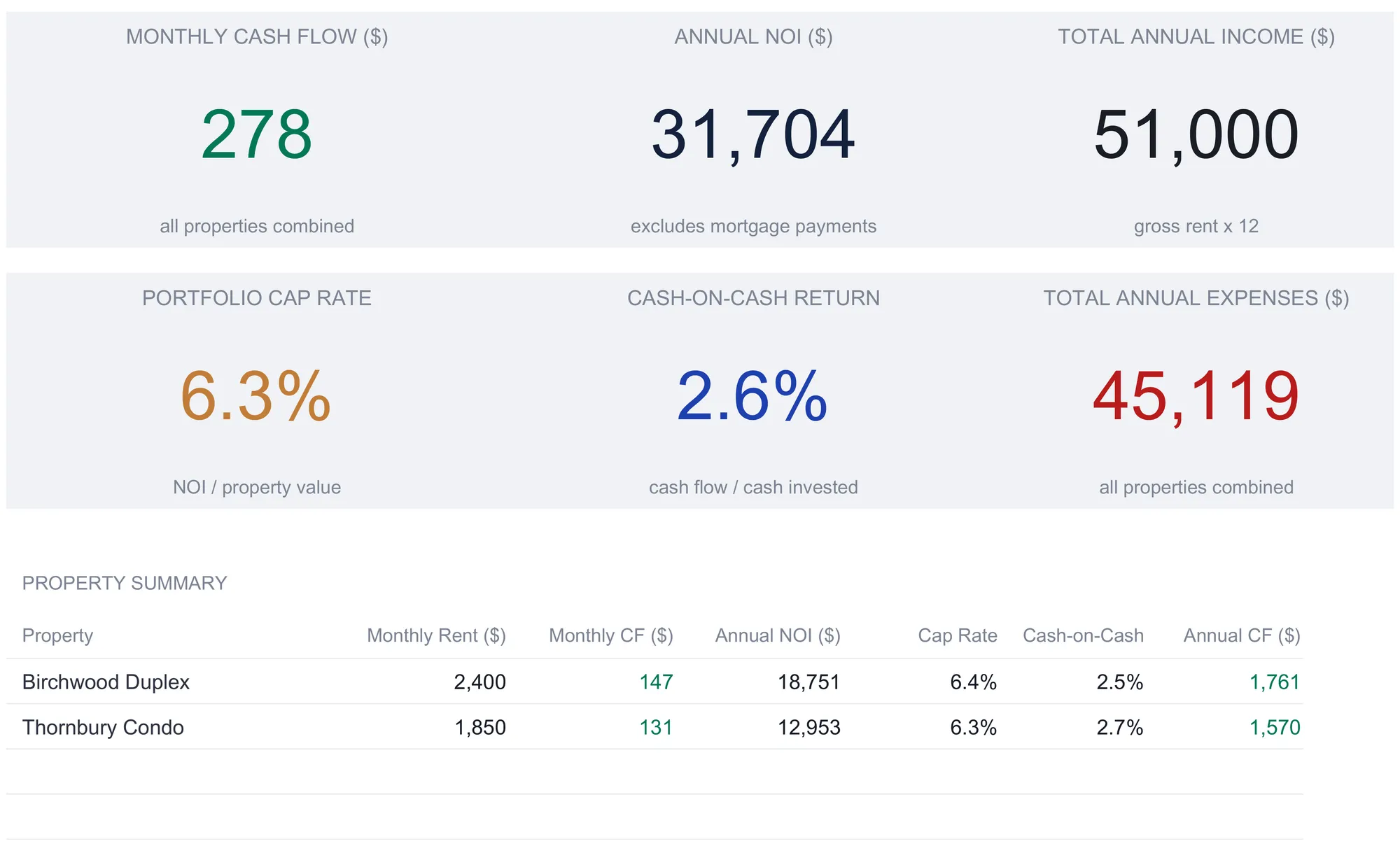
With the input sheets filled, the Dashboard reduces the whole portfolio to six tiles, a summary table, and two charts. The tiles read across the top: a modeled monthly cash flow of $278 for all properties combined, annual NOI of $31,704 that excludes mortgage payments, total annual income of $51,000 (gross rent times twelve), a portfolio cap rate of 6.3 percent, a cash-on-cash return of 2.6 percent, and total annual expenses of $45,119.
A couple of those tiles reward a second look. The income tile is gross rent annualized, so it does not equal cash flow minus expenses; the vacancy haircut and the difference between gross and effective rent sit between them. And the portfolio cap rate is the combined NOI over the combined current value, $31,704 against $500,000, which is why it lands between the two properties’ individual rates rather than being an average of them. The cash-on-cash tile does the same trick, combined annual cash flow of $3,331 over combined cash invested of $126,750.
Below the tiles, the property summary table gives each building its own row, the same monthly rent, monthly cash flow, annual NOI, cap rate, cash-on-cash, and annual cash flow that the working sheets computed, with a portfolio total beneath. It is the ROI Calculator and the dashboard tiles collapsed into one place, so two properties can be compared line by line without leaving the front sheet. Two charts sit under the table: a bar chart of modeled monthly cash flow by property, and a pie chart of the portfolio’s monthly expenses split across the same eight rows the Income & Expenses sheet carries.
The tiles take their color from the figures themselves. The cash flow tile is green because it is above zero and would flip red below it; the expenses tile is red as a running cost. None of that color is a verdict on whether the portfolio is a good one. It is the sheet’s arithmetic on the sample inputs, and every figure changes the moment one of those inputs does.
What the projection leaves out
No cash flow model is complete, and the gaps are worth naming before the numbers get trusted too far. Everything in the workbook is pre-tax, with no depreciation, no income tax on rental profit, and nothing about the tax treatment of a sale. The cash flow figures describe money in and out of a bank account rather than a taxable result. The financing is one fixed-rate mortgage per property, which leaves no cell for an adjustable rate, an interest-only period, or a second lien. Vacancy is a flat percentage haircut rather than specific empty months, so the modeled sheet never shows the lumpiness the actual tracker captures. And there is one maintenance reserve percentage covering everything from a dripping tap to a new roof, so a capital expense has to live inside the same figure that covers routine upkeep.
There is also a gap that sits outside the file. The inputs are estimates sourced elsewhere: a lease for the rent, a tax bill for the property tax, a broker’s quote for the insurance, a recent appraisal or a portal estimate for the current value. The workbook computes a cap rate to a decimal place whether the value came from a signed appraisal or a rough guess, and it cannot tell the two apart. That is exactly what the Sensitivity Analysis sheet is for, and why the actual tracker matters: one shows how far the answer moves if an assumption is off, and the other replaces the assumption with what really happened as the year fills in.
Excel or Google Sheets for a rental portfolio
The template is an .xlsx file built on standard formulas, with no macros, no VBA, and no array formulas, so it behaves the same in Microsoft Excel, in Google Sheets after upload, and in LibreOffice Calc. Google Sheets suits an owner updating the monthly tracker from a phone as rent clears and bills are paid, or sharing the file by link with a partner or an accountant. Excel suits keeping a local file per year on one machine. The structure described here is buildable by hand in either, and the currency selector on the dashboard relabels every money header across the workbook without converting the underlying numbers.
Which rental spreadsheet fits which job
- Rental Property Cashflow Ultimate Spreadsheet Template ($29) is the workbook this walkthrough follows: up to five properties, a monthly projection, a 12-month actual tracker, the three return ratios side by side, a sensitivity grid, and a portfolio dashboard. The same family has a free Rental Property Cashflow template that puts one property’s month on a single sheet, budgeted against actual, and an Essentials version ($19) between the two.
- Airbnb Rental Tracker Ultimate Spreadsheet Template ($29) is the short-term rental counterpart, built around a booking log, occupancy, and a monthly profit and loss rather than a single monthly rent, for hosts whose income arrives one stay at a time instead of one lease at a time.
- Before a property is owned, the job is underwriting rather than tracking. The how to analyze a rental property in a spreadsheet walkthrough covers a single-property model with a ten-year projection and a sale at exit, which answers the purchase question this workbook picks up after.
Where the numbers land at tax time
For US owners, the expense categories the workbook already totals map onto tax reporting. Rental income and expenses for most residential rentals are reported on Schedule E, and IRS Publication 527 covers residential rental property including the rules on depreciation and passive activity. The workbook is a pre-tax cash flow tool, with no depreciation deduction and no tax calculation in it, so the cash flow figures are pre-tax. Arriving at year-end with income and categorized expenses already totaled, per property, turns filing prep into a copy job rather than a reconstruction, and a tax professional can work out the after-tax picture for a specific portfolio.
Related
- How to Analyze a Rental Property in a Spreadsheet - the single-property underwriting model, with a ten-year projection and the sale at exit
- Rental Property Cash Flow Spreadsheet (Excel, Per-Unit Tabs) - the long-form version of the tracking idea, with a tab per unit
- How to Calculate ROI on a Rental Property - the concepts behind cap rate and cash-on-cash, and the assumptions that drive them
- How to Track Airbnb Income and Expenses in a Spreadsheet - the short-term rental version, built on occupancy, ADR, and RevPAR
Frequently asked questions
Why does this workbook calculate cap rate on current property value instead of purchase price?
It is a deliberate choice that fits a property you already own. Cap rate here is annual NOI divided by the Current Property Value typed on Property Setup, so the Birchwood Duplex reads $18,751 over $295,000, or 6.4 percent, rather than $18,751 over its $280,000 purchase price. Using today's value answers what the building yields at what it is worth now, which is the question an owner asks. An underwriting model built for a purchase divides by the price instead, because the buyer has not paid anything else yet. Both are cap rate; they just measure it against a different denominator, and the workbook computes the number without judging it against any target.
What is the difference between the Income & Expenses cash flow and the Monthly Cash Flow tracker?
The Income & Expenses sheet is a projection built from the assumptions on Property Setup: it applies one rent, one vacancy rate, and one set of monthly bills to produce a single modeled cash flow per property, which the sample carries at $147 a month for the duplex. The Monthly Cash Flow sheet is a 12-month record of what actually came in and went out. In the sample year those two disagree, because the tracker carries a July turnover with reduced rent and a repair bill the smooth projection never sees. The projection is the plan; the tracker is the receipt.
Can it track more than five properties?
Property Setup holds five columns, and every downstream sheet, the per-property Income & Expenses, the ROI Calculator, the dashboard summary, and the monthly tracker, is wired to those same five. A sixth property is a second copy of the file. Investors running larger portfolios sometimes keep one workbook per building and a separate hand-built sheet that collects the annual cash flow totals, since the dashboard already reduces each property to a handful of figures.
What does the Sensitivity Analysis grid show that the single cash flow number does not?
The dashboard reports one modeled cash flow figure for the base assumptions. The sensitivity grid recomputes that figure across a range of rents and vacancy rates around Property 1's own inputs, so the base case sits in the middle and every neighboring cell shows how the number moves. In the sample it runs from minus $601 a month at a low rent and high vacancy to plus $884 at a high rent and full occupancy. The grid is arithmetic on hypothetical inputs, not a forecast of which cell will happen.
Where does this rental income go on a US tax return?
Rental income and expenses for most residential rentals are reported on Schedule E, and IRS Publication 527 covers residential rental property including the rules on depreciation and passive activity. The workbook's expense categories, property tax, insurance, management, maintenance, and the rest, line up with the kinds of costs those forms ask about, but the sheet is a pre-tax cash flow tool with no depreciation or tax calculation in it. A tax professional can confirm how a specific portfolio should be reported.
Sources
- About Schedule E (Form 1040), Supplemental Income and Loss - Internal Revenue Service
- About Publication 527, Residential Rental Property (Including Rental of Vacation Homes) - Internal Revenue Service
About this article
Sheets, inputs, formulas, sample figures and the two Dashboard charts checked on 2026-09-10 against the shipped Rental Property Cashflow Ultimate workbook (Dashboard, Property Setup, Income & Expenses, Monthly Cash Flow, ROI Calculator, Sensitivity Analysis, How to Use). Schedule E and Publication 527 references rechecked against the live IRS pages on 2026-09-10. Last reviewed September 2026.