
Net worth is assets minus liabilities, and the tracker that works is the one you keep updating. This 2026 comparison covers six options: the FinancialAha Net Worth Tracker, a $29 one-time Google Sheets template with monthly snapshots, charts, and milestones; the free Net Worth Calculator for an instant snapshot; Empower's free dashboard for automatic account syncing; and Tiller ($99/year) for daily bank imports. Simple and consistent beats feature-packed and abandoned.
Net worth tracking is simple math: assets minus liabilities. One number that tells you whether your financial life is heading the right direction.
The hard part isn’t the calculation. It’s finding a tracker you’ll actually open every month.
Quick picks: The FinancialAha Net Worth Tracker ($29, one-time purchase) tracks assets, liabilities, and milestones with visual charts in Google Sheets, no bank connection needed. For a free starting point, the Net Worth Calculator gives an instant snapshot. Empower’s free dashboard works well if you’re comfortable linking investment accounts. For Reddit’s favorite, CompiledSanity’s Personal Finance Sheet (around $8 on Etsy) combines net worth with investment tracking.
Below are the options compared honestly.
What Actually Matters in a Tracker
Most net worth spreadsheets do the same basic thing. The differences that matter:
Will you actually use it? A simple tracker you update monthly beats a comprehensive dashboard you abandon by March.
Does it show history? Knowing your net worth today is useful. Seeing the trend over 12 months? That’s where the insight lives.
Can you customize it? Your financial life doesn’t fit neatly into someone else’s categories.
Beyond these basics, complexity often becomes the enemy of consistency. A tracker with 50 features that you abandon by March is worse than a simple one you use every month for years.
Get today’s number first
Before comparing trackers for the long haul, it helps to have a starting figure. Enter your assets and liabilities below for an instant net worth reading, then pick the spreadsheet that will hold that number month after month.
FinancialAha Net Worth Tracker
This is ours, so take the bias into account. But there’s a reason we built it the way we did.
Monthly snapshots with automatic calculations. Visual charts that actually motivate. Eleven asset categories, from cash and cryptocurrency to real estate and business equity, plus seven debt categories. One purchase, keep it forever.
The visual progress chart tends to be what keeps people coming back. Something about seeing that line trend upward makes the monthly update feel worth it.
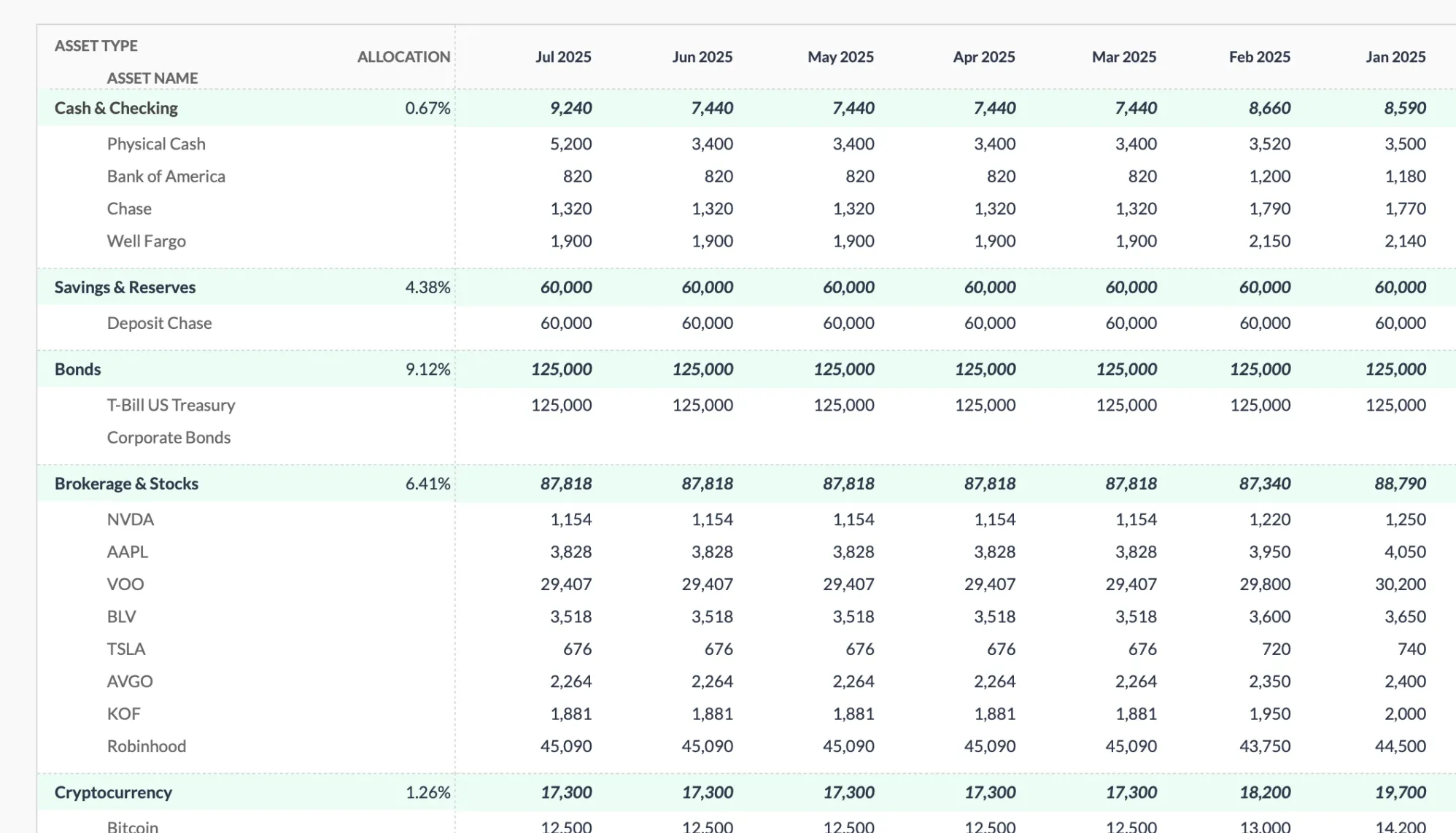 The Premium Net Worth Tracker groups assets by type, from cash and brokerage holdings to cryptocurrency, with a column for each month so the trend builds automatically.
Tiller Community Template
Tiller automatically pulls balances from your bank accounts, credit cards, and investment accounts. If you’re already paying for Tiller ($99/year after a 30-day free trial), their net worth template is solid.
The automation is the whole point. No manual data entry. Balances update daily.
But if you’re not already on Tiller? Subscribing just for net worth tracking might be more than most people need. A manual update takes about five minutes a month.
Vertex42 Net Worth Calculator
Vertex42 has been making spreadsheet templates forever. Their net worth calculator is exactly what you’d expect: straightforward, works offline, no frills.
Download it, use it in Excel without internet. Categories are basic but cover what most people need.
Good starting point if you want something free and simple. Just don’t expect historical tracking or visual charts.
Money Under 30 Spreadsheet
Month-by-month layout across a single year. See how net worth changes January through December.
Works well for beginners. Limited to one year of data though - if you want to track longer, you’ll need something else. The simplicity can be an advantage for getting started, but many people outgrow it within a year.
Reddit/FIRE Community Trackers
The financial independence community has built several open-source trackers on GitHub. Highly customizable, often include FI timeline calculations.
Fair warning: these can be complex. Great if you’re comfortable with spreadsheets and want advanced features. Overwhelming if you just want to track assets and liabilities.
The Mad Fientist spreadsheet is one of the more well-known options. Calculates your FI date based on savings rate and investment returns. Overkill for basic tracking, but works well for the FIRE crowd.
DIY: Build Your Own
Sometimes the best tracker is one you build yourself. Doesn’t take long:
- Column A: Account names
- Column B: Asset or liability
- Columns C+: Monthly balances
- One formula for the total
Takes maybe 30 minutes to set up. Complete control over everything. Just requires basic spreadsheet skills.
The advantage of building your own is that you understand exactly how it works. When something needs adjusting, you know where to look. The disadvantage is the setup time and the need to figure out formulas yourself.
The Honest Take
Most people overthink this. A net worth tracker needs to do two things:
- Calculate assets minus liabilities
- Show you the trend over time
Everything else is nice-to-have.
If you want something ready to use with good visuals, the Net Worth Tracker does that. If you want free and simple, Vertex42 works. If you’re into financial independence calculations, check the Reddit community templates.
The tracker that works is the one you’ll actually update.
Beyond Just Net Worth
Net worth tracking is one part of the bigger picture. The Financial Planning Template puts net worth next to a goals tab, a monthly cashflow log, and a projection that runs out to an end year you set, so the current number sits alongside where the trend is heading.
Related
- Net Worth Trackers Compared: Apps vs Spreadsheets - Broader comparison including apps like Empower and Monarch
- Net Worth Tracking for Beginners - The starting guide
- How to Calculate Net Worth in Google Sheets - DIY tutorial
- Net Worth Tracker - Ready-made template
- Financial Planning Template - Net worth plus projections
Frequently asked questions
Do free net worth spreadsheets track history, or just a snapshot?
Most free calculators and one-page templates give you a single snapshot of assets minus liabilities right now. Seeing the trend needs a layout with a column per month, which is where a dedicated tracker earns its place. The FinancialAha Net Worth Tracker keeps monthly snapshots side by side so the line moves over time.
Do I have to connect my bank accounts to track net worth?
Only if you want automatic imports. Empower and Tiller link to your accounts and update balances for you, which is convenient but means sharing credentials. A spreadsheet like ours is manual: you type the balances in once a month, and nothing connects to your bank.
Google Sheets or Excel for net worth tracking?
Both work. Google Sheets runs in a browser and syncs across devices with no software to install, which is where our Premium Net Worth Tracker is built. Most of our other templates are spreadsheet files that open in Excel, Google Sheets, or LibreOffice Calc. Vertex42's calculator is Excel-based and runs offline. The math is identical either way; the choice comes down to where you already keep your files.
How often do people update a net worth tracker?
Monthly is the most common cadence, since a month is long enough for balances to move but short enough that the update stays quick. A manual entry takes about five minutes. Some people check quarterly instead, which still shows the trend without the monthly habit.
Sources
- Tiller Pricing And Free Trial - Tiller
- Net Worth Calculator - Empower
About this article
Competitor pricing checked against Tiller's official pricing page; Empower's free dashboard confirmed on Empower's own site. Template claims checked on 2026-09-10 against the shipped Net Worth Tracking Google Sheet (Summary, Assets, Liabilities, Milestones, Setup, Instructions tabs) and the shipped Financial Planning Google Sheet (Summary, Goals, Assets, Debt, Cashflow, Projection tabs). Last reviewed September 2026.