Best Value Complete Financial Planning Bundle
✓ Financial Planning✓ Net Worth Tracker✓ Monthly Budgeting✓ Travel Budget Planner✓ Annual Budgeting Planner✓ Monthly Expense Tracker✓ Annual Tax Planner✓ Retirement Planning
View Bundle →
Ultimate Template - Excel & Google Sheets

Ultimate Retirement Calculator Spreadsheet Template for Google Sheets & Excel

Employer match calculated from salary and match terms, contributions that rise with your annual pay increase, and returns credited on a mid-year convention. The Ultimate Retirement Calculator spreadsheet template runs the withdrawal phase to life expectancy with inflation-adjusted withdrawals and a Social Security offset, then tests the plan across three return scenarios and two sensitivity grids. Every assumption on one sheet. Six working sheets. Google Sheets and Excel. No macros, no VBA.

See Preview
Retirement Calculator Spreadsheet Template - Ultimate version for Google Sheets and Excel

What's Included

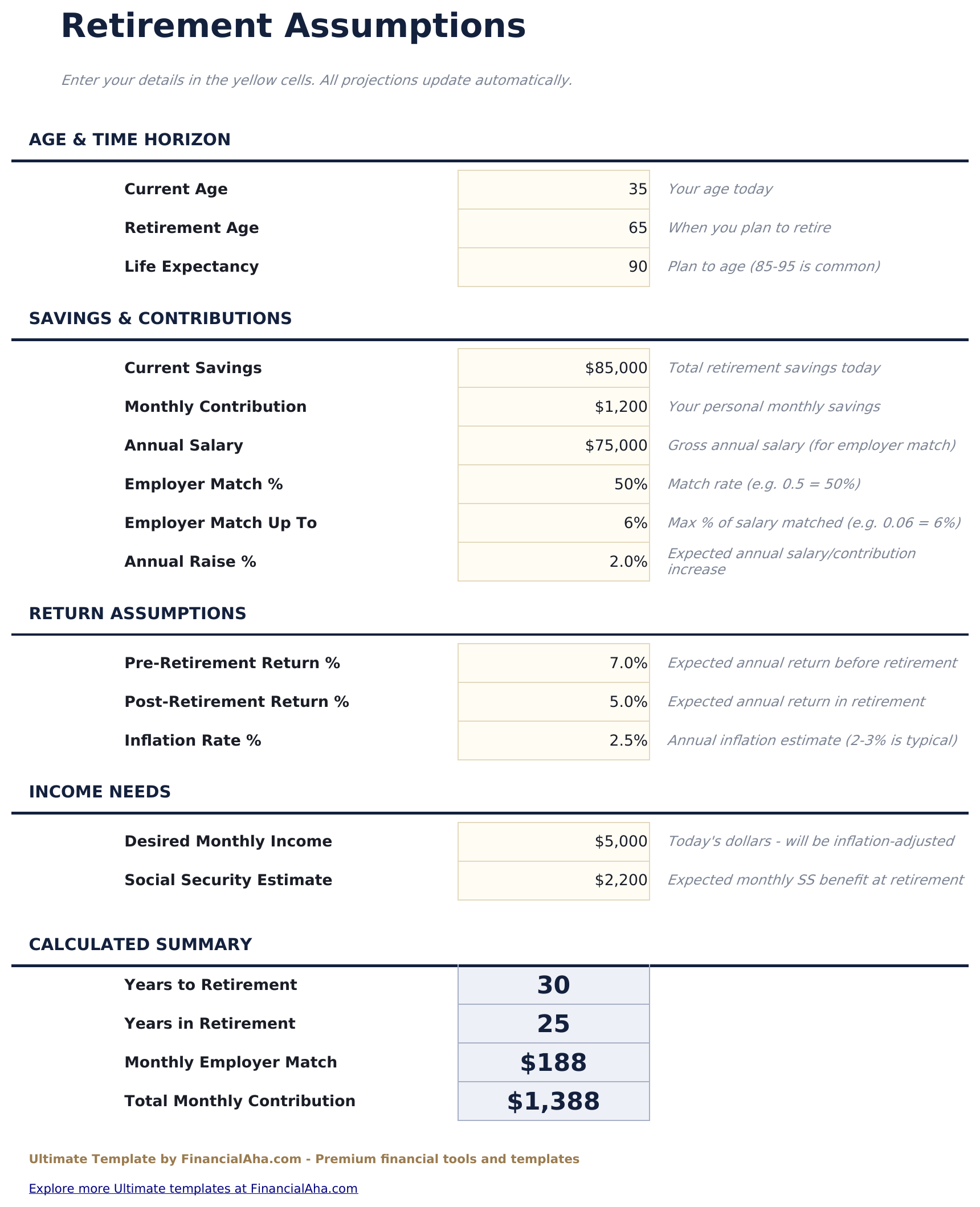
  • Assumptions gathered on one sheet - ages, life expectancy, salary, match terms, returns, inflation and the income you want
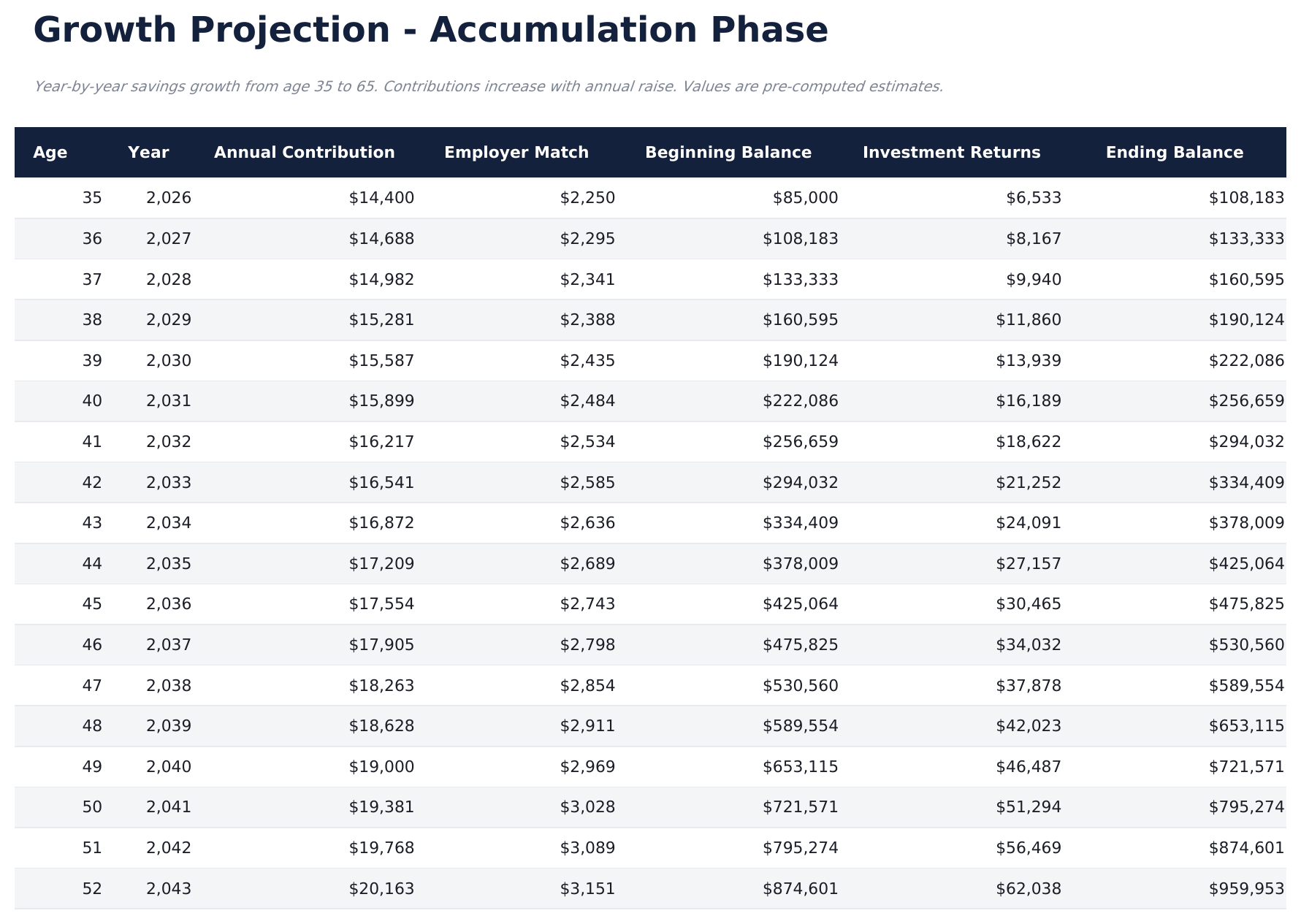
  • Growth Projection with employer match calculated from salary and match terms
  • Contributions that rise with the annual pay increase rather than sitting flat
  • Investment returns credited on a mid-year convention
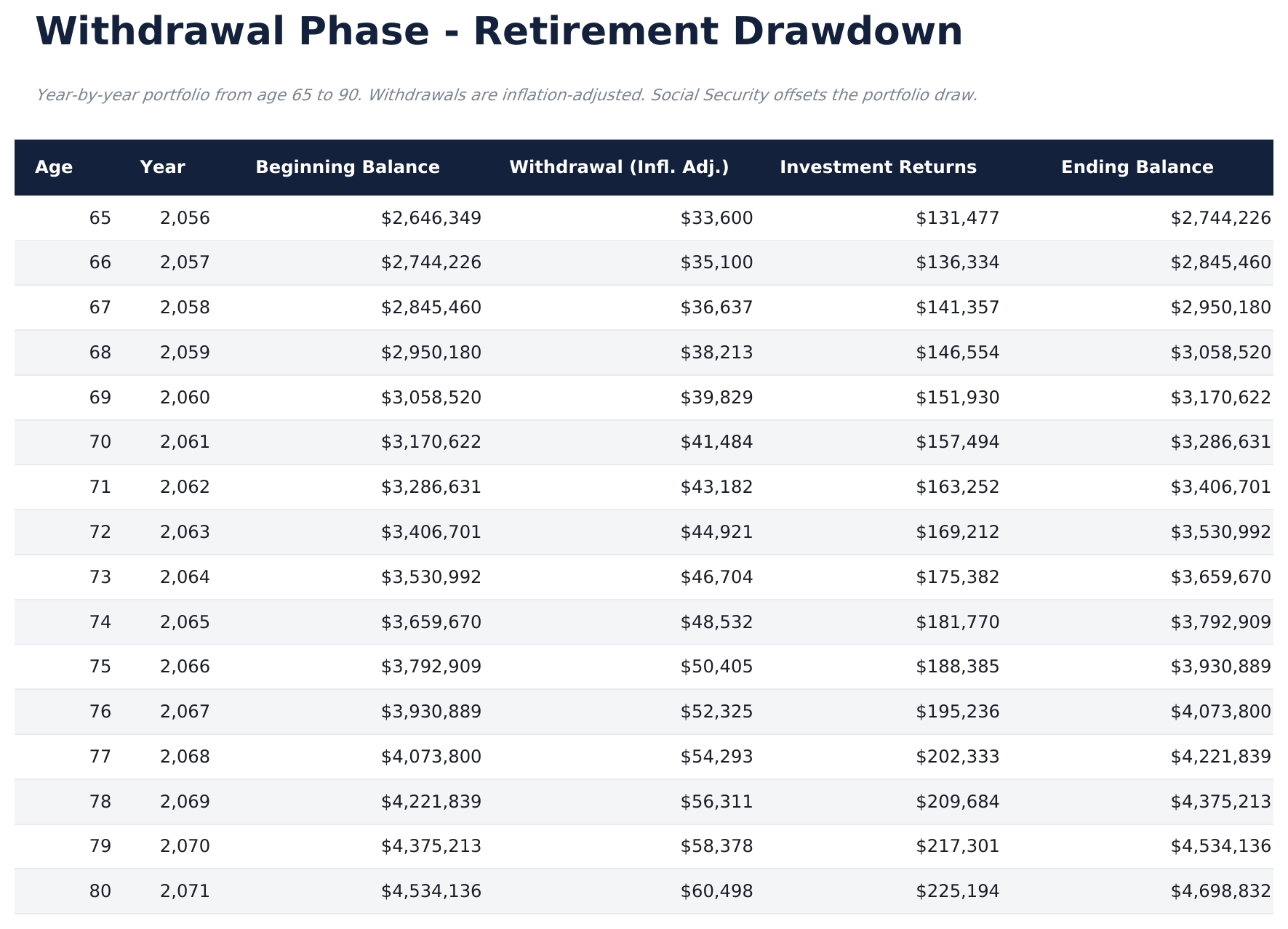
  • Withdrawal Phase running to life expectancy with inflation-adjusted withdrawals
  • A Social Security figure that reduces what the portfolio itself has to provide
  • A savings surplus figure showing whether the plan lands above or below the income you want
  • A required monthly contribution showing what would close the gap
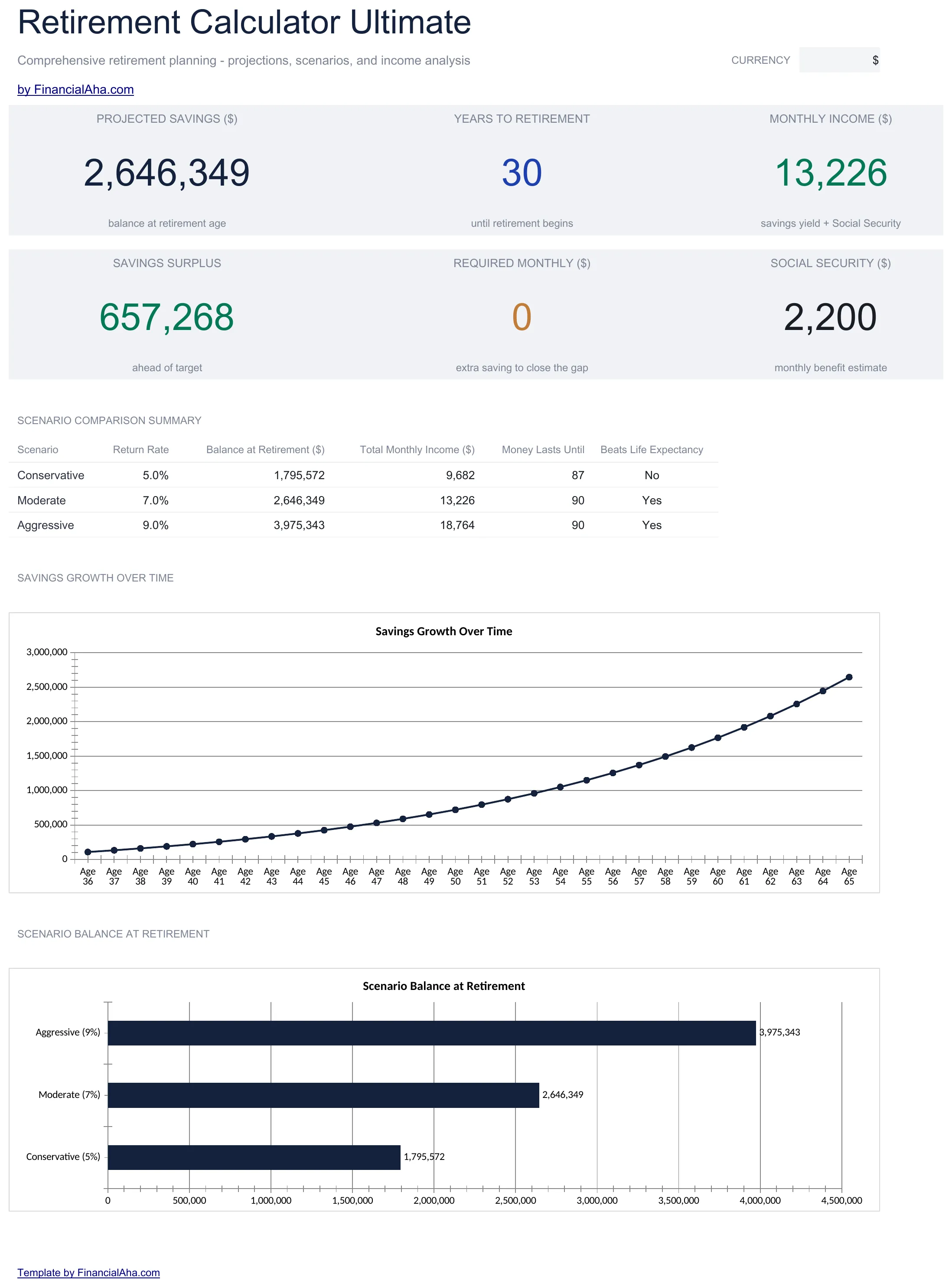
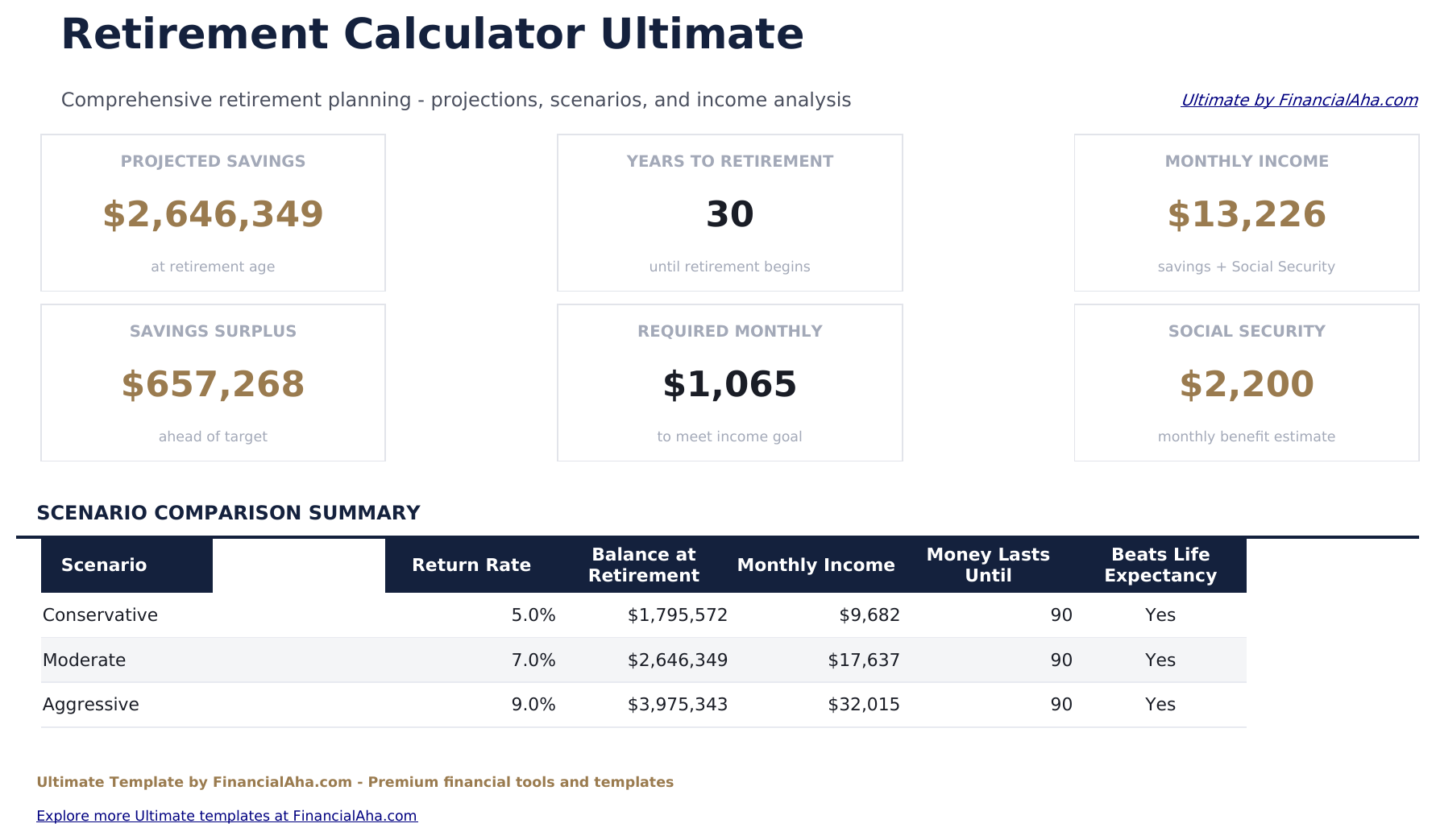
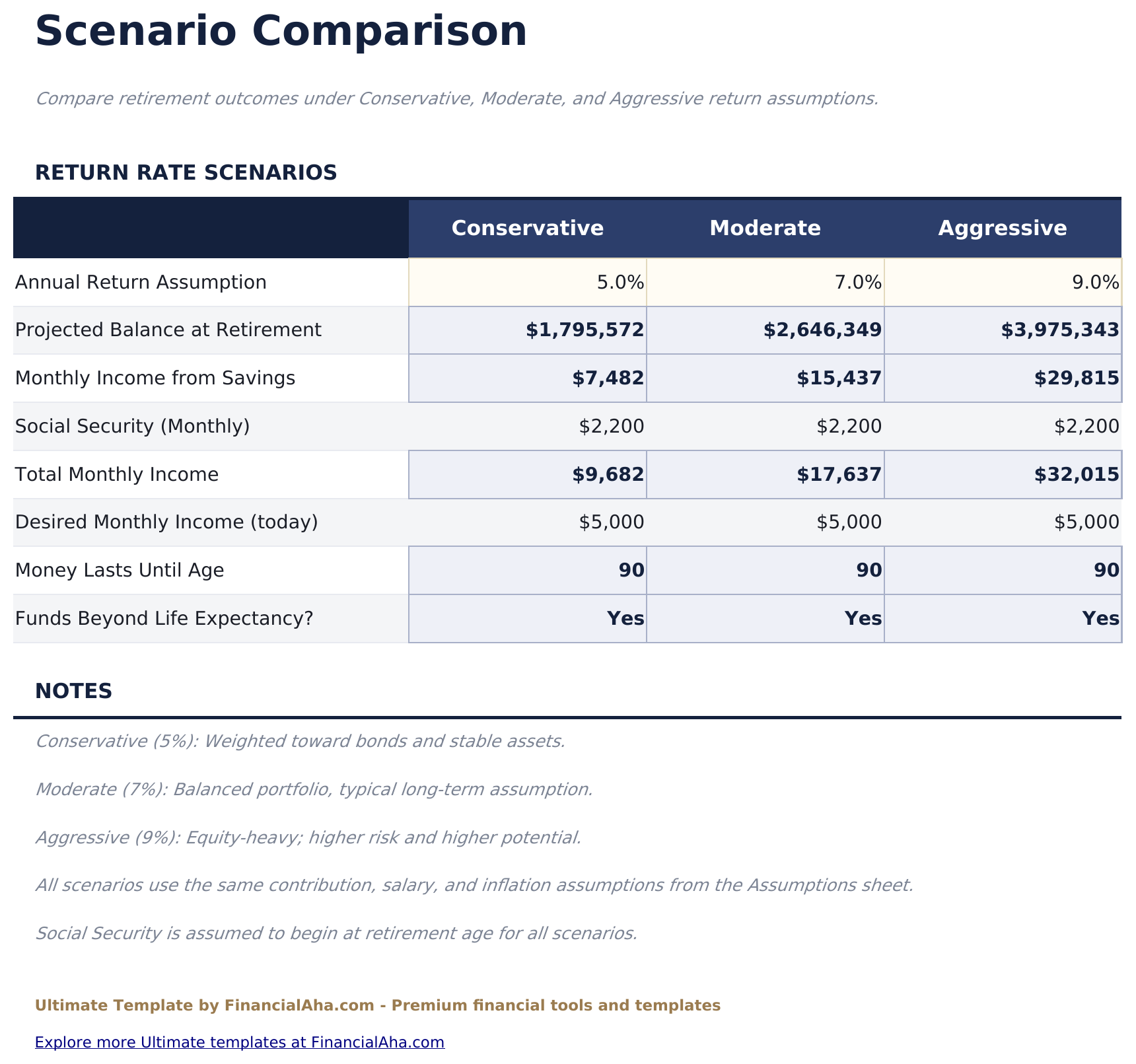
  • Three return scenarios compared side by side with balance, income and how long the money lasts
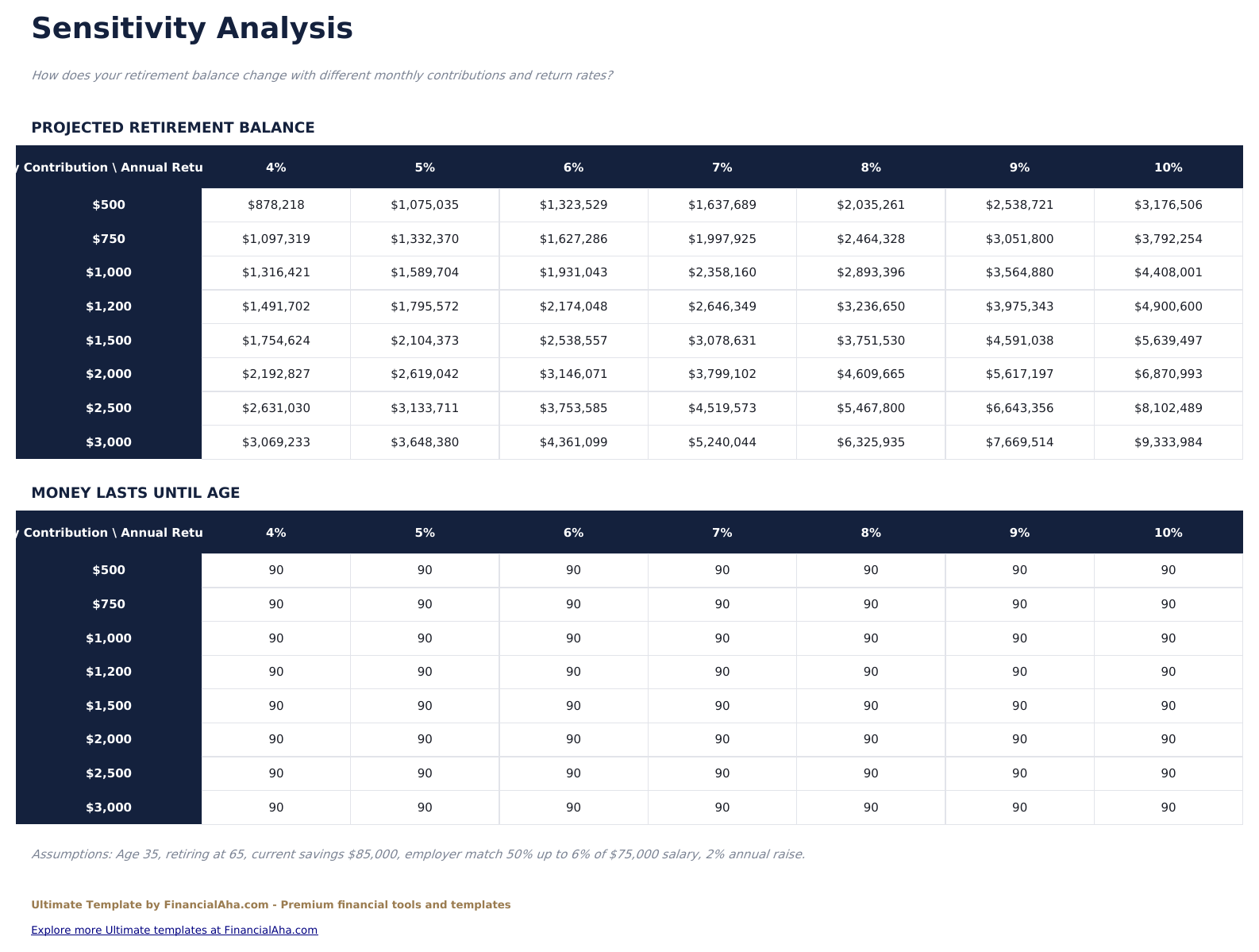
  • Two sensitivity grids running monthly contribution against annual return
  • Works in Microsoft Excel and Google Sheets with no macros required

The FinancialAha Ultimate Retirement Calculator Spreadsheet Template for Google Sheets and Excel is a six-sheet workbook that models both halves of a retirement and then tests the answer, with a How to Use guide on a seventh tab. It ships as an Ultimate Retirement Calculator Excel template and an Ultimate Retirement Calculator Google Sheets template in one file. This Ultimate Retirement Calculator spreadsheet template counts employer match and pay rises on the way up, carries inflation-adjusted withdrawals and a Social Security offset on the way down, and runs the whole plan across three return scenarios and two sensitivity grids. No macros, no VBA.

Inside the workbook

What's inside the FinancialAha Ultimate Retirement Calculator spreadsheet template

The FinancialAha Ultimate Retirement Calculator Spreadsheet Template runs on six working sheets - three take entries from you, three report back - plus the guide. It works in both Microsoft Excel and Google Sheets and here is what the Ultimate Retirement Calculator spreadsheet holds.

  1. 01 of 06

    Dashboard

    Six figures covering both halves of the question: what the portfolio reaches, how long until you get there, the monthly income it supports, whether that lands above or below what you said you wanted, what you would need to contribute to close the gap, and what Social Security is assumed to bring. A summary table underneath sets the three return scenarios against each other, each with its balance, its monthly income, and the age the money would last to.

  2. 02 of 06

    Assumptions

    Every input in one place, grouped the way the decision actually breaks down: ages and how long you expect to live, savings and salary with the employer match terms, the returns you assume before and after retiring plus inflation, and the income you want in today's money alongside a Social Security estimate. Changing anything here moves every sheet, which is what makes testing a different view of the future a single edit.

  3. 03 of 06

    Growth Projection

    The accumulation, year by year. Each row carries the contribution for that year, the employer match earned against it, the balance it started with, what it earned, and where it closed. Contributions climb with the pay rise you set rather than sitting flat for decades, and returns use a mid-year convention rather than crediting a full year to money that arrived through it.

  4. 04 of 06

    Withdrawal Phase

    The other half, from the day you stop to the age you have planned to. Each year's withdrawal is carried forward at inflation, so the draw keeps its purchasing power rather than shrinking in real terms, and the Social Security figure reduces what the portfolio itself has to provide. A balance reaching zero before the final row is the sheet answering the question plainly.

  5. 05 of 06

    Scenario Comparison

    The same plan under three different return assumptions - a cautious one, a middle one and a more aggressive one - set side by side with the balance each produces, the monthly income it supports, and how long the money lasts. The three rates themselves are typed values you can change. It reframes the question from what will happen to how much the answer depends on something nobody controls.

  6. 06 of 06

    Sensitivity Analysis

    Two grids rather than two numbers. Both run monthly contribution against annual return, and both axes are typed values you can retune - the contribution amounts down the side and the return rates across the top. The first grid reports the balance each pairing reaches, the second the age the money would last to. Reading across a row shows what a different return does to the same saving; reading down a column shows what saving more does at a fixed return.

  7. Included guide

    How to Use

    A step-by-step guide on its own tab, covering setup, what each sheet models, how the match and the inflation adjustment are applied, and what the model leaves out. Because it ships inside the file, the instructions travel with the template wherever it is opened.

Works in both Google Sheets and Excel

Ultimate Retirement Calculator Spreadsheet template for Google Sheets

Upload the Ultimate Retirement Calculator Spreadsheet Template to Drive, right-click it, and choose "Open with Google Sheets". This Ultimate Retirement Calculator Google Sheets template needs no conversion step and both charts survive the trip intact. The cross-sheet references that feed the Dashboard rely on the existing tab names, so the one thing worth leaving alone is the tab labels.

Ultimate Retirement Calculator Google Sheets template setup

A shared copy of the Ultimate Retirement Calculator Google Sheets template suits two people planning one retirement together, and because every input sits on the Assumptions sheet, a changed assumption is visible rather than buried. Sheets version history covers a figure typed over.

Sharing the Ultimate Retirement Calculator Google Sheet

The Ultimate Retirement Calculator Google Sheet is built for sittings rather than a routine: set the assumptions once, then read the sheets that answer different questions - what the portfolio reaches, whether it lasts, and how much of that rests on the return holding up.

Ultimate Retirement Calculator Spreadsheet template for Excel

The Ultimate Retirement Calculator spreadsheet Excel download is a plain .xlsx. Excel opens this Ultimate Retirement Calculator Excel template directly, with no import step and no compatibility prompt, and both charts are native Excel charts that redraw as the assumptions change. There are no macros and no VBA in the file, so it opens without a security warning.

Ultimate Retirement Calculator Excel template setup

The same Ultimate Retirement Calculator Excel template opens in Excel on Windows, Excel on Mac, and Excel for the web. It is also the identical file you would upload to Drive, so there is no separate Ultimate Retirement Calculator spreadsheet download to choose between.

Ultimate Retirement Calculator spreadsheet Excel notes

The Ultimate Retirement Calculator spreadsheet Excel file carries no macros and no VBA, so Excel opens it without a trust prompt. The same Ultimate Retirement Calculator spreadsheet Excel download also opens in Excel for the web, which matters when you move between a work machine and a personal one.

Opening the Ultimate Retirement Calculator spreadsheet Excel file

Nothing in the Ultimate Retirement Calculator Excel template is version-specific, so this Ultimate Retirement Calculator spreadsheet Excel workbook behaves identically in Excel on Windows, Excel on Mac, and older builds.

Spreadsheet template highlights

What the Ultimate Retirement Calculator spreadsheet template tracks

Assumptions carries most of the entry, though the three return rates on Scenario Comparison and both axes on Sensitivity Analysis are yours to set too. These are the columns the Ultimate Retirement Calculator Spreadsheet Template carries through the two phases:

Age
each year of the plan, on both sheets
Annual Contribution auto
derived, rising with the pay increase you set
Employer Match auto
derived from your salary and the match terms
Beginning Balance auto
derived, what the previous year closed on
Investment Returns auto
derived, credited on a mid-year convention
Ending Balance auto
derived, where the year finished
Withdrawal (Infl. Adj.) auto
derived, the draw carried forward at inflation

Compare builds

FinancialAha Retirement Calculator spreadsheet template: Free, Essentials, and Ultimate compared

Feature Free View Spreadsheet Template Essentials View Spreadsheet Template Ultimate This page
Working sheets 1 3 6
Balance at retirement Yes Yes Yes
Year-by-year accumulation Yes Yes, with employer match
Drawdown modelled Yes, in the same table Dedicated sheet, to life expectancy
Sustainable monthly income Yes, on a 30-year draw Yes, against the income you want
Employer match Yes, from salary and match terms
Pay rises Contributions grow with them
Inflation Not modelled Applied to withdrawals
Social Security Not modelled Offsets the portfolio draw
Charts 2 2
Return scenarios 3, compared side by side
Sensitivity grids 2, contribution against return

The FinancialAha Ultimate Retirement Calculator Spreadsheet Template covers six working sheets and treats retirement as two problems rather than one. The Free Retirement Calculator Spreadsheet Template returns the balance at retirement. The Essentials Retirement Calculator Spreadsheet Template for Google Sheets and Excel carries that into a drawdown and reports how long it lasts, but holds withdrawals flat and models neither inflation nor Social Security. This build counts the employer match and lets contributions rise with pay on the way up; carries withdrawals forward at inflation and offsets them with Social Security on the way down; sets the plan against the income you actually want and says what monthly contribution would close the gap; then stops relying on one return assumption altogether, with three scenarios side by side and two grids running contribution against return. Tax treatment, sequence-of-returns risk and healthcare costs sit outside all three builds.

Good to know

Notes on working in the Ultimate Retirement Calculator spreadsheet template

  • Every input lives on the Assumptions sheet, so testing a different retirement age or return never means editing a projection.
  • Withdrawals are carried forward at inflation here, which is why this build can disagree with the smaller one on identical inputs - Essentials holds the draw flat.
  • A zero ending balance in the withdrawal table is the model answering the question rather than an error.
  • The scenario and sensitivity sheets exist because the answer moves with the return. A result that flips between neighbouring cells is worth knowing about before leaning on it.
  • Tax treatment, sequence-of-returns risk and healthcare costs are not modelled, which is worth holding in mind alongside any figure the sheet returns.

How to Use This Template

1

Fill in Assumptions

Enter ages and life expectancy, savings and salary with the match terms, your return and inflation assumptions, and the income you want.

2

Read the dashboard

Six figures, including whether the plan lands above or below the income you asked for and what would close the gap.

3

Follow both phases

Growth Projection runs the accumulation with match and pay rises; Withdrawal Phase runs the drawdown to life expectancy.

4

Test the answer

Scenario Comparison runs three return assumptions, and the sensitivity grids run contribution against return.

Customer Reviews

What Our Customers Say

"If I get half as good at handling my finances as you are at customer service, this'll be the best $26 I've spent lately."

J Jenny Verified Buyer

"Great tool! Simplifies financial planning without the hassle of complex spreadsheets."

F Fazia Search Marketing Manager

"I recently purchased your super convenient spreadsheet, it really helps me!"

J John Verified Buyer

"They're great and super intuitive. Thank you!"

M Mira Verified Buyer

Built by Claude AI. Perfected by us.

We use Claude AI to draft each template, after a deep research. Then our team steps in. We refine the layout, stress-test every formula, fix edge cases, and polish the design until it feels like something we would actually use ourselves. The AI gets us 80% there. The last 20% is all human judgment.

One-time purchase. No subscription. Works in Excel & Google Sheets.

Frequently Asked Questions

Is the FinancialAha Ultimate Retirement Calculator Spreadsheet Template a Google Sheets template?

Yes. Upload the file to Drive and choose "Open with Google Sheets". The Ultimate Retirement Calculator Google Sheets template needs no conversion step and both charts survive the trip intact. The cross-sheet references rely on the existing tab names, so those are worth leaving alone.

Is the FinancialAha Ultimate Retirement Calculator Spreadsheet Template an Excel template?

Yes. The download is a plain .xlsx, so the Ultimate Retirement Calculator Excel template opens directly in Excel with no import step. Both charts are native Excel charts, and there are no macros or VBA.

Will the FinancialAha Ultimate Retirement Calculator spreadsheet Excel file open in older versions of Excel?

Yes. The Ultimate Retirement Calculator spreadsheet Excel workbook ships as a plain .xlsx, so it opens identically in current Excel and in builds that predate dynamic arrays.

Does the Ultimate Retirement Calculator spreadsheet account for inflation and Social Security?

Yes to both, and that is the main difference against Essentials. Withdrawals are carried forward at the inflation rate you set rather than held flat, and a Social Security estimate reduces what the portfolio itself has to cover.

Does the Ultimate Retirement Calculator spreadsheet model an employer match?

Yes. The match is calculated from your salary and the match terms you enter, and it is carried in the accumulation table alongside your own contribution. Contributions also rise with the annual pay increase you set.

How does the scenario comparison in the Ultimate Retirement Calculator spreadsheet work?

The same plan is run under a cautious, a middle and a more aggressive return assumption, side by side, each showing the balance it reaches, the monthly income it supports and how long the money lasts.

What does the sensitivity analysis in the Ultimate Retirement Calculator Excel template do?

Two grids run monthly contribution against annual return. The first reports the balance each pairing reaches; the second the age the money would last to. It shows how much of the answer rests on the return rather than on the saving.

Does the Ultimate Retirement Calculator spreadsheet track each account separately, like a 401k and an IRA?

No. The projection works from a single combined balance and a single monthly contribution rather than per-account. Account-level detail is not part of this build.

What do I get after buying the Ultimate Retirement Calculator spreadsheet template?

You receive the Ultimate Retirement Calculator spreadsheet template as an Excel file (.xlsx) that works in Microsoft Excel and Google Sheets. Download it immediately after purchase - no signup or account required.

Is there a free Ultimate Retirement Calculator spreadsheet template?

Yes. A free version of the Ultimate Retirement Calculator spreadsheet template is available with basic features. The Ultimate version adds advanced analysis, more capacity, and additional sheets.

What if the Ultimate Retirement Calculator spreadsheet template does not work for me?

Contact us and we will help troubleshoot. The Ultimate Retirement Calculator spreadsheet template works in Microsoft Excel and Google Sheets with no macros required.

Ultimate

Highlights:

Instant download after purchase
No macros or VBA required
All formulas auto-calculate
No subscription required
Works in
Excel Google Sheets

Looking for more Ultimate templates?

We offer Ultimate versions of our most popular spreadsheet templates with advanced features, more capacity, and deeper analysis.

Private & secure

Your financial data stays on your device. We never see it.

Learn more →

Need help?

Check our guides or reach out with questions.

View FAQ →