Lifetime Deal Complete Personal Financial Planning Bundle
✓ Financial Planning✓ Net Worth Tracker✓ Monthly Budgeting✓ Travel Budget Planner✓ Annual Budgeting Planner✓ Monthly Expense Tracker✓ Annual Tax Planner✓ Retirement Planning
View Bundle →

Instant digital delivery · Terms & Conditions apply

Ultimate Template - Excel & Google Sheets

Ultimate FIRE Calculator Spreadsheet Template for Google Sheets & Excel

Assumptions live on a sheet of their own - profile, income, expenses, return, withdrawal rate, inflation - and the forty-year projection carries expenses forward at inflation with a can-retire flag on every year. The Ultimate FIRE Calculator spreadsheet template sets lean, regular and fat targets side by side, each with its own timeline and required savings rate, shows whether compounding alone would coast you there, and runs a sensitivity grid across ages and return rates. Seven sheets, Google Sheets or Excel.

See Preview

Instant digital delivery · Terms & Conditions apply

FIRE Calculator Spreadsheet Template - Ultimate version for Google Sheets and Excel

What's Included

  • Assumptions gathered on one sheet - profile, income, expenses, return, withdrawal rate and inflation
  • Forty-year projection with an inflation-adjusted expense line and a can-retire flag on every year
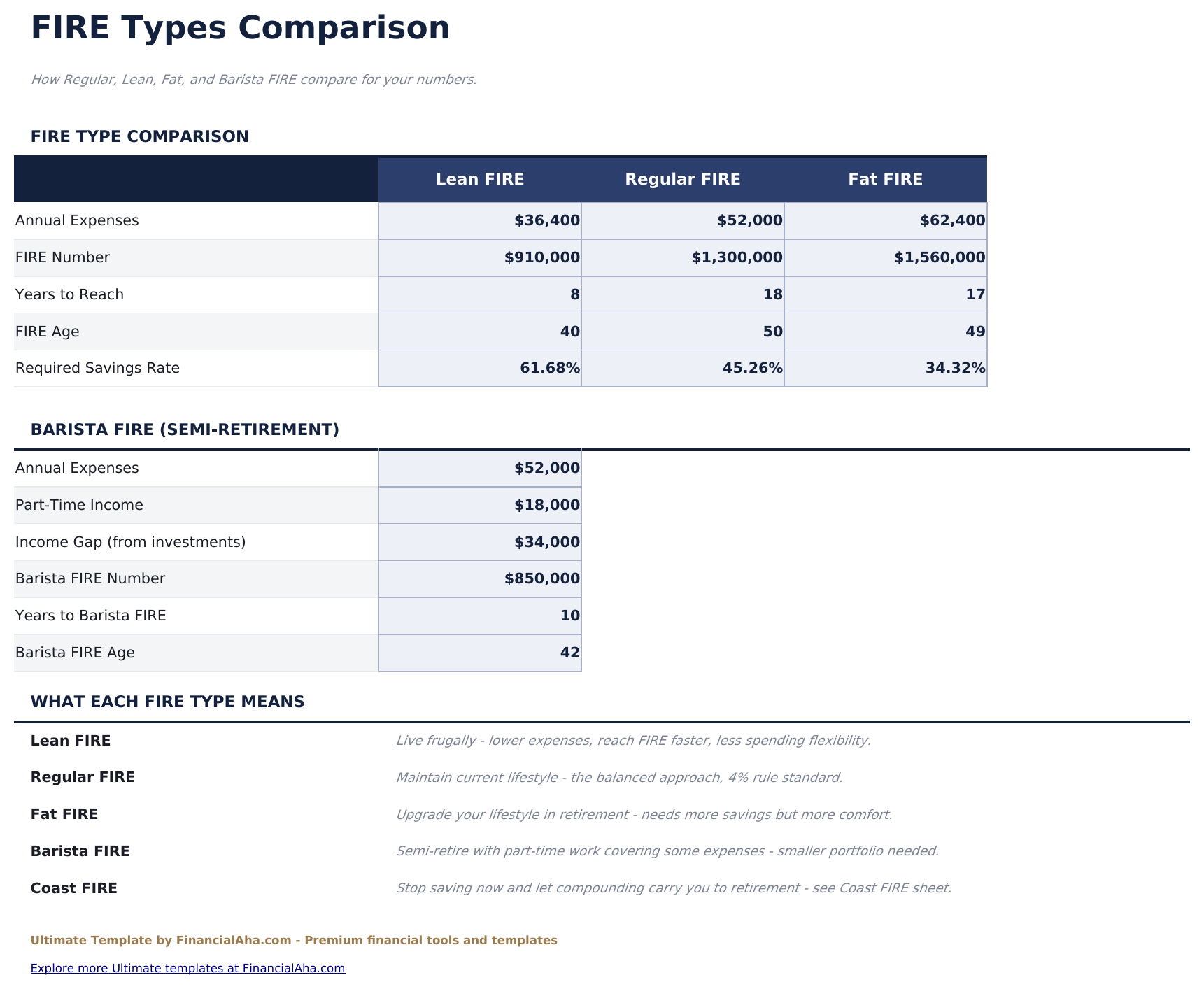
  • Lean, regular and fat targets compared side by side, each with its own timeline and required savings rate
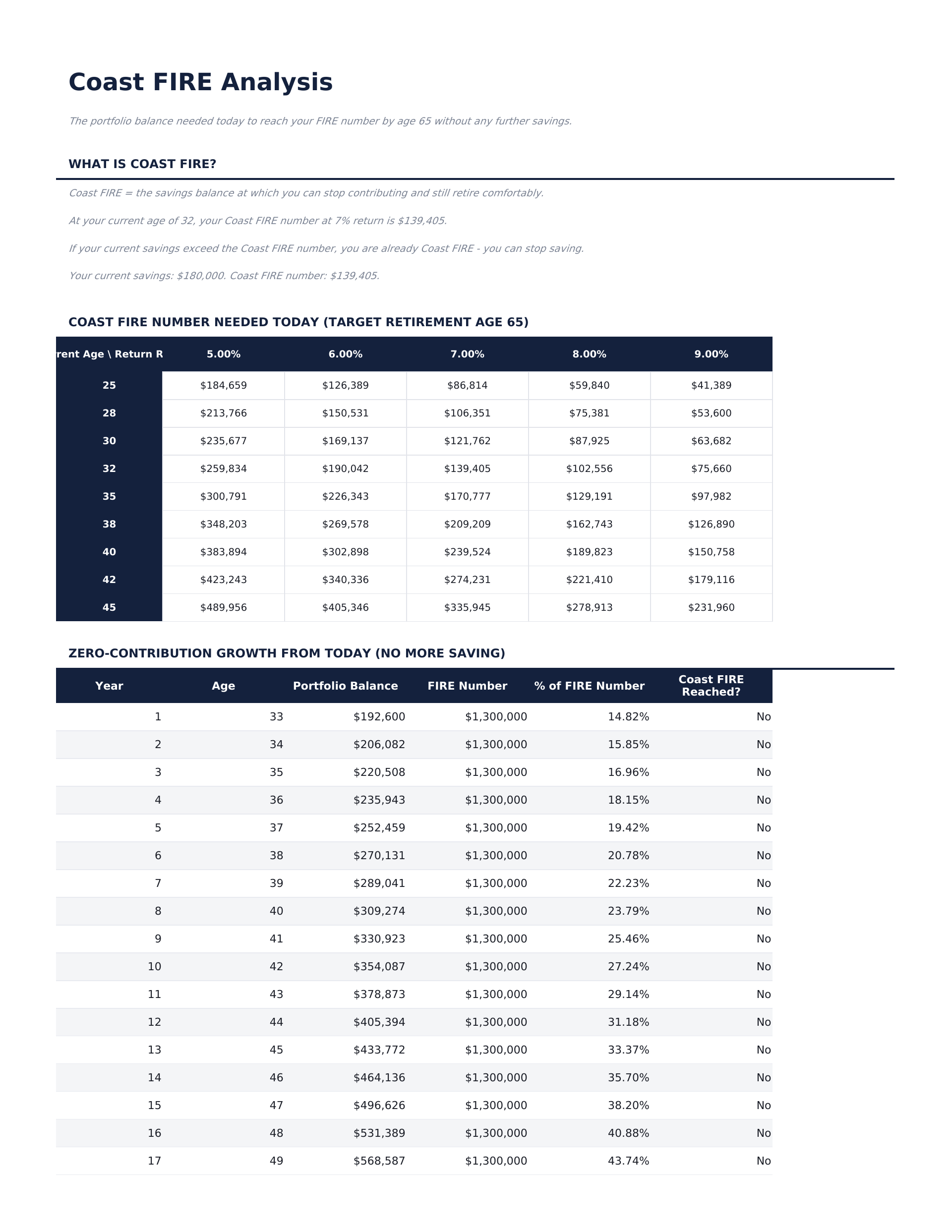
  • Coast analysis showing whether compounding alone would reach the target without further contributions
  • A sensitivity grid running the coast figure across ages and return rates
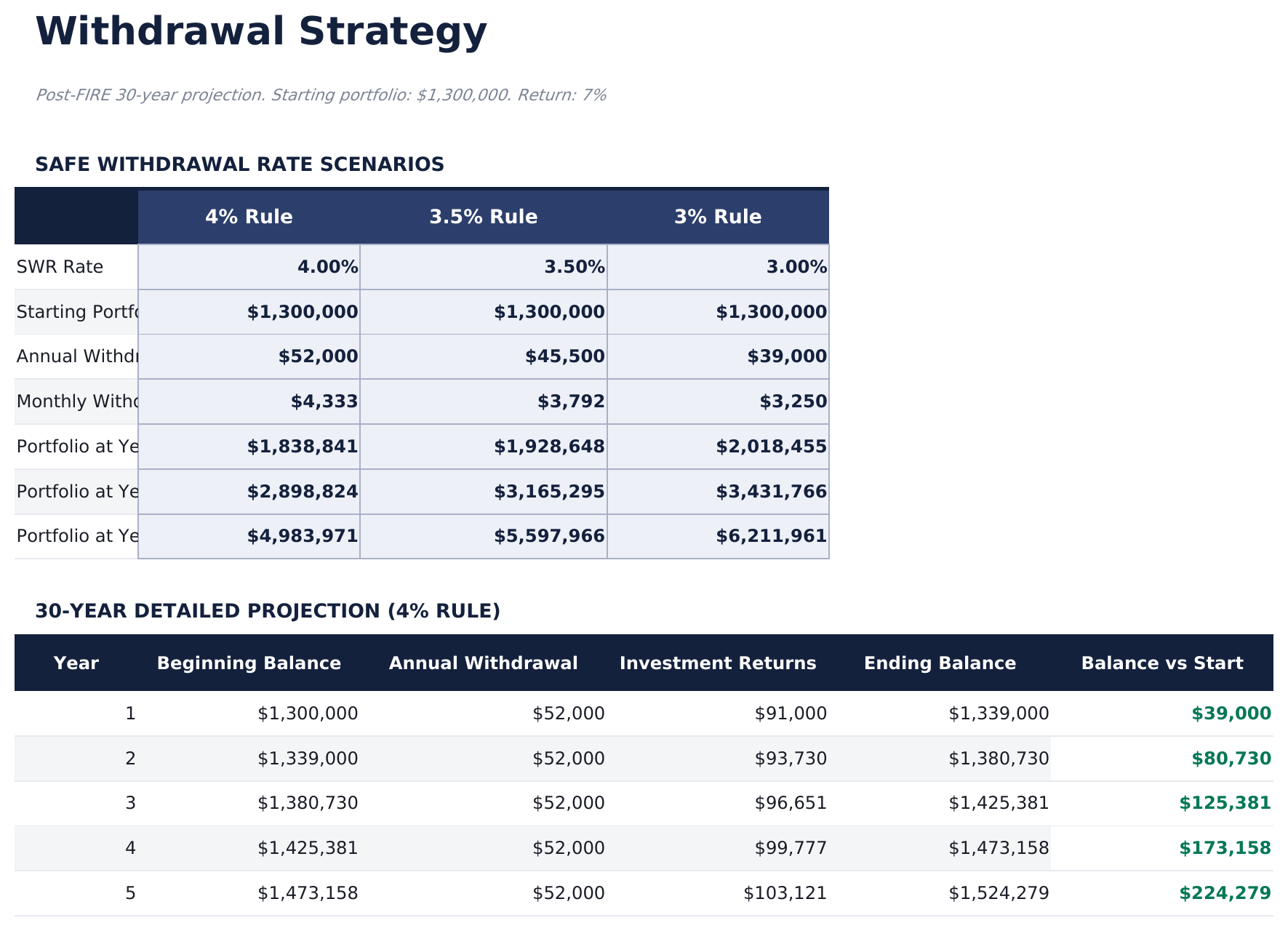
  • Withdrawal Strategy sheet carrying a finished portfolio forward against annual withdrawals and returns
  • Several withdrawal rates modelled side by side
  • Dashboard with six KPIs plus a FIRE-type comparison table
  • Two charts covering the projection and the make-up of the eventual total
  • Works in Microsoft Excel and Google Sheets with no macros required

The FinancialAha Ultimate FIRE Calculator Spreadsheet Template for Google Sheets and Excel is a six-sheet workbook that treats financial independence as several questions rather than one number, with a How to Use guide on a seventh tab. It ships as an Ultimate FIRE Calculator Excel template and an Ultimate FIRE Calculator Google Sheets template in one file. This Ultimate FIRE Calculator spreadsheet template holds every assumption on a sheet of its own, runs a forty-year projection with expenses carried forward at inflation, sets lean, regular and fat targets side by side, works out whether compounding alone would carry you there, and models the drawdown afterwards. No macros, no VBA.

Inside the workbook

What's inside the FinancialAha Ultimate FIRE Calculator spreadsheet template

The FinancialAha Ultimate FIRE Calculator Spreadsheet Template runs on six working sheets - one you type into, five that report back - plus the guide. It works in both Microsoft Excel and Google Sheets and here is what the Ultimate FIRE Calculator spreadsheet holds.

  1. 01 of 06

    Dashboard

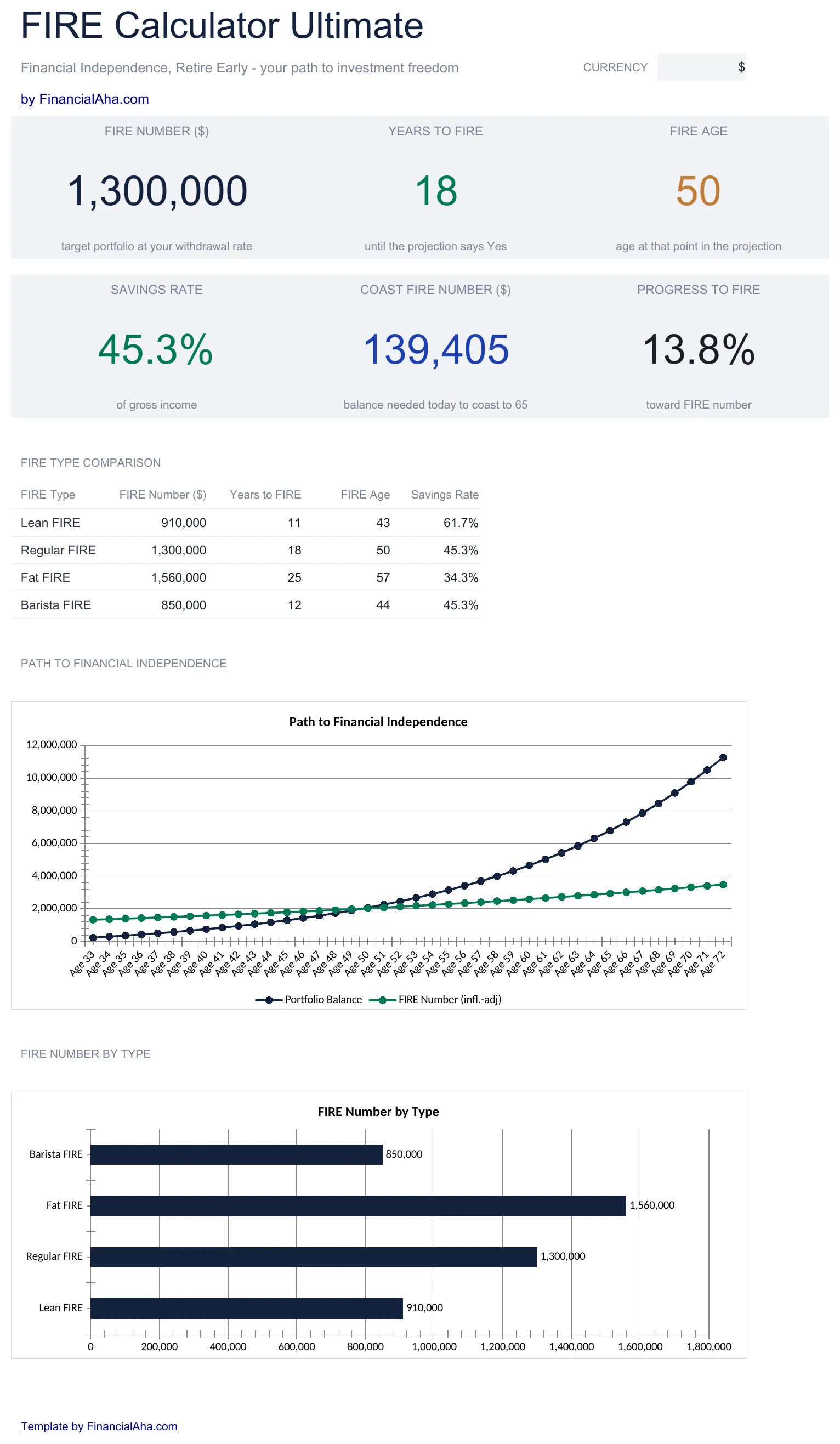
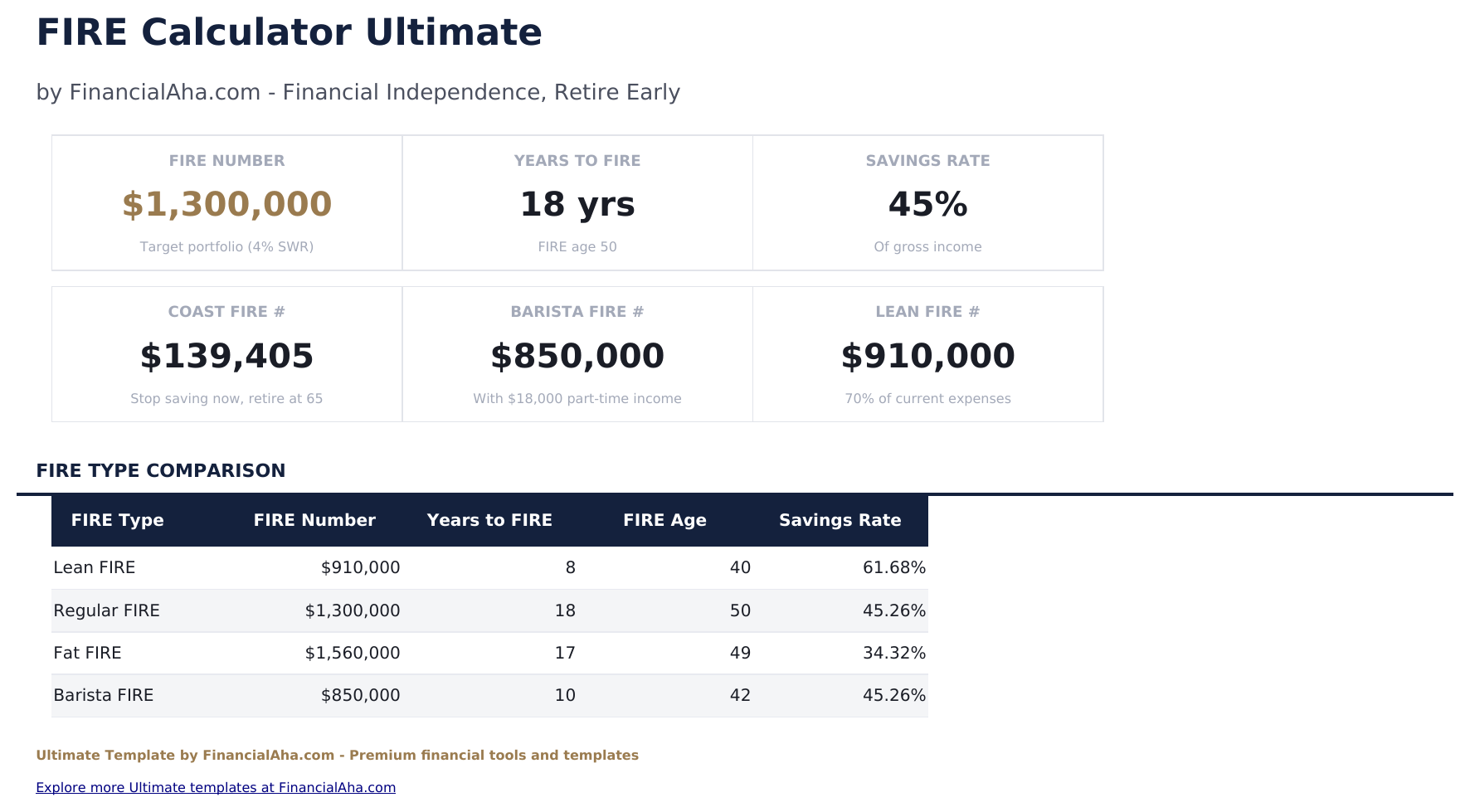
    Six headline figures - the target, the years remaining, the age that lands on, the share of income being saved, the coast figure, and how far along you already are - with a comparison table underneath setting the lean, regular and fat targets against each other, each with its own years, age and required savings rate. Two charts carry the projection and the make-up of the eventual total.

  2. 02 of 06

    Assumptions

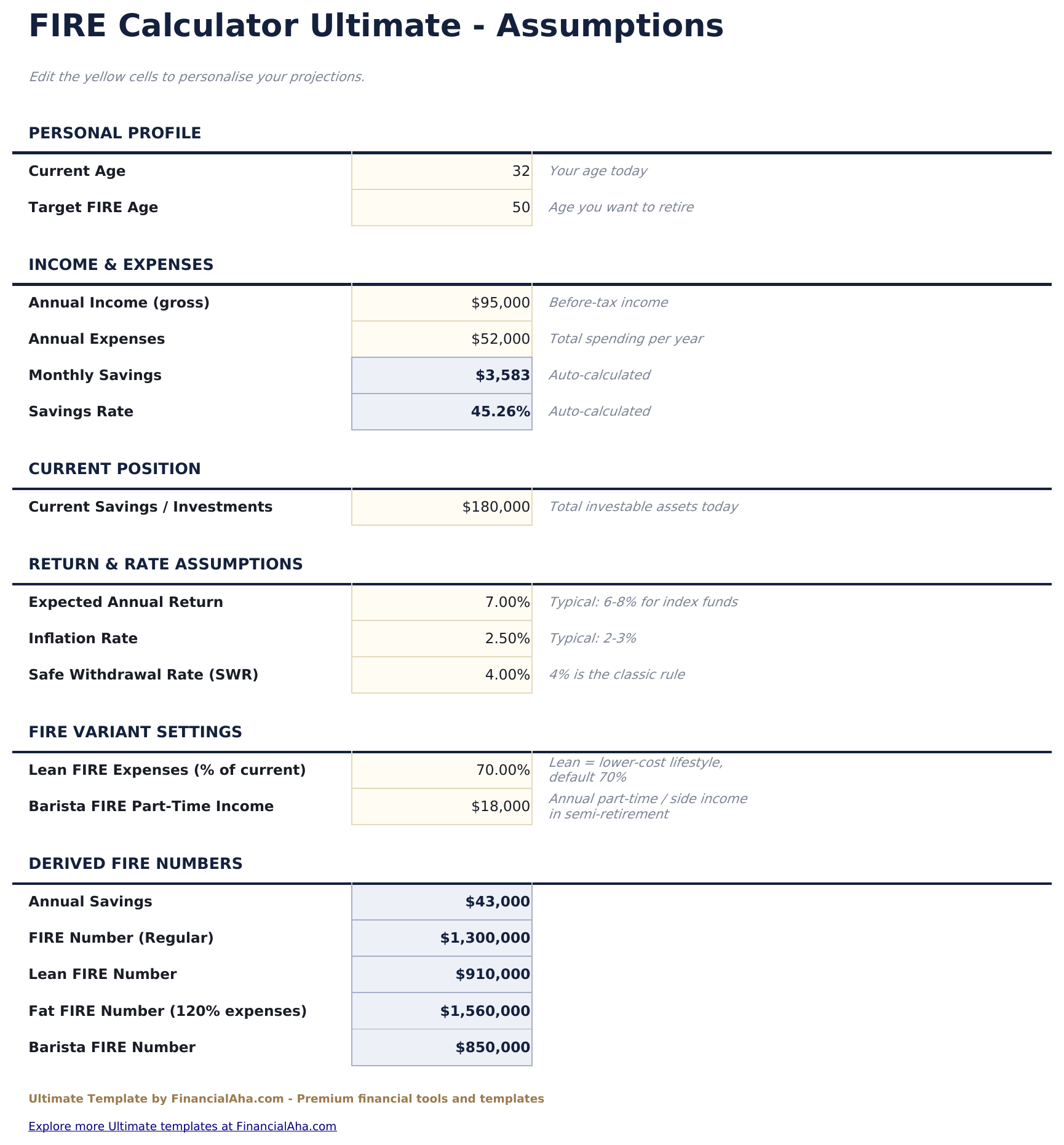
    Every input gathered in one place: the personal profile on one side, income and expenses on the other, and the assumptions the whole model turns on - expected return, withdrawal rate and inflation. Because nothing is entered anywhere else, testing a different view of the future is a single edit rather than a hunt through six sheets.

  3. 03 of 06

    FIRE Projection

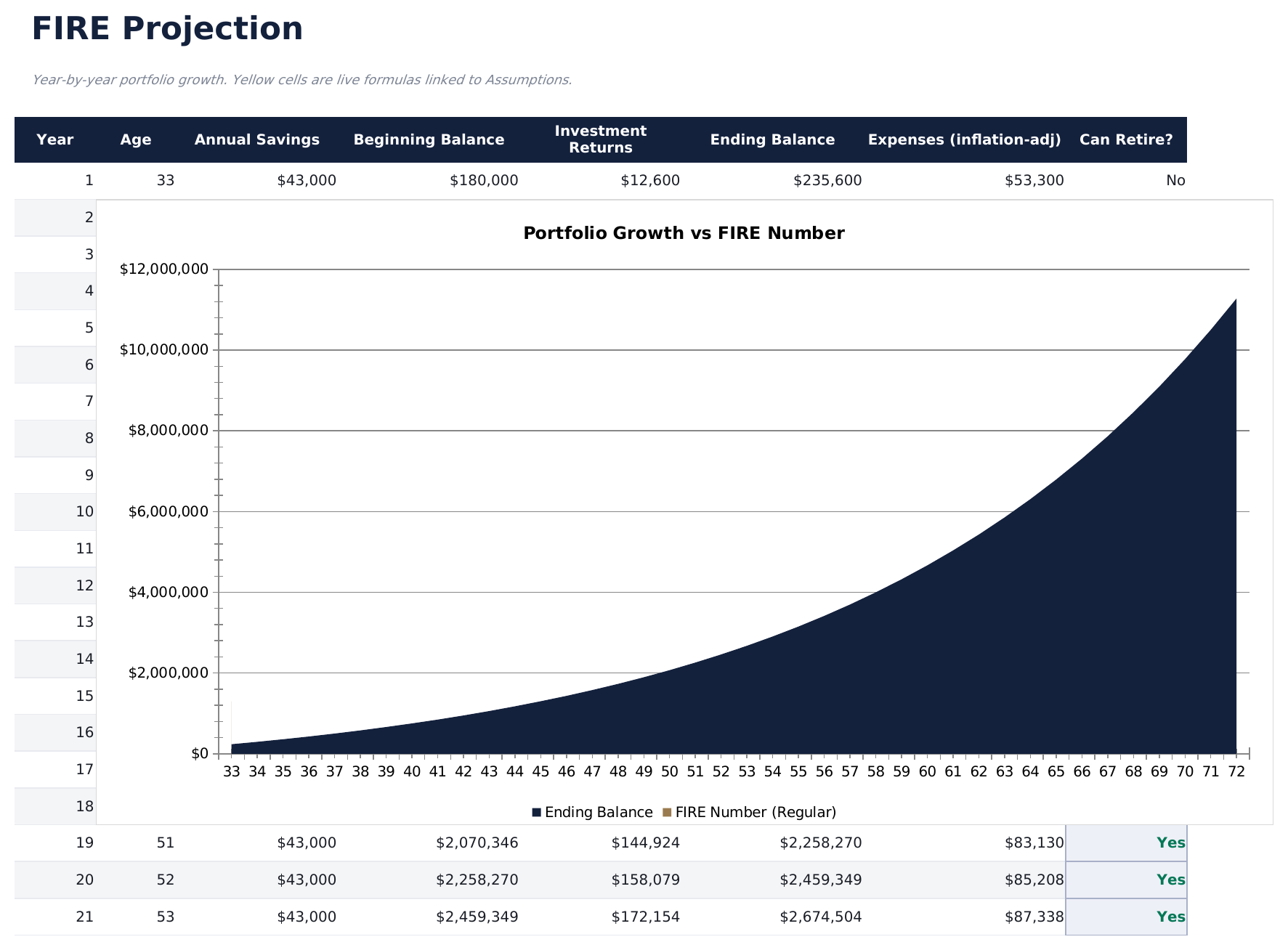
    Forty years, one row each. The balance carries forward with savings and returns added, and alongside it the cost of a year in retirement is carried forward at inflation rather than held flat - which is what separates this build from the smaller one. A flag marks each year against the question of whether the portfolio would cover it.

  4. 04 of 06

    FIRE Types

    The same finances read three ways: a lean target on a frugal spend, a regular one on the classic multiple, and a fat one on a more comfortable lifestyle. Each carries its own number, its own timeline and the savings rate it would take, which turns the question from whether you can reach independence into which version of it you are aiming at.

  5. 05 of 06

    Coast FIRE

    The question of whether the saving is already done. Year by year the sheet sets the portfolio against what it would need to be for compounding alone to carry it to the target, and flags the point where further contributions stop being necessary. A sensitivity grid runs the same figure across a range of ages and return rates, because that answer moves with both.

  6. 06 of 06

    Withdrawal Strategy

    What happens after. Starting from a finished portfolio, the sheet carries a balance forward against annual withdrawals and returns, showing where it stands each year against where it began, and runs the same projection across several withdrawal rates. The withdrawals are modelled at a fixed amount rather than rising with inflation, which the workbook notes.

  7. Included guide

    How to Use

    A step-by-step guide on its own tab, covering setup, what each sheet answers, how the projection is built, and what the model leaves out. Because it ships inside the file, the instructions travel with the template wherever it is opened.

Works in both Google Sheets and Excel

Ultimate FIRE Calculator Spreadsheet template for Google Sheets

Upload the Ultimate FIRE Calculator Spreadsheet Template to Drive, right-click it, and choose "Open with Google Sheets". This Ultimate FIRE Calculator Google Sheets template needs no conversion step and both charts survive the trip intact. The cross-sheet references that feed the Dashboard rely on the existing tab names, so the one thing worth leaving alone is the tab labels.

Ultimate FIRE Calculator Google Sheets template setup

A shared copy of the Ultimate FIRE Calculator Google Sheets template suits two people planning one timeline together, and because every input sits on the Assumptions sheet, an assumption changed in a shared file is visible rather than buried. Sheets version history covers a figure typed over by mistake.

Sharing the Ultimate FIRE Calculator Google Sheet

The Ultimate FIRE Calculator Google Sheet is built for sittings rather than a routine: set the assumptions once, then read the sheets that answer different questions - what the target is, whether compounding alone would get there, and what the drawdown looks like afterwards. Nothing needs recalculating by hand in between.

Ultimate FIRE Calculator Spreadsheet template for Excel

The Ultimate FIRE Calculator spreadsheet Excel download is a plain .xlsx. Excel opens this Ultimate FIRE Calculator Excel template directly, with no import step and no compatibility prompt, and both charts are native Excel charts that redraw as the assumptions change. There are no macros and no VBA in the file, so it opens without a security warning.

Ultimate FIRE Calculator Excel template setup

The same Ultimate FIRE Calculator Excel template opens in Excel on Windows, Excel on Mac, and Excel for the web. It is also the identical file you would upload to Drive, so there is no separate Ultimate FIRE Calculator spreadsheet download to choose between.

Ultimate FIRE Calculator spreadsheet Excel notes

The Ultimate FIRE Calculator spreadsheet Excel file carries no macros and no VBA, so Excel opens it without a trust prompt. The same Ultimate FIRE Calculator spreadsheet Excel download also opens in Excel for the web, which matters when you move between a work machine and a personal one.

Opening the Ultimate FIRE Calculator spreadsheet Excel file

Nothing in the Ultimate FIRE Calculator Excel template is version-specific, so this Ultimate FIRE Calculator spreadsheet Excel workbook behaves identically in Excel on Windows, Excel on Mac, and older builds.

Spreadsheet template highlights

What the Ultimate FIRE Calculator spreadsheet template tracks

Assumptions is the only sheet you type into. These are the columns the Ultimate FIRE Calculator Spreadsheet Template carries across the forty-year projection:

Year
each year of the projection
Age auto
derived, your age in that year
Annual Savings auto
derived, the gap between the income and expenses you entered
Beginning Balance auto
derived, what the previous year ended on
Investment Returns auto
derived, what the balance earned at the return you set
Ending Balance auto
derived, the beginning balance plus savings plus returns
Expenses (infl.-adj) auto
derived, a year of spending carried forward at inflation
Can Retire? auto
derived, the flag on whether the portfolio would cover that year

Compare builds

FinancialAha FIRE Calculator spreadsheet template: Free, Essentials, and Ultimate compared

Feature Free View Spreadsheet Template Essentials View Spreadsheet Template Ultimate This page
Working sheets 1 3 6
FIRE number Fixed 25x spending From the rate you set Per FIRE type
Years to FIRE Yes Yes Yes
Year-by-year projection Yes, with a FIRE? flag 40 years, with a Can Retire? flag
Withdrawal rate Settable Settable, plus scenarios
Inflation Shown, not applied Applied to expenses
Charts 2 2
Lean / regular / fat comparison Dedicated sheet
Coast FIRE Sheet plus sensitivity grid
Drawdown modelling Dedicated sheet

The FinancialAha Ultimate FIRE Calculator Spreadsheet Template covers six working sheets and answers several questions rather than one. The Free FIRE Calculator Spreadsheet Template returns a target at a fixed multiple and a duration. The Essentials FIRE Calculator Spreadsheet Template for Google Sheets and Excel makes the withdrawal rate an input, dates the answer against your age, and lays the path out year by year - but shows inflation without applying it. This build carries expenses forward at inflation across forty years, sets lean, regular and fat targets side by side with the savings rate each would take, works out whether compounding alone would reach the target without further contributions, and models the drawdown afterwards across several withdrawal rates. Tax treatment, sequence-of-returns risk and healthcare costs sit outside all three builds.

Good to know

Notes on working in the Ultimate FIRE Calculator spreadsheet template

  • Every input lives on the Assumptions sheet, so testing a different return or withdrawal rate never means editing the model.
  • The projection carries expenses forward at inflation. The Essentials build shows an inflation figure but holds expenses flat, which is why the two can disagree on the same inputs.
  • The coast question is separate from the target question: the sensitivity grid exists because that answer moves with both the age you ask at and the return you assume.
  • Drawdown is modelled at a fixed annual withdrawal rather than one rising with inflation, and the workbook notes it.
  • Tax treatment, sequence-of-returns risk and healthcare costs are not modelled here, which is worth holding in mind alongside any figure the sheet returns.

How to Use This Template

1

Fill in Assumptions

Enter your profile, income and expenses, then the expected return, withdrawal rate and inflation. Nothing is entered anywhere else.

2

Read the dashboard

Six headline figures plus a table setting the lean, regular and fat targets against each other.

3

Work through the projection

FIRE Projection runs forty years with an inflation-adjusted expense line and a flag on every year.

4

Test the edges

Coast FIRE asks whether compounding alone would get there; Withdrawal Strategy models what happens after.

Stress-tested with AI.

Every template starts with deep research into how people actually track the topic. We design the layout, build the formulas, and polish the design until it feels like something we would use ourselves. Along the way, we use AI to stress-test the calculations: unusual inputs, edge cases, and formula behavior, checked until the numbers hold.

One-time purchase. No subscription. Works in Excel & Google Sheets.

Frequently Asked Questions

Is the FinancialAha Ultimate FIRE Calculator Spreadsheet Template a Google Sheets template?

Yes. Upload the file to Drive and choose "Open with Google Sheets". The Ultimate FIRE Calculator Google Sheets template needs no conversion step and both charts survive the trip intact. The cross-sheet references rely on the existing tab names, so those are worth leaving alone.

Is the FinancialAha Ultimate FIRE Calculator Spreadsheet Template an Excel template?

Yes. The download is a plain .xlsx, so the Ultimate FIRE Calculator Excel template opens directly in Excel with no import step. Both charts are native Excel charts, and there are no macros or VBA.

Will the FinancialAha Ultimate FIRE Calculator spreadsheet Excel file open in older versions of Excel?

Yes. The Ultimate FIRE Calculator spreadsheet Excel workbook ships as a plain .xlsx, so it opens identically in current Excel and in builds that predate dynamic arrays.

What does the Ultimate FIRE Calculator Excel template add over Essentials?

It carries expenses forward at inflation across a forty-year projection rather than holding them flat, sets lean, regular and fat targets side by side, adds a coast analysis with a sensitivity grid, and models the drawdown after the target is reached.

What is Coast FIRE in the Ultimate FIRE Calculator spreadsheet?

The question of whether the saving is already done - whether the portfolio is large enough that compounding alone would carry it to the target without further contributions. The sheet flags the point year by year, and a grid runs the same figure across a range of ages and return rates because the answer moves with both.

What FIRE types does the Ultimate FIRE Calculator spreadsheet compare?

Lean, regular and fat - the same finances read against a frugal spend, the classic multiple, and a more comfortable lifestyle. Each carries its own target, timeline, age and the savings rate it would take.

How does the withdrawal modelling work in the Ultimate FIRE Calculator spreadsheet?

Starting from a finished portfolio, the sheet carries the balance forward against annual withdrawals and returns, showing each year against where it began, and runs the same projection across several withdrawal rates. Withdrawals are modelled at a fixed amount rather than rising with inflation, which the workbook notes.

Does the Ultimate FIRE Calculator spreadsheet account for inflation?

Yes, in the projection - the expense line is carried forward at the inflation rate you set. Tax treatment, sequence-of-returns risk and healthcare costs are not modelled, and returns are applied as a constant average.

What do I get after buying the Ultimate FIRE Calculator spreadsheet template?

You receive the Ultimate FIRE Calculator spreadsheet template as an Excel file (.xlsx) that works in Microsoft Excel and Google Sheets. Download it immediately after purchase - no signup or account required.

Is there a free Ultimate FIRE Calculator spreadsheet template?

Yes. A free version of the Ultimate FIRE Calculator spreadsheet template is available with basic features. The Ultimate version adds advanced analysis, more capacity, and additional sheets.

What if the Ultimate FIRE Calculator spreadsheet template does not work for me?

Contact us and we will help troubleshoot. The Ultimate FIRE Calculator spreadsheet template works in Microsoft Excel and Google Sheets with no macros required.

Ultimate

Highlights:

Instant download after purchase
No macros or VBA required
All formulas auto-calculate
No subscription required
Works in
Excel Google Sheets

Looking for more Ultimate templates?

We offer Ultimate versions of our most popular spreadsheet templates with advanced features, more capacity, and deeper analysis.

Private & secure

Your financial data stays on your device. We never see it.

Learn more →

Need help?

Check our guides or reach out with questions.

View FAQ →