Lifetime Deal Complete Personal Financial Planning Bundle →
✓ Financial Planning✓ Net Worth Tracker✓ Monthly Budgeting✓ Travel Budget Planner✓ Annual Budgeting Planner✓ Monthly Expense Tracker✓ Annual Tax Planner✓ Retirement Planning
View Bundle →

Instant digital delivery · Terms & Conditions apply

Ultimate Template - Excel & Google Sheets

Ultimate Household Budget Spreadsheet Template for Google Sheets & Excel

A split ratio you set explicitly for the shared costs, thirty shared expenses each with a description, budget, actual and variance, and a paid-by column on every one so the household can settle up. The Ultimate Household Budget spreadsheet template takes per-person income on its own setup sheet and keeps personal categories per person, out of the shared pool. Seven sheets, Google Sheets and Excel, one file. No macros, no VBA.

See Preview

Instant digital delivery · Terms & Conditions apply

Household Budget Spreadsheet Template - Ultimate version for Google Sheets and Excel

What's Included

  • A shared expense split ratio, set explicitly rather than assumed
  • Per-person income entered on its own setup sheet
  • Thirty shared expenses with a description, budget, actual and variance
  • A paid-by column on every shared cost, so the household can settle up
  • Personal categories kept per person, out of the shared pool
  • Monthly Tracking carrying categories across the year
  • Budget vs Actual with variance in money and percentage terms
  • Dashboard with household income, total expenses and net savings, plus two charts
  • Works in Microsoft Excel and Google Sheets with no macros required

The FinancialAha Ultimate Household Budget Spreadsheet Template for Google Sheets and Excel is a six-sheet workbook for a household where who pays for what actually matters, with a How to Use guide on a seventh tab. It ships as an Ultimate Household Budget Excel template and an Ultimate Household Budget Google Sheets template in one file. This Ultimate Household Budget spreadsheet template holds a split ratio you set, records who paid each shared bill, gives each person their own spending, and carries the whole year month by month. No macros, no VBA.

Inside the workbook

What's inside the FinancialAha Ultimate Household Budget spreadsheet template

The FinancialAha Ultimate Household Budget Spreadsheet Template runs on six working sheets - four you type into, two that report back - plus the guide. It works in both Microsoft Excel and Google Sheets and here is what the Ultimate Household Budget spreadsheet holds.

  1. 01 of 06

    Dashboard

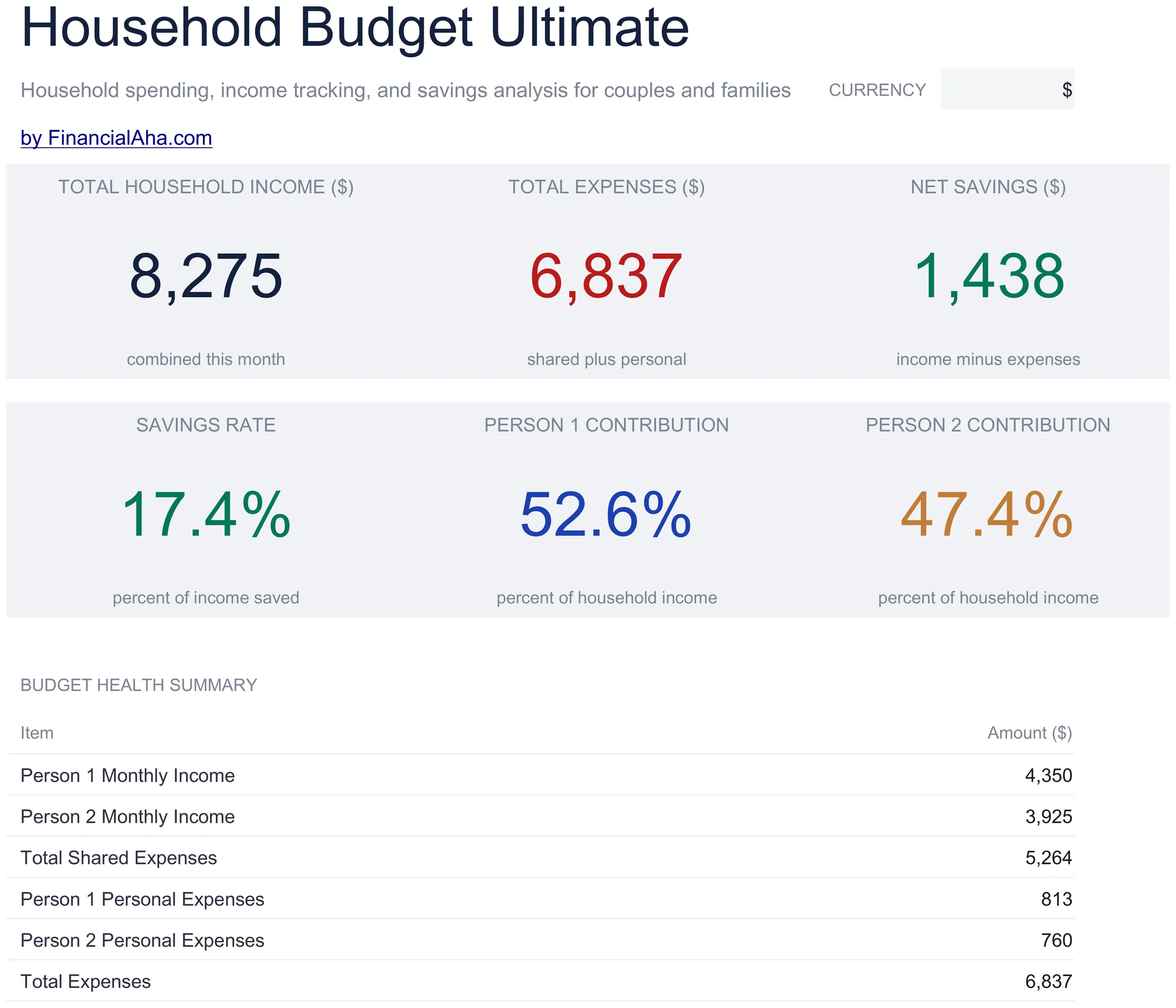
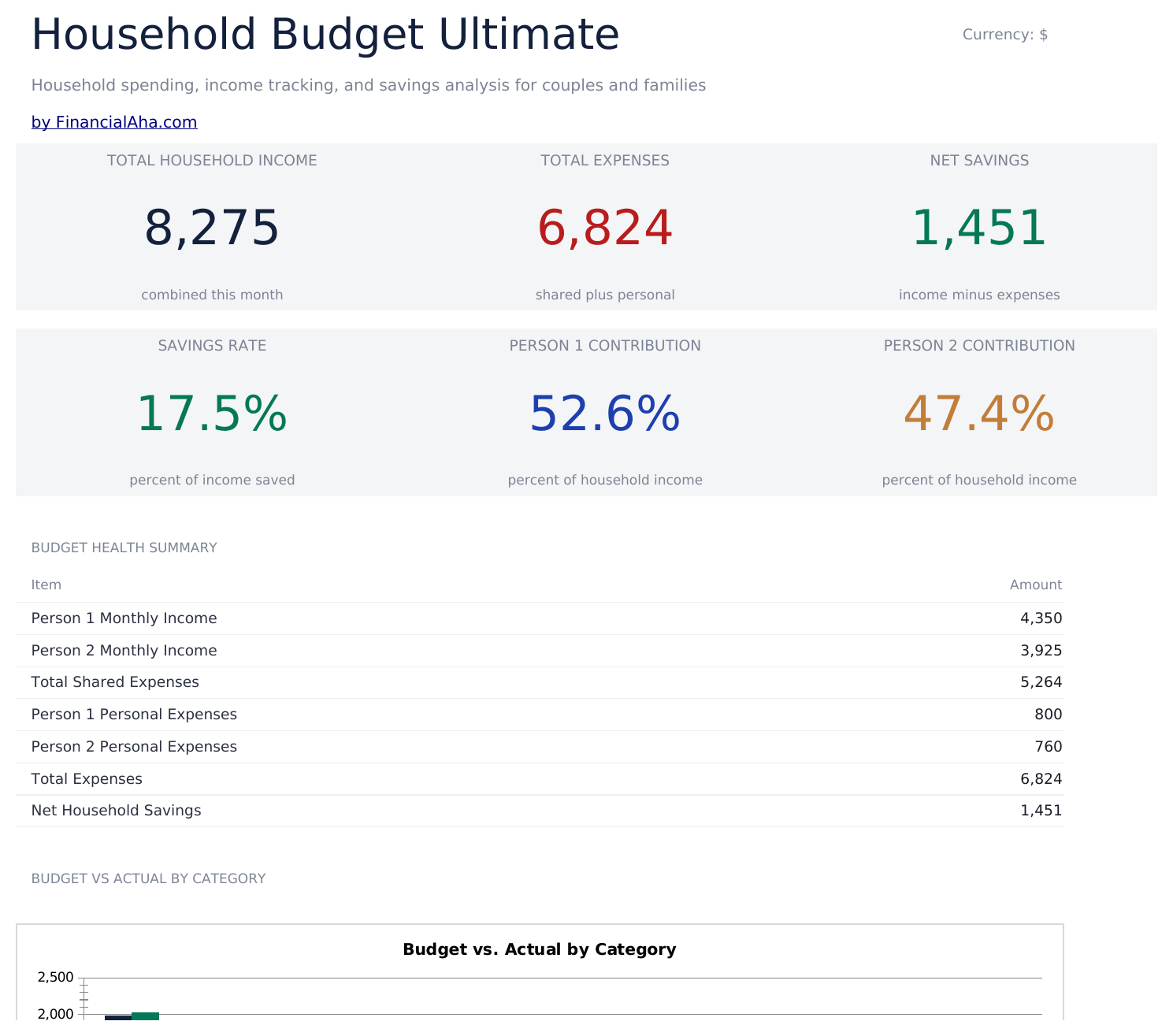
    The month in six figures: what the household brought in between them, what went out across shared and personal spending, what is left, the share of income that saves, and what each person contributed as a share of the household total. Those last two are the ones a shared budget tends to be missing. Splitting costs evenly out of unequal incomes is a different arrangement from splitting them proportionally, and the two contribution shares are what make that conversation possible without anyone doing arithmetic in their head. Two charts carry the shape of it. Everything reads from the sheets behind, so nothing here needs keeping in step by hand.

  2. 02 of 06

    Income Setup

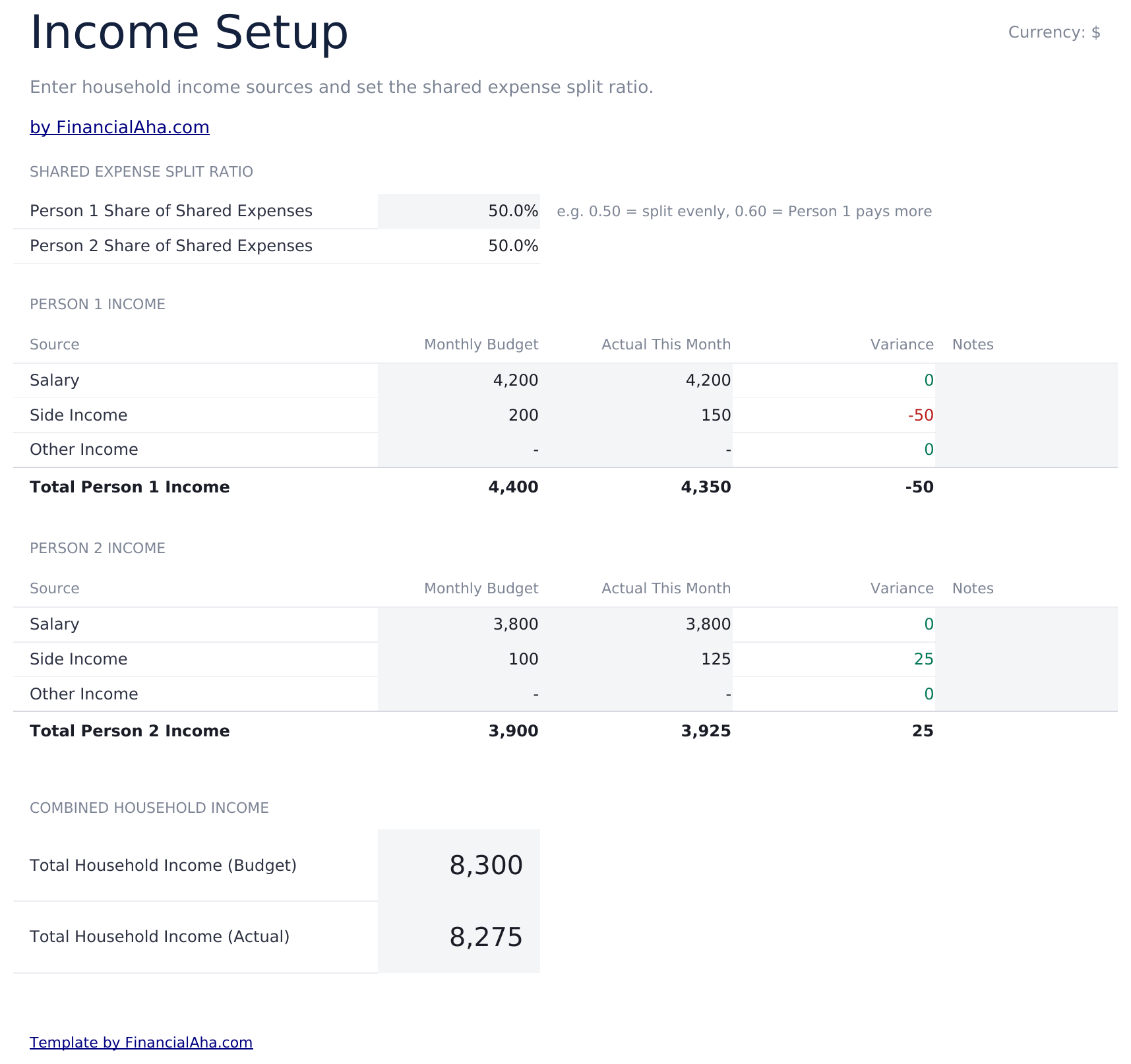
    Each person's income entered separately, with a split ratio for the shared costs sitting alongside. That ratio is the field that makes this build different: households divide shared costs in different ways, and setting it explicitly turns an assumption into something written down rather than argued about later.

  3. 03 of 06

    Shared Expenses

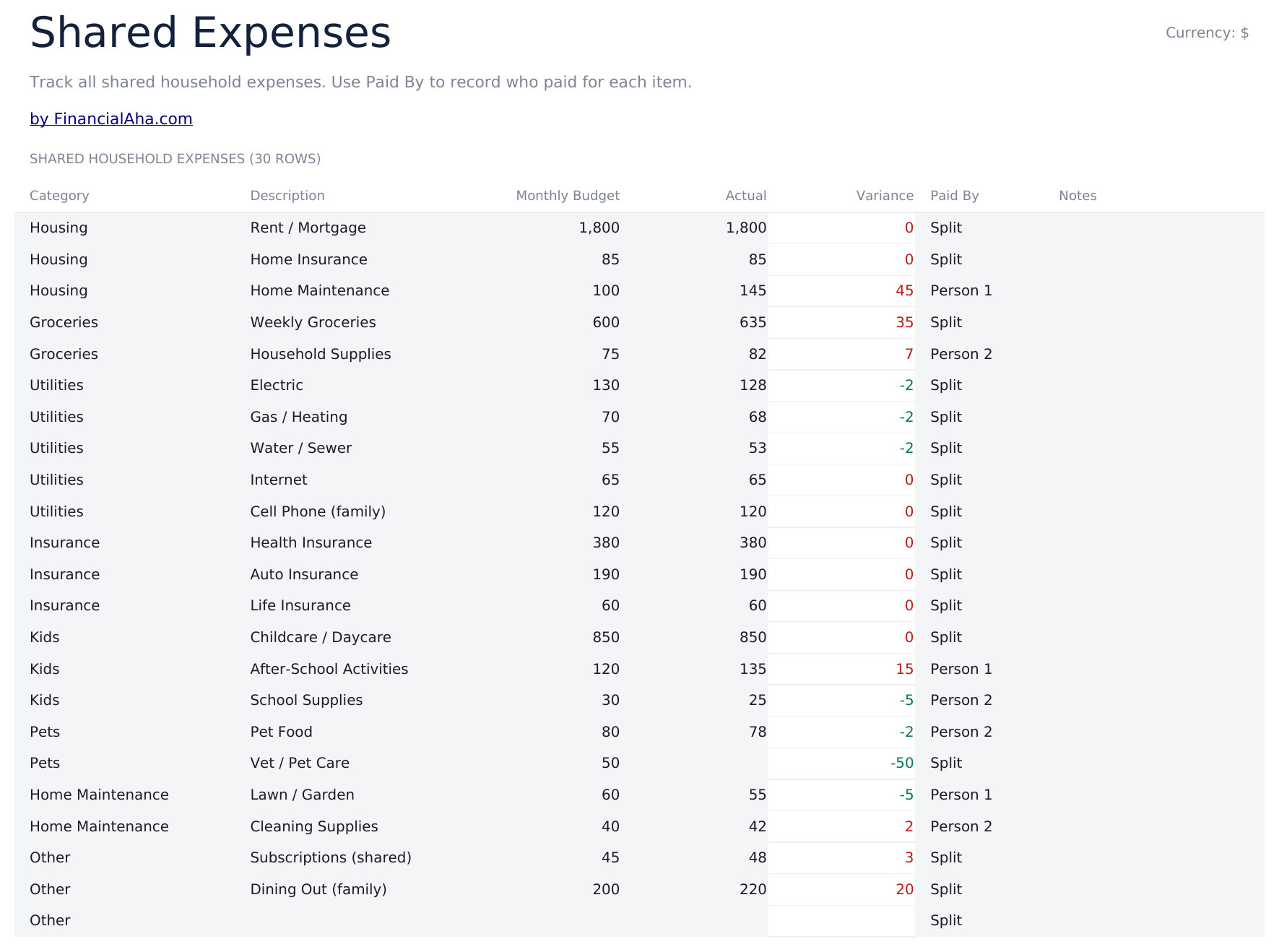
    The costs the household carries together, thirty of them, each with a description, what was planned, what was actually spent, the variance - and, importantly, who paid it. Recording who paid is what turns a joint budget into something that can be settled up, rather than a list everyone hopes is roughly even.

  4. 04 of 06

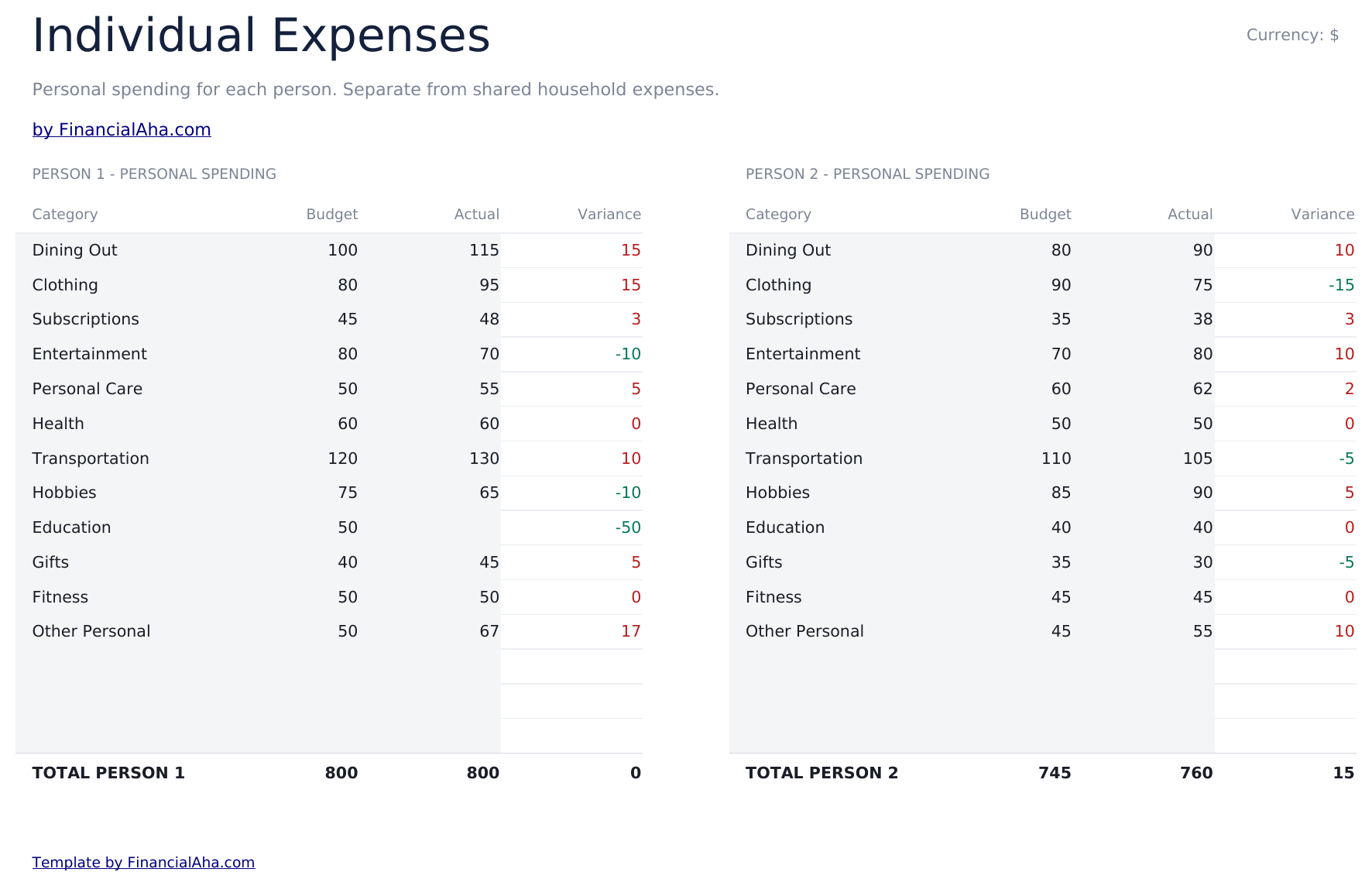
    Individual Expenses

    Each person's own spending, kept in their own section. It sits in the same file as the shared costs without being pooled with them, which is the arrangement the sheet is built around.

  5. 05 of 06

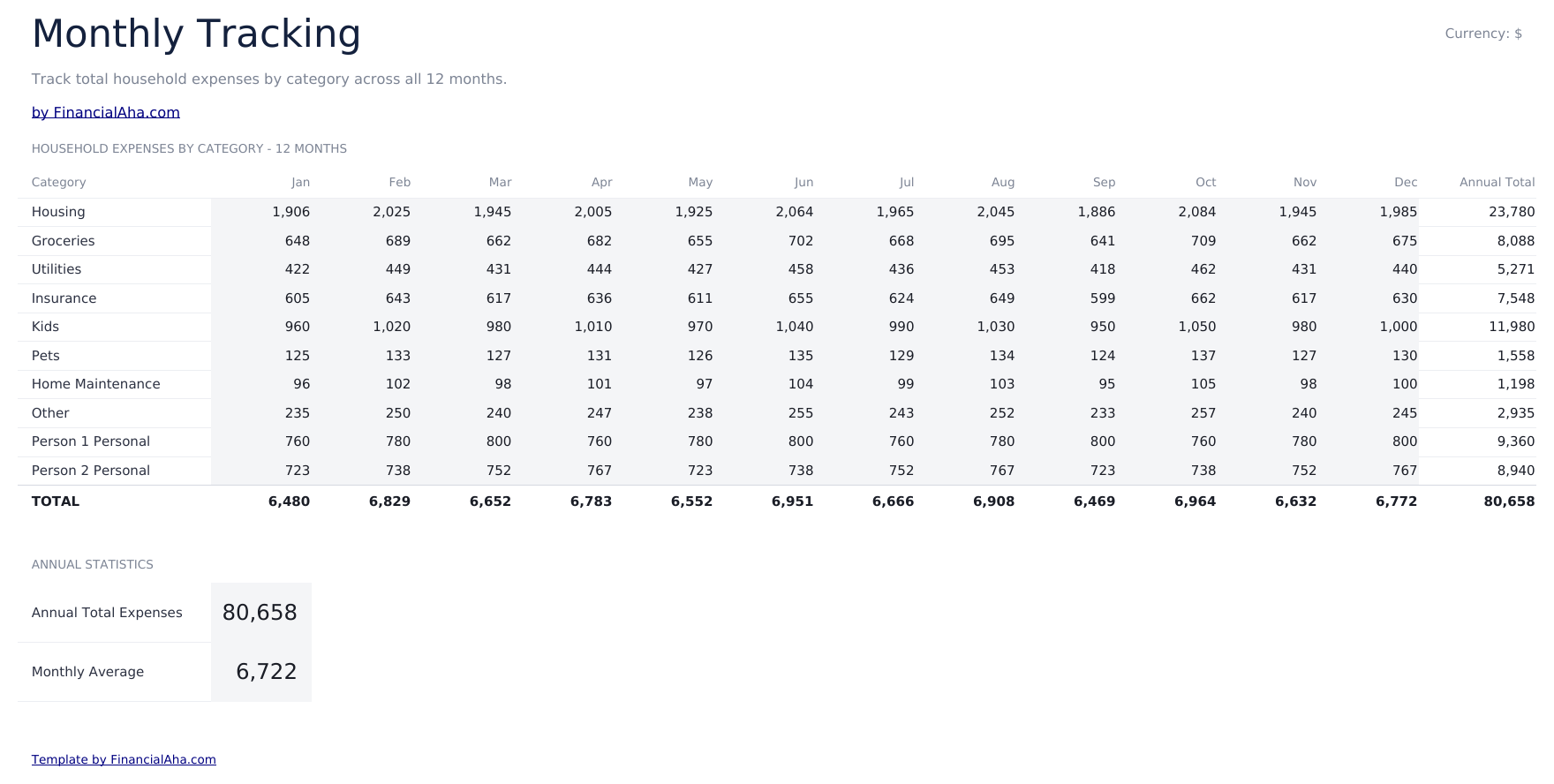
    Monthly Tracking

    Categories carried across the months of the year, so the household's pattern is visible rather than the current month's snapshot. A budget that works in January and not in November is a seasonal problem, and this is where that shows.

  6. 06 of 06

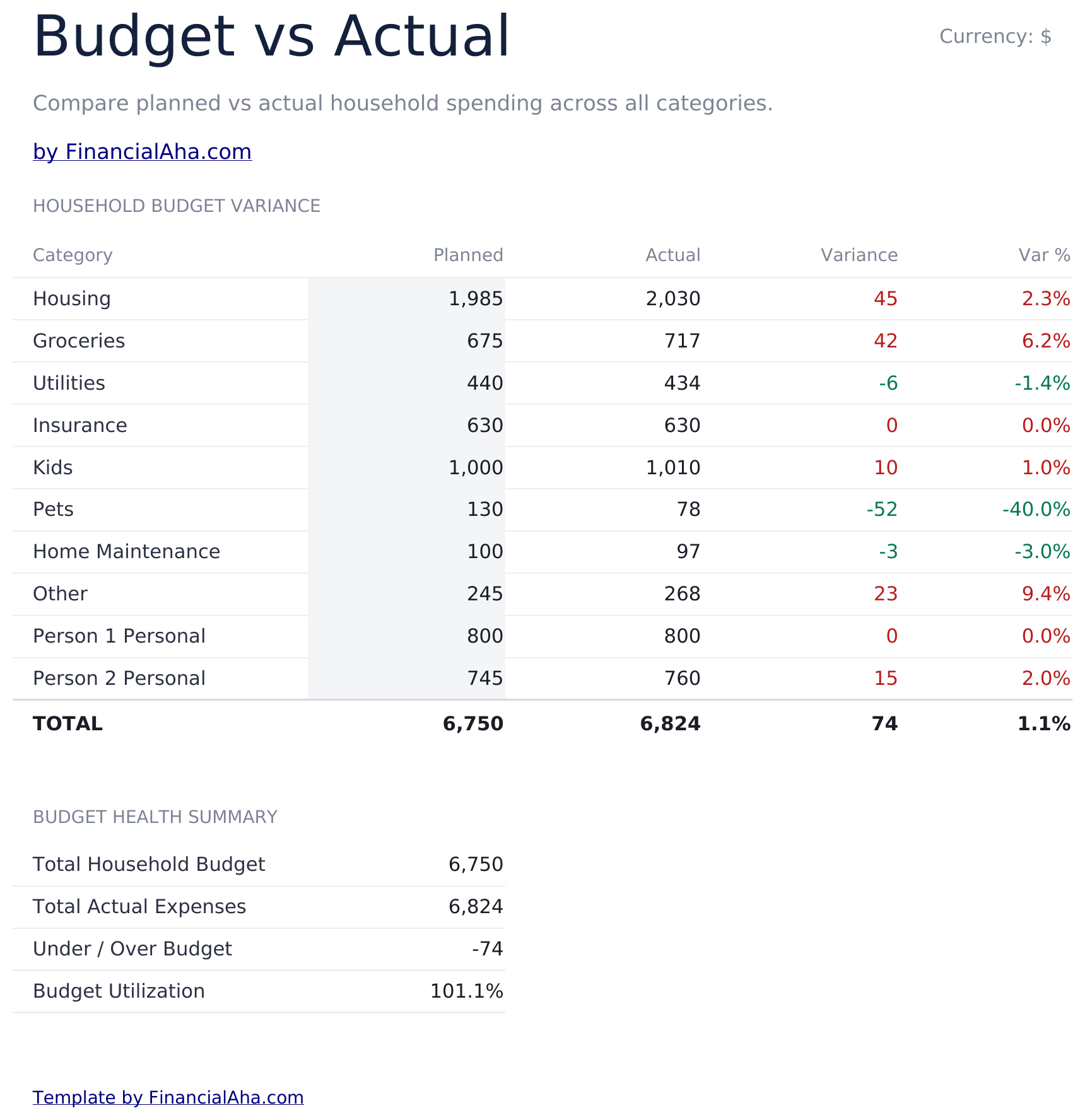
    Budget vs Actual

    The reckoning: each category with what was planned, what happened, and the variance in both money and percentage terms. It is the sheet that answers whether the plan was wrong or the month was unusual.

  7. Included guide

    How to Use

    A step-by-step guide on its own tab, covering setup, how the split ratio is applied, what belongs in shared against individual, and how the monthly view builds. Because it ships inside the file, the instructions travel with the template wherever it is opened.

Works in both Google Sheets and Excel

Ultimate Household Budget Spreadsheet template for Google Sheets

Upload the Ultimate Household Budget Spreadsheet Template to Drive, right-click it, and choose "Open with Google Sheets". This Ultimate Household Budget Google Sheets template needs no conversion step and both charts survive the trip intact. The cross-sheet references that feed the Dashboard rely on the existing tab names, so those are worth leaving alone.

Ultimate Household Budget Google Sheets template setup

A shared copy of the Ultimate Household Budget Google Sheets template is how a two-person household would run it - both people in the same file, each keeping their own section and both able to see who paid what. Sheets version history covers a figure typed over, which matters when two people are editing.

Sharing the Ultimate Household Budget Google Sheet

Day to day the Ultimate Household Budget Google Sheet is a line against a category, shared or personal, with who paid it noted on the shared ones. The monthly view and the variance sheet follow without further entry.

Ultimate Household Budget Spreadsheet template for Excel

The Ultimate Household Budget spreadsheet Excel download is a plain .xlsx. Excel opens this Ultimate Household Budget Excel template directly, with no import step and no compatibility prompt, and both charts are native Excel charts that redraw as the numbers change. There are no macros and no VBA in the file, so it opens without a security warning.

Ultimate Household Budget Excel template setup

The same Ultimate Household Budget Excel template opens in Excel on Windows, Excel on Mac, and Excel for the web. It is also the identical file you would upload to Drive, so there is no separate Ultimate Household Budget spreadsheet download to choose between.

Ultimate Household Budget spreadsheet Excel notes

The Ultimate Household Budget spreadsheet Excel file carries no macros and no VBA, so Excel opens it without a trust prompt. The same Ultimate Household Budget spreadsheet Excel download also opens in Excel for the web, which matters when you move between a work machine and a personal one.

Opening the Ultimate Household Budget spreadsheet Excel file

Nothing in the Ultimate Household Budget Excel template is version-specific, so this Ultimate Household Budget spreadsheet Excel workbook behaves identically in Excel on Windows, Excel on Mac, and older builds.

Spreadsheet template highlights

What the Ultimate Household Budget spreadsheet template tracks

Shared Expenses is the sheet that does the most work. These are the columns the Ultimate Household Budget Spreadsheet Template carries:

Category
the cost the line covers
Description
what it actually was, where the category alone is not enough
Monthly Budget
what was planned for it
Actual
what was really spent
Variance auto
derived, planned against actual
Paid By
which person actually paid, so the household can settle up
Notes
anything worth recording against the line
Source
an income line on the setup sheet
Actual This Month
what that income source actually delivered

Compare builds

FinancialAha Household Budget spreadsheet template: Free, Essentials, and Ultimate compared

Feature Free View Spreadsheet Template Essentials View Spreadsheet Template Ultimate This page
Working sheets 1 2 6
Two people handled – Income and personal spending per partner Income, personal spending and who paid
Category rows 16 3 to 7 per section 30 shared, 15 personal each
Planned vs actual Yes Yes Yes
Share of income – Per category –
Shared vs personal split – Reported Split ratio you set
Who paid a bill – – Recorded per expense
Charts – 2 2
Savings rate – Yes Yes
Months covered One One 12, tracked by category
Variance analysis – – Dedicated sheet

The FinancialAha Ultimate Household Budget Spreadsheet Template covers six working sheets and is the build for a household that needs to settle up rather than simply agree a total. The Free Household Budget Spreadsheet Template holds one shared list and no income. The Essentials Household Budget Spreadsheet Template for Google Sheets and Excel gives each partner income and personal sections and reports the savings rate. This build adds the two things a shared household actually argues about: a split ratio written down rather than assumed, and a record of who paid each shared bill. On top sit personal categories per person, a year tracked month by month, and a variance sheet.

Good to know

Notes on working in the Ultimate Household Budget spreadsheet template

  • The split ratio is yours to set. Households divide shared costs differently, and writing it down is what stops it being re-litigated each month.
  • The paid-by column is what makes settling up possible - without it, a joint budget records what was spent but not who is owed.
  • Personal sections sit in the same file as the shared costs without being pooled with them.
  • The monthly view is where a seasonal pattern shows - a plan that works in one month and not another is a different problem from overspending.
  • The currency dropdown sits on the Dashboard and relabels money columns across the whole Ultimate Household Budget spreadsheet. It changes the label only and does not convert the numbers.

How to Use This Template

1

Set up income and the split

On Income Setup, enter each person's income and the ratio you use to share costs.

2

Record shared costs

Enter each shared expense with its budget, actual and who paid it.

3

Add personal spending

Each person keeps their own categories in their own section.

4

Track the year

Monthly Tracking builds the pattern, and Budget vs Actual reports the variance.

Stress-tested with AI.

Every template starts with deep research into how people actually track the topic. We design the layout, build the formulas, and polish the design until it feels like something we would use ourselves. Along the way, we use AI to stress-test the calculations: unusual inputs, edge cases, and formula behavior, checked until the numbers hold.

One-time purchase. No subscription. Works in Excel & Google Sheets.

Frequently Asked Questions

Is the FinancialAha Ultimate Household Budget Spreadsheet Template a Google Sheets template?

Yes. Upload the file to Drive and choose "Open with Google Sheets". The Ultimate Household Budget Google Sheets template needs no conversion step and both charts survive the trip intact. The cross-sheet references rely on the existing tab names, so those are worth leaving alone.

Is the FinancialAha Ultimate Household Budget Spreadsheet Template an Excel template?

Yes. The download is a plain .xlsx, so the Ultimate Household Budget Excel template opens directly in Excel with no import step. Both charts are native Excel charts, and there are no macros or VBA.

Will the FinancialAha Ultimate Household Budget spreadsheet Excel file open in older versions of Excel?

Yes. The Ultimate Household Budget spreadsheet Excel workbook ships as a plain .xlsx, so it opens identically in current Excel and in builds that predate dynamic arrays.

How does the split ratio in the Ultimate Household Budget spreadsheet work?

You set it. Households divide shared costs in different ways, and the sheet applies whatever ratio you enter rather than assuming one - which turns an arrangement into something written down instead of re-agreed each month.

What does the paid-by column do in the Ultimate Household Budget spreadsheet?

It records which person actually paid a shared bill. Without it a joint budget shows what was spent but not who is owed, which is the part that eventually needs settling.

Can I add categories to the Ultimate Household Budget spreadsheet?

Shared expenses and personal categories get sections of their own, and you can right-click inside any table and choose Insert when you need another row. Income sits on its own setup sheet and the year tracked across twelve months.

Does the Ultimate Household Budget spreadsheet track the whole year?

Yes. Monthly Tracking carries categories across the months, so a pattern that only appears seasonally is visible rather than lost between monthly files.

What does the variance sheet add in the Ultimate Household Budget spreadsheet?

Each category with what was planned, what happened, and the gap in money and percentage terms - which answers whether the plan was wrong or the month was unusual.

What do I get after buying the Ultimate Household Budget spreadsheet template?

You receive the Ultimate Household Budget spreadsheet template as an Excel file (.xlsx) that works in Microsoft Excel and Google Sheets. Download it immediately after purchase - no signup or account required.

Is there a free Ultimate Household Budget spreadsheet template?

Yes. A free version of the Ultimate Household Budget spreadsheet template is available with basic features. The Ultimate version adds advanced analysis, more capacity, and additional sheets.

What if the Ultimate Household Budget spreadsheet template does not work for me?

Contact us and we will help troubleshoot. The Ultimate Household Budget spreadsheet template works in Microsoft Excel and Google Sheets with no macros required.

Ultimate

Highlights:

Instant download after purchase
No macros or VBA required
All formulas auto-calculate
No subscription required
Works in
Excel Google Sheets

Looking for more Ultimate templates?

We offer Ultimate versions of our most popular spreadsheet templates with advanced features, more capacity, and deeper analysis.

Private & secure

Your financial data stays on your device. We never see it.

Learn more →

Need help?

Check our guides or reach out with questions.

View FAQ →