Startup Financial Model Spreadsheet Template for Excel & Google Sheets
An early-stage operating model focused on what matters before product-market fit - funding rounds, the hiring plan, a 24-month burn and runway projection, and a simplified cap table. Dual compatible with Microsoft Excel and Google Sheets.
The set · 3 templates
Startup Founder Bundle
This template + 2 more: 5-Year Financial Projections, Business Valuation
This template only
Startup Financial Model
Instant digital delivery · Terms & Conditions apply
One-time purchase
Startup Operating Model
Everything in This Startup Spreadsheet
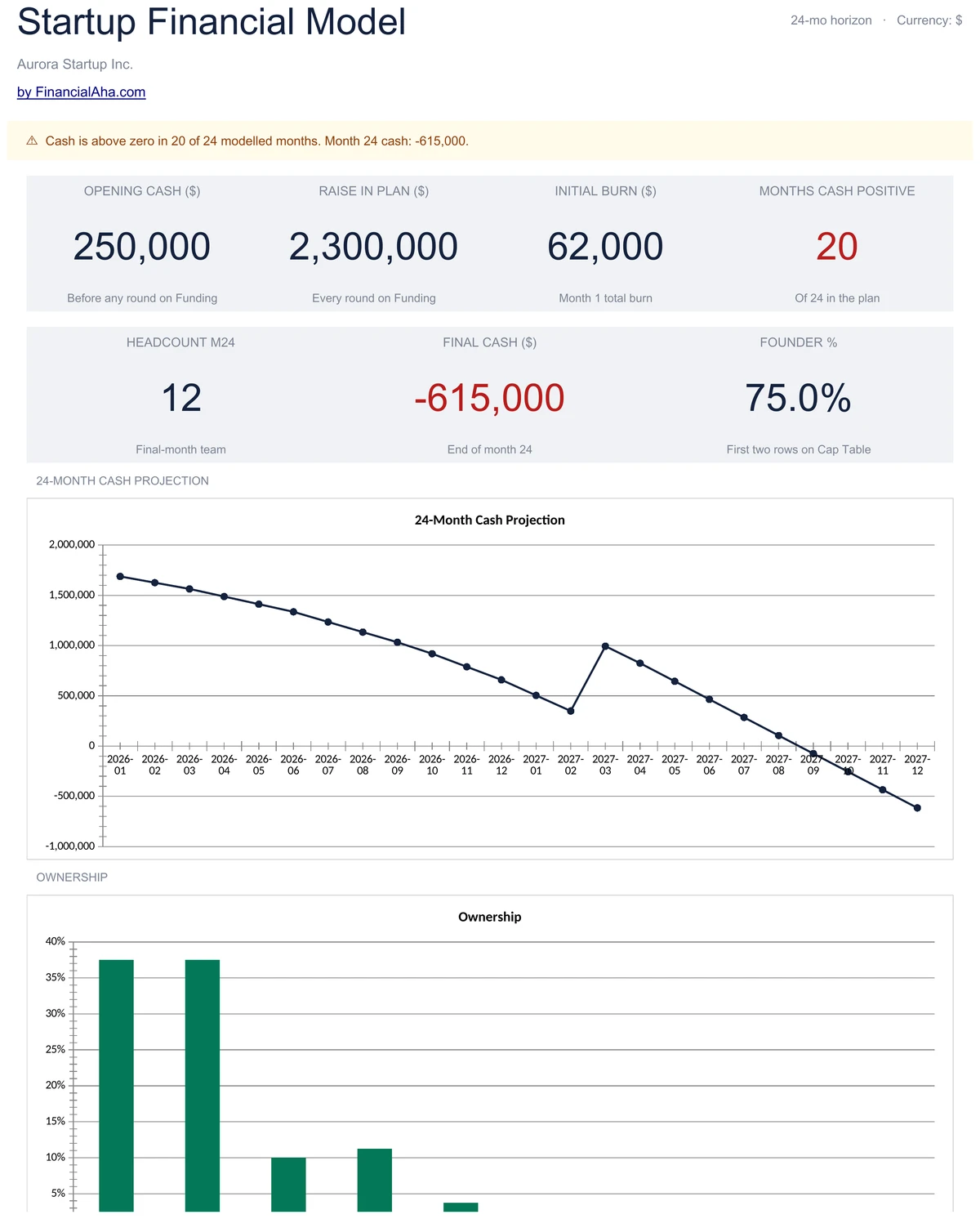
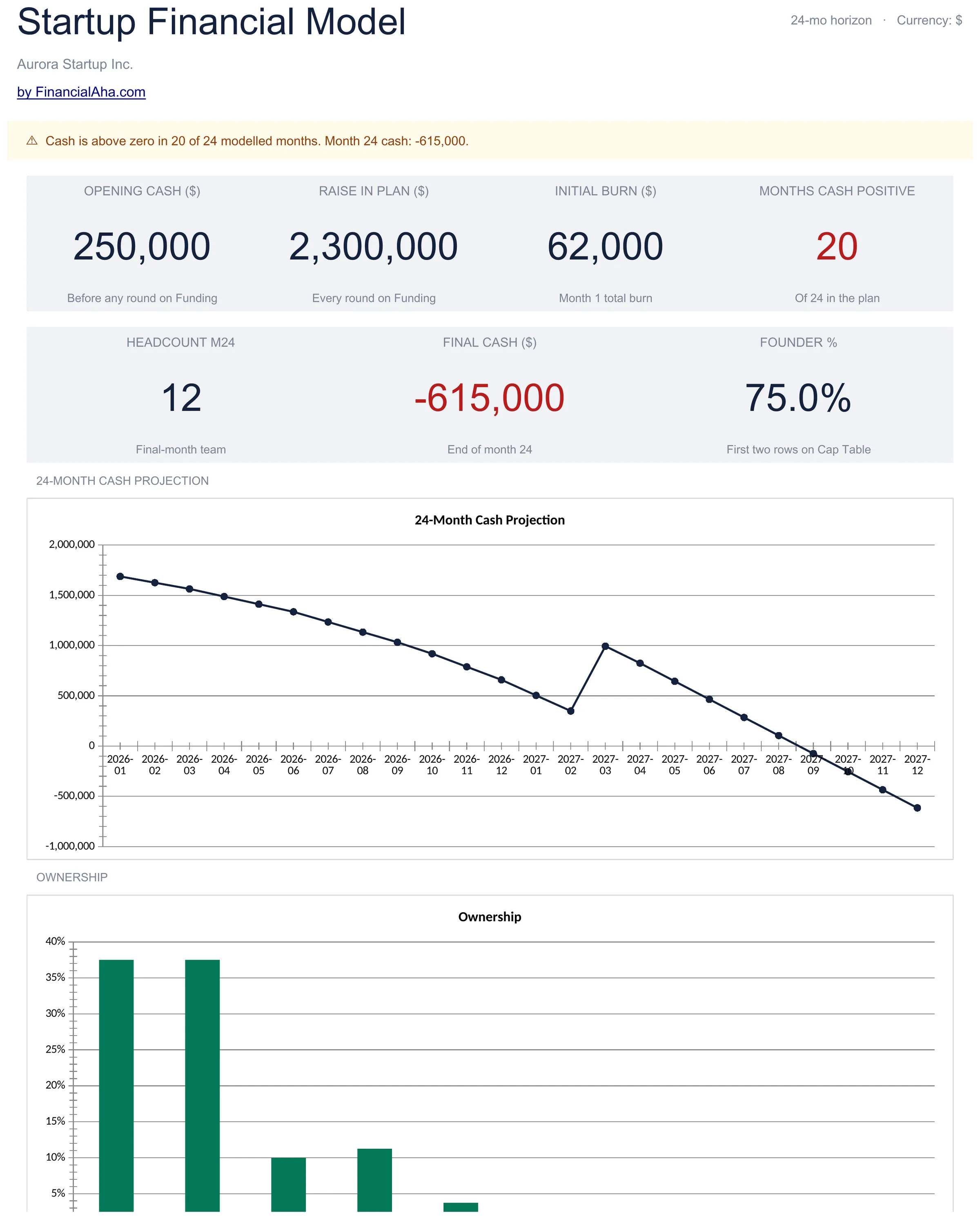
Your Early-Stage KPIs at a Glance
Open the dashboard and see where the company stands. Cash on hand, raised to date, initial burn, and initial runway sit on the top row. Headcount at month 24, final cash, and founder ownership sit beneath - with cards flipping red when runway or cash dip into the danger zone.
- 7 KPI cards covering cash, burn, hiring, and ownership
- Runway and final-cash cards flag the danger zone
- Cash projection chart over the 24-month horizon
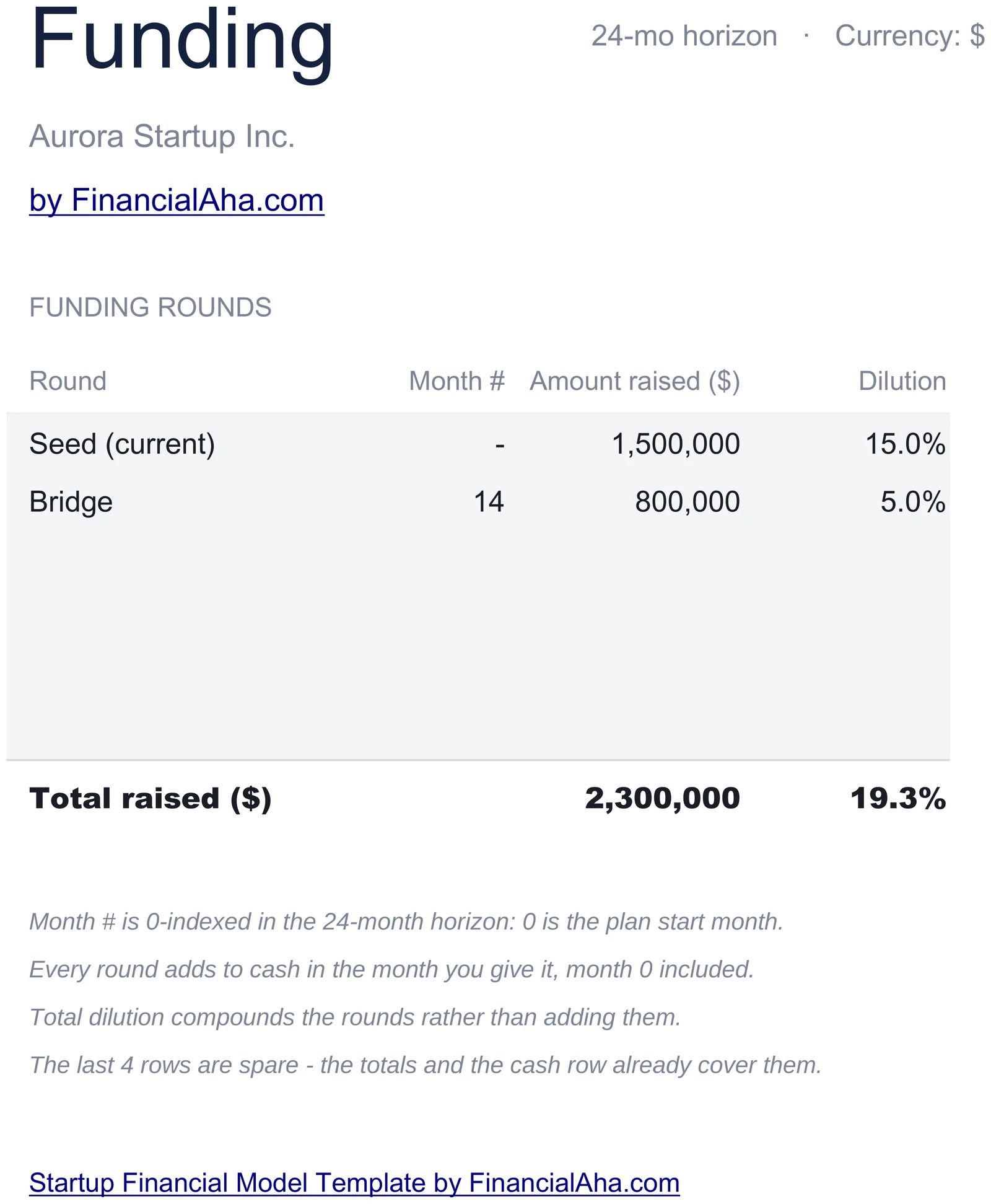
Log Every Round
Each funding round lives on a single row - name, month number within the 24-month horizon, amount raised, and dilution. Total raised sums at the bottom and feeds the dashboard. Adding a bridge round is one new row.
- Round name, month #, amount, dilution
- Total raised auto-summed
- Adding a round flows into the cash schedule
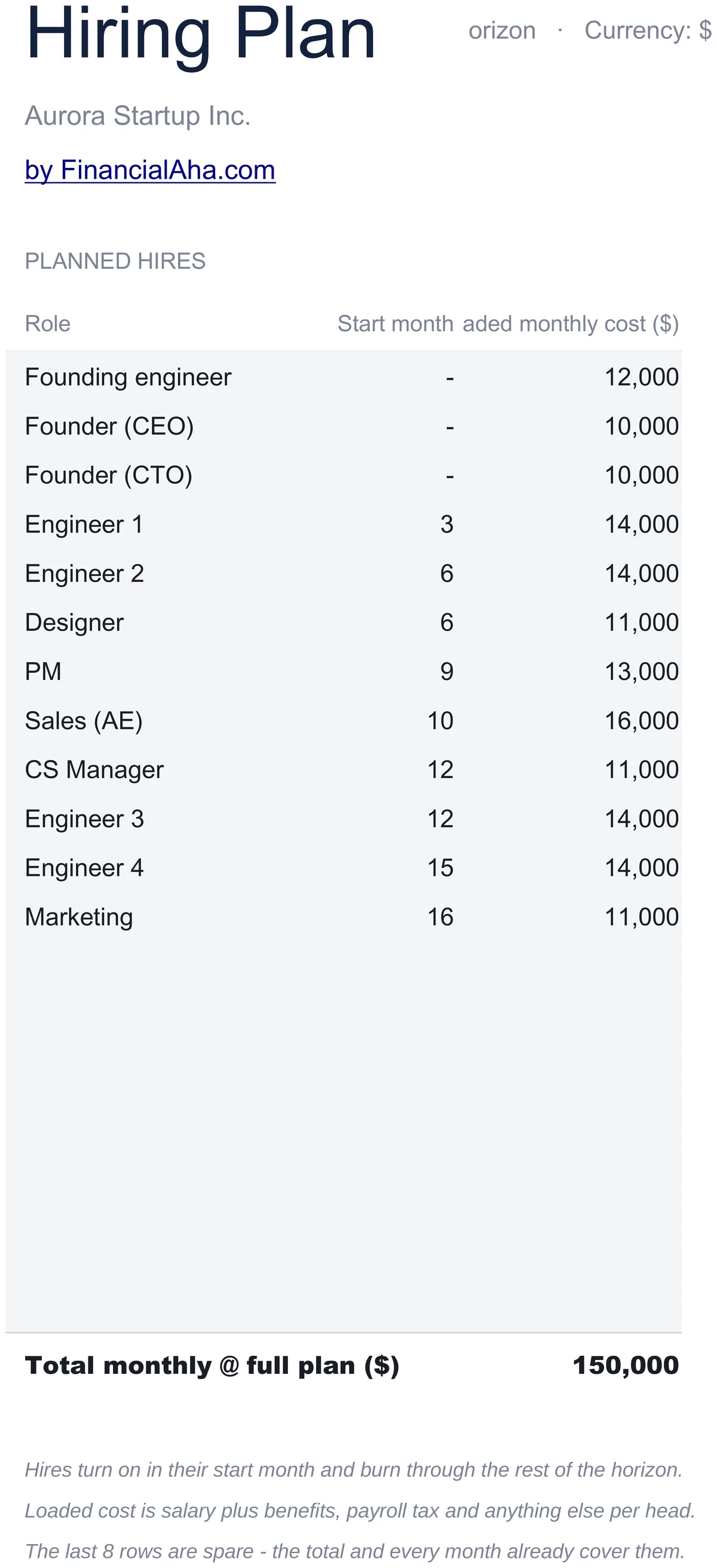
Plan Hires Month by Month
List every planned hire with role, start month within the 24-month horizon, and fully loaded monthly cost (salary plus benefits plus tax). Hires turn on in their start month and burn through the rest of the horizon. Total headcount at month 24 flows to the dashboard.
- Role, start month, loaded monthly cost
- Hires turn on in their start month
- Loaded cost = salary + benefits + tax
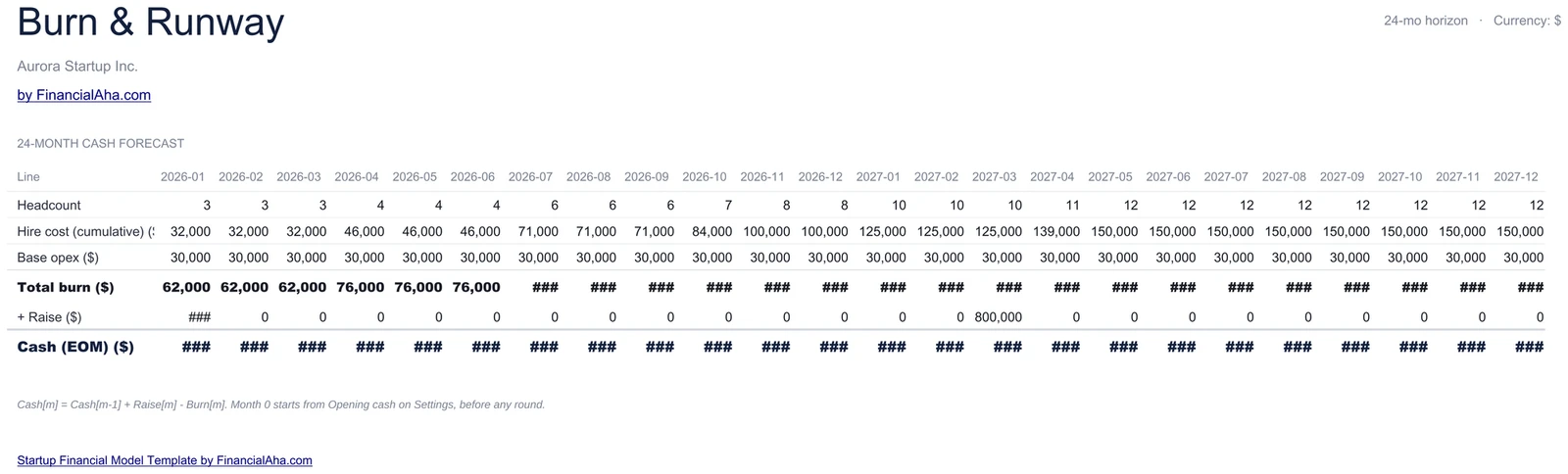
24-Month Cash Schedule
A month-by-month grid: cumulative headcount, hire cost, base opex, total burn, raise, and cash at end of month. Cash[m] = Cash[m-1] + Raise[m] - Burn[m]. The 24-month cash line flows straight into the dashboard projection chart.
- Headcount, hire cost, opex, burn, raise, cash EOM
- Cash[m] = Cash[m-1] + Raise[m] - Burn[m]
- 24-month horizon by default
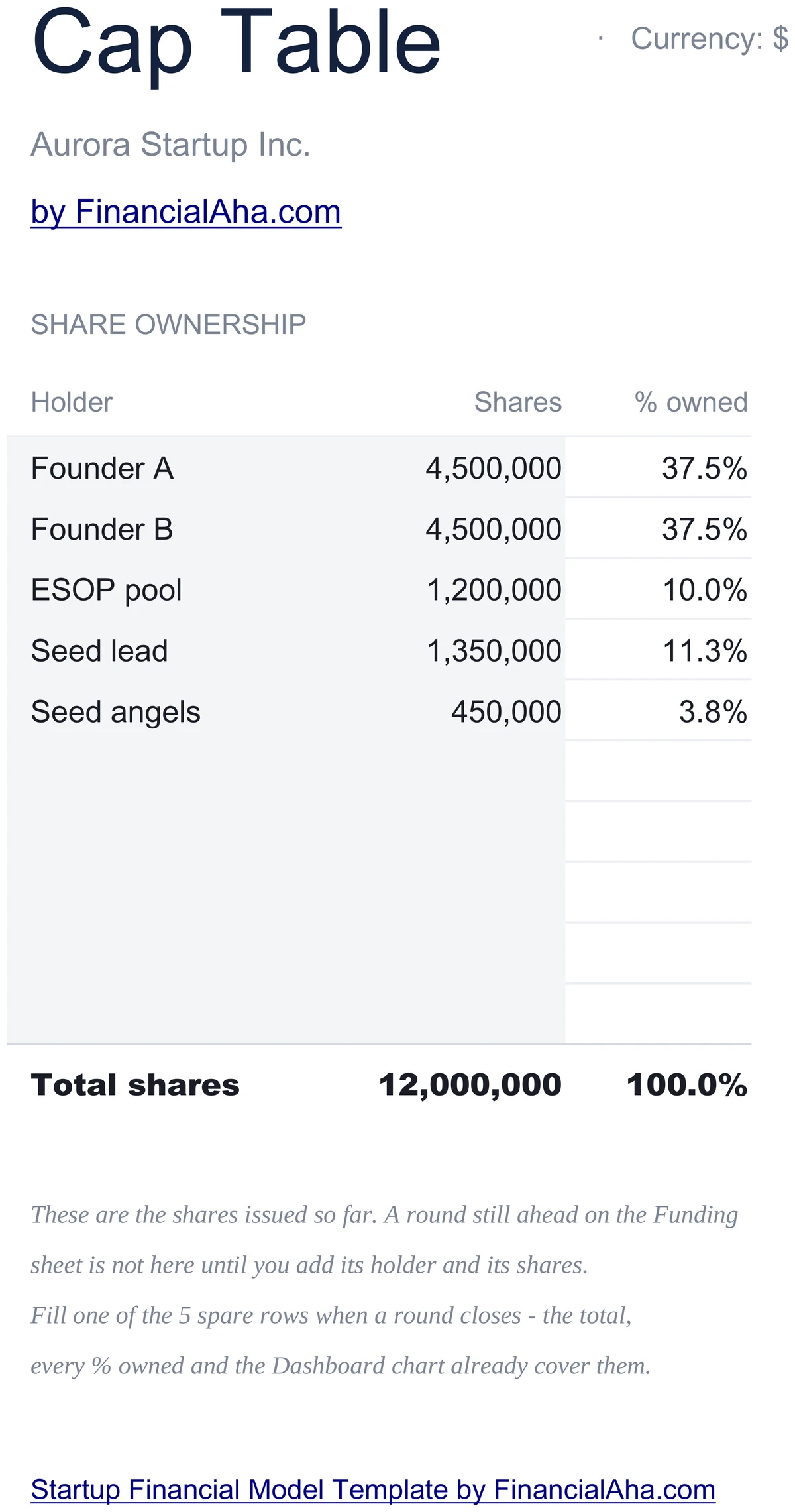
Simple Ownership View
Holders, share counts, and percent ownership. Total shares sum at the bottom; percent ownership recalculates per row. Founder share lands on the dashboard so you can see dilution alongside raised-to-date.
- Holders and share counts
- % ownership auto-calculated
- Founder share on the dashboard
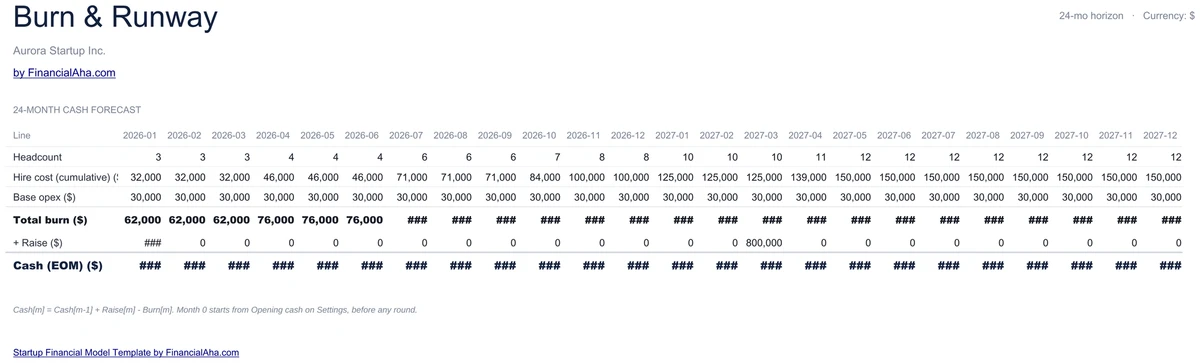
See How Hiring Eats Runway
Initial runway is computed against the first month's burn. As hires turn on, real runway shortens. The cash chart on the dashboard makes that pressure visible - so you can see when the next round needs to land.
- Initial runway vs effective runway
- Hiring ramp pressures the cash line
- Chart highlights when cash runs dry
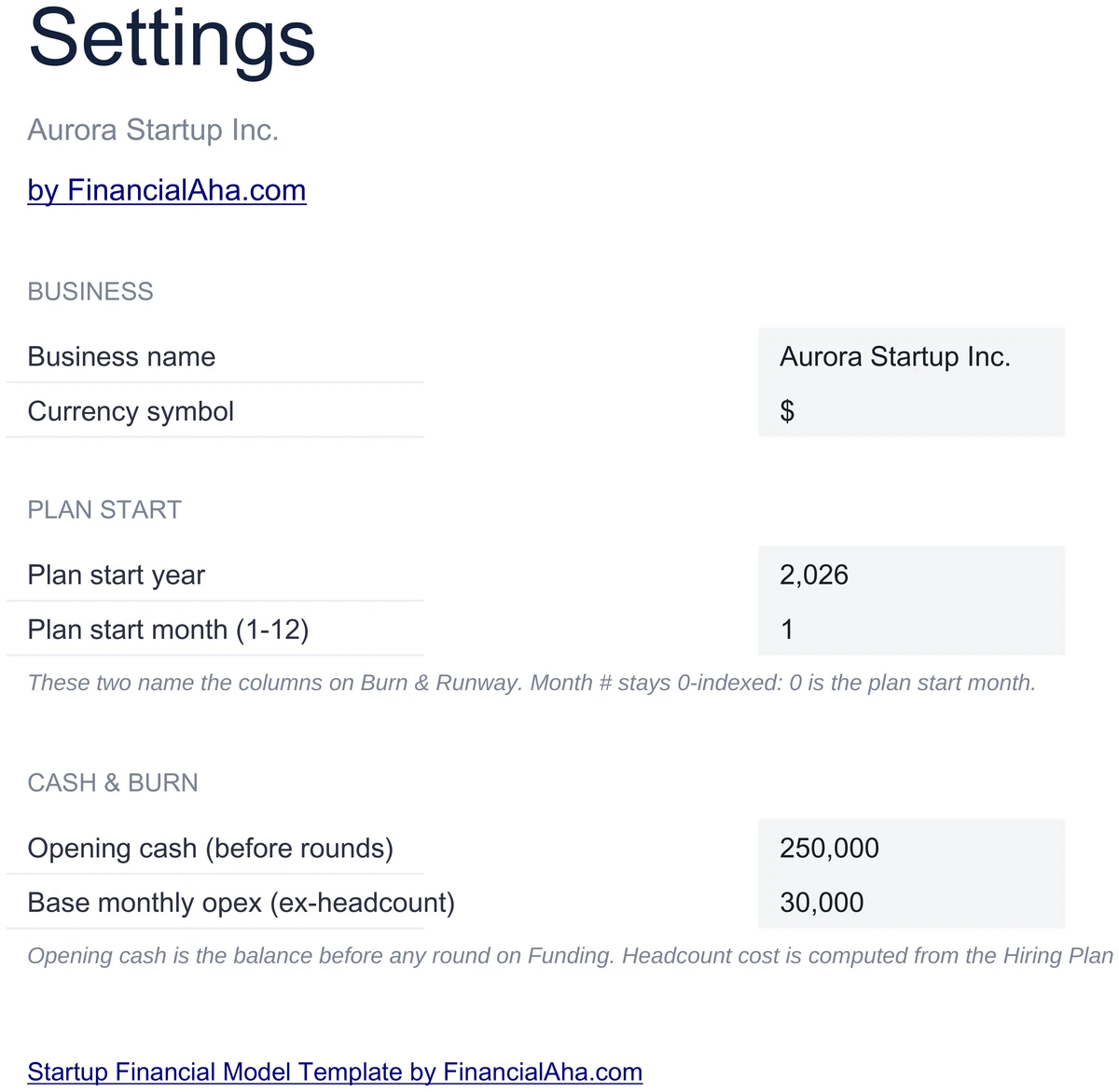
Configure It for Your Startup
Set your business name, currency, starting cash, and base opex (rent, software, the non-headcount line). The Burn & Runway schedule reads these values - set them once and the projection follows.
- Business name and currency
- Starting cash drives the schedule
- Base opex - non-headcount monthly fixed
Customizable & Flexible
Adapt the workbook to your stage. Add a bridge round, adjust the hiring plan, change loaded costs - the Burn & Runway schedule updates automatically. Works identically in Excel and Google Sheets.
- Add rounds and hires as plans change
- Adjust loaded cost and base opex
- Excel and Google Sheets compatible
Ready to take control of your finances?
Set Up in 15 Minutes
How the Startup Model Works
Open in Excel or Google Sheets
Get instant access after purchase. Open in Microsoft Excel directly, or import into Google Sheets - no software to install, no add-ons.
Configure Your Startup
Set your business name, currency, starting cash, and base opex on the Settings sheet. Takes about 15 minutes.
Funding and Hiring
Log your funding rounds with amount and dilution, then list planned hires by start month and loaded cost.
Watch Burn & Runway
The 24-month cash schedule, dashboard KPIs, and cash projection chart update automatically as plans change.
Built for Early-Stage Founders
Why Founders Use This Model
Early-Stage Focused
Funding rounds, hiring plan, 24-month burn, and a simplified cap table - the numbers founders actually present.
No Formulas to Write
Enter numbers in highlighted input cells. Cumulative headcount, monthly burn, runway, cash EOM, and ownership are pre-built.
Excel and Google Sheets
Works identically in Microsoft Excel and Google Sheets. No macros, no add-ons, no proprietary functions.
Free Lifetime Updates
Any updates we release to the startup model included at no extra cost.
Your Financial Data Stays Private
Runs entirely in your spreadsheet. Your data stays in your file - we never see or store it.
One-Time Purchase
Pay once, use forever. No subscriptions, no monthly fees, no recurring charges.
Got Questions?
Frequently Asked Questions
Is this template free to use?
This template is not free, but it is available for a one-time purchase. This purchase gives you lifetime access to the template and to any updates we release.
What do you mean by lifetime access?
Lifetime access means that you will have access to this template for as long as you need it. You will not be required to pay any additional fees for continued access to the template or to any updates we release.
Do I need to sign up to use this template?
You don't need to create an account with us. The template is delivered as an Excel file: open it directly in Microsoft Excel, or import it into Google Sheets from your own Google account if you prefer working there.
What are the benefits of using this template?
This template offers a range of benefits, including: Easy-to-use interface, Customizable to suit your needs, Secure and private, Free access to any updates we release, One-time purchase for lifetime access.
Can I get future updates?
Yes. Whenever we release an update to this template, you get it at no additional cost - lifetime access covers every version we publish. We do not commit to a fixed update schedule; improvements ship when they are ready.
Do you offer any discounts?
There are no discount codes for individual templates, but many templates are also part of a bundle that costs less than buying the same templates separately. Either way it is a one-time purchase with lifetime access and free updates.
Do you have any access to my financial data?
No, we do not have access to your financial data when you use this template. The template is a file you keep yourself, on your computer or in your own Google Drive, so your financial information never reaches us.
Is this template financial advice?
Our templates are not financial advice. They are tools designed to help you manage your personal finances more effectively. If you need personalized financial advice, consider consulting with a financial advisor or accountant.
Can I make my own changes and customize this template?
Yes, you can make your own changes and customize this template to suit your needs. The template is designed to be flexible and adaptable, allowing you to add or remove sections, change formulas, and adjust formatting as needed.
Do you offer technical support?
This is a self-service product, and we do not offer technical support. However, if you encounter any issues or have any questions about the template, please contact our team for assistance. Because everyone's financial situation is unique, consider consulting with a financial advisor or accountant if you need personalized financial advice.
Do you offer refunds?
Because these digital products are delivered instantly, purchases are generally final once you consent to immediate delivery at checkout. If the file we delivered has a genuine error, such as a formula that miscalculates or a feature its page describes but the file lacks, tell us what does not match: we will fix or replace it, or refund you if we cannot. Reporting within 30 days speeds resolution but never limits your statutory consumer rights; the full policy is in our Terms & Conditions.
Can't find the answer you're looking for? Contact our team
The set · 3 templates
Startup Founder Bundle
This template + 2 more: 5-Year Financial Projections, Business Valuation
This template only
Startup Financial Model
Instant digital delivery · Terms & Conditions apply
Highlights:
Build a Plan Investors Will Recognize
Get the Startup Financial Model and track funding, hiring, burn, runway, and the cap table in Excel or Google Sheets.