Payroll Tracker Spreadsheet Template for Excel & Google Sheets
Keep an employee roster, run a pay period, and see gross pay, withholding, net pay, and total employer cost roll up to year-to-date totals. Print a clean pay stub for any employee. One spreadsheet, dual compatible with Microsoft Excel and Google Sheets.
The set · 3 templates
Day-to-Day Operations Bundle
This template + 2 more: Invoice Generator & Tracker, Inventory Management
This template only
Payroll Tracker
Instant digital delivery · Terms & Conditions apply
One-time purchase
Payroll Tracker Spreadsheet
Everything in This Payroll Tracker
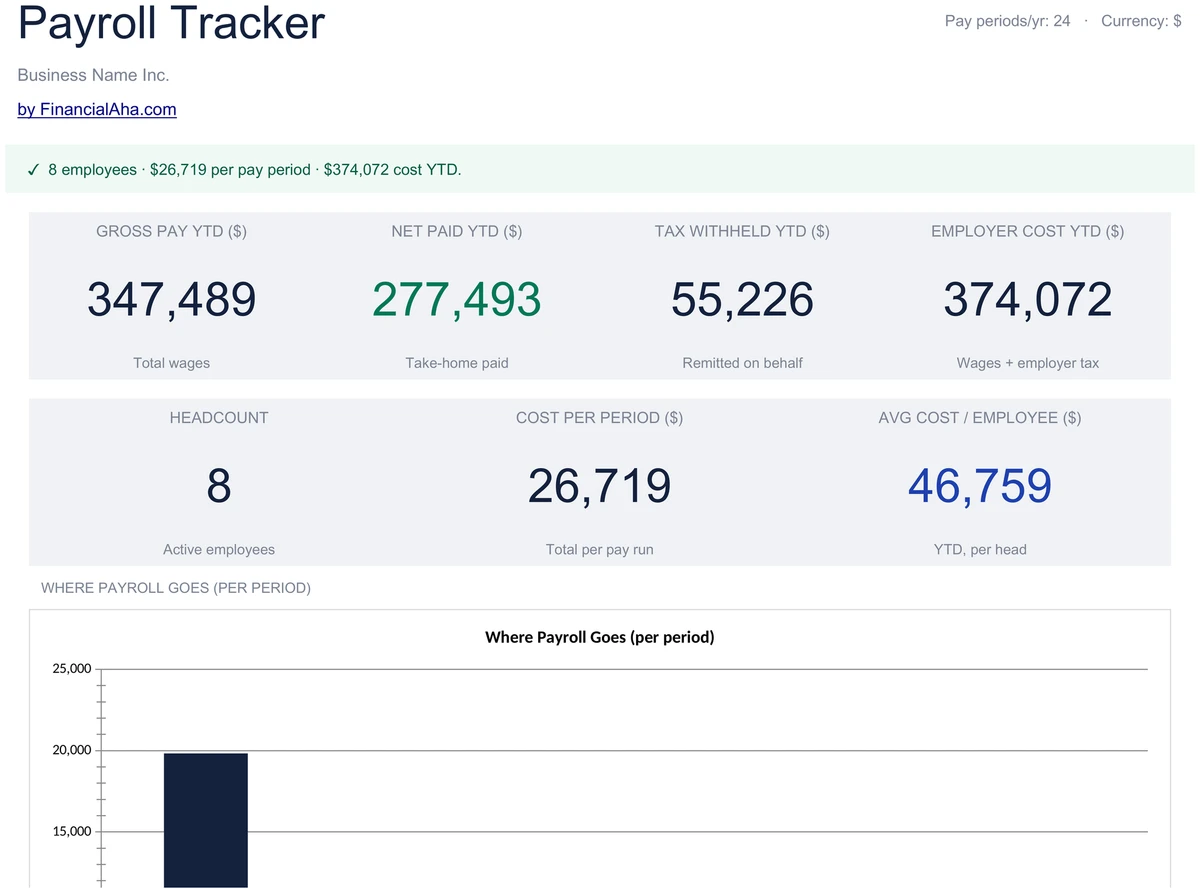
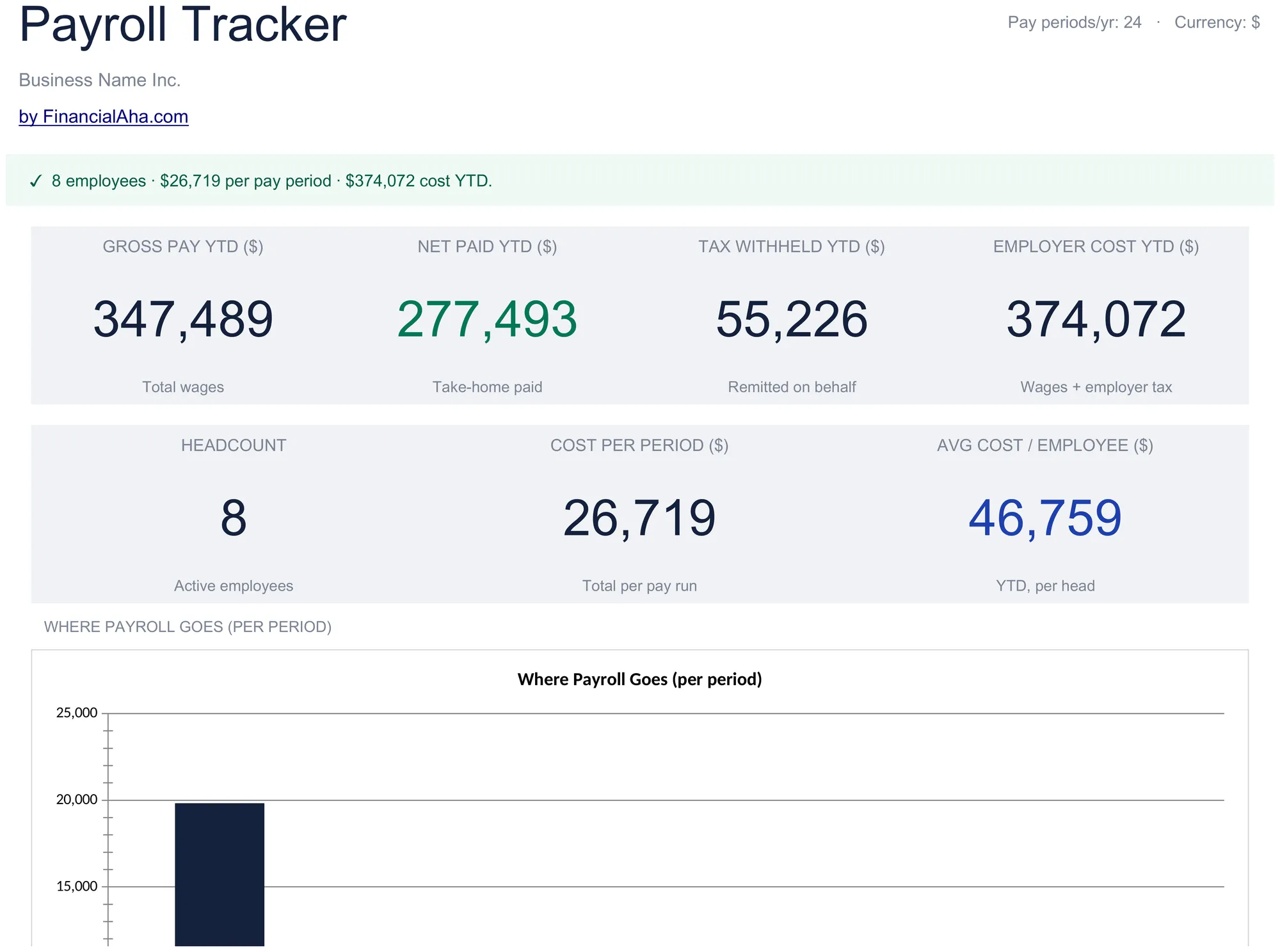
Your Payroll at a Glance
Open the dashboard and see where payroll stands. Gross Pay YTD, Net Paid YTD, Tax Withheld YTD, and Employer Cost YTD - alongside headcount, cost per period, and average cost per employee. Two charts show where payroll goes and total cost by employee.
- 7 KPI cards covering pay, tax, and employer cost
- Where-payroll-goes column chart
- Total-cost-by-employee column chart
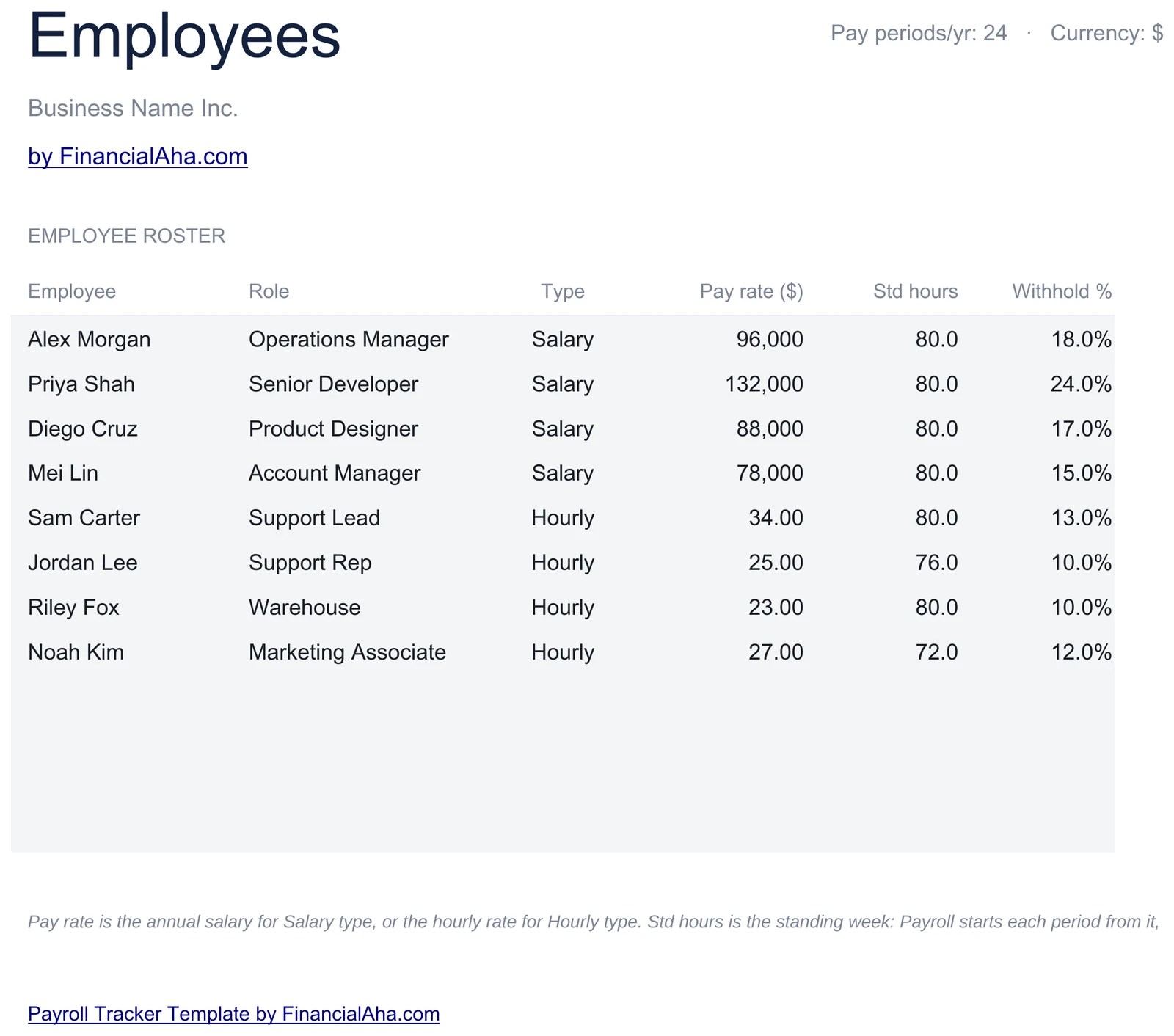
Keep Your Roster in One Place
List every employee with name, role, and pay type - Salary or Hourly. Set the annual salary or hourly rate, standard hours, and a withholding percentage per person. The roster feeds every other sheet automatically.
- Name, role, and pay type per employee
- Annual salary or hourly rate plus standard hours
- Per-employee withholding percentage
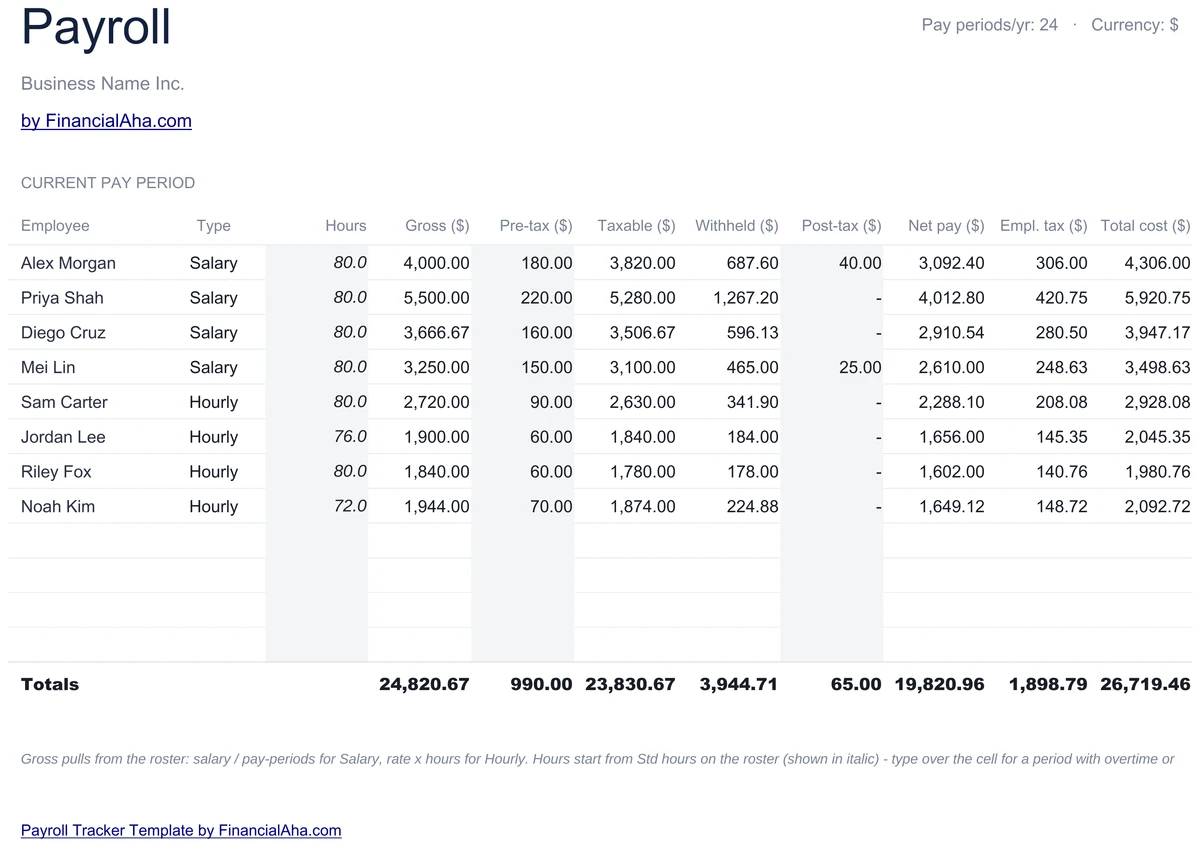
Run One Pay Period
For each employee, gross pay is salary divided by pay periods, or rate times hours for hourly staff. Subtract pre-tax deductions, apply the withholding percentage, subtract post-tax deductions, and see net pay. Employer payroll tax and total cost to employer calculate alongside.
- Gross from salary per period or rate times hours
- Pre-tax and post-tax deductions per employee
- Net pay plus full employer cost
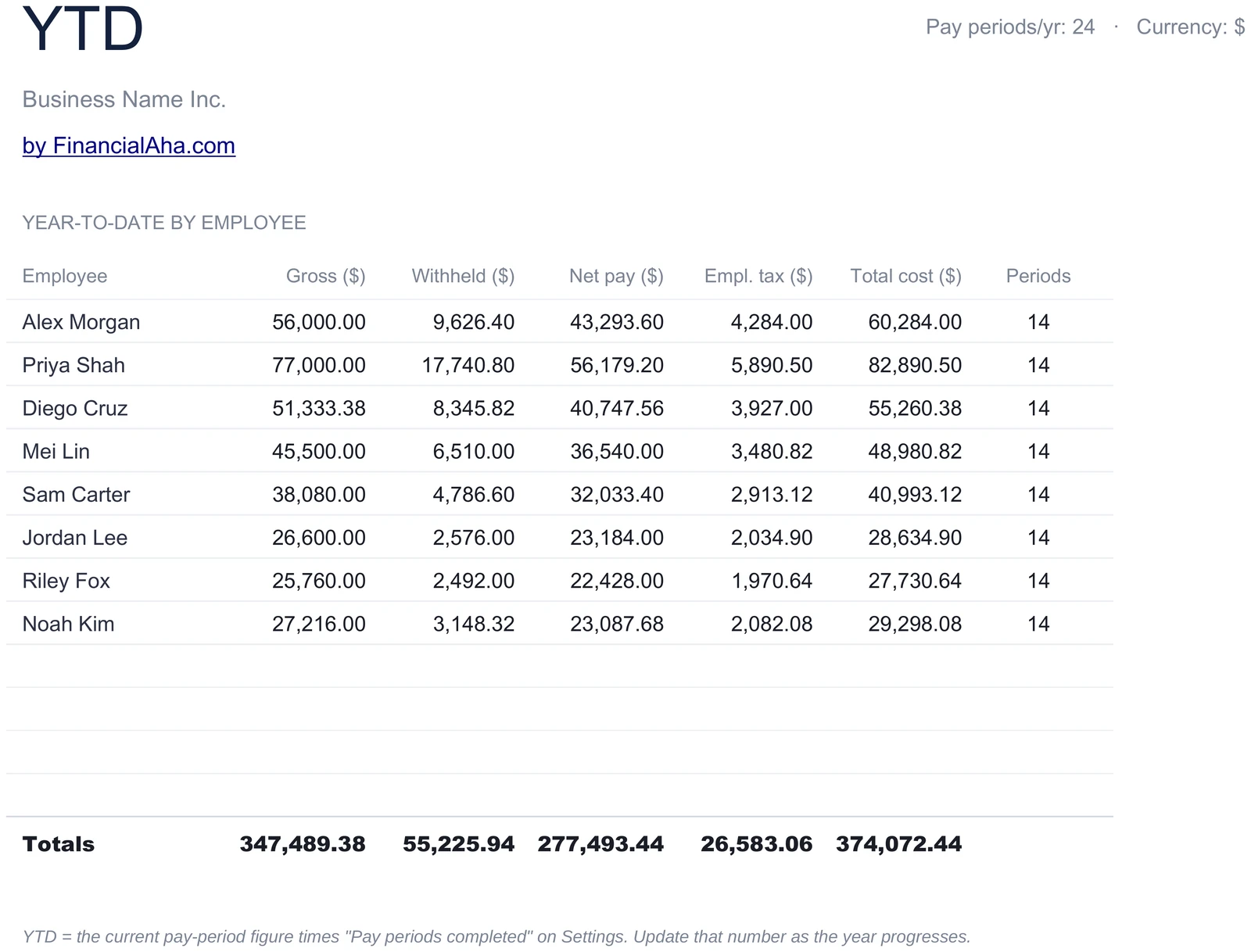
Roll Up the Whole Year
Each employee's per-period figure is multiplied by the number of pay periods completed, so YTD gross, net, tax withheld, and employer cost stay accurate. Totals are deterministic - no volatile dates - and a totals row sums the team.
- Per-period figure times periods completed
- YTD gross, net, tax, and employer cost
- Team totals row across all employees
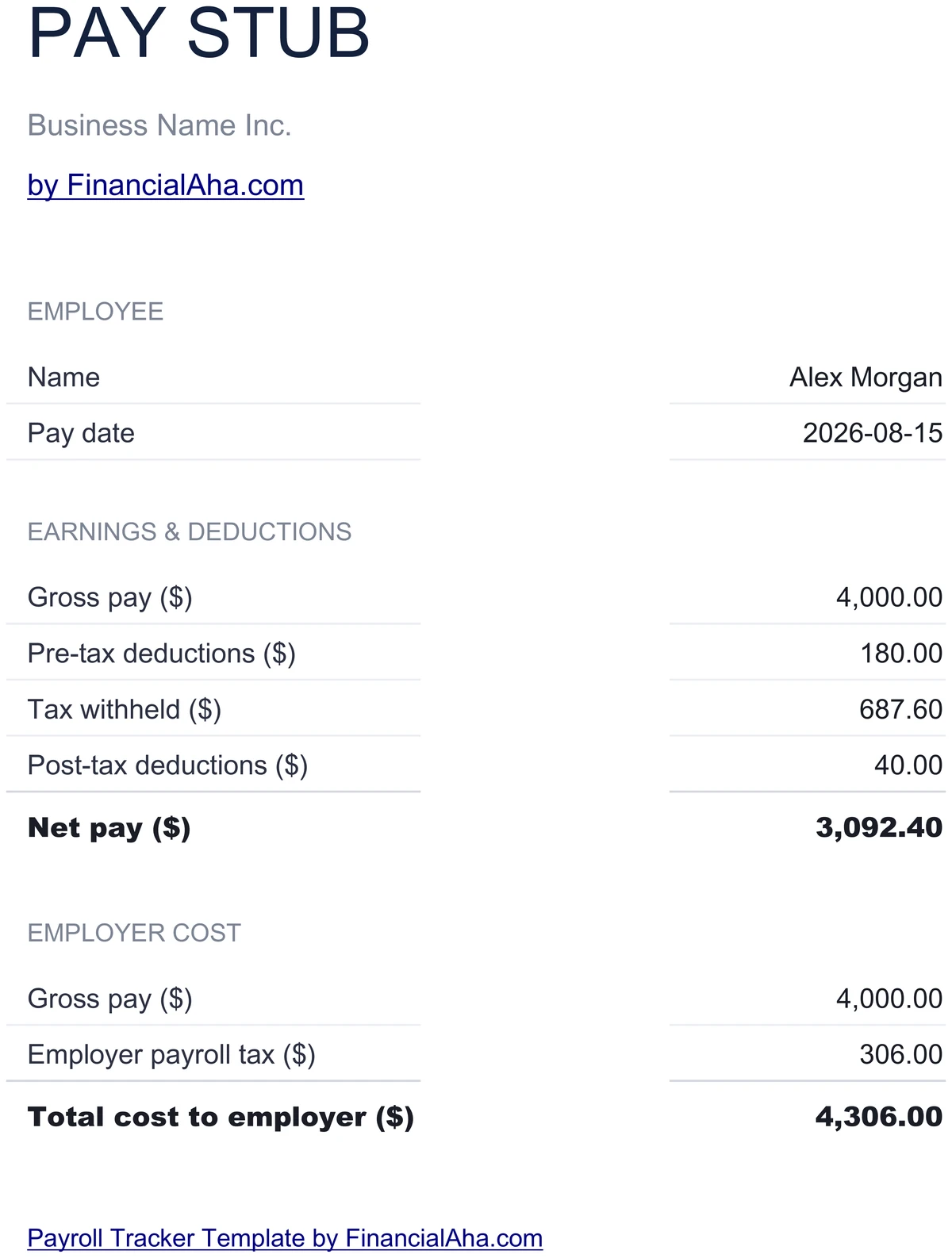
Print a Clean Pay Stub
Pick one employee and the pay stub fills in - gross pay, deductions, tax withheld, and net pay laid out on a single printable page. Ready to print or save as a PDF and hand to the employee.
- Single-employee printable layout
- Gross, deductions, tax, and net pay
- Print or save as PDF
See What Each Employee Costs
The total-cost-by-employee chart on the dashboard breaks down full employer cost person by person, while the where-payroll-goes chart splits net pay, tax withheld, and employer payroll tax. Spot your biggest cost drivers at a glance.
- Total cost by employee column chart
- Net pay, tax, and employer tax split
- Cost per period and per employee
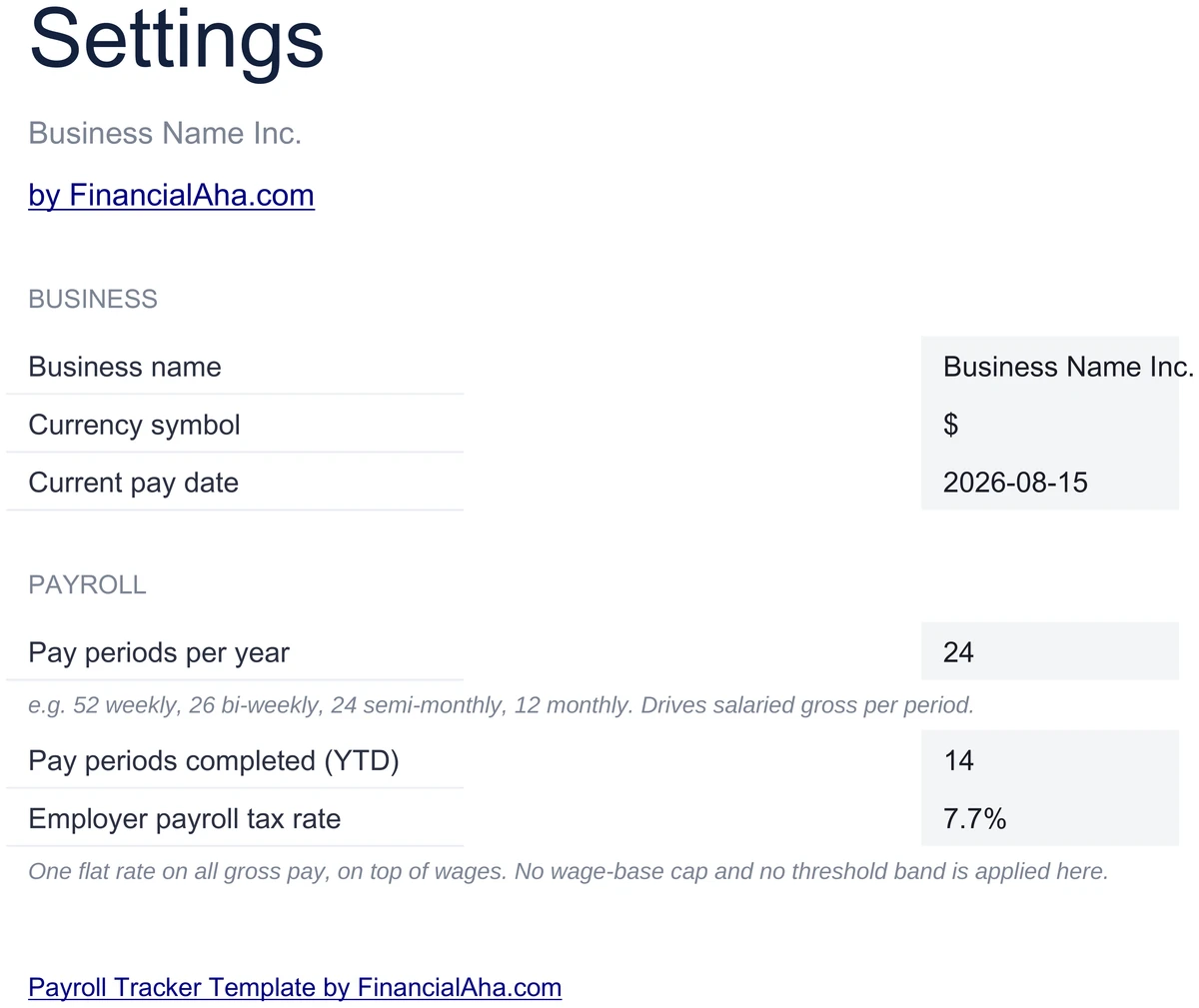
Configure It for Your Business
Set your business name, currency, and the number of pay periods per year. Enter how many pay periods are completed so far and your employer payroll tax rate. Every sheet updates from these inputs.
- Business name and currency
- Pay periods per year and periods completed
- Employer payroll tax rate
Customizable & Flexible
Adapt the template to your business. Add employees, change pay rates, adjust deductions - the formulas update automatically. Works identically in Excel and Google Sheets.
- Add or update employees
- Adjust deductions and withholding
- Excel and Google Sheets compatible
Ready to take control of your finances?
Set Up in 15 Minutes
How the Payroll Tracker Works
Open in Excel or Google Sheets
Get instant access after purchase. Open in Microsoft Excel directly, or import into Google Sheets - no software to install, no add-ons.
Configure Your Business
Set your business name, currency, pay periods per year, periods completed, and employer payroll tax rate on the Settings sheet. Takes about 15 minutes.
Add Your Employees
List each person with role, pay type, pay rate, standard hours, and withholding percentage. The Payroll and YTD sheets fill in automatically.
Run Each Pay Period
Enter deductions for the period and read gross pay, tax withheld, net pay, and employer cost. Print a pay stub for any employee.
Built for Results
Why This Payroll Tracker Works
Full Payroll Picture
Gross pay, withholding, net pay, and total employer cost for every employee - per period and rolled up to year to date.
No Formulas to Write
Enter numbers in highlighted input cells. Gross pay, tax, net pay, employer cost, charts, and KPIs are pre-built and update automatically.
Excel and Google Sheets
Works identically in Microsoft Excel and Google Sheets. No macros, no add-ons, no proprietary functions.
Free Lifetime Updates
Any updates we release to the payroll tracker included at no extra cost.
Your Payroll Data Stays Private
Runs entirely in your spreadsheet. We never see or store your employee or pay data.
One-Time Purchase
Pay once, use forever. No subscriptions, no monthly fees, no recurring charges.
Got Questions?
Frequently Asked Questions
Is this template free to use?
This template is not free, but it is available for a one-time purchase. This purchase gives you lifetime access to the template and to any updates we release.
What do you mean by lifetime access?
Lifetime access means that you will have access to this template for as long as you need it. You will not be required to pay any additional fees for continued access to the template or to any updates we release.
Do I need to sign up to use this template?
You don't need to create an account with us. The template is delivered as an Excel file: open it directly in Microsoft Excel, or import it into Google Sheets from your own Google account if you prefer working there.
What are the benefits of using this template?
This template offers a range of benefits, including: Easy-to-use interface, Customizable to suit your needs, Secure and private, Free access to any updates we release, One-time purchase for lifetime access.
Can I get future updates?
Yes. Whenever we release an update to this template, you get it at no additional cost - lifetime access covers every version we publish. We do not commit to a fixed update schedule; improvements ship when they are ready.
Do you offer any discounts?
There are no discount codes for individual templates, but many templates are also part of a bundle that costs less than buying the same templates separately. Either way it is a one-time purchase with lifetime access and free updates.
Do you have any access to my financial data?
No, we do not have access to your financial data when you use this template. The template is a file you keep yourself, on your computer or in your own Google Drive, so your financial information never reaches us.
Is this template financial advice?
Our templates are not financial advice. They are tools designed to help you manage your personal finances more effectively. If you need personalized financial advice, consider consulting with a financial advisor or accountant.
Can I make my own changes and customize this template?
Yes, you can make your own changes and customize this template to suit your needs. The template is designed to be flexible and adaptable, allowing you to add or remove sections, change formulas, and adjust formatting as needed.
Do you offer technical support?
This is a self-service product, and we do not offer technical support. However, if you encounter any issues or have any questions about the template, please contact our team for assistance. Because everyone's financial situation is unique, consider consulting with a financial advisor or accountant if you need personalized financial advice.
Do you offer refunds?
Because these digital products are delivered instantly, purchases are generally final once you consent to immediate delivery at checkout. If the file we delivered has a genuine error, such as a formula that miscalculates or a feature its page describes but the file lacks, tell us what does not match: we will fix or replace it, or refund you if we cannot. Reporting within 30 days speeds resolution but never limits your statutory consumer rights; the full policy is in our Terms & Conditions.
Can't find the answer you're looking for? Contact our team
The set · 3 templates
Day-to-Day Operations Bundle
This template + 2 more: Invoice Generator & Tracker, Inventory Management
This template only
Payroll Tracker
Instant digital delivery · Terms & Conditions apply
Highlights:
Take Control of Your Payroll
Get the Payroll Tracker template and run pay periods, track employer cost, and print pay stubs in Excel or Google Sheets.