Monthly Expenses Tracker
Monthly Expenses Tracker for YouTubers
Track equipment costs, software subscriptions, production expenses, and operating costs to see what running a YouTube channel actually costs.
In Depth
What It Actually Costs to Run a YouTube Channel
YouTube revenue arrives from multiple streams that each have different timing, reporting, and tax characteristics. AdSense pays monthly based on the prior month's ad performance, typically 45 days after the month ends. Sponsorship payments vary widely - some brands pay upfront, others net-30 or net-60 after the video publishes. Merchandise revenue depends on the platform (Shopify payouts differ from Spring or Teespring). Channel memberships and Super Chats arrive through YouTube's payment cycle. Tracking all of these in one place reveals the true monthly revenue picture, which is essential for understanding whether the channel is covering its costs.
Content creation expense categories for YouTubers are broader than most creators initially realize. Direct production costs include camera equipment, lighting, microphones, and set materials. Post-production costs include editing software (Premiere Pro, Final Cut, DaVinci Resolve), music licensing ($10-$30/month for services like Epidemic Sound or Artlist), thumbnail design tools, and the hard drive storage needed for raw footage (a single 4K shoot can generate 50-100GB). Behind-the-scenes costs include SEO tools, analytics platforms, scheduling software, and website hosting. Tracking by category reveals which parts of the operation consume the most resources.
Estimated quarterly taxes on variable creator income present a specific challenge. Unlike a salaried job where withholding happens automatically, YouTube income arrives with no tax removed. A creator whose monthly revenue swings from $800 to $5,000 faces a moving target for quarterly estimates. One approach: set aside 25-30% of every payment as it arrives into a separate account, then use the accumulated total to make quarterly payments. This handles the variability without requiring accurate income predictions months in advance.
For creators who reinvest channel revenue into better equipment or outsourced editing, tracking shows whether that reinvestment is producing returns. Hiring an editor at $200-$500 per video changes the cost structure substantially but may enable a higher upload frequency that increases revenue. A $1,200 lighting upgrade might improve production quality enough to attract higher-paying sponsors. Seeing these costs alongside revenue data - broken down by stream - helps creators make grounded decisions about where to invest next rather than spending based on what other creators are doing.
The Challenge
Why YouTubers Need to Track Production Costs
AdSense revenue and sponsorship checks look like profit until you subtract the real costs of producing content. Equipment, software, and production expenses add up faster than most creators realize.
Equipment spending is ongoing and expensive
Cameras, microphones, lighting, tripods, hard drives, and upgrades - the gear treadmill never stops. Each purchase feels like an investment, but without tracking, the total cost is invisible.
Software subscriptions multiply
Editing software, thumbnail tools, music licensing, analytics platforms, scheduling tools, and cloud storage - each is $10-$50 per month. Ten subscriptions totals $100-$500 monthly.
Production costs vary per video
Props, sets, travel, talent, sound effects, stock footage - production costs vary with each video but consistently eat into revenue. The per-video cost is often unknown.
Channel growth requires investment
Promoting videos, learning from courses, attending creator events, and networking all cost money. These investments are harder to justify without understanding the overall cost picture.
Ready to take control of your youtuber finances?
What You Get
Expense Tracking Tools for Content Creators
Content creation expense categories
Pre-built categories for equipment, software, music licensing, props, travel, and outsourced services like editing or thumbnails.
Personal spending tracked apart from channel costs
Separate section for personal living expenses. See channel costs and personal costs clearly.
Production costs totaled as you go
Category totals update as you enter expenses. See your biggest cost areas at any point.
Channel costs vs. personal spending
Total channel expenses, total personal expenses, and combined total. Compare production costs against revenue.
Categories for content creation expenses
Add categories for your niche - cooking ingredients, gaming equipment, studio rent, or hired talent.
No budget setup needed
Pure expense tracking. Record what you spend and see where it goes.
See It In Action
What the template looks like
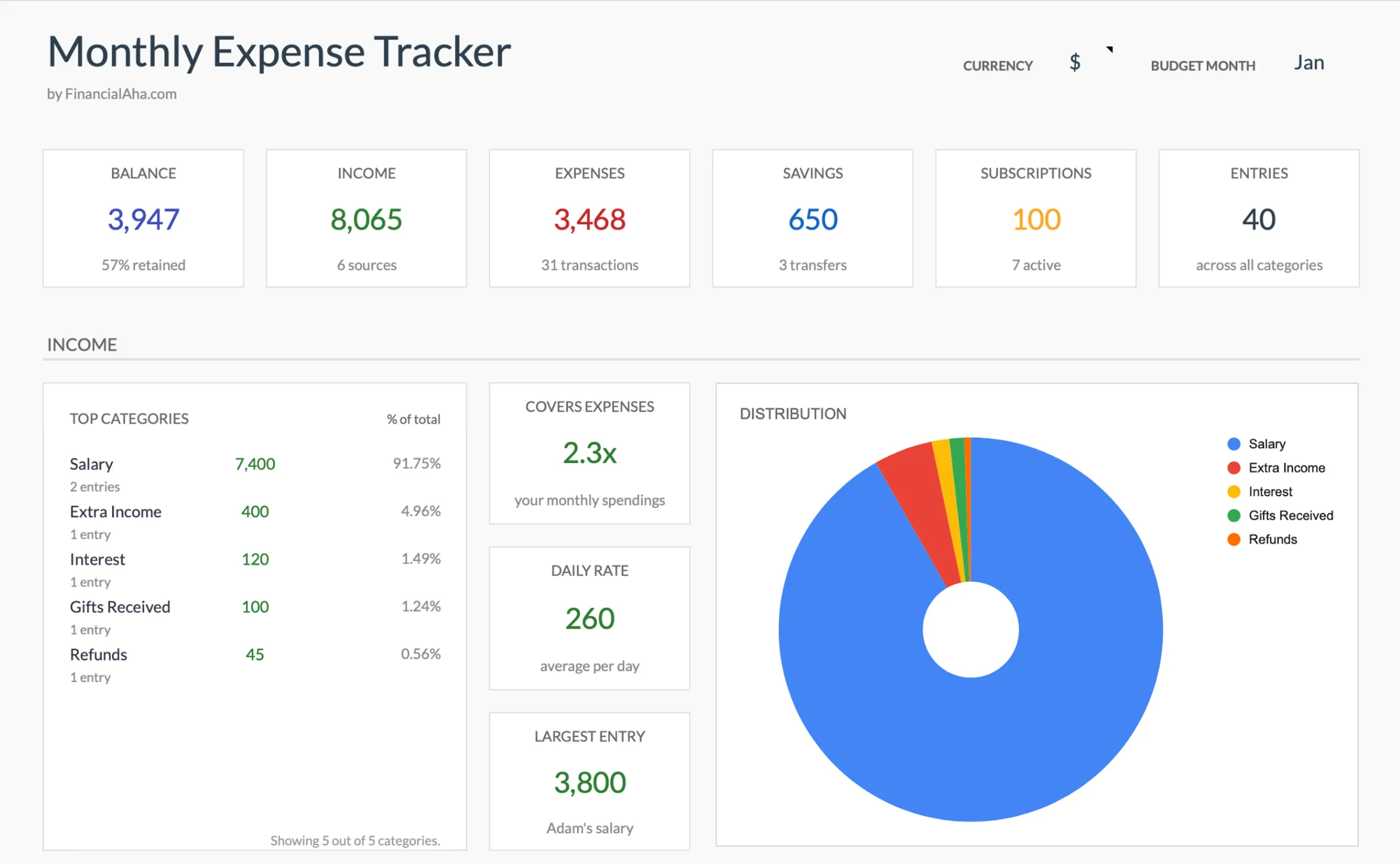
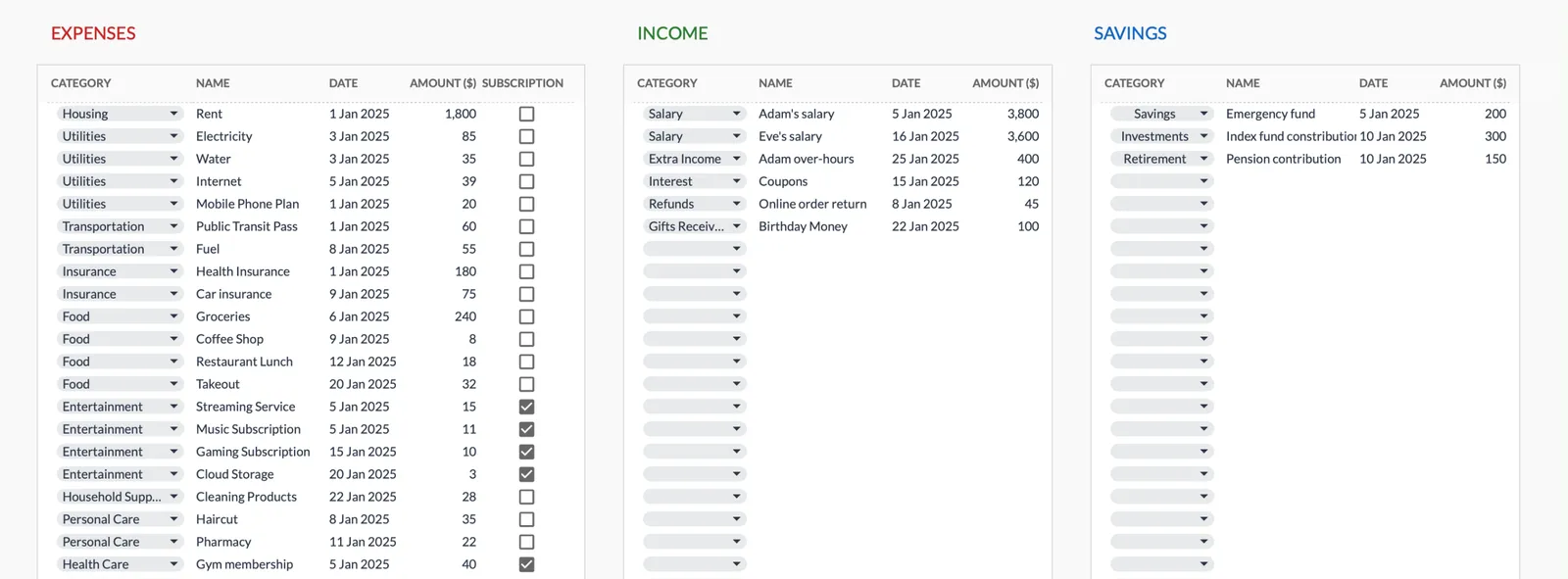
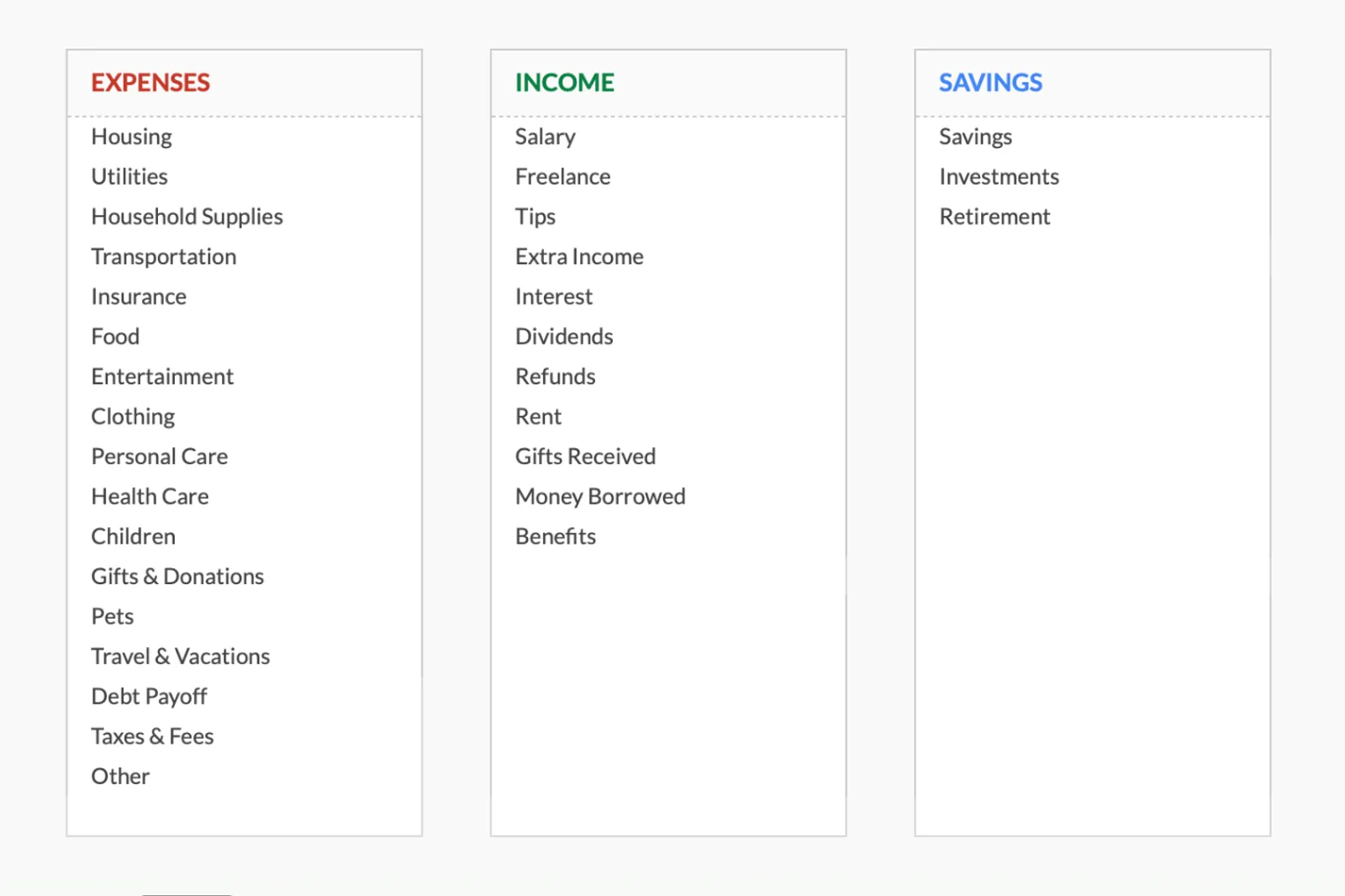
Browse through the template to see how it handles expense logging, category breakdowns, and spending analysis.
- Dashboard with key metrics at a glance
- Transaction logging with categories
- Expense tracking and summaries
- Visual charts and breakdowns
- Fully customizable categories
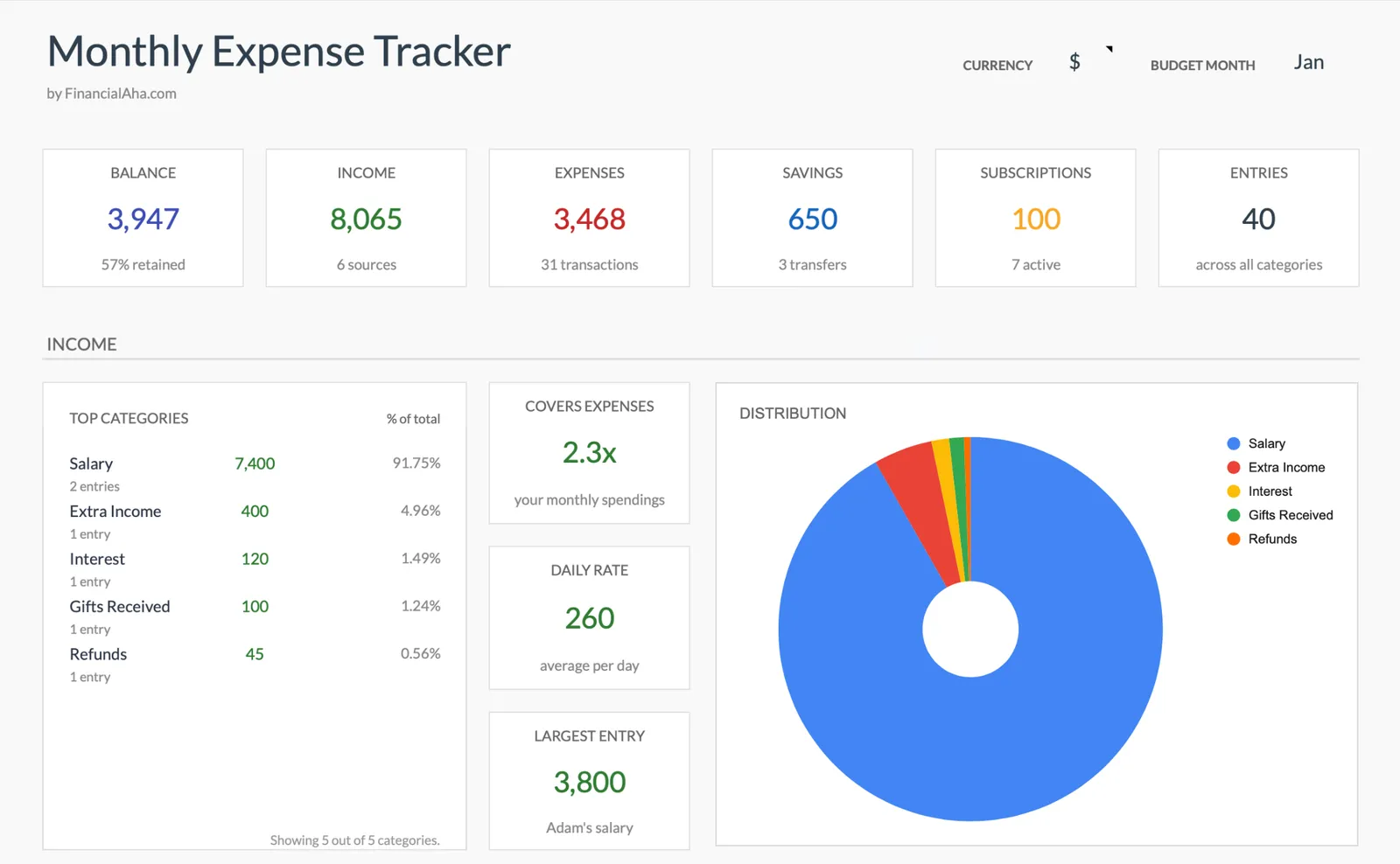
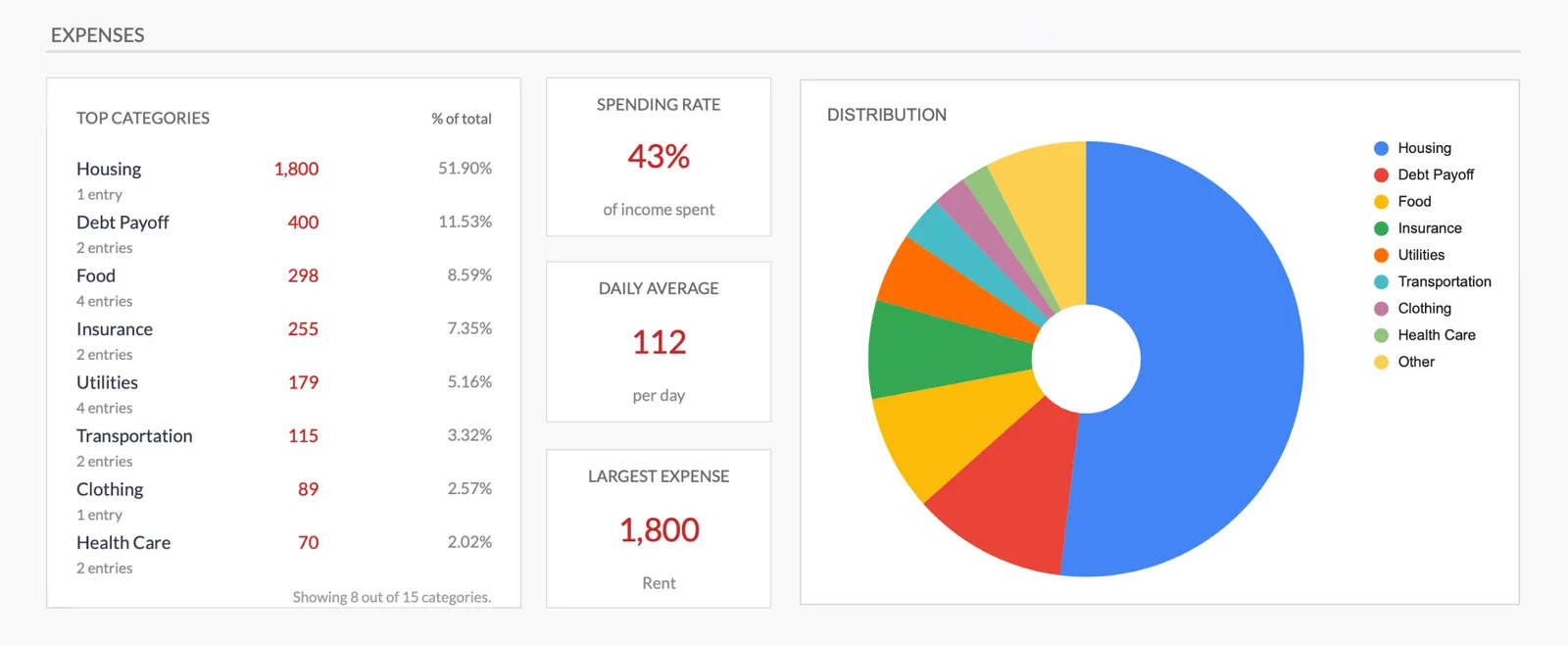
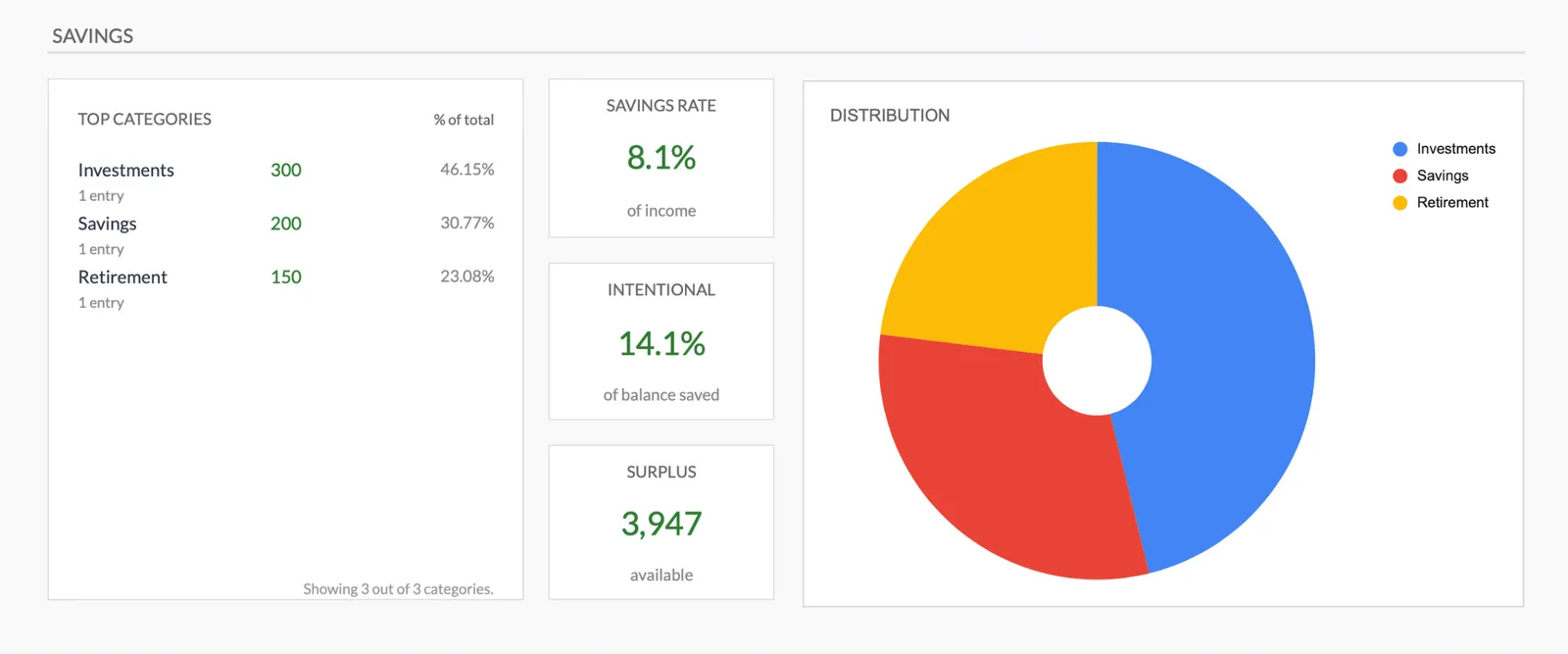
Monthly expense overview with charts
Log every expense with dates and categories
Organize spending into customizable categories
Detailed breakdown of all expenses
Track savings alongside expenses
Getting Started
Begin Logging Your Content Creation Costs
Customize for your content type
A vlogger, educator, and gaming channel have different cost structures. Adjust categories to match your niche.
Log every channel expense
Equipment, software, outsourced editing, props, travel - enter each cost as it occurs.
Track personal expenses separately
Keep rent, food, and personal spending in their own categories. The separation shows true channel profitability.
Review monthly against revenue
Compare total channel expenses against AdSense, sponsorships, and merchandise revenue. See your actual profit.
Use for tax deductions
Categorized channel expenses become a ready-made list of deductions at tax time.
Common Questions
Expenses Tracker for YouTubers - FAQ
Should I track equipment even if I bought it with channel revenue?
Yes. It is still an expense regardless of where the money came from. Tracking it shows the true cost of running your channel and supports tax deductions.
What about courses and education?
Add a category for creator education. YouTube courses, editing tutorials, and business workshops are all costs of improving your content and growing your channel.
How do I track outsourced work?
Add categories for editors, thumbnail designers, virtual assistants, or any other hired help. These are often significant costs as channels grow.
What if my channel is not yet monetized?
Tracking expenses before monetization is especially important. It shows the investment required to reach monetization and sets up expense records for when revenue does arrive.
Can I see cost per video?
Divide monthly expenses by the number of videos published for an average. For exact per-video costs, you would need to allocate specific expenses to specific productions.
Is this worth it for small channels?
Small channels benefit the most from cost awareness. When revenue is low, understanding expenses helps determine whether the channel is trending toward profitability or away from it.
How do I track revenue from multiple platforms in one place?
Create separate categories for each revenue stream - AdSense, sponsorships, merchandise, memberships, affiliate income. Enter payments in the month received. The tracker totals everything together so you see combined revenue alongside expenses.
How do I handle quarterly taxes on income that changes every month?
Set aside a fixed percentage (25-30% is a common starting point) of every payment as it arrives. Use the accumulated amount when quarterly deadlines arrive. This approach handles variable income without requiring you to predict future earnings.
Can't find the answer you're looking for? Contact our team
Start tracking expenses as a youtuber
One-time purchase. No subscription. Your financial data stays in your Google Drive.