Monthly Expenses Tracker
Monthly Expenses Tracker for Online Sellers
Track platform fees, shipping costs, materials, and operating expenses to see what selling online actually costs each month.
In Depth
Where the Money Goes in an Online Selling Business
Online selling platforms display revenue prominently but rarely give sellers a clear picture of actual costs. The fee structures alone vary significantly across platforms: Etsy charges a $0.20 listing fee plus 6.5% transaction fee plus 3% + $0.25 payment processing. Shopify charges a monthly subscription ($39-$399) plus 2.6-2.9% + $0.30 per transaction. Amazon takes a referral fee of 8-15% depending on category plus $39.99/month for a professional account. For a seller doing $3,000/month in revenue, the platform fee difference between these channels can be $200-$400 per month - a gap that only becomes visible through tracking.
Cost of goods sold (COGS) is the number that separates profitable sellers from those who are busy but not making money. COGS includes the direct cost of materials or wholesale purchase price, packaging materials per item, and any direct labor if applicable. A handmade item using $8 in materials, $2 in packaging, and 45 minutes of labor (at whatever rate the maker values their time) has a COGS that needs to be measured against the selling price minus platform fees and shipping. Tracking COGS per product category reveals which items generate real margin and which ones move volume without much profit.
Inventory cost management is where many online sellers tie up cash without realizing the impact. Buying materials in bulk to get a better unit price makes sense on paper, but $2,000 in raw materials sitting on a shelf is $2,000 that cannot be used for other business needs or personal expenses. Tracking inventory purchases as they happen - and noting when that inventory converts to sold product - shows the true cash flow cycle of the business. Some sellers discover that their best-selling products have 60-90 day cash conversion cycles, meaning revenue from a sale does not recoup the inventory cost for two to three months.
Sellers operating across multiple platforms face the added complexity of consolidating expenses and comparing profitability by channel. An item that nets $12 profit on Etsy after fees might net $8 on Amazon after its higher referral fee but sell three times as often due to traffic volume. Without tracking platform-specific expenses, it is impossible to make informed decisions about where to focus inventory, advertising spend, and listing efforts. Some sellers find that their highest-revenue platform is not their most profitable one once all fees are accounted for.
The Challenge
Why Online Sellers Need to Track Every Cost
Marketplace dashboards show sales revenue, not profit. The gap between what customers pay and what you keep is filled with fees, shipping, materials, and overhead that only expense tracking reveals.
Platform fees add up across many transactions
Listing fees, transaction fees, payment processing fees, advertising fees - each takes a small percentage, but across hundreds of sales they represent a significant cost. Most sellers underestimate the total.
Shipping costs eat into margins
Packaging materials, postage, insurance, and returns shipping are real costs. Free shipping promotions move the cost from the buyer to the seller - tracking shows the true impact.
Materials and inventory costs are variable
Raw materials, wholesale inventory, packaging supplies, and storage all fluctuate. Without tracking, it is impossible to know the actual cost per item sold.
Profitability per product is unknown without data
Some products generate healthy margins. Others barely break even after all costs. Expense tracking reveals which products are worth selling and which are consuming resources.
Ready to take control of your online seller finances?
What You Get
Expense Features for Online Selling
Selling expense categories
Pre-built categories for platform fees, shipping, packaging, materials, advertising, and storage.
Seller living costs vs. marketplace costs
Separate section for personal living expenses. See business costs alongside personal costs.
Automatic category totals
Totals update as you enter expenses. See your biggest cost areas at any time.
Seller cost breakdown by month
Total selling expenses, total personal expenses, and combined monthly total. The full cost picture.
Categories shaped around online selling
Add categories for your specific business - photography equipment, craft supplies, software tools, or marketplace-specific fees.
No setup complexity
Open, enter expenses, see totals. No configuration or income tracking required.
See It In Action
What the template looks like
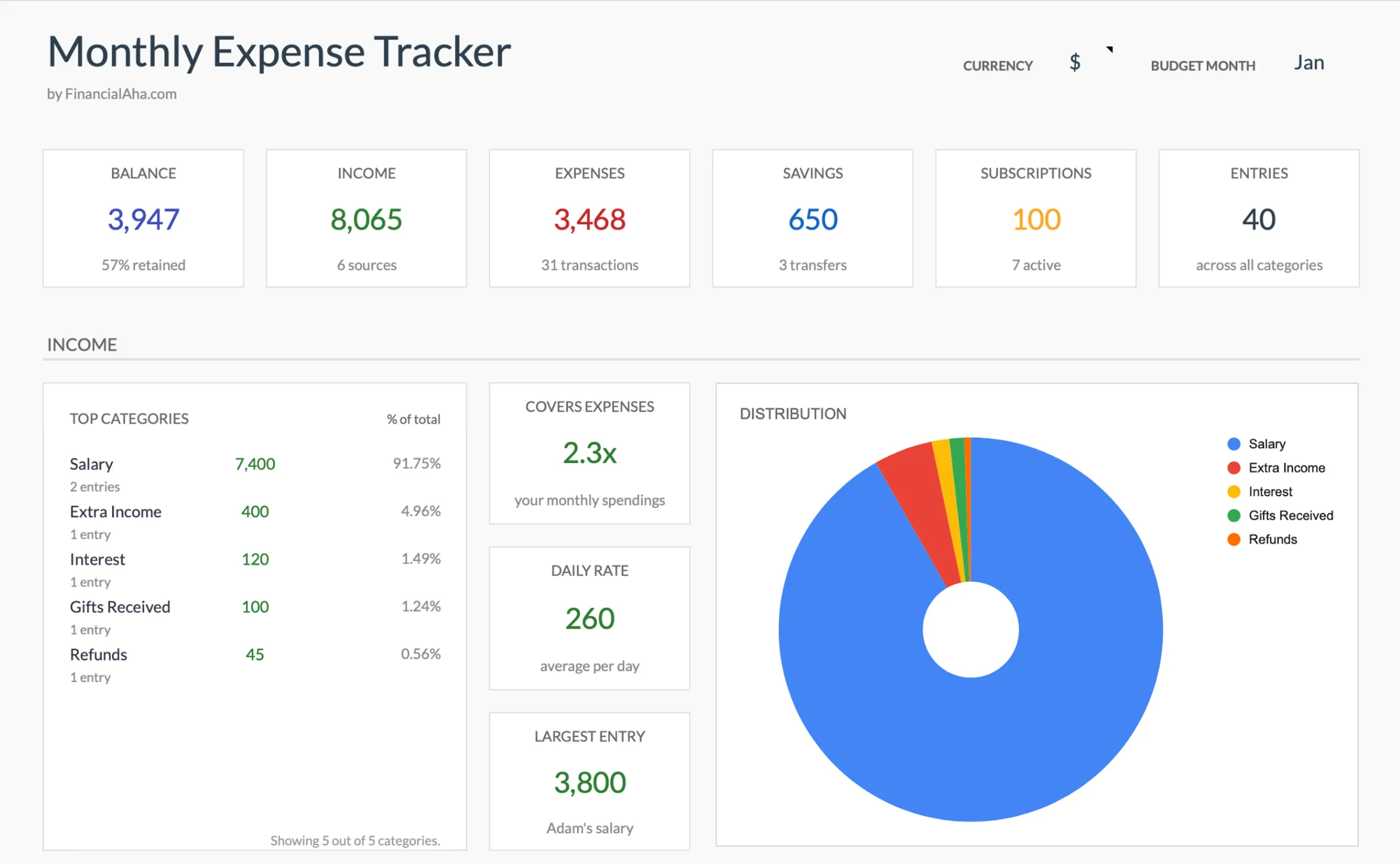
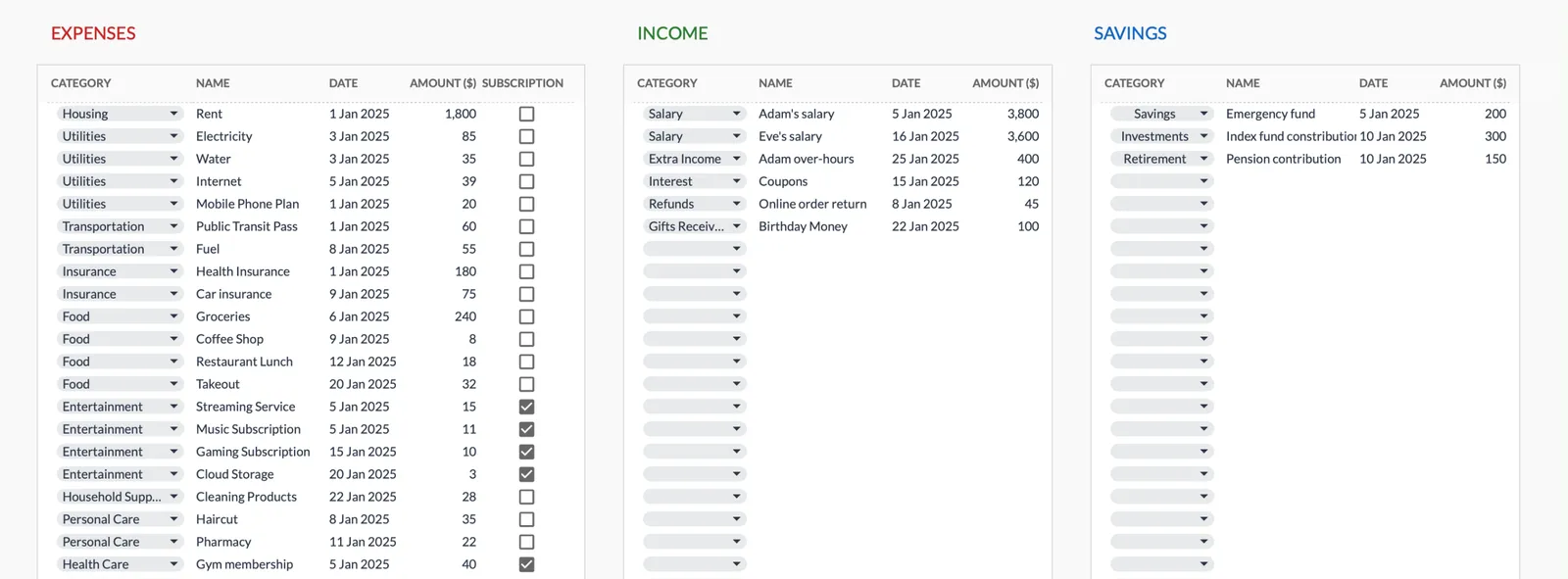
Browse through the template to see how it handles expense logging, category breakdowns, and spending analysis.
- Dashboard with key metrics at a glance
- Transaction logging with categories
- Expense tracking and summaries
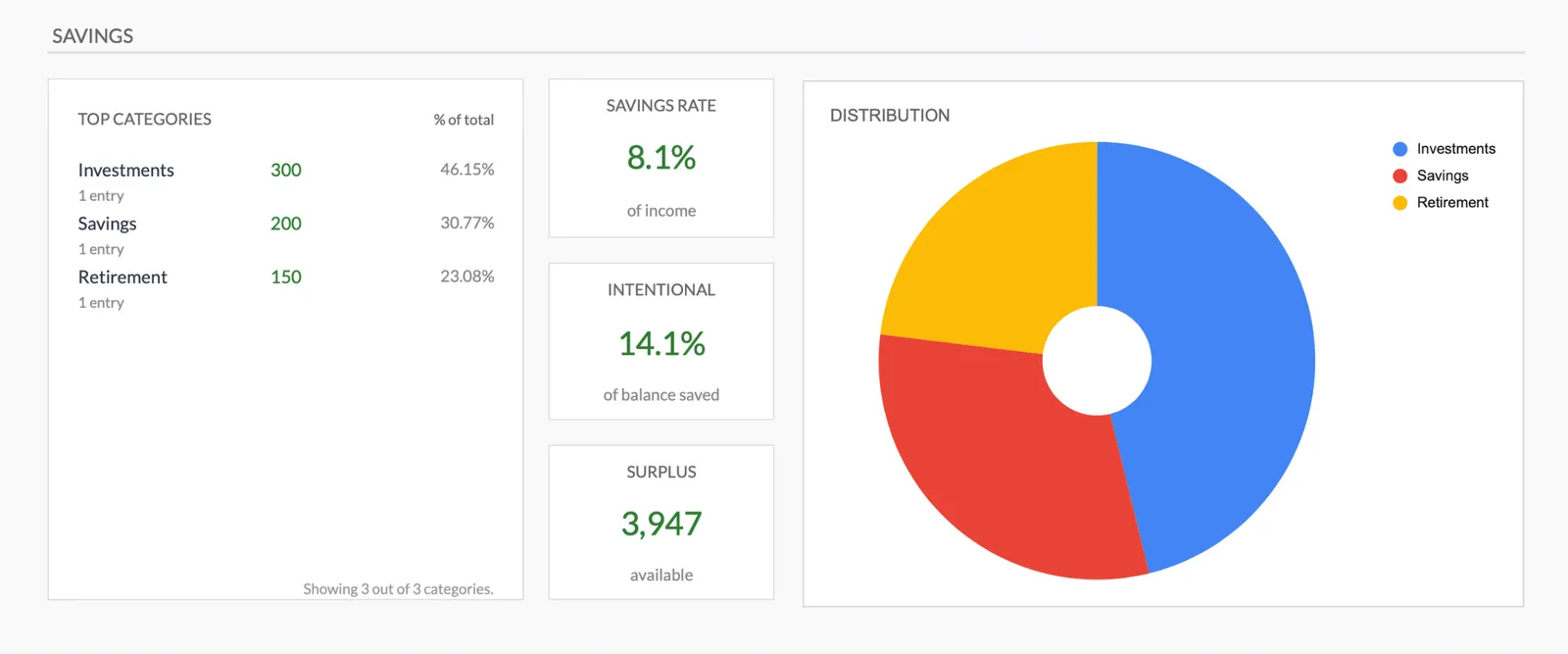
- Visual charts and breakdowns
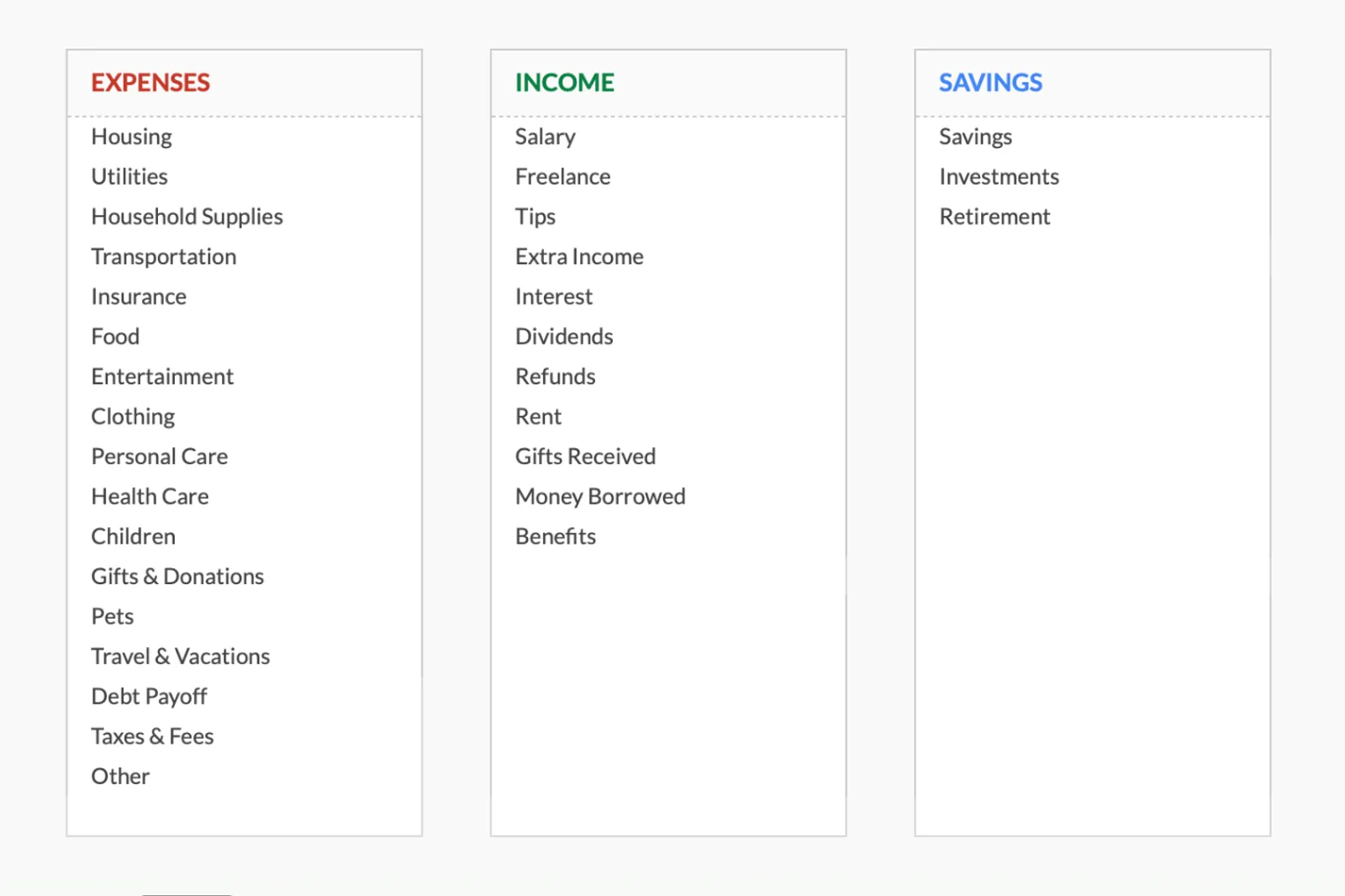
- Fully customizable categories
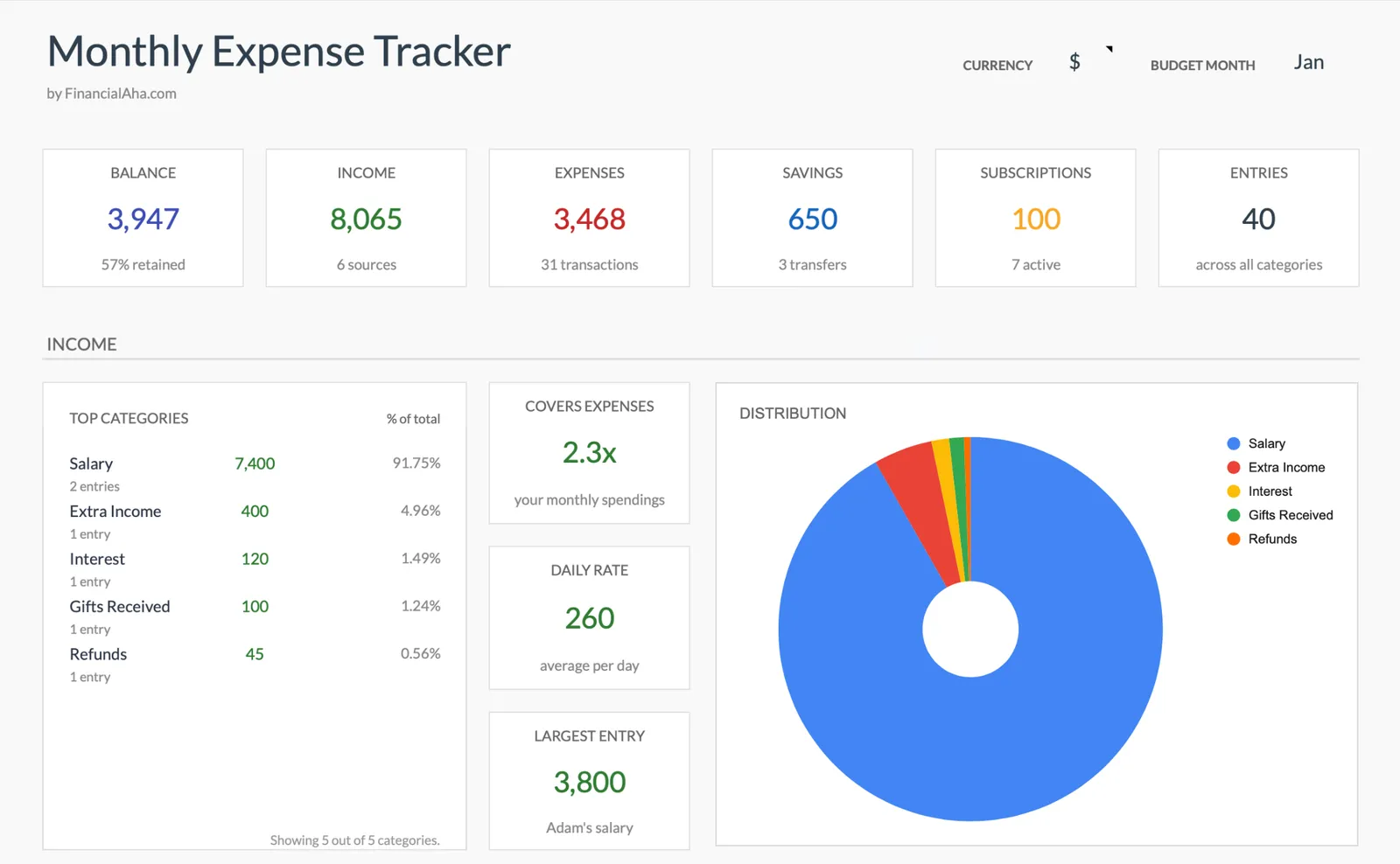
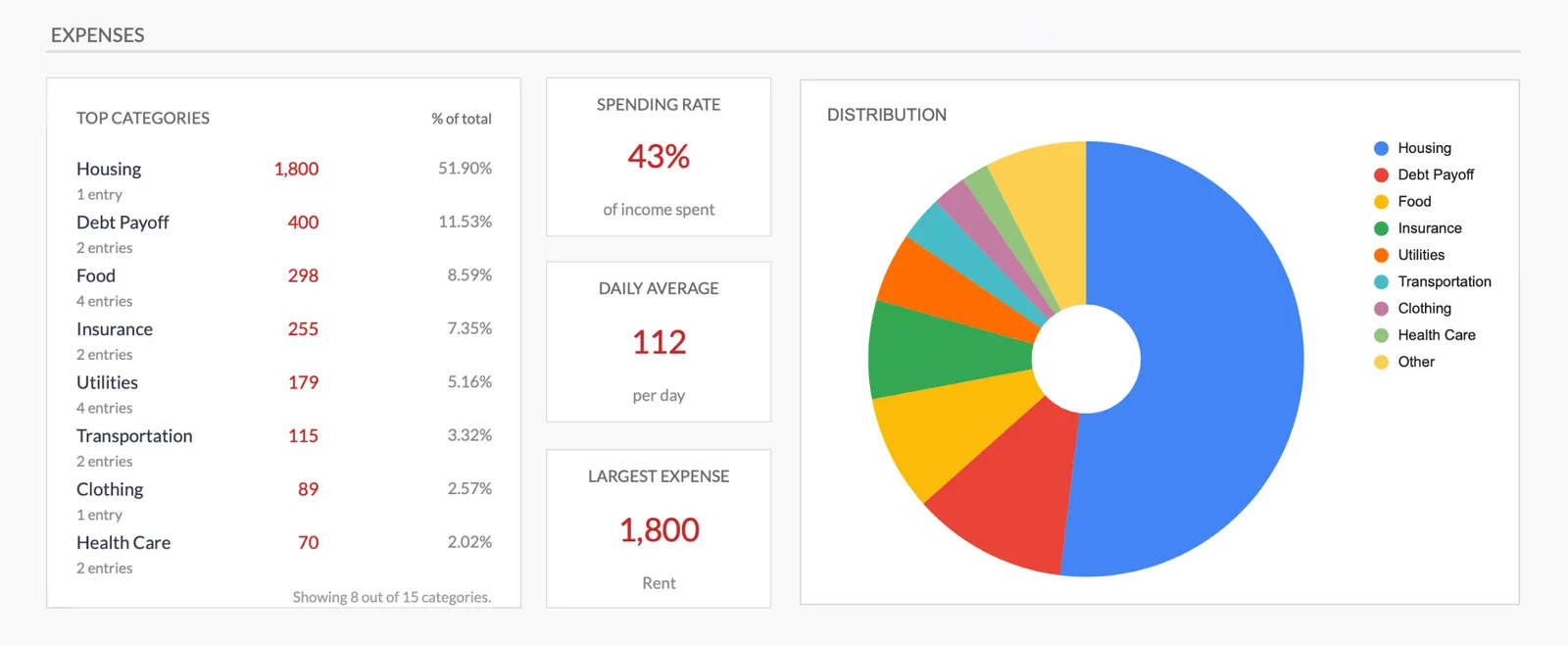
Monthly expense overview with charts
Log every expense with dates and categories
Organize spending into customizable categories
Detailed breakdown of all expenses
Track savings alongside expenses
Getting Started
Begin Tracking Your Selling Expenses
Customize categories for your business
Review the pre-built categories and add any specific to your products or platforms.
Log expenses as they occur
Platform fees, material purchases, shipping costs - enter them when they happen.
Include often-forgotten costs
Packaging tape, printer ink, labels, tissue paper - the small supplies that feel insignificant but total hundreds per year.
Review monthly totals
Compare total selling expenses against your revenue to understand your actual margins.
Identify your biggest cost areas
The category totals show where money is going. Use this awareness to negotiate better rates or find alternatives.
Common Questions
Expenses Tracker for Online Sellers - FAQ
Can I figure out profit per product with this?
The tracker shows total expenses by category. For per-product profitability, you would need to allocate costs to individual items. The monthly totals give you overall margin awareness.
Should I track platform fees that are automatically deducted?
Yes. Even though they are deducted automatically, tracking them shows their total monthly impact. Many sellers are surprised when they see the annual total.
What about inventory purchases?
Add inventory or materials as an expense category. Track what you spend on goods each month. This is a cost of doing business that directly affects profitability.
How is this different from full business accounting?
This is expense tracking, not accounting. It shows where money goes but does not handle invoicing, inventory valuation, or tax filing. It is the starting point for understanding your costs.
Can I track expenses for multiple platforms?
Yes. Add separate fee categories for Etsy, Amazon, eBay, or Shopify if the distinction matters. Or group all platform fees together for simplicity.
What if I also have a day job?
The personal expense categories cover your full living costs. The selling expense categories cover the business. Together they show your complete monthly picture.
How do I compare profitability across Etsy, Shopify, and Amazon?
Track platform fees separately for each channel. When you compare total fees as a percentage of revenue per platform, the differences become clear. An item selling for $30 might net $24 on one platform and $21 on another after all fees are deducted.
How do I track cost of goods sold for handmade items?
Record the material cost and packaging cost for each product type. When an item sells, that cost moves from inventory expense to COGS. Over time, you see the true per-item cost and can compare it against the selling price minus fees to understand your actual margin.
Can't find the answer you're looking for? Contact our team
Start tracking expenses as a online seller
One-time purchase. No subscription. Your financial data stays in your Google Drive.