Monthly Budget Template
Monthly Budget Template for Military Members
Track base pay, allowances, deployment income, and military-specific expenses in a budget that understands how military compensation works.
In Depth
Allowances, Deployments, and the LES Nobody Reads
Military compensation is structured unlike any civilian paycheck, and the differences affect budgeting directly. BAH (Basic Allowance for Housing) varies dramatically by location and dependency status - an E-5 with dependents might receive $1,800/month in one duty station and $2,800/month in another. BAS (Basic Allowance for Subsistence) is a flat $452.56/month for enlisted members (2024 rate). Both allowances are tax-free, which means their effective value is higher than the face amount. An E-5 receiving $2,200/month in BAH would need to earn roughly $2,750 in taxable income to have the same after-tax spending power. Understanding the actual monthly total - and which parts are taxable versus tax-free - requires reading the Leave and Earnings Statement in detail.
PCS (Permanent Change of Station) move budgeting is one of the most financially disruptive events in military life. Even with the Dislocation Allowance (DLA) and mileage reimbursement, out-of-pocket costs during a move routinely reach $2,000-$5,000 and sometimes more. Temporary lodging (up to 10 days before departure and up to 60 days at the new location for CONUS moves), security deposits on new housing, utility setup fees, items damaged or lost in shipment, and the general cost of re-establishing a household in a new area add up quickly. The reimbursement timeline does not always align with when the money is needed, creating a cash flow gap that requires advance planning.
Deployment creates a distinct financial window that some service members use strategically. Combat zone tax exclusion (CZTE) makes all military pay tax-free for enlisted members in designated zones, which can increase effective take-home by 15-25% depending on the tax bracket. Reduced personal spending while deployed - no commuting, minimal dining out, limited shopping - further increases the savings potential. Some service members use deployment months to accelerate debt payoff, maximize TSP contributions, or build emergency funds. At the same time, the family at home may face increased childcare costs, lawn care, home maintenance, and other expenses that shift when one household member is absent.
TSP (Thrift Savings Plan) contribution optimization parallels 401(k) planning in the civilian world, but with important differences. Under the Blended Retirement System (BRS), the government matches up to 5% of base pay - not total pay. Contributions can come from base pay, special pays, or bonuses, and Roth TSP contributions are available. The 2024 annual contribution limit ($23,000, or $30,500 if over 50) applies across the year, and some service members front-load contributions to maximize investment time. Tracking TSP contributions month by month within the budget ensures the match is captured every pay period and the annual limit is approached deliberately rather than accidentally.
The Challenge
Why Military Finances Need a Different Budget
Military pay is more complex than a single salary. Allowances, special pays, tax exemptions during deployment, and frequent relocations create a financial picture that civilian budget tools miss.
Pay includes multiple components
Base pay, BAH, BAS, special duty pay, hazardous duty pay - military compensation arrives as a mix of taxable and non-taxable components. A budget that tracks only one number misses the full picture.
PCS moves disrupt everything
Permanent Change of Station moves happen every 2-3 years. Each one brings temporary housing costs, moving expenses, deposits, and the financial chaos of uprooting. Even with reimbursement, out-of-pocket costs are real.
Deployment changes income and expenses simultaneously
Combat zone tax exclusion increases take-home pay, but family expenses at home may shift too. Some costs drop during deployment while others - like family support services or storage - increase.
TSP and military benefits are easy to overlook
The Thrift Savings Plan, SGLI, Tricare premiums - these deductions happen automatically and are easy to ignore. Without tracking them, you lose sight of their impact on your available income.
Ready to take control of your military member finances?
What You Get
Tools for Military Financial Management
Multi-component income tracking
Separate entries for base pay, BAH, BAS, special pays, and bonuses. See your total compensation broken down clearly.
Military expense categories
Categories for uniforms, gear, mess dues, PCS costs, and other military-specific expenses alongside standard household costs.
Budget vs. actual tracking
Set targets for each category and compare with actual spending. Spot variances early in the month.
Savings and TSP tracking
Track TSP contributions and other savings alongside your monthly budget. See your total savings rate at a glance.
Deployment income adjustments
Easily adjust for deployment pay changes - add combat pay, remove commuting costs, and recalculate targets.
Built-in calculations throughout
Every total and subtotal updates automatically. Enter the numbers and the template handles the rest.
See It In Action
What the template looks like
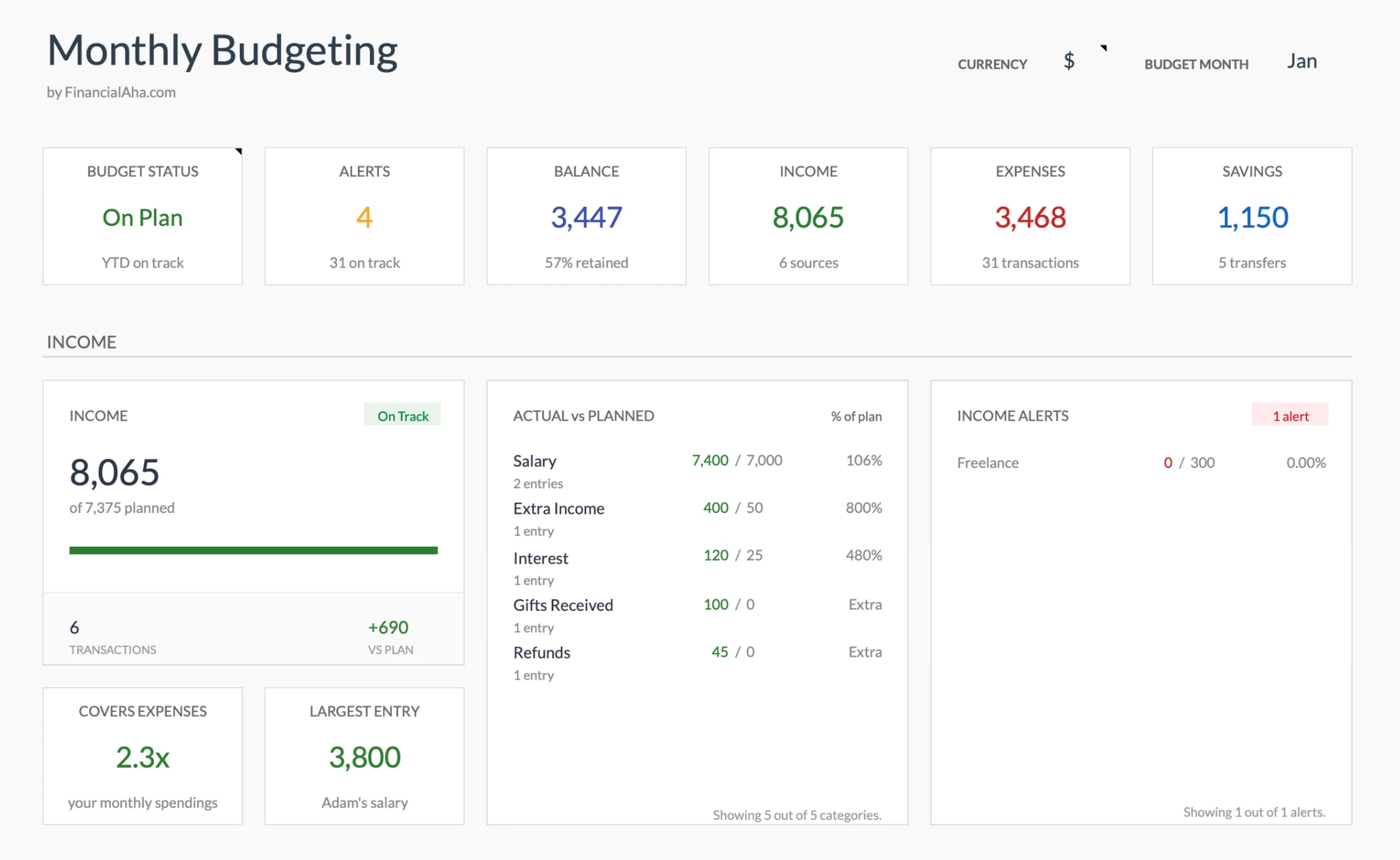
Browse through the template to see how it handles income tracking, expense budgets, savings goals, and spending analysis.
- Dashboard with key metrics at a glance
- Transaction logging with categories
- Budget vs actual comparison
- Visual charts and breakdowns
- Fully customizable categories

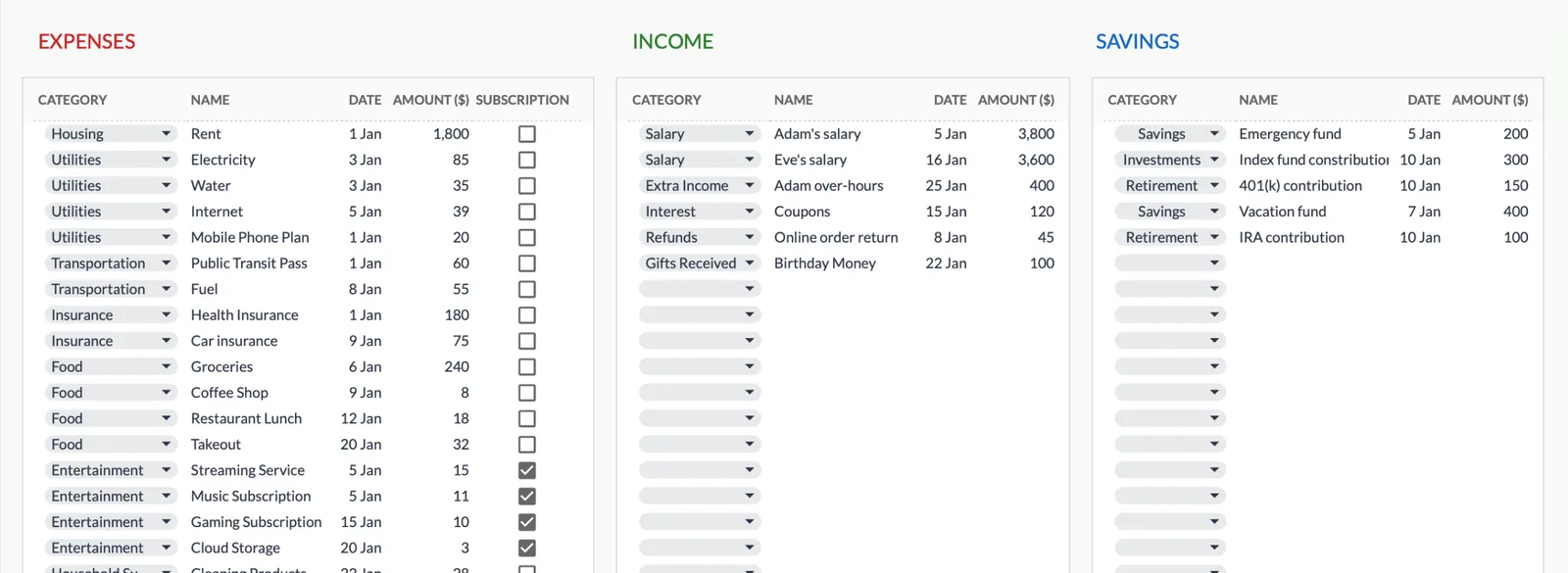
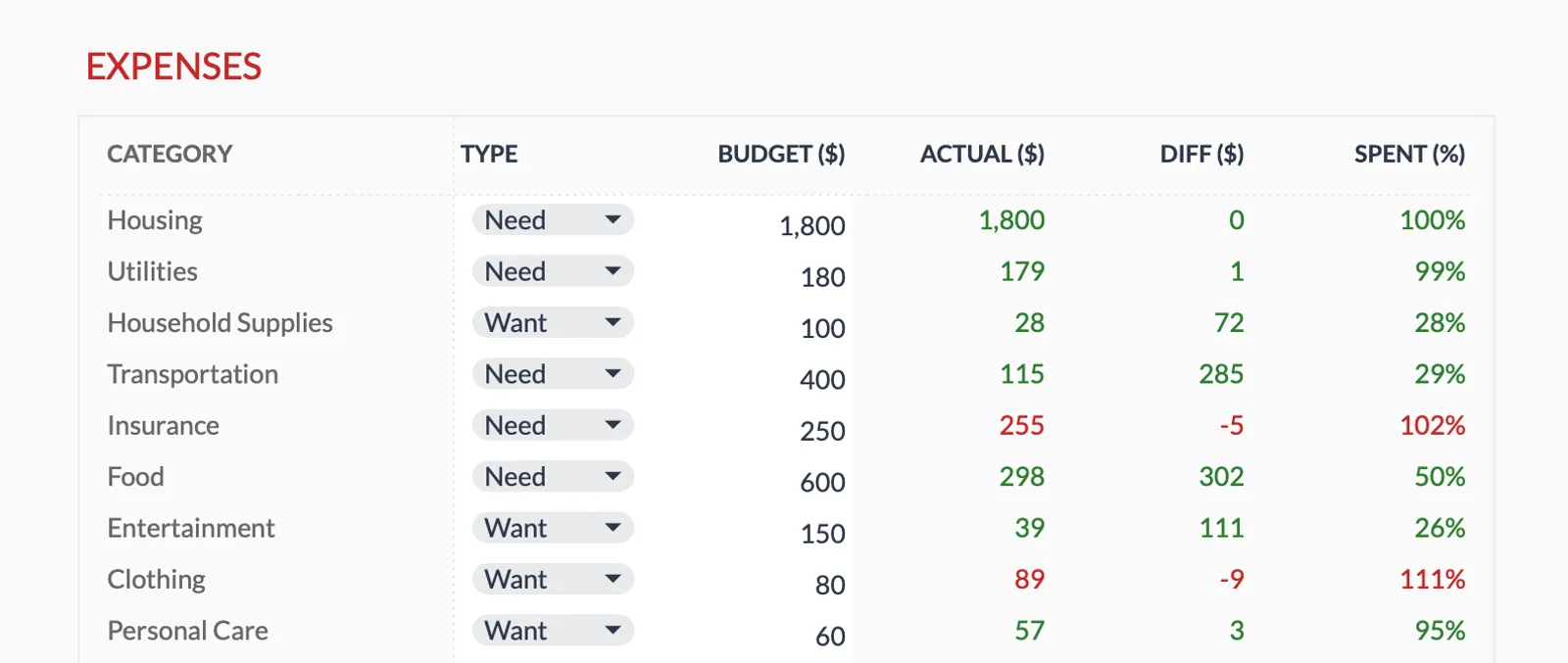
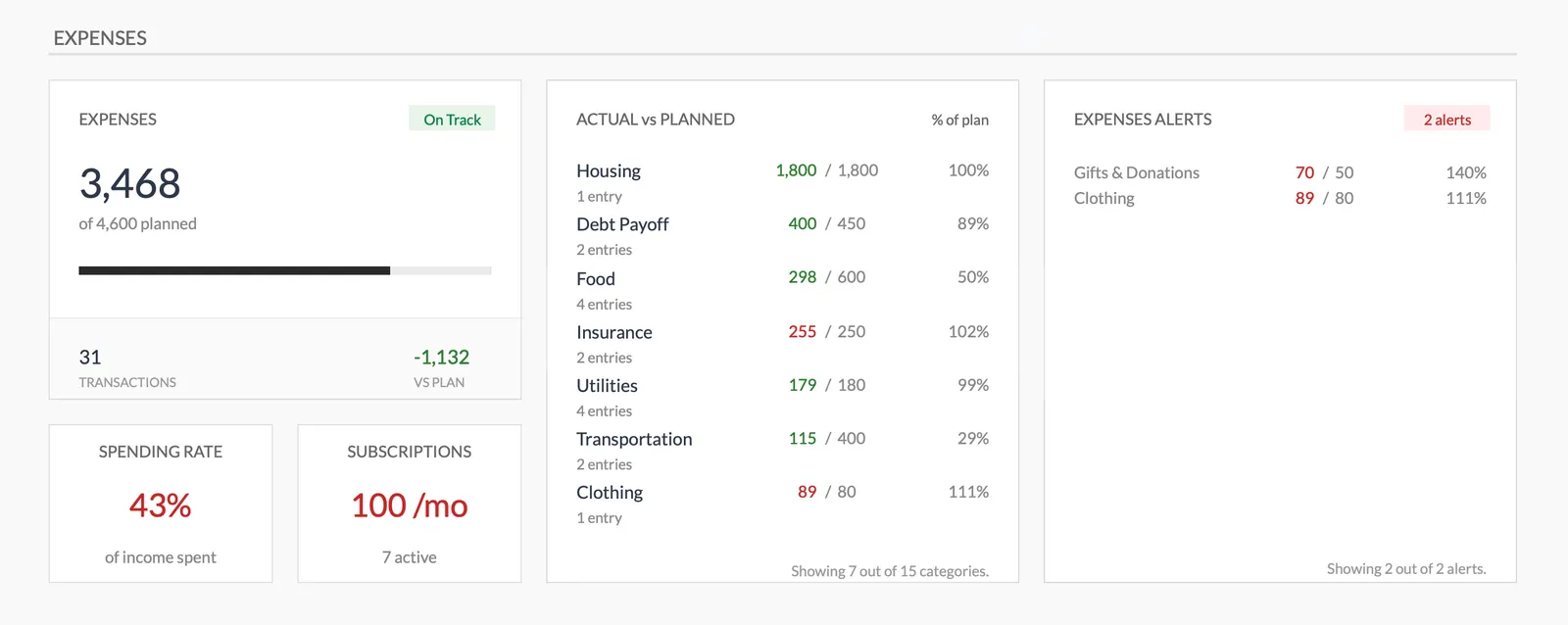
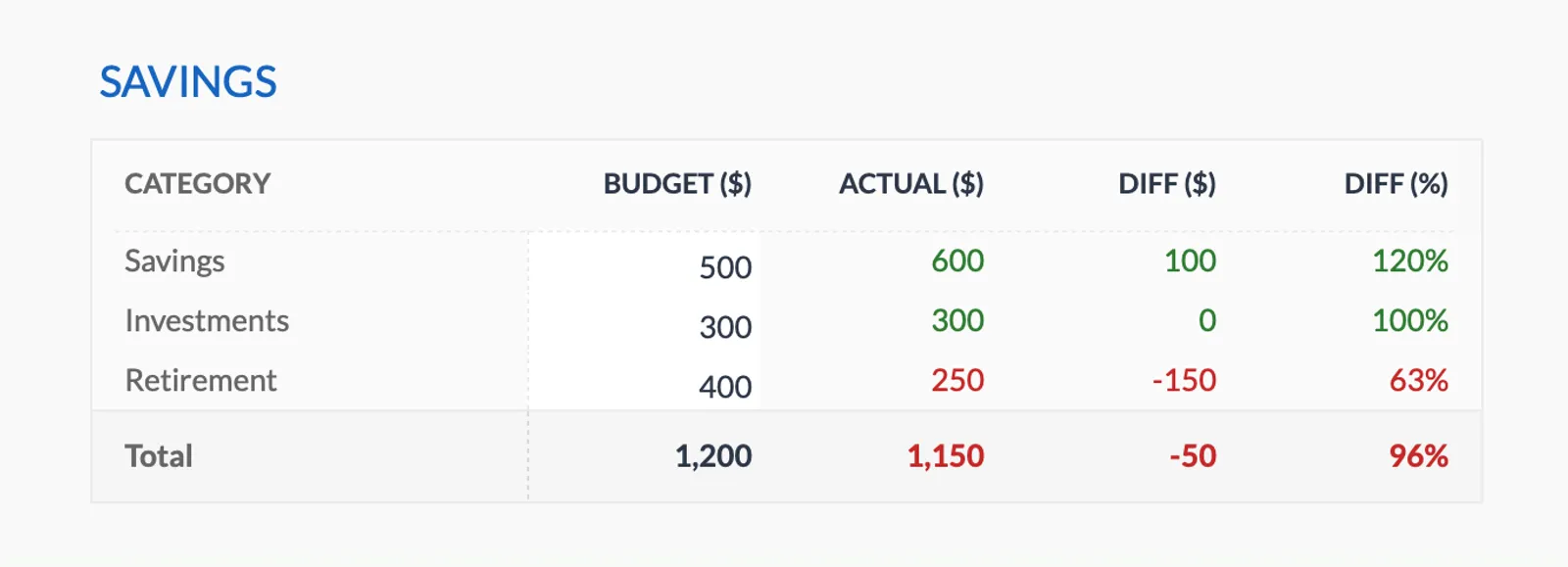
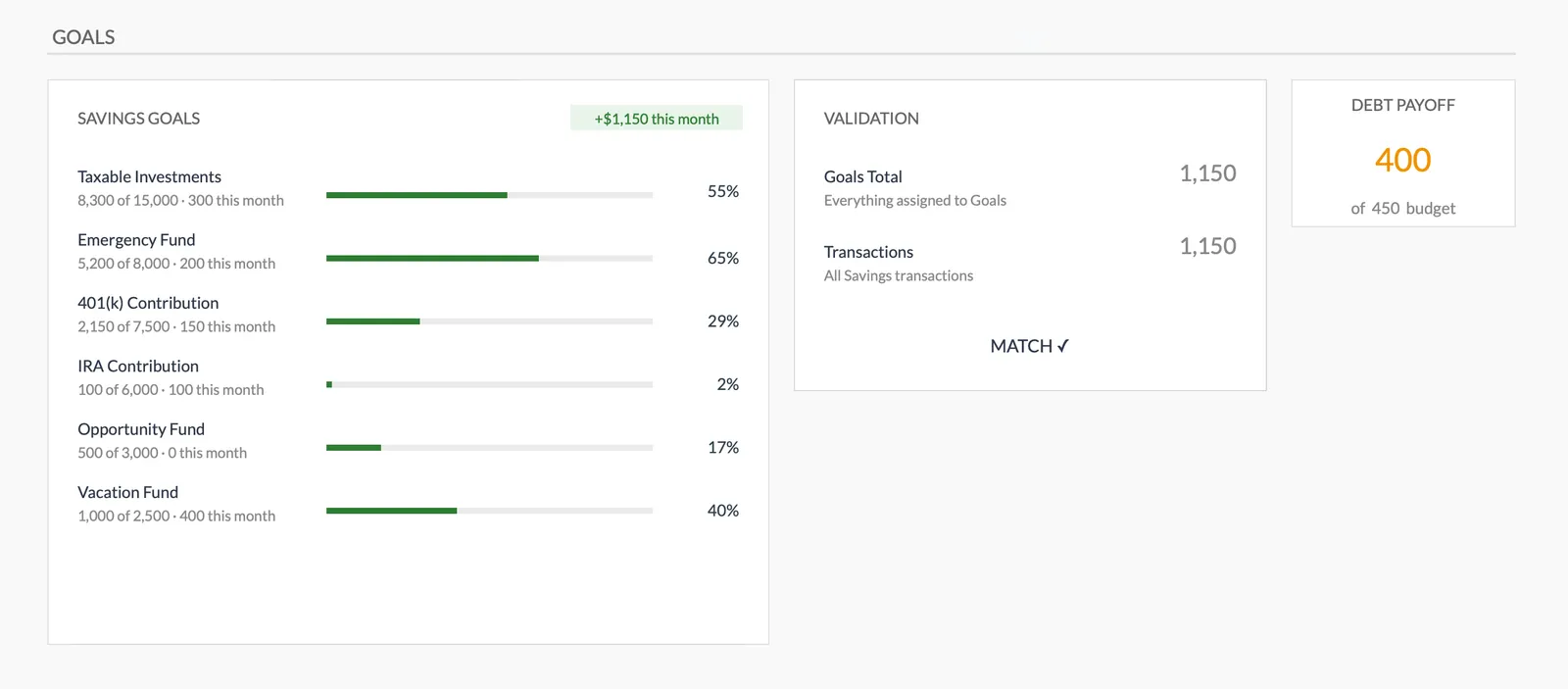
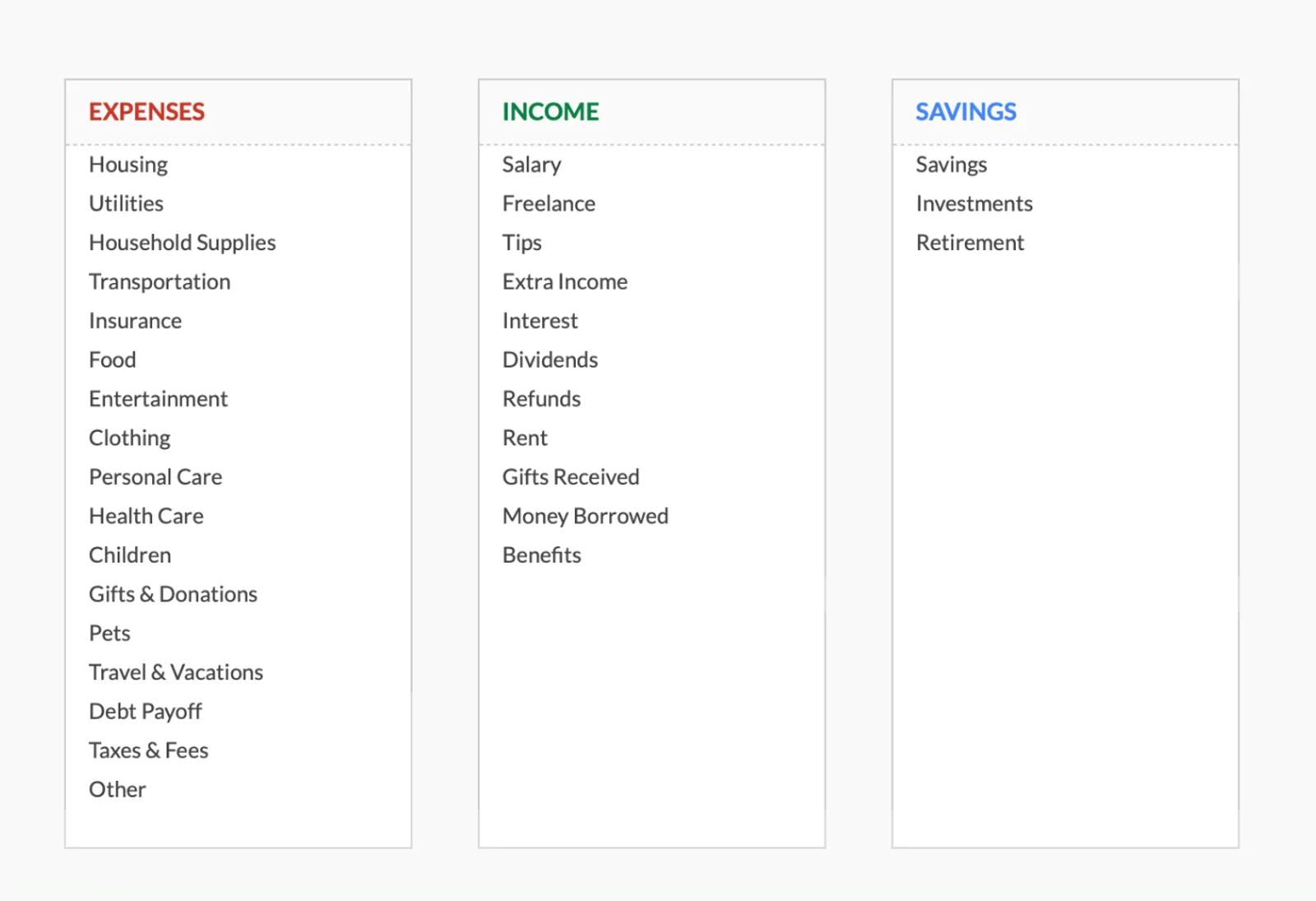
Dashboard with income, expenses, and savings at a glance
Log transactions with automatic categorization
Set targets per category and track actual spending
Visual breakdown of where your money goes
Track savings goals alongside your budget
Monitor progress toward financial goals
Fully customizable expense, income, and savings categories
Getting Started
From Download to Military Budget in Minutes
Enter all pay components
Start with your LES. Enter base pay, BAH, BAS, and any special pays. The template totals your compensation.
Set up expense categories
Use the military-relevant categories and add any that apply to your situation - on-base vs. off-base living costs differ significantly.
Set spending targets
Allocate your income across categories. Start with necessities and work down to discretionary spending.
Track spending through the month
Log expenses regularly. Consistent tracking prevents surprises at month end.
Update during transitions
Adjust the budget when pay changes, PCS orders arrive, or deployment status changes. The template adapts with simple edits.
Common Questions
Monthly Budget for Military Members - FAQ
How do I account for tax-free allowances?
Enter BAH and BAS as separate income lines. Since they are not taxed, your take-home from these allowances equals the full amount. This helps you budget with the correct total.
Can this handle a PCS move?
Add temporary categories for PCS-related expenses - deposits, temporary housing, travel costs. Remove them once you are settled. The template is fully customizable.
What about dual-military couples?
Enter both members' pay components. The template handles multiple income sources, so you can see combined household income and coordinate spending.
How do I track TSP contributions?
Add TSP as a line item under savings or deductions. Track the monthly contribution amount and watch your savings rate over time.
Does this work for National Guard and Reserve?
Yes. Guard and Reserve members can enter drill pay and annual training pay. The variable schedule makes budgeting especially important.
What happens to my budget during deployment?
Update income to reflect deployment pay changes and adjust expenses - some drop, others may increase. The template recalculates everything when you change the numbers.
How does BAH change with a PCS move and how do I plan for it?
BAH rates vary by duty station zip code and dependency status. Look up the new location's rate on the Defense Travel Management Office website before the move. The difference between your current and new BAH directly affects housing budget. If BAH drops, housing costs may need to decrease accordingly.
How do I budget for TSP contributions to capture the full BRS match?
Under BRS, the government matches up to 5% of base pay. To capture the full match, contribute at least 5% of base pay every pay period. The template tracks TSP contributions monthly so you can verify the match is being captured and plan your annual contribution strategy.
Can't find the answer you're looking for? Contact our team
Start budgeting as a military member
One-time purchase. No subscription. Your financial data stays in your Google Drive.