Gratuito Calculadora de Empréstimo com Juros Apenas Planilha
Calculate payments during an interest-only period and see how they change when principal repayment begins. Compare total costs with standard amortizacao.
Upgrade your template
Here is how you unlock a better version.
- Full-featured Interest-Only Loan Calculator with dashboard and detailed analytics
- Pre-filled subcategories, sample scenarios, and helper calculations
- Larger data capacity for real-world usage
O Que Está Incluído
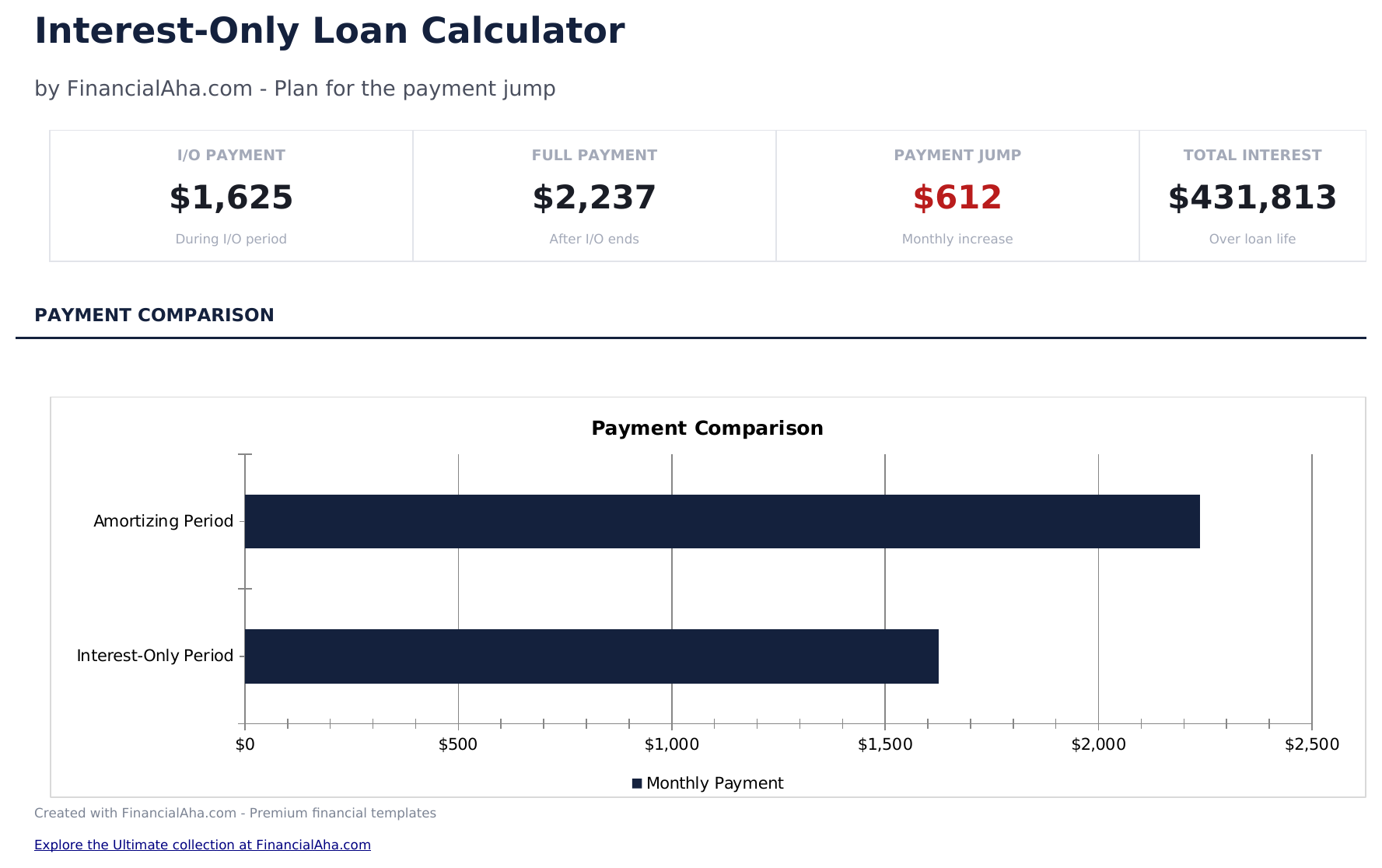
- Painel com payment phase comparison showing interest-only payment vs. full amortizing payment amounts
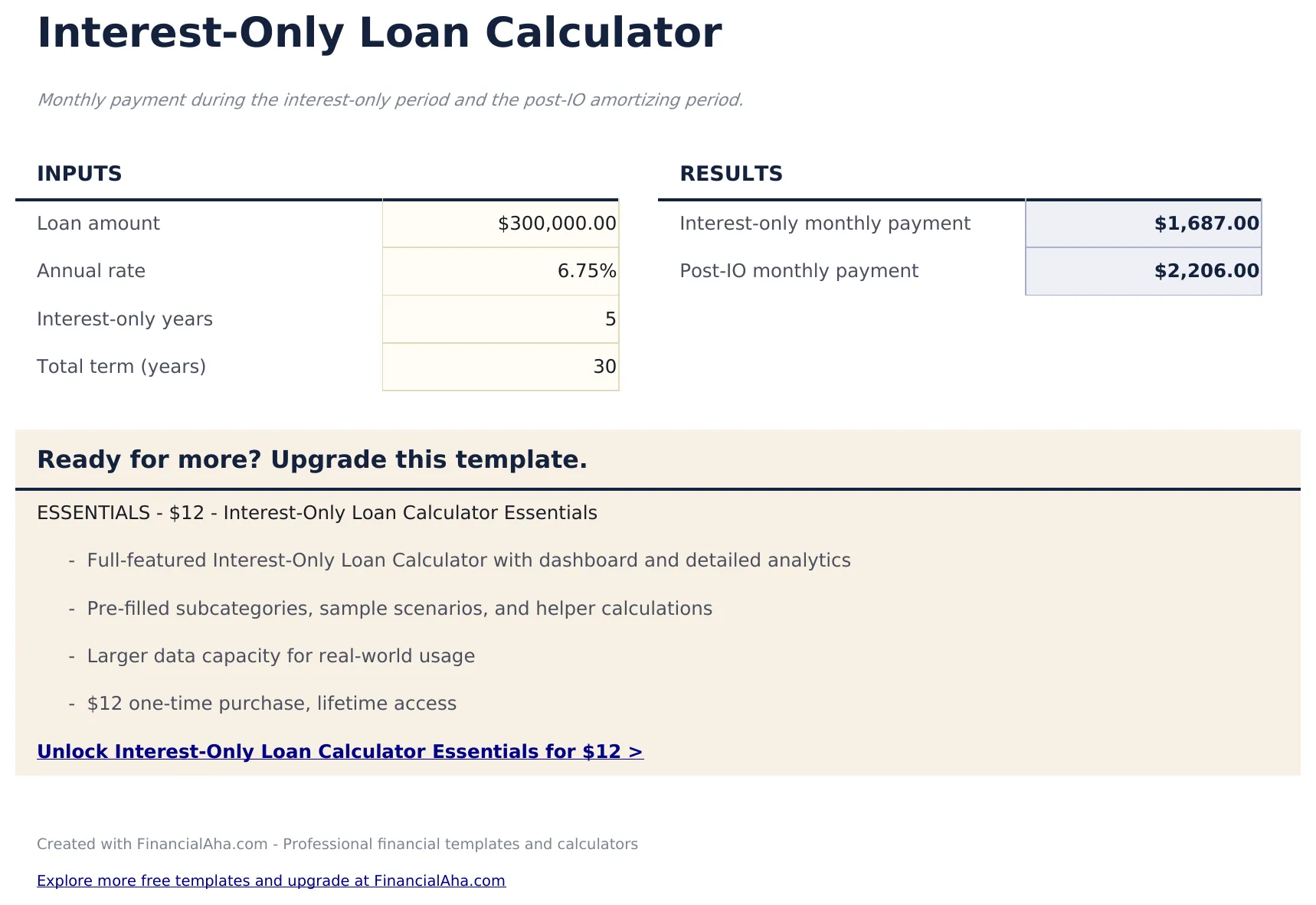
- Calculator with valor do emprestimo, rate, total term, and interest-only period length for complete loan modeling
- Interest-only vs. full payment schedule displayed lado a lado for every month across both phases
- Custo total ao longo da vida do empréstimo mostrando quanto de juros extras o período de amortização apenas com juros adiciona em comparação ao modelo padrão
- Payment jump visualization with celulas coloridas highlighting the increase when principal payments begin
- Works in Microsoft Excel, Google Sheets, and LibreOffice Calc sem necessidade de configuracao
Free e Essentials - qual a diferença?
- "Interest-Only" sheet with clearly labeled input cells at the top
- Live formulas - every result recalculates as you tweak inputs
- Compact output table so you can scan results without scrolling
- Step-by-step "How to Use" guide included in a second sheet
- Works in Microsoft Excel, Google Sheets, and LibreOffice Calc - no setup or sign-up
- Tudo que há em Free
- Full-featured Interest-Only Loan Calculator with dashboard and detailed analytics
- Pre-filled subcategories, sample scenarios, and helper calculations
- Larger data capacity for real-world usage
- $12 one-time purchase, lifetime access
Como funciona o modelo Calculadora de Empréstimo com Juros Apenas
Monthly payment during the interest-only period and the post-IO amortizing period. Open the spreadsheet, enter your own numbers, and let the formulas do the math.
Quando este modelo ajuda
- You are deciding between two financial options and need a quick number.
- You want to see how changing one input (rate, years, amount) shifts the result.
- You want a calculation you can save and revisit, not a one-shot web form.
- You want to tweak the math - this is a spreadsheet, not a black box.
Dicas para aproveitar ao máximo
- Keep the column labels simple - the formulas work best when categories are consistent month to month.
- Watch the payment jump regularly - once a week is a good rhythm for most people.
Erros comuns a evitar
- Treating the result as a decision rather than an input. Calculators answer "what if" - the final call is yours.
- Mixing up annual and monthly rates. If a formula uses a monthly rate, divide the annual by 12 before entering.
- Ignoring taxes, fees, or assumptions. A result is only as good as the inputs you feed it.
Como Usar Esta Planilha de Calculadora de Empréstimo com Juros Apenas
Insira os detalhes do empréstimo
Insira o(a) valor do emprestimo, taxa de juros, total term, and the length of the interest-only period.
Revise a parcela de juros apenas
A calculadora shows the lower parcela mensal during the interest-only phase when no principal is being paid down.
Veja o(a) payment increase
Após o término do período de juros apenas, a parcela completa com amortização é exibida - geralmente representa um aumento perceptível.
Compare os custos totais
O painel mostra total interest for the interest-only loan vs a standard fully amortizing loan over the same term.
Criadas com Claude AI. Aperfeiçoadas por nós.
Usamos Claude AI para criar cada planilha, após uma pesquisa aprofundada. Depois, nossa equipe entra em ação. Refinamos o layout, testamos exaustivamente cada fórmula, corrigimos casos extremos e polimos o design até que pareça algo que nós mesmos usaríamos. A IA nos leva 80% do caminho. Os últimos 20% são puro julgamento humano.
Upgrade your template
Here is how you unlock a better version.
- Full-featured Interest-Only Loan Calculator with dashboard and detailed analytics
- Pre-filled subcategories, sample scenarios, and helper calculations
- Larger data capacity for real-world usage
Perguntas Frequentes
Por que the interest-only payment lower?
During the interest-only period, you pay only the interest charges with no principal reduction. This makes the parcela mensal lower but does not reduce the balance.
Quanto does the payment jump?
The increase depends on the valor do emprestimo, rate, and remaining term after the interest-only period. A calculadora shows both payments lado a lado.
Quando the principal repaid?
Principal repayment begins after the interest-only period ends. The saldo restante is then amortized over the shorter remaining term.
Como total interest compare?
Interest-only loans typically cost more in total interest because the full principal accrues interest for longer. O painel mostra the exact difference.
Como abrir no Google Sheets?
Envie o arquivo .xlsx para o Google Drive e abra com o Google Sheets. Todas as fórmulas e formatações serão preservadas.
Qual é a licença desta planilha?
Todas as planilhas gratuitas são disponibilizadas sob a licença CC BY 4.0 (Creative Commons Atribuição). Você pode usar, modificar e compartilhar livremente - inclusive para fins comerciais - desde que dê crédito ao FinancialAha.com. São fornecidas como estão e não constituem aconselhamento financeiro.
Mais Planilhas Gratuitas de Veículos e Empréstimos
Procurando planilhas premium?
Nossas planilhas pagas incluem painéis avançados com várias abas, gráficos nativos do Excel e atualizações contínuas.