
ProjectionLab bills $129/year for Premium, or $549/year for Pro, with no one-time plan. A Google Sheets retirement projection template runs the deterministic year-by-year projection for $39 once. The trade: you give up Monte Carlo and Sankey diagrams, and keep every formula in a cell you can audit.
The Retirement Financial Planning Projections template runs the deterministic year-by-year projection in cells you can read and edit, for $39 once. ProjectionLab is a polished SaaS planner: $129 a year for Premium or $549 a year for Pro, with Monte Carlo simulations, Sankey income diagrams, and scenario branching that a spreadsheet cannot match. For some plans that is worth the subscription. For plans that only need the median projection, an open file you own covers it.
ProjectionLab is genuinely good, and the Sankey diagram alone can change how you read your own money. The catch is two-fold: the subscription runs indefinitely, and the math behind every chart sits behind closed JavaScript. For a lot of people that trade is fine. For some, it is not.
This post compares the two on the things that actually decide it: cost, transparency, scenario depth, country support, and what happens when you stop paying.
Where ProjectionLab wins
Three things genuinely set ProjectionLab apart, and a spreadsheet can’t match them.
Monte Carlo simulation. PL runs thousands of randomized return sequences against your plan and reports the percentage chance you don’t run out. A deterministic spreadsheet gives you one outcome based on one return assumption. That’s a real modeling difference, especially for people whose plan is sensitive to sequence-of-returns risk.
Sankey income flow diagrams. The visualization showing income flowing from sources (salary, dividends, withdrawals) into spending categories is genuinely useful. It changes how you see your plan.
Scenario branching. You can fork your plan, change one assumption, and compare side by side. Our template compares three fixed scenarios and twelve what-if cards, which is not the same thing as branching on any assumption you like.
If you need any of those three, pay for ProjectionLab. The rest of this post is for people who don’t.
Where a spreadsheet wins
Cost over a 30-year planning horizon.
| Tool | Year 1 | Year 10 | Year 30 |
|---|---|---|---|
| ProjectionLab Premium ($129/yr) | $129 | $1,290 | $3,870 |
| ProjectionLab Pro ($549/yr) | $549 | $5,490 | $16,470 |
| Retirement Projections (one-time $39) | $39 | $39 | $39 |
Over a 30-year retirement plan, the spreadsheet costs less than four months of the Premium subscription. There is no one-time ProjectionLab tier to weigh anymore: the plans bill annually, so the meter runs for as long as you keep the account open.
Transparency. Every formula in our Retirement Projections template is in a cell you can click. Each retirement year takes the gap between expenses and income out of the balance first, then grows what is left: =MAX(0, (PortfolioStart - Gap) * (1 + NetReturn)), with the gap itself =MAX(0, Expenses - Income). Expenses climb from the year-one figure with =Year1Expenses * (1 + Inflation)^(Year - 1). If you don’t trust a number, you can audit it. ProjectionLab is a black box by design.
You own the file. When ProjectionLab changes its pricing, you have to decide whether to keep paying. When the spreadsheet vendor (us) goes out of business someday, your copy of the sheet sits in your own Google Drive and keeps working. The math doesn’t depend on our server.
Country and tax neutrality. ProjectionLab handles US, Canada, UK, Australia, Germany, and Netherlands tax models. Useful, but if you live elsewhere or have an unusual tax situation (foreign earned income exclusion, multiple residencies, dual citizenship), the model breaks down. The template has no country tax rules in it. It asks for return rates net of taxes and fees, and for a state pension start age you set yourself, so it is not tied to one country’s system.
Feature-by-feature comparison
| Feature | ProjectionLab | Retirement Projections (Sheets) |
|---|---|---|
| Cost | $129/yr (Premium), $549/yr (Pro) | $39 one-time |
| Monte Carlo | Yes | No (deterministic) |
| Sankey diagrams | Yes | No |
| Scenario branching | Native | Three fixed scenarios plus 12 what-if cards |
| Year-by-year projection | Yes | Yes |
| Inflation assumption | Yes | One rate input |
| Tax modeling | US, CA, UK, AU, DE, NL | None built in, returns entered net |
| Pension inputs | Yes | Start age and monthly amount |
| Other income | Yes | One monthly figure |
| Mobile app | iOS, Android, web | Google Sheets mobile |
| Data ownership | Cloud account sync | Your own copy in your Google Drive |
| Formula visibility | Closed | Every cell readable |
| Open source | No | No (but auditable) |
| Country agnostic | Mostly | Yes |
| Offline use | Limited | Google Sheets offline mode |
Who should use which
Use ProjectionLab if any of these are true:
- Sequence-of-returns risk is your top planning concern and Monte Carlo matters.
- You’ll iterate on dozens of scenarios per year for the next decade.
- You value the Sankey visualization for understanding income flow.
- You’re a US, Canadian, UK, Australian, German, or Dutch resident with a tax situation the model handles cleanly.
- You’re comfortable with $129 a year recurring for Premium (or $549 for Pro).
Use a spreadsheet if any of these are true:
- You want to read the formulas and trust them.
- You’ll review your plan once or twice a year, not weekly.
- You live in a country PL doesn’t model (or have an unusual tax situation in one it does).
- You prefer a one-time cost.
- You want the file to outlive any product or company, including ours.
Use both:
- The spreadsheet is the one you keep forever.
- A one-year ProjectionLab Premium subscription before a major decision (retirement date, asset allocation shift) gives you the Monte Carlo confidence interval.
- Let it lapse after the decision. Total cost: $129 every few years instead of every year.
That’s the pattern most people who have used both settle into.
What our spreadsheet actually does
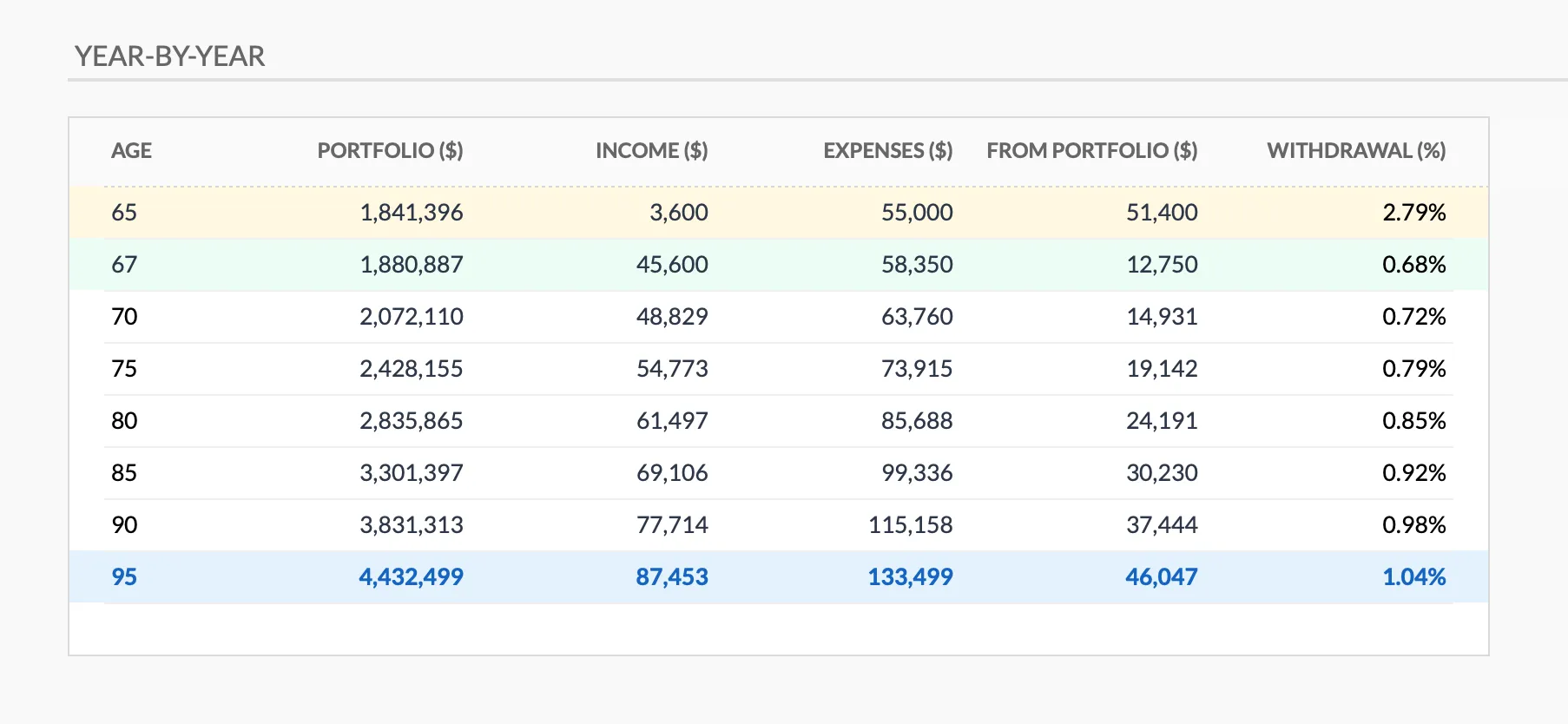
The year-by-year projection tab in the Retirement Financial Planning Projections template (Premium). Every figure in this table is produced by a formula you can click into and read.
The Retirement Financial Planning Projections template runs from your current age to the life expectancy you set, and every input sits on one Inputs tab:
Personal:
- Current age, target retirement age, life expectancy
- State pension start age, which sets the bridge period between retiring and the pension starting
Assumptions:
- Inflation rate, applied to expenses
- Pre-retirement and post-retirement return rates, both entered net of taxes and fees
- Pension annual increase
Money:
- Total current savings as one combined figure across all accounts
- Annual savings until retirement
- Monthly pension income and monthly other income
- Total annual expenses in the first year of retirement
Output:
- Projected portfolio value at retirement, from a monthly compounded future-value formula
- A table of portfolio, income, expenses, the amount drawn from the portfolio, and the withdrawal rate that implies, at retirement age, pension start age and every fifth year after
- Conservative, base and optimistic scenarios derived from your own inputs, with where each one ends
- Twelve what-if cards, from a one-year delay to a 20 percent market crash
- Savings milestones at 10x, 25x, 30x and 33x annual expenses, and a legacy figure at life expectancy
- Four charts: portfolio balance over retirement, income vs expenses over time, income sources over time, and withdrawal rate over time
It is a narrower input set than ProjectionLab takes for its base case, with one combined savings balance rather than per-account modeling. What the two share is the engine: a future-value calculation compounded forward, then a balance drawn down year by year.
The difference is what’s hidden vs visible. PL hides the math and adds Monte Carlo on top. The spreadsheet shows the math and skips the Monte Carlo.
A worked example to compare outputs
A 45 year old with $300,000 saved, adding $25,000 a year, planning to retire at 65 with $60,000 of expenses in the first year of retirement, assuming a 7 percent net return and 3 percent inflation.
Spreadsheet output (deterministic): about $2,300,000 at age 65. The template’s formula is =FV(Return/12, Years*12, -AnnualSavings/12, -CurrentSavings, 0), so savings compound monthly rather than as one annual lump, which lands a little above the annual version of the same sum. The sheet does not apply a 4 percent rule to that balance. It takes the expense gap instead, $60,000 in year one with no pension running yet, and reports it as a withdrawal rate of roughly 2.6 percent with an under-4-percent check beside it.
ProjectionLab output (Monte Carlo, 1000 runs): median outcome around $2,180,000, 90th percentile near $2,850,000, 10th percentile near $1,500,000, and a probability of the plan not running out by age 95 in the region of 90 percent.
Both tools tell you the median plan works. ProjectionLab also tells you there’s roughly a 10 percent chance it doesn’t. That’s the value-add. If 10 percent versus 0 percent in your model changes a decision (working two more years, saving $5,000 more annually, shifting to a more conservative allocation in late accumulation), pay for PL. If the deterministic median is enough to plan around, the spreadsheet covers it.
To see the deterministic side of this on your own numbers before deciding, run them through the free retirement calculator below, then reach for the template when you want the full year-by-year sheet:
What happens when you stop paying
The most underrated factor in choosing planning tools is the exit ramp.
ProjectionLab cancellation: your data exports as JSON, and you can re-import it if you resubscribe. But the plans bill annually with no one-time tier, so once the subscription lapses you have the export and no way to model new scenarios until you pay again.
Spreadsheet cancellation: there’s nothing to cancel. The file works forever in any spreadsheet program, and the math is in the cells. If we shut down tomorrow, your file is unaffected.
This isn’t theoretical. Mint shut down in March 2024, and the scramble to replace it sent a lot of people looking for tools they could actually own. Personal Capital was renamed and restructured. Tools change ownership and pricing models; a file you own outlives that.
How to migrate from ProjectionLab to the spreadsheet
If you’re considering moving, here’s the practical path.
- Export your ProjectionLab plan to JSON or screenshot every input page.
- Open the Retirement Projections template and walk through the Inputs sheet.
- Add your account balances together into the single savings total, then copy your contributions, expected returns, retirement age, and first-year retirement spending into the matching cells.
- Reconcile the year-by-year projection. If the two land far apart, the usual cause is a different return, inflation or contribution assumption in one of them, or the template’s monthly compounding read against an annual figure.
- Decide whether the Monte Carlo confidence interval changes any decision. If yes, keep PL for that. If no, cancel.
For most people the answer is: the median is enough, the math is the same, the spreadsheet wins on cost and ownership.
The one-time path
If the median projection is what you need and the audit trail is what you want, the file is the shorter route:
- Retirement Financial Planning Projections ($39 once) runs from your current age to the life expectancy you set, across three scenarios, and is the sheet shown in the screenshot above.
- Retirement Planning Bundle pairs it with the Net Worth Tracker and the Annual Tax Planner if you want the fuller picture in one purchase.
Not sure the projection math is what you need yet? The free retirement calculator above runs a deterministic future-value projection on a handful of inputs, so it is a fair way to test the deterministic answer before buying the full sheet.
Related
- Retirement Template vs Retirement Calculator: Which One You Actually Need
- Best FIRE Calculators and Spreadsheets, Compared
- Retirement Account Tracker for 401(k) and IRA Balances
- Mint Alternatives After the Shutdown
- Best Free Retirement Calculators Compared - the free calculators to reach for before a full projection tool
Frequently asked questions
Which ProjectionLab plan does the $129 refer to?
Premium, ProjectionLab's main paid tier, is $129 a year. Pro, with more advanced modeling, is $549 a year. Both bill annually; there is no monthly or one-time option on the current pricing page. A free Basic tier exists for trying it out.
Does the spreadsheet do Monte Carlo?
No. It runs deterministic future-value calculations. For Monte Carlo, you'd need a tool like ProjectionLab, Boldin (formerly NewRetirement), or a custom script. The deterministic median answer covers most planning questions, though not all.
Can I add my own tax model to the spreadsheet?
The template has no country tax rules built in. It asks for return rates net of taxes and fees, and every cell is editable, so a bracket table or a pension taxation rule can be added alongside. ProjectionLab handles this for you in supported countries; the spreadsheet leaves it open.
Is the spreadsheet supported?
Updates to the template are included at no extra cost after the one-time purchase. There are no country tax rules inside it to go stale, so an update is a change to the sheet itself rather than to a rule table.
What if I want to compare both side by side first?
ProjectionLab has a free Basic tier and a trial. The template has a live preview you can open before buying. Run your numbers in both, compare the outputs, and weigh whether Monte Carlo and Sankey are worth $129 a year to you specifically.
Does the spreadsheet work on a phone?
The template is a Google Sheet, so it opens in the Google Sheets mobile app like any other file. It is not as polished as ProjectionLab's mobile interface, but for reviewing numbers and tweaking assumptions on the Inputs tab, it works.
Sources
- ProjectionLab Pricing - ProjectionLab
- ProjectionLab (features and international tax presets) - ProjectionLab
About this article
ProjectionLab plan prices and country tax presets were checked against ProjectionLab's published pricing and product pages. Template sheets, inputs, formulas, charts and outputs checked on 2026-09-10 against the shipped Retirement Financial Planning & Projections Google Sheet (Summary, Inputs, Projections, Helpers and Instructions tabs). The retirement projection figures were recomputed with the template's own future-value formula. Last reviewed September 2026.