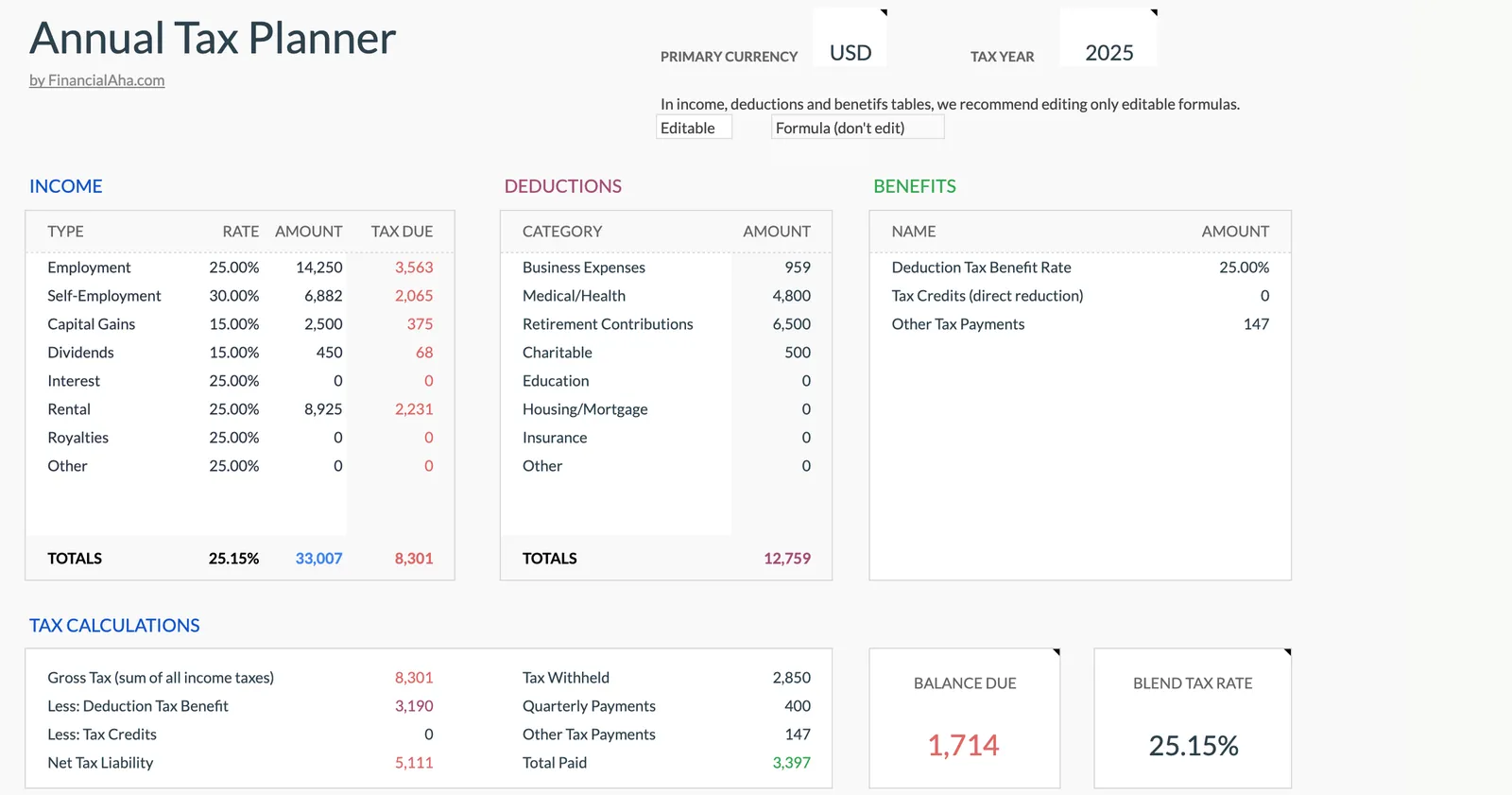
We built a tax planner template because we needed one ourselves. Track income from multiple sources, log deductions as they happen, monitor quarterly payments, and know which documents you have - all year long.
We’re happy to announce the Annual Tax Planner - a template we’ve been working on for months.
Year-round tax tracking: The Annual Tax Planner keeps income, deductions, quarterly payments, and document checklists in one place - so tax season is a review, not a scramble.
This one came from personal frustration. Every year, around February, we’d find ourselves digging through emails looking for 1099s, trying to remember which doctor visits were deductible, and wondering if we’d logged that freelance project from the spring. The information existed somewhere, just never in one place.
So we built a spreadsheet to keep it all together.
What’s in the template
The planner tracks four things:
Income from all sources. The type dropdown covers employment, self-employment, capital gains, dividends, interest, rental, royalties, and other. For each entry you log the type, a description, the date, the amount, the currency, and any tax that was already withheld. There’s also multi-currency support if you have foreign income: you set the rates on the Exchange Rates sheet, and every entry converts into your primary currency.
Deductions by category. Business expenses, medical costs, retirement contributions, charitable giving, education - log them as they happen instead of trying to reconstruct a year’s worth later. Each entry has room for notes so you remember what it was for.
Quarterly estimated payments. The quarterly tab lists all four quarters with their periods and due dates, plus columns for estimated income, estimated tax, and the amount you paid. The paid total carries to the dashboard, where it counts against the year’s tax to leave a balance due. Useful if you’re self-employed or have income that doesn’t have withholding.
A document checklist. Check off W-2s, 1099s, and statements as they arrive. Come filing time, you’ll know exactly what you have and what’s still missing.
The point of year-round tracking
Nobody wants to think about taxes in July. But the alternative is that February scramble - pulling bank statements, searching email, trying to remember expenses from 10 months ago.
Logging things as they happen takes a few minutes. Reconstructing a year takes hours. And you’ll miss things.
What this doesn’t do
The template organizes your tax information and adds up a rough total. You set a tax rate for each income type and a benefit rate for deductions, and the dashboard shows gross tax, the deduction benefit, any credits you enter, a net tax liability, and a balance due once withholding and payments are counted. What it isn’t is a filing calculation. There are no bracket tables, no filing statuses, and no schedule-level rules, so the figures are only as good as the rates you put in. Use it alongside tax software, or bring the organized data to your accountant. Either way, you’ll show up prepared instead of scattered.
And like everything we build, it runs entirely in your own Google Sheets or Excel. We don’t see your data.
Get It
The Annual Tax Planner is a one-time purchase - no subscription, no recurring fees. Updates included.
It’s also in the Personal Finance Bundle with the Financial Planning Template and Net Worth Tracker if you want the set.
Related
- Annual Tax Planner - Full product page with preview
- Financial Planning Template - Long-term financial overview
- Tax Season Budget Prep - Organizing finances before tax time
- Personal Finance Bundle - Tax planner with financial planning and net worth tracking
Frequently asked questions
Does this replace tax software?
No. The template organizes your tax information throughout the year. You still use tax software or an accountant for the actual filing.
Can I track multiple income sources?
Yes. The income tab has a type dropdown covering employment, self-employment, capital gains, dividends, interest, rental, royalties, and other. Each entry logs the type, a description, the date, the amount, the currency, and any tax already withheld, and foreign amounts convert using the rates you set on the Exchange Rates sheet.
When is the best time to start using it?
Any time. Starting mid-year still saves you from reconstructing those months later. The biggest benefit comes from logging things as they happen.