Annual Tax Planner
Annual Tax Planner for Real Estate Agents
Track commission income, real estate business deductions, and quarterly estimated payments - built for the feast-or-famine rhythm of real estate.
In Depth
Commission-Based Income and the Tax Filing Challenge
Real estate agents face a tax situation that combines the unpredictability of commission income with the expense profile of running a small business. A single closing might generate $8,000 in commission one month, followed by two months of no closings at all. This volatility makes quarterly estimated payments particularly tricky - the income pattern rarely aligns with the four equal installments the IRS payment schedule assumes.
The range of deductible expenses in real estate is extensive and often underappreciated. Marketing costs alone - photography, staging, mailers, online advertising, yard signs, open house supplies - can represent thousands of dollars annually. Add vehicle expenses for property showings, MLS fees, brokerage desk fees, continuing education, and professional association dues, and the total deduction picture becomes significant. Tracking these in real time prevents the common year-end scramble through bank statements and shoe boxes of receipts.
Seasonal patterns in real estate add another layer of complexity to tax planning. Spring and summer typically bring higher transaction volumes and larger commission checks, while winter months may be slower. Some agents find that their Q2 and Q3 income represents 60-70% of their annual total. Understanding this pattern through year-round tracking helps with quarterly payment calculations and cash flow planning for the leaner months.
The Challenge
Why Real Estate Agents Need Tax Planning All Year
Commission income arrives in large, irregular chunks. Two closings in one month and nothing the next creates a tax planning challenge that requires year-round attention.
Commission income is unpredictable
A $15K commission check feels like a windfall until 30-40% goes to taxes. Without tracking, it is easy to spend gross income and scramble when estimated payments are due.
Business expenses are significant
MLS fees, lockbox fees, marketing, signage, client gifts, car expenses, continuing education, association dues - the cost of running a real estate business is substantial.
Vehicle expenses are a major deduction
Driving to listings, showings, inspections, and closings racks up significant mileage. Whether tracking actual expenses or using the standard mileage rate, consistent logging matters.
Seasonal patterns affect tax timing
Spring and summer closings create income spikes that do not align well with equal quarterly payments. Planning around the seasonal cycle prevents penalties.
Ready to take control of your real estate agent finances?
What You Get
Tax Planning Features for Real Estate Agents
Commission income tracker
Record each commission by closing date and amount. See income by quarter and year-to-date. Track splits with your brokerage.
Real estate agent deduction categories
Pre-built categories for MLS fees, marketing, vehicle expenses, licensing, association dues, continuing education, and client-related costs.
Vehicle expense log
Track mileage or actual vehicle expenses for business driving. This is often one of the largest deductions for agents.
Agent quarterly payment planner
Estimate quarterly payments based on commissions earned and deductions claimed. Adjust as the sales year unfolds.
Self-employment tax tracker
Calculate the SE tax portion of your obligation. Most agents are independent contractors and owe both halves.
Year-end summary
Total commissions, total deductions, net income, and estimated tax liability. Complete picture for filing.
See It In Action
What the template looks like
Browse through the template to see how it handles income tracking, deductions, quarterly payments, and tax projections.
- Tax overview dashboard
- Income source tracking
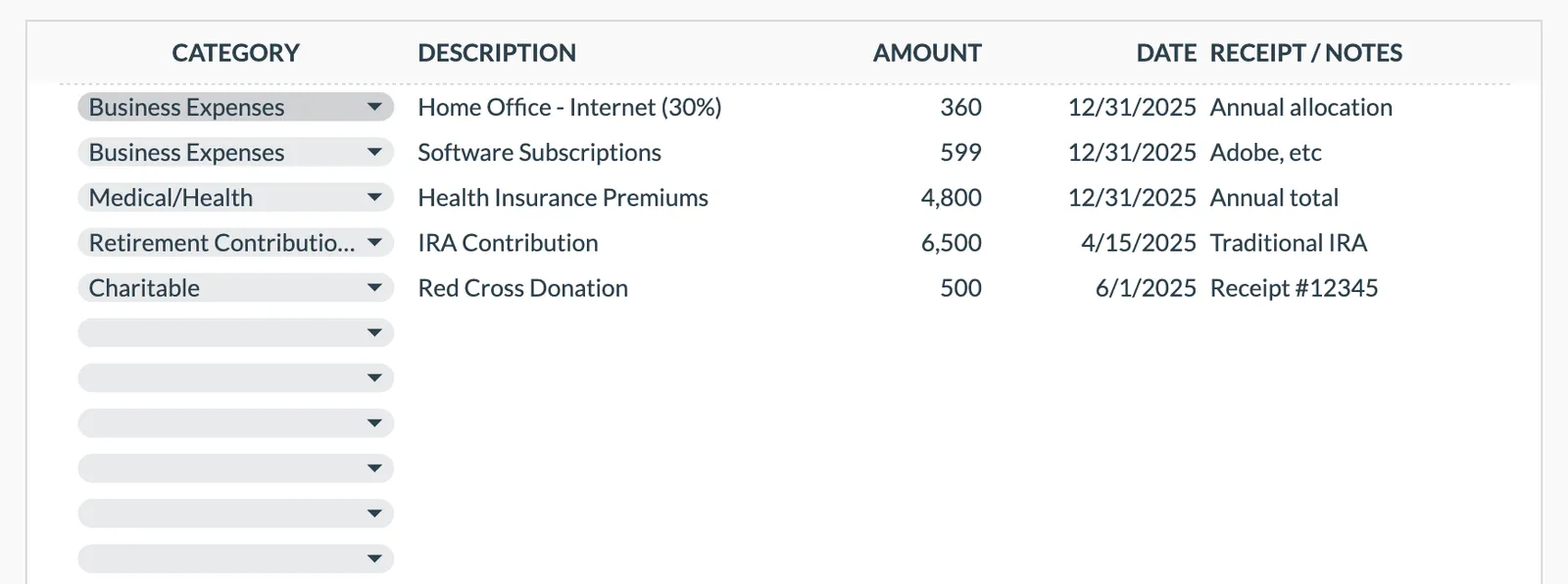
- Deduction organization
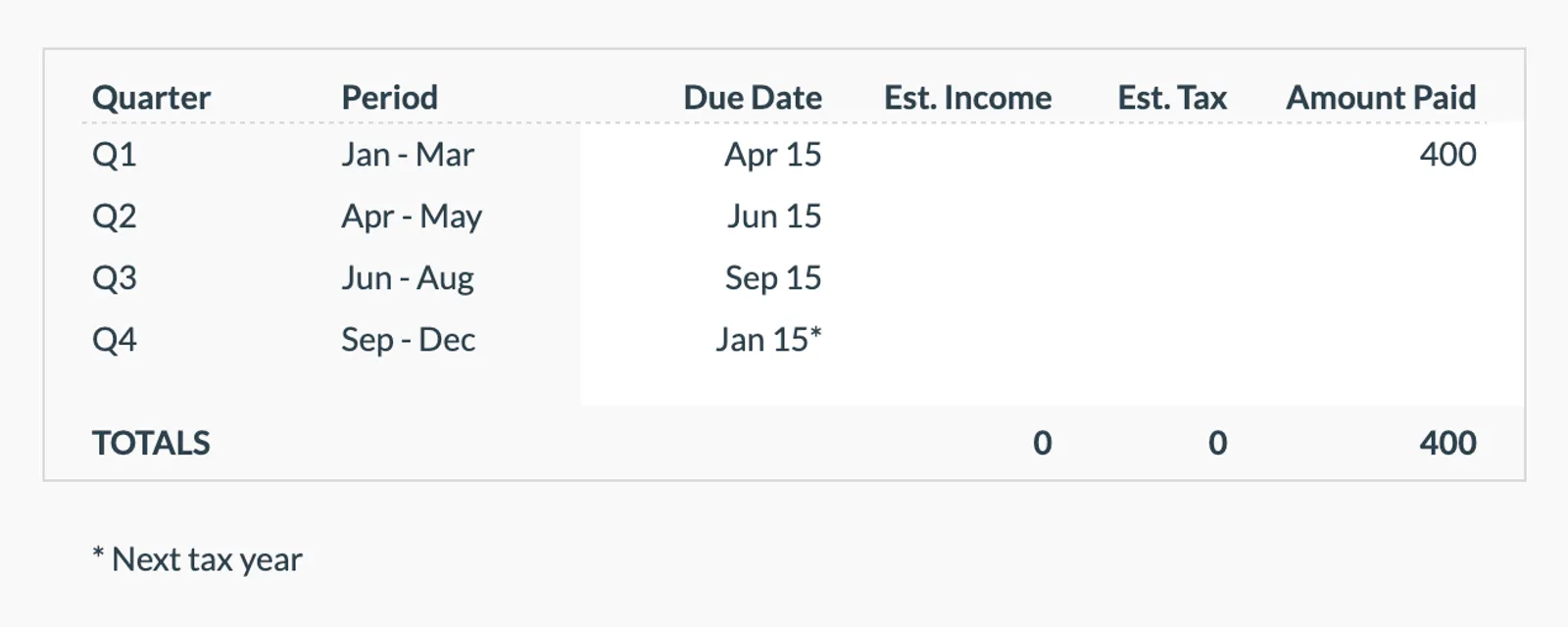
- Quarterly payment planning
- Tax projection estimates
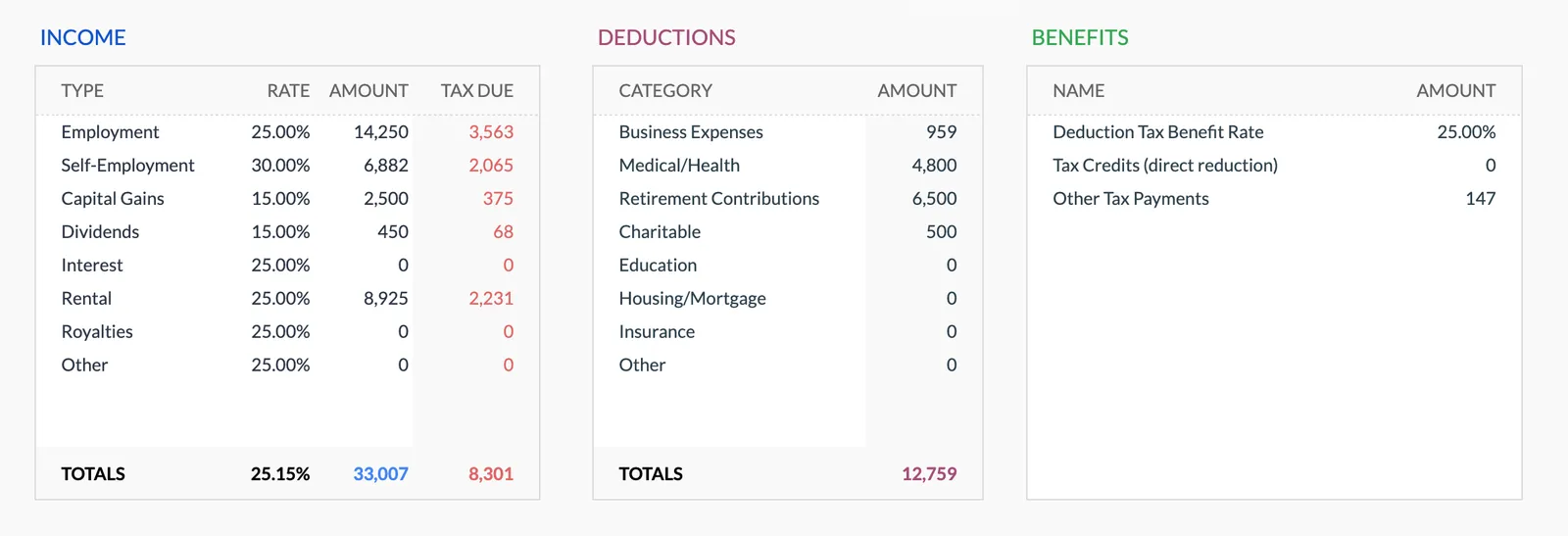
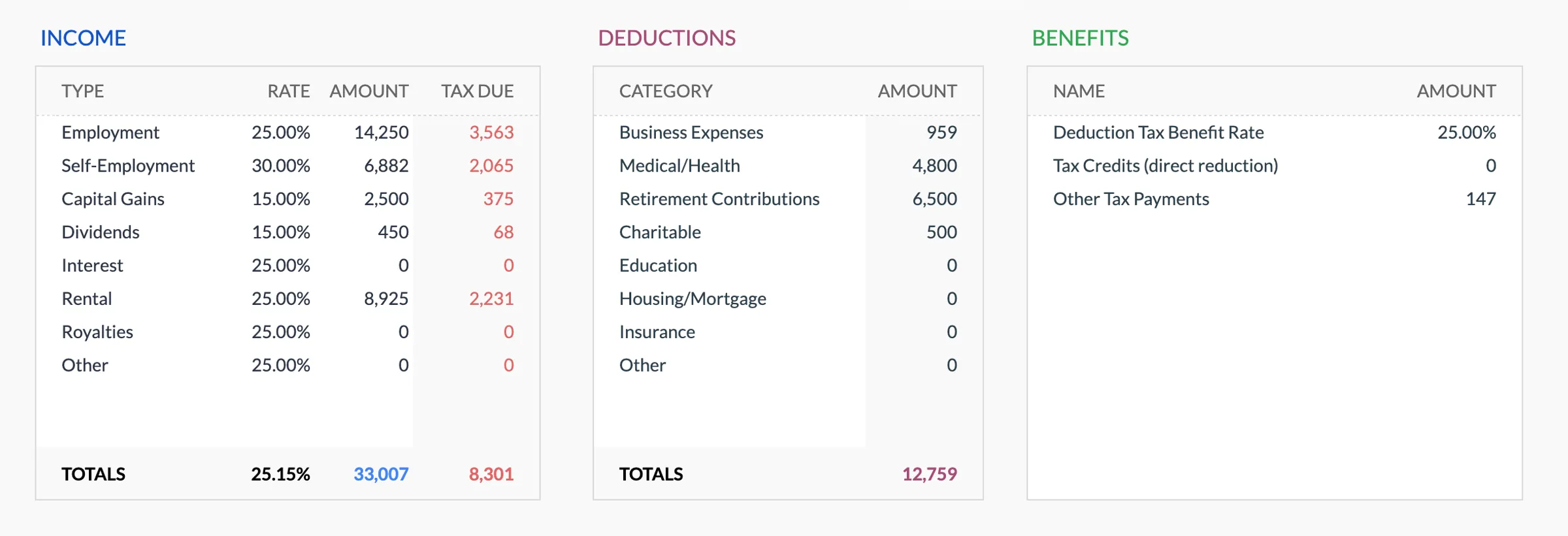
Annual tax overview with key figures
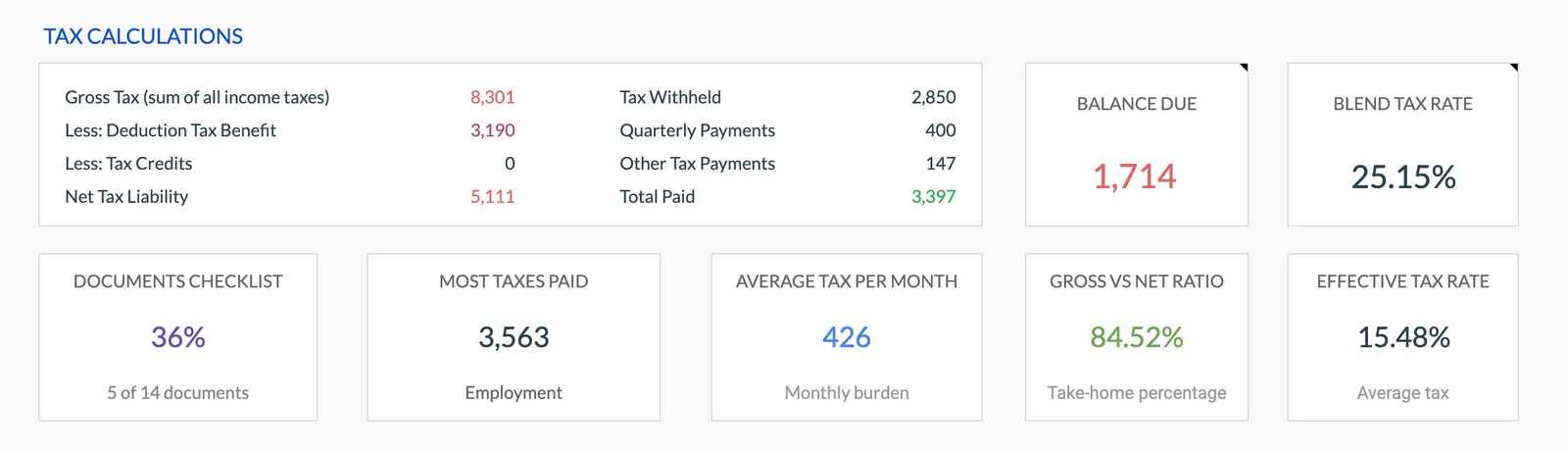
Detailed tax breakdown and projections
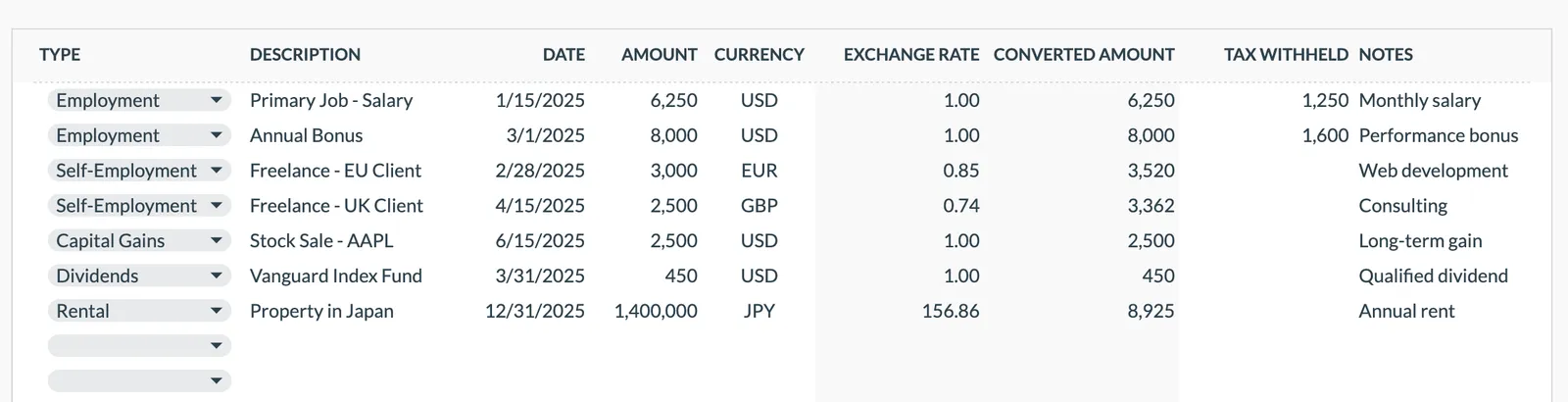
Track all income sources for tax purposes
Organize and track tax deductions
Plan and track quarterly estimated tax payments
Getting Started
Start Your Real Estate Tax Planning
Record each commission when received
Enter closing date, property, gross commission, and your net after brokerage split.
Log business expenses weekly
Set a weekly habit to enter expenses - fuel, marketing invoices, MLS fees, and other costs.
Track vehicle use
Log business miles after each trip or use a mileage tracking app and enter totals weekly.
Calculate quarterly payments
Before each deadline, review your estimated tax based on year-to-date income and deductions.
Compile for tax filing
The year-end summary provides organized data for your Schedule C and estimated tax reconciliation.
Common Questions
Tax Planner for Real Estate Agents - FAQ
Should I track gross or net commissions?
Track both - the gross commission and the split paid to your brokerage. Your taxable income is your portion after the brokerage split.
Standard mileage rate or actual expenses?
Either method works. The template can track both mileage and actual vehicle costs. Compare the two at year end to see which produces a larger deduction.
What about marketing expenses?
Track everything - business cards, yard signs, online ads, mailers, photography, staging, and open house costs. These are legitimate business deductions.
How do I handle a slow winter quarter?
If you earn less in Q4 than Q2, your quarterly estimates can reflect that. The annualized income method allows smaller payments in slower quarters.
Can team leaders track agent splits?
This template is designed for individual agent tax planning. Team leaders paying splits can track those as a business expense.
What about licensing and continuing education costs?
License renewals, CE courses, and exam fees are deductible business expenses. Track them in the appropriate category.
Can't find the answer you're looking for? Contact our team
Start tax planning as a real estate agent
One-time purchase. No subscription. Your financial data stays in your Google Drive.