Annual Tax Planner
Annual Tax Planner for Freelancers
Track freelance income, deductions, and quarterly estimated payments throughout the year - so tax season is data entry, not a scramble.
In Depth
The Tax Reality of Working for Yourself
Freelancing changes the tax equation in ways that catch many people off guard during their first year. Without an employer handling withholding, the full weight of income tax and self-employment tax lands on the freelancer. The 15.3% self-employment tax alone - covering both the employer and employee portions of Social Security and Medicare - represents a significant expense that does not exist in traditional employment. Some freelancers discover this only when they file their first return.
Quarterly estimated payments introduce a rhythm that runs counter to how most people think about taxes. Instead of one annual event, freelancers operate on a four-payment cycle with deadlines in April, June, September, and January. Missing these deadlines or underpaying triggers penalties that compound the cost. The challenge is that estimating income accurately requires knowing what the rest of the year looks like - something that is inherently uncertain in freelance work.
Deduction tracking tends to be where the gap between organized and unorganized freelancers shows up most clearly. A home office, professional software, health insurance premiums, and business travel all reduce taxable income - but only when documented. Many freelancers leave legitimate deductions on the table simply because they did not record expenses as they occurred. Year-round tracking turns tax season from a stressful reconstruction project into a straightforward data review.
The Challenge
Why Freelancers Need Year-Round Tax Tracking
Freelance income comes without tax withholding. Every dollar arrives gross, and the tax obligation is yours to calculate, track, and pay - four times a year.
No employer withholds taxes for you
Every client payment arrives without federal, state, or self-employment tax removed. If you do not set aside the right amount, tax season brings an unwelcome bill.
Quarterly estimated payments require planning
The IRS expects quarterly payments. Underpaying triggers penalties. But calculating the right amount requires knowing your income and deductions - information that changes throughout the year.
Deductions get lost without real-time tracking
Home office, equipment, software, travel, professional development, health insurance - freelancers have many potential deductions, but only if they track them as they happen.
Self-employment tax adds 15.3%
On top of income tax, freelancers pay both the employer and employee portions of Social Security and Medicare. This additional tax is often a surprise to new freelancers.
Ready to take control of your freelancer finances?
What You Get
Tax Planning Features for Freelance Income
Income tracking by client
Record income from each client as it arrives. See total gross income year-to-date and by quarter.
Deduction categories for freelancers
Pre-built categories for home office, equipment, software, travel, meals, professional development, insurance, and more.
Quarterly estimated tax calculator
Based on income and deductions, see your estimated quarterly payment amount. Adjust as income changes throughout the year.
Self-employment tax tracker
Calculate the SE tax portion separately. See the full tax picture - income tax plus self-employment tax.
Payment tracking
Record each estimated payment made. See total paid year-to-date versus estimated obligation.
Annual tax picture for freelancers
Total income, total deductions, estimated tax liability, and payments made. Ready reference for filing.
See It In Action
What the template looks like
Browse through the template to see how it handles income tracking, deductions, quarterly payments, and tax projections.
- Tax overview dashboard
- Income source tracking
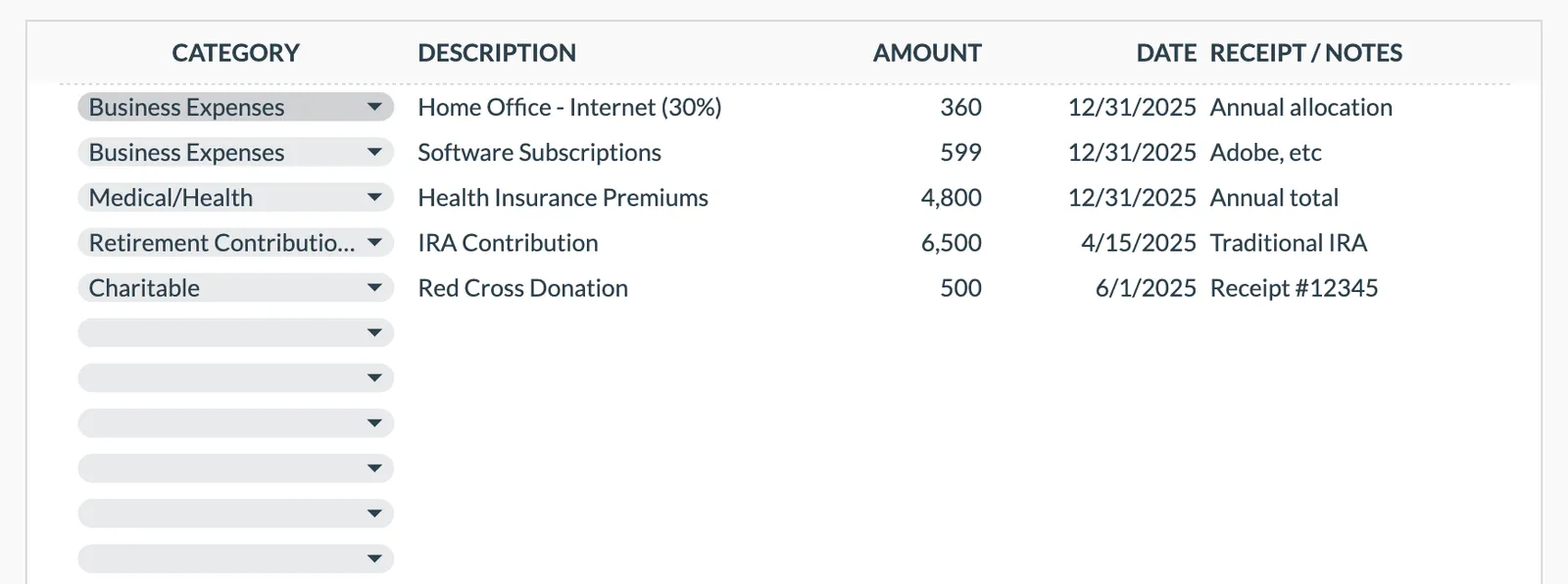
- Deduction organization
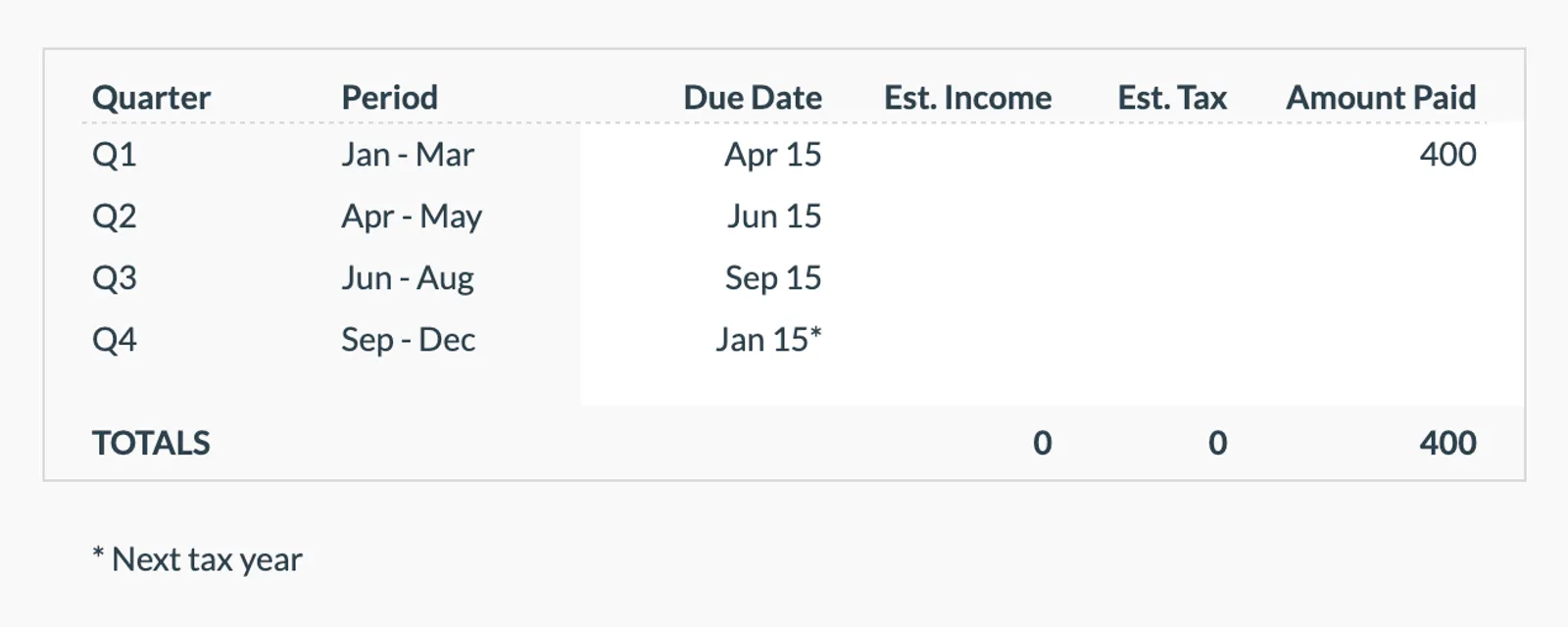
- Quarterly payment planning
- Tax projection estimates
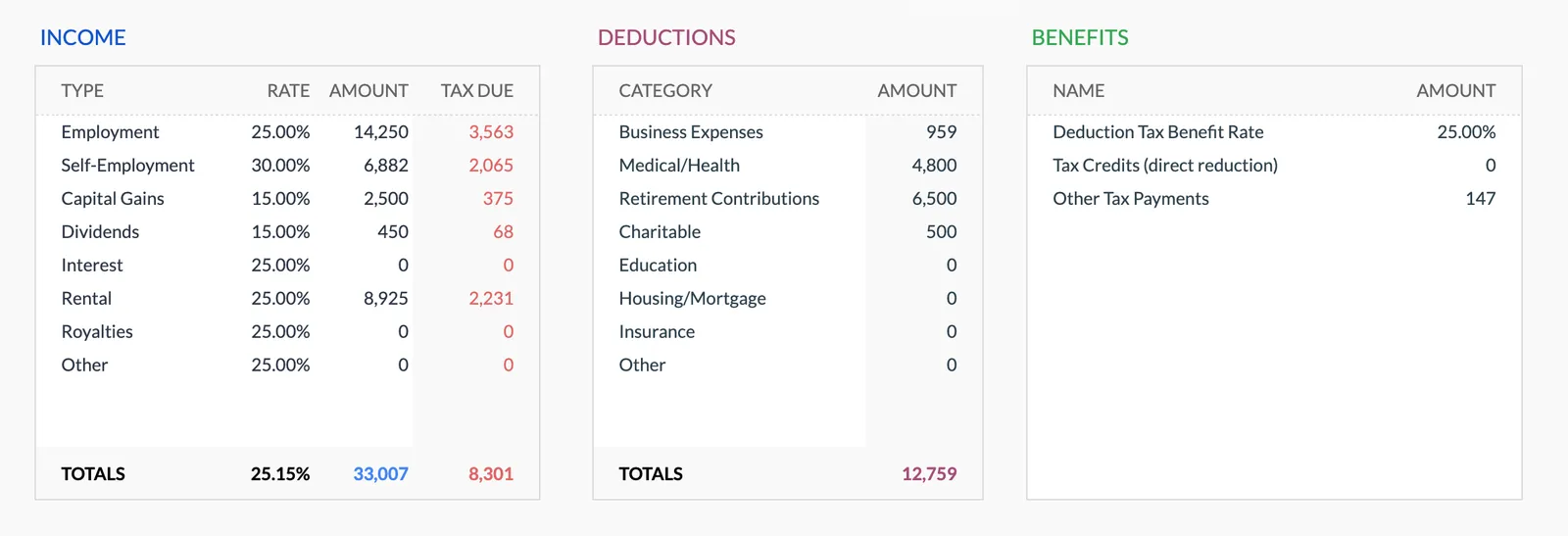
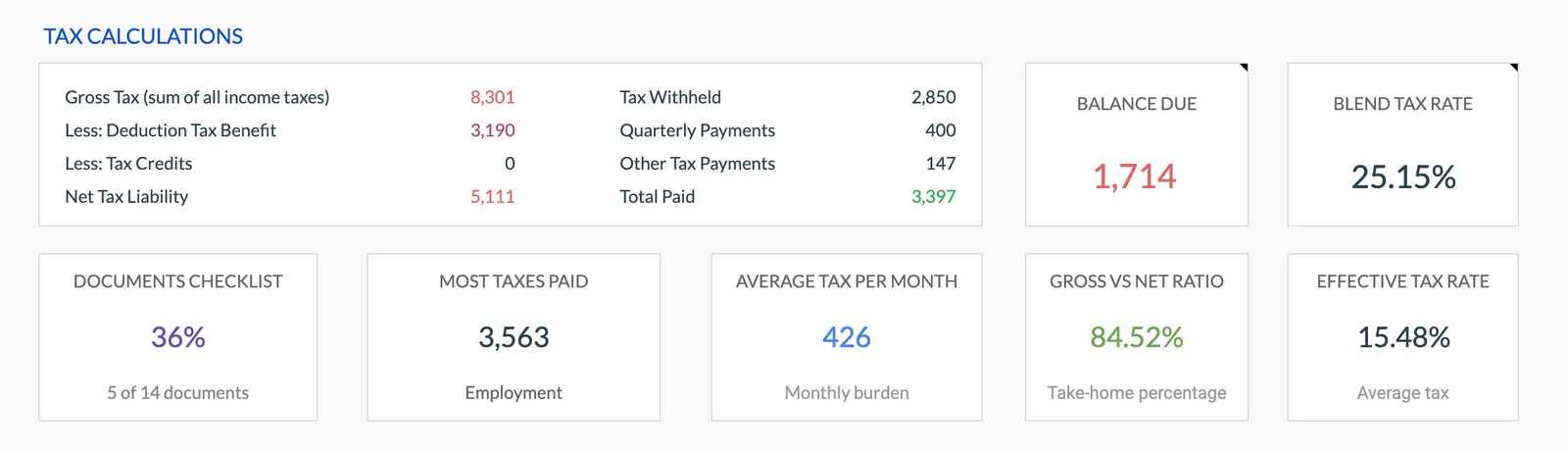
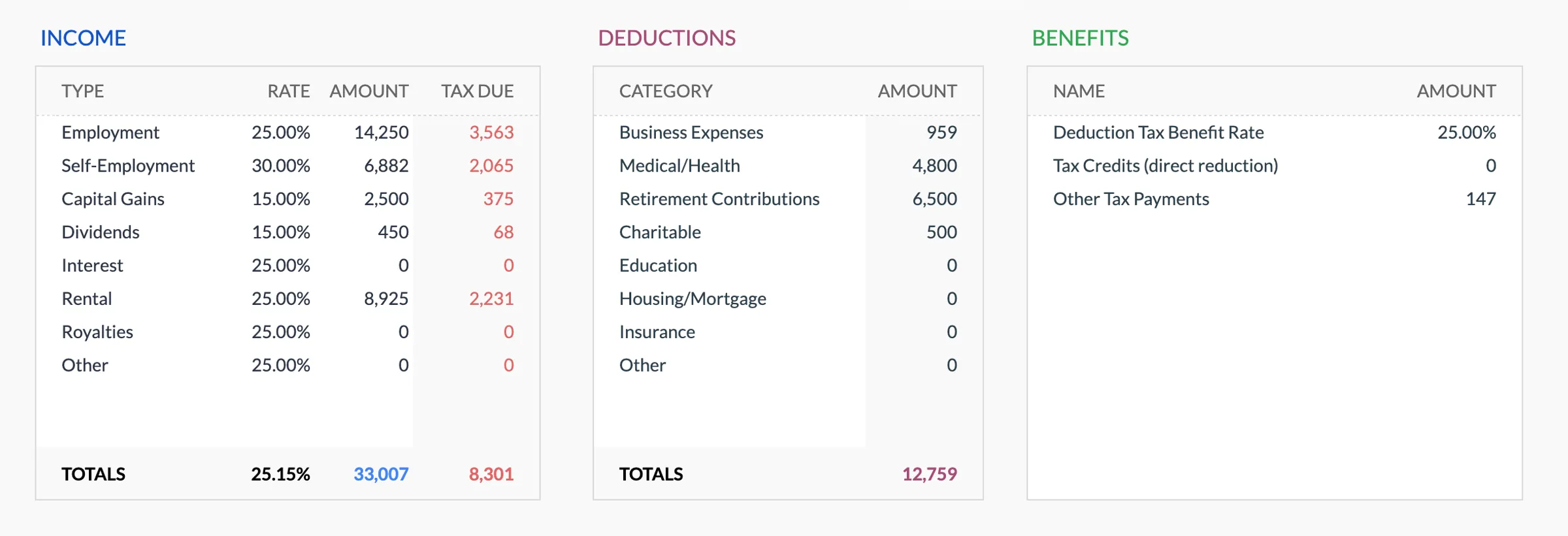
Annual tax overview with key figures
Detailed tax breakdown and projections
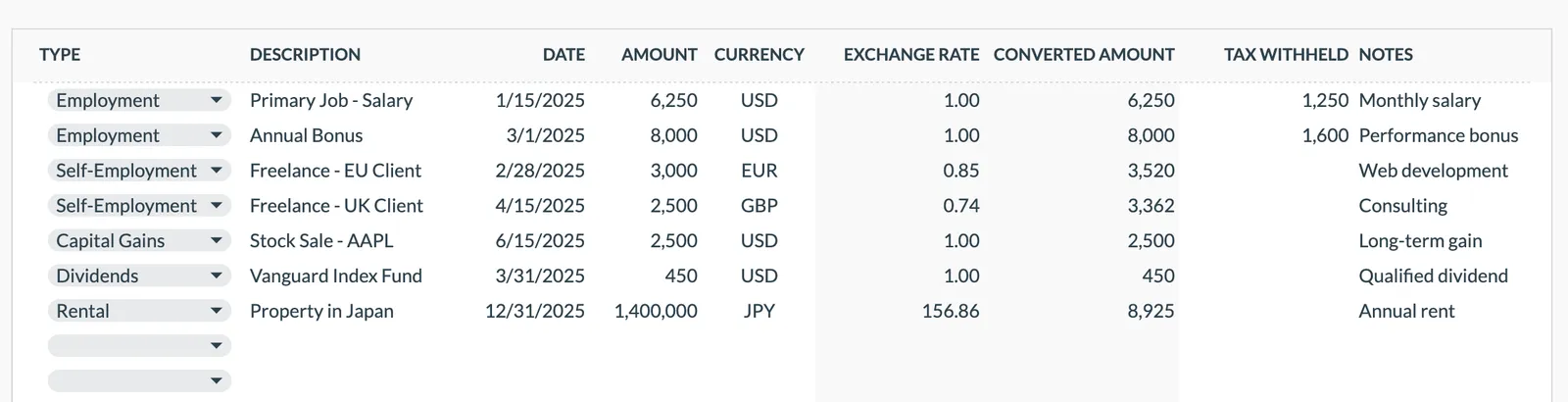
Track all income sources for tax purposes
Organize and track tax deductions
Plan and track quarterly estimated tax payments
Getting Started
Start Organizing Your Freelance Taxes
Enter your income as it arrives
Record each client payment with the date and amount. The template calculates running totals.
Log deductions throughout the year
Enter business expenses in the appropriate category as they occur. Do not wait until December.
Calculate quarterly estimates
Before each quarterly deadline, review the calculator to see your estimated payment amount.
Record payments made
After each estimated payment, log it in the template. Track cumulative payments against obligations.
Review at year end
The summary shows your full tax picture. Use it to prepare for filing or hand it to your tax preparer.
Common Questions
Tax Planner for Freelancers - FAQ
When are quarterly estimated payments due?
Generally April 15, June 15, September 15, and January 15. The template includes space to record each payment and its due date.
What deductions can freelancers take?
Common categories include home office, equipment, software, travel, professional development, health insurance premiums, and business-related subscriptions. The template has pre-built categories for these.
Does this calculate my exact tax owed?
The template provides estimates based on income and deductions you enter. For exact calculations, consult a tax professional. The template gives you organized data to share with them.
What if my income varies a lot between quarters?
The annualized income method allows different estimated payments per quarter. The template tracks actual income by quarter so you can adjust payments accordingly.
Does this work for sole proprietors and LLCs?
Yes. Single-member LLCs and sole proprietors have the same tax structure for self-employment purposes. The template works for both.
What about state taxes?
The template focuses on federal tax tracking. You can add a section for state estimated payments using the same income and deduction data.
Can't find the answer you're looking for? Contact our team
Start tax planning as a freelancer
One-time purchase. No subscription. Your financial data stays in your Google Drive.