Business Valuation Spreadsheet Template for Excel & Google Sheets
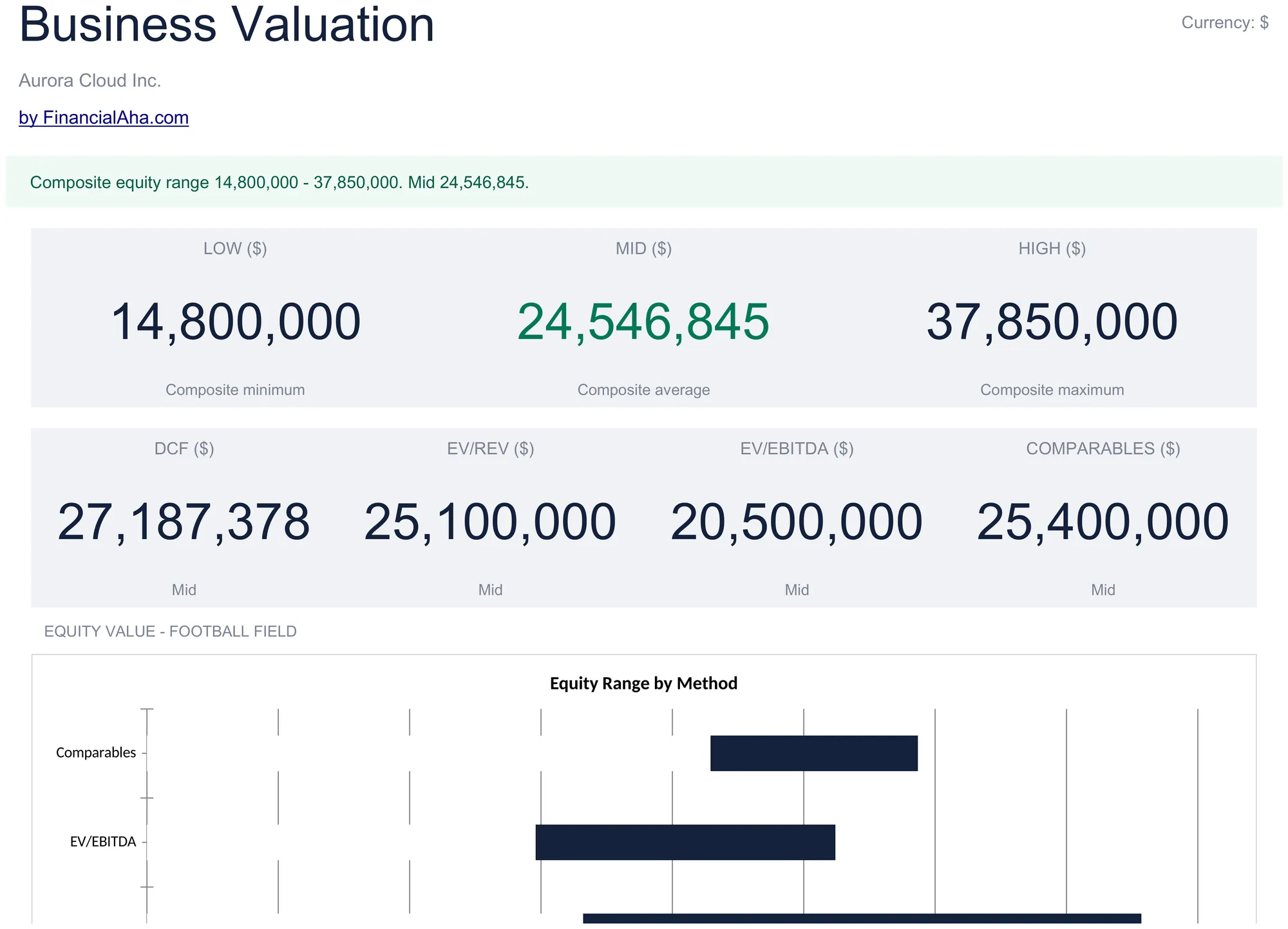
Estimate the value of a business using four classic methods at once - DCF (discounted cash flow), EV/Revenue multiple, EV/EBITDA multiple, and comparable transactions. The Summary surfaces a composite low, mid, and high range across methods, so you do not bet the answer on a single model. One spreadsheet, dual compatible with Microsoft Excel and Google Sheets.
The set · 3 templates
Commercial Real Estate Bundle
This template + 2 more: Commercial Property Analysis, Mortgage Analysis
This template only
Business Valuation
Instant digital delivery · Terms & Conditions apply
One-time purchase
Business Valuation Spreadsheet
Everything in This Business Valuation Spreadsheet
Valuation at a Glance
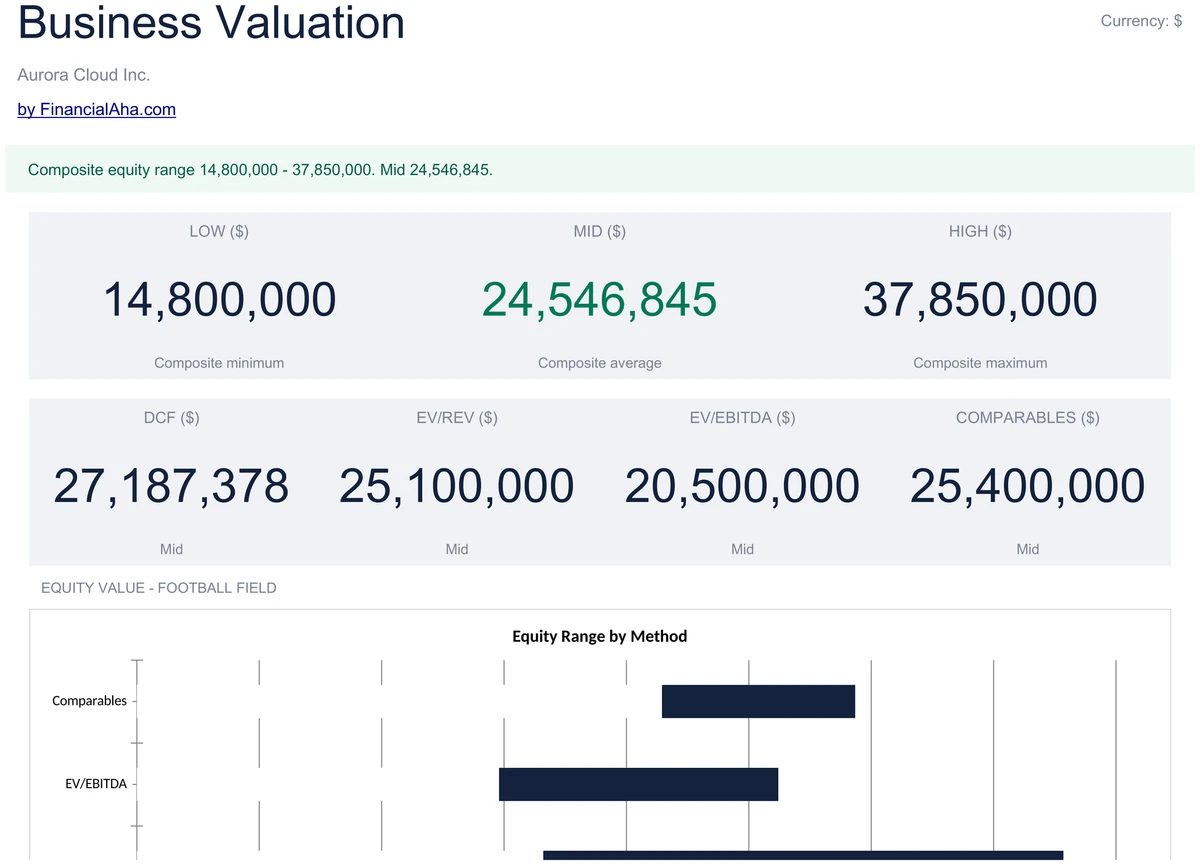
Open the Dashboard and see the headline composite range - low, mid, high equity value - alongside the four method results side by side. A pacing banner sums up the spread in a sentence, and a chart compares method outcomes.
- Composite low, mid, and high equity value
- Four method outcomes side by side
- Method comparison chart and pacing banner
One Sheet, All the Numbers You Need
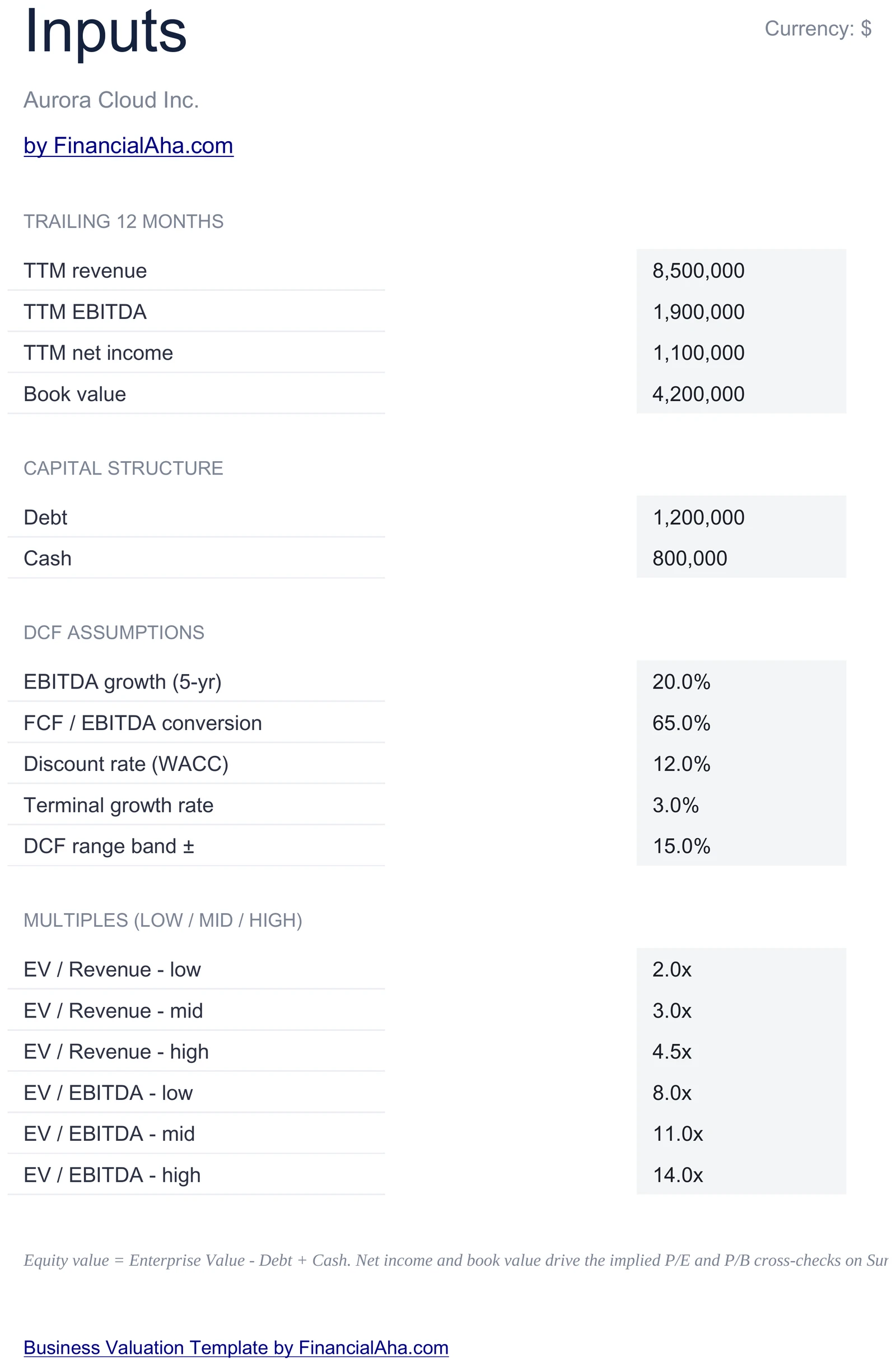
Enter TTM revenue, EBITDA, and net income; book value, debt, and cash; plus assumptions for 5-year growth, FCF conversion, WACC, and terminal growth. Every other sheet reads from here, so you set the model once.
- TTM revenue, EBITDA, net income, book value
- Debt and cash for EV-to-equity bridge
- Growth, FCF conversion, WACC, terminal growth
5-Year DCF with Terminal Value
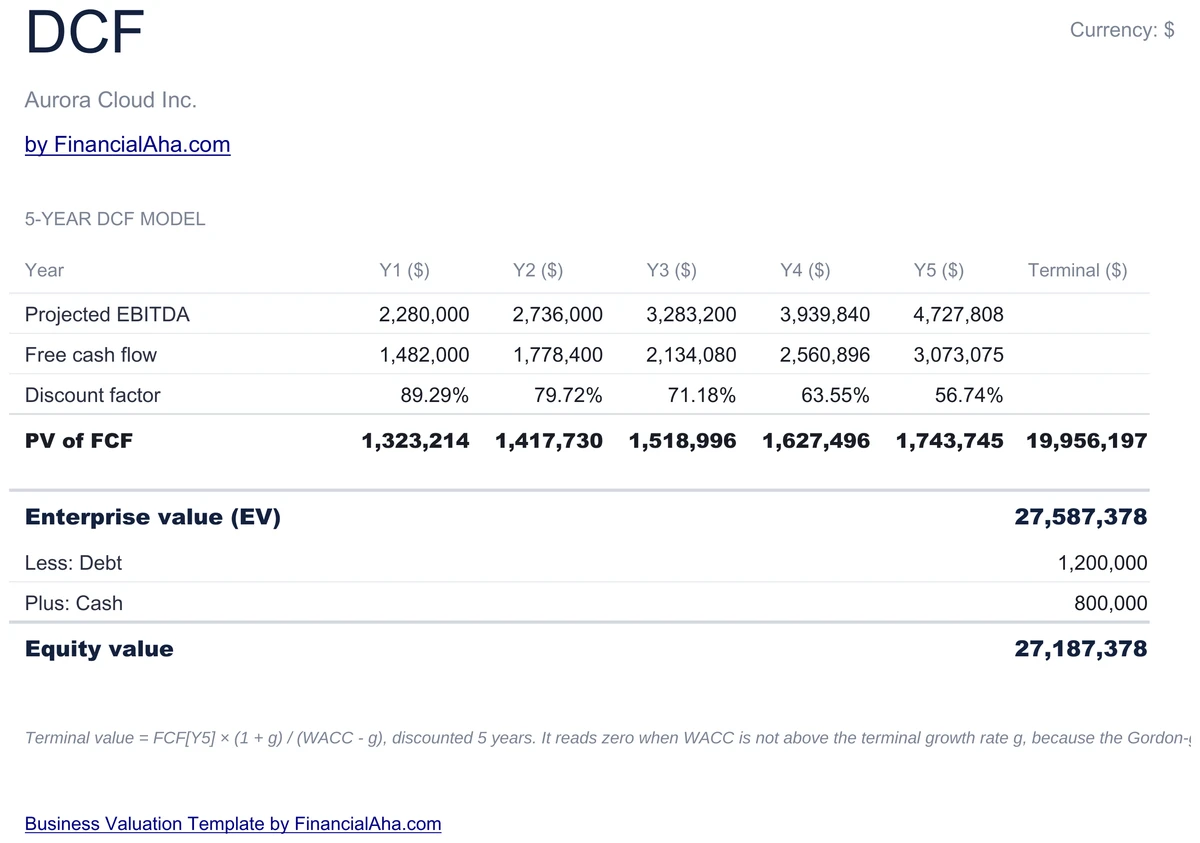
EBITDA grows at your growth rate for 5 years, free cash flow is EBITDA times your FCF conversion percent, and each year's FCF is discounted at WACC. A Gordon-growth terminal value is added in year 5, then the EV is bridged to equity using debt and cash.
- 5-year FCF projection at your growth rate
- WACC discount and PV of terminal value
- EV bridged to equity via debt and cash
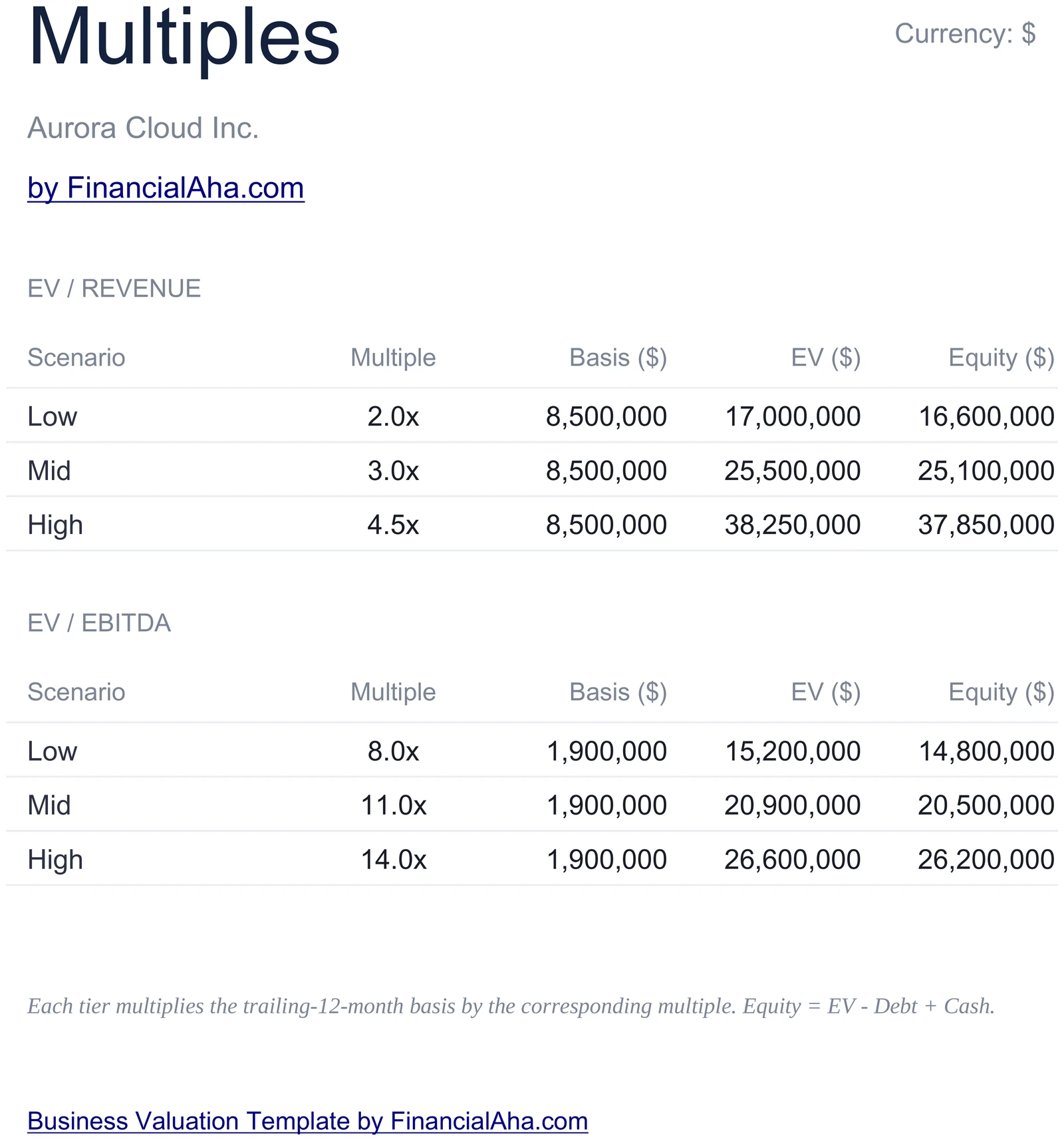
EV/Revenue and EV/EBITDA
Plug in low, mid, and high multiples for both EV/Revenue and EV/EBITDA. The sheet applies them to your TTM revenue and EBITDA, gives you EV ranges for each, then bridges to equity. Six valuations land on a single page.
- Low / mid / high multiples for both methods
- EV times revenue and EV times EBITDA
- Equity bridge for every band
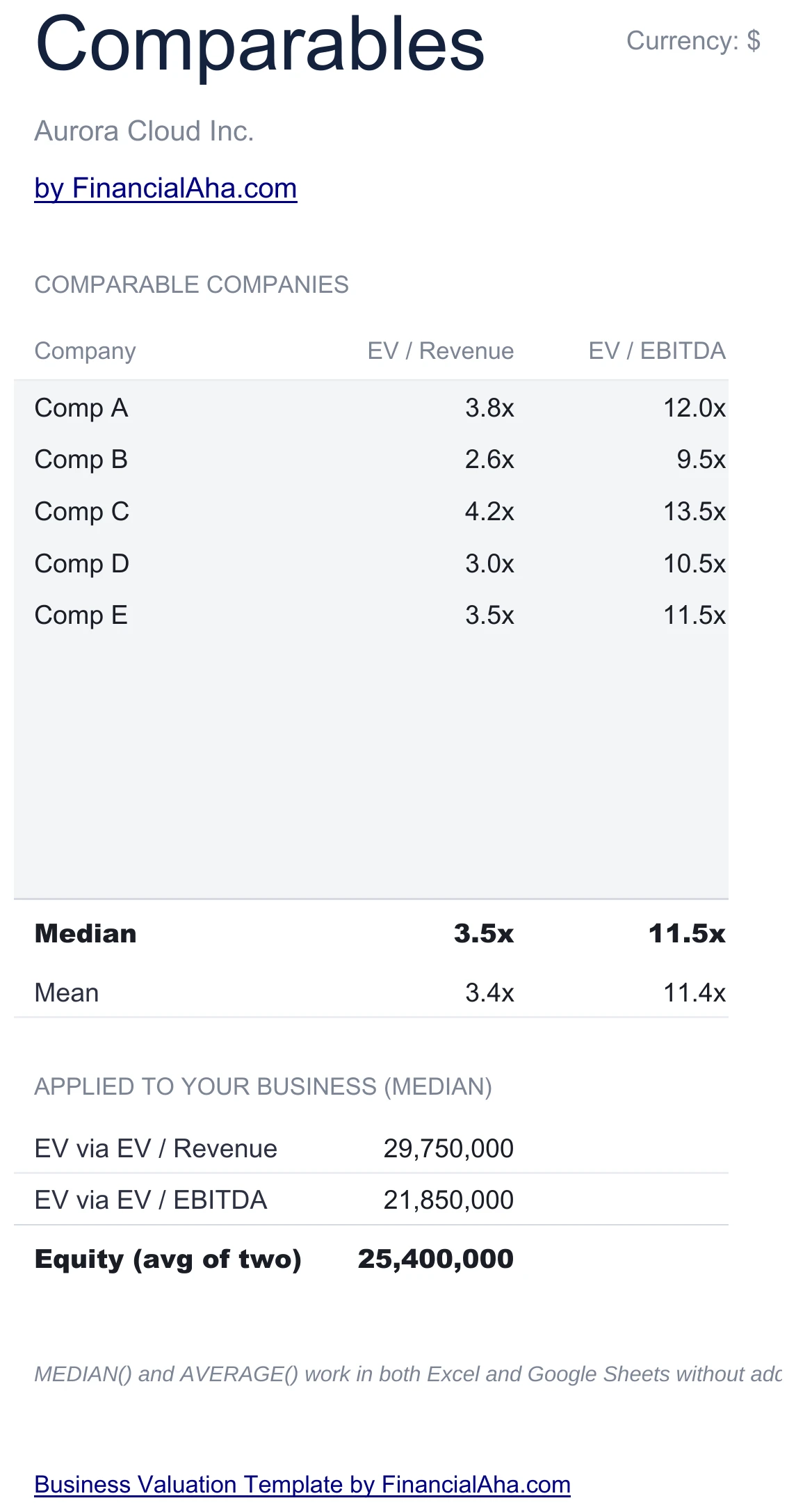
Five Comp Transactions
List up to five comparable companies or transactions with their EV/Revenue and EV/EBITDA multiples. The sheet averages them and applies the average to your TTM revenue and EBITDA - giving you a market-implied valuation alongside the analyst multiples.
- Up to 5 comparable companies or deals
- EV/Revenue and EV/EBITDA per comp
- Average multiple applied to your TTM
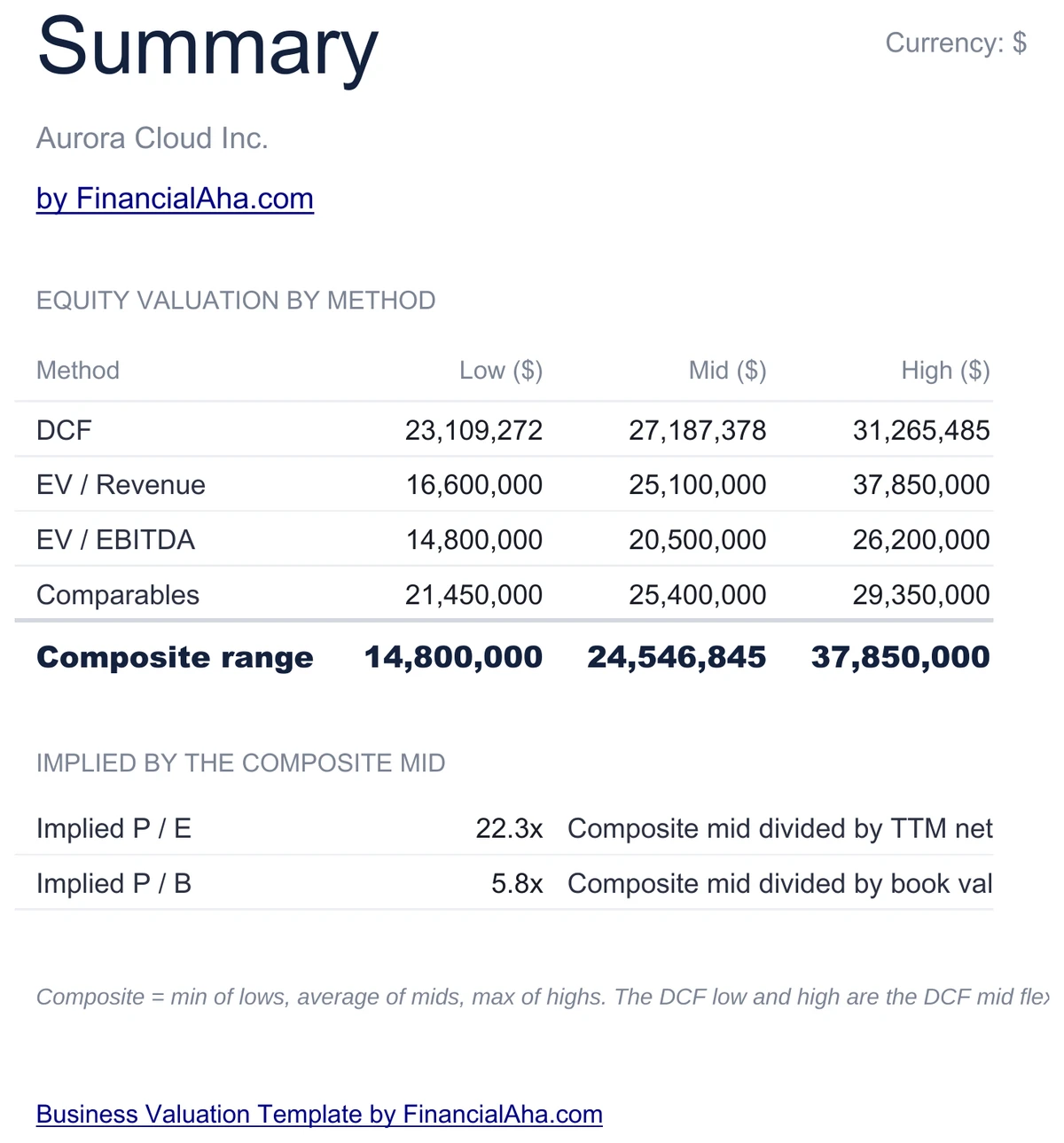
Composite Range Across Methods
The Summary sheet lists every method - DCF, EV/Revenue (low/mid/high), EV/EBITDA (low/mid/high), and Comparables - with its equity result. It then computes a composite low, mid, and high range across the lot, so you walk away with a triangulated answer.
- Every method on one page
- Composite low, mid, high range
- Triangulated equity range
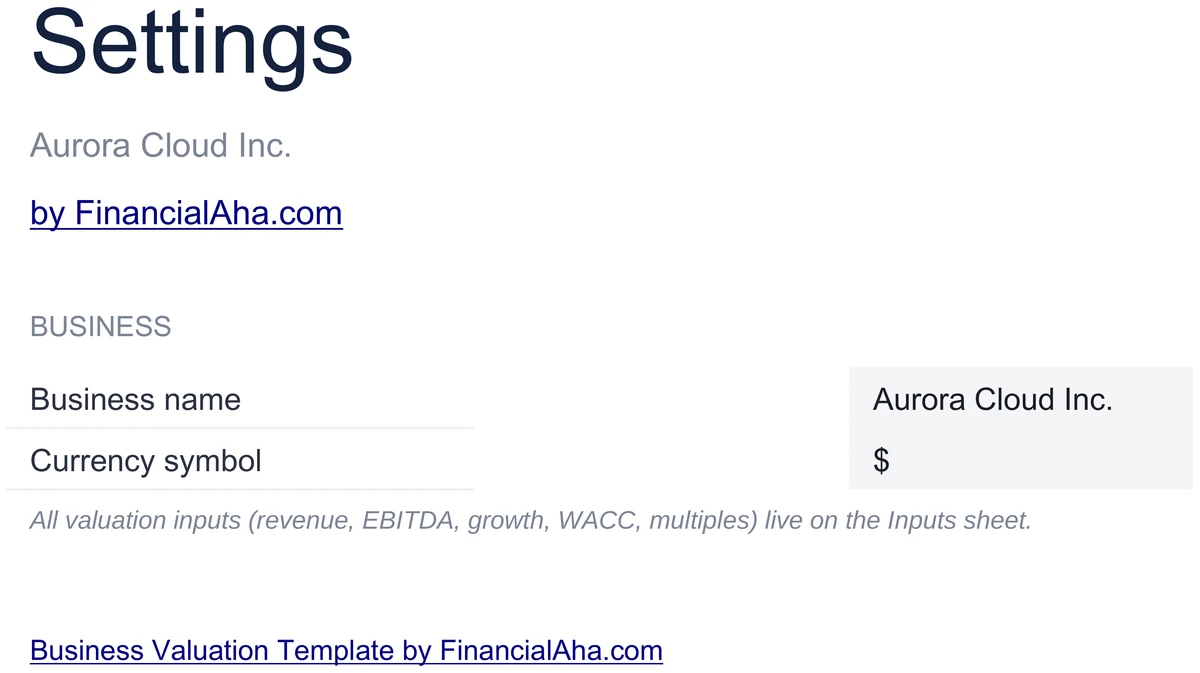
Configure It for Your Business
Set your business name and currency symbol on the Settings sheet. Headers, dashboard meta, and chart titles all read from these values, so you set them once and the whole workbook is branded for your target.
- Business name and currency symbol
- Used across every sheet header
- Set once - the workbook reads from here
Customizable & Flexible
Adapt the workbook to your business. Flex WACC, growth, multiples, or swap in different comparables - the DCF, multiples, comparables, and composite range update automatically. Works identically in Excel and Google Sheets.
- Flex WACC, growth, and multiples freely
- Swap in your own comparables
- Excel and Google Sheets compatible
Ready to take control of your finances?
Set Up in 20 Minutes
How the Business Valuation Works
Open in Excel or Google Sheets
Get instant access after purchase. Open in Microsoft Excel directly, or import into Google Sheets - no software to install, no add-ons.
Configure Your Business
Set your business name and currency symbol on the Settings sheet. Takes about 2 minutes.
Fill In the Inputs
Enter TTM revenue, EBITDA, net income, book value, debt, cash, and DCF assumptions on the Inputs sheet. About 15 minutes.
Read the Four Methods
DCF, Multiples, Comparables, and Summary calculate from the inputs. The Dashboard surfaces the composite low, mid, and high range.
Built for Results
Why This Valuation Template Works
Four Valuation Methods at Once
DCF, EV/Revenue, EV/EBITDA, and comparable transactions - the same inputs flow through every method, and the Summary triangulates a composite range.
No Formulas to Write
Enter TTM financials and assumptions in highlighted input cells. DCF, multiples, comparables, equity bridge, and the composite range are pre-built and update automatically.
Excel and Google Sheets
Works identically in Microsoft Excel and Google Sheets. No macros, no add-ons, no proprietary functions.
Free Lifetime Updates
Any updates we release to the valuation template included at no extra cost.
Your Financials Stay Private
Runs entirely in your spreadsheet. Your data stays in your file - we never see or store it.
One-Time Purchase
Pay once, use forever. No subscriptions, no monthly fees, no recurring charges.
Got Questions?
Frequently Asked Questions
Is this template free to use?
This template is not free, but it is available for a one-time purchase. This purchase gives you lifetime access to the template and to any updates we release.
What do you mean by lifetime access?
Lifetime access means that you will have access to this template for as long as you need it. You will not be required to pay any additional fees for continued access to the template or to any updates we release.
Do I need to sign up to use this template?
You don't need to create an account with us. The template is delivered as an Excel file: open it directly in Microsoft Excel, or import it into Google Sheets from your own Google account if you prefer working there.
What are the benefits of using this template?
This template offers a range of benefits, including: Easy-to-use interface, Customizable to suit your needs, Secure and private, Free access to any updates we release, One-time purchase for lifetime access.
Can I get future updates?
Yes. Whenever we release an update to this template, you get it at no additional cost - lifetime access covers every version we publish. We do not commit to a fixed update schedule; improvements ship when they are ready.
Do you offer any discounts?
There are no discount codes for individual templates, but many templates are also part of a bundle that costs less than buying the same templates separately. Either way it is a one-time purchase with lifetime access and free updates.
Do you have any access to my financial data?
No, we do not have access to your financial data when you use this template. The template is a file you keep yourself, on your computer or in your own Google Drive, so your financial information never reaches us.
Is this template financial advice?
Our templates are not financial advice. They are tools designed to help you manage your personal finances more effectively. If you need personalized financial advice, consider consulting with a financial advisor or accountant.
Can I make my own changes and customize this template?
Yes, you can make your own changes and customize this template to suit your needs. The template is designed to be flexible and adaptable, allowing you to add or remove sections, change formulas, and adjust formatting as needed.
Do you offer technical support?
This is a self-service product, and we do not offer technical support. However, if you encounter any issues or have any questions about the template, please contact our team for assistance. Because everyone's financial situation is unique, consider consulting with a financial advisor or accountant if you need personalized financial advice.
Do you offer refunds?
Because these digital products are delivered instantly, purchases are generally final once you consent to immediate delivery at checkout. If the file we delivered has a genuine error, such as a formula that miscalculates or a feature its page describes but the file lacks, tell us what does not match: we will fix or replace it, or refund you if we cannot. Reporting within 30 days speeds resolution but never limits your statutory consumer rights; the full policy is in our Terms & Conditions.
Can't find the answer you're looking for? Contact our team
The set · 3 templates
Commercial Real Estate Bundle
This template + 2 more: Commercial Property Analysis, Mortgage Analysis
This template only
Business Valuation
Instant digital delivery · Terms & Conditions apply
Highlights:
Value Your Business with Four Methods
Get the Business Valuation template and triangulate equity value across DCF, multiples, and comparables in Excel or Google Sheets.