Cash Flow Forecast Template for Google Sheets
Project your 12-month cash flow, compare actuals against your forecast, and stress-test best, expected, and worst case scenarios - all in one Google Sheets spreadsheet. Monitor your closing balance trend, catch shortfalls early, and know exactly where your business stands financially.
One-time purchase • 14-day satisfaction guarantee
Cash Flow Forecast Spreadsheet
Everything in This Cash Flow Spreadsheet
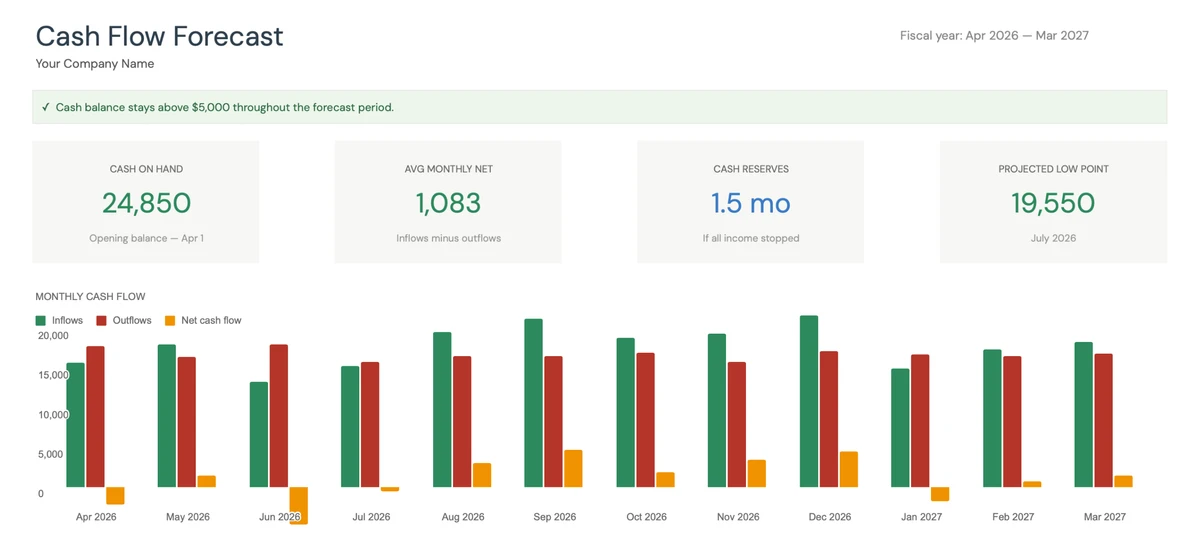
Your Cash Position at a Glance
Open the cash flow dashboard and see where you stand. Cash on hand, average monthly net, cash reserves in months, and your projected low point - with a monthly chart showing inflows vs outflows.
- Cash on hand and reserves
- Monthly inflow vs outflow chart
- Low cash alert indicator
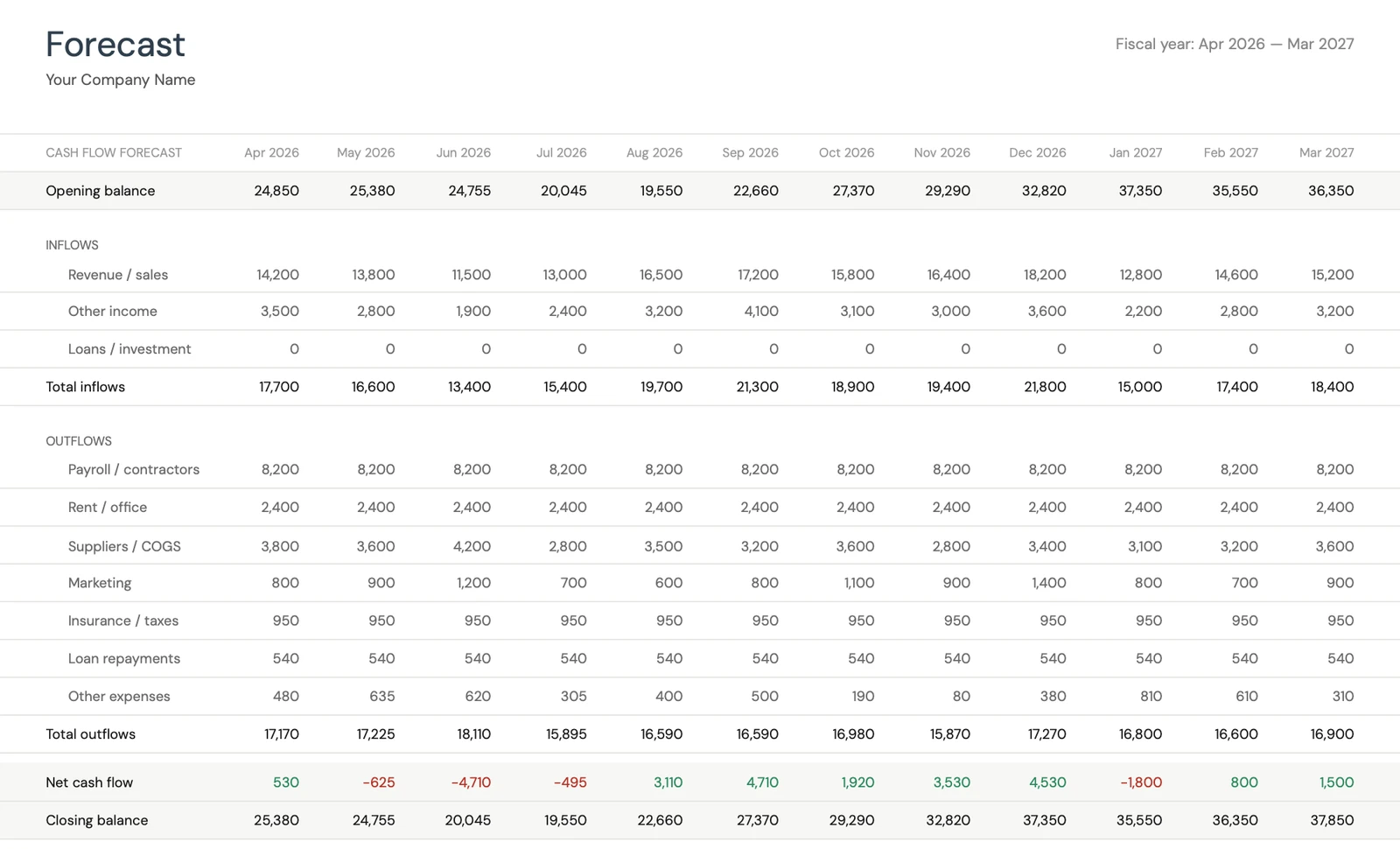
Plan Every Month of the Year
Enter your projected revenue, other income, and all expense categories month by month. The template calculates net cash flow and closing balance automatically. See exactly when cash gets tight.
- Revenue and income projections
- Categorized expense planning
- Auto-calculated closing balances
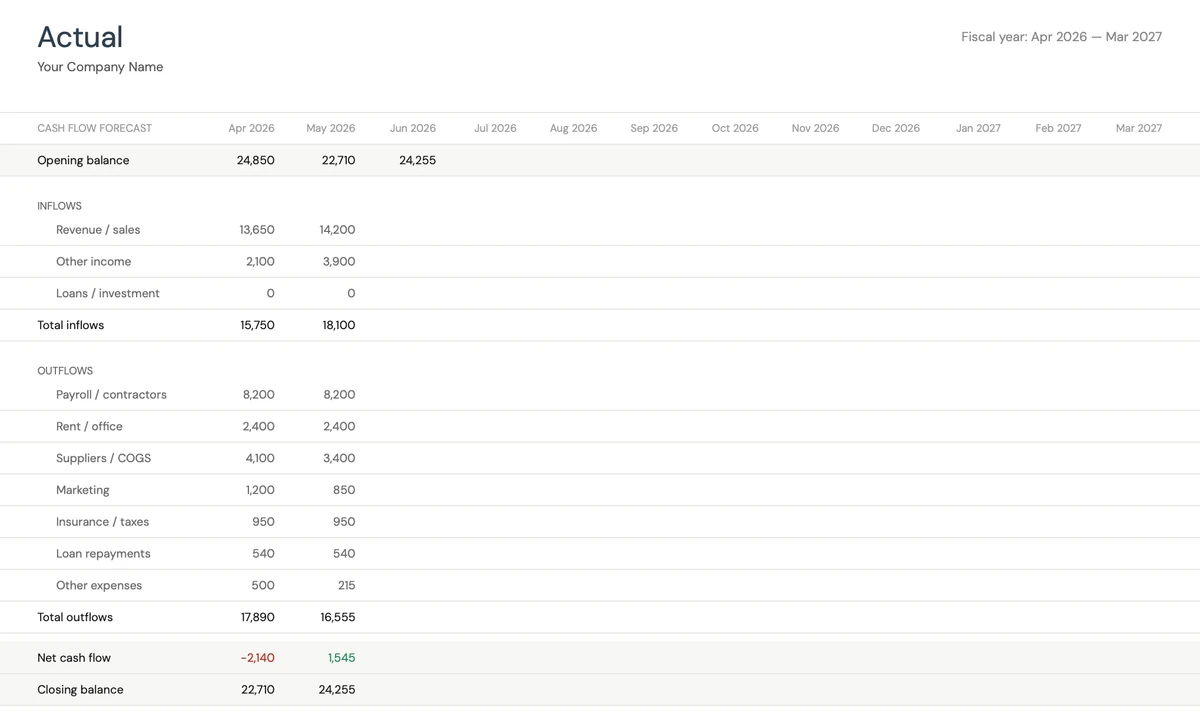
Track What Actually Happened
Each month, enter your real inflows and outflows. The template mirrors your forecast layout so comparison is instant. Build a history of what your business actually does - not just what you planned.
- Same categories as forecast
- Enter actuals as months close
- Builds your financial history
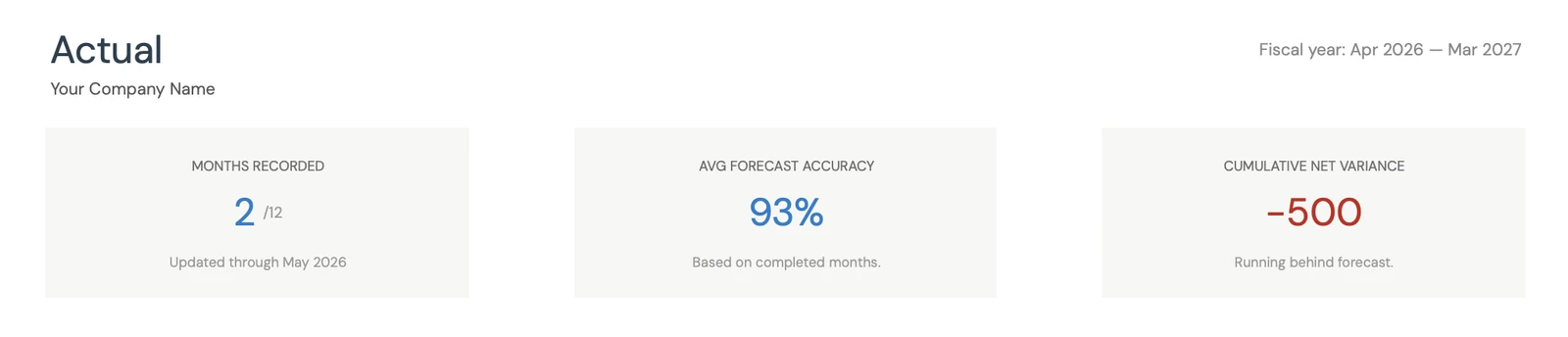
Measure Forecast Accuracy
See how many months you've recorded, your average forecast accuracy percentage, and cumulative variance. Know whether you're running ahead or behind your plan - and by how much.
- Months recorded vs total
- Forecast accuracy percentage
- Cumulative net variance
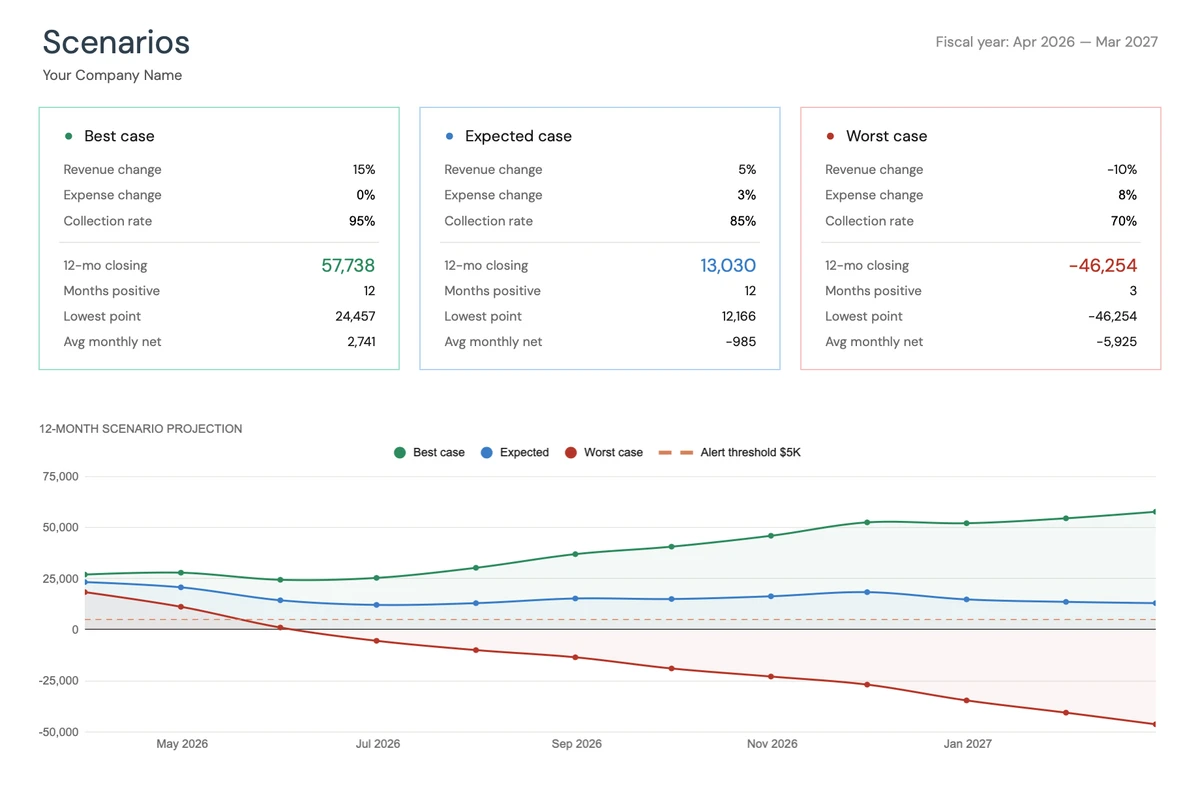
Stress-Test Your Cash Position
Define your own assumptions for best, expected, and worst case scenarios. The template projects your 12-month closing balance for each, with a chart showing all three lines and your low-cash alert threshold.
- Best, expected, worst cases
- Custom revenue and expense assumptions
- Visual projection with alert line
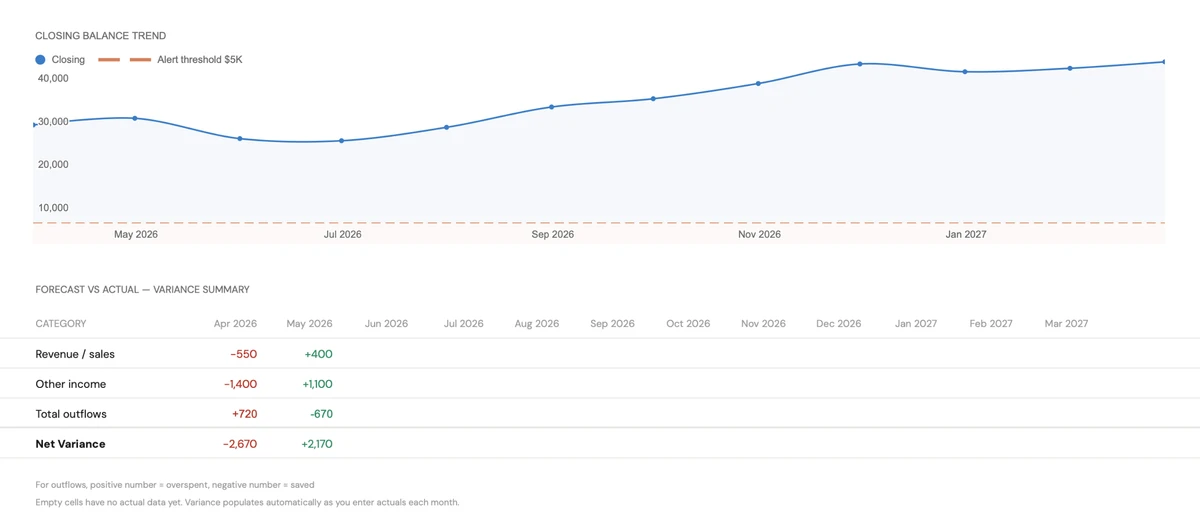
Spot Trends Before They Become Problems
A closing balance trend chart shows your cash trajectory over the full year, with the low-cash alert threshold visible. Below it, a variance summary breaks down where forecast and actuals diverge - by revenue, other income, and total outflows.
- Closing balance trend line
- Low-cash alert threshold
- Category-level variance breakdown
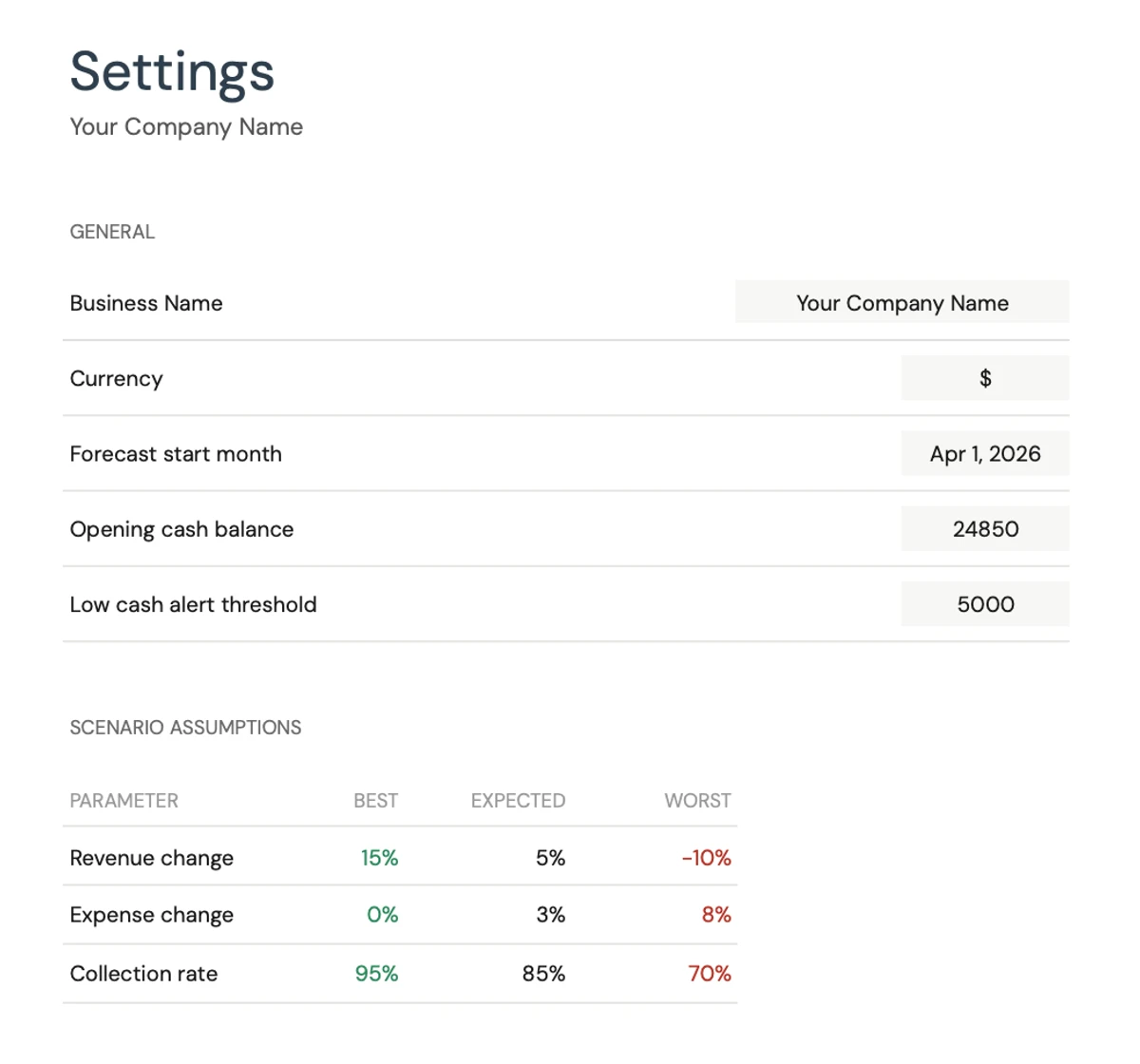
Configure It for Your Business
Set your business name, currency, fiscal year start, opening cash balance, and low-cash alert threshold. Define scenario assumptions - revenue change, expense change, and collection rate for each case. Categorize expenses as fixed or variable.
- Business name and currency
- Scenario assumption controls
- Fixed vs variable expense types
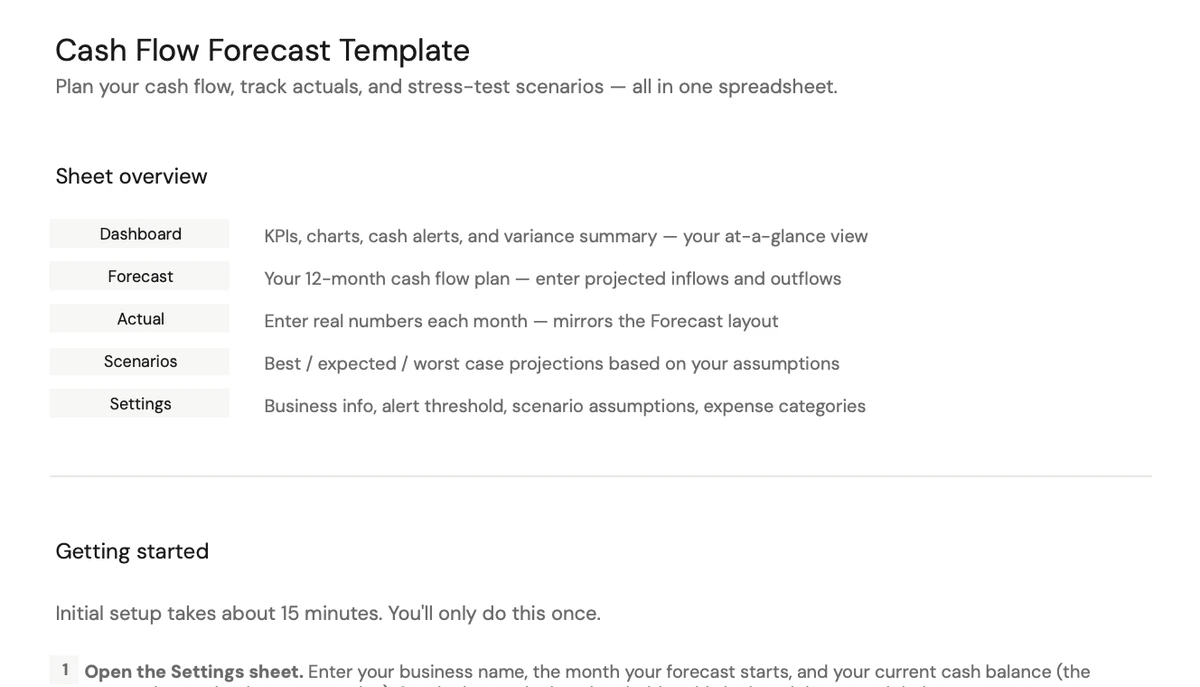
Up and Running in 15 Minutes
A built-in guide walks you through every sheet - what it does, what to enter, and what to expect. Set up once, then update monthly as real numbers come in.
- Sheet-by-sheet walkthrough
- 15-minute initial setup
- Monthly update routine
Customizable & Flexible
Adapt the template to your business. Add income sources, change expense categories, adjust scenarios - the formulas update automatically.
- Add custom categories
- Modify expense types
- Adjust scenario assumptions
Ready to take control of your finances?
Set Up in 15 Minutes
How the Cash Flow Template Works
Copy to Google Sheets
Get instant access after purchase. Copy the cash flow forecast template to your Google account - no software to install.
Configure Your Business
Set your fiscal year, opening cash balance, expense categories, and scenario assumptions. Takes about 15 minutes.
Enter Your Cash Flow Forecast
Fill in projected revenue and expenses month by month. The dashboard, charts, and scenario projections update automatically.
Track Actuals Monthly
Record real inflows and outflows each month. Forecast accuracy, variance reports, and KPIs update in real time.
Customer Reviews
Used by Small Businesses Worldwide
"If I get half as good at handling my finances as you are at customer service, this'll be the best $26 I've spent lately."
"Great tool! Simplifies financial planning without the hassle of complex spreadsheets."
"I recently purchased your super convenient spreadsheet, it really helps me!"
"They're great and super intuitive. Thank you!"
Built for Results
Why This Cash Flow Template Works
12-Month Cash Flow Projection
See your full fiscal year cash position with monthly projections and three scenario outcomes.
No Formulas to Write
Enter numbers in highlighted cells. All calculations, charts, and KPIs are pre-built and update automatically.
Access From Any Device
Works on desktop, tablet, and phone. Google Sheets keeps your cash flow forecast synced and accessible anywhere.
Free Lifetime Updates
All future improvements to the cash flow template included at no extra cost.
Your Financial Data Stays Private
Runs entirely in your Google account. We never see or store your business financial data.
One-Time Purchase
Pay once, use forever. No subscriptions, no monthly fees, no recurring charges.
Got Questions?
Frequently Asked Questions
Is this template free to use?
This template is not free, but it is available for a one-time purchase. This purchase gives you lifetime access to the template and all future updates.
What do you mean by lifetime access?
Lifetime access means that you will have access to this template for as long as you need it. You will not be required to pay any additional fees for continued access to the template or any future updates.
Do I need to sign up to use this template?
You don't need to create an account with us. The template works in Google Sheets, so you'll need a Google account. If you don't have one, you can create one for free at google.com. After you purchase the template, copy it to your Google Drive, and start using.
What are the benefits of using this template?
This template offers a range of benefits, including: Easy-to-use interface, Customizable to suit your needs, Secure and private, Regular updates and improvements, One-time purchase for lifetime access.
Can I get future updates?
Yes, you will receive all future updates to this template at no additional cost. This ensures that you always have access to the latest features and improvements.
Do you offer any discounts?
At this time, we do not offer any discounts on this template. However, the template is available for a one-time purchase, which provides lifetime access and free updates.
Do you have any access to my financial data?
No, we do not have access to your financial data when you use this template. The template is designed to be used in your own Google Sheets account, ensuring that your financial information remains private and secure.
Is this template financial advice?
Our templates are not financial advice. They are tools designed to help you manage your personal finances more effectively. If you need personalized financial advice, consider consulting with a financial advisor or accountant.
Can I make my own changes and customize this template?
Yes, you can make your own changes and customize this template to suit your needs. The template is designed to be flexible and adaptable, allowing you to add or remove sections, change formulas, and adjust formatting as needed.
Do you offer technical support?
This is a self-service product, and we do not offer technical support. However, if you encounter any issues or have any questions about the template, please contact our team for assistance. Because everyone's financial situation is unique, consider consulting with a financial advisor or accountant if you need personalized financial advice.
Do you offer refunds?
Yes. We offer a 14-day satisfaction guarantee on all paid products. If the product doesn't work as advertised, contact us within 14 days of purchase for a full refund.
Can't find the answer you're looking for? Contact our team
One-time purchase
Highlights:
Take Control of Your Business Cash Flow
Get the cash flow forecast template and start projecting, tracking, and managing your business finances in Google Sheets.