Bester Wert All-in-One Finanzplanungs-Bundle
✓ Finanzplanung✓ Vermögens-Tracker✓ Monatliches Budget✓ Reisebudget-Planer✓ Jahresbudget-Planer✓ Monatlicher Ausgaben-Tracker✓ Jährlicher Steuerplaner✓ Altersvorsorgeplanung
Bundle ansehen →
Ultimate Ultimate-Version verfügbar - Kreditkarten-Tilgung Ultimate
Essentials-Vorlage - Excel & Google Sheets

Credit Card Payoff Essentials-Vorlage

Calculate how long it takes to pay off credit card debt at various payment amounts. See the impact of paying more than the minimum each month.

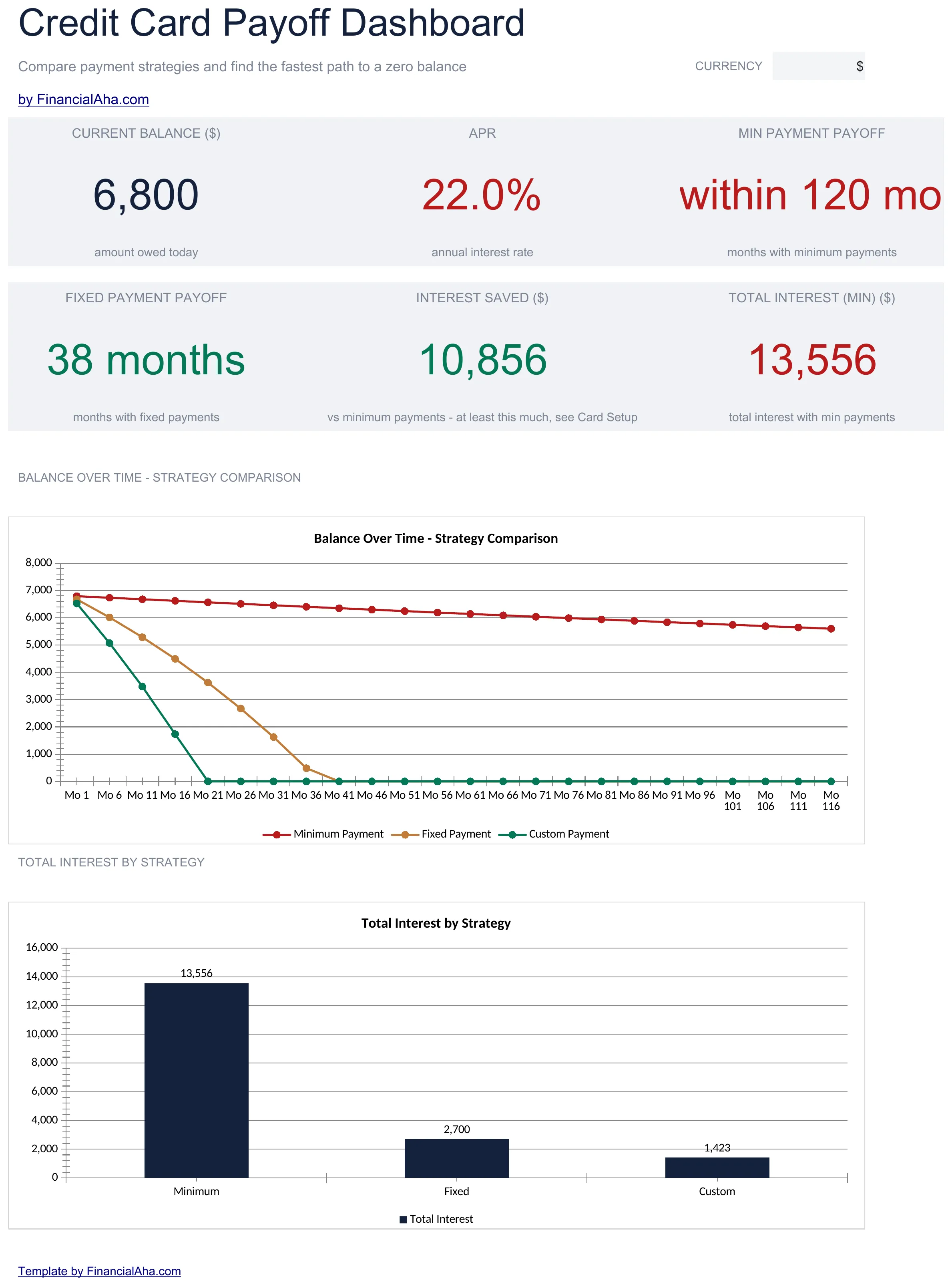
Credit Card Payoff preview

Was enthalten ist

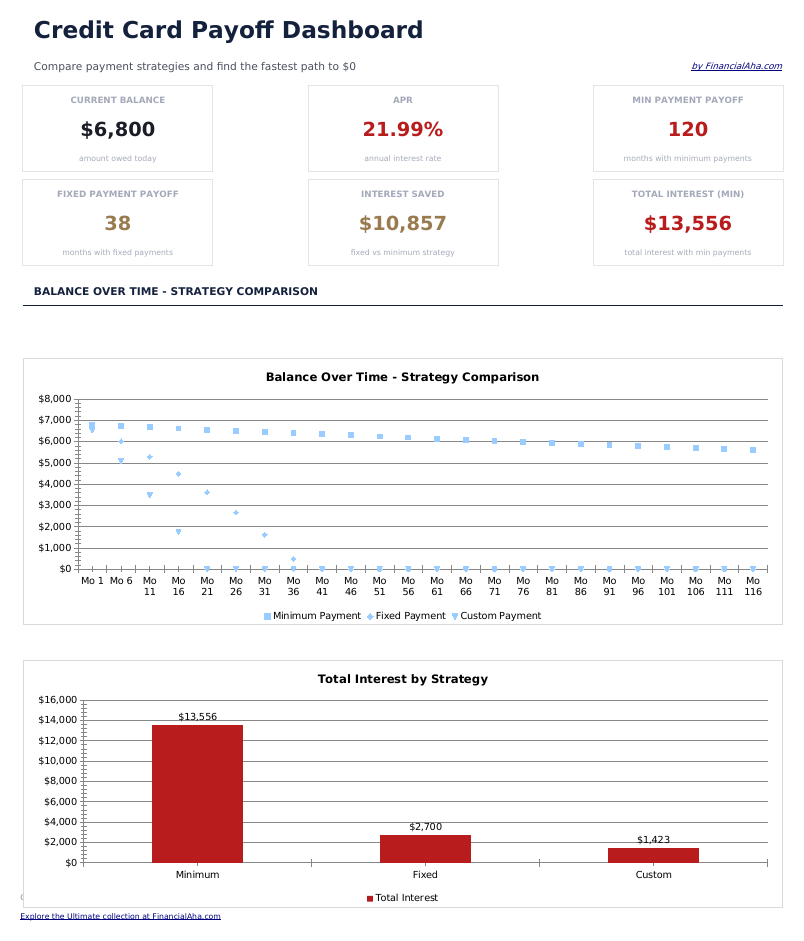
  • Dashboard with payoff projections showing estimated payoff date, total interest, and monthly payment
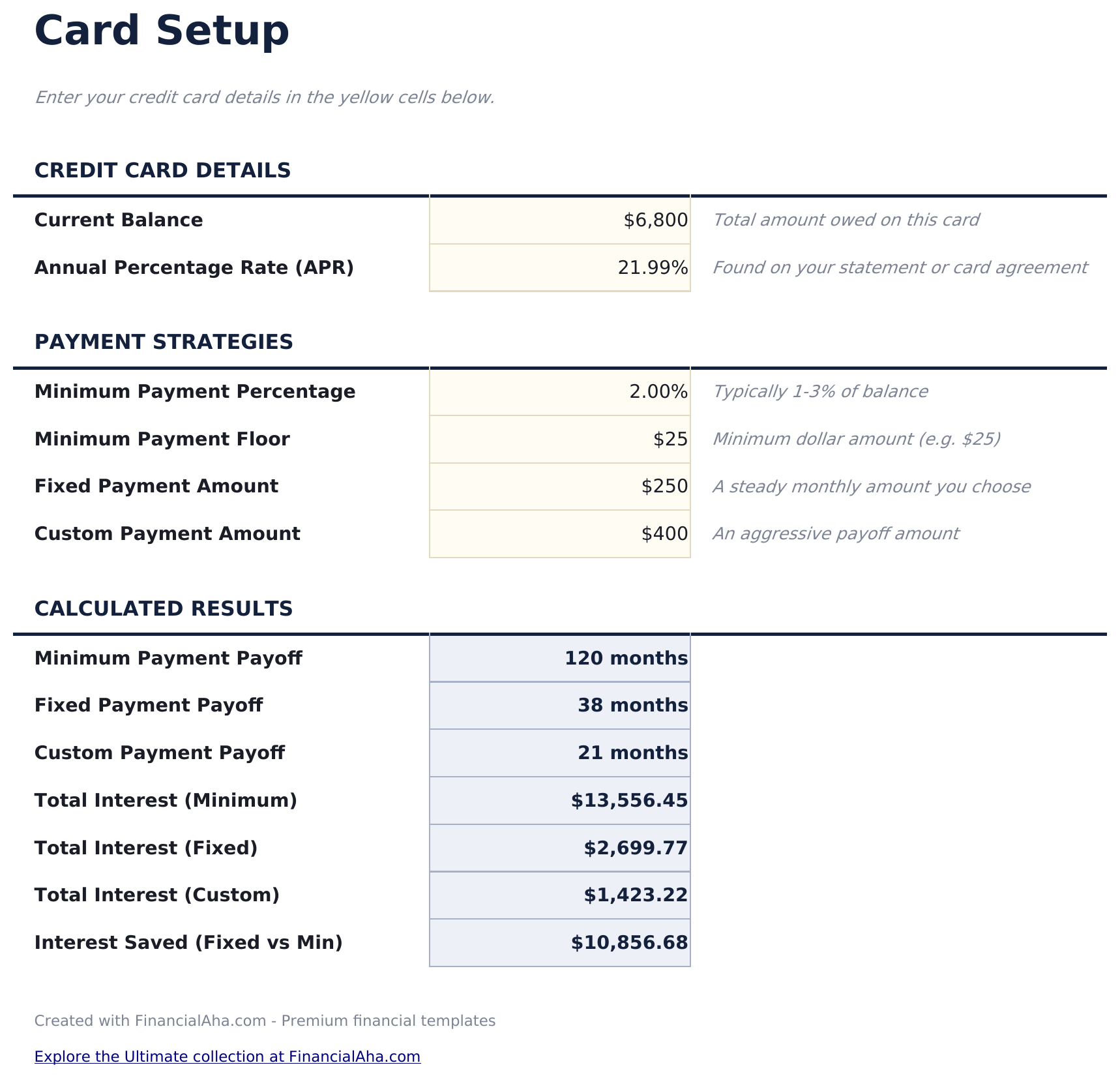
  • Card setup sheet with fields for each card balance, APR, minimum payment, and credit limit
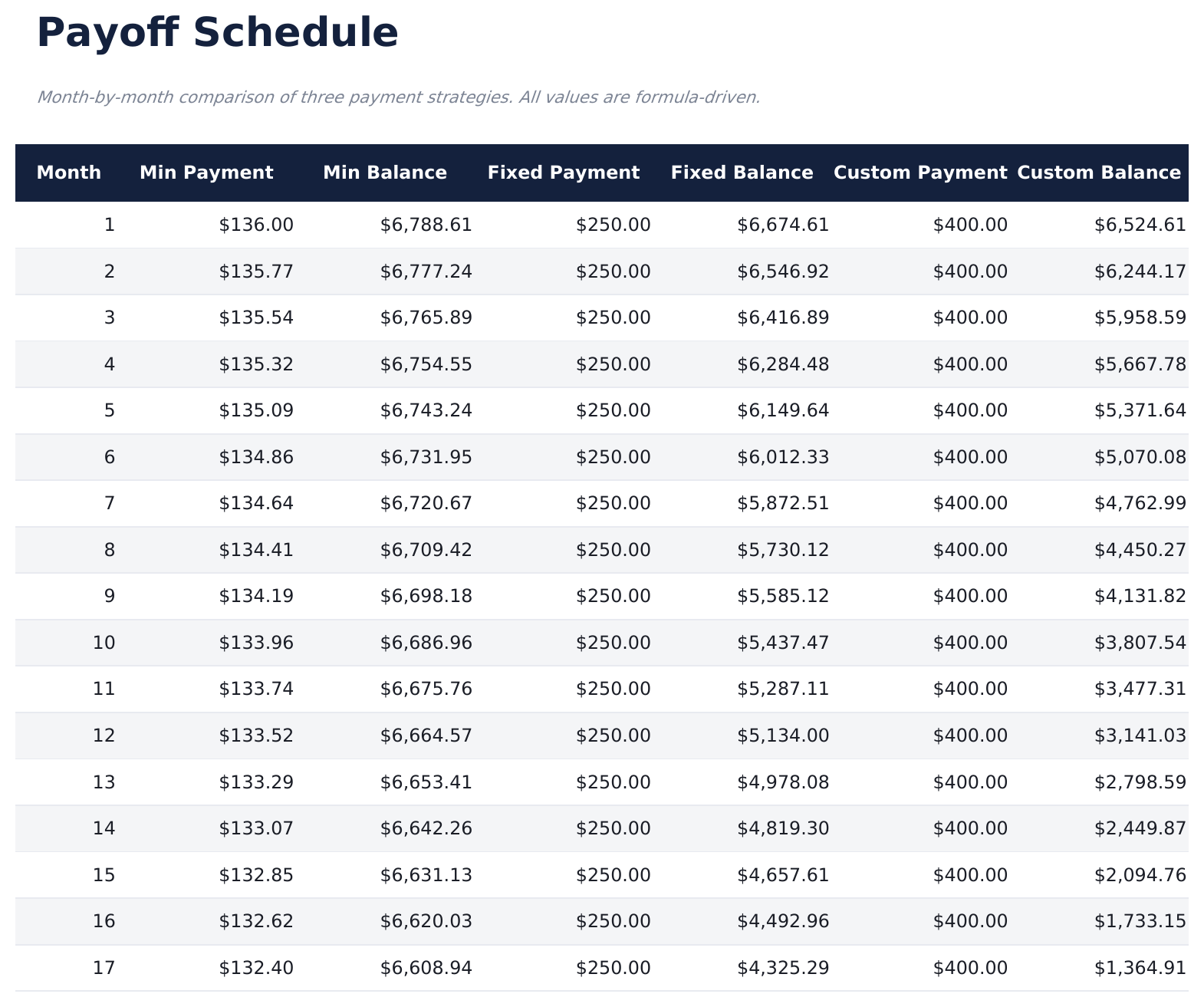
  • Month-by-month payoff schedule showing payment applied, interest charged, and declining balance
  • Minimum vs. accelerated payment comparison highlighting time saved and interest saved side by side
  • Color-coded input cells and auto-calculated schedule fields for straightforward credit card planning
  • Works in Microsoft Excel, Google Sheets, and LibreOffice Calc with no setup required
Ultimate Version Available

Need more from this template?

The Essentials version covers everyday tracking. Ultimate goes further with multi-entity support, scenario analysis, and ultimate-grade reporting.

Essentials - $12
  • Dashboard with payoff projections showing estimated payoff date, total interest, and monthly payment
  • Card setup sheet with fields for each card balance, APR, minimum payment, and credit limit
  • Month-by-month payoff schedule showing payment applied, interest charged, and declining balance
  • Minimum vs. accelerated payment comparison highlighting time saved and interest saved side by side
Ultimate - $19
  • Verfolgen Sie bis zu 10 Kreditkarten mit Saldo, APR, Mindestzahlung, Kreditlimit und Auslastungsrate
  • Dashboard mit 6 KPIs: gesamte Kreditkartenschulden, Mindestzahlungen gesamt, gewichteter durchschnittlicher APR, prognostiziertes Tilgungsdatum, Gesamtzinskosten und durchschnittliche Auslastung
  • Vergleich von Mindest- vs. beschleunigten Zahlungen mit gesparten Monaten und Zinsersparnis für jede Karte einzeln
  • Monatlicher Tilgungsplan pro Karte mit angewandter Zahlung, berechneten Zinsen, Tilgungsanteil und Restsaldo
  • Vorschläge zur Zahlungsoptimierung mit Ranking der Karten nach Zinskosten zur Identifizierung der teuersten Schulden
See what's in the Ultimate version One-time purchase. No subscription.

So verwenden Sie diese Credit Card Payoff-Vorlage

1

Enter card details

Input each credit card balance, APR, and minimum payment on the card setup sheet.

2

Set payment amount

Choose your monthly payment amount - minimum only or an accelerated amount. The calculator models both scenarios.

3

Review the schedule

The month-by-month payoff schedule shows how payments are applied to principal and interest with the declining balance.

4

Compare payment scenarios

See the difference in payoff time and total interest between minimum payments and your chosen accelerated amount.

Erstellt von Claude AI. Verfeinert von uns.

Wir verwenden Claude AI, um jede Vorlage nach gründlicher Recherche zu entwerfen. Dann greift unser Team ein. Wir verfeinern das Layout, testen jede Formel auf Herz und Nieren, beheben Grenzfälle und polieren das Design, bis es sich anfühlt wie etwas, das wir selbst verwenden würden. Die KI bringt uns 80 % ans Ziel. Die letzten 20 % sind rein menschliches Urteilsvermögen.

Häufig gestellte Fragen

Does it handle multiple credit cards?

Yes. Enter each card separately on the setup sheet. The calculator projects payoff for each card individually.

How does minimum vs accelerated compare?

The comparison section shows the exact months saved and interest saved when paying more than the minimum. Even small increases can make a significant difference.

What APR format do I enter?

Enter the annual percentage rate as shown on your card statement. For example, enter 22.99 for a 22.99% APR. The template converts it to monthly for calculations.

Does it account for new purchases?

The calculator assumes no new purchases are added to the card balance. It projects payoff on the current balance only.

Wie öffne ich diese Vorlage in Google Sheets?

Laden Sie die .xlsx-Datei auf Google Drive hoch und öffnen Sie sie mit Google Sheets. Alle Formeln und Formatierungen bleiben erhalten.

Weitere Essentials-Vorlagen: Debt Management

Auf der Suche nach Premium-Tabellenvorlagen?

Unsere kostenpflichtigen Vorlagen umfassen erweiterte mehrseitige Dashboards, native Excel-Diagramme und laufende Aktualisierungen.

Privat & sicher

Ihre Finanzdaten bleiben auf Ihrem Gerät. Wir sehen sie nie.

Mehr erfahren →

Brauchen Sie Hilfe?

Schauen Sie in unsere Anleitungen oder kontaktieren Sie uns.

FAQ ansehen →