A monthly budget tracks money coming in and going out, organized by category. But tracking alone doesn’t change behavior. The useful part is the comparison: what you planned to spend versus what you actually spent.
Google Sheets works well for this. It’s free, accessible from anywhere, and keeps your data in your own account - no bank linking required, no third-party access to your finances. The question is how to set one up, and whether the effort is worth it.
The Real Problem With Most Budget Templates
People don’t abandon budgets because they’re lazy. They abandon them because most templates solve the wrong problem.
The common complaint: “I can see where my money went, but not where it should go.” Basic expense trackers show history. They don’t help you plan, and they don’t warn you when a category is running hot. You find out you overspent after the month ends - when it’s too late to adjust.
Other frustrations come up repeatedly. Complexity is a major barrier - apps like YNAB are powerful but have steep learning curves that discourage new users. Subscription fatigue is real; paying $99/year for budgeting feels excessive to many people. And privacy concerns matter - not everyone wants to link their bank accounts to third-party services, no matter how convenient the automation.
These aren’t character flaws. They’re design problems. The right template addresses them.
Your Options
There are three ways to create a monthly budget in Google Sheets:
1. Free Templates
Google Sheets includes a basic budget template in its gallery, and you’ll find many others shared on Reddit, personal finance blogs, and template directories.
These cover the fundamentals: income categories, expense categories, totals. For someone who wants to start immediately with zero cost, they work.
The limitations show up with use. Most free templates lack plan-vs-actual comparison - the core feature that turns passive tracking into active budgeting. There are typically no alerts when spending exceeds targets, no savings goal tracking, and no support for budgeting frameworks like 50/30/20. For basic awareness of where money goes, free templates are adequate. For actually changing spending behavior, you’ll likely outgrow them and want something like a budget planner with targets.
2. Premium Templates
Paid templates from companies like ours - such as our Monthly Budget Template - offer features that address the actual pain points of budgeting.
Quality varies. Some are just free templates with different colors. Others include meaningful improvements: budget targets per category, overspending alerts, savings goals with progress tracking, and support for budgeting methods like 50/30/20 or zero-based budgeting.
When evaluating premium templates, the questions that matter:
Does it let you set planned amounts and compare against actual spending? This comparison is the core of budgeting - without it, you’re just logging history.
Does it warn you before you overspend, not after? Real-time alerts on category spending let you adjust mid-month.
Can you track savings goals with visible progress? For many people, seeing progress toward specific goals - emergency fund, vacation, down payment - is more motivating than abstract budget numbers.
Does it support a budgeting method you understand? The 50/30/20 rule (50% needs, 30% wants, 20% savings) gives structure to otherwise arbitrary category limits. Zero-based budgeting ensures every dollar has a purpose.
The advantage of spreadsheet-based templates over apps: your data stays private. No bank linking, no account aggregation, no wondering who has access to your financial information.
3. Build From Scratch
Starting from a blank spreadsheet, you can design your own structure, write your own formulas, and create exactly what you want.
The time investment is substantial. Building something robust - with dynamic categories, real-time calculations, budget comparisons, alerts, and proper error handling - typically takes 40-80 hours. That’s before ongoing maintenance as you discover edge cases.
For people who genuinely enjoy spreadsheet building or have very specific requirements that no existing template addresses, this path can make sense. For most people, it’s reinventing the wheel.
What Actually Helps People Stick With Budgeting
Certain features make the difference between templates people abandon and templates people stick with:
Budget vs. actual comparison. The most-requested feature across forums and reviews. People want to set a target for dining out, then see whether they’re on track. This is the difference between passive tracking and active management.
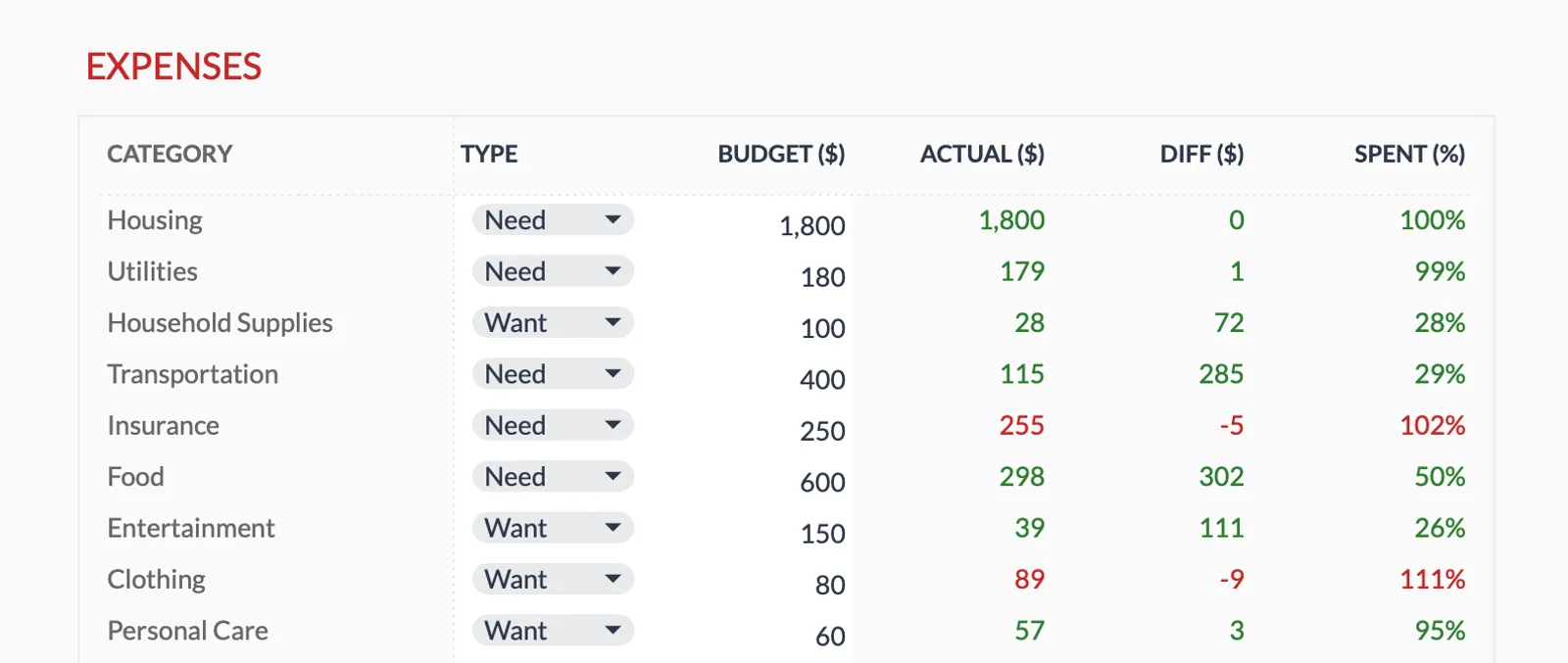
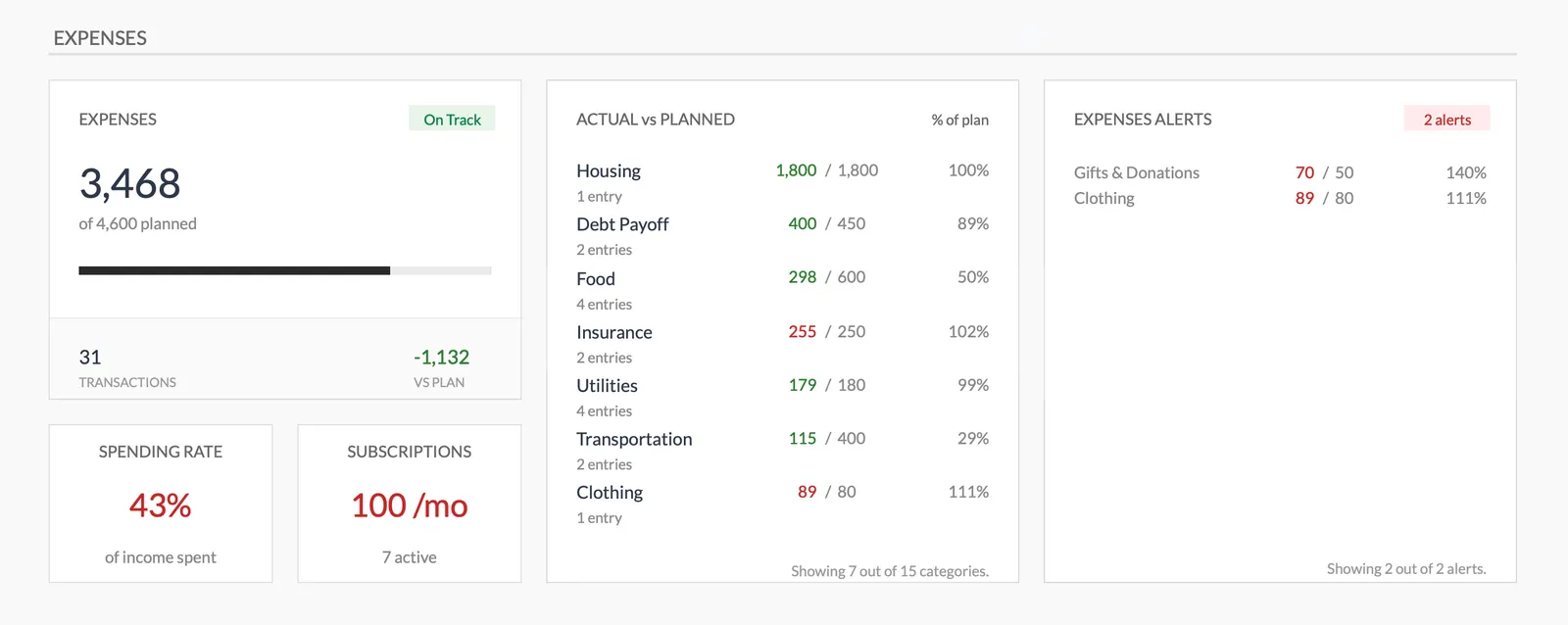
Overspending alerts. When your grocery spending hits 90% of budget by mid-month, a visual warning gives you time to adjust. Most templates only show you the damage after it’s done.
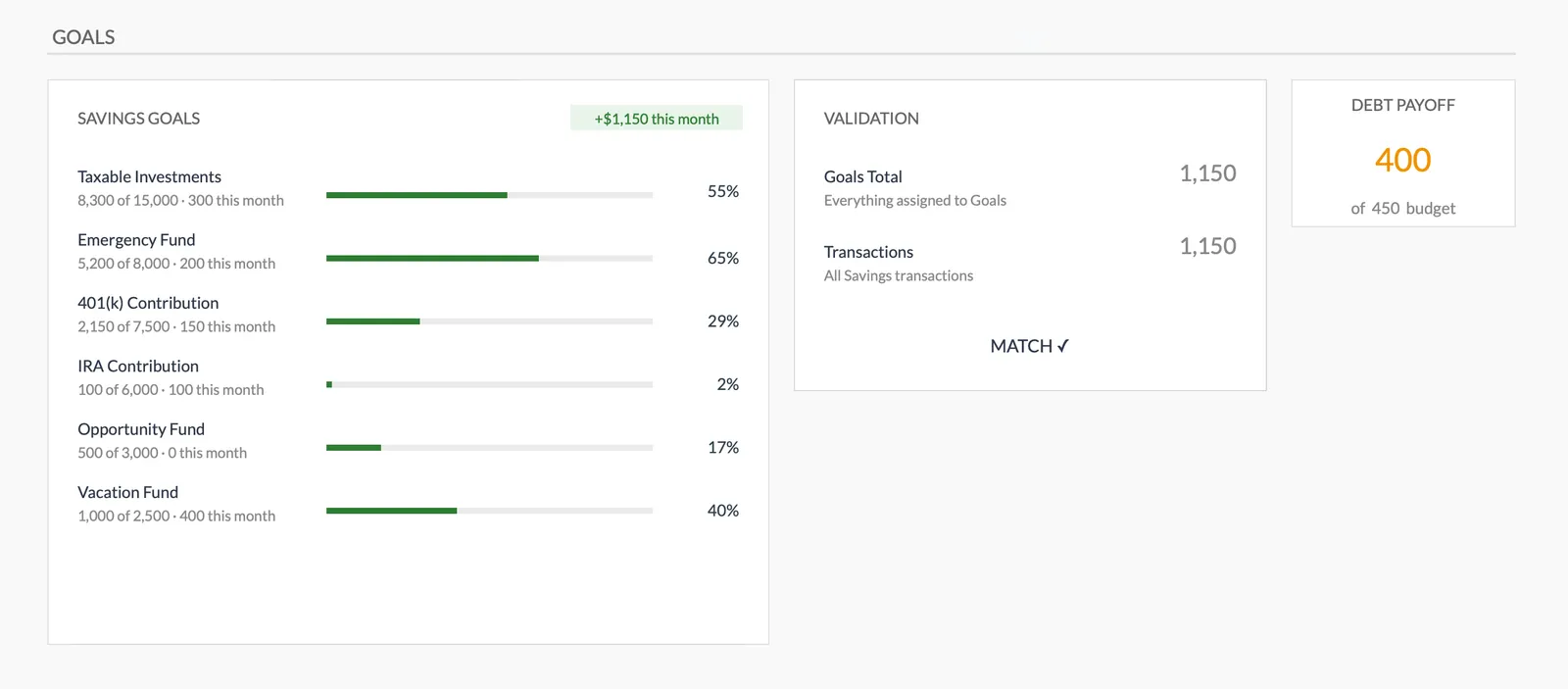
Savings goals with progress tracking. Abstract categories like “savings” feel bottomless. Specific goals - “emergency fund: $4,200 of $10,000” - create momentum. Progress bars turn saving from an obligation into a game you can win.
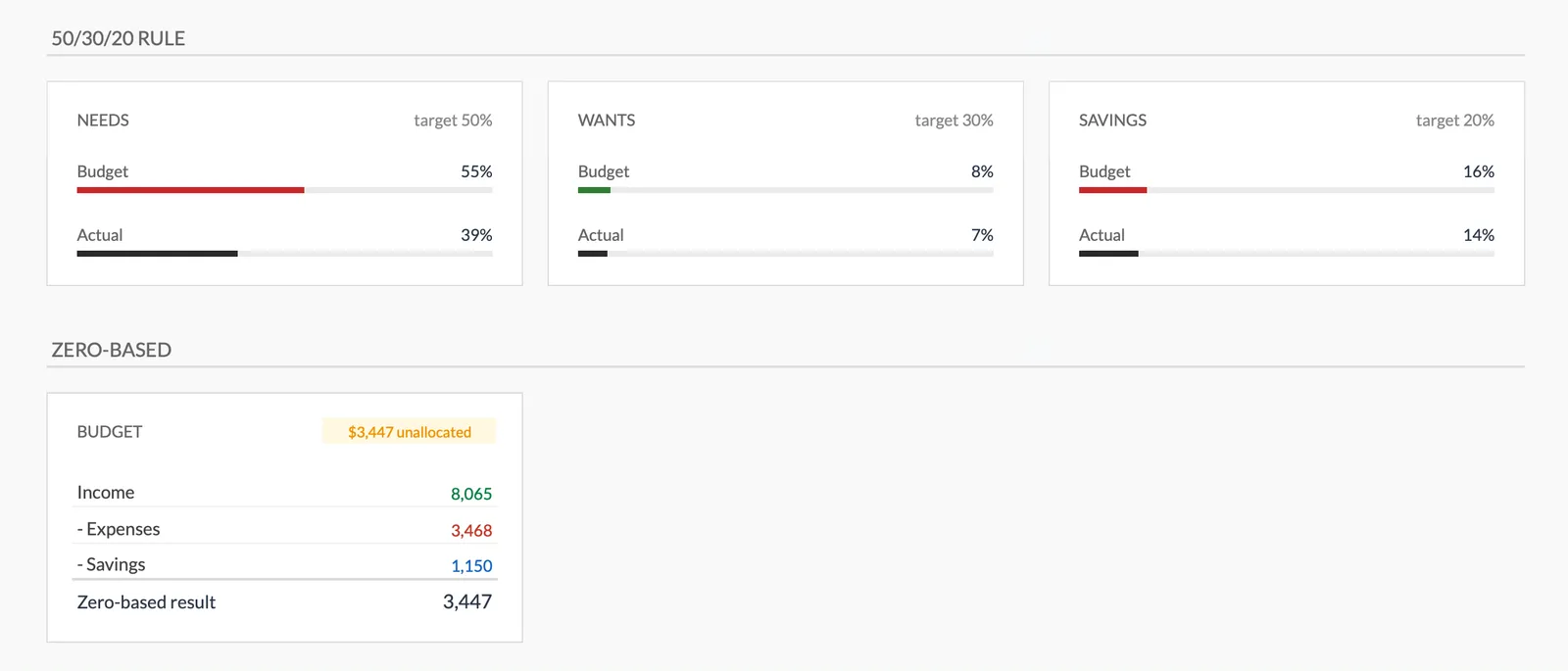
50/30/20 visibility. This framework (50% needs, 30% wants, 20% savings) is widely understood and gives people a sanity check on their overall allocation. Seeing these percentages calculated automatically helps people understand if their budget structure is reasonable.
Privacy by default. Spreadsheets keep your financial data where it belongs - in your own account. No bank credentials shared with third parties, no data aggregation, no security concerns about who can see your transactions.
A clear dashboard. Key numbers visible at a glance: total income, total expenses, savings rate, which categories need attention. If understanding your situation requires clicking through multiple sheets, you won’t check regularly.

Using a Budget Template
Once you have a template, the workflow is straightforward:
Setup (once): Review the default categories and adjust to match your spending patterns. Enter your expected income. Set planned amounts for each expense category. Define any savings goals you’re working toward.
During the month: Enter transactions as they happen, or batch them every few days. Glance at the dashboard to see where you stand. Pay attention to any alerts on categories approaching their limits.
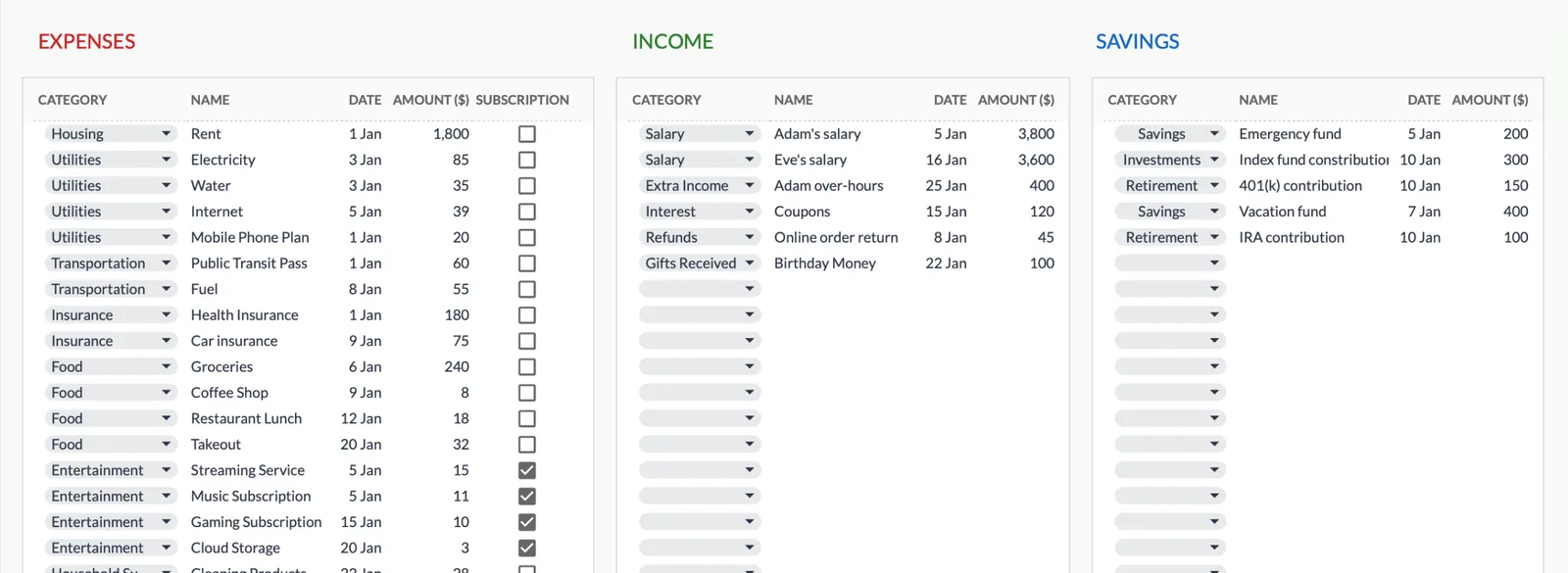
End of month: Review what happened - which categories ran over, which had room, how your savings goals progressed. Consider whether next month’s targets need adjusting. Start fresh.
The first month is calibration. Targets are educated guesses until you have real data. By month two or three, you’ll have a clearer picture of what’s realistic for your actual life.
Our Monthly Budget Planner
We built the Monthly Budget Planner to address the specific problems that cause people to abandon budgeting.
Plan vs. actual for everything. Set budget targets for income, expenses, and savings. See immediately whether you’re on track, with variance calculations for each category.
Real-time alerts. The expense dashboard flags categories that exceed their limits. You know there’s a problem while there’s still time to do something about it.
Savings goals with progress tracking. Define specific goals - emergency fund, vacation, down payment - with target amounts. Watch progress accumulate. The goals dashboard shows funded percentages and auto-reconciles against actual savings transactions.
50/30/20 and zero-based budgeting support. See your spending categorized as needs, wants, and savings. Check whether your allocation matches the 50/30/20 guideline. Or use zero-based mode to ensure every dollar is assigned a purpose.
Dashboard that shows what matters. Income, expenses, savings, balance - updated automatically. Distribution charts for visual learners. All the key metrics without digging through tabs.
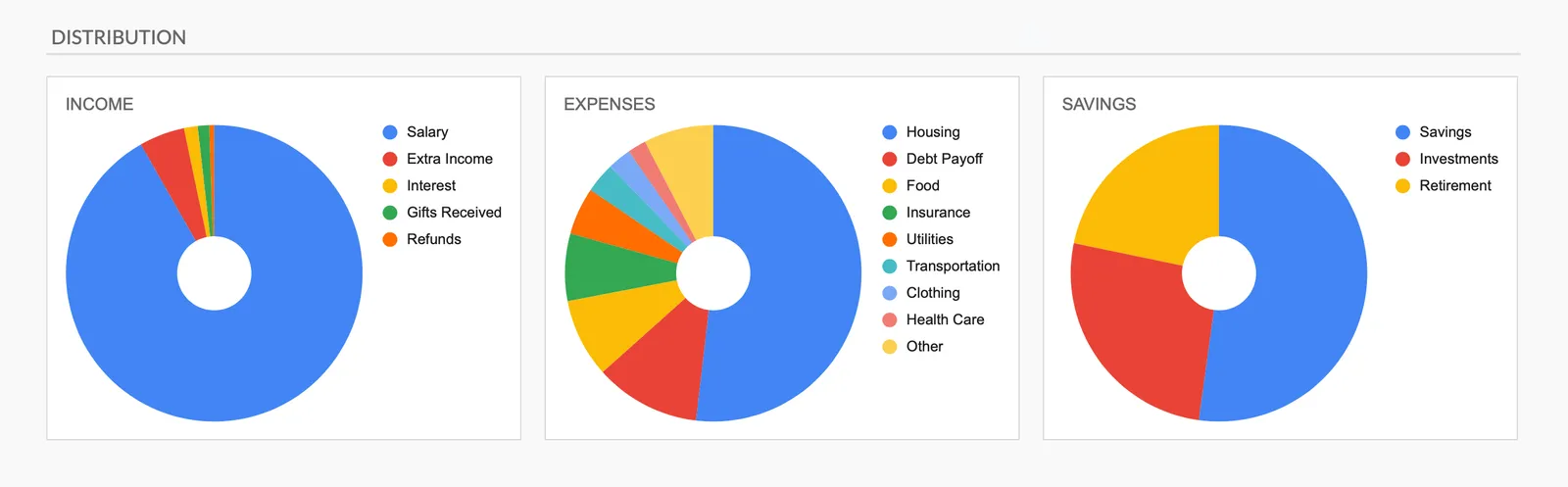
Flexible categories. Comes with 17 expense categories, 11 income sources, and 3 savings types. Add, rename, or remove them to match how you think about your money.
Privacy by design. Your data stays in your Google account. We never see your financial information - the template runs entirely in your own spreadsheet.
The template is a one-time purchase with lifetime access to updates. No subscriptions, no recurring fees.
For people who want a simpler starting point, the Monthly Expense Tracker covers tracking without the budget-planning features. Both use compatible categories, so you can start with tracking and move to full budgeting later.
Getting Started
Pick a template that matches your needs and start entering transactions. The specific tool matters less than the habit of checking in regularly.
The goal is visibility and control: knowing where money comes from, where it goes, and whether that matches your intentions. What you decide to do with that clarity is up to you.